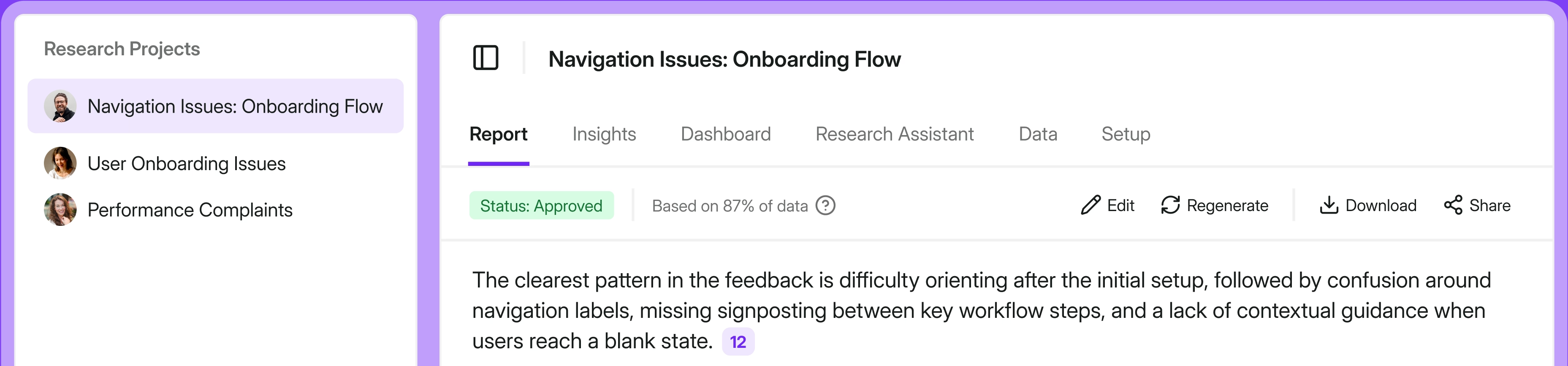
A voice of customer program (VoC) can look busy and still be of little use. The question that matters is whether your VoC tool can piece the feedback together well enough for the team to see what keeps going wrong and decide who should respond.
That is the test behind this list. I write about CX and customer research for Survicate, a customer feedback platform, and spend much of my time examining these tools. A polished survey builder helps you launch, but the harder test arrives a few campaigns later, when the team has enough responses to discover whether the tool can help them make sense of what customers said.
This comparison is for CX teams listening continuously across web, app, email, links, and support conversations. I’m looking at tools that can recognize when the same complaint is hiding in a survey response, an Intercom conversation, and an app review. AI helps connect and investigate those signals. What the team learns should then shape a product decision or prompt a customer follow-up.
Listed brands are not placed in order of importance or ranking of any sort.
TL;DR
Here's the short version if you just want the shape of it before reading the full breakdowns.
Before diving deeper into the list, one market development is worth noting. A VoC platform is rarely a one-year decision, and this market has gone through an unusual amount of consolidation since 2025. Here's how the VoC landscape has changed so far in 2026:
- Qualtrics completed its $6.75 billion acquisition of Press Ganey Forsta in May 2026, a year after Press Ganey Forsta acquired InMoment.
- In June, Medallia announced a recapitalization agreement that would transfer ownership from Thoma Bravo to a lender group led by Blackstone, Apollo, and FS KKR Capital.
- Delighted shut down on June 30, while GetFeedback Direct is scheduled to follow on December 31, 2026. You will still find both recommended in older roundups, but neither belongs on a current shortlist.
5 features I look for in a voice of customer tool
These are the five features I expect from a serious VoC tool. Miss one and you may have a workable trade-off. Miss several and your team becomes the integration layer, carrying feedback between surveys, spreadsheets, and follow-up.
- Multi-channel collection. Customers should be able to respond where the experience happens: on your website, inside your web or mobile app, by email, through a link, or in Intercom. An email survey can measure the relationship. It will miss the frustration that appears halfway through a broken workflow.
- AI analysis of open-ended feedback. Scores show movement. Comments provide clues. Once they run into the hundreds, the tool should group recurring themes, let you question the data, and keep the source comments one click away. Otherwise, you have an NPS/CSAT/CES chart but no insights.
- A place where all the feedback lives together. Surveys, support tickets, app store reviews, sales calls. When these sit in one repository, you can see that the onboarding complaint in a support ticket is the same issue dragging down your CSAT. Apart, they're noise.
- Closing the loop. Feedback needs an owner and a next step: create a task for the account owner, alert a team in Slack, or update the CRM. Some platforms manage the case themselves. Others, including Survicate, route it through native integrations. Choose based on where you want the follow-up to happen.
- Metric tracking across segments and touchpoints. A company-wide NPS can look stable while CSAT among new customers falls. The tool should expose that change by segment or journey stage early enough for someone to investigate it. If you're choosing a leading metric, start with our breakdown of CSAT versus NPS.
How I did this review
What I looked for
I judged every tool against the main question: does it help a CX or CS team collect feedback across channels, understand it, and act on it? A pretty survey builder with no path from response to action doesn't score well here, no matter how popular it is. I weighted multi-channel reach, AI analysis of open text, how feedback gets consolidated, and how each tool closes the loop.
How I validated the claims
I checked features, plans, and pricing against vendor websites and documentation. G2, Capterra, and relevant Reddit discussions were for the messier part: usability, support, billing, and the problems that appear after setup. I also drew on in-house competitor tests and patterns that came up in our sales conversations with teams evaluating these tools. One complaint is merely a signal; I treated it as a pattern only when it recurred. Pricing tends to shift, so treat every figure as a starting point and confirm current numbers with the vendor. For Survicate, I have closer access to the product and checked its limitations as carefully as its strengths.
The close-the-loop test: how 9 voice of customer tools perform in practice
Here's the full run-down. For each tool I cover what it does, who it's for, ease of use, support, the main pros and cons, pricing, and a hot take on how it holds up for a CX team trying to close the loop.
Survicate: multi-channel feedback with an AI research repository behind it
What does Survicate do?
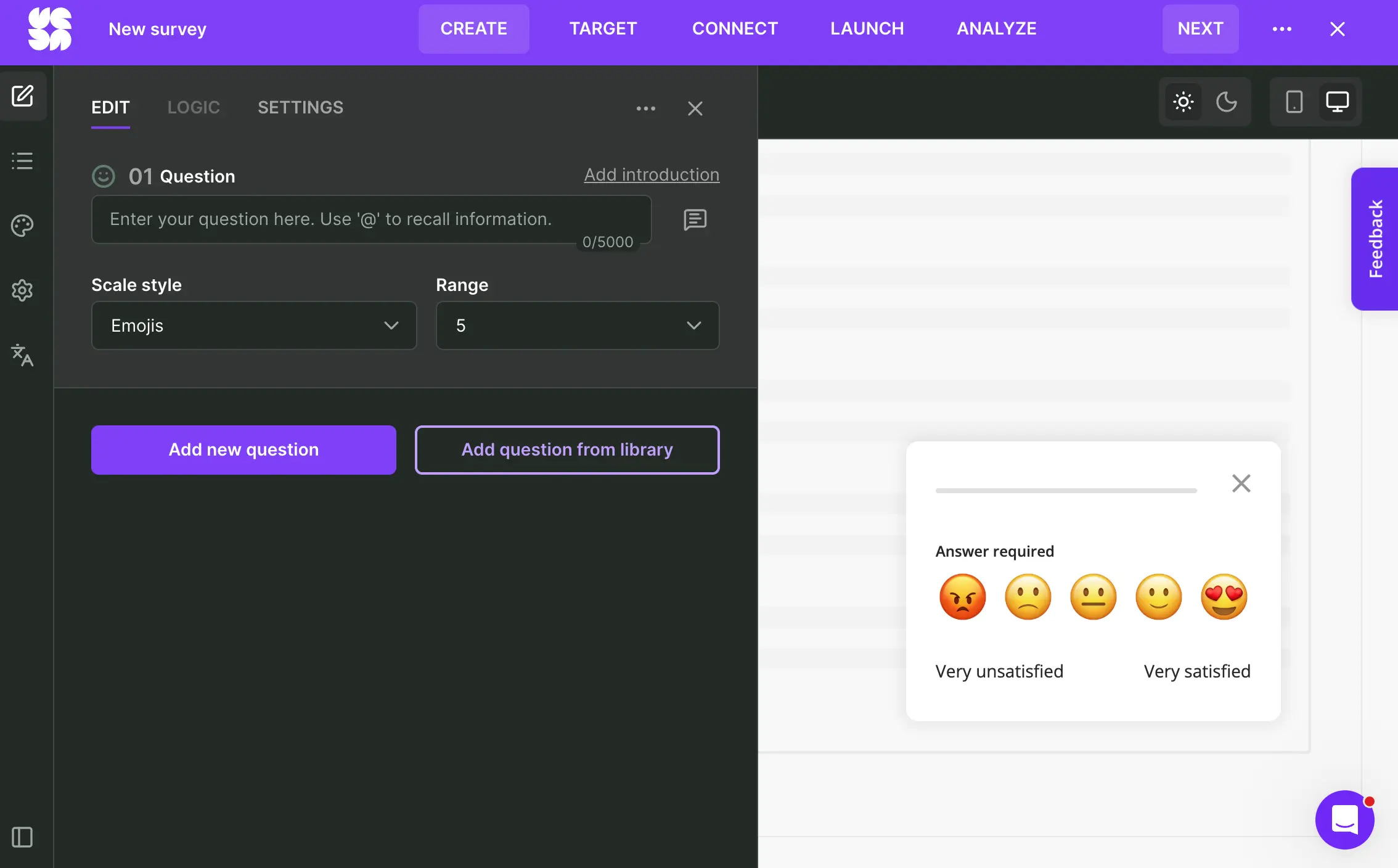
Survicate is a customer feedback platform built for product and CX teams that collect feedback across the customer journey. It runs surveys across web, in-product, email (embedded surveys), link, and chat channels, then feeds everything into Research Hub, an AI research repository that pulls together survey responses, support tickets, app reviews, and call transcripts into one searchable place.
The second half is what sets it apart for CX work. Instead of feedback scattered across a survey tool, your helpdesk, and a spreadsheet, Research Hub keeps it together and uses AI to sort open-ended comments into themes such as onboarding friction, pricing complaints, or feature requests. When a CSAT score dips, you can see the support tickets and product feedback sitting behind it. It's the kind of setup we describe in our look at how the best CX teams automate feedback.
Who is Survicate primarily for?
CX and customer success teams at SaaS companies who want to run NPS, CSAT, and CES programs across web, in-app, and email, and connect the results to tools such as HubSpot, Intercom, Zendesk, and Slack. It fits teams that want feedback to be continuous and connected, not a once-a-quarter survey blast.
What's Survicate's ease of use?
Reviewers on G2 and Capterra consistently point to fast setup, clean interface, and a generally smooth experience. You can launch a survey in minutes, and the mobile SDK is light enough that engineering effort stays low.
What's Survicate's customer support like?
Support is human, over live chat, with reviewers generally describing it as helpful and responsive. Survicate publicly reports a 97% satisfaction rate and a 2-minute first response time. In a category where enterprise tools push you toward ticket queues, quick human help is a real advantage for a lean CX team.
What are the main pros of using Survicate?
- Multi-channel reach across website, in-product, email, shareable link, and chat tools.
- Research Hub brings survey responses, support tickets, reviews, and call transcripts into one repository. It groups recurring themes with AI, while Research Assistant lets you ask questions across the combined feedback.
- Up to 40-plus native integrations depending on plan, several of them two-way, so feedback flows into the systems your team already uses.
- Easy setup and responsive human support.
What are the main cons of using Survicate?
- It doesn't close the loop natively: there's no built-in case management or ticketing workflow, so routing and follow-up happen through integrations.
- Analytics depth is lighter than the enterprise suites. Reviewers note limited crosstabs and dashboard customization.
- Pro and Enterprise use custom yearly pools for survey responses and Research Hub data points, so teams need to estimate both before requesting a quote.
Pricing
Survicate starts at $56/month. The full range runs Free, Starter, Growth, Pro, and Enterprise, with the differences being response volume, data retention, seats, integrations, and support level. Every paid plan includes multi-channel surveys, Research Hub, and human support. There's a free plan, plus a free 10-day trial that covers all pro-level features, no card required. Check the current numbers on the pricing page.
My hot take: How well does Survicate hold up for closing the CX loop?
Survicate makes the most sense once feedback starts arriving from several directions. A CX team can run NPS and CSAT across web, product, and email (embedded surveys), bring the comments together in Research Hub, and send a low score to HubSpot or Intercom while the rest of the workflow stays where the team already runs it.
That is why I would shortlist it for a growing SaaS company before looking at, say, Qualtrics or Medallia. Both go considerably deeper, but that depth comes with a much higher cost, longer implementation, and a heavy platform someone has to run.
I would make a different choice if the VoC platform is expected to own each case from assignment to resolution. Survicate routes that work into the CRM or helpdesk, but it does not track the case itself. I suggest investigating Zonka Feedback first for native case management. AskNicely is more relevant when NPS is meant to guide coaching across frontline teams.
Qualtrics Customer Experience: the enterprise heavyweight
What does Qualtrics do?
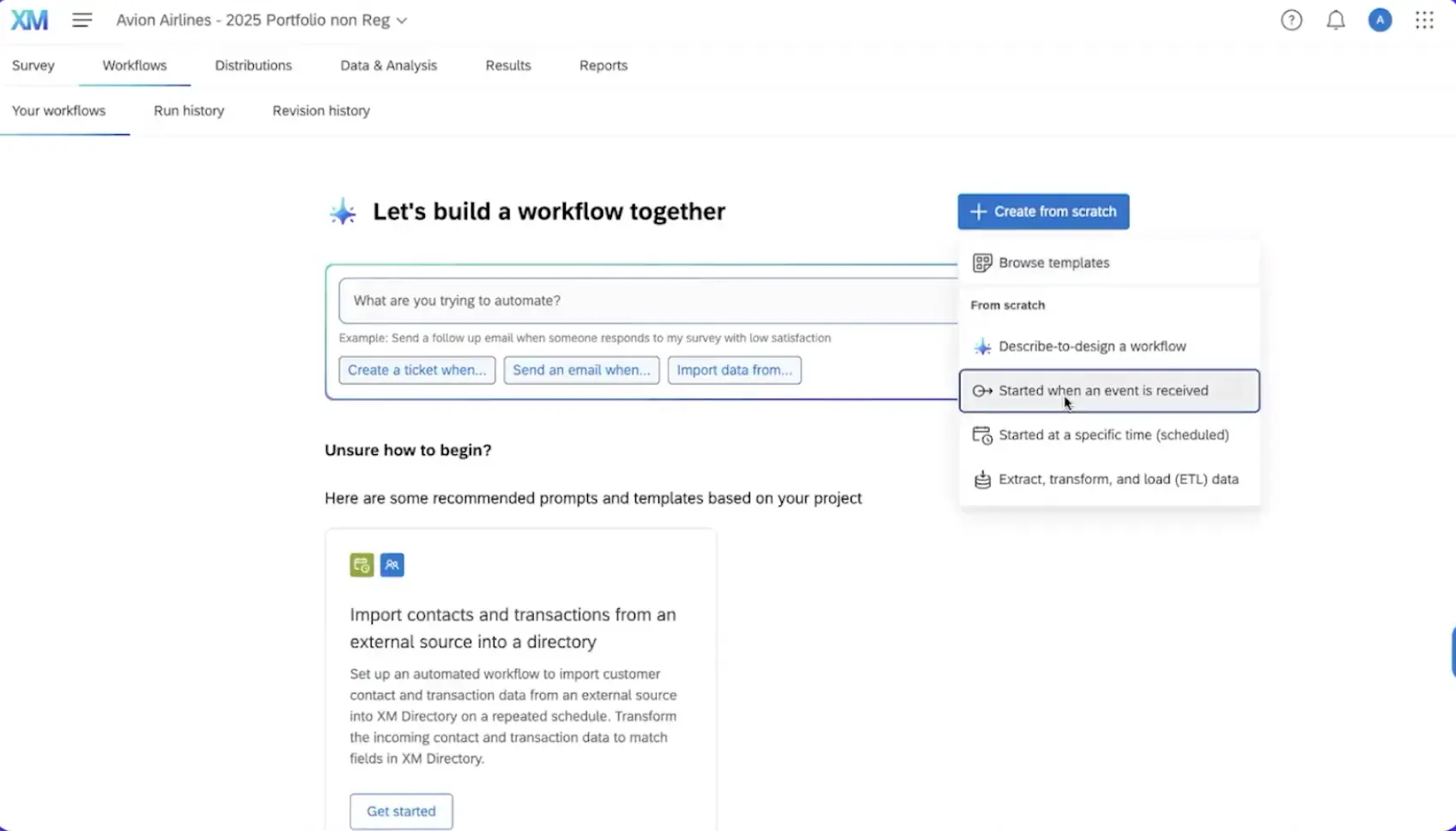
Qualtrics is an experience management platform built for large-scale CX and research programs. It captures feedback across channels, runs deep statistical analysis, and offers native closed-loop workflows including ticketing and automated actions.
Who is Qualtrics primarily for?
Large enterprises with dedicated CX teams, complex survey logic, and enough budget to implement and run the platform properly. Its depth begins to pay off when feedback programs span multiple markets, languages, business units, and integrations.
What's Qualtrics's ease of use?
G2 reviewers repeatedly mention the complexity of its advanced features, and a full CX rollout can take weeks. Large implementations often need a dedicated administrator after launch as well.
What's Qualtrics's customer support like?
Reviews are mixed: some users report responsive help, while others describe slow escalations and tickets that bounce between teams.
What are the main pros of using Qualtrics?
- The deepest analytical toolkit on this list, including crosstabs, significance testing, text analysis, and advanced research methods.
- Native closed-loop CX workflows.
- Scales across large, complex, multi-market programs.
What are the main cons of using Qualtrics?
- High, quote-based CX pricing, with the final cost shaped by interaction volume and contract terms.
- Full CX implementations require time, training, and ongoing administration.
- Overkill for teams that mainly need to track and act on feedback.
Pricing
Qualtrics is quote-based. Third-party estimates put CoreXM entry around $25,000 to $50,000 per year, with full CX programs running into six figures. There's a limited free account and a self-serve research tier, but the CX platform is a sales conversation. Pricing here is estimated, not vendor-published, so confirm directly.
My hot take: How well does Qualtrics hold up for closing the CX loop?
Who is allowed to change a global survey without breaking local reporting? Where should an unhappy customer’s ticket go when ownership differs by market and business unit? Large CX programs have people whose full-time job includes answering questions like these. Qualtrics gives them the controls, analysis, and workflows to do that work properly.
Put the same platform in a 40-person SaaS company where one CX manager tracks CSAT and asks CSMs to call unhappy accounts. Qualtrics will handle the job, but the company will still be paying for enterprise implementation, training, and administration to manage a relatively simple loop.
That is my reservation. I would shortlist it once the loop has become difficult to govern across teams and markets. Before that point, the team risks spending too much of its budget and time running Qualtrics and too little time responding to what customers said. If you're weighing it up seriously, we go deeper in our rundown of affordable Qualtrics alternatives.
Medallia: omnichannel capture at enterprise scale
What does Medallia do?
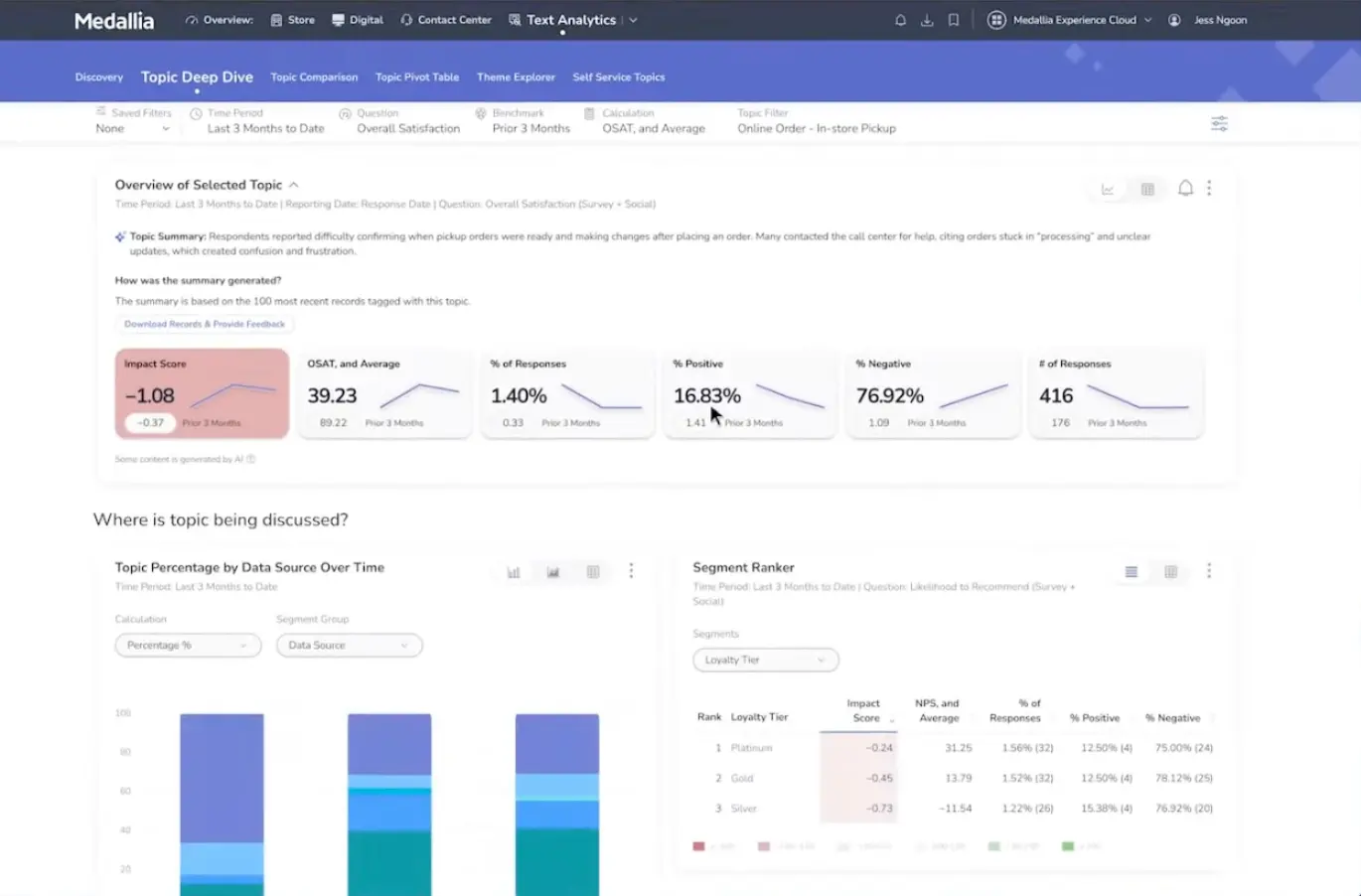
Medallia is an enterprise CX platform that captures customer and employee signals across many channels, from surveys to messaging to behavioral data, and analyzes them for patterns. It closes the loop natively through case management and alerts.
Who is Medallia primarily for?
Large organizations running CX across many locations or touchpoints, such as retail chains or financial services firms, that need enterprise-grade signal capture and have the budget and team to operate it.
What's Medallia's ease of use?
Most of the work sits around the survey itself: configuring data sources, dashboards, permissions, and follow-up workflows. Capterra reviewers describe a demanding initial setup, and large programs usually need someone to own the platform after launch.
What's Medallia's customer support like?
Medallia pairs technical support with implementation and advisory services. That suits an enterprise rollout, but it also makes onboarding closer to a consulting engagement than opening a self-serve account.
What are the main pros of using Medallia?
- Broad omnichannel signal capture at scale.
- Journey analytics and native closed-loop workflows.
- Strong fit for large, multi-location CX programs.
What are the main cons of using Medallia?
- High cost and setup complexity.
- Recent ownership change adds some roadmap uncertainty.
- More platform than most mid-market CX teams can use.
Pricing
Medallia is quote-based, with third-party estimates typically starting around $100,000 per year. No public pricing, no free plan. Treat the figure as an estimate and confirm with the vendor.
My hot take: How well does Medallia hold up for closing the CX loop?
Medallia does a good job when a bad customer experience can begin in one channel and land on the desk of someone in another location. A bank may need to connect a branch visit, a call center transcript, an app session, and a complaint, then assign the case to the manager who can resolve it. At that scale, native case management is doing real organizational work across locations and teams.
A digital product team collecting in-app CSAT and sending detractors to HubSpot has a much shorter chain. Medallia can manage it, but the team would be paying for and maintaining layers designed for a far more distributed operation. I would shortlist it when physical locations, contact centers, and local ownership are central to the program. The recent ownership transfer would also make me ask for a clear product roadmap before signing a multi-year contract. For teams that reach that conclusion, our guide to Medallia competitors for CX teams covers the lighter options.
SurveyMonkey: the familiar generalist
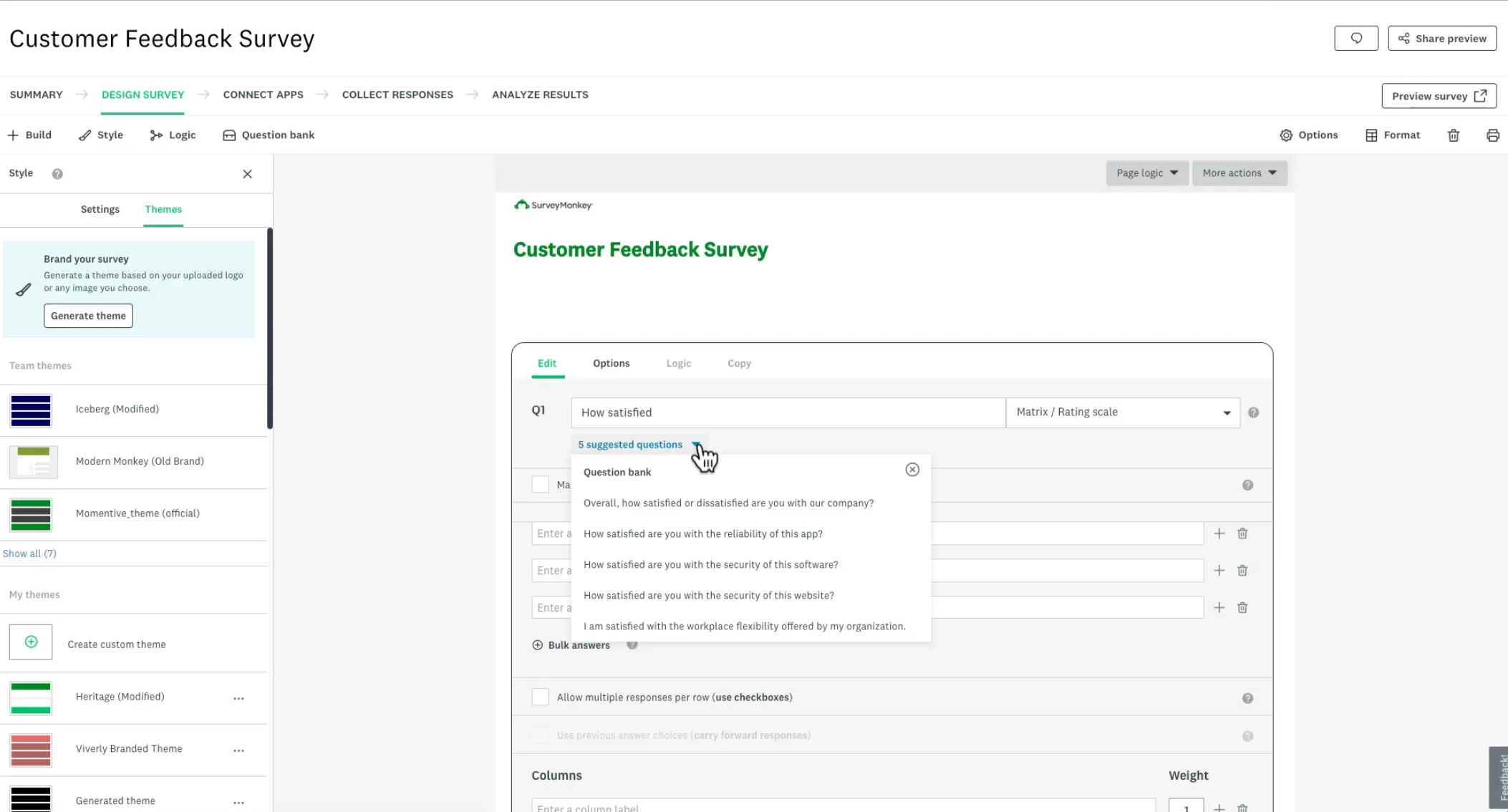
What does SurveyMonkey do?
SurveyMonkey is a broad survey platform used across all kinds of teams. It handles standard surveys, has a large template library, and integrates with common business tools. For CX, it covers NPS and CSAT, though it leans general-purpose rather than CX-specialized.
Who is SurveyMonkey primarily for?
Teams that want a recognizable, easy survey tool for a range of uses, from HR to marketing to basic CX tracking. It's a generalist, which is both its appeal and its limitations.
What's SurveyMonkey's ease of use?
Easy to pick up. The interface is familiar and the template library gets you started quickly, which is a big part of why it's one of the more popular survey tools.
What's SurveyMonkey's customer support like?
SurveyMonkey offers 24/7 email support, but some TrustRadius reviewers describe slow replies and ask for live help inside the product. An email queue feels much less adequate when a live survey is already collecting responses, yet phone support is reserved for higher tiers.
What are the main pros of using SurveyMonkey?
- Familiar and fast to start with.
- Templates cover everything from employee engagement to NPS, so several departments can use the same tool.
- Survey responses can flow into HubSpot or Slack and, with the Enterprise add-on, back into Salesforce records.
What are the main cons of using SurveyMonkey?
- Users are charged for every response over the limit, so a high-volume program may cost more than the plan price suggests.
- Team plans start at three seats, and the bill grows as more people need access.
- CX depth is shallow compared to dedicated platforms, and there's no unified feedback repository.
Pricing
SurveyMonkey has a free plan. Team plans run roughly $25 to $75 per user per month billed annually, with a three-user minimum, so real entry is closer to $1,080 per year. Enterprise is custom, and response overages are charged per response.
My hot take: How well does SurveyMonkey hold up for closing the CX loop?
SurveyMonkey can send an NPS survey, flag a detractor, and pass the response into Salesforce or Slack. If that is the loop you need, it can do the job.
The trouble starts when the same issue is showing up in surveys, support tickets, app reviews, and customer calls. SurveyMonkey can analyze what people wrote in the survey, but it gives the CX team no shared research layer for connecting those signals. That leaves someone to assemble the story elsewhere.
I would consider it for a survey program with workflows attached, but I wouldn’t recommend making it the center of a multi-channel VoC program. If that is the gap you're trying to close, we compare the stronger CX-focused options in our SurveyMonkey alternatives guide.
Alchemer: advanced surveys inside a broader feedback platform
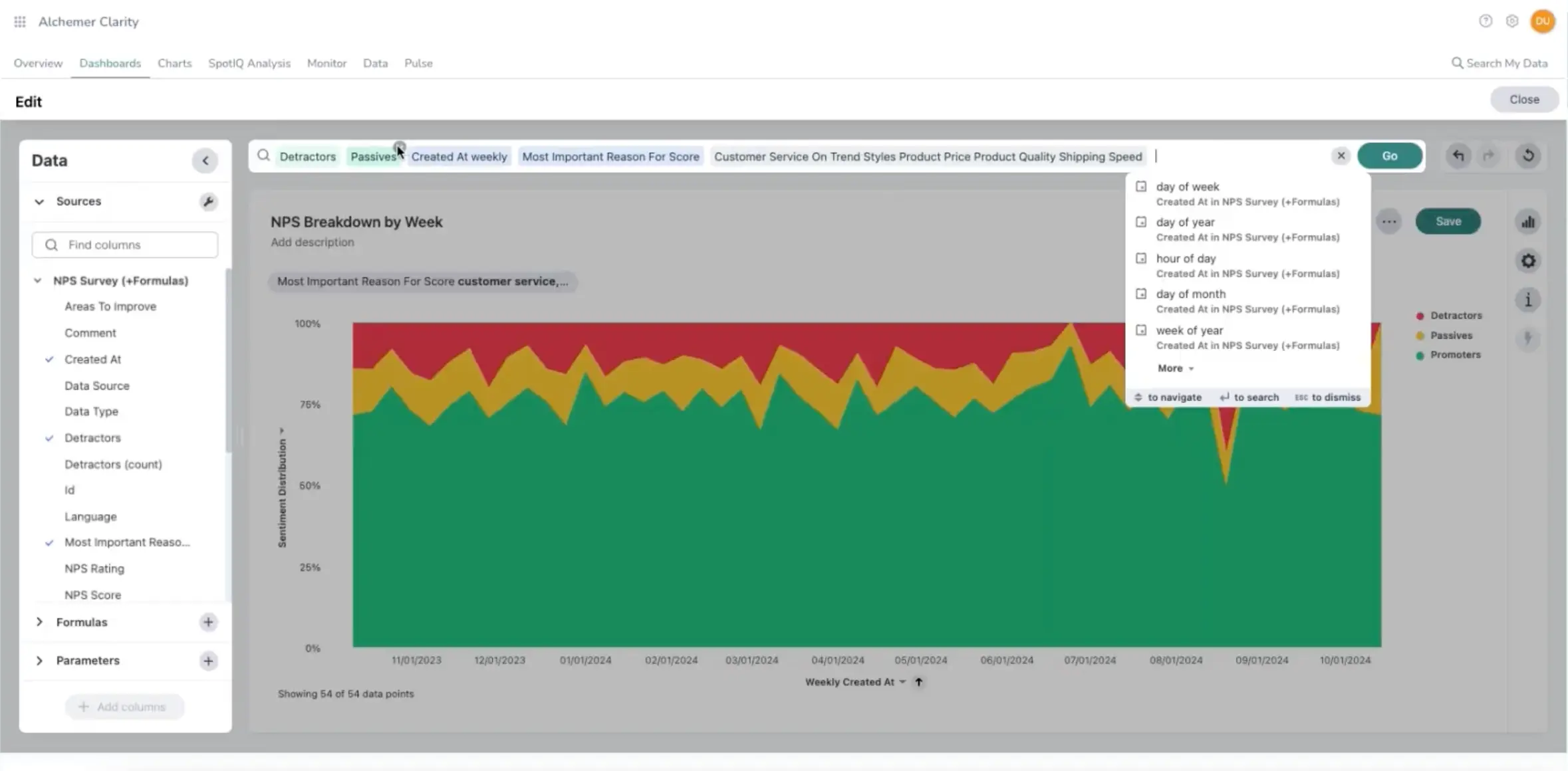
What does Alchemer do?
Alchemer began as SurveyGizmo, and advanced surveys are still central to the product. It gives teams detailed control over how surveys behave and how results are analyzed, including scripting and advanced reporting. On quote-based plans, the same platform can also bring in feedback from other channels, connect it with the rest of your stack, and automate follow-up.
Who is Alchemer primarily for?
Alchemer fits teams that need configurable logic, scripting, and reporting, and have someone comfortable setting them up. The broader platform suits organizations that also need cross-channel analysis and workflow automation and are comfortable moving to a custom agreement.
What's Alchemer's ease of use?
More of a learning curve than the simple builders. Reviewers praise the logic options, but advanced setup can mean hunting through menus and documentation. Several describe the interface as dated or difficult to navigate.
What's Alchemer's customer support like?
Reviewers regularly mention helpful staff and getting a human on the phone, while Alchemer reports a 94 Support NPS. That matters here because advanced logic is exactly where a good documentation stops being enough.
What are the main pros of using Alchemer?
- Logic, branching, piping, and scripting can handle surveys that simpler builders would push into workarounds.
- For larger programs beyond the publicly priced tiers, integrations and no-code workflows can route feedback into the systems where teams act on it.
- Reviewers repeatedly single out the support as helpful and human.
What are the main cons of using Alchemer?
- Advanced logic and reporting reward experience; newcomers can spend time looking for options buried in the interface.
- The capabilities needed for a broader VoC program sit in the quote-based tiers, so you can’t know what the full setup will cost until you talk to sales.
- Once a team grows beyond three users, self-serve pricing gives way to a custom Business Platform quote.
Pricing
Alchemer’s self-serve survey plans cost $55, $165, and $275 per user per month. Annual billing brings those figures down considerably, and there is also a limited free plan plus a 7-day trial of a selected paid plan. The public price list stops being useful once you need a fourth user or the analysis and automation capabilities. From there, pricing is handled through sales.
My hot take: How well does Alchemer hold up for closing the CX loop?
Alchemer makes the most sense to me when complex surveys sit at the center of the program. Its publicly priced plans go well beyond a basic form builder, and the most advanced one includes serious analysis. A continuous CX program soon brings in feedback from outside the survey tool, however, and someone still has to connect it with what happens next.
Alchemer can handle that wider job too, but this is exactly where the price disappears behind a sales conversation. I would not judge it by the public survey prices unless surveys really are the backbone of the program. For broader VoC work, the useful number is the quote for the setup your team would actually run.
Zonka Feedback: native closed-loop workflows
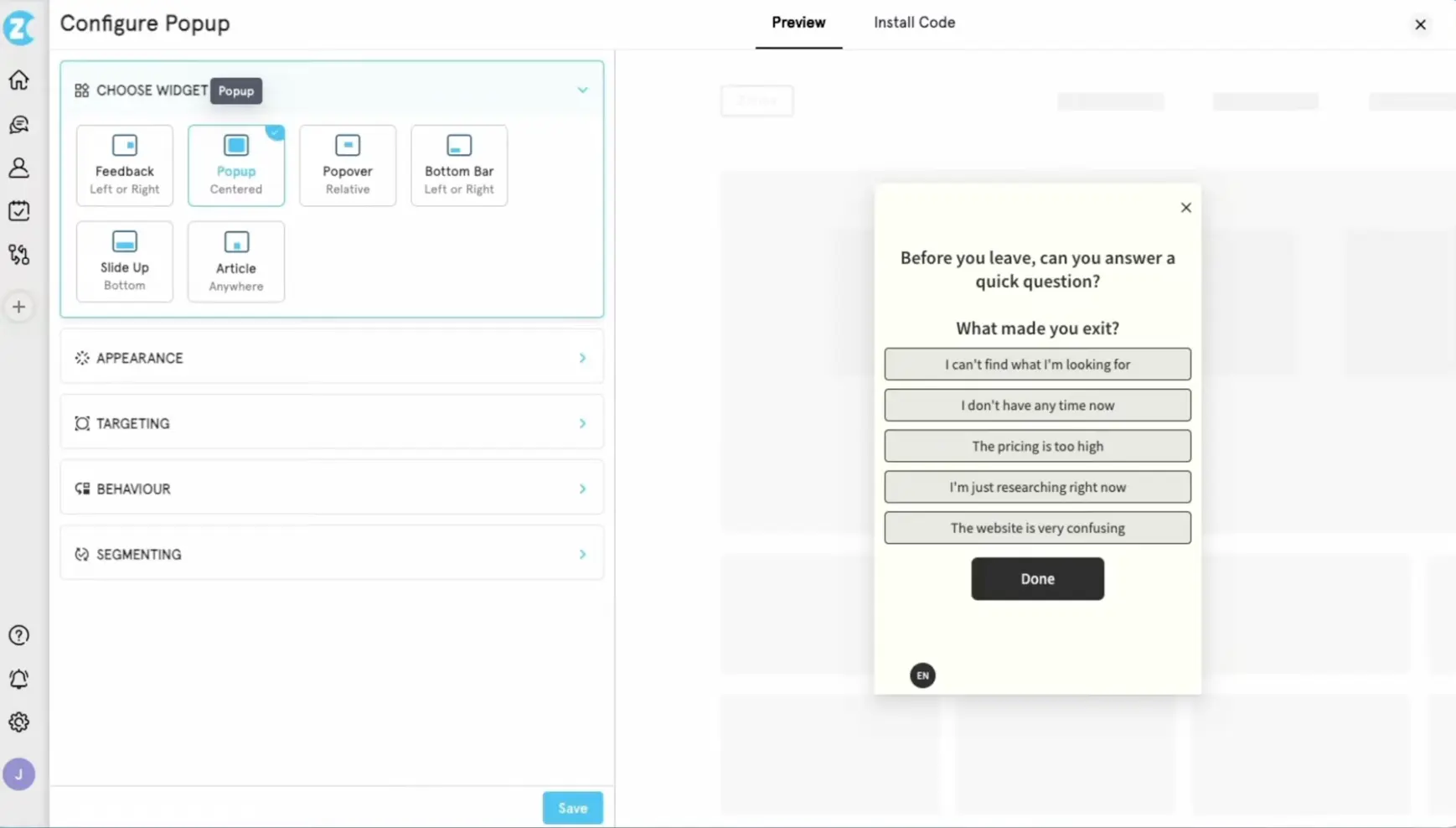
What does Zonka Feedback do?
Zonka Feedback keeps the operational part of closing the loop inside its own response inbox. When a low score comes in, the team can turn it into a case, assign an owner, escalate it, and track what happens next. Cross-source AI analysis lives in a separate product, AI Feedback Intelligence, which brings in surveys, support tickets, reviews, chats, and calls. Zonka sells Feedback Management and Feedback Intelligence separately or as a bundle.
Who is Zonka Feedback primarily for?
Zonka fits CX teams that want an unhappy response to become an owned case inside the feedback platform. Some of its features are particularly useful when customer experience happens in branches, stores, clinics, or other physical locations.
What's Zonka Feedback's ease of use?
Most reviewers find surveys easy to build and launch. The learning curve shows up later, when teams start customizing workflows or connecting the rest of their stack. G2 reviews also mention occasional bugs and navigation that can be confusing.
What's Zonka Feedback's customer support like?
Reviewers praise responsive, hands-on support. The review base is smaller than for the household names on this list, but the signal is very consistent.
What are the main pros of using Zonka Feedback?
- Cases, owners, escalation rules, and status tracking keep follow-up visible inside the platform.
- WhatsApp, SMS, and offline kiosks reach customers beyond the usual web and email surveys.
- Reviewers repeatedly praise the responsive support and value for money.
What are the main cons of using Zonka Feedback?
- Feedback Intelligence is priced separately by data credits, making the full bundle harder to budget from the public information.
- Advanced workflows and integrations take more setup, and reviewers mention occasional bugs and confusing navigation.
- There is no permanent free plan, although a trial is available upon a demo sales call.
Pricing
Zonka no longer gives buyers a fixed number to work with on its pricing page. Feedback Management is quoted according to response volume, while AI Feedback Intelligence uses data credits; you can buy them separately or as a bundle. TrustRadius lists the two products at $199 and $999 per month, but these are not the official numbers.
My hot take: How well does Zonka Feedback hold up for closing the CX loop?
Zonka gets one practical thing right: ownership is visible. After a bad NPS response, a CX manager can see who has the case, whether it was escalated, and whether anyone replied. For a multi-location team, that is more useful than another Slack alert.
Before buying, I would decide whether the team is genuinely willing to manage those cases in Zonka. If CSMs already work in HubSpot or Intercom, a second inbox may create its own follow-up problem. Cross-source AI also means adding the separately priced Feedback Intelligence product. I would choose Zonka when native case ownership sits at the top of the brief, but compare the bundled quote, not Feedback Management alone.
AskNicely: feedback as frontline coaching
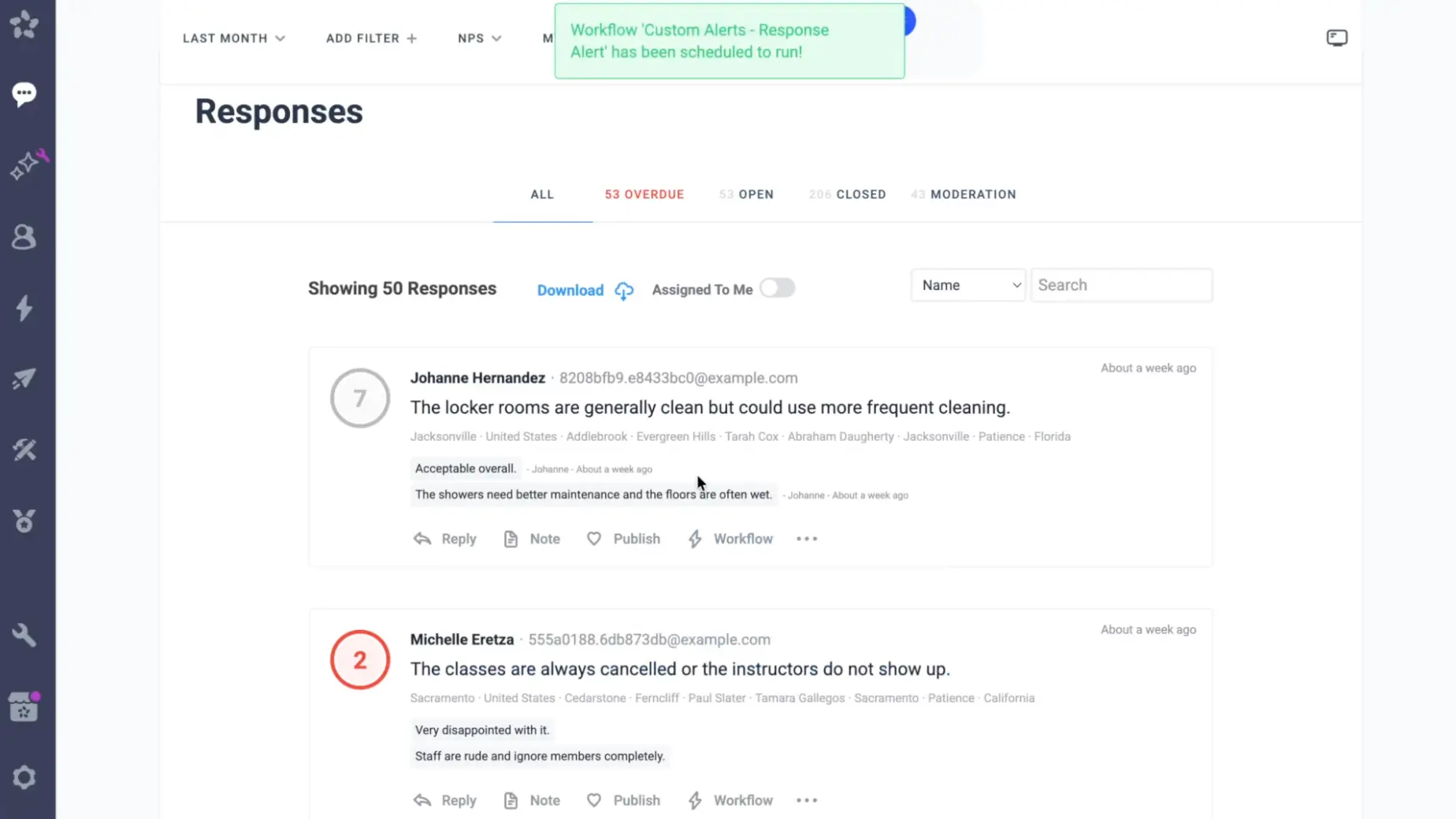
What does AskNicely do?
AskNicely is built for service businesses where customer experience depends heavily on frontline staff, often working across multiple locations. It collects NPS, CSAT, and 5-star feedback through email, SMS, WhatsApp, QR codes, and, on higher plans, mobile apps. The results feed into workflows, team scorecards, recognition, and follow-up.
Who is AskNicely primarily for?
AskNicely fits service businesses where managers are responsible for keeping customer experience consistent across many employees and locations. Think hotel groups, healthcare networks, home-service franchises, or fitness chains.
What's AskNicely's ease of use?
Reviewers generally find the interface intuitive and the basic survey setup quick. The operational layer asks more of the rollout: data feeds need connecting, and managers need a routine for using scorecards and coaching prompts.
What's AskNicely's customer support like?
Reviews consistently praise AskNicely’s support. Chat and email are included on every plan; contracts above $9,600 a year also get a named CSM and Activation Team.
What are the main pros of using AskNicely?
- Tools that give frontline managers something concrete to do with customer feedback.
- Workflows and case management can assign an unhappy response before it disappears into a report.
- Automated requests for turning positive feedback into reviews and testimonials.
What are the main cons of using AskNicely?
- Frontline coaching sits in Transform, the top plan, while NiceAI remains an add-on across the range.
- The product stays close to service metrics and frontline performance, making it less suited for broader product or market research.
- There is no self-serve trial, and plans require a sales conversation.
Pricing
AskNicely sells three annual plans: Learn, Grow, and Transform. Its own 2026 comparison content lists them at $449, $849, and $999 per month, starting at 500 responses, while the current pricing page still sends buyers to sales and says the final price scales with volume. Treat these as reference points rather than guaranteed list prices. NiceAI costs extra, overages apply, and there is no free trial.
My hot take: How well does AskNicely hold up for closing the CX loop?
AskNicely makes the strongest case for itself when a location manager opens a team huddle with yesterday’s customer comments, praises one employee, and coaches another. That is the product’s real loop: feedback changes what the frontline does on the next shift.
Before buying, I would ask whether managers will actually run that routine. Since coaching sits in Transform, the answer determines whether the top plan is justified. If responses stay with the CX team or are handed to product and support, much of AskNicely’s distinctive layer will sit idle. A digital product team usually has feedback to investigate across channels, not dozens of local managers to coach. AskNicely looks like a solid piece of software, but it wouldn’t be my pick for this job.
Retently: automated NPS, CSAT, and CES programs
What does Retently do?
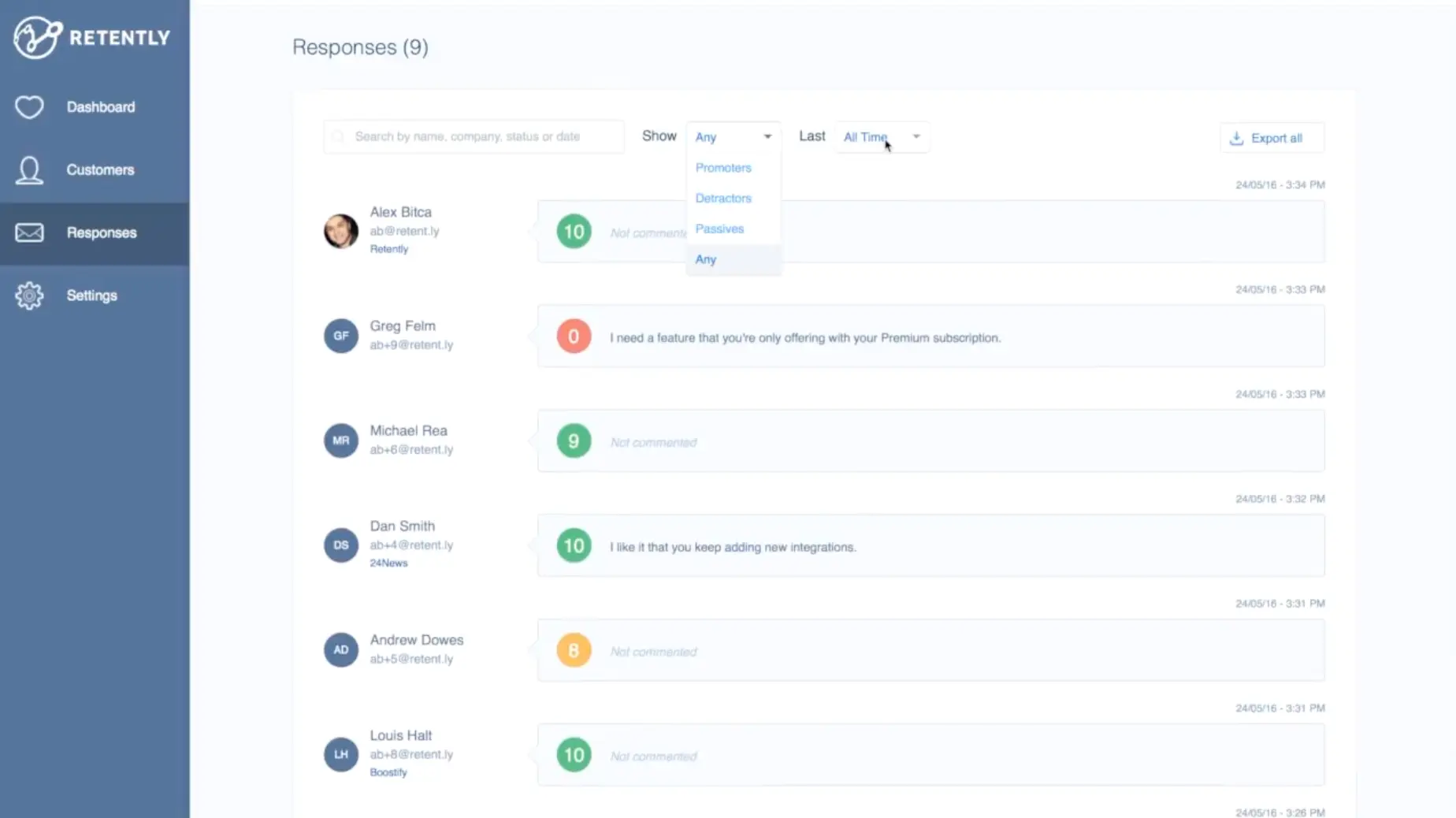
Retently runs recurring and transactional NPS, CSAT, and CES programs across email, links, embeds, and web pop-ups. Its AI groups comments into themes, identifies the drivers behind scores, and flags emerging issues. CRM and helpdesk integrations can trigger surveys and send the results back to the customer record.
Who is Retently primarily for?
B2B SaaS teams running relationship and transactional surveys, especially when customer data already lives in HubSpot, Pipedrive, or another CRM. Retently also has a separate ecommerce offer for post-purchase and support feedback.
What's Retently's ease of use?
Reviewers generally find Retently quick to set up and easy to run day to day. Some users find the reporting menus harder to follow and would like something better than a CSV dump when exporting results.
What's Retently's customer support like?
Support is one of the few things Retently reviewers on Capterra and G2 mention as a positive standout. The level of access depends on the plan: Basic gets email support, Pro adds live chat and Zoom, while Enterprise includes a named CSM.
What are the main pros of using Retently?
- Focused automation for recurring and transactional NPS, CSAT, and CES programs.
- AI groups comments by theme and flags emerging issues, while CRM and helpdesk integrations keep survey triggers and scores connected to customer records.
- Easy setup and support that reviewers repeatedly praise.
What are the main cons of using Retently?
- Campaign and seat caps on lower tiers.
- In-app collection is limited to web pop-ups, with no native mobile SDK.
- Salesforce integration is reserved for Enterprise.
Pricing
Retently’s public plans start at $99/month, with Pro at $299 and Enterprise priced on request. It offers separate B2B and ecommerce tracks, and a 14-day free trial with no card required.
My hot take: How well does Retently hold up for closing the CX loop?
Retently is easy to underestimate because it still looks like an NPS specialist. Give it a renewal survey triggered from HubSpot, or a detractor who should reach the right account owner before the next call, and the product is on comfortable ground. Its newer AI layer also gives the team more than a sentiment label: it groups themes, identifies drivers, and watches for complaints that suddenly start multiplying.
I would slow down at the words “in-app.” Retently means a web pop-up, and a Segment event triggers an email survey rather than a question inside the product experience. That may be enough for a browser-based SaaS program. Once the brief includes an iOS or Android app, precise behavioral targeting, or broader product research, the channel gap becomes difficult to ignore.
Typeform: the best-looking forms in the room
What does Typeform do?
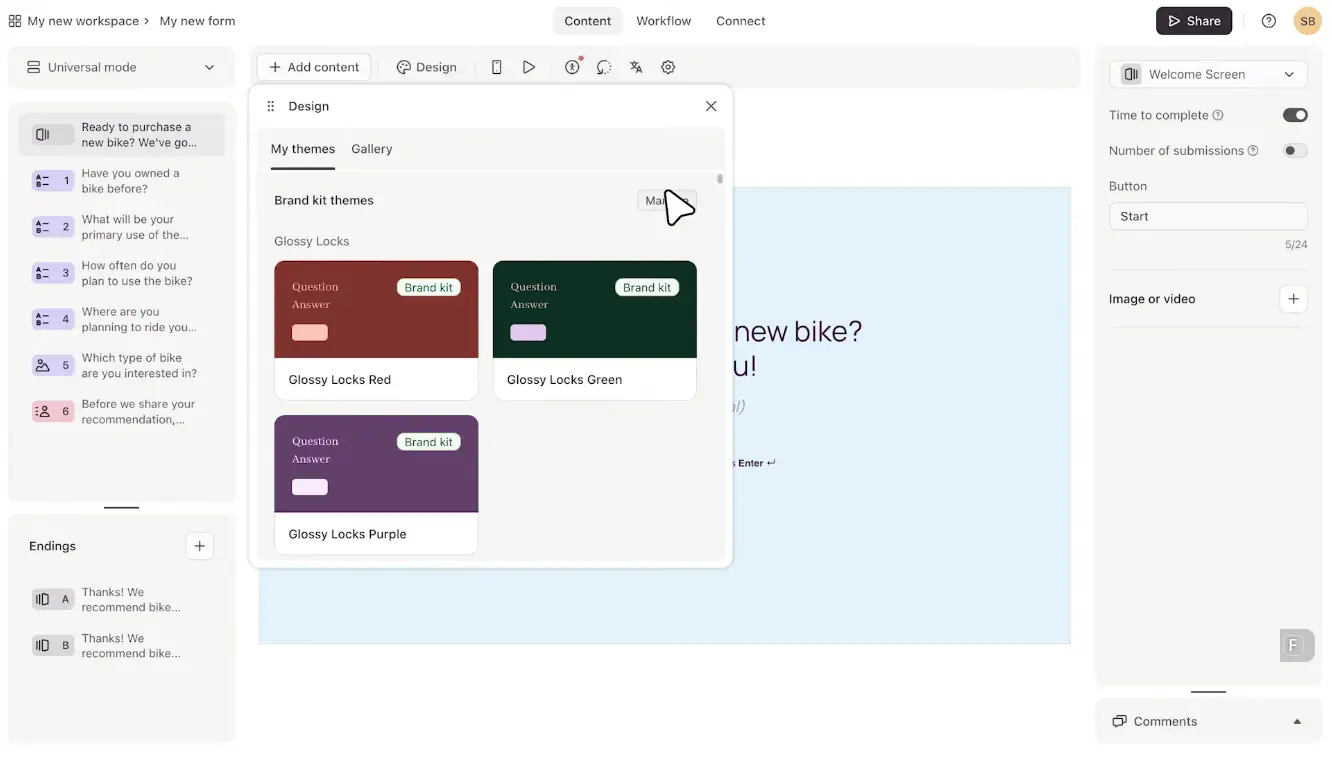
Typeform is a design-first survey and form builder known for conversational, one-question-at-a-time surveys that look and convert well. It handles feedback collection and integrates with other tools, but it's a form builder rather than a CX platform.
Who is Typeform primarily for?
Teams that care about the respondent experience, particularly in marketing, product research, and selected feedback projects. For CX teams, Typeform makes the most sense when the immediate job is to build a polished survey. The wider feedback program will usually need another home.
What's Typeform's ease of use?
Typeform is easy to pick up, and reviewers consistently praise both the builder and the respondent experience.
What's Typeform's customer support like?
Lower tiers rely mainly on the Help Center, community, and standard support. Moving up the pricing ladder brings faster assistance and live chat, while the highest tiers can include a dedicated CSM and implementation help.
What are the main pros of using Typeform?
- The one-question format makes polished surveys feel lighter, especially when presentation matters.
- Strong branding and logic give teams plenty of control without making the builder difficult to learn.
- On higher tiers, AI shortens the work of reading open text, while automations can move selected responses into follow-up.
What are the main cons of using Typeform?
- Hitting the account-wide response cap closes all your forms to respondents until the limit resets or you upgrade.
- Typeform can automate some follow-up on its own responses, but running a full VoC loop still requires another system for wider analysis and case management.
- Branding removal starts with Plus, while AI insights and native automations require higher plans or add-ons.
Pricing
Typeform’s free plan allows 10 responses per month across all forms. Paid plans range from $29 to $379 per month, with lower rates for annual billing and custom Enterprise pricing.
My hot take: How well does Typeform hold up for closing the CX loop?
I would reach for Typeform when an ordinary-looking form would make an important customer interaction feel cheaper than it should. Onboarding is a good example. The questionnaire shapes the customer’s impression before the team has acted on a single answer. AI theming and follow-up automations are Typeform’s useful additions, although the design is still the buying argument.
The limitation shows up once feedback starts arriving from somewhere else. Smart Insights works on Typeform responses, Growth Flow follows up on contacts, and Research Flow runs studies. None gives a CX team one place for surveys, support tickets, app reviews, and calls. To me, that makes Typeform a decent choice for the surveys themselves, but not for running the program. If you like the format but need more behind it, our Typeform alternatives roundup walks through tools that add the missing layers.
Which voice of customer tool is right for you?
I’m part of the Survicate team, and that inevitably informs how I see this market. It also gives me a fairly clear sense of our product’s limits. The benchmark here has been a continuous VoC program that collects feedback across multiple channels, uses AI to make sense of scattered feedback, and moves the result into follow-up without the cost and implementation burden of an enterprise platform. Within that frame, I’ve tried to distinguish between the use cases where Survicate has a genuine advantage and those where another tool is likely to serve the team better.
Here’s how I’d narrow the list.
- If you are a big company that runs CX across many markets or physical locations and has a team dedicated to the platform, look at Qualtrics or Medallia. Both close the loop inside the platform and can handle complexity smaller teams have little reason to carry.
- If every detractor needs an owner, an escalation path, and a resolution status inside the feedback platform, Zonka Feedback handles that job most directly.
- If local managers are expected to bring customer comments into team huddles and coaching conversations, AskNicely is built around that routine.
- If the brief centers on recurring and transactional NPS, CSAT, and CES tied closely to your CRM, Retently is a focused, well-supported option. The fit weakens if you need a native mobile SDK.
- If the survey itself needs to make a strong impression, Typeform still has a real edge. Its AI and automations now handle more of what happens after submission, but feedback from support, reviews, and calls will still live elsewhere.
- If your team wants one familiar survey builder for several departments and does not need a unified feedback repository, SurveyMonkey does the job. Its familiarity is still one of its strongest arguments.
- If flexible survey logic is the starting point and you are prepared to assemble a modular setup, Alchemer can take the program further than a standard survey builder. Survey, Pulse, and Workflow can cover a larger part of the loop, but doing so means combining separately licensed products.
- If you are a CX or CS team at a SaaS company and feedback needs to span web, in-app, email, and chat, Survicate is the closest match to that brief. Research Hub brings survey responses together with support tickets and reviews, then uses AI to find patterns across them. Integrations route responses into HubSpot, Intercom, Zendesk, or Slack for follow-up. If case ownership and resolution need to stay inside the feedback platform, Zonka is a better fit.
If you are still shaping the program itself, start with our guide to running a voice of customer program. If you are deciding whether NPS should be the lead metric at all, our guide to NPS alternatives worth tracking is the more useful next step.
FAQ
What separates a voice of customer tool from a basic survey tool?
A survey tool collects responses. A voice of customer tool built for CX also consolidates feedback from multiple channels, analyzes open-ended comments, and gives you a path from a response to an action. The collection is the easy part. The consolidation and the loop are what actually change customer experience.
What's the difference between closing the loop natively and through integrations?
Native loop closing means the tool has built-in case management: a detractor comes in, gets assigned to someone, and is tracked to resolution inside the platform. Closing the loop through integrations means the tool routes that feedback out to your CRM, helpdesk, or Slack, where the follow-up happens. Neither is wrong. Native suits teams that want one system; integrations suit teams whose workflow already lives elsewhere.
What's the most common mistake CX teams make when choosing a tool?
Buying for collection and forgetting about action. It's easy to pick the tool with the nicest survey builder, then discover six months later that the scores are piling up on a dashboard nobody acts on. Decide how feedback will trigger follow-up before you choose, then pick the tool that fits that, whether that's native workflows or integrations into your stack.
Do I need AI analysis, or is that just a buzzword?
If you collect any real volume of open-ended feedback, it earns its place. Reading a few dozen comments by hand is fine. Reading a few thousand isn't. AI theming groups those comments so you're looking at patterns, such as a spike in onboarding complaints, instead of scrolling forever. The value scales with how much qualitative feedback you gather.
Author's note (last verified: 17 August 2026): Statements such as 'best' reflect our opinion and typical use cases, not a universal guarantee. This comparison is based on publicly available information and our best understanding at the time of writing. Vendors may change features, pricing, and packaging without notice. For the latest details, please check the official sources or reach out to the vendor directly.


.svg)

.svg)