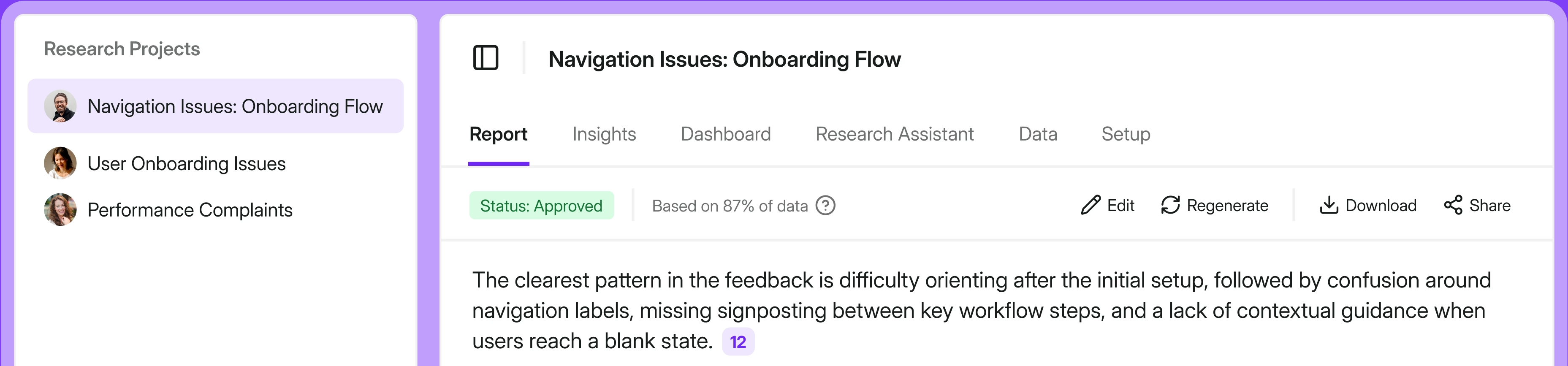
What does Qualtrics XM do?
Qualtrics XM is a cloud-based experience management software. It encompasses multiple products like Customer XM, Employee XM, Brand XM, and more. It helps you to track your satisfaction statistics across the entire funnel from both your customers and team members.
Who is Qualtrics primarily for?
Mid-size to enterprise organizations are their most common users. Qualtrics focuses on end-to-end enterprise solutions and academic research.
In this guide, we focus on some of the more affordable and easier-to-use alternatives to Qualtrics – especially tools built with customer success and customer experience teams in mind. Academic research tools are outside the scope of this comparison.
Why look for Qualtrics competitors?
Qualtrics is an experience management platform that supports both survey data collection and analysis. It’s widely used by customer and experience teams to collect and analyze feedback at scale. The platform is also popular among educators and researchers for scientific studies, and it’s designed to help teams build engaging surveys and get a comprehensive understanding of users.
That said, there are a few common reasons why teams start looking for alternatives:
- High total cost
Qualtrics often requires extensive implementation support, which can drive the overall contract value up quickly. For context, the only public self-serve paid pricing Qualtrics lists starts at $420/month ($5,040 billed annually) for a Strategic Research plan limited to 1,000 responses/year – essentially a standalone research license rather than a full CX platform deployment. Broader CX and enterprise packages are quote-based, and marketplace data suggests the median Qualtrics contract value is around $30,000 per year. Customers frequently mention that the platform becomes “worth it” mainly when you use it deeply across teams and programs – otherwise it can feel like overkill for the price. - Ongoing admin burden
Beyond initial setup, some organizations also point to administrative hardships – maintaining configurations, permissions, and programs can require dedicated ownership rather than being a “set and forge”’ tool. While the platform is feature-rich, users might need third-party help to configure it efficiently, which adds time and cost.
- Steep learning curve and training overhead
Qualtrics gets negative mentions around usability – teams say they need training to get the most out of the platform. Reporting experience and day-to-day data work come across as harder than expected, especially for non-technical owners. - Opaque pricing and procurement friction
Qualtrics doesn’t publish standard pricing on its website, so you typically need a demo or a sales conversation to get a quote. In practice, this slows down evaluation and makes it harder to compare tools apples-to-apples. - Mismatch between “enterprise suite” and “simple survey” needs
If you only need basic surveys and lightweight analysis, many cheaper tools will cover 80–90% of the job with far less setup, admin work, and stakeholder alignment.
How easy to use is Qualtrics?
Qualtrics is quite a complex platform – it even acquires other tools, like Delighted. So, it may be more difficult to use than many competitors. You might need a code-fluent developer if you want to set up custom logic, branching, or customization beyond simple basics.
Open-text feedback analysis can be hard to customize
If a major part of your program is open-text feedback and you need fast, reliable theme detection at scale, teams tend to look elsewhere. Some reviews argue that Qualtrics’ Text iQ can produce generic categories unless you invest manual effort into creating and maintaining tagging rules over time. This issue becomes more cumbersome as feedback volume grows. Our 100-page analysis of real Qualtrics reviews often cite survey design constraints as a common complaint.
Bottom line
If you mainly want to run simple surveys and do basic analysis, there are plenty of more affordable and easier to use options. And if your pain points are specifically pricing transparency, training overhead, or the feeling that the platform is “too much suite for too little need,” a more affordable, easy-to-use competitor could very well be a better fit.
How we did this review
This isn’t a “lab test” where we ran surveys through every platform and scored them on 50 dimensions. The goal of this guide is to simply help you get a hold of what each tool is actually good at (and where it falls short), so you can shortlist faster. We're obviously team Survicate, so our preference shouldn't surprise you. Survicate is on this list and we know it better than the other tools. We also know where we fall short compared to Qualtrics, and we'll make those cases in the review.
What we looked for
We focused on the stuff that usually decides the purchase in real life:
- What the tool is primarily built for
- The “shape” of surveying (basic forms vs. advanced features)
- Ease of implementation and daily use (how quickly you can get it running, and whether non-technical teammates can own it)
- Pricing reality (public pricing vs. quote-based, plus any credible estimates when pricing is hidden)
- How it compares to Qualtrics (when and what to choose)
How we validated the claims
To keep the comparison grounded, we used:
- Official product materials (docs, pages, and feature descriptions) to confirm what’s actually supported
- Review platforms and community discussions (G2, TrustRadius, Reddit, etc.) to capture what daily use looks like
- Pricing signals from third-party sources when vendors hide pricing behind demos (and we clearly label those as estimates)
- Where relevant, we also share our insights from in-house testing of competitor tools and sales calls transcripts where Qualtrics have been discussed
The result is a comparison that’s less about “who has the longest feature list” and more about which tool fits your team’s reality, your workflows, and your tolerance for complexity. Listed brands are not placed in order of importance or ranking of any sort.
9 Qualtrics alternatives
Below you’ll find a mix of tools that teams commonly consider as alternatives to Qualtrics. Some are full-blown CX platforms, while others focus on lightweight surveys, feedback collection, or specific use cases like social experience or customer journeys. For each option, we briefly explain what the tool is best at, who it’s mainly for, its main pros and cons, and how it compares to Qualtrics.
Survicate
What does Survicate do?
Survicate is a customer feedback platform that helps businesses:
- Collect, unify, and act on user input across multiple touchpoints
- Creating surveys with logic (branching and skip patterns)
- Distribute surveys through key channels (website, in-product, email, etc.)

Survicate also connects survey responses with context from external systems thanks to +40 integrations. Through its research repository, Research Hub, teams can enrich feedback with customer attributes and route insights to the tools they already use.
In addition to structured survey data, the platform supports working with open-text feedback through dedicated analysis and insight-management features.
Who is Survicate primarily for?
Survicate is perfect for B2C software companies, B2B SaaS businesses, retail, and media companies that want to easily collect targeted feedback, and then turn it into actionable insights to boost retention, UX, conversions, and product decisions.
What are the main pros of using Survicate?
- Ease of use and quick setup (high G2 ratings in comparison with Qualtrics for Ease of Use – 9.3, and Ease of Setup – 9.1).
- Strong support and “human help” as a common theme in reviews (high G2 Quality of Support score in the comparison – 9.4).
- Fast survey creation via 400+ templates and a Question Library (400+ templates), plus AI-assisted survey creation
- Research repository creation and analysis (Research Hub and AI Research Assistant), with natural language querying of feedback data.
- Flexible survey distribution across key channels, with response autosave for partial responses.
- A wide set of integrations for custom workflows, e.g., HubSpot, Intercom, Zendesk, Slack, Salesforce, Klaviyo, and more.
Voice of the community:
“Since I started using Survicate I was hooked from the beginning, how easy it integrates with everything and how simple it is to start using it.”

What are the main cons of using Survicate?
- Some reviewers point out pricing can feel high at higher needs, as response volume grows.
- A few reviewers mention limitations around customization or targeting edge cases.
- If you’re looking for a very broad, enterprise XM suite with deep governance and “everything in one ecosystem,” Survicate may not be enough.
Voice of the community:
“I find the character limits in the privacy policy settings to be quite restrictive.”
How does it compare to Qualtrics?
Survicate won't be the right fit for everyone. We'd rather tell you when to pick someone else than pretend it does everything. Here's where we'd point you elsewhere:
- You’re building a large-scale enterprise XM program with deeper governance needs and expect a longer rollout. If your plan spans customer, employee, and brand programs with role-based permissions, that's where Qualtrics excels.
- For unified enterprise CX that leans on call recordings, reviews, and social data across a large frontline, Medallia is the more natural home.
- Your priority is social customer care. If the real job is managing conversations, comments, and user-generated content across social and messaging channels, Emplifi Service Cloud is built for that. Survicate collects and analyzes feedback, but it isn't a social care console.
- You're focused on journey orchestration. If you want to map end-to-end journeys, spot drop-off, and trigger automated nudges in real time, inQuba is the specialist. If you'd rather run an always-on customer panel alongside your surveys, look at Alida.
- You just need a quick, free form. For a one-off survey with no targeting, no integrations, and no ongoing analysis, Google Forms does the job for free. Reaching for Survicate would be overkill.
Survicate earns its place in the middle of that range. You collect contextual feedback across web, in-product, email, and mobile. You make sense of open-text responses in your AI-powered research repository (Research Hub). Then you push those insights straight into the tools your team already uses, without an enterprise setup project. If that matches your core needs, Survicate stays a more light-weight, affordable option than Qualtrics.
G2 ratings still confirm that reality: on their Qualtrics Customer Experience vs Survicate comparison, Survicate scores higher in Ease of Use (9.3 vs 8.4), Ease of Setup (9.1 vs 7.6), and Quality of Support (9.4 vs 8.5).
Pricing
Survicate keeps pricing relatively straightforward, with a free plan to get started and paid tiers that scale mainly with your response limits and billing model.
- Free ($0): no time limit, 25 responses/month, up to 3 teammates, unlimited active surveys (300 responses total across active surveys), plus essentials like branch logic, response autosave, and templates.
- Starter (from $89/month): monthly option with 100/250/500 responses per month (by variant), 2 active surveys, up to 5 teammates, and paid overages if you exceed the limit.
- Growth (from $56/month, billed annually): built for ongoing programs, with higher limits plus multilingual surveys, AI-assisted analysis, and the option to remove Survicate branding (up to 10 teammates).
- Pro (starting at $349/month) and Enterprise (starting at $569/month): for larger, more complex setups, with pricing that scales based on limits and billing.
Medallia
What does Medallia do?
Medallia is a customer and employee experience management platform. In addition to surveys, it also offers in-app feedback and review features, and pulling in social mentions data to create a unified view of customer sentiment. Teams use it to aggregate and analyze online reviews and social feedback to boost satisfaction.

Who is Medallia primarily for?
Medallia is better for those looking for a complete customer experience management solution.
What are the main pros of using Medallia?
- In addition to surveys, it also offers in-app feedback and review features.
- Ability to work with online review data (including third-party review sources) alongside survey feedback.
- Medallia provides survey templates (depending on product/module), which can speed up program setup.
What are the main cons of using Medallia?
- Some users describe limitations around making certain changes and say turnaround can be slower than expected for “simple” requests, for example adding a new filter to a report or making a small change to a survey.
- Enterprise deployments can require more implementation effort and governance than lightweight survey tools (especially when multiple channels and workflows are involved).
Voice of the community:
“Sometimes, there are aspects to the platform that seem easy to add but are told it isn't possible. AI is also an upcharge.”
How does it compare to Qualtrics?
Medallia and Qualtrics are both heavy-hitters in the enterprise CX space, with comparable strengths in multi-channel feedback and analytics. However, their sweet spots differ noticeably.
In practice:
- If your primary need is advanced survey design, deep customization, predictive analytics, or professional-grade market research capabilities, Qualtrics emerges as the stronger choice.
- If you're after real-time feedback management, heavy emphasis on unstructured data (like call recordings or reviews), frontline workforce activation, or a broader, unified CX platform across channels, Medallia may be the better choice.
Pricing
The pricing is quote-based. Medallia describes a pricing model based on Experience Data Records (EDR) for Medallia Experience Cloud.
Estimated pricing varies widely by scope and EDR volume. Third-party pricing guides commonly describe enterprise, “tens of thousands USD per year and up” pricing, and case studies show multi-year, multi-million total costs for large-scale programs.
InMoment
What does InMoment do?
InMoment focuses on customer, employee, and market experience; in 2020, InMoment acquired MaritzCX.
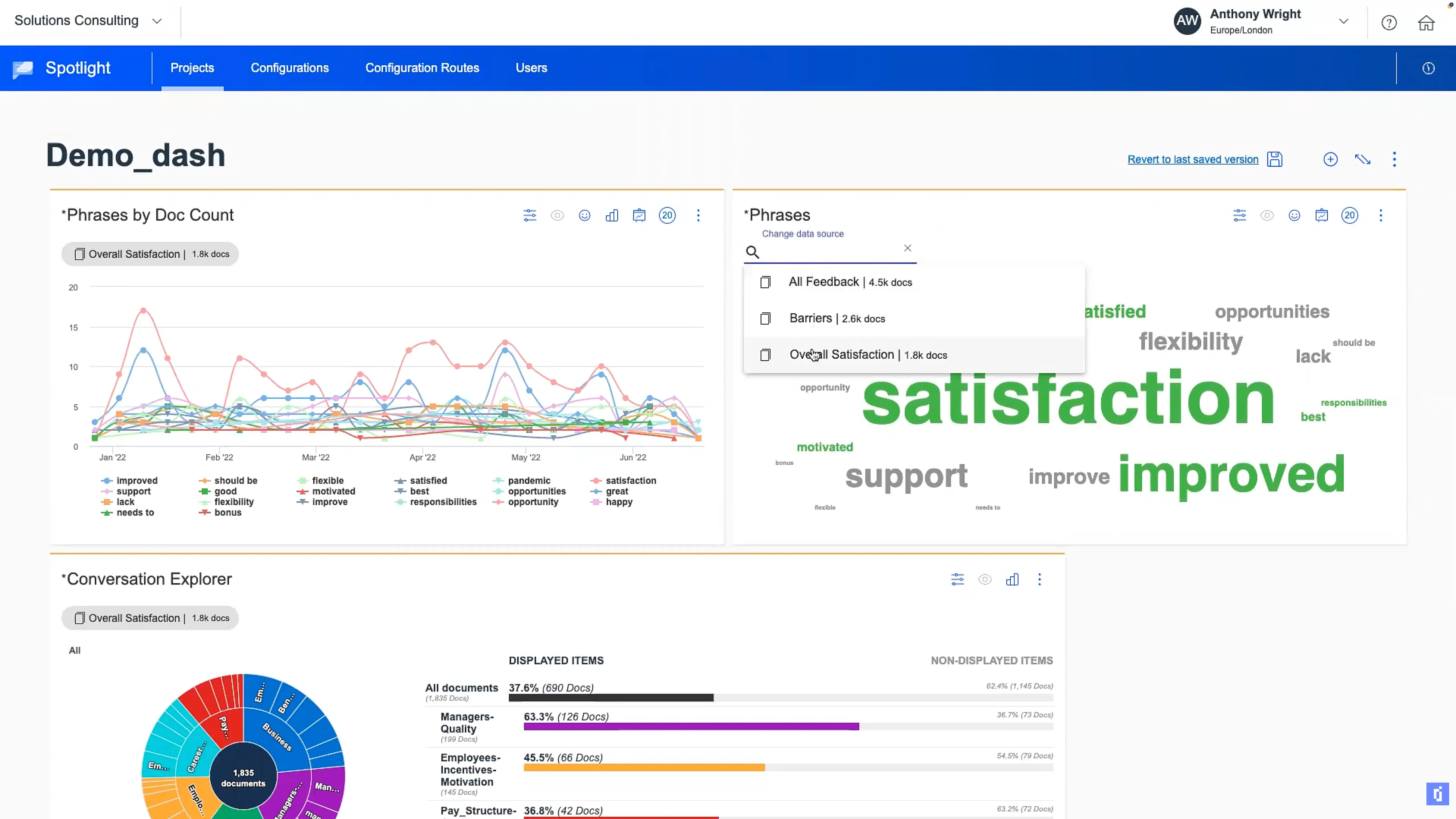
Key features:
- Feedback gathering from surveys and chatlogs
- Incorporating indirect and inferred feedback
- The feedback includes social media reviews and mentions
This software can connect feedback from multiple channels like social media, Google Reviews, and TripAdvisor.
Who is InMoment primarily for?
InMoment is a solution popular mainly with travel and hospitality teams focused on guest experience.
What are the main pros of using InMoment?
- Helps you find insights on how to differentiate from competitors, attract new customers, and identify emerging trends.
- Can help you measure how successful your marketing campaigns are.
- Customers mention responsive support teams when needed.
Voice of the community:
“The customer service [is] very knowledgeable and helpful for any issues that we have ever had.”
What are the main cons of using InMoment?
- Enterprise-oriented and quote-based: you have to book a demo (and usually a sales call) to get pricing.
- For some reviewers, the platform can be sluggish at times, especially in reporting-heavy workflows.
- Some users report long turnaround times for changes, especially when requests go through a managed service model.
Voice of the community:
“The platform can be slow and unreliable at times.”
How does it compare to Qualtrics?
InMoment focuses on real-time feedback, text analytics, and closing the loop on insights. Qualtrics offers broader XM with sophisticated surveys and research tools.
In practice:
- If your priority is fast action on feedback and conversational insights, then InMoment often wins operationally.
- If you need large-scale research programs, custom surveys, and full XM, look into Qualtrics.
Pricing
InMoment pricing is quote-based: you have to book a demo or a call with the sales team to get a quote. Vendr’s buyer guide reports an average annual cost of about $13,488 (treat this as an aggregate benchmark, not a list price – real contracts can vary a lot depending on scope, modules, and service model).
Emplifi Service Cloud
What does Emplifi Service Cloud do?
Emplifi Service Cloud is part of Emplifi’s AI-powered social platform.
- It is focused on customer care and experience across social channels
- It supports service workflows (e.g., managing and resolving customer interactions)
- Emplifi Service Cloud can be used alongside other Emplifi modules for social marketing, social commerce, and UGC.
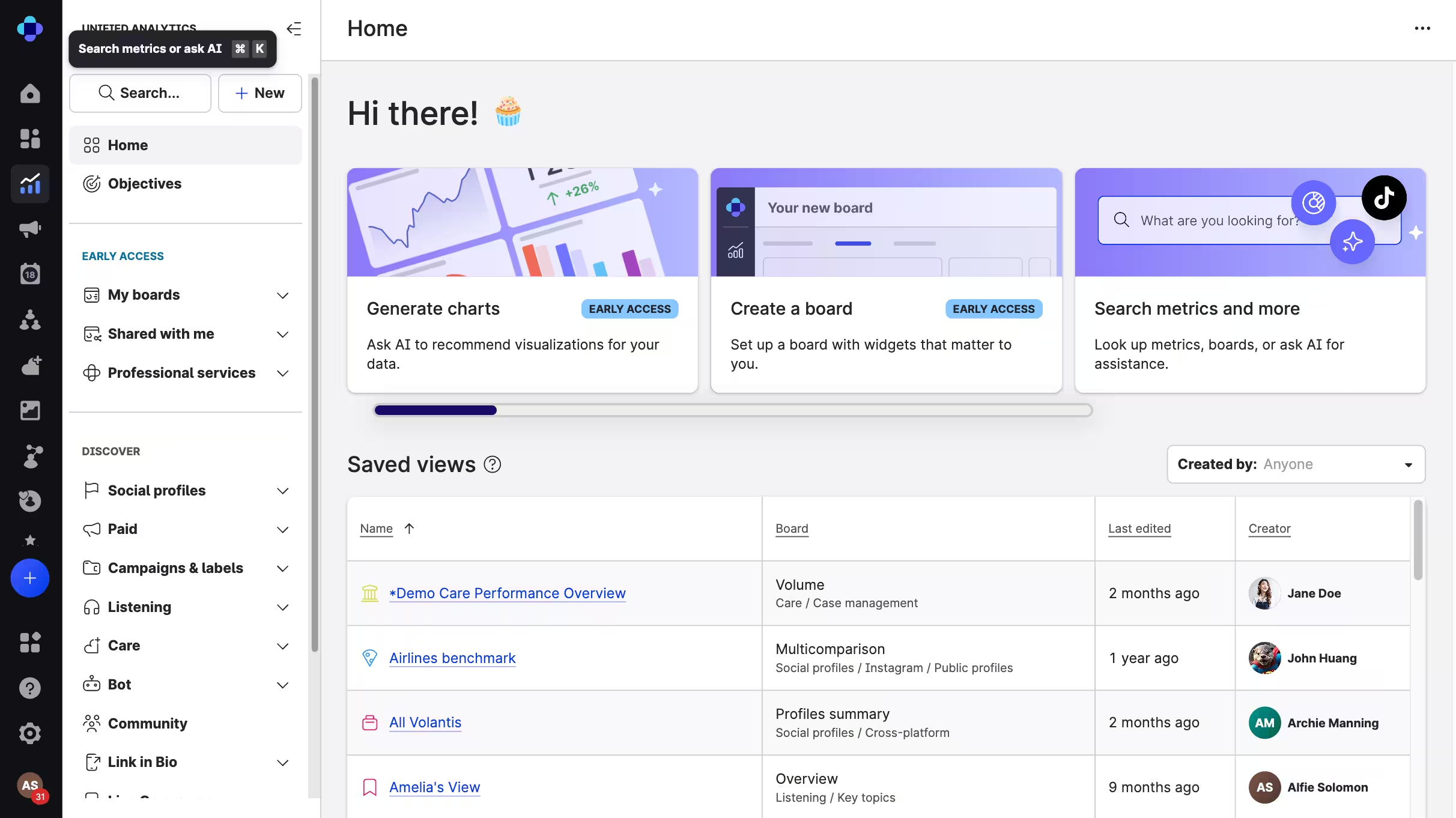
Influencer discovery and campaign tracking are handled via Emplifi’s Influencer Management module, and Emplifi also supports embedding/publishing UGC displays on websites (including WordPress).
Who is Emplifi Service Cloud primarily for?
Emplifi Service Cloud is mainly for mid-to-large brands that handle lots of customer questions and conversations on social media, messaging apps, email, and other digital channels (e.g., retail, e-commerce, travel, hospitality, and consumer brands).
What are the main pros of using Emplifi Service Cloud?
- This tool is useful for brands looking for influencers and tracking their marketing campaigns.
- Besides feedback collection, they also connect you with brand advocates.
The Emplifi Influencers module has a database of 30M+ influencer profiles who can help promote your company. - Emplifi Service Cloud adds contact-center-grade capabilities like agent case management, VoC insights, and analytics (plus data sharing with Emplifi’s other clouds).
Voice of the community:
“Reporting - this has massively reduced the time spent on creating reports for social media activities”
What are the main cons of using Emplifi Service Cloud?
- On the downside, some reviewers point out that certain areas can be harder to evaluate or operationalize depending on how you deploy specific modules.
- You typically have to contact Emplifi and book a meeting to get a custom quote (pricing isn’t shown as fixed numbers on their site).
- Reviewers often note that capabilities are modular and tiered – so some features may require higher tiers and/or additional modules beyond your base package.
Voice of the community:
“It has been challenging to attach an [sic] specific metric to Emplifi's solutions.”
How does it compare to Qualtrics?
Qualtrics is a research- and survey-first Experience Management suite. Emplifi Service Cloud, on the other hand, is more social- and care-first, centered on managing customer interactions on social channels and tying that operational service work to social experience insights.
In practice:
- If you need robust survey research and enterprise VoC measurement, Qualtrics is usually the closer fit.
- If your priority is social customer care, social engagement, and connecting service operations with social CX, Emplifi is typically the more direct tool.
Pricing
You have to contact Emplifi and book a meeting to receive a custom quote. Emplifi describes three tiers per solution (Essential, Advanced, Intelligent) and emphasizes that pricing is not per-seat.
Community chatter suggests pricing structures can vary by usage model – for example, one long-term customer described contracts moving toward an “audience size allowance” with overage pricing.
Alida CXM
What does Alida CXM do?
The Alida CXM, formerly Vision Critical, software serves to:
- Collect both direct and indirect customer feedback
- Automate responses and other actions (e.g., rules and case management)
- Give users an overview of key customer experience metrics

The tool allows users to build surveys, distribute them, and analyze results. Their survey creator has 25+ question types, supports multi-language surveys and includes activity templates. You can also create surveys from scratch if you prefer, and set your own survey logic and question flows based on chosen attributes.
Who is Emplifi Service Cloud primarily for?
Alida CXM is mainly for mid-to-large companies that want to run ongoing research for continuous feedback, not just one-off surveys.
What are the main pros of using Alida CXM?
- Reviews focus on an intuitive interface.
- Reviews also highlight wide access to guides and extensive help documentation.
- Alida provides on-demand training resources (help videos and quick-start guides).
Reviews mention survey/activity templates.
Voice of the community:
“The platform is easy to use and continuously improving.”
What are the main cons of using Alida CXM?
- There is no public list pricing (quote-based) and getting started is typically sales-led (you usually need to book a demo to get a quote and access).
- Some users mention setup can feel cumbersome in more complex use cases.
Voice of the community:
“Setting up an external survey proved to be quite cumbersome.”
How does it compare to Qualtrics?
Qualtrics is a research- and survey-first Experience Management suite, while Alida is more community- and engagement-first – often used to run continuous feedback communities alongside surveys and reporting.
In practice:
- Qualtrics is usually the closer fit for large-scale XM programs and advanced VoC measurement.
- Alida is a strong fit if you want an always-on customer panel plus surveys and CX analytics in one platform.
Pricing
There is no public list pricing. You typically have to book a demo to receive a custom quote. Third-party estimates suggest Alida often lands in the tens of thousands USD per year, with Enterprise Edition (5000 members/unlimited seats) costing as much as $150,000 per year.
GetFeedback
What does GetFeedback do?
GetFeedback is SurveyMonkey’s customer feedback platform built for CX and support teams – especially in the Salesforce ecosystem. The product has historically existed in two versions: GetFeedback Direct (survey-focused) and GetFeedback Digital (in-product feedback and experience signals).

GetFeedback Direct, the survey-focused version of the product, lets you:
- Collect feedback across key touchpoints (CSAT, NPS, CES surveys).
- Syncs responses into Salesforce for reporting and follow-up workflows.
- Supports integrations like Zendesk, and broader connectivity via Zapier (including tools like HubSpot).
Note: GetFeedback Direct is being sunset on December 31, 2026, with SurveyMonkey campaigns pushing customers over to SurveyMonkey Enterprise. GetFeedback Digital is expected to continue.
Who is GetFeedback primarily for?
GetFeedback is mainly for mid-sized companies and teams that want simple, modern surveys and customer feedback – especially in tech, SaaS, retail, and services. It has historically been particularly popular among teams already working in the Salesforce ecosystem.
What are the main pros of using GetFeedback?
- GetFeedback links this information with your Salesforce customer relationship management (CRM) natively.
- You can send surveys via multiple channels and analyze data in one place.
- GetFeedback Direct has been widely used for Customer Satisfaction (CSAT) score collection and other metrics (e.g., NPS/CES) tied to operational workflows.
Voice of the community:
“[GetFeedback] integrates nicely with Salesforce.”
What are the main cons of using GetFeedback?
- There is no pricing information available on the website (quotes are typically custom).
- GetFeedback was acquired by SurveyMonkey, and GetFeedback Direct is scheduled to be retired (transition to SurveyMonkey Enterprise is required).
- Some teams report the tool can feel expensive relative to lighter survey options – especially if you don’t need deep Salesforce-driven workflows.
Voice of the community:
“It can be pricey for smaller teams.”
How does it compare to Qualtrics?
Qualtrics is a broader, research-first Experience Management suite. GetFeedback has historically been more Salesforce-first and operational.
In practice:
- GetFeedback can be recommended when you want surveys tightly connected to CRM workflows and customer data.
- Choose Qualtrics for a full enterprise research stack.
Pricing
Annual pricing is split it into two tiers: Starter at $1,190 for up to 1,000 responses/month, and Plus at $2,990 for up to 2,000 responses/month.
These response limitations don't get you far, so most people who're still interested in GetFeedback will likely end up contacting sales. If you make contact, given the GetFeedback Direct sunset, you’ll almost certainly be quoted on SurveyMonkey Enterprise for CX.
Third-party estimates of SurveyMonkey Enterprise vary widely. Low monthly starting points on some comparison sites cite entry points around $7,500 annually for up to 1000 responses, while Spendhound estimate an annual cost of over $41,000 (1,000+ employees).
InQuba
What does inQuba do?
inQuba is a Customer Journey Management (CJM) and Customer Experience (CX) platform designed for analyzing and optimizing:
- Customer experience
- Customer acquisition
- Retention and churn
- Conversion
- And more

Who is inQuba primarily for?
Orgs choose this tool if their focus is on the customer journey. The software helps discover and visualize customers’ real, end-to-end journeys across touchpoints, enriched with sentiment context.
inQuba also positions itself around creating “nudges & interventions” and reviewing ROI – so you can optimize journeys iteratively, without heavy dev involvement for every change.
What are the main pros of using inQuba?
- Choose this tool if your focus is on the customer journey.
- The software will help you discover and visualize how customers move through your tool or website.
- You’ll be able to measure customer sentiment and emotional context.
- The goal is to reduce dependency on developers.
- inQuba is positioned not only as analytics, but also as journey optimization – using insights to help teams decide where and when to intervene (e.g., nudges) and track outcomes.
Voice of the community:
“I like that it gives you a full view of the customer experience journey and touchpoints.”
What are the main cons of using inQuba?
- Some reviewers point out that the platform can require additional analysis to go from insight to root cause, depending on the case and data you’re working with.
- Some reviewers point out limitations around reporting or workflow efficiency (e.g., delays in getting additional reports or manual work due to UI limitations).
- There is no pricing information available before a sales-led meeting.
Voice of the community:
“It takes forever to get any extra report completed, not very agile.”
How does it compare to Qualtrics?
inQuba specializes in Customer Journey Management (CJM) with AI-driven real-time interventions and journey optimization. Qualtrics, on the other hand, is a broad XM platform for large-scale research and VoC programs.
In practice:
- If you need deep journey analytics, drop-off detection, and automated business actions, then inQuba is usually the better fit.
- Want advanced surveys, complex research, and wide XM coverage? Qualtrics is stronger.
Pricing
inQuba doesn’t publicly list pricing tiers, but they do promote a limited-time GROWin90 offer, positioned as a 90-day trial of the inQuba Customer Journey Management platform – with pricing “as little as $8K/month,” subject to qualification.
Zonka Feedback
What does Zonka Feedback do?
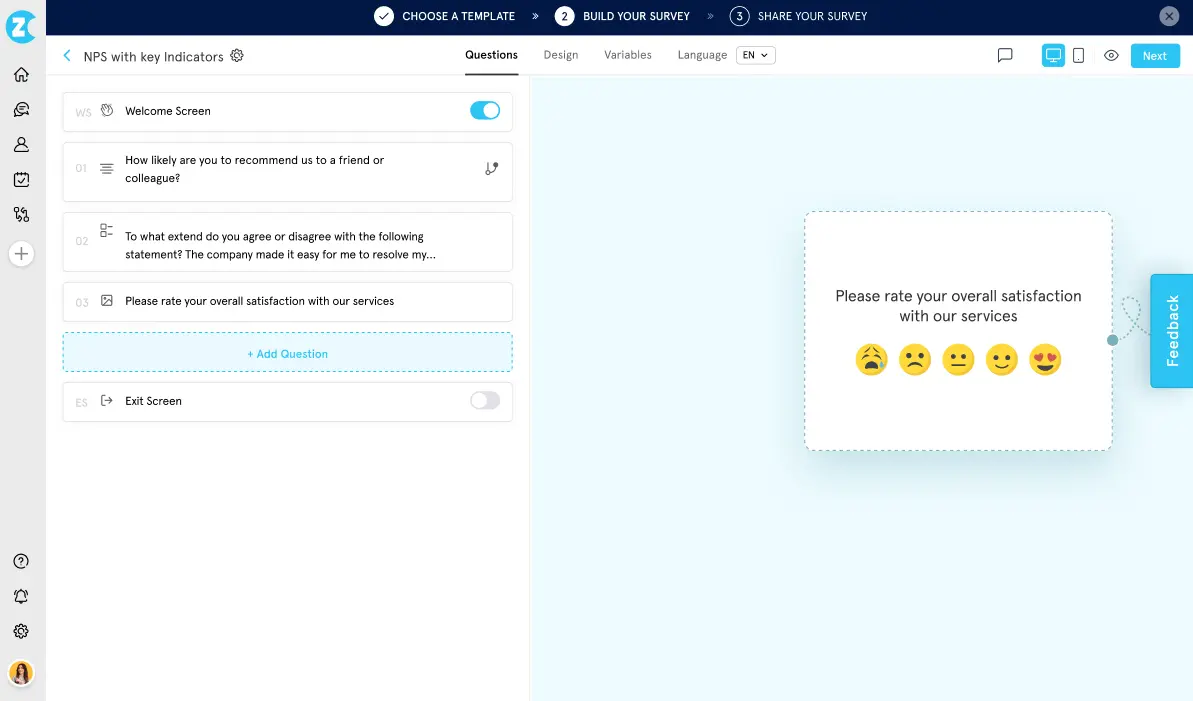
Zonka Feedback is an AI customer feedback and CX platform that covers the full feedback lifecycle: collection, analysis, and closed-loop action. It lets teams:
- Collect feedback across email, SMS, WhatsApp, web, in-app, kiosks, offline, and QR codes
- Analyze open-text responses with Gen AI, surfacing themes, intent signals, and impact scores - for instance to show which location is driving NPS decline or which support interaction is creating churn
- Close the loop with a centralized inbox, automated case routing, and AI-generated response suggestions
The platform unifies feedback from surveys alongside support tickets, reviews, and chats into a single intelligence layer, so teams aren't stitching insights together from multiple tools.
Who is Zonka Feedback primarily for?
Zonka Feedback is a fit for mid-size to enterprise CX, product, and ops teams running NPS, CSAT, or CES programs that need omnichannel feedback collection and AI-driven analysis in one platform.
What are the main pros of using Zonka Feedback?
- AI-driven analysis is included by default, not behind a separate contract as it is in Qualtrics XM Discover (formerly Clarabridge).
- Omnichannel reach: email, SMS, WhatsApp, web, in-app, kiosks, offline, and QR codes. This is one of the broadest channel sets among Qualtrics alternatives.
- Salesforce integration is bidirectional - custom object mapping, merge fields inside surveys, and field-level data writing.
- 50+ integrations including HubSpot, Zendesk, Intercom, and Slack.
Voice of the community:
"I was searching for an omnichannel way to collect feedback. Some of my customers are not tech-savvy and don't even have an email. With Zonka Feedback, surveys can be collected via SMS or at physical touchpoints too."
What are the main cons of using Zonka Feedback?
- Pricing is not published - you need to contact sales for a quote.
- Highly customized reporting dashboards are still maturing - teams with complex, multi-variable report requirements may find this limiting compared to Qualtrics today.
- At the time of reviewing, the platform has limited brand awareness compared to many other alternatives, so community discussions and third-party reviews from platforms like Capterra are more limited for now.
Voice of the community:
"The data analytics provided is okay but does not meet the needs of our organization."
How does it compare to Qualtrics?
Qualtrics is a mature enterprise XM suite spanning customer, employee, brand, and research programs. For organizations that need that full scope, it's a strong fit. Zonka Feedback is more focused: omnichannel feedback collection, built-in AI analysis, and closed-loop workflows in one platform, without the implementation investment Qualtrics typically requires.
In practice:
- If you need AI feedback intelligence, deep Salesforce integration, and the full feedback loop in one platform - Zonka is worth evaluating.
- If you need enterprise XM across employee, brand, and academic research programs at scale - Qualtrics is the broader platform.
Pricing
Zonka Feedback pricing is quote-based - you need to contact sales for a custom quote. The platform offers plans that scale based on feedback volume and channels used. G2 estimates place the Feedback Management tier at around $99/month and the AI Feedback Intelligence tier at around $799/month.
Google Forms
What does Google Forms do?
Google Forms is a lightweight builder in Google Workspace. It lets you create:
- Surveys
- Quizzes
- Simple data-collection forms
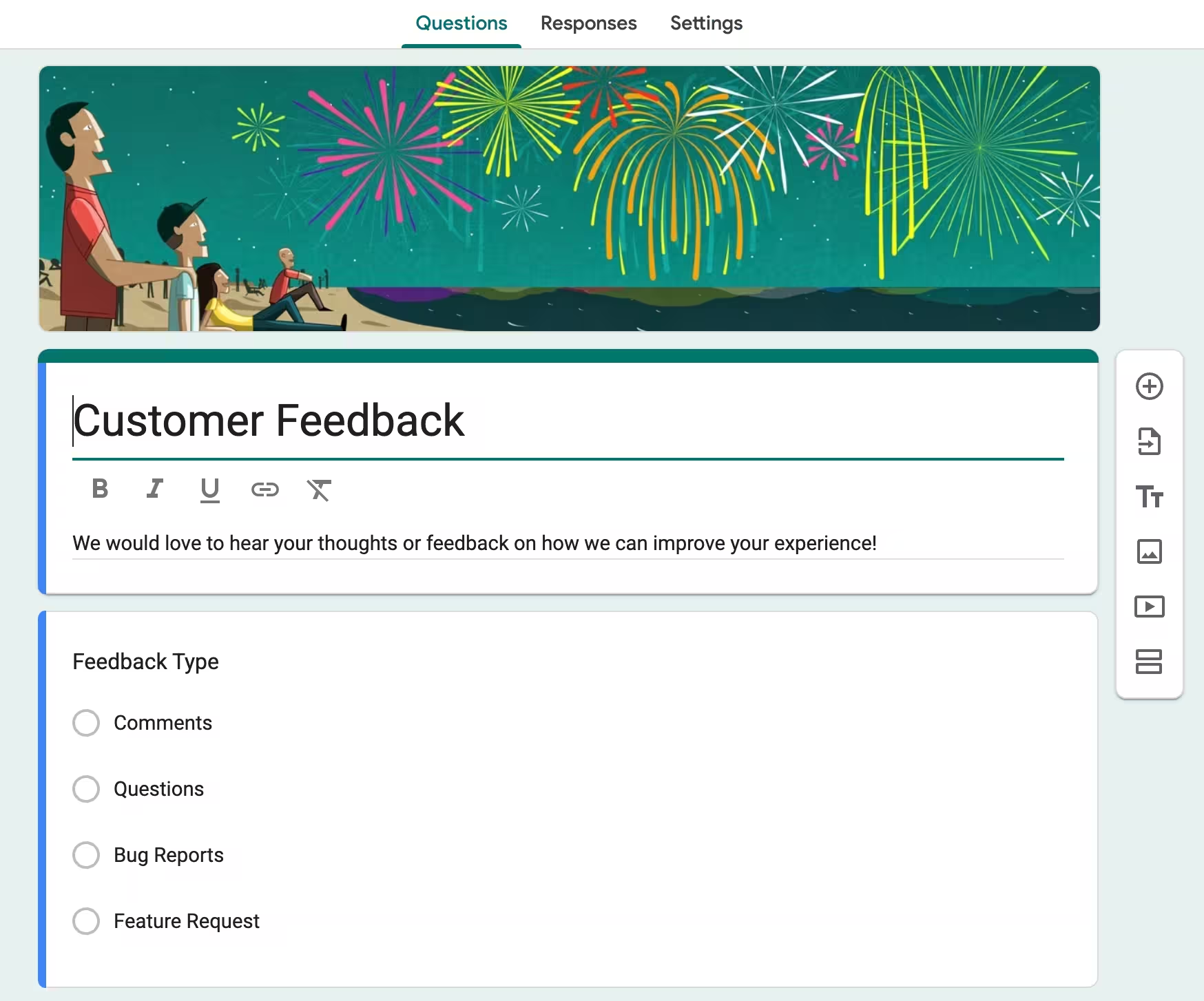
You can share them via a link or email, and view results in a basic dashboard or export them to Google Sheets for analysis. It supports common question types, basic validation, and simple branching via sections.
Who is Google Forms primarily for?
Google Forms is mainly for everyone needing quick and simple surveys, polls, or data collection forms; be it teachers, students, small teams, non-profits, and businesses already using Google Workspace for everyday feedback, registrations, or basic research.
What are the main pros of using Google Forms?
- Intuitive and easy to handle for most users.
- If you are looking for a free survey tool, Google Forms is a common pick.
- You can create unlimited forms and connect them all to the Google Suite.
- Each form can have as many questions and options as you need.
Voice of the community:
“UI/UX of Google Forms is clean, intuitive, and minimalistic, which makes the form-building experience smooth even for people who aren’t tech-savvy.”
What are the main cons of using Google forms?
- Customization is very limited.
- You cannot alter the appearance of surveys, and Google branding will always be visible.
- Not manageable when running surveys on larger scale to many different, custom user segments.
- No central analytics that can be connected to other user feedback data inside the business.
Voice of the community:
“Conversion rates are low, the forms look like they were made in 2012, and there's no logic or real customization.”
How does it compare to Qualtrics?
Collecting data as complex as that of Qualtrics customers usually comes with a steep price. For occasional, one-off surveys, Google Forms remains an intuitive starting point. But to professionally run custom, multi-channel surveys and connect the results to other feedback points, like support tickets, Google Forms is in reality not an alternative at all.
Pricing
Google Forms is free.
Is Qualtrics right for You? (the final verdict)
Qualtrics is powerful, no question. But it’s built for large enterprises that need end-to-end experience management, academic-grade research capabilities, and are willing to invest months in implementation plus serious budget in training and ongoing support.
Based on our comparison, Qualtrics is NOT for you if:
- You run a small or mid-sized team and want to keep costs predictable
- You need to launch surveys quickly
- You don’t have (or don’t want to hire) a developer just to set up logic and integrations
- You’re tired of steep learning curves and complicated onboarding
- Your main goal is fast, actionable customer feedback – not a full enterprise XM platform
Which Qualtrics alternative should you choose?
For big organizations looking for reputation management and social listening beyond just surveys, Medallia or InMoment are serious contenders to consider.
However, if your goal is to bridge the gap between data collection and actual growth, we at Survicate offer great value for money. You get powerful customer and product feedback tools without the enterprise hassle:
- Surveys live in under a day (often minutes)
- Zero coding for advanced logic
- One-click integrations with the tools you already use
- Built-in AI to speed up everything
- And transparent pricing that starts with a generous free plan
It’s easier, faster, and way more affordable – while still delivering the insights that actually help you close the feedback loop.
Ready to stop managing software and start managing feedback? Start your free trial with Survicate and see the difference for your response rates.
Author’s note (last verified: August 14, 2026): Statements such as ‘best’ reflect our opinion and typical use cases, not a universal guarantee. This comparison is based on publicly available information and our best understanding at the time of writing. Vendors may change features, pricing, and packaging without notice. For the latest details, please check the official sources or reach out to the vendor directly.



.svg)

.svg)