Do you often gamble on ChatGPT’s prompt roulette when trying to automate your user‑survey data? Don’t fret–there’s a smarter way!
In this hands-on guide I’ll demonstrate two effective, real-life workflows for automated survey analysis that any product or UX researcher can set up and run today.
Crucially, I’ll show how Survicate beats messy workarounds by delivering verifiable AI insights you truly can trust.
Why do we still automate the hard way?
No product or UX researcher today is immune to the demands of automation. Yet when push comes to shove, a lot of us still end up trying to use workarounds like Claude or ChatGPT.
We use these workarounds against our own better knowledge.
Maybe because ChatGPT is already available in our toolkit and ticks the management/IT approval checkbox. Perhaps because it’s irresistibly cheap.
Or to call out the elephant in the room: Everyone’s feeling the heat to improve work output. So we resort to patch work and chasing quick wins, rather than stopping to think about the best way to go about automation.
Enter Prompt Purgatory
I say purgatory, because this is where reliable and valuable research insights go to die. If you don’t yet see the challenges with using prompts to automate your research analysis, let me break it down quickly:
- Single-source bias
You think ChatGPT’s semi-fabricated insights might be an obstacle? It gets worse.
GPTs struggle to unify data sets, especially if the formats differ wildly (like they always do in the real world). You therefore run the risk of committing one of the cardinal sins in user research: failing to triangulate data across multiple sources.
You might neglect to include support tickets alongside interview data, so your user insights fail to take real, documented pain points into account.
Or say you try to analyze outstanding churn factors for key accounts and never include the actual bug reports submitted by those same accounts.
ChatGPT will often fail to effectively triangulate datasets, because of complexity or scope. What’s worse, it won’t even tell you the context you’re missing, that could have completely changed your final report.
- Analysis inefficiency
Weren’t we supposed to save time? Instead, many end up manually:
- cleaning data,
- uploading to GPT,
- double-checking source information, because was that intel even there?,
- gradually refining prompts and projects,
- beautifying charts,
... to eventually arrive at some kind of one-off “insight” we can present to the broader UX and Product Teams.
That’s not only time-consuming, it’s also going to deliver inconsistent results depending on who, when, and how this process is executed within your team.
If that workflow at all is accessible to other co-workers, not to mention people in Marketing or Sales.
- It doesn’t scale
Say you’re starting out in an LLM with a monthly NPS report and perhaps cross-running with churn data. That’s doable and will give you a clearer picture of which segments tend to cancel.
But your job is ultimately to uncover insights, whose business value exceeds the sum of its parts.
Anyone without a UX background can learn in 10 minutes how to put together such a prompt flow. But few possess the readiness to add MRR by account to the mix, and cross-run interesting segments against what’s previously learned from such accounts during interviews.
Crucially, GPTs lack that readiness–their work doesn’t scale.
“Automation” to us at Survicate means that we’re saving precious time and effort on tedious, manual processes, so we can get down to the real work of analyzing insights: What they mean to the business, and what should be done next.
What is automated survey analysis (according to Survicate)?
Let’s get more specific. We’re already established that automation of survey analysis in GPTs in fact is a dead end.
Now let’s look at what such automation should - and should not - look like instead, according to us here at Survicate:
Automation of survey analysis IS
- ✅ Automatic categorization and labelling of survey data (insights)
- ✅ Automatic merging of multiple (survey) data sources/sets
- ✅ Automatic enablement of interacting with the survey data using AI chat
- ✅ Automatic highlights from survey data
- ✅ Increasingly providing you with automated summaries and conclusions based on survey data
Automation of survey analysis IS NOT
- ❌ Disregarding human judgement and knowledge about business context (why Product and UX Researchers exist 🙂)
- ❌ Separating automated summary/conclusion from verifiable, business-relevant, synthesized insight
- ❌ Automated product strategy (what does it say ≠ what do we do next)
- ❌ Deciding our business priorities
- ❌ Telling us what impact acting on an insight may have for our business
So far we’ve taken a good stab at the futility of GPT automation. But notice also how we don’t jump on the bandwagon that says researchers will be replaced by agentic AI/vibe coding/pick-your-AI-trend-of-the-year.
AI-empowered survey analysis won’t take our jobs. But it does force us to reprioritize focus away from manual grunt work, so that more time can be spent on creating business value and driving change in the organization.
That’s what this guide is for.
The starter workflow: Multi-channel survey analysis
This is the baseline for any beginner’s automation scenario.
In my starter workflow, I’m a fearless UX researcher in a SaaS product team (original, huh!), responsible for running and analyzing product-related surveys.
This time, I’m evaluating the user feedback on our brand new AI chat feature. My job: To find out what type of issues users might be experiencing and if/how this has impacted their view of our product as a whole.
1. Preparing the data
On my computer I’ve got two separate product surveys exported as comma-separated CSVs:
- Started survey: An in-app survey asking users to rate and comment on the AI chat feature.
- Follow-up survey: Sent via email to those who responded to my first survey, digging deeper into how the perceived AI chat quality impacts how they see our product as a whole.
While there’s lots of intriguing data in these CSVs, the most important 3 columns for my cross-channel analysis are:
Column A: Comment. Free text field with juicy answers I need to dig into.
Column B: Data & Time. Just making sure it follows a standardized format.
Column C: First name. Helps me to unify feedback across the two surveys, so I can trace feedback to a single user and learn more.
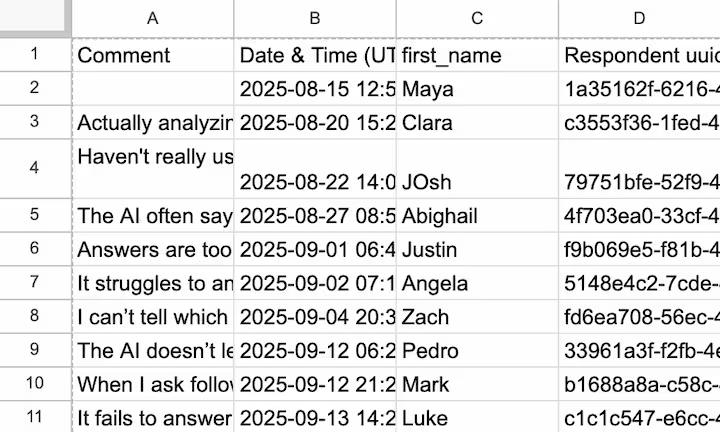
Different survey software will allow you to export different types of data. What matters to Survicate’s AI research repository, or Research Hub, as we like to call it: All feedback in one single column.
All I gotta do now is upload my starter survey CSV directly to the Research Hub.
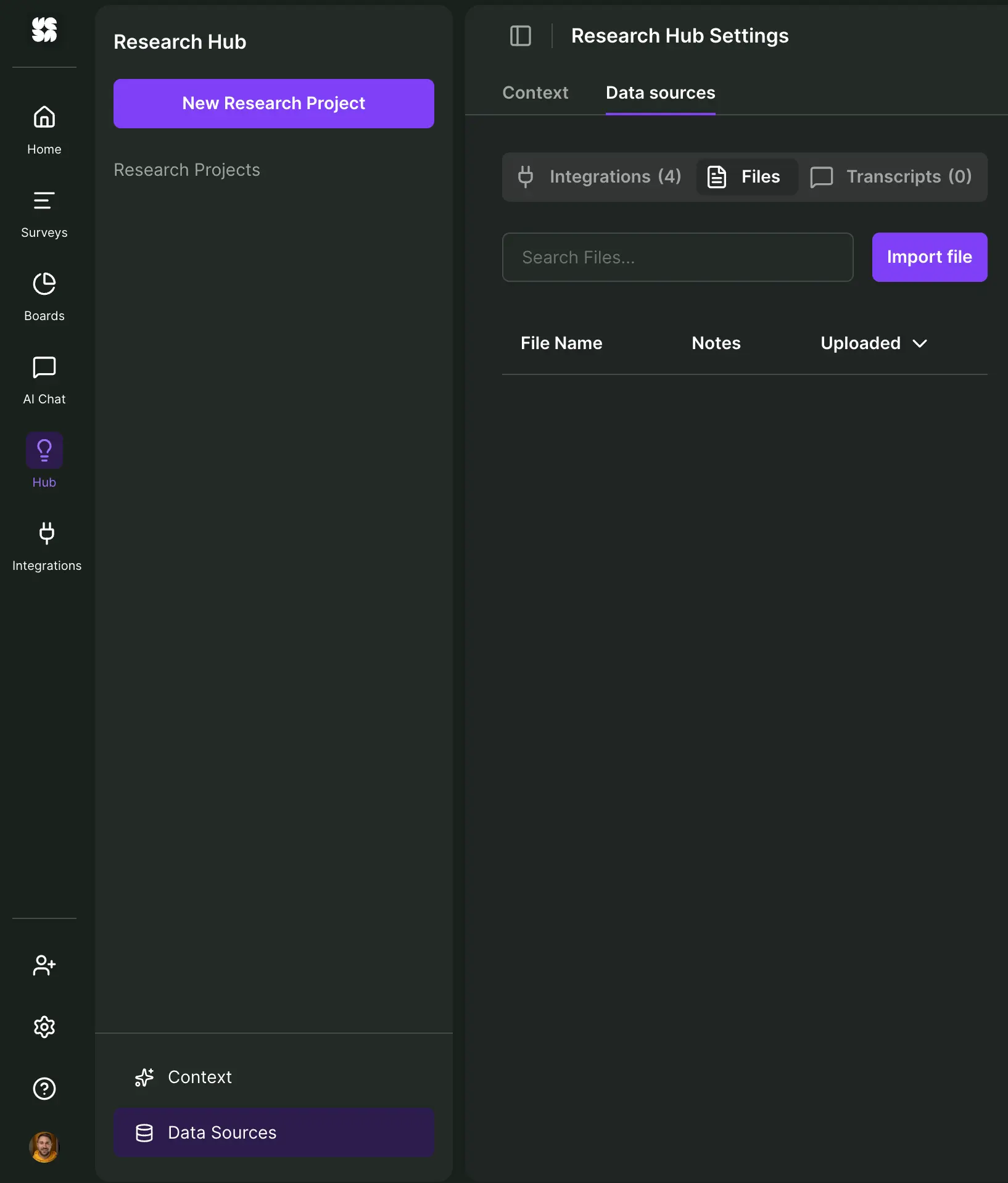
If my survey tool was among our supported API integrations, the process would be even quicker. Better yet, if I simply ran the survey inside Survicate, I could seamlessly connect it directly to my research repository.
In this case I go to "Data Sources" in my Hub, head to "Files," select “Import file” and select my starter survey.
What I want to do now is simply select the two required, main data points from my CSV:
- Feedback content: This one’s easy–it’s my first column “Comment.”
- Date: Again, I select my 2nd date column from the drop-down menu.
Additionally, I’d like to introduce “first name” as a feedback attribute. I select “Author” and then map it to what my column is called inside the CSV: “first_name.”
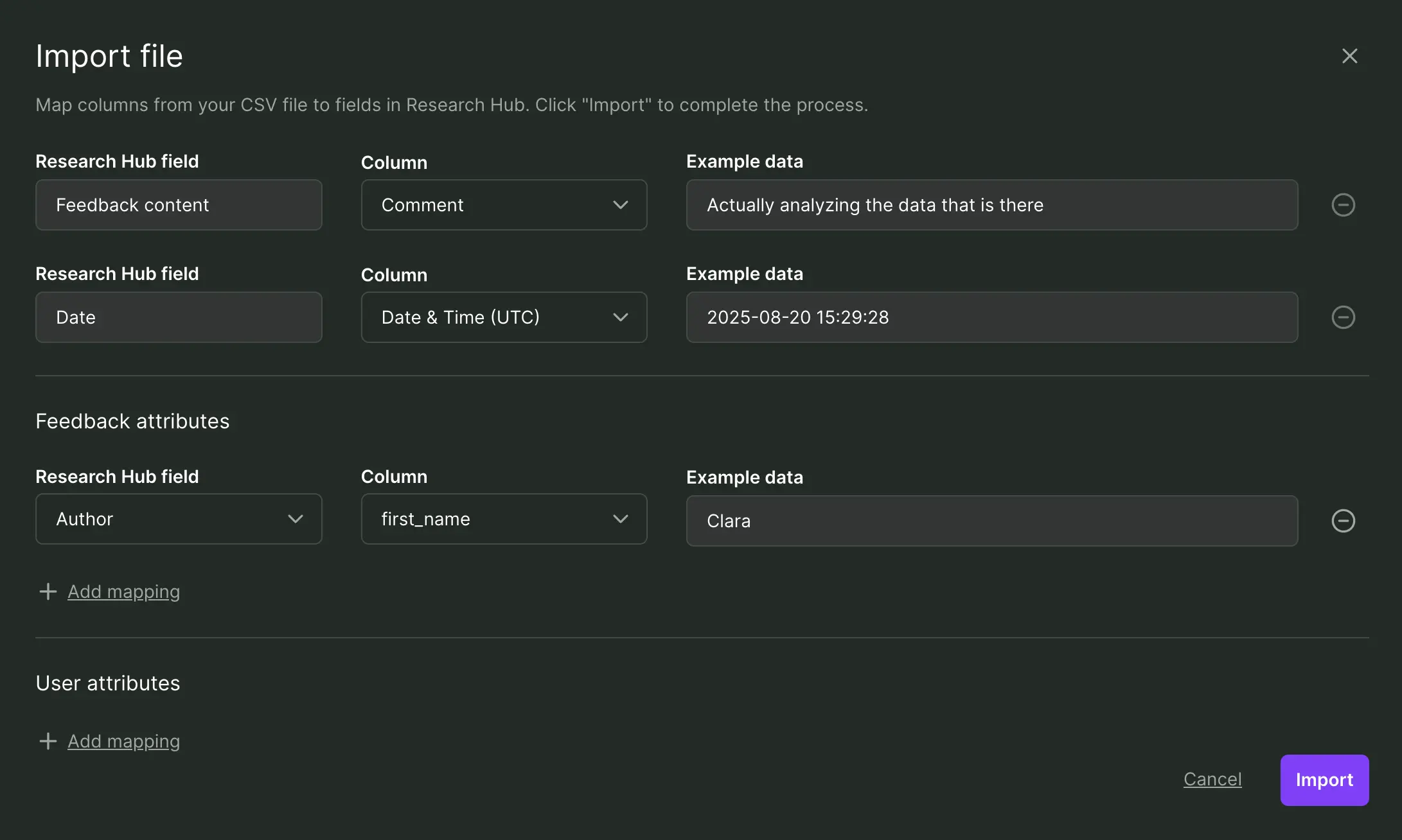
All example data checks out and looks good - that’s it! I hit “Import” and in a flash Survicate has stored all of my feedback data.
2. Initial survey analysis
I begin by creating a new research project from scratch, based on a one-time analysis of last year's survey data I just uploaded.
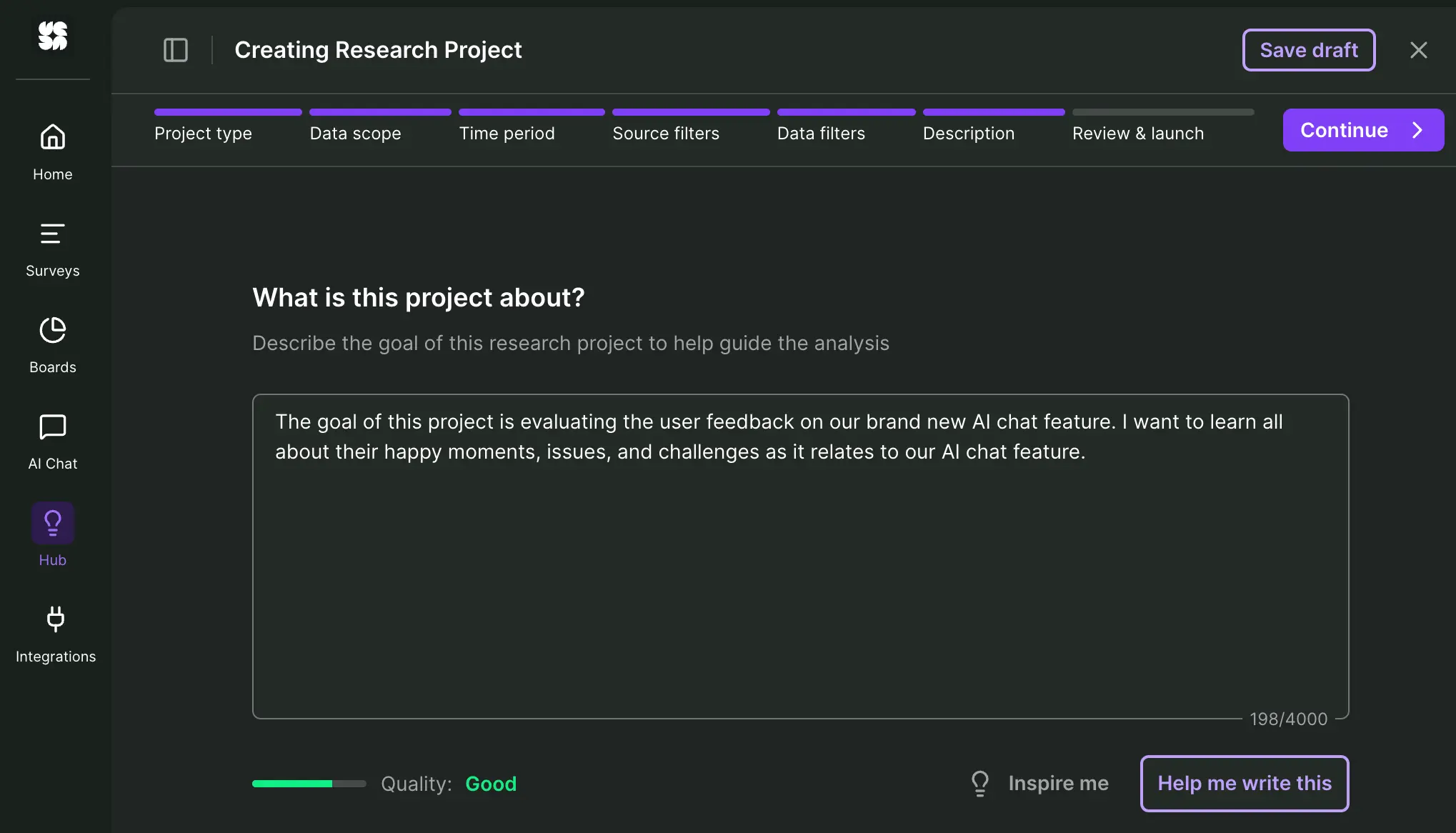
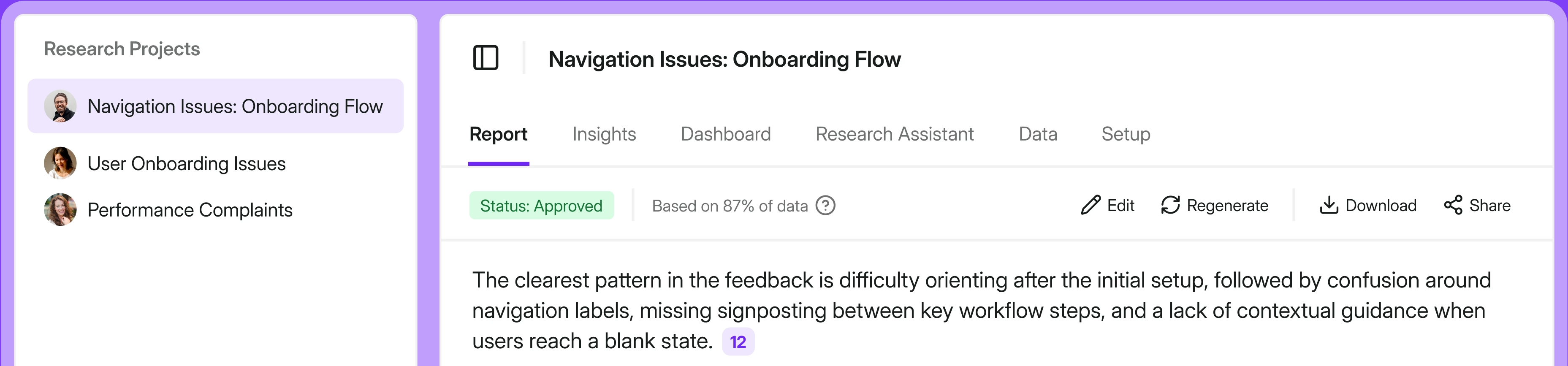
In less than 2 minutes I’m already getting much more contextual, verifiable information than what ChatGPT would put together in that same time. The stand-out is a professional, automatically prepared but editable report:
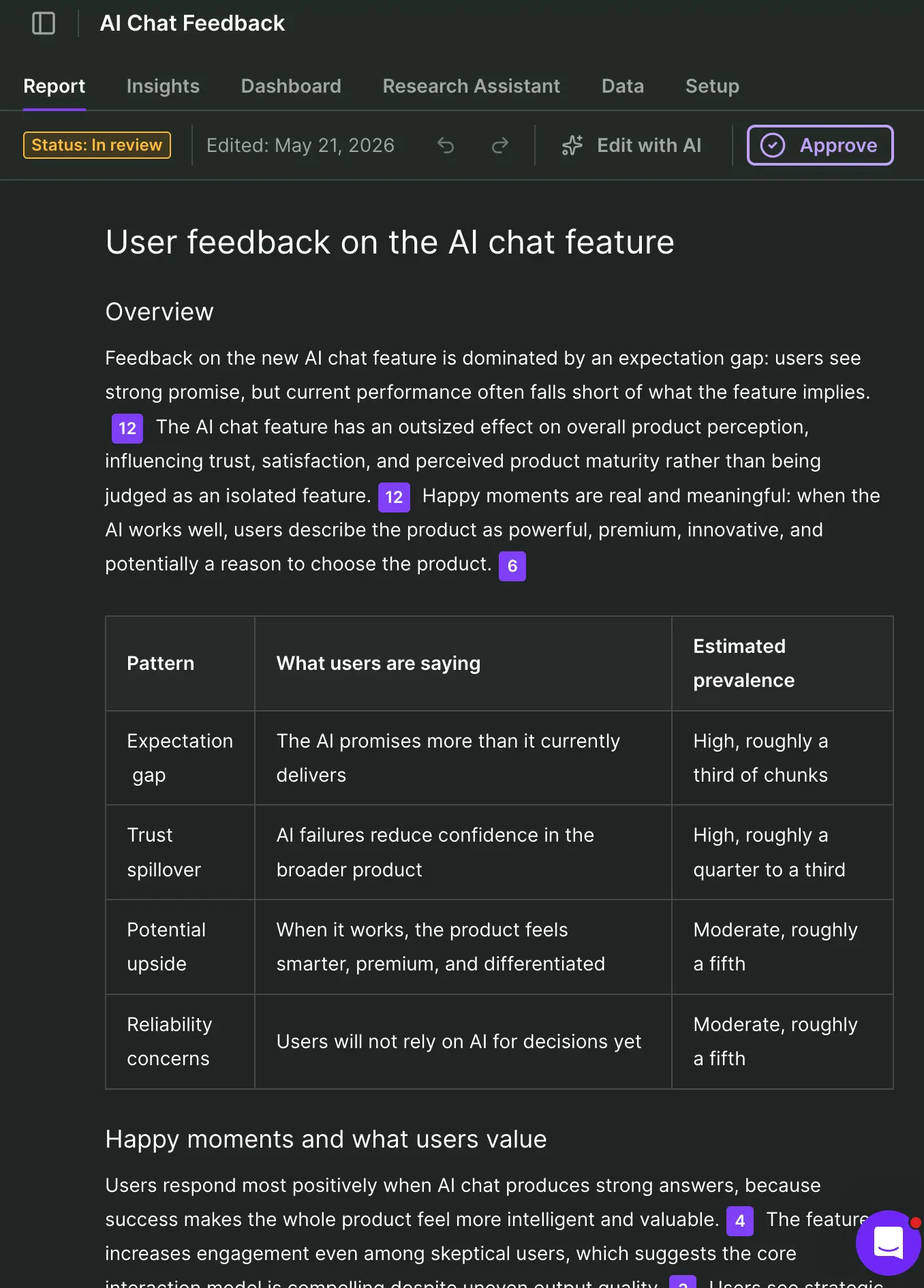
Supporting that report are AI discovered insights. If I choose to track any of those insights by choice, it's going to allow me to verify each claim by feedback source. I only need a couple of clicks to instantly visualize those insights by sentiment.
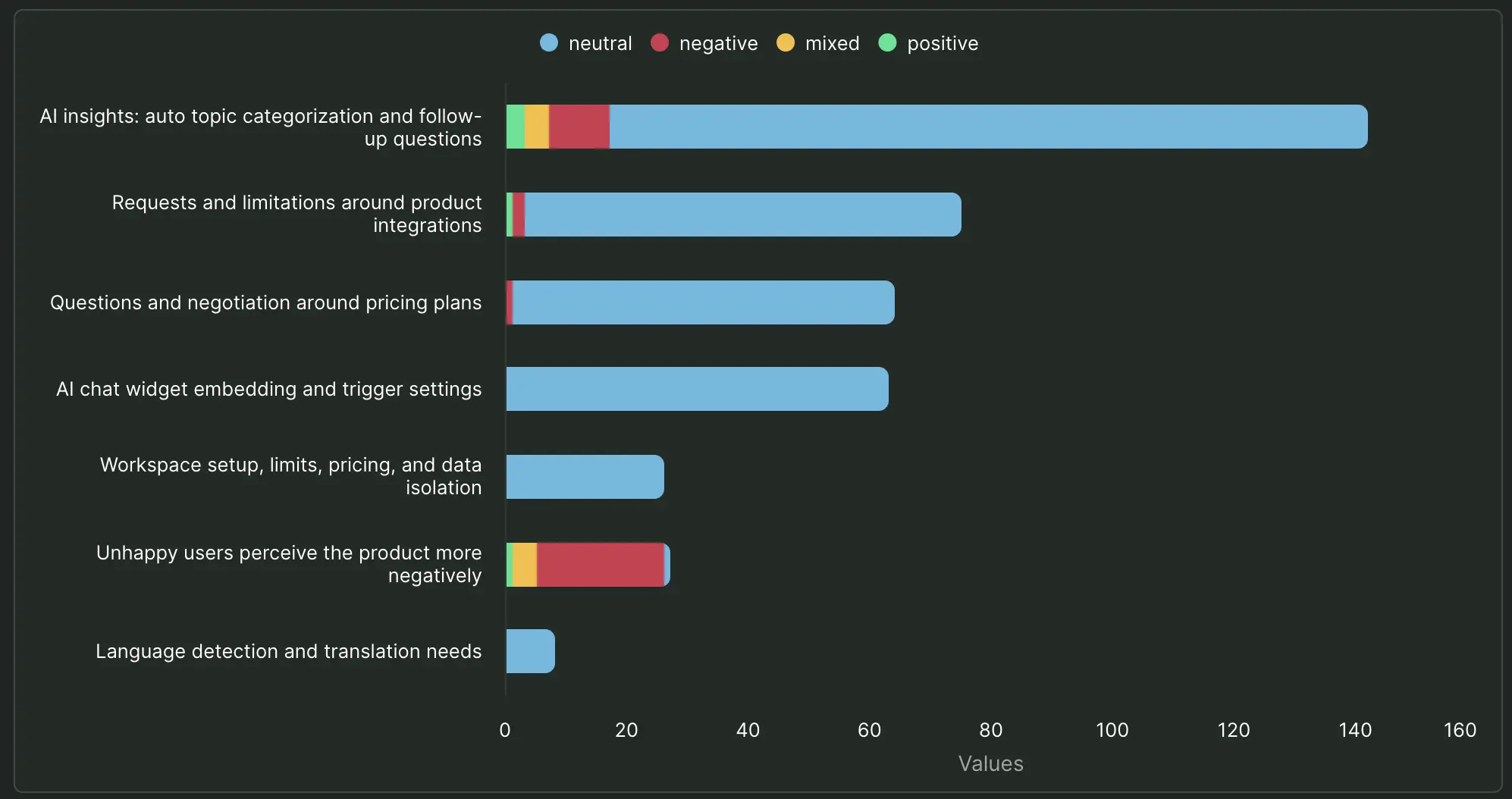
I can quickly spot that while for example AI insights themselves and integrations are major topics with critical voices, my immediate concern should be to understand the negative sentiment affecting the product as a whole.
Before we proceed to add our second survey for synthesis, let’s stop for a moment to think about what every UX researcher fears at this point: AI hallucinations.
Can I really trust the semantic grouping?
This is where our Research Hub shines, because every automated insight, summary, and key finding is grounded to a real data point. I can verify every single claim and sleep good at night.
The footnote system is inherently intuitive and resembles the Oxford referencing system, if you ever had to dabble with theses or academia in general.
So while I feel for our respondent Brian in our imaginary survey, his complaint isn’t my pain, because I can pinpoint exactly how each automated conclusion and sentiment was generated:

We’re only half-way in and already I can extract so many more insights that are verifiable, compared to if I was chatting my way down to Prompt Purgatory. Let’s complete this journey with a synthesis, shall we?
3. Multi-channel survey analysis
I upload the second CSV following exactly the same flow as before. A minute after and my existing project has now been strengthened with more insights. If I want to verify any insight and track its source mentions over time, I simply do as before and hit "track." As a researcher I remain in the driver's seat with AI as an assistant only.
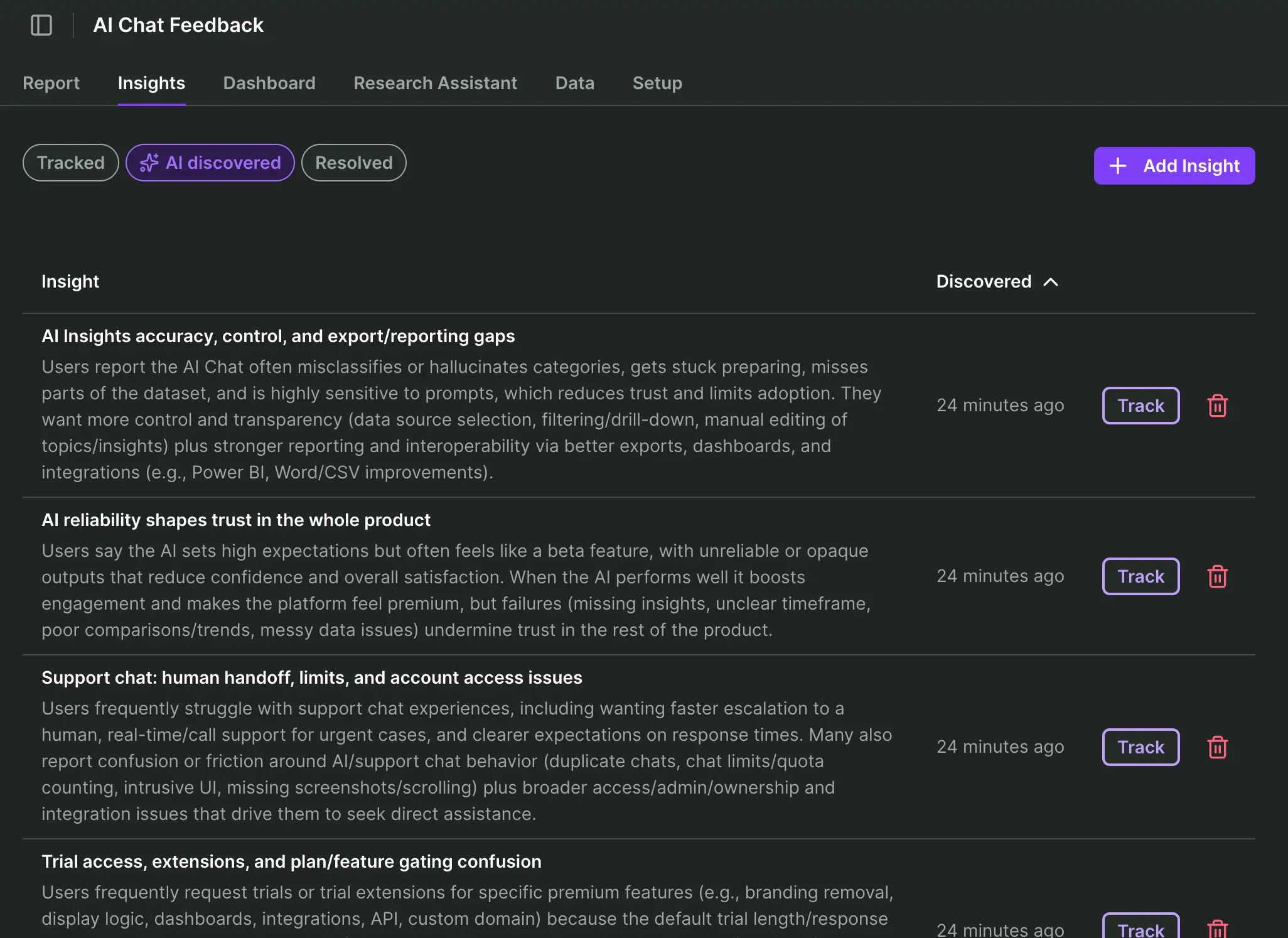
Asking a GPT to merge multiple datasets in this fashion would typically increase the risk of truncated or fabricated data, while offering little or no transparency in return.
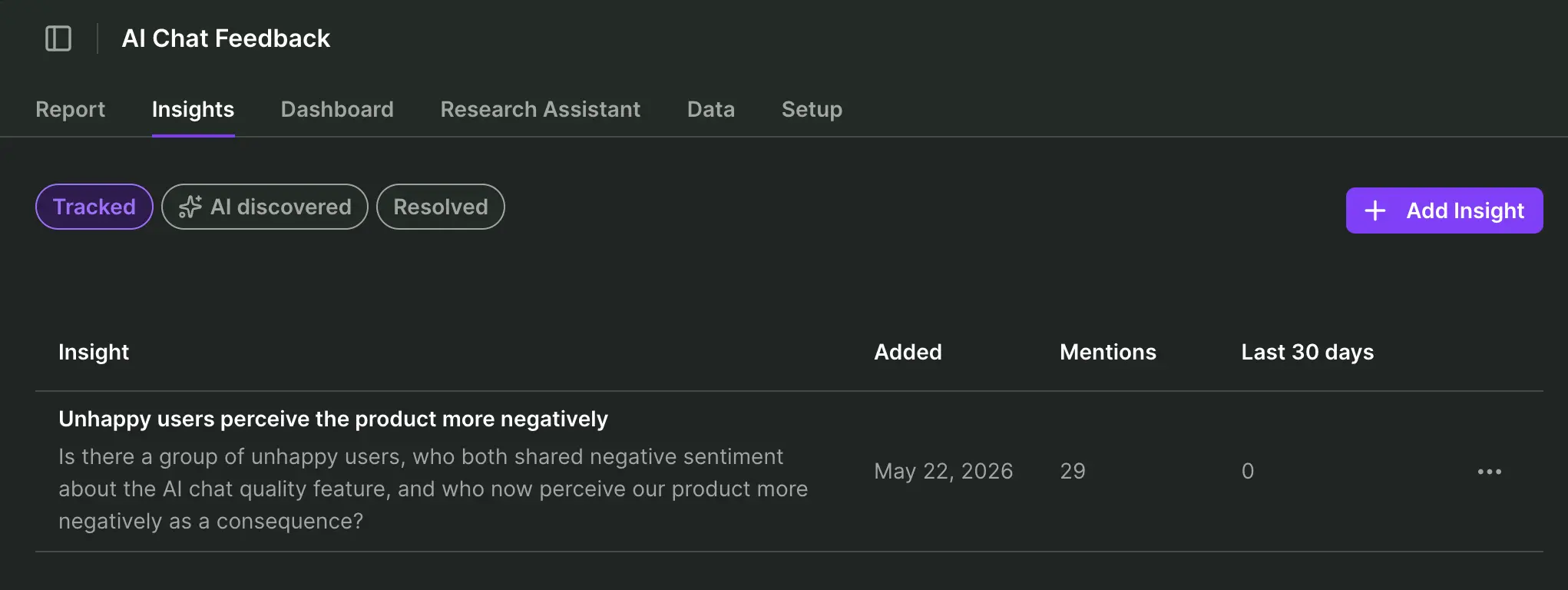
For my simple synthesis example, I’m specifically interested in the group of unhappy users, who both shared negative sentiment about the AI chat quality feature, and who now perceive our product more negatively as a consequence.
I simply create a new insight for those unhappy users fitting that description and let the Research Hub do the heavy lifting in verifying my hypothesis. Product Team won’t be happy to read this:
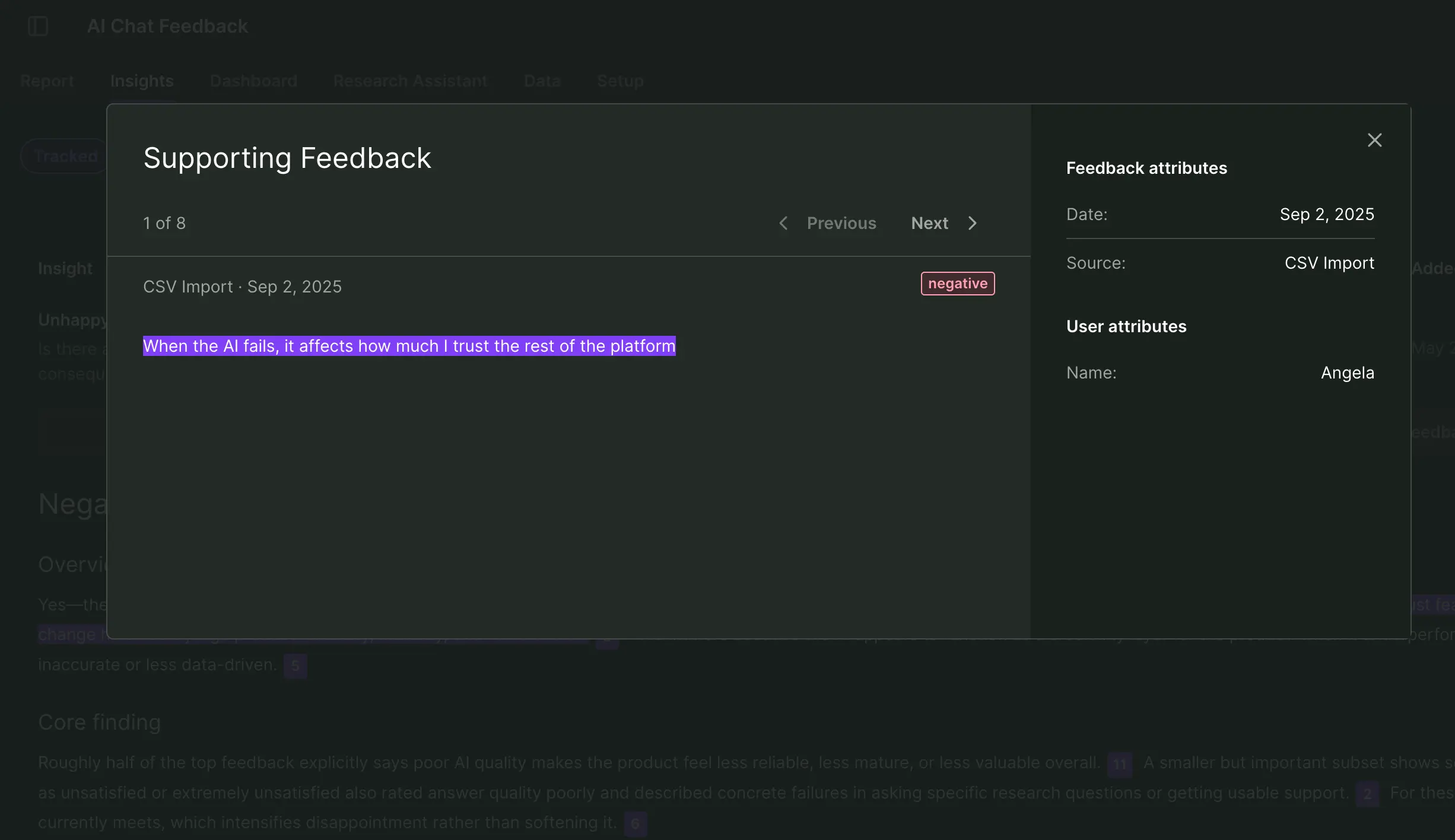
If I click on the insight, I can immediately verify the underlying feedback synthesized from both surveys. This helps me to trust what I see, but I can also back-trace each feedback to the person who wrote it and later contact it for a deep interview.
Recap: How Survicate’s Research Hub beats ChatGPT for multi-channel survey analysis
Single-source bias
- ❌ ChatGPT struggles to effectively and reliably synthesize multiple data sets.
- ✅ Survicate’s AI research repository automates insights across any and all sources I connect to in my research project.
Analysis efficiency
- ❌ ChatGPT requires follow-up prompts, gradual data refinement and filtering, chart creation, and more.
- ✅ Survicate automates the creation of insights (if you like), charts are only a few clicks away, and research reports are automatically prepared, pending your final approval.
Reliable results
- ❌ ChatGPT delivers new or different insights each time a prompt or workflow is executed. Claims cannot reliably be verified, no transparency how an insight was created.
- ✅ Survicate consistently grounds each claim and visual to a specific data point, which can be verified at any point in time.

"We got 2,000+ responses in a day and a half. Survicate’s AI let us quickly cluster those comments into clear themes, helping us to quickly shape the product experience we aimed to release"
Bruna Maia, Director of User Experience at Wellhub
The master workflow: Real-time feedback ops
We’ve arrived at the endgame of automated survey analysis.
Because once you automate surveys, the next step becomes obvious: Pull every other customer signal into the same real‑time feedback ops workflow.
In this updated version of myself, I’m a data-hungry Product Owner, ready to release a more mature version of that AI chat feature a couple of months back.
Now I need to find out how users are responding to this feature across customer support, user interviews, and existing surveys. And I want to query the data real-time, in my own way.
1. Connect all data
You already saw me uploading external surveys into my AI research repository. Now watch me hook up my help center support tickets and transcribed user calls to the mix.
Connecting Intercom to Survicate’s Research Hub
In my scenario, we manage all help content and customer service via Intercom, which Survicate happens to have an integration with. I simply connect my data by logging into my account and approving the connection:

This integration allows me to:
- Automatically import all support chat conversations (or only those I choose to tag for import) in real-time
- Automatically import all user attributes of people who interact with customer service
- Create, send, and track surveys inside Intercom emails or chat conversations
Connecting tl;dv to Survicate’s Research Hub
Transcribed video calls are a huge asset in user research. Especially today as AI is so good at accurately capturing long, complex discussions and making semantic sense of them.
My UX researcher has conducted a series of deep interviews with users from the past 2 surveys who complained about the AI chat feature. Those Google Meet talks were recorded using the AI meeting notetaker app TL;DV.
In this case I need to generate an API key inside my TL;DV account and use that inside Survicate’s integration settings:

This integration allows me to:
- Automatically import past and future meeting transcriptions
- Automatically detect insights, sentiment
Our research repository is now continuously being updated in real-time with feedback data. I choose whenever I want to update my research project with any new, relevant transcription data. The Research Hub then automatically extracts verifiable insights and summaries.
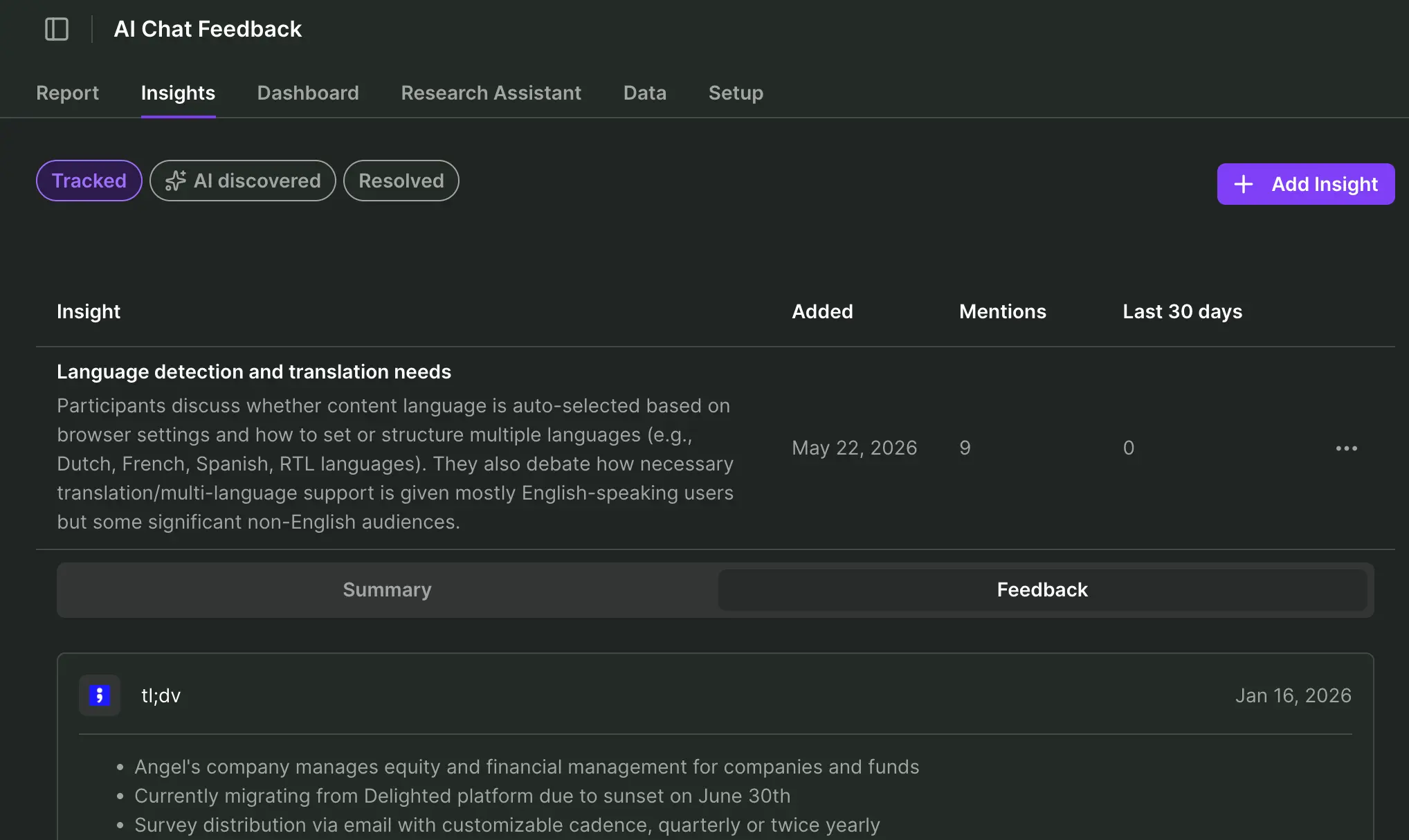
In my case, AI discovered a new insight related to language detection and translation needs for my AI chat feature, so I choose to track it and dive deeper into the transcription feedback:
2. Real-time feedback analysis
Let’s take a step back here for a moment and be real: The starter workflow was an ideal scenario. I had time to sift through insights and charts, verify summaries, and perhaps later extract the data to do further analysis outside of the Research Hub.
Out there in the real world, you’re feeling the heat from AI efficiency expectations, and pile research project upon research project, until you’re building Mount Sinai.
And that’s when your manager pops up in Slack: “How’s our AI chat feature doing right now with users? I’ve got a board meeting in half an hour, let me know please, thanks.”
What will you answer?
Real-time feedback analysis with Survicate’s AI Research Assistant
I head over to my new friend, Research Assistant, and talk to it as I would talk to ChatGPT or my favorite UX researcher on Slack:
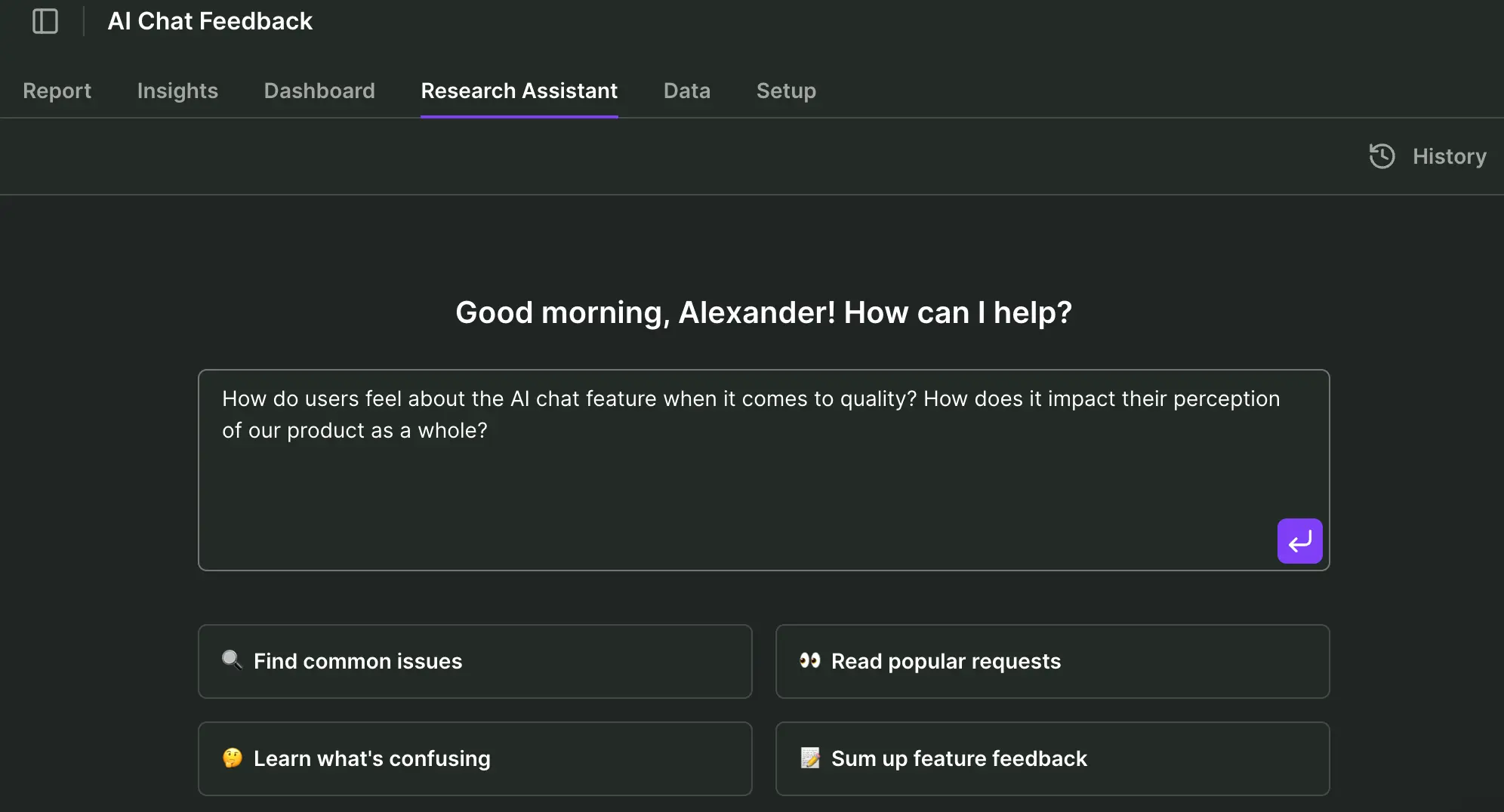
The excerpt you see here is a balanced answer, comparing the good and the bad:
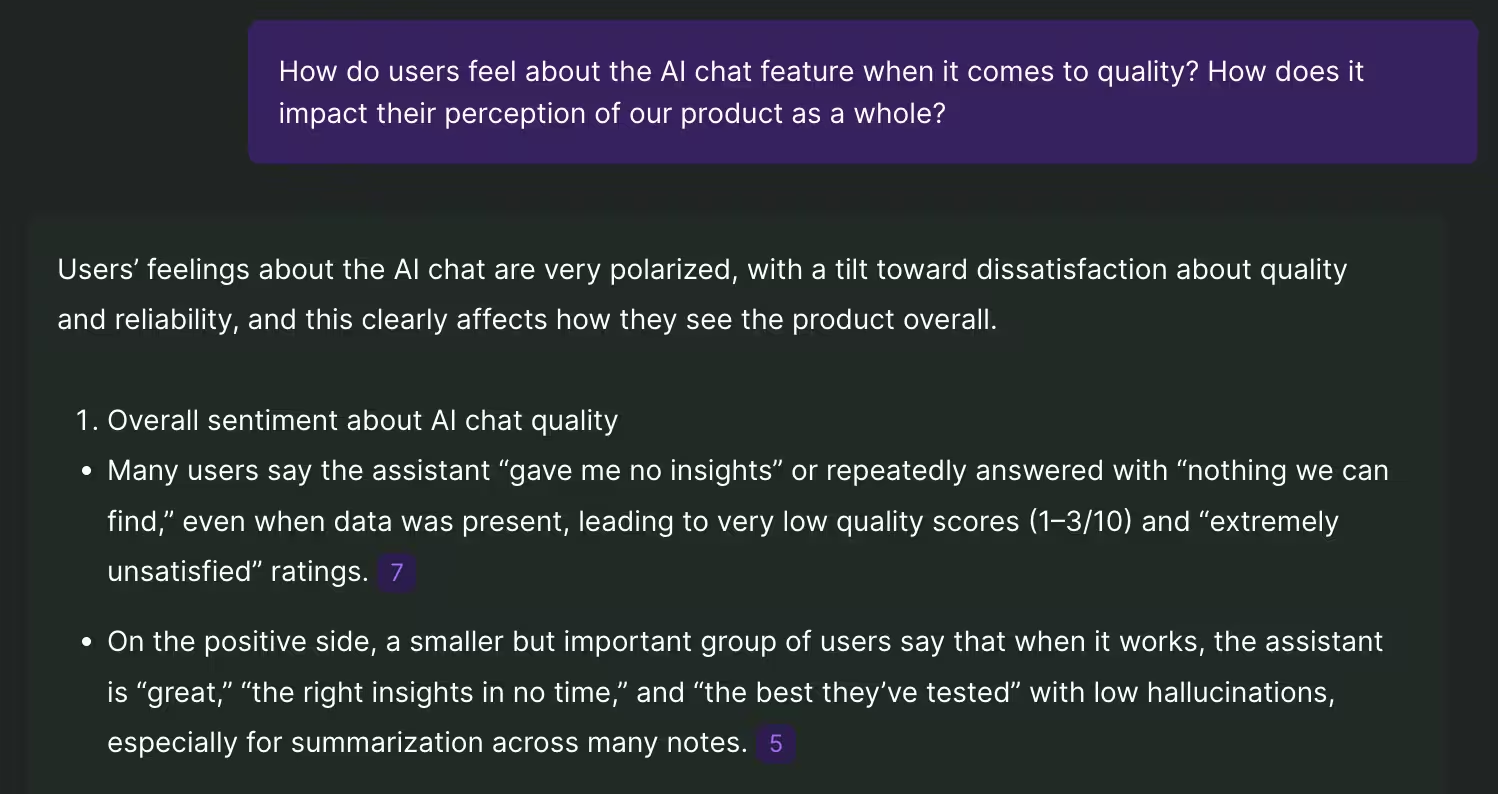
I get an at-a-glance overview of all the available feedback data, synthesized in real-time, and I can verify or go deeper on any grounded claim.
This “prompt” approach to querying user data empowers me to quickly assess the situation and reply to my manager on Slack within that half an hour. If follow-up questions arise, even during the board meeting, I can safely provide verifiable citations.
No hallucination worries. This is automated survey analysis you can trust.
Finally, to truly become part of the decision-making in that board room, we can refine and later approve our stakeholder-ready report. We've got enough grounded insight to be part of the discussion ourselves.
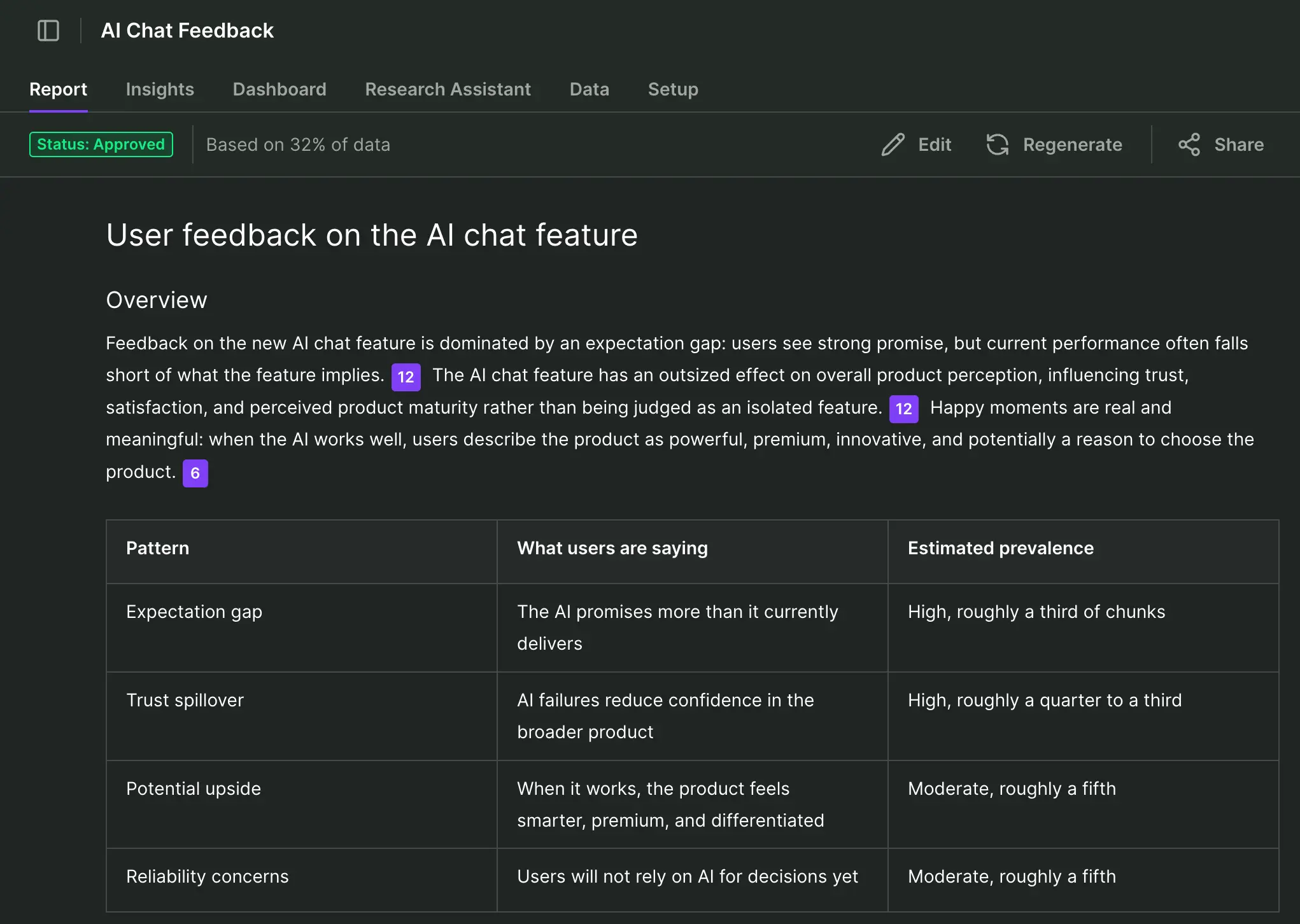
Real-time feedback ops with Survicate’s Research Hub
We’ve arrived at our endgame of setting up a fully automated feedback ops process. Here’s what such a setup may look like:
- ✅ Always‑on collection across surveys, interviews, tickets, chats, calls, reviews, and product usage: Done
- ✅ Automatic enrichment with customer attributes (MRR, plan, lifecycle stage, etc.): We simply need to add such user attributes via CRM integration with Survicate, such as Hubspot or Salesforce.
- ✅ Automated analysis (insights, sentiment, visualization, report summary): Research Hub will automatically offer insights by research project, grounded in incoming data you request on-demand.
- ✅ Routing insights to the right teams instantly: Using Survicate’s integration with Slack or Microsoft Teams, teams can be instantly notified of new survey responses, and chosen people can be tagged in those messages following rules you set up.
- ✅ Closing the loop with customers or internal owners: By setting up Zapier as integration with Survicate, you can for instance automate support ticket creation based on incoming survey responses.
- ✅ Influence decision-making using a stakeholder-ready, verifiable research report with outstanding insights.
What Survicate’s own, real-time feedback ops looks like
We don’t just honk our horn - our day to day feedback ops processes are fully utilizing our own research repository software. Here’s what a typical feedback flow can look like:
1. A customer has just used Survicate’s feedback button inside our software to let us know that it’s experiencing a problem:

2. Our Slack channel, integrated directly with Survicate and dedicated only to incoming product feedback of this kind, alerts us that someone’s having a problem:

3. I can click “Response details” and get a full 360 degree overview of who this customer is, how long they’ve been with us, which subscription tier they’re on - everything!

4. Is this a problem more customers are experiencing? Let’s ask our research repository, shall we? We can query our Research Hub directly from within Slack.
I simply select the message, choose “Ask Survicate,” and add my question to the quoted message:

5. Within a minute I get a very detailed response, as always with grounded claims that I can verify by clicking and digging deeper inside my research repository:
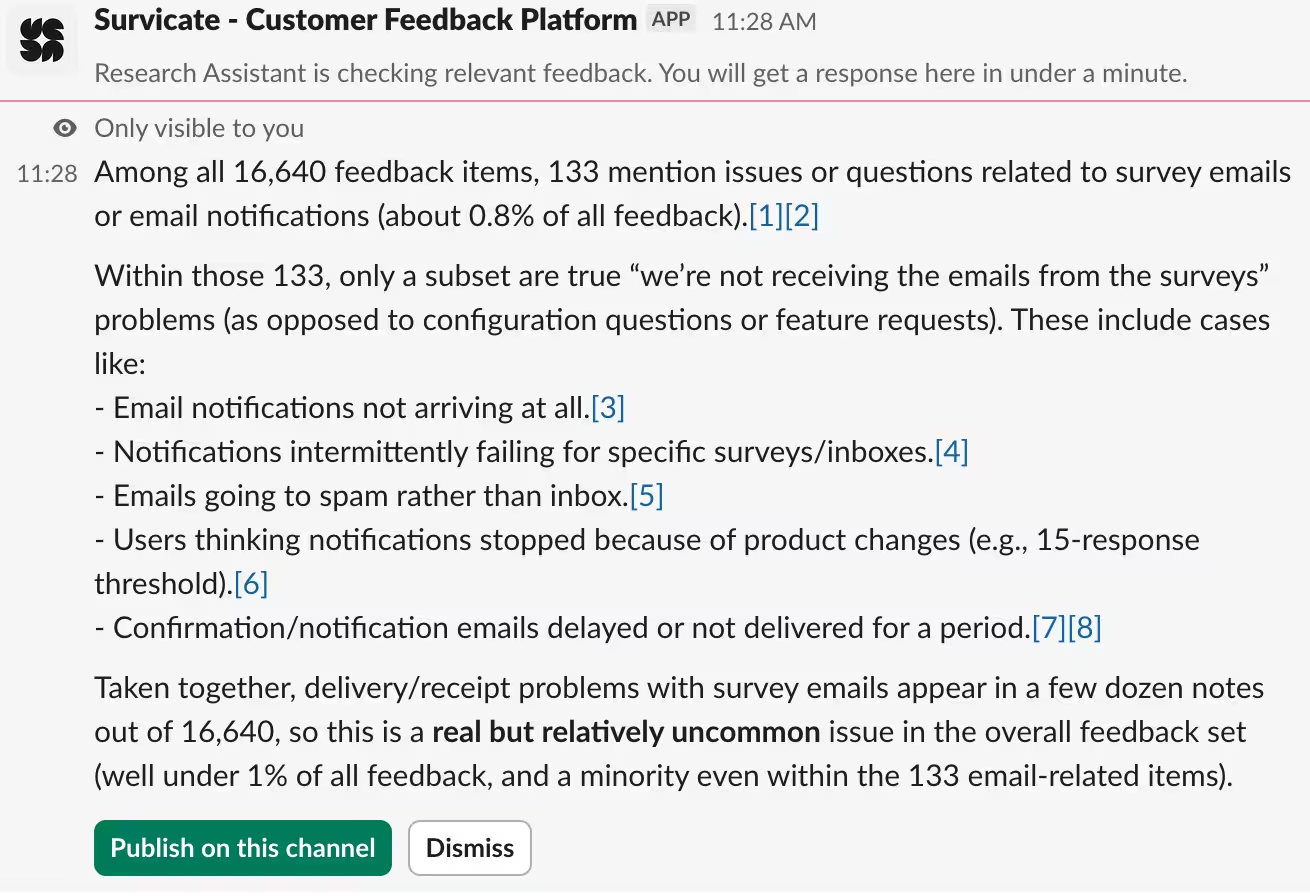
6. It’s reassuring to know that this is a relatively uncommon problem for our customers. If alarm bells were ringing, I could publish the message in the channel and tag our product owner for further clarification.
Or better yet, create an incident report through our incident.io Slack integration - prefilled with a summary based on our research repository message:

Recap: How Survicate’s Research Hub beats ChatGPT for real-time feedback ops
Real-time data import, on-demand analysis
- ❌ ChatGPT operates on manual workflows to import and analyze incoming data.
- ✅ Survicate’s research repository automatically fetches data from all connected sources and can analyze it on-demand in real-time.
Robust data triangulation
- ❌ ChatGPT doesn’t cope well with triangulating enterprise-level amounts of data from various sources.
- ✅ Survicate triangulates transcribed video meetings, support tickets, CRM user attributes, and ongoing surveys with ease.
Grounded research claims
- ❌ ChatGPT occasionally hallucinates answers confidently
- ✅ Survicate consistently grounds each claim and visual to a specific data point, which can be verified at any point in time.
Closing the feedback loop
- ❌ ChatGPT doesn’t enable you to receive real-time notifications on feedback and sharing that or taking immediate action in relevant communication channels.
- ✅ Survicate integrates seamlessly with communication tools like Slack to send/receive research repository data and enable feedback resolution without ever leaving those communication channels. Stakeholder-ready reports enable true decision-making influence.

"The fastest we've gone from survey response to action was just 2 days. The insights revealed a platform error that was disconnecting patients from their telehealth consults. We escalated it immediately, and by Day 2 the issue was fixed. Satisfaction jumped to 89%"
Swetha Srivatsan, Senior VOC Program Manager at Montu Group
Don’t automate only to tick a box
On a closing note, let’s return to where we started: Patch work, quick wins. Look, I get it. Ever since the covid bubble burst and OpenAI later opened doors to the world, we’ve all felt the pressure from cut budgets and increased efficiency expectations.
Unfortunately this is where some of us got stuck. Automation of survey analysis, or any user feedback, isn’t just a prompt flow “done right” in ChatGPT, NotebookLM or Claude. If we don’t implement proper automation of manual research work today, we’ll get left behind tomorrow.
I’ve shown you how over-reliance on prompts leads to a dead-end. There’s a better way with a research repository like Survicate’s Research Hub, where AI empowers automation of feedback analysis - but where you as UX/Product researcher remain in the driver seat and can verify everything.
So let’s leave Prompt Purgatory behind–the future of feedback isn’t about suffering through tools, it’s about finally letting them do the heavy lifting while you get back to real insight work.
FAQ
What is automated survey analysis?
Automated survey analysis, according to Survicate, is the automatic categorization and labelling of survey data across multiple data sources, enabling real-time analysis through automated summaries, survey response highlights, and AI chat.
Can ChatGPT analyse survey data?
Yes, but it cannot do so consistently or reliably, because it’s unable to transparently share how it arrived at a certain insight or conclusion. ChatGPT doesn’t cope well with large amounts of survey data from multiple sources, or survey data appearing real-time from user feedback processes.
How accurate is ChatGPT survey data analysis?
That depends on the source, scale, and format of the survey data. The more sources included, the more the format varies, and the bigger the amount of data you import, the more likely it is that ChatGPT will hallucinate or fail its final survey analysis.
Can I use Excel for survey data analysis?
Excel is an excellent tool for all kinds of data analysis, but analyzing qualitative survey data unfortunately isn’t one of them.
It is possible to run AI prompts inside Excel, by connecting to ChatGPT’s API via a plugin such as Excel Labs, but the limitations are many:
- ❌ You cannot automatically import survey data from multiple sources with different formats
- ❌ You cannot run survey analysis in real-time as new feedback data emerges
- ❌ You cannot build a cohesive, searchable research repository for the entire organization
- ❌ You cannot easily share any insights with the rest of the organization or take immediate action on that feedback
- ❌ The AI analysis of survey data is subject to strict character limitations for each prompt, cannot analyze a larger set of data, and will suffer the same risk of hallucination
- ❌ AI prompting inside Excel often leads to time-outs because of API query limitations
What is the best tool for survey analysis?
The best tool for survey analysis allows you to do all of the following in one and the same system, such as in Survicate:
- ✅ Create and run surveys
- ✅ Gather and automatically analyze insights from responses
- ✅ Share those responses with others
- ✅ Take immediate action on selected responses
What data privacy measures are needed for survey automation?
In data privacy, the law follows the survey respondent. That means if you’re a US-based company running a survey for respondents inside the European Union, the data privacy laws of the European Union apply.
The essential elements of data privacy for survey automation are:
- Data minimization: Limit the automatic data collection only to that which you truly need
- Explicit consent: Inform respondents of what and why you collect data, how it will be used, and to what extent AI and automation are involved
- Secure data transfer: Use encrupted channels between every automation hop
- Role-based permissions: Ensure only relevant people can access sensitive data
- Data retention rules: Limit how long you store data, when it becomes anonymized, and later, deleted
- Compliance checks: Every tool in your automation workflow should meet industry standards, such as: ISO/IEC 27001 certification, end-to-end encryption, compliance with CCPA/CPRA, GDPR, and HIPAA. Here’s how Survicate guarantees security compliance across the board.
- Every automated hop — survey → CRM → analytics → insights hub — must use encrypted channels (HTTPS/TLS). No exceptions.
- Audit logs: Log all automation activities to enable potential audits and investigations
- Data processing agreements (DPAs): Ensure a DPA is in place for any and every tool touching personal data
- AI transparency & oversight: Disclose when AI is used, enable review and correction of AI output



.svg)

.svg)