
The 2025 State of User Research by UserInterviews revealed some pretty disheartening conclusions:
“Almost half of researchers (49%) we surveyed said they feel bad vibes about the future of UXR—a 26-point increase from 2024. Career opportunities? Even worse: 67% gave a thumbs down—up 21 points from last year.”
But, despite the bad vibes, interestingly enough, AI adoption is increasing a lot.
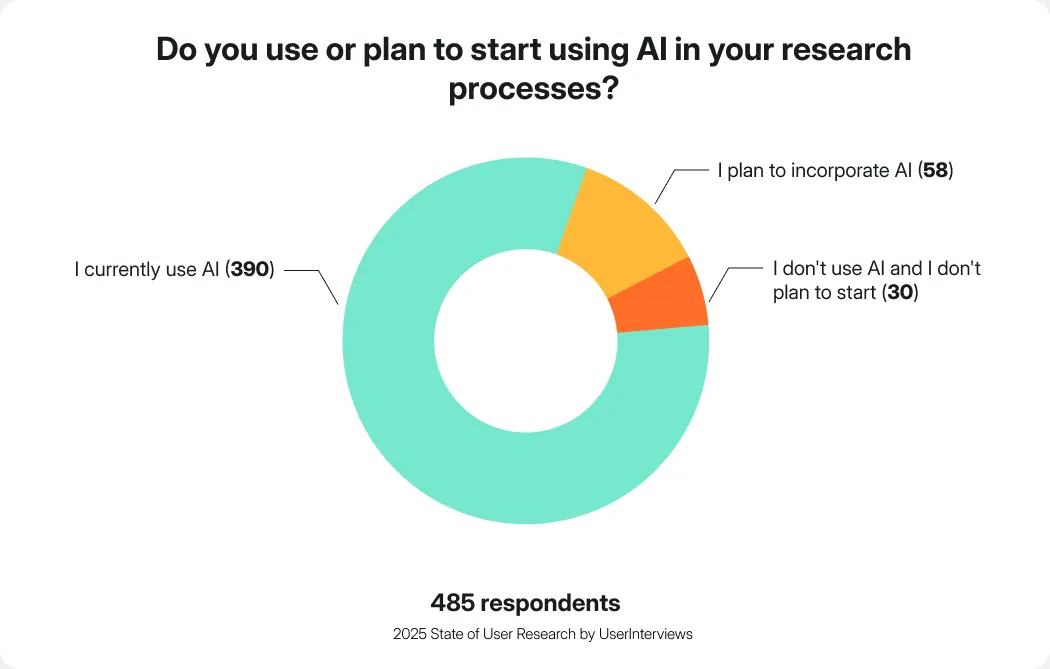
Out of 485 Researchers, 390 said “I currently use AI” when asked whether they use or plan to start using AI in their research processes. Moreover, 58 plan to incorporate AI into their practice, with only 30 out of nearly 500 Researchers saying they do not use AI and are not planning to start using it in their practice.
But what does AI have to do with a research repository?
A research repository is a centralized space for all research data and insights from across sources. A good repository should be easily accessible and allow you to not only store the data, but also quickly analyze it to then draw conclusions and build the narrative to help make informed decisions.
Here’s where AI may come into place.
Weronika Denisiewicz, a Senior User Researcher says in her recent article about traditional repositories:
“In my experience, even a structured and well-tagged repository quickly turned into a silo of knowledge that looked organized but no one actually used it. It was hard to search, disconnected from the team's daily work, and overly dependent on me to interpret or resurface insights.”
“The real breakthrough came with AI-powered tools. They removed the need for manual tagging, enabled natural-language search, and allowed the team to work with research data without requiring expert help. What once felt like a static archive turned into a living knowledge base—accessible, searchable, and actually used.”
In this article, we’ll take a look at the best research repository tools, with a particular close lens on their AI features (heavy on features, not platforms aiming at replacing UX Researchers altogether.)
The best options we’ll dive deeper into, showcasing specific features, interface, and more, the rest will be presented as a list with essential information laid out for easy, scan-like comparison.
Tl;dr
- UX research feels uncertain right now, with 49% of researchers pessimistic about the field and 67% concerned about career opportunities, but AI adoption is accelerating, not slowing down.
- AI isn’t replacing researchers. It’s being used to remove friction: manual tagging, fragmented data, slow synthesis, and insight resurfacing.
- Traditional research repositories fail when they become static archives that only researchers can interpret. AI changes this by enabling natural-language search, automatic theming, and source-backed insights.
- A good research repository must do four things well:
- aggregate feedback from multiple sources,
- analyze and synthesize data (with traceability),
- organize work into clear research projects,
- make insights easy to share and act on.
- AI matters only when it’s grounded in your data. The best tools avoid hallucinations by always linking insights back to exact quotes and sources.
- Not all repositories are equal:
- Survicate stands out for end-to-end workflows (data collection → analysis → sharing) and affordability.
- Dovetail excels at qualitative depth but can get costly and cluttered at scale.
- Condens offers flexibility but requires heavy manual effort.
- Enterpret is powerful for large orgs, though complex and expensive.
- NotebookLM works for lightweight synthesis, not serious repositories.
- The real win isn’t “more insights”, it’s faster, more relevant insights that actually get used.
4 must-have research repository features
Before we get into the actual tool comparison (no one’s stopping you, though!), we’re going to focus a bit more on the must-have UX repository features to make it clearer as to what we’re actually looking for.
Aggregating feedback data from across sources
What gives you confidence in your research?
We’ve talked to quite a few Researchers at Survicate, building a platform and a dedicated product for them.
Many of them say that what gives them confidence is several different data points from various sources pointing to a single path or conclusion. But collecting and analyzing data from across sources is a tedious task.
10 user interviews, 3 surveys, and some analytics data thrown into the mix. All analyzed separately, with no single source of truth.
Unless you use a proper research repository. Then you get to aggregate data from any research method you decide to use, in one place.
The data input usually includes csv files uploads, integrations with other tools, calls and video recordings, survey data, and more.
Bonus feature: call and video transcriptions
Not absolutely must-have, but good repository tools offer one additional feature that helps aggregate as much data as possible, even the seemingly difficult studies: the ones in the form of call or video recordings.
So, if the research repository platform you’re looking for also offers call and video transcription, you’re in for a treat.
Instead of rewatching the recordings, getting distracted by that one pimple on your face, and wasting time re-visiting old conversations for the tenth time, you simply automatically transcribe the interview or study into text.
Analyzing the data and presenting results
There’s never enough done in research, right?
Another project popping in because of a quick question over Slack from leadership. Wasting time re-watching call recordings. Mental overload from talking to interviewees and struggling to take coherent notes at the same time.
Data analysis and making conclusions does not make it any easier. Hence, another set of must-have features for a research repository tool is to not only aggregate the user research data into one place, but also analyze it to help you make conclusions.
Here, you can come across such features as:
- Auto-categorizing aggregated data into themes and groups
- Citing back to exact quotes and sources to avoid hallucination
- Auto-creating graphs, charts, and reports based on the extracted themes
- Filtering the data by time, source, sentiment, and more
- Sentiment analysis
Bonus feature: auto-translations
Another micro-feature that can speed up future analysis a lot is…translations.
If your target audience is multilingual, an advanced research repository platform may allow you to automatically translate research data into a default language of your choosing.
No matter if these are survey responses, csv data points, or transcribed call/video recordings of user interviews.
Research Projects
Another project half-opened, someone left the org, team leader has a quick question and every study has 5 different sources and varied user groups.
It all has to be organized in a smart way to avoid chaos.
Organizing the data into specific Research Studies or Research Projects that answer specific questions is another core feature of a good research repository tool.
Sharing the data, insights, and findings easily
Finally, what’s good about finding the best answers if you don’t have a structured way of sharing the insights?
Prepped the most amazing and detailed deck, but stakeholders still hit you with the ok, and what about it?
Changed strategies and now give all the important answers upfront, but the research still gets overlooked?
Make it easier to democratize research with these research repository features:
- Slack integrations to auto share reports/findings
- Let team collaborate on findings, chat with the insights from Slack
- Downloading auto-generated reports, charts, graphs in PNG, PDF, csv formats
- Access to other team members so that they can log in themselves
Is AI in all of this necessary?
According to the State of User Research, most studied Researchers do plan to incorporate AI into their processes (as mentioned at the beginning of this article), but that doesn’t mean they’re not wary of it at all.
UX Researchers are concerned about:
- The accuracy of AI output (“hallucinations”) and the risk of making decisions based on incorrect or fabricated information
- They also worry about data privacy, security, and the ethical use of participant data, especially when sensitive information is sent to third-party tools whose inner workings are not fully transparent.
- Many fear that AI could devalue human insight and critical thinking, while also raising questions around copyright, intellectual property, cost, and in some cases environmental impact.
Those are all valid concerns.
So to answer the question of is AI necessary in a good research repository tool? It is to actually make a difference in efficiency as opposed to traditional repositories.
But, it is not to say that the tools should have AI that’s marketed as one to replace UX Researchers altogether.
It also shouldn’t be used just to get ‘more findings’. It should be used to give you a quicker way to provide more relevant insights, not more data volume. If it’s based fully on your research data, it won’t hallucinate. Instead, it speeds up tedious work.
Leave human connection human and speed up whatever can be sped up.
Tools comparison: top 5 options deep-dive
Care for a table overview of the top options we deep-dived into?
| Category | Survicate | Dovetail | Condens | Enterpret | NotebookLM |
|---|---|---|---|---|---|
| Primary positioning | End-to-end feedback + research repository with smart AI features | Qualitative research repository | Classic research repository | Enterprise-grade feedback intelligence | AI document & note analysis |
| Built-in surveys | ✅ Yes (advanced, multi-channel) | ❌ | ❌ | ❌ | ❌ |
| Data sources & integrations | 14 Research Hub integrations + CSV + transcripts, 40+ native integrations overall to share or enrich feedback data | ~12 native integrations + CSV + API/Zapier | Limited integrations + CSV | 50+ native integrations + docs | Files, URLs, YouTube, Google Workspace only |
| Auto-analysis & theming | Strong, automatic, source-linked | Automatic, slower at scale | Mostly manual | Multi-level taxonomy; may be even too granular | Basic summaries only |
| Traceability to quotes | Always linked to exact sources | Yes | Manual tagging required | Yes | Partial (file-level, not granular) |
| AI chat with data | Production-ready, filtered by source & time | Beta chat available | Very limited | Yes | Yes |
| Dashboards & visualization | Custom dashboards, exportable charts | Small, cluttered charts | Basic charts | Highly filterable dashboards | Not dashboard-based |
| Research projects support | Coming Q1 2026 | Core feature | Core feature | Indirect (via taxonomy & dashboards) | Not research-specific |
| Ease of use | Very intuitive | Easy, some clutter | Steep learning curve | Powerful but complex | Simple & clean |
| Average annual cost (Vendr / estimates) | < $8k | ~$22k | ~6k EUR | ~$40k | $360–$4.2k |
| Best for | Teams wanting collection → analysis → sharing in one tool | Deep qualitative analysis teams | Small UX teams willing to tag manually | Large orgs with massive feedback volume | Lightweight synthesis of documents |
Now let’s get into a deep dive comparison of Survicate, Dovetail, Condens, Enterpret, and NotebookLM.
1. Survicate
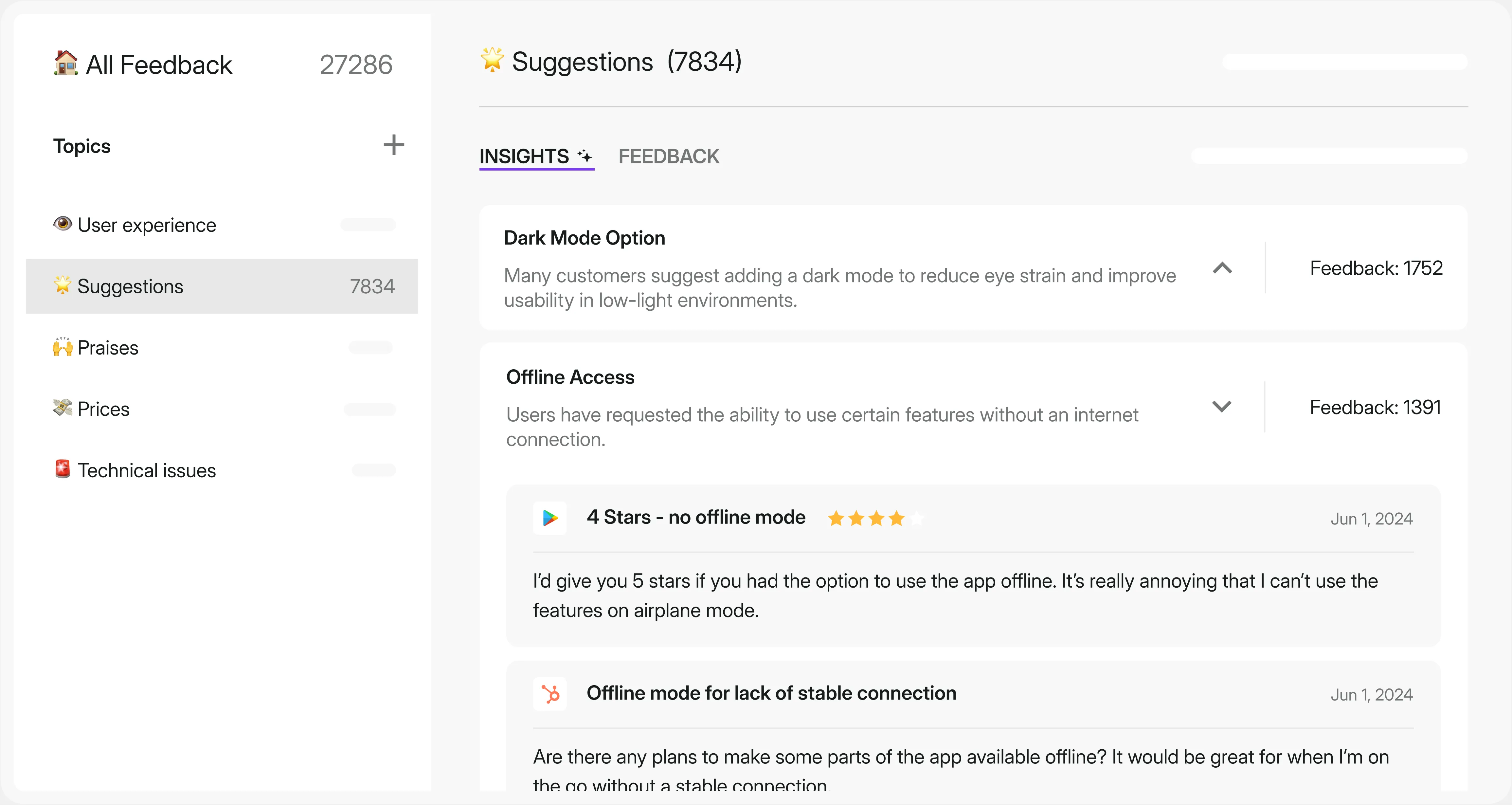
The first platform on the deep dive is Survicate.
Survicate is a complete feedback platform that serves a different purpose depending on the exact team that’s using it.
For example, it can be used by Customer Success teams to run recurring CSAT surveys and track customer satisfaction, but also Research teams to run highly-targeted in-product surveys and/or use Survicate as a complete research repository tool for data centralization and deep analysis.
As a research repository, it offers all the must-have features such a tool should have:
- centralizing data from across sources (14 external platforms, from tl;dv to Zendesk or Google reviews), csv uploads, call and video transcriptions, Survicate surveys (of course),
- auto-analyzing the centralized data, categorizing it into themes and topics, and always linking back to exact quotes and sources to avoid any hallucinations,
- filtering the analyzed data by source and time frame, as well as auto-generating charts and graphs that can be downloaded in PDF and PNG formats,
- generating AI summaries of the analyzed data for each spotted pattern or theme to ease sharing insights (with links to exact sources, again),
- generating AI answers in a dedicated chat that’s connected only to the centralized data and that can be filtered by source and time frame for answers to be specific and actually helpful,
- 360-view Dashboards with customizable widgets for easy data comparison and bird’s eye view for stakeholders.
- and soon to be introduced: Research Projects.
G2 rating: 4.6/5 ⭐
Pricing
Survicate offers four pricing tiers.
The Free plan gives you 25 responses monthly with basic surveys, CX metrics, and basic CRM integrations. Starter ($89/month) bumps you to 100 responses with AI features. Growth ($56/month, billed yearly) is built for ongoing feedback programs—unlimited surveys, advanced targeting, AI sentiment analysis, and 10 user seats.
Pro and Enterprise plans (starting at $349-$569/month, monthly or yearly billing) offer custom response pools, sophisticated targeting, multi-survey dashboards, and advanced integrations. Enterprise adds HIPAA compliance and white-glove support.
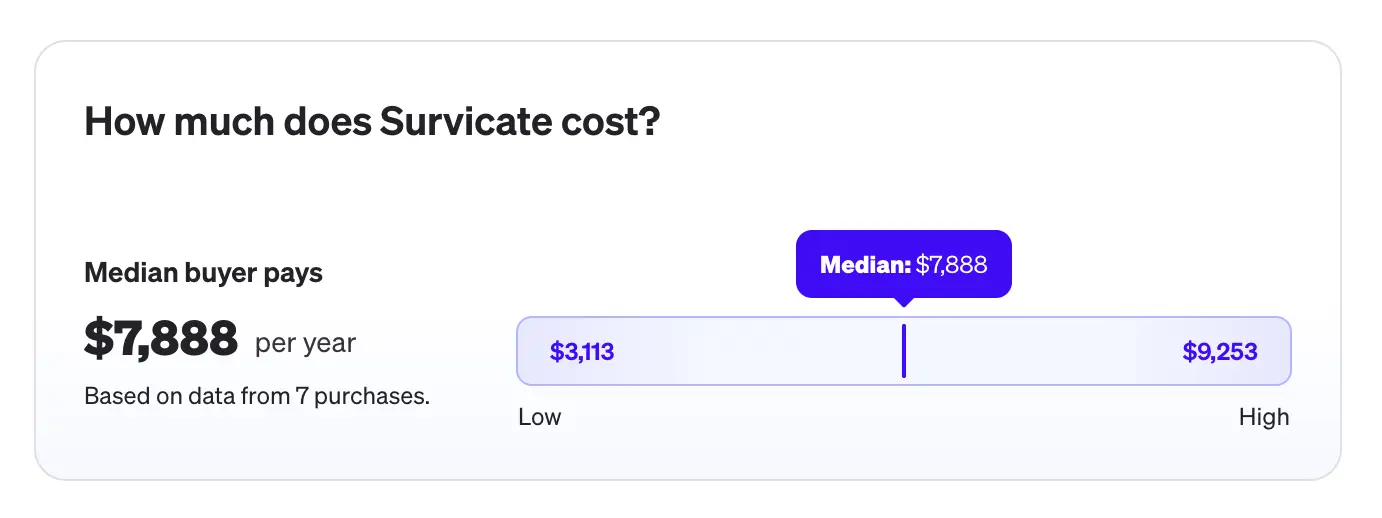
Okay, but how much does Survicate actually cost for an average user?
According to Vendr, the median price users pay for Survicate is less than $8k per year, making it much more affordable than other research repository tools on this list.
Features overview
Let’s take a deep dive into Survicate’s research repository features and actually click around.
Research Hub: centralize and analyze
Survicate’s Research Hub is one of the five core elements of the whole platform. Found on the left-hand side panel, Research Hub is the research repository you’re looking for.
It’s the one place where you can automatically analyze and categorize all your research data into recurring themes and topics, spotting patterns quicker.
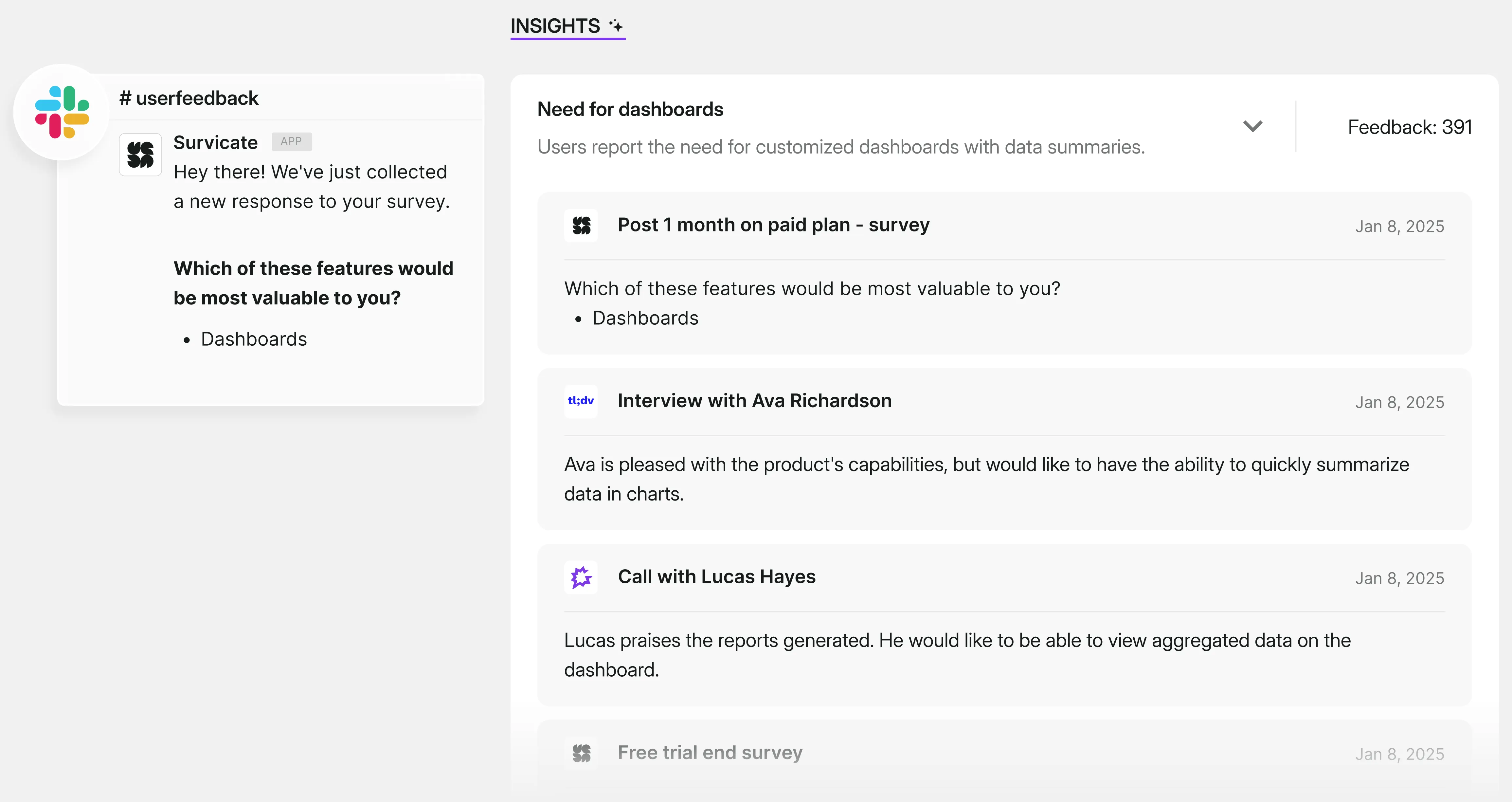
The data you can connect with Research Hub covers:
- Survicate surveys (in-product, in-app, web, in-platform, email, link surveys)
- external feedback sources, such as Intercom conversations, App Store reviews, Google reviews, Zendesk tickets, Slack conversations, tl;dv or Gong,
- call and video transcriptions uploaded as files from your desktop,
- csv files with data points.
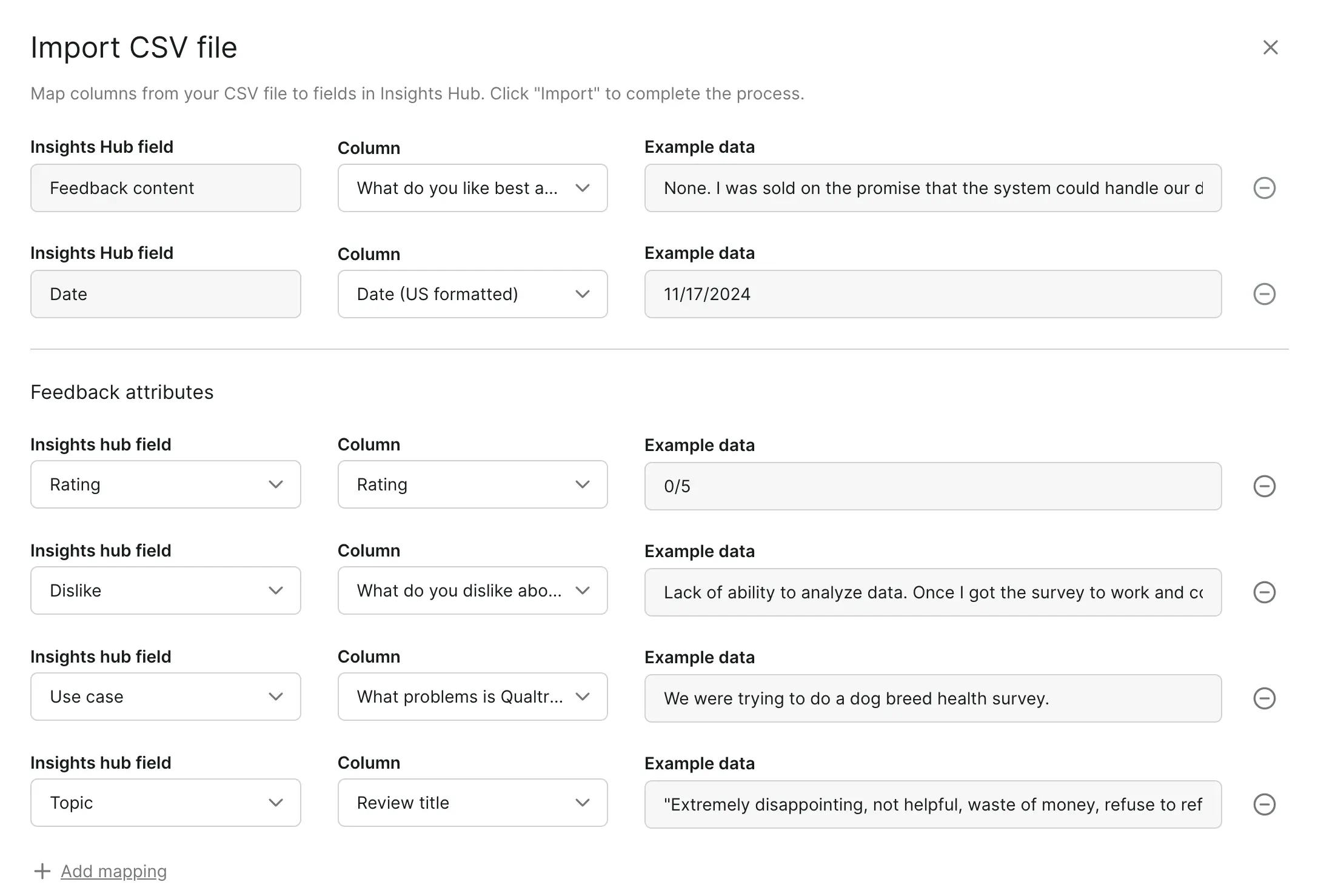
When uploading csv files manually, you get to map many fields into existing ones in Research Hub, adding different feedback or user attributes, mapping data like email addresses, names, ratings, and more.
When connecting data from a third-party tool, we simply click “Add feedback” and then choose “Integration” to then select the actual tool you want Research Hub to extract data from.
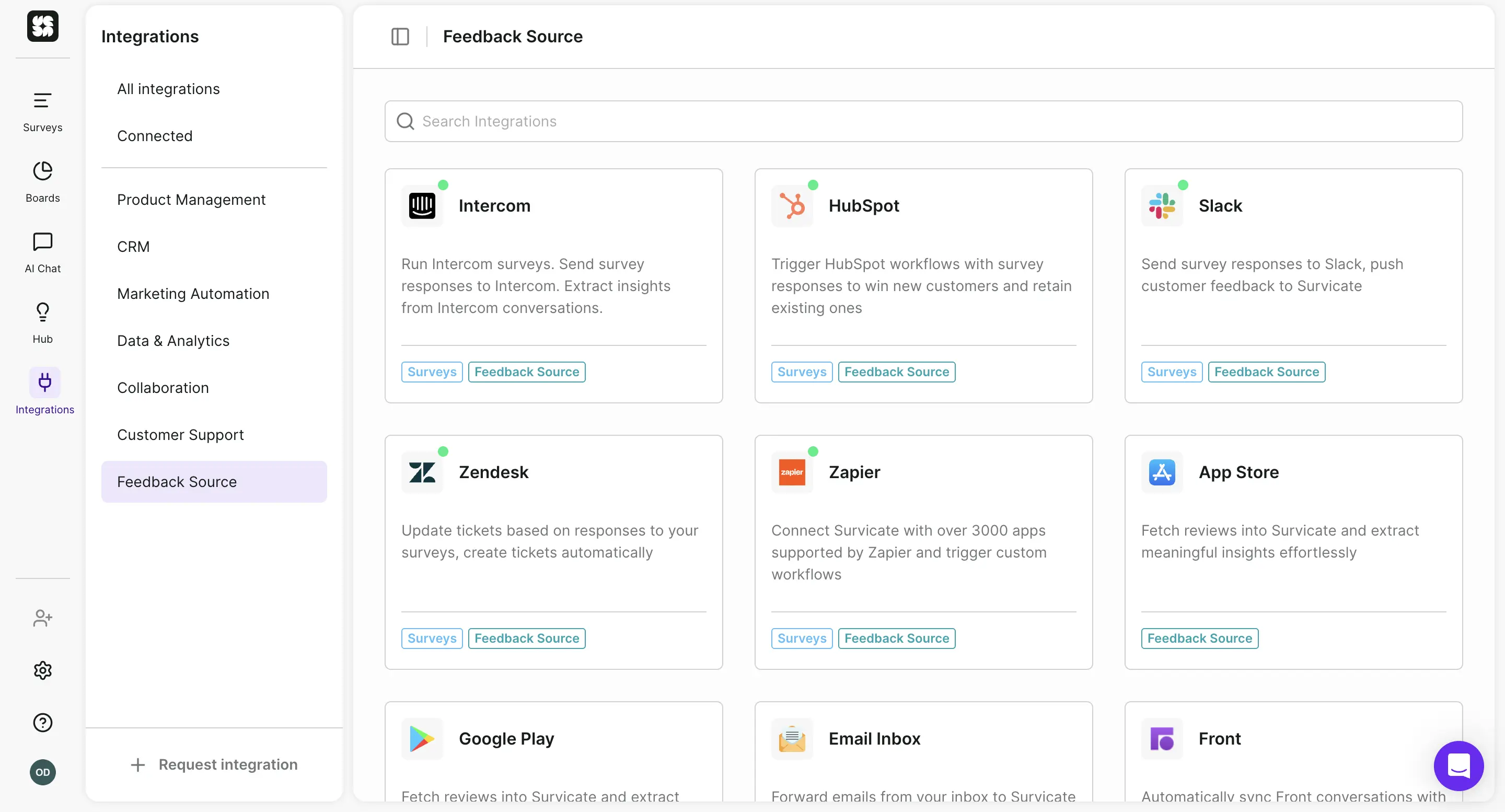
Then, from all the connected data (which from connected third-party tools flows into the centralized hub in real time), Survicate’s Research Hub spots recurring patterns and categorizes them into themes. Within those, you’ll find specific insights backed by exact customer feedback quotes and source of that data.
“Survicate excels in feedback management, offering a powerful insight hub that gathers and shares valuable insights. Its topic detection feature is particularly strong” G2 review
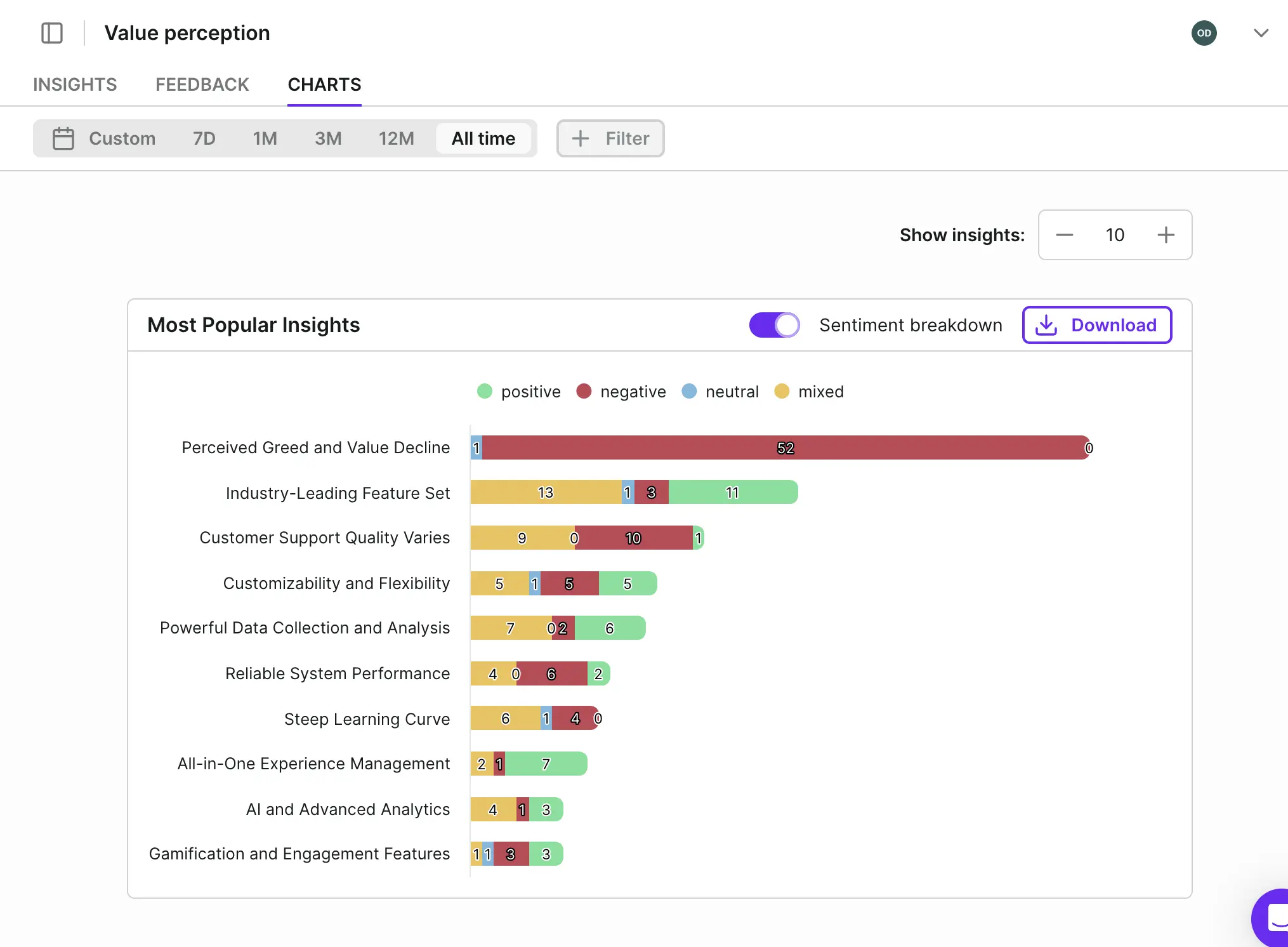
But to make it even more useful, you also get automatically generated charts for each spotted pattern to visualize the feedback better. Charts can be downloaded in PDF or PNG versions.
What’s crucial to notice is that Survicate’s research repository tool is all based on an extremely user-friendly interface, which is reflected not only in how easy it is to get around the platform, but also how the insights and charts are all presented.
AI Chat
To dive even deeper into all the connected research repository data, you can also use Survicate’s AI Chat to converse with the source-backed information (not in Beta mode as in many other platforms.)
All responses are backed by exact feedback quotes and sources to avoid any hallucinations whatsoever.
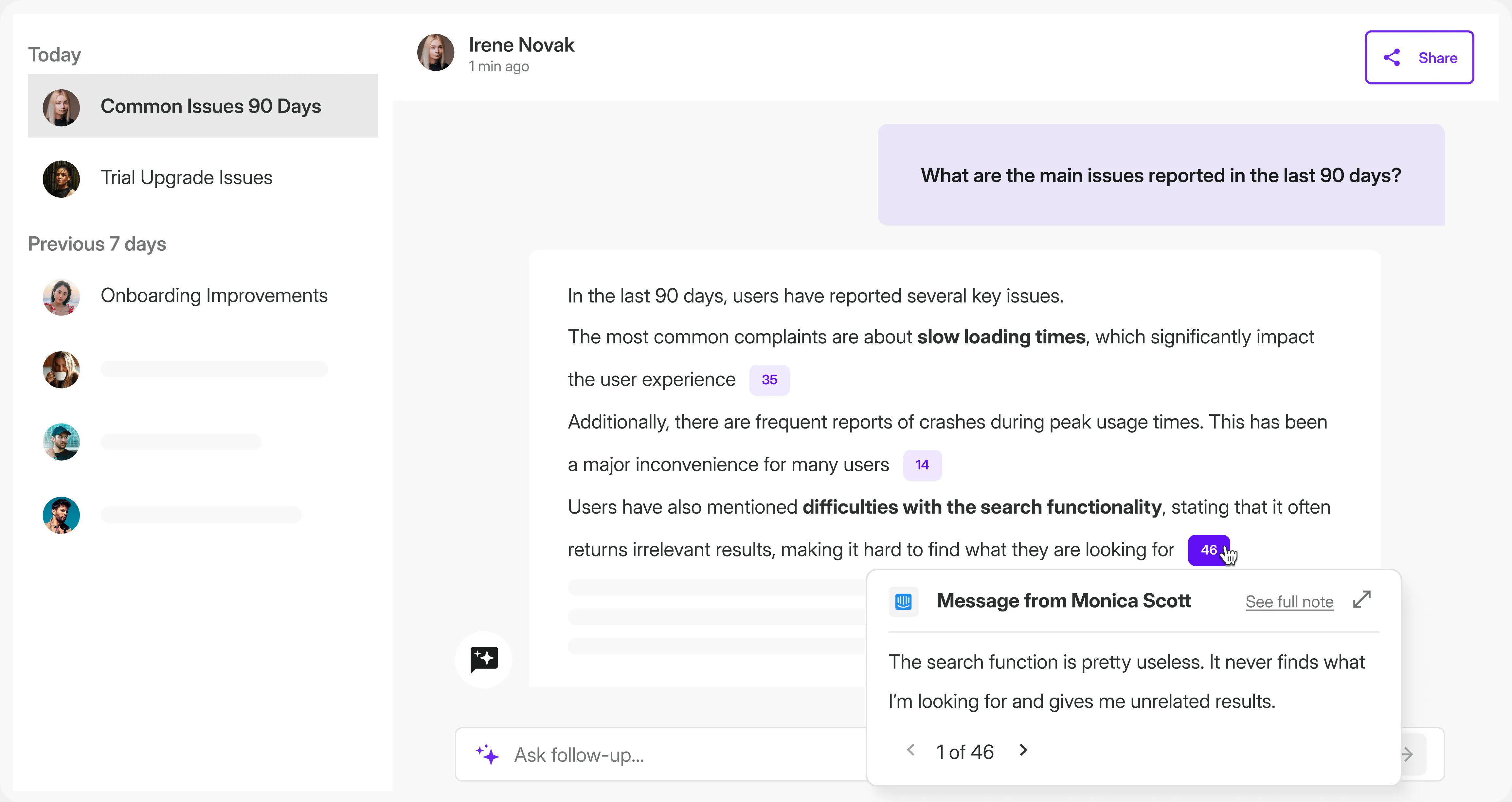
With it, you can ask the AI Chat to compare insights from Q4 interviews on specific topics, like validating a new feature idea from a Product Manager for 2026 with a feature validation survey run at the same time.
AI Chat will give you the answer quickly supported by the exact data sources and data points to help you validate ideas faster and show whether or not your sources all point in the same direction or not.
To narrow down the answers, you can filter the feedback by time range (past year, past quarter, etc.) and exact sources from all connected feedback data.
Sharing insights
We’ve covered connecting all sorts of data into Survicate’s research repository (Research Hub), as well as analyzing said data to easily extract insights from across sources and compare it across time frames.
Let’s now get into sharing the findings with stakeholders, Product Managers, leadership, and other team members.
If you don’t want your team to scroll past your research report faster than a boring UGC video on Instagram, the findings have to answer specific questions (that the team needs answering) and the answers have to come up first.
With Survicate, there’s a few ways you can share the conclusions of your research (all best applied with a little bit of your human help 😉.)
First, you can simply share the generated charts and graphs, along with the AI-generated summaries of each spotted pattern, along with your conclusions on whether or not this data answers the specific question a given study has posed.
Second, you can integrate Survicate with Slack, and give your team an easy way to chat with your research data themselves, directly in said communication platform.
The integration with Slack allows you and your teammates (even those not having a Survicate account) to chat with all the connected feedback data directly in Slack (either privately or publishing the generated results for others to see and react to.)
Third, with Survicate’s Dashboards, you can create custom data-comparison widgets and put them right next to each other.
Other team members can then view this page updated in real time. You could put graphs answering the most pressing questions currently and keep them up there to reduce the number of questions you have to answer on the daily.
Completing research data with integrations
As a cherry on top, we have to mention that Survicate connects with 40+ native, one-click integrations that are super easy to set up and work smoothly together.
Integrations with tools like Fullstory, Mixpanel, and Amplitude allow researchers to connect behavioral data with survey responses.
Mixpanel integration lets you enrich your quantitative product analytics with qualitative feedback, giving you the "why" behind user behavior. Smartlook integration adds heatmaps and session recordings to understand how people actually interact with your site alongside their survey responses.
You can automatically build your roadmap by triggering new Linear or Zendesk tickets to be created based on the survey responses, collect more positive reviews by launching dedicated email campaigns to high NPS scores users, or avoid users churning offering them additional support right after unsatisfying interactions with the product.
That way, feedback doesn't just sit in a dashboard. It flows directly into the tools your team already uses, making it easier to close the loop and take action when it matters.
Icing on the cake: advanced use-case ready built-in surveys
Researchers use a variety of specific research methods to collect the needed data they can then analyze to complete their studies.
That’s why, even though this article is about research repositories, we’ll quickly mention built-in functionality of Survicate that can be of great help to all Researchers: surveys.
Researchers run surveys for a variety of reasons.
From exploratory research in the learning and discovery phase, aiming to understand users, their needs or specific problems. Even though it’s usually interviews or observations used, surveys can also serve as an additional study method with surveys like:
- Customers' motivations research,
- Competitive advantage research,
- Users' jobs, pains, and gains.
Following, other phases are also often complimented with surveys. Like validation to get a better understanding of the significance or consistency of findings, especially across a larger sample size with surveys like buying criteria or features prioritization surveys.
Evaluative research with surveys that ask questions on feature evaluation or user experience, operational purposes research, like running surveys to recruit participants for qualitative research or building a future respondent base, segmentation research, including sending out surveys on buyer or user persona; you get the gist.
From running research specific surveys, to using standardized scores and metrics (NPS, CSAT), you can do it all in Survicate, which gives you the option to collect feedback from across channels and devices with different types of surveys you can launch.
Starting with surveys to embed in emails or share via links. Next, we can choose to create website or in-product surveys that can take the form of a pop-up or a sticky Feedback Button. This is the type of survey that helps you gather feedback from real users, prospects, and customers, right where they get to experience your product or website.
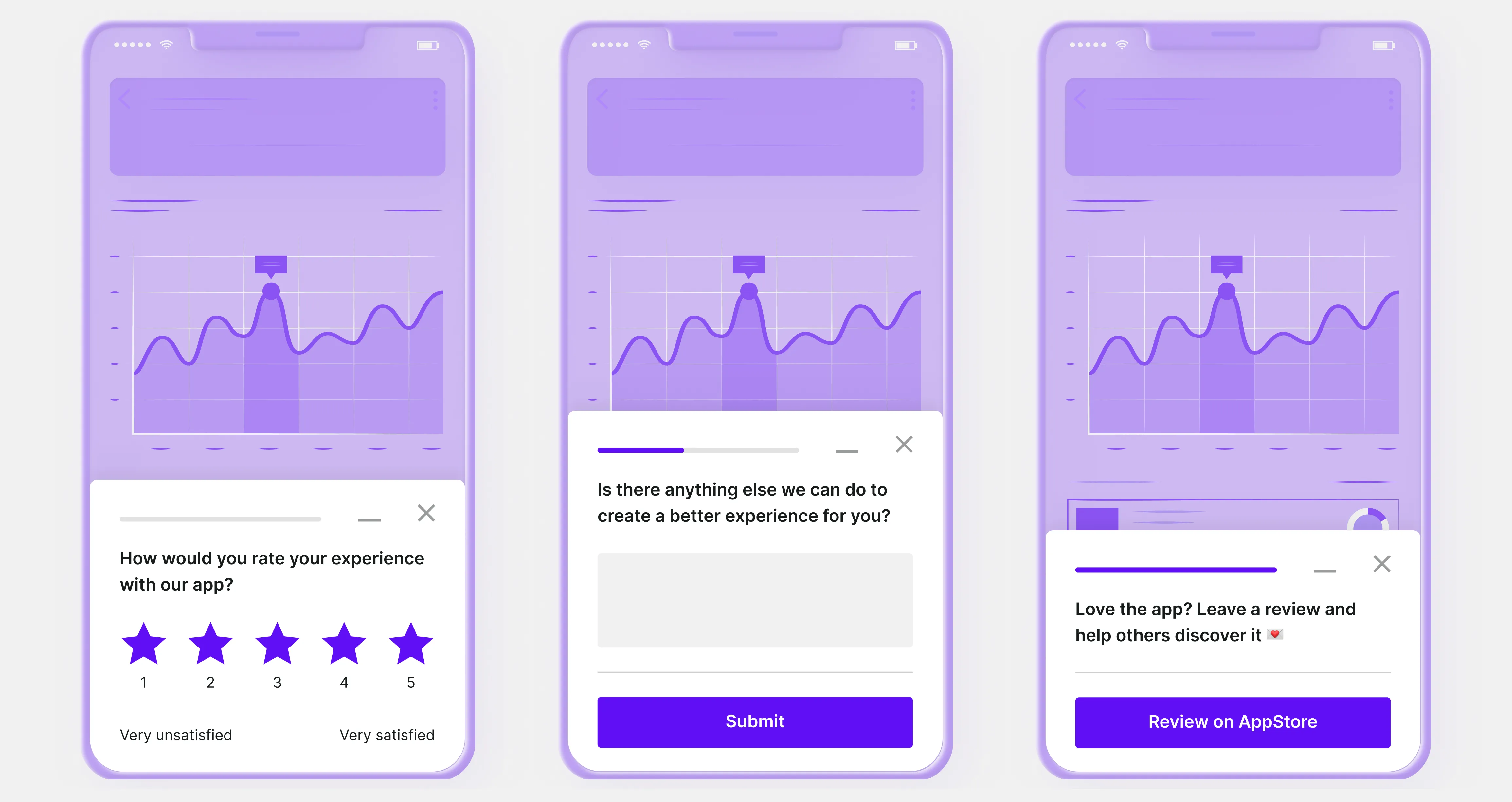
For mobile apps, Survicate offers dedicated SDK solutions that work perfectly in sync with iOS, Android, React Native, Unity, and Flutter applications. Again, here you can reach your users right where they are, asking relevant questions about their experience.
Lastly, Survicate also makes it possible to launch surveys directly in Braze and Intercom. For example, when launching a new marketing automation campaign.
Survicate surveys are highly advanced options when it comes to targeting, too. The platform lets you control survey visibility through respondent identification (via ESP integrations), retake permissions, response caps, and link expiration dates.
You can target surveys by URL, trigger them based on user behavior (exit intent, scroll depth, specific actions), and schedule automatic start/end dates. Anti-fatigue settings prevent survey overload by hiding additional surveys from users who've already responded or closed one in the same session.
In the same vein, Survicate offers extensive visual customization. Choose pre-built themes or create your own with branded colors for every survey element (questions, answers, backgrounds, buttons, progress bars), plus add your logo, text, and avatar. Users appreciate it a lot, saying:
“The ability to customize the look and feel is a significant advantage, ensuring consistency with our branding.”
“The standout feature for me is the deep customization available for in-app surveys. Being able to tailor every aspect to match our brand's aesthetics is crucial for maintaining a seamless user journey and building trust with our users.“
To control the way a given survey behaves, you get to use advanced logic. From Branch logic that routes respondents to different next questions based on their answer (e.g., send detractors to a follow-up question, promoters to a review request), to Display logic that shows or hides any question based on previous responses to keep surveys relevant and personalized.
Now, to create a new survey, Survicate gives you several options, from:
- AI-assisted survey creation, which users like to use for breaking the blank-page syndrome, just like Weronika Denisiewicz, Senior UX Researcher working with Survicate for her research projects,
- Hundreds of perfectly curated categorized templates in Product Experience, Customer Experience, Marketing Insights, and more,
- Starting from scratch to build your survey from the bottom up using 12 question types, from NPS to smiley scale or matrix,
- Importing pre-written survey questions directly into Survicate to easily re-create any past created or thought-of surveys.
If you’ve ever created a perfectly thought-out survey, but still received generic responses or just wished to dig a tiny bit deeper into users' answers, AI follow-ups is exactly what you need to add in your survey.
You can choose for Survicate to ask one or two AI follow-up questions per each open-text response. Let's say you're running a user research study and ask participants: "What motivated you to choose our product over alternatives?" A participant responds: "The reporting features."
With AI follow-ups enabled, Survicate automatically asks contextual questions like "Which specific reporting capabilities were most important in your decision?" This lets you dig deeper into their initial answer without manually crafting follow-up logic or conducting separate interviews—turning a surface-level response into actionable insight about which features actually drive product selection.
Ease of use
Survicate stands out for its modern, intuitive interface that makes data analysis genuinely straightforward, even for users who've struggled with clunky platforms in the past (or chaotic Miro boards and forgotten Google Sheets docs.)
“We have experienced brilliant integration mechanisms from Survicate, more so with numerous analytical tools and this makes it easy to evaluate the feedback shared.” G2 review
Setup and integration are equally simple, with one-click connections (no dev help required) that work smoothly.
Top notch Customer Support
Survicate's Customer Support consistently earns praise for being exceptionally responsive and genuinely helpful.
Users describe our Support team as "stellar" and "incredibly responsive," with many highlighting how they provide real conversations rather than templated responses.
The team is known for going the extra mile, not just solving problems quickly, but being creative and focused on helping customers work as effectively as possible.
“Their customer support is stellar, without a doubt one of the best teams I have ever interacted with.” G2 review
Our numbers back this up: in Q3 2024, Survicate's support team maintained a 97.8% CSAT score while handling 1,591 customer conversations. The median first response time was just 3 minutes and 10 seconds, with an overall median response time of 3 minutes and 26 seconds, meaning you get help immediately when you reach out.
2. Dovetail
.webp)
Dovetail is an AI-powered customer intelligence platform that aggregates feedback from multiple sources and turns it into strategic insights. So, a research repository.
Launched in 2017 by Benjamin Humphrey and Bradley Ayers, the platform is used by companies like Atlassian, The New York Times, Spotify, Universal, and Starbucks, operating with 100+ team members between Sydney and San Francisco.
The platform integrates with your existing channels, applies AI to surface patterns and themes, then delivers centralized insights across your organization (similar to Survicate), but not as presentable UI-wise.
It also focuses heavily on call transcription and gives you the option to create specific research projects.
What researchers should know: Dovetail won't help you build or send surveys, it's designed for what happens after data collection. If you need both survey distribution and analysis, you'll need a separate tool for gathering responses.
Pricing
Dovetail offers three tiers that scale from individual researchers to enterprise teams.
The Free plan gives you one channel for automatic feedback classification, one project for analyzing calls, recordings, documents and surveys, plus basic AI chat for questions and summaries within that project.
Professional starts at $15 per user per month (billed annually, saving 25% vs. monthly) and includes unlimited projects, unlimited channels as paid add-ons, advanced analysis tools like charts and filters, and enhanced AI features including cross-project summaries and semantic search.
Enterprise offers custom pricing with unlimited free viewers (read and comment access), AI chat in Slack and Teams, organization-wide features like folders and global templates, advanced AI including custom vocabulary and 75-language translation, plus security controls, priority support, and dedicated customer success.
The critical factor for Researchers: Dovetail charges separately for data points—the individual pieces of feedback you analyze. For example, 500 data points cost $50/month (billed annually). This means your actual costs scale with feedback volume, not just team size, so analyzing large datasets from surveys or user interviews can get expensive quickly beyond your base subscription.
.webp)
This is clearly reflected in the median price users pay for Dovetail (according to Vendr), which is over $22, 000. Compared with Survicate above, it’s almost three times more expensive.
Features overview
Let’s now dive into exact features and our experience testing Dovetail.
Channels
Channels is the main area of the Dovetail platform, right where you get to connect your research data sources.
And the sources you can choose to connect are:
- Support ticket platforms, including Front, Intercom, Jira Service Management, Freshdesk, HubSpot Service Hub, and Zendesk,
- App reviews: Google Play store, Apple App store, and G2,
- In-product feedback collected via Pendo,
- Call transcription platform, Gong,
- Feedback tool that has an integration with Zapier, or via Dovetail’s Public API (Dovetail integrates with Qualtrics for example).
Making it a total of 12 direct data integrations, not counting csv uploads or connecting a tool with Zapier or Dovetail’s API.
.webp)
Now, once connected, Channels will classify and track themes across integrated or uploaded data sets, monitoring the data in real time.
.webp)
A theme in Dovetail is a collection of related data points with a specified title. The platform's technology uses AI built on models from Anthropic, processing data without of course training any on your information.
What’s crucial to bring up is the fact that Professional and Enterprise workspaces can import up to 250 data points per month (which is not a whole lot), with the option to purchase additional capacity through Settings → Billing.
Although fairly easy to use and all set up on a modern interface, we did face a few limitations with Dovetail.
For one, the processing time, which can be quite significant. The AI analysis takes a while to complete, and you may need to wait a bit before insights become available. We’ve tested a quite small sample size, so it could become an issue particularly when analyzing larger datasets.
For two, CSV upload and field mapping is a little bit limited.
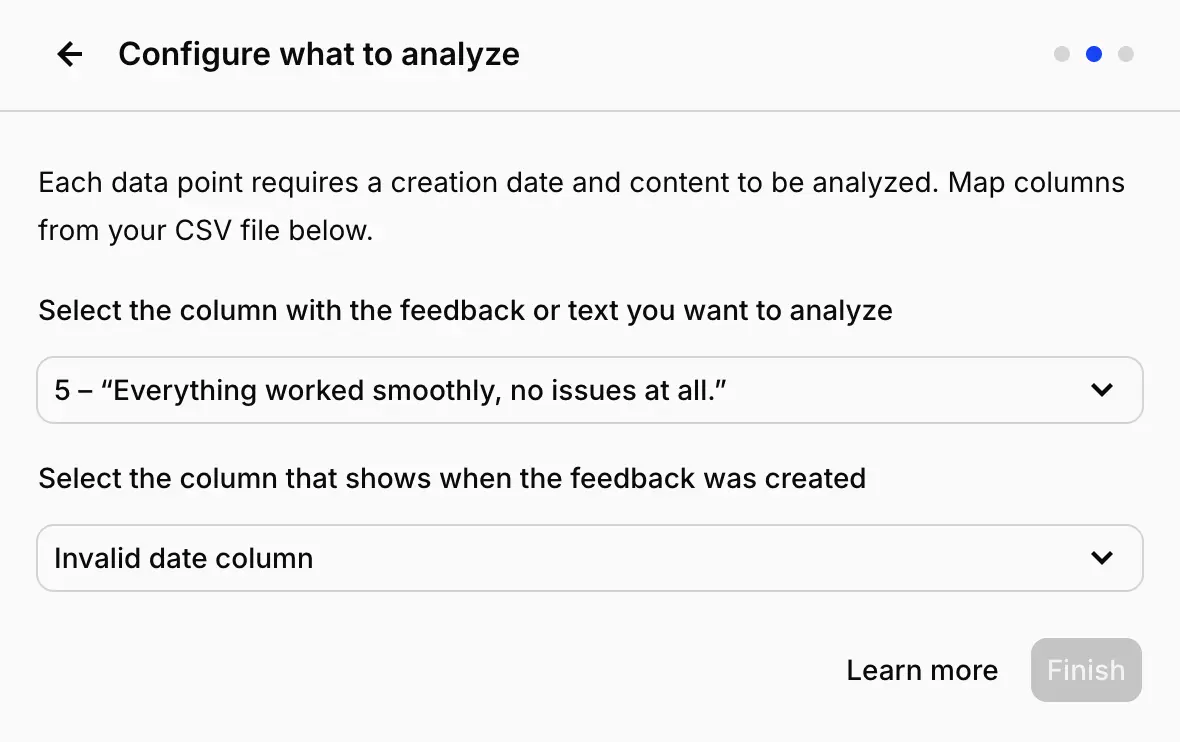
The data import workflow has some inflexible requirements that don't always match real-world datasets.
Dovetail mandates field mapping for certain attributes (like timestamps) regardless of whether they exist in your source data. If your feedback doesn't naturally include dates, you're still required to create or assign that field before importing.
Similarly, if you connect CSV columns that lack headers to Dovetail fields, those mappings will show up without labels in the platform, creating confusion when you're trying to interpret your data later.
Insights visualization in Channels suffers from readability issues, too.
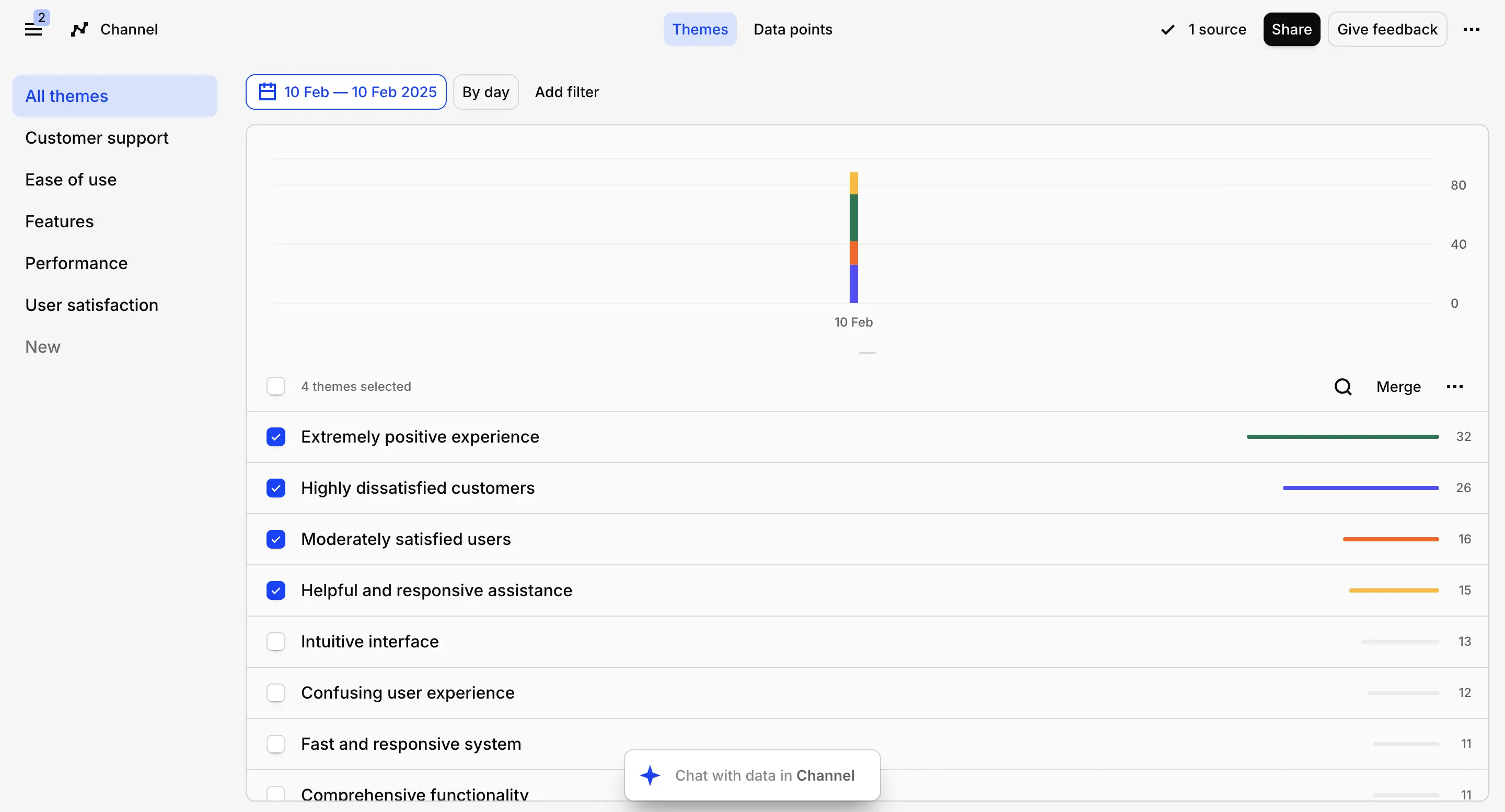
Charts display at a really small size that makes it harder to spot trends at a glance.
Even after Dovetail's AI has organized feedback into themes, the presentation feels cluttered and the analyzed information can be challenging to interpret quickly.
Adding more context
Now, Channels also let you provide context that shapes how the AI identifies themes and categorizes your feedback. During channel setup, you describe your role, research objectives, or specific areas of interest, and Dovetail uses this framing to generate relevant topics.
For instance, you might say: "I am a UX Researcher analyzing usability testing sessions to identify pain points in the checkout flow. Surface moments where participants hesitated, expressed frustration, or abandoned tasks. Flag any patterns around navigation issues, unclear labeling, or missing information that prevented task completion."
Based on your imported data and this contextual prompt, the platform automatically suggests topics with descriptions. You have the flexibility to accept these AI-generated topics, delete ones that aren't useful, or create your own custom topics. Each channel supports up to ten topics total.
Managing themes and data
After Dovetail generates your initial themes, you have several options for refining the organization.
You can consolidate similar themes by selecting them and using the Merge function, modify existing themes to improve their titles or descriptions, or build new custom themes when the AI misses something important.
Weekly Digests
Every Friday, Channels produce automated digest emails that summarize recent activity. These digests highlight themes showing notable shifts, whether that's a spike from 1 mention to 100 or a drop from 100 down to 1. The summaries also call out emerging patterns and unusual trends in your feedback data.
Digests only go to users who follow a channel. If you create a channel, you're automatically subscribed.
Action steps or summaries
Similarly to Survicate, you get to summarize your research and the auto-categorized insights with AI.
Generate specific action steps or insights based on the auto-categorized themes, to then copy, paste, and send over to stakeholders or other team members.
Projects
While Channels focus on automated theme detection across connected feedback streams, Projects are designed for investigating specific research questions with curated datasets. This includes recordings that need transcription alongside other source material.
Projects accommodate various study types like customer interviews, user testing, sales conversations, or survey data. Each project functions as a contained research study built around particular questions you're trying to answer. You can include interview recordings with transcripts (where each file represents one session), usability testing sessions with video and transcripts, or survey responses (where each completed questionnaire becomes a data object).
One frustration: when importing CSV files, each row gets created as a separate item, which clutters the data view significantly.
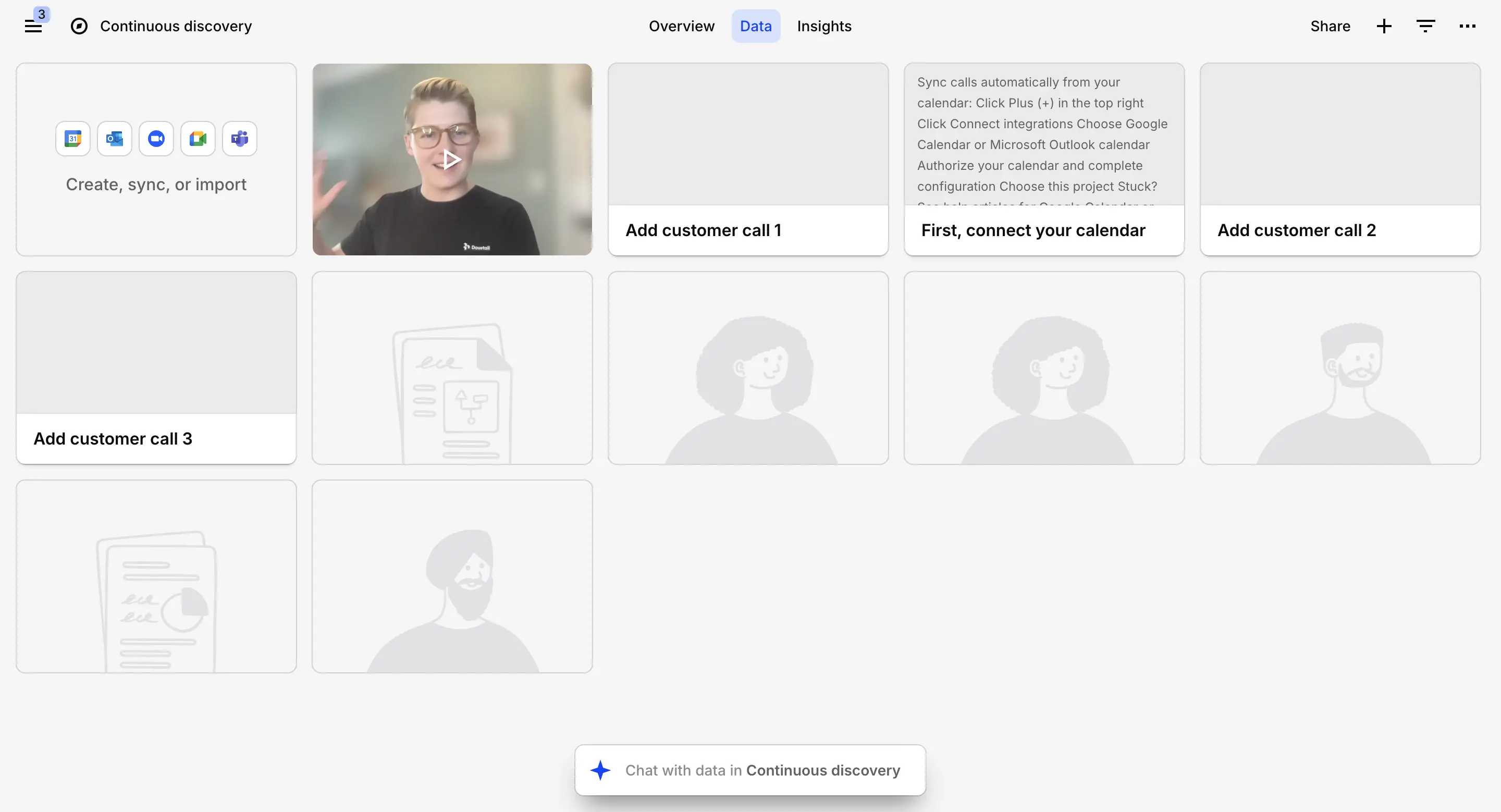
Projects organize around six customizable object types that you can toggle on or off to suit your workflow.
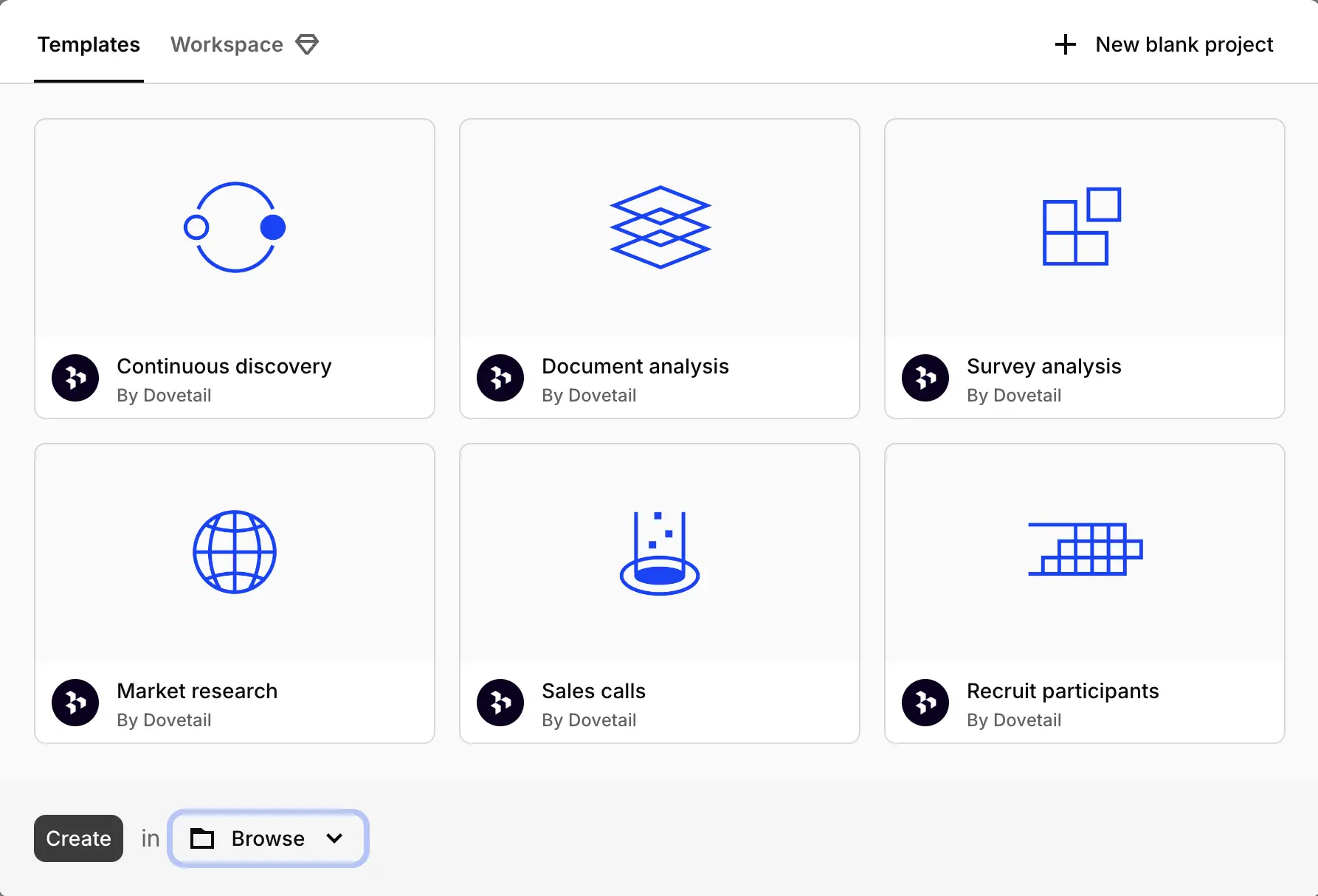
Projects are built around six customizable components that you can enable or disable based on your needs.
The system even prompts you during project creation to select a workflow template, which automatically activates the relevant tabs and objects for your study type.
- Overview functions as your project homepage where you document research background, objectives, hypotheses, methodology, timeline, and current status for team members joining the study.
- Recruit integrates with Respondent to help you source and schedule external participants without leaving the platform.
- Data stores your source materials like recordings, documents, and survey submissions as individual objects, while Highlights captures important quotes and passages extracted from your notes.
- Tags allow you to code and group highlights into thematic categories.
- Insights enable you to document findings from the current project or synthesize learnings across multiple studies.
- Charts provide visual representations of patterns emerging from your tagged highlights.
AI Chat
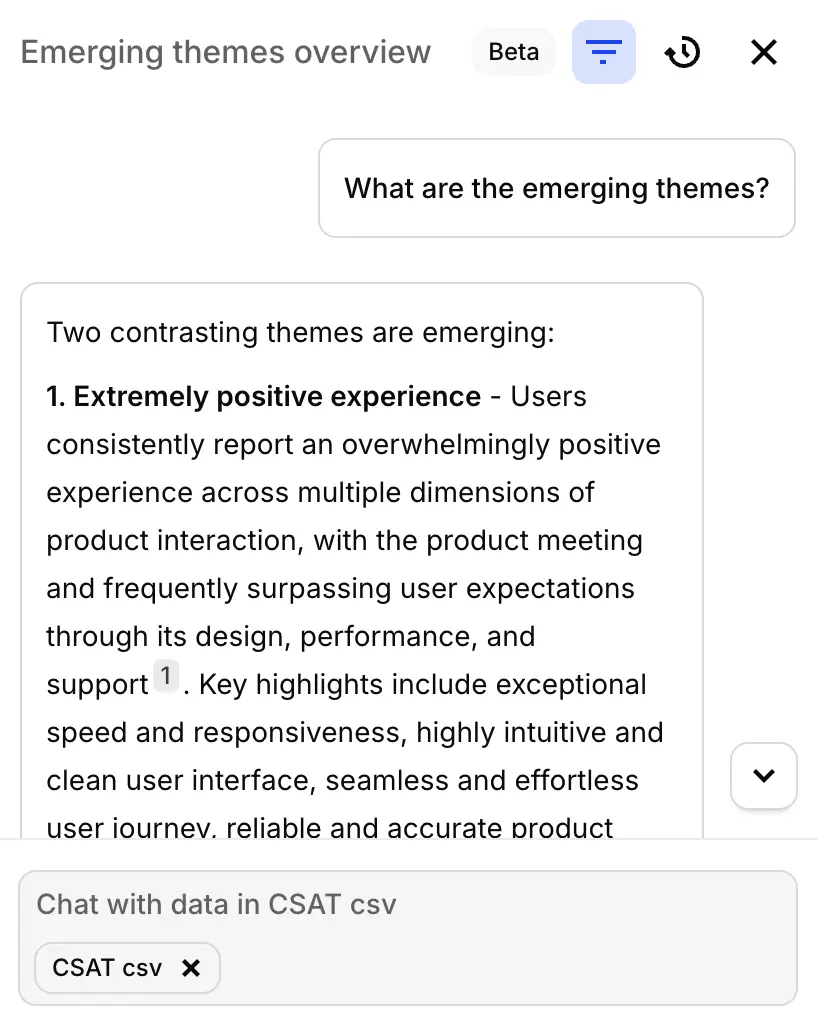
The final feature worth noting is AI Chat, currently in beta testing.
This conversational interface runs on Claude and lets you query your data in natural language. The system interprets where you are in the platform and automatically scopes your questions accordingly. Ask something while viewing a single transcript and it searches that file. Ask from a project view and it searches that study. Ask from the workspace level and it searches everything.
Potential applications include refining your sales methodology based on call patterns, identifying gaps in your research coverage, creating summary reports that pull from multiple projects, or helping new team members get up to speed quickly.
You can launch Chat from the sidebar or with the keyboard shortcut ⌘J (Mac) or Ctrl J (Windows). Responses include clickable links that take you directly back to source material, for easy present and future reference.
The search mechanism adapts to your current view, whether you're in a tag collection, project, channel, or looking at specific data. It uses a combination of keyword matching, semantic understanding, and filter logic. If you haven't selected a particular scope, Chat defaults to searching your entire workspace.
Each answer provides traceable citations showing exactly which data points informed the response.
Ease of use
From our experience testing Dovetail, the platform is pretty easy to get around, especially thanks to its clean, minimalistic, and modern UI.
But Dovetail is also not a feature-heavy platform.
The majority of users on G2 are satisfied with Dovetail’s ease of use, like this user here saying:
“Dovetail is incredibly easy to use and has helped us build a stronger research culture at my company.” G2 review
Selected users mention specific UI struggles, like:
“Project folders and organisation could improve. Not being able to have a personalized view of the workspace can make finding projects and general administration more complicated than needed.” G2 review
Which is pretty much in tune with our experience. Some UI things could be improved, like the csv upload issues we’ve come across or the Projects becoming messy after connecting our data points with it.
Customer support
Customer support rarely appears as a topic in Dovetail's roughly 200 G2 reviews, but the mentions that do exist lean positive.
Reviewers note quick response times and effective problem resolution, with some characterizing the support experience as excellent.
3. Condens
Condens is a tool that positions itself as a purely research repository tool, aiming to centralize all your user data and insights into one place. This Germany-based platform was co-founded in 2018 by Alexander Knoll, Matej Svejda, and Maximilian Hackenschmied.
At the time of writing this article, Condens’ G2 rating remained solid at 4.8/5 stars with over 90 reviews submitted on the platform.
When it comes to research repository features, Condens checks off:
- Organizing research data into Projects,
- Data upload (csv files and limited external integrations),
- Charts and highlights,
- Sharing insights with stakeholders,
- Miro or Figma-like boards with different research templates,
- Managing a participant pool (adding manually and importing participant data).
Unfortunately, Condens is a platform that requires much more time spent implementing your research data into, as well as manual tagging, in order to receive highlights and charts that previous tools all generated manually after auto-categorizing connected data.
Condens pricing
Condens offers three pricing tiers designed for different organizational scales.
The Lite plan starts at €15 per month (or €165 annually, saving you one month) and targets individual researchers or small teams working on discrete projects. It includes one contributor seat with additional users at €15/month each. You get unlimited automated transcription, core analysis tools, basic integrations, unlimited projects, and the ability to share findings publicly via read-only links. Personal support and onboarding are included.
The Business plan costs €500 per month, billed annually at €6,000/year, and is built for organizations scaling research across multiple teams. It includes five contributor seats, with additional contributors at €85/month each. Beyond everything in Lite, this is the plan where you get access to the repository features for centralized knowledge management, access to all integrations, unlimited viewer seats for stakeholders, a dedicated interface for non-researcher stakeholders, and data security assessments. SSO and HIPAA compliance are available as optional add-ons.
The Enterprise plan offers custom pricing for organizations with specific requirements, starting at a minimum of five contributors. It includes everything in Business plus negotiable contract terms, service level agreements, automated data deletion capabilities, and advanced user and permission management features.
Unfortunately, there’s no data for average Condens costs, so we decided to take a peek at G2 reviews some more, and find some information there.
Out of a little over 90 reviews, 3 mention Condens being a bit expensive, specifically if your organization is rather big.
- “I would like pricing solutions for small business (ex: something in-between 50-100$ for 2 researchers with repository features).” G2 review
- “Unfortunately, the bill can get salty if your organisation is big. But the product is worth it.” G2 review
Features overview
Let’s dive into specific research repository features in Condens.
Projects and data upload
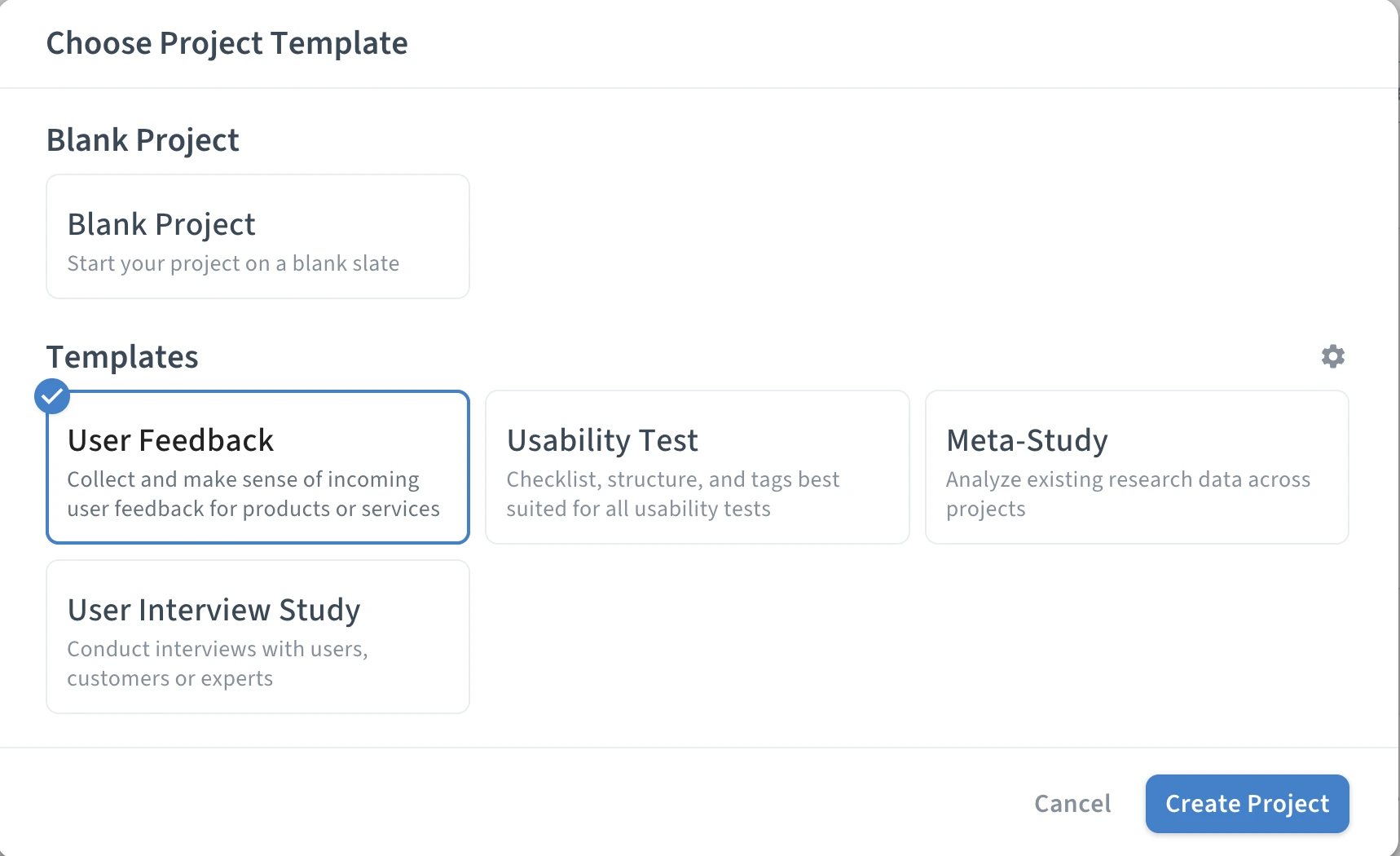
Starting with Projects, one of the core elements of Condens platform. To add one, click “Create new project” and choose one of the available options, from starting with a blank page to using a few templates (user feedback, usability test, meta-study, and user interview study).
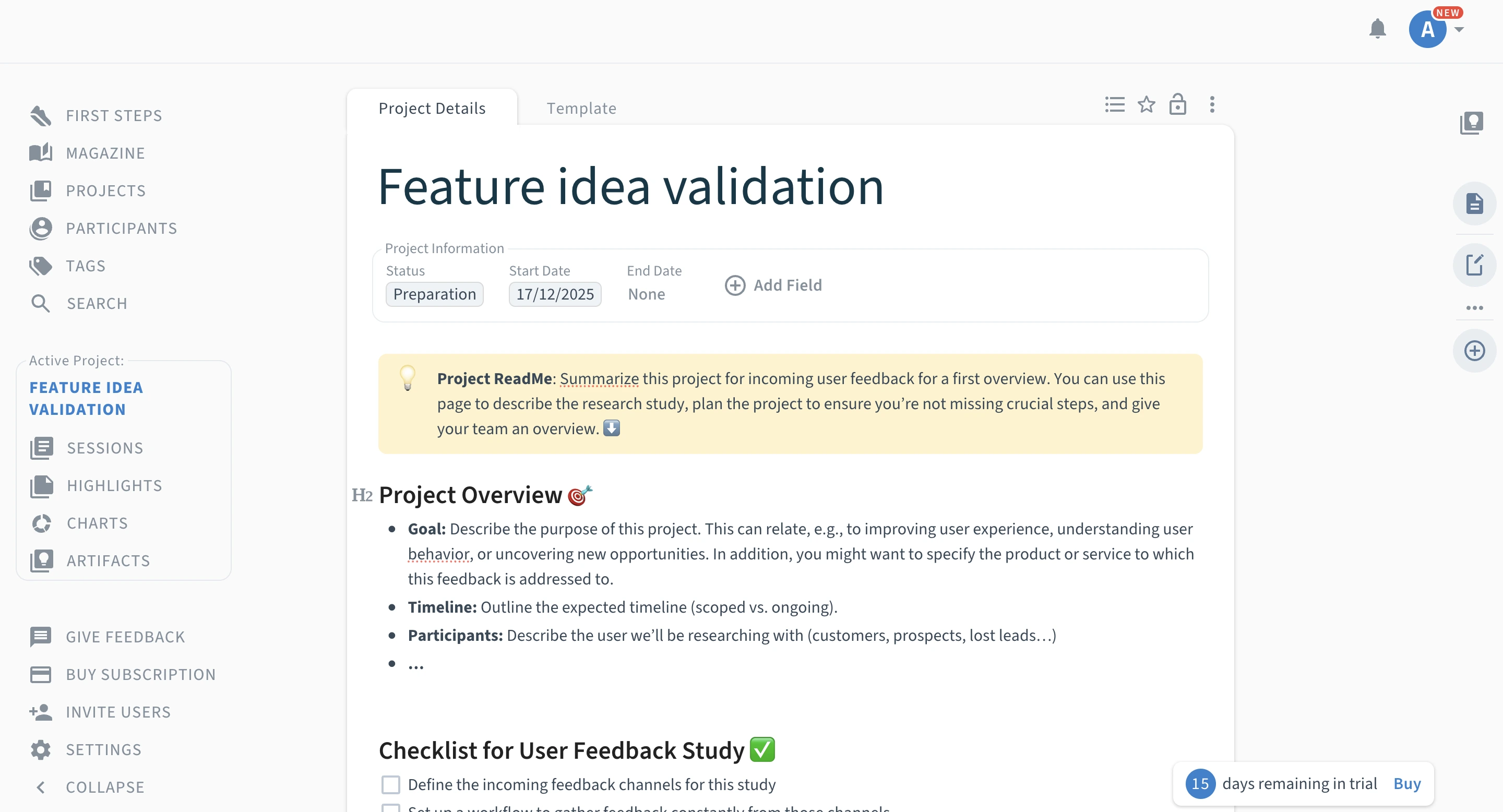
Unfortunately, at first glance Condens projects seem to be a less-modern replica of Notion pages with the possibility of manually adding data points into each Project. Adding new fields into the page, choosing from various field types, such as participant’s name, email address, to their answers in the study, from single select and multi select answers to NPS or simple open text fields.
As you’d imagine, adding all of your research data that way would take you straight to your retirement.
Contrary to what the tool presented, the platform’s website let us to believe there’s much more to Condens than it seemed at first sight. So we dug a little deeper, and found you can actually upload existing research data into the platform, it’s just not that obvious on how you do it.
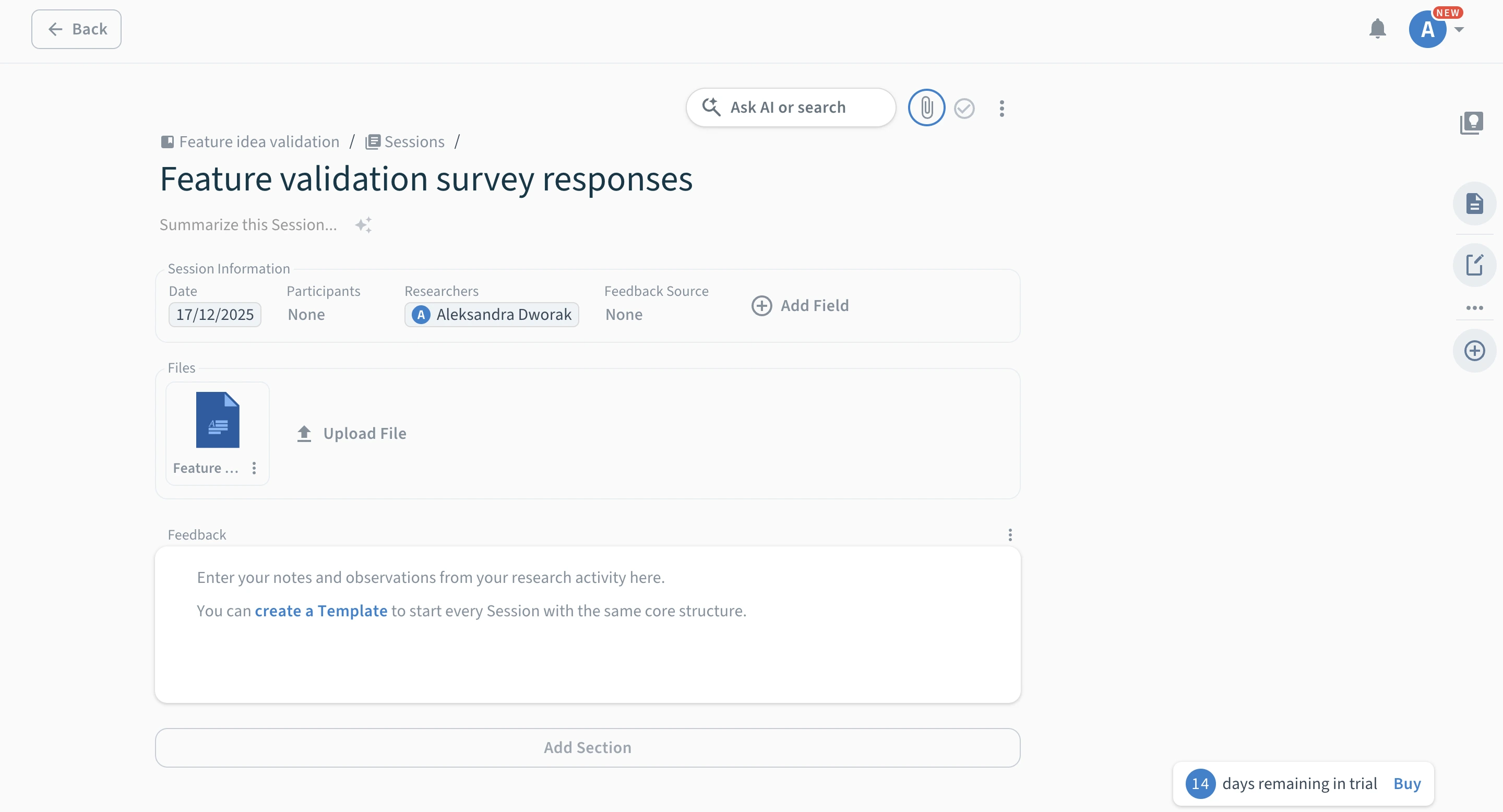
To do the import, you have to go into Sessions and from there, create a new session (again, either a blank one or start from a template), where you can name your session and (ding, ding, ding) actually upload your files.
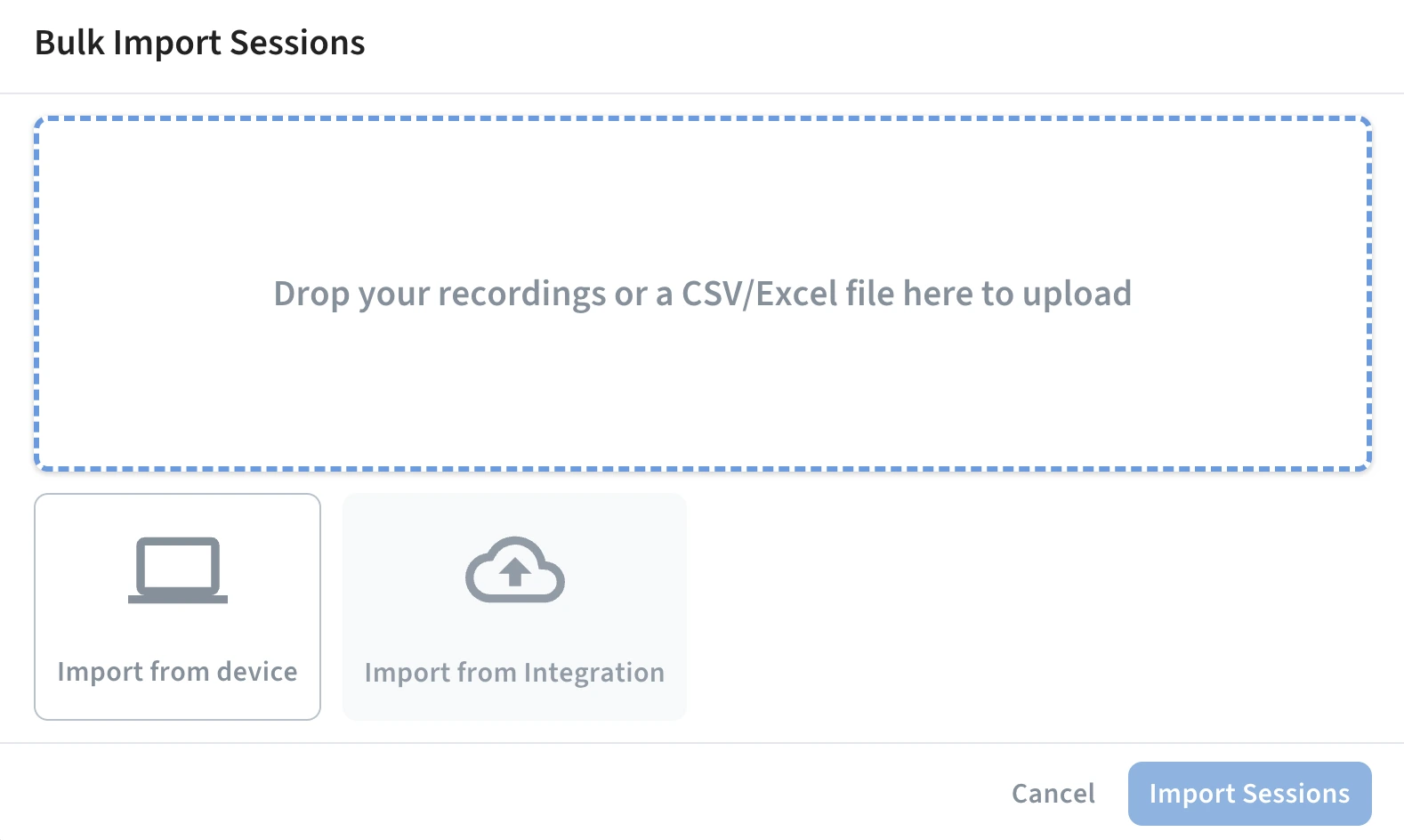
Figuring out how to integrate data with Condens was another story. Turned out, it’s available with bulk upload only where you get to choose to sync data from:
- Zoom,
- Google Drive,
- Microsoft Cloud Storage,
- UXtweak,
- Slack,
- Microsoft Teams,
- and Zapier.
Which is not as big of a selection as the previous two platforms offered.
Only when uploading from the main Sessions view within the Project do we get the option to actually select how we want the data to be imported. After this moment, the upload finally goes smoothly.
The uploaded csv file shows accurately reflected on the platform, with questions named and presented correctly. Besides just looking at the data, you get to re-attribute fields if they have been recognized incorrectly and not import rows you don’t need.
Unfortunately, each data row (when uploading from a csv file) is uploaded as an entirely separate session (similar issue to what happened in Dovetail), making the Sessions view a bit cluttered.
Data analysis
Unfortunately, data analysis is not presenting any better in Condens. In fact, that may be just where the platform really goes downhill (sorry!).
While both Survicate and Dovetail automatically analyzed uploaded files and connected external sources for insights, Condens plays much harder to get.
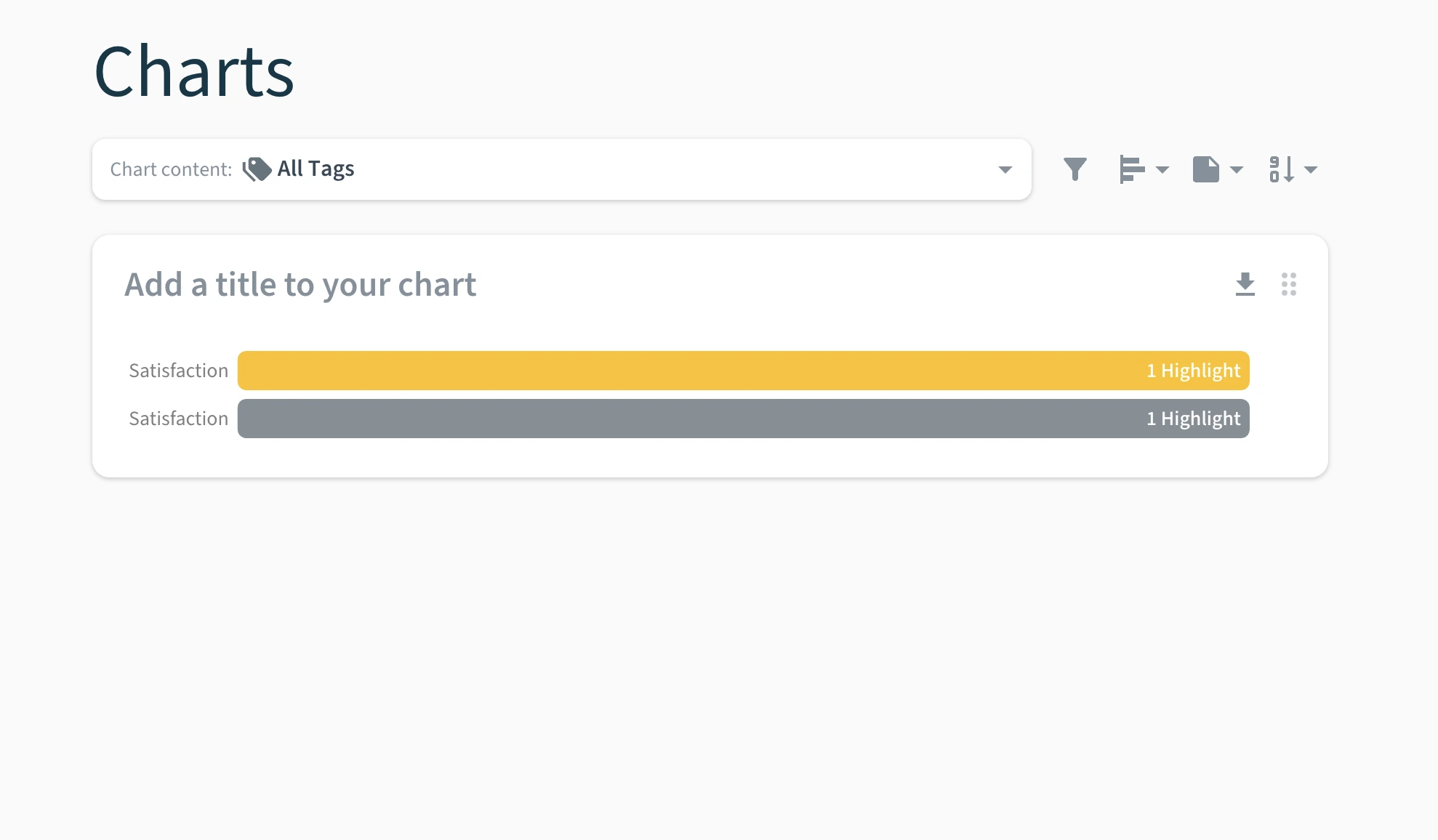
For analysis, besides the Notion-like Project page you have to write ourselves, there are two more tabs you get to ‘use’: Highlights and Charts.
You’d think these would automatically be there in a platform that claims you can “unlock insights from raw data in minutes” and “speed up your analysis with the power of AI”.
Well, the AI is nowhere to be found (when we finally did, it didn’t help much), and for the research highlights and charts to actually appear, you have to tag each data point yourself. Just to make it clear. In an AI-based platform, you have to…Tag. Each. Data. Point. Yourself. 🙂
Only then, you get Highlights and not-the-best-looking charts in their respective tabs.
Miro, Figma, and other artifacts
We’ve already mentioned how Condens Projects resemble Notion. Well, the platform does not only incorporate Notion-like pages, but also Miro or Figma-like pages too.
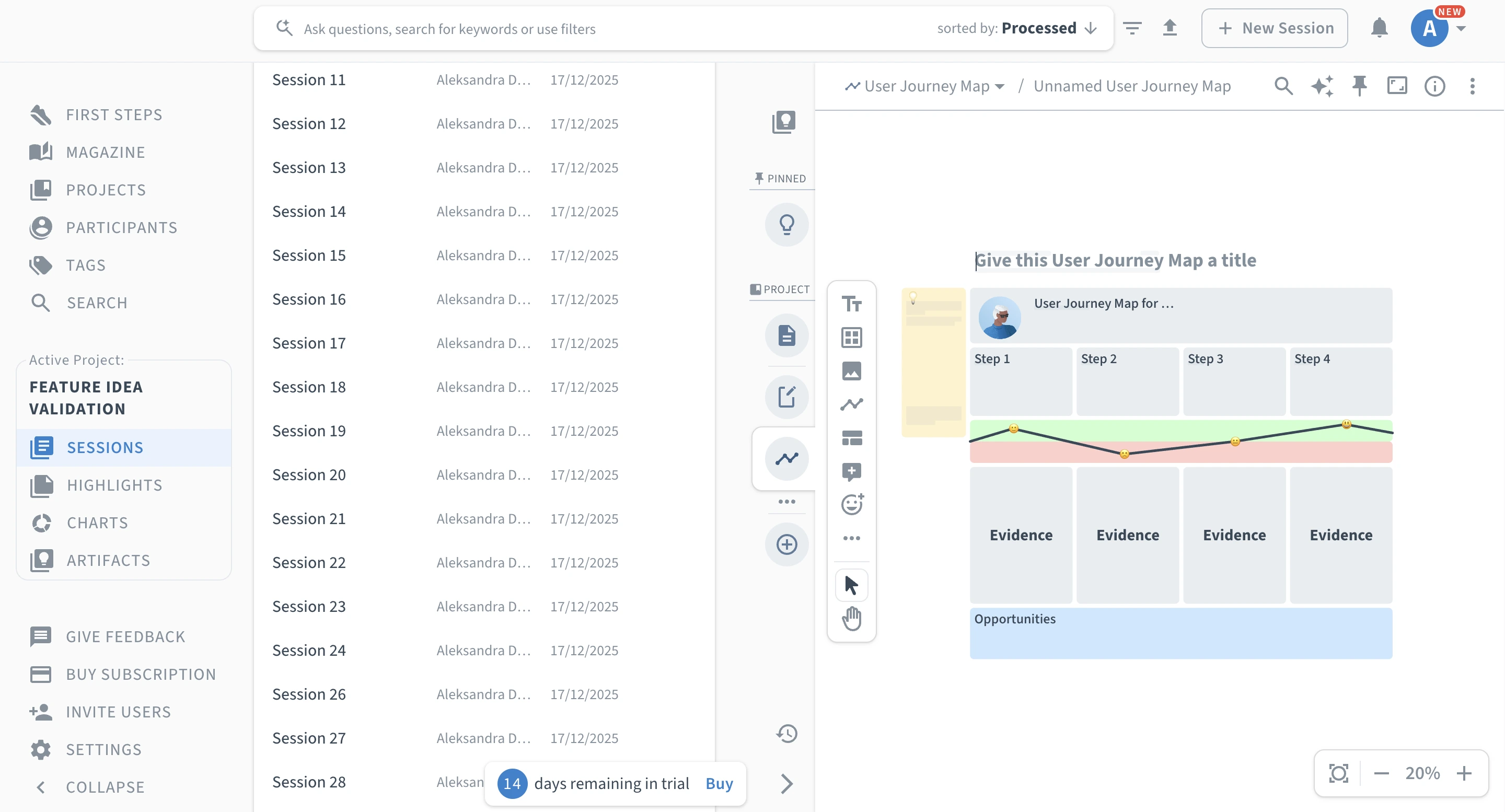
In each Project, you get to add different artifacts to complement a given research study. You can choose from:
- an empty note or an empty whiteboard,
- a report template,
- a finding template,
- a persona template,
- an affinity map,
- a user journey map,
- an empathy map.
Fun fact, playing around with a user journey map, we finally got to see Condens’ auto-categorization and theme-spotting feature in action (worked well!).
Not sure why this functionality is not available elsewhere in the platform, and instead hidden so deep.
Overall, the templates seem to be pretty valuable (again, not the most modern), but pretty practical if you don’t mind the manual work attached with filling them out here on the tiny page in Condens.
The Magazine and role-based access
Finally, let’s get to sharing the insights and giving out access to your research through Condens.
You can share your findings in three main ways.
For one, you can download created charts as images or files, to then upload elsewhere or share over Slack, Teams, and other platforms.
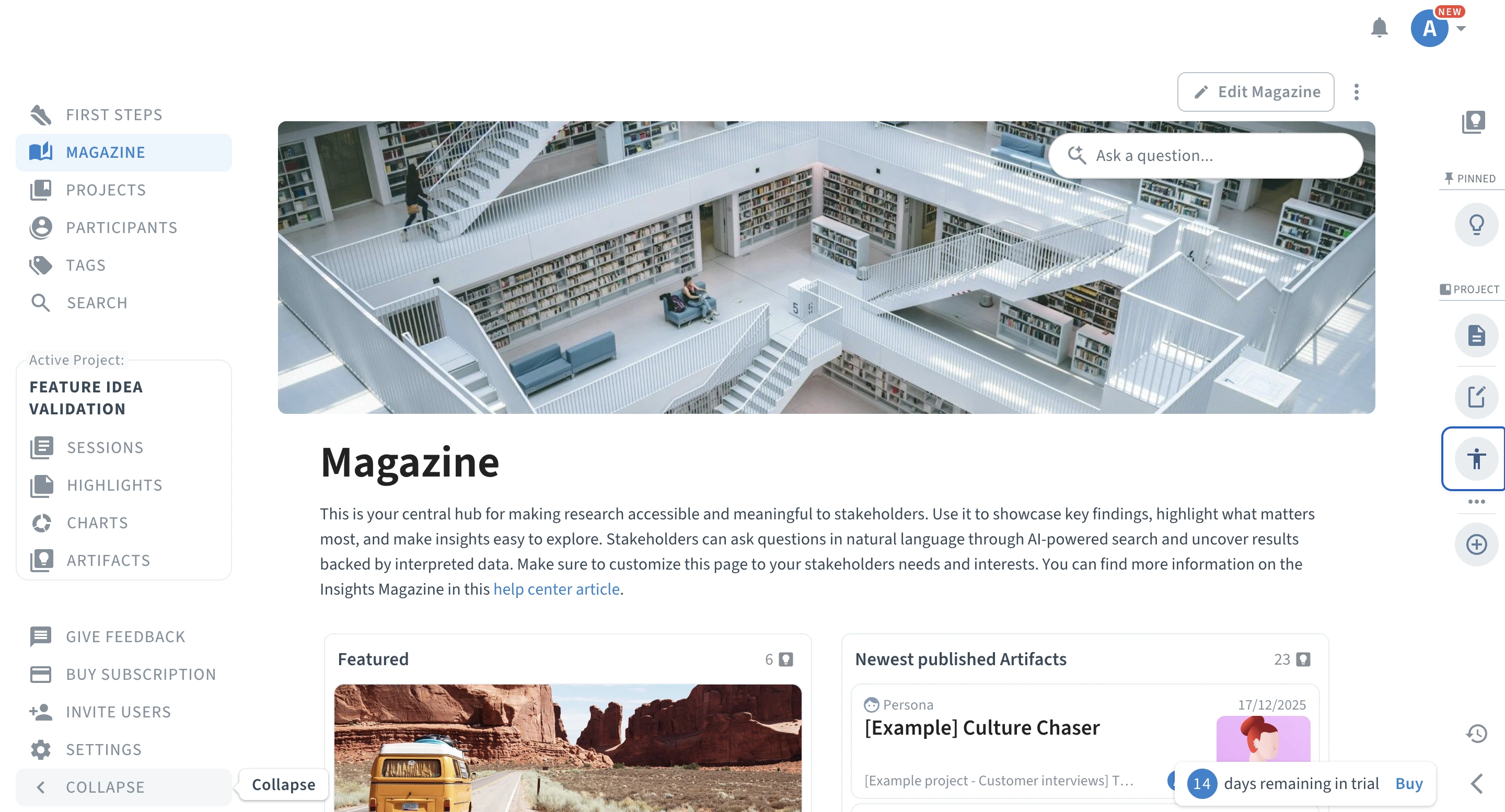
For two (a more practical option, given your team validates research and wants to actually be involved in the process), you can give your stakeholders direct access to the platform inviting them to Condens. From there, they get to access a dedicated page called the ‘Magazine’ where all research you decide to publish lives. From specific findings to full research reports.
For three, after giving access to Condens, you can also invite your stakeholders to view past projects or the ones you’re currently working on (if you decide to keep them public).
Ease of use
An excerpt from Condens website summarizes the platform pretty well in our opinion:
“Build an insights hub. Translate your analysis, themes, and findings into actionable, traceable insights. Develop a searchable insights library that empowers your organization to make impactful decisions.”
With Condens, you really have to put in the work to build your own, searchable repository.
Putting a lot of manual effort aside, we also run into many issues, confused moments, and wait, it’s supposed to be here pauses. Help center was extremely needed when trying out Condens’ possibilities given its outdated UI and somewhat clunky feeling with many clicks needed to get to core features or perform basic actions, as simple as uploading research data into the platform.
What Condens users themselves say about the platform’s ease of use varies. Some praise it saying: “What I love most is how user-friendly and intuitive it is—it truly makes the often messy work of research feel smooth and enjoyable.” G2 review.
Others, not so much. Saying things like:
- “I think the usability of the highlights feature can be a little smoother - for example creating folders or categorize highlights for each study / project. Not a fan of the home screen, can be more user friendly.” G2 review
- “Some clients tell us they're confused by the UI” G2 review
- “The Whiteboards (kinda like a miro board, but integrated with your tags and research directly) are a great concept, but the usability is kinda tough.” G2 review
“The learning curve can be a bit steep for newcomers.” G2 review
Customer support
Customer support is one of the areas where Condens seems to shine most at, offering a user centered approach.
Customers on G2 praise the platform’s Customer Support team a lot, describing it as simply ‘stellar’.
“Customer support have been helpful in identifying possible sessions with the company, to board in the new tool, but recent changes in the plans made things we needed more expensive.” G2 review
4. Enterpret
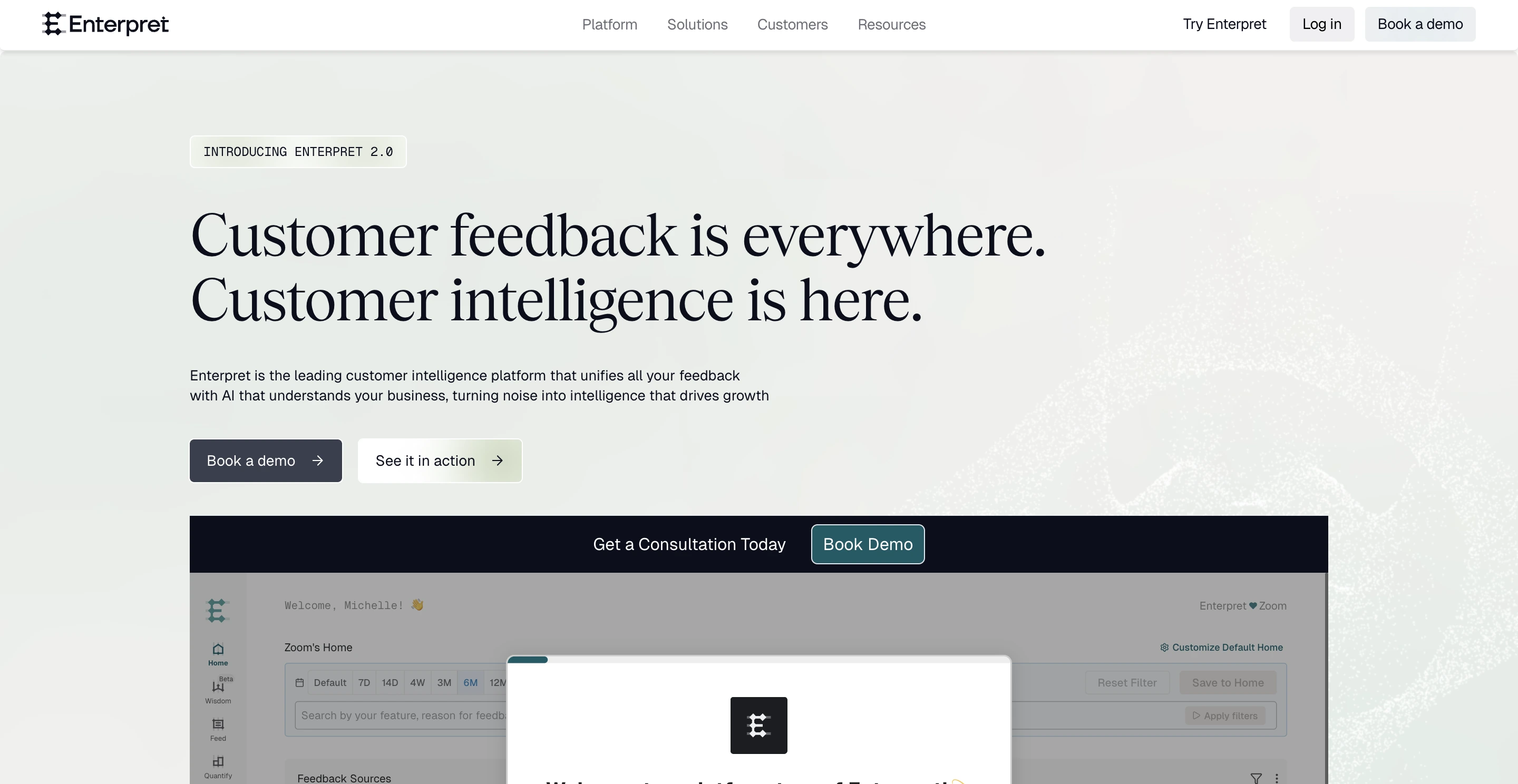
Enterpret is a platform that enables you to centralize and analyze customer feedback to then help shape product development. But they also dedicate their tools for other teams, not just UX Researchers and Product people, but also Sales teams to help analyze user needs better.
Taken as a research repository specifically, it covers features such as:
- Connecting feedback data into the platform with 50+ native integrations and file uploads,
- Analyzing the data with AI and Dashboards,
- Classifying the feedback and insights with tags,
- How about charts, graphs, and sharing insights, though?
At the time of writing this article, Enterpret has a 4.5 out of 5 star rating with a little over 50 reviews submitted on G2.
Enterpret pricing
Unfortunately, Enterpret's pricing is not disclosed on their website. To get to know the exact pricing, you have to book a call with Enterpret’s team.
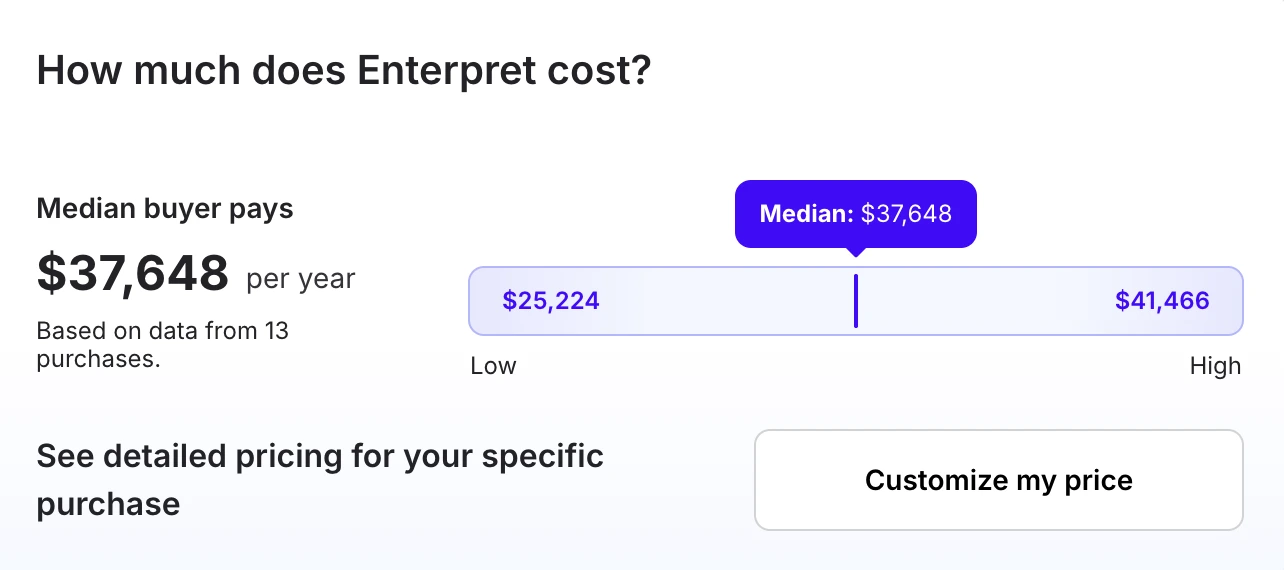
But, to get a rough idea on how much you’d need to spend on Enterpret’s research repository, we took a look at Vendr again, which told us that the median buyer pays nearly $40k per year for their Enterpret subscription. Making it the most expensive solution from the top research repositories platforms we took for a close up look.
Features overview
Enterpret is one of the tools that not only hides its pricing behind a demo, but also the possibility to test out the tool on a self-serve free trial.
But, they don’t leave you completely empty-handed. So, if you don’t feel like booking a whole demo just to take a quick look whether Entrepret is a match for your research needs, you can take a 5-minute platform tour directly on their website.
Here’s how the tour goes and what it presents.
Unifying customer feedback with context
The platform tour starts off by giving you three paths for it to happen.
We chose one closest to exploring a research repository solution, so the one where the platform unifies feedback with context, connecting sources, eliminating manual tagging with AI analysis, and understanding feedback at scale.
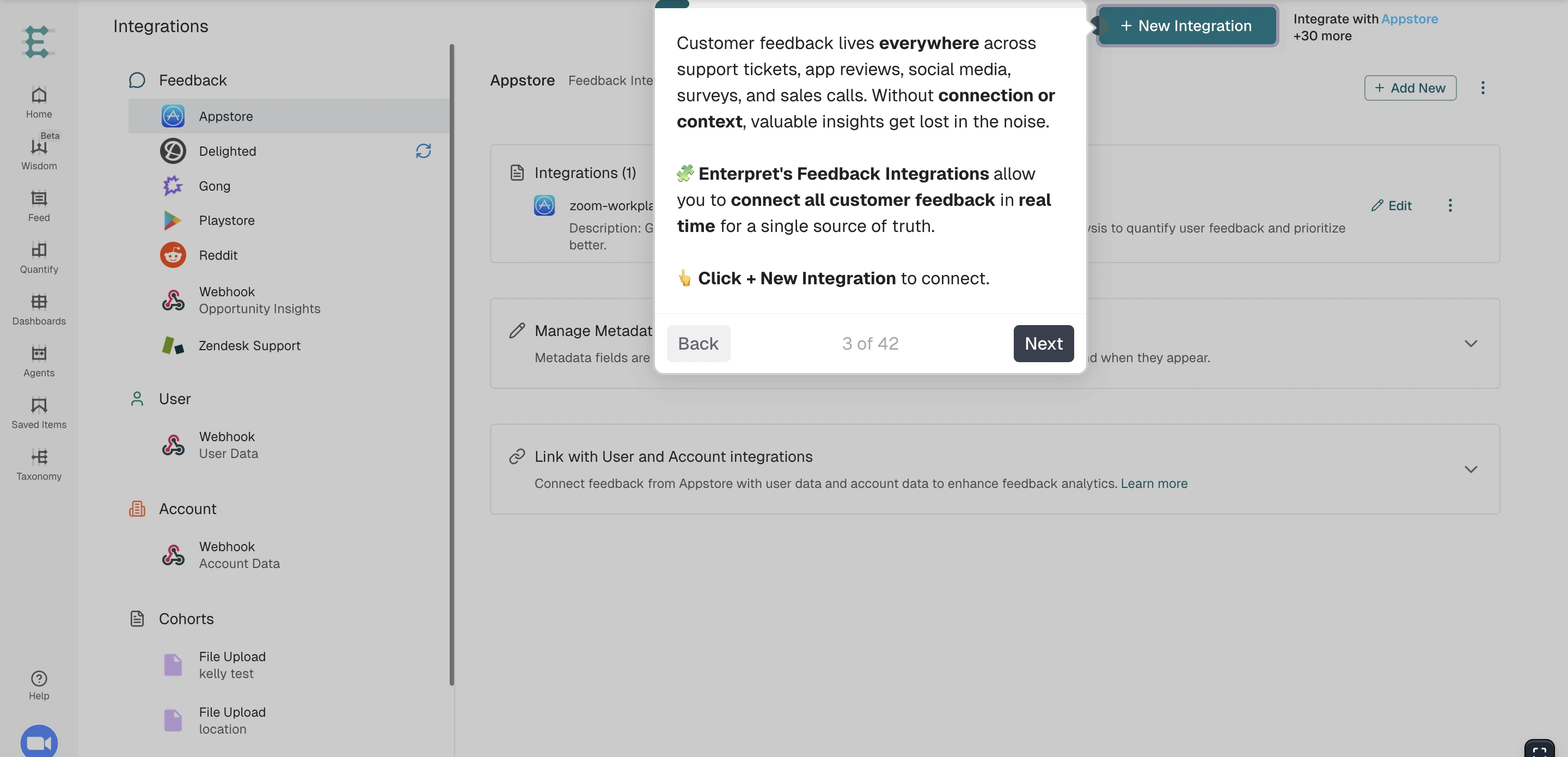
Now, the first part, connecting feedback, Enterpret, although most expensive, gives you the biggest number of integrations to connect feedback from within them. You get to connect 50+ platforms, from Gong, to Slack, to G2, or Playstore.
An added option that wasn’t possible with the previous platforms is to add more context into the tool, just as you would when working on an AI agent. You can import your existing resources like detailed documentation about the product, help content, guides, and changelogs.
AI and taxonomy
Enterpret’s Adaptive Taxonomy uses AI to eliminate manual tagging and automatically classify feedback into contextual themes that uncover the full granularity and “why” behind every comment.
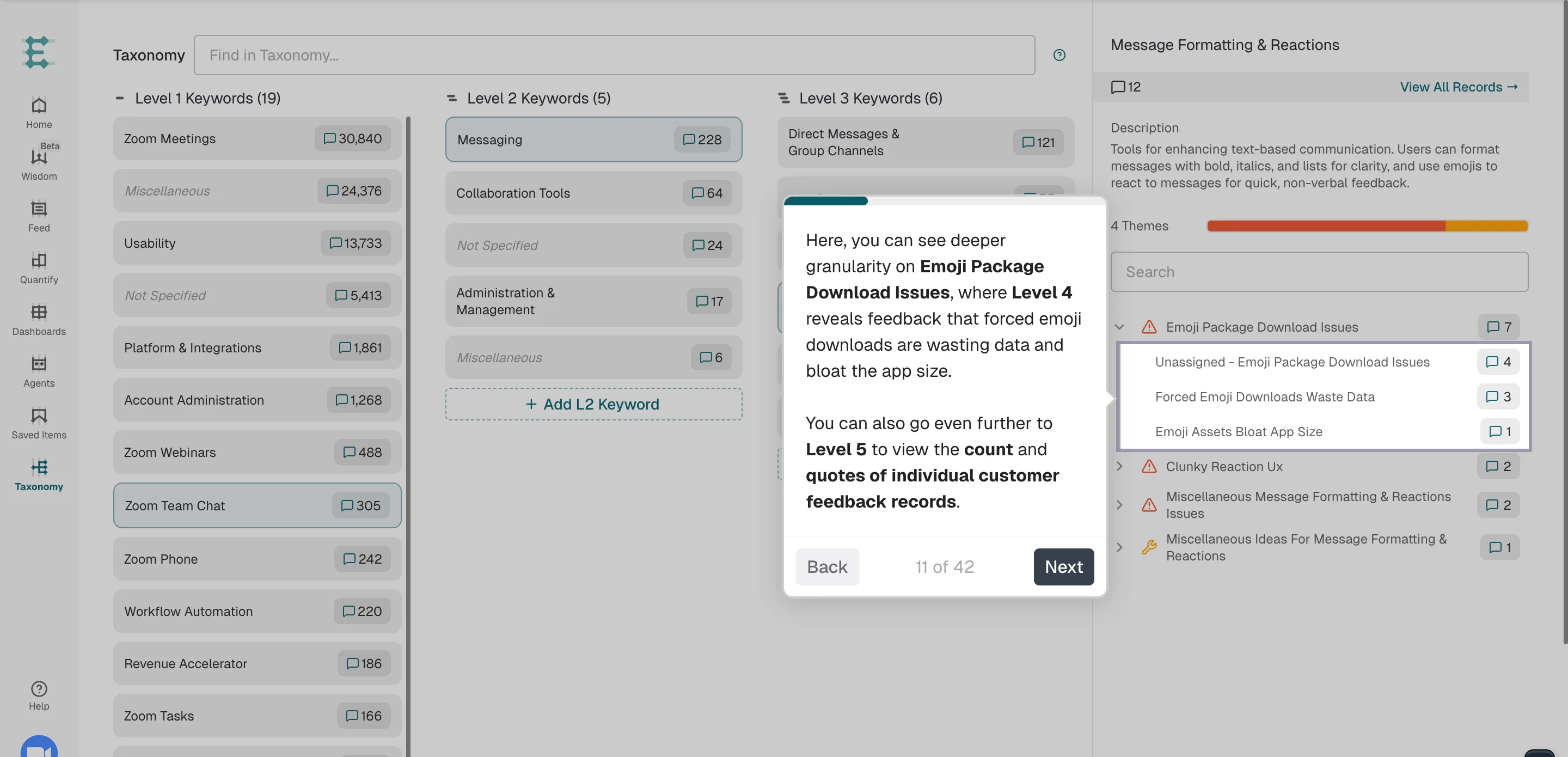
Now, each added source is broken down into 5 levels of insights depth.
Starting with level 1, you get the most surface level overview of the overall topics and themes found within the data, level 2 is specific topics within each theme, level 3 is even more specific pain points within a given topic, level 4 goes even more granular, but still stays within the idea of insights based on data, and level 5 is actual feedback count and exact quotes that support a given idea.
Explaining how granular the platform gets, breaking down the data into ever smaller pieces was a challenge in itself, but apparently, it’s also a particular challenge for Enterpret’s users too.
Users mention the following issues:
- “I found the different levels of filters difficult to navigate at first. I also find that the formatting in each Quantify isn't always consistent even if the prompt hasn't changed. [...] Outside of that I experience intermittent slowness and loading issues.” G2 review
- “For a team like my own who may design for more applications than my fingers can count, with so many integrations pulling in feedback it can be difficult to filter out actionable insights from noise. It may take you some time to fine tune to ensure you’re getting relevant, high impact trends rather than sifting through redundant or low priority feedback.” G2 review
- “It can be difficult to maintain taxonomy and requires a significant amount of manpower to constantly merge duplicate reasons, etc.” G2 review
Understanding feedback
Next comes deeper understanding of the uploaded data besides just overviewing the extracted insights.
Similarly to two other top research repository platforms on this list, Survicate and Dovetail, Enterpret also gives you the possibility to chat with your data using a trained AI.
You can ask AI any question across your feedback to get insights and data on your customers
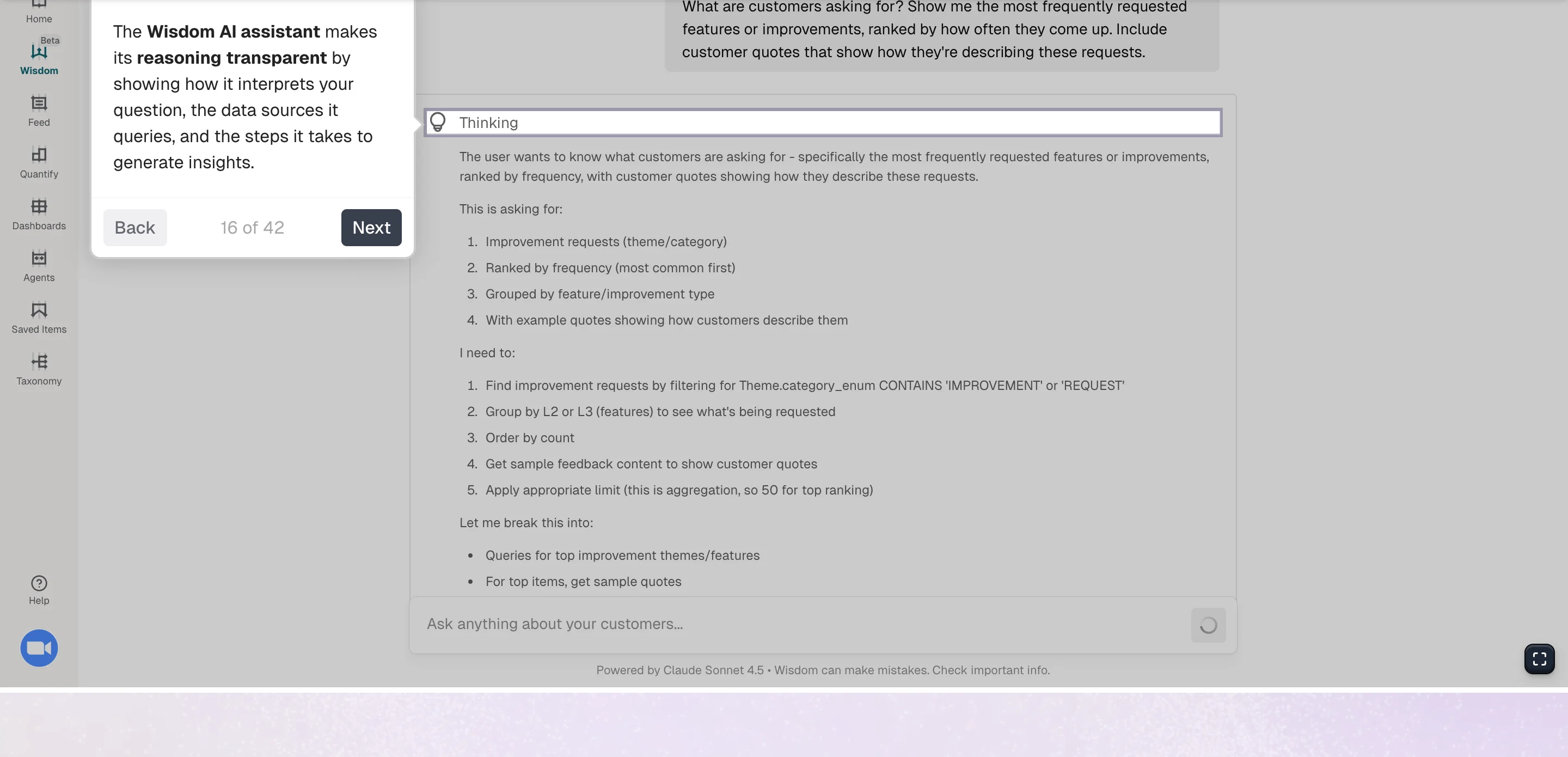
Enterpret’s Wisdom AI is powered by Claude Sonnet 4.5.
The AI chat gives you quick answers to your questions while linking back to specific quotes and sources it extracted the feedback from for added transparency.
What’s unique about this particular AI chat within a research repository is that it’s also available directly from tools like Claude or ChatGPT. Similarly to Survicate, Enterpret also makes it possible to chat with your data directly from within Slack.
Dashboards
Next on the list of features we’d like to take a closer look at is Dashboards.
Now here, it’s again pretty similar to what Survicate offers, giving you a custom view of your feedback with charts, graphs, and data in bird-view mode. Especially useful for giving easy access to the most important data to stakeholders.
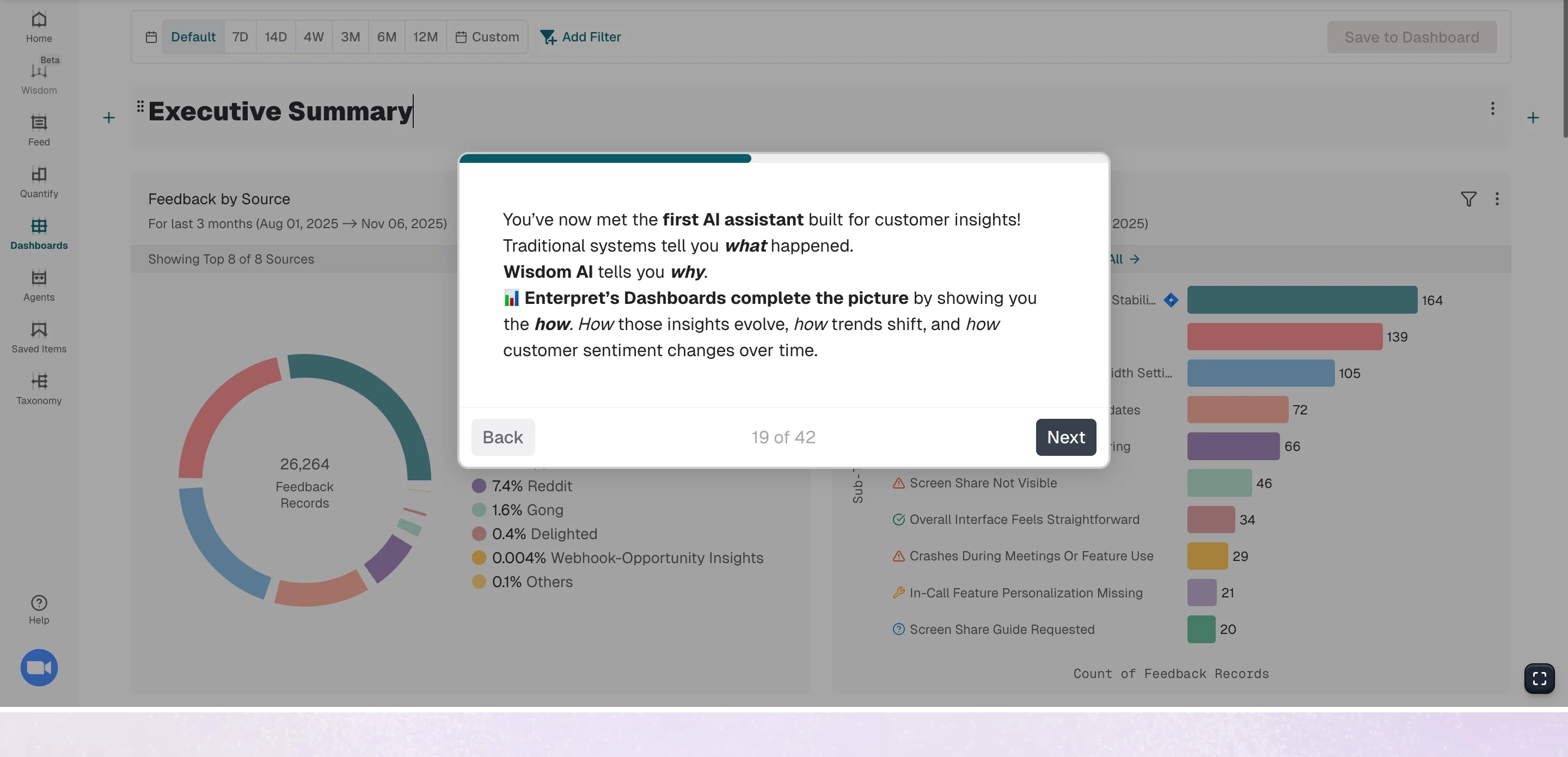
What’s up for praise when it comes to Enterpret’s Dashboards is definitely the amount of filters available. You can break feedback down by keyword, theme, source, sentiment, and language.
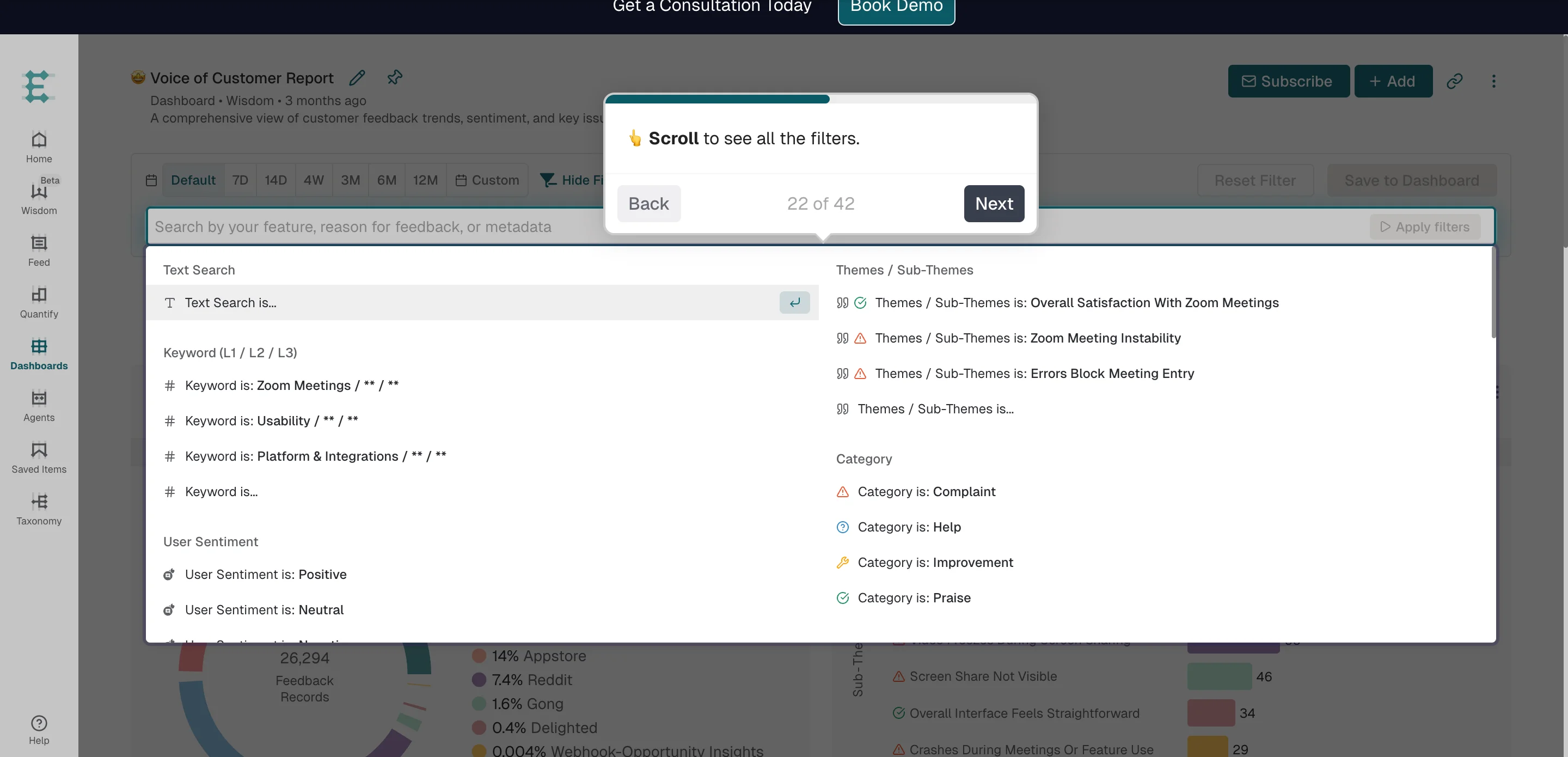
From within the Dashboard, you can also reach the trained AI directly to ask any more questions that pop into your head while viewing the data.
To act on feedback, you get to assign work to Jira directly from Dashboards (more on that in the next section.)
But before we get into acting on feedback, we have to mention the biggest con that’s visible even without testing the platform ourselves: the outdated design.
Not the most visually pleasing UI may not only affect the aesthetics, but often hinder how user-friendly a given platform is too.
Although most users who left their reviews for Enterpret on G2 are happy with the ease of use, some report issues with specific features (particularly how granular the platform gets, as explained earlier), but also with how intuitive it is, especially at first.
Saying things like:
- “It can be difficult to get started on, sometimes very simple things can be very complicated.” G2 review
- “Enterpret, while not too difficult to use still is not as intuitive as it could be.” G2 review
Agents
Enterpret is very similar to Survicate (the top, robust research repository solution on this list), in many ways.
Enterpret connects with around 50 external solutions, Survicate with around 45 platforms. Those native integrations make it possible not only to send research or feedback data for analysis, but also to act on the extracted insights.
Say your team learned that the new checkout process in the mobile app is not working as expected, not loading properly for half of the users. Right after spotting that pattern, you can create a direct ask in Jira for a fix to be made.
Or you’d like to set up AI-generated summaries and reports sent directly to a specific Slack channel for easy insights sharing. All those scenarios are possible with both platforms.
Although similar, Entrepret offers a slightly different approach here.
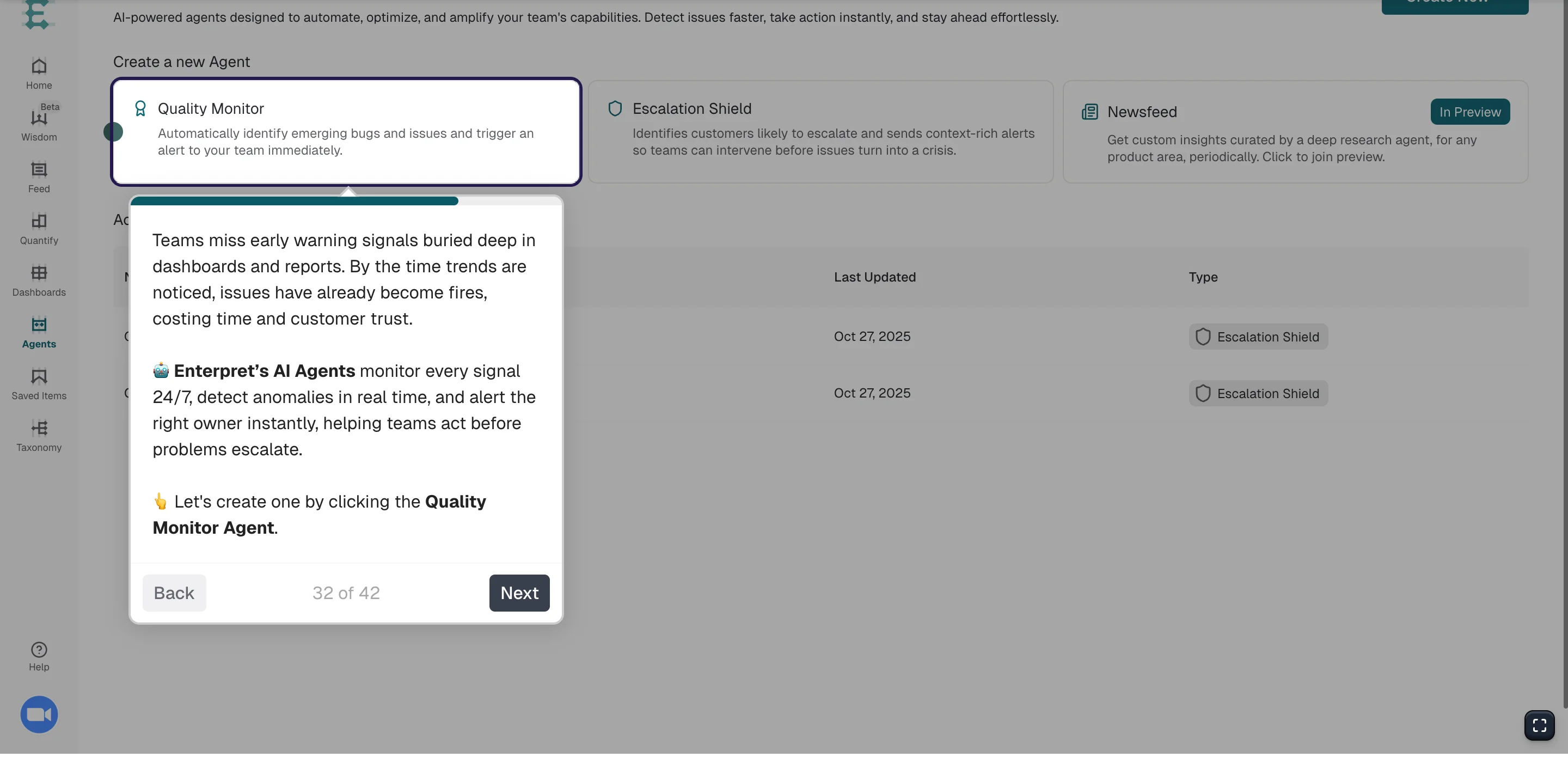
Here, you can choose to set up three different AI agents that track the data within the platform and spot anomalies to then send alerts through a selected channel.
The AI agents in question:
- Quality Monitor Agent: tracks signals constantly, detects anomalies in real time, and instantly alerts the right owner through Slack.
- Escalation Shield: identifies customers likely to escalate and sends context rich alerts so teams can intervene before issues turn worse.
- Newsfeed: customer insights delivered periodically.
Ease of use
Enterpret's ease of use presents a mixed picture with most users finding it easy to use and user-friendly, while some mention specific problems
The platform may have an initial learning curve, with users reporting that getting started can be difficult and that "sometimes very simple things can be very complicated," while others note it's "not as intuitive as it could be."
The platform's depth can create substantial navigation complexity too, particularly around its 5-level taxonomy system that breaks down feedback from high-level themes to individual quotes. Users specifically mention finding "different levels of filters difficult to navigate at first."
The amount of data we can connect with Enterpret can also be a double-edged sword.
For teams managing multiple products with many integrations pulling in feedback, filtering actionable insights from noise becomes challenging and requires time to fine-tune the system for relevant, high-impact trends rather than redundant or low-priority feedback.
Lastly, the outdated design, while not the most visually pleasing, may also hinder user-friendliness beyond just aesthetics.
Overall, Enterpret appears to be a powerful platform that requires a bit of time investment to master, particularly for teams dealing with large volumes of feedback across multiple sources. But definitely not on the super difficult list of platforms that could end up being unusable.
Customer support
With Enterpret, you can certainly expect a good Customer Support team.
Users on G2 explain it best:
- “The Enterpret team are very attentive, and respond to any questions really quickly, whether it's a bug, asking for support with an analysis, or any other questions. They have implemented new features at our request on multiple occasions, and take feedback onboard for small improvements to the UX.” G2 review
- “The support from the Enterpret team has also been great - they're super response, friendly and helpful.” G2 review
- “The implementation process for Enterpret was straightforward and remarkably user-friendly. The Enterpret team played a pivotal role in expediting our onboarding process, offering assistance through comprehensive training sessions, support, and a close working partnership.” G2 review
5. NotebookLM
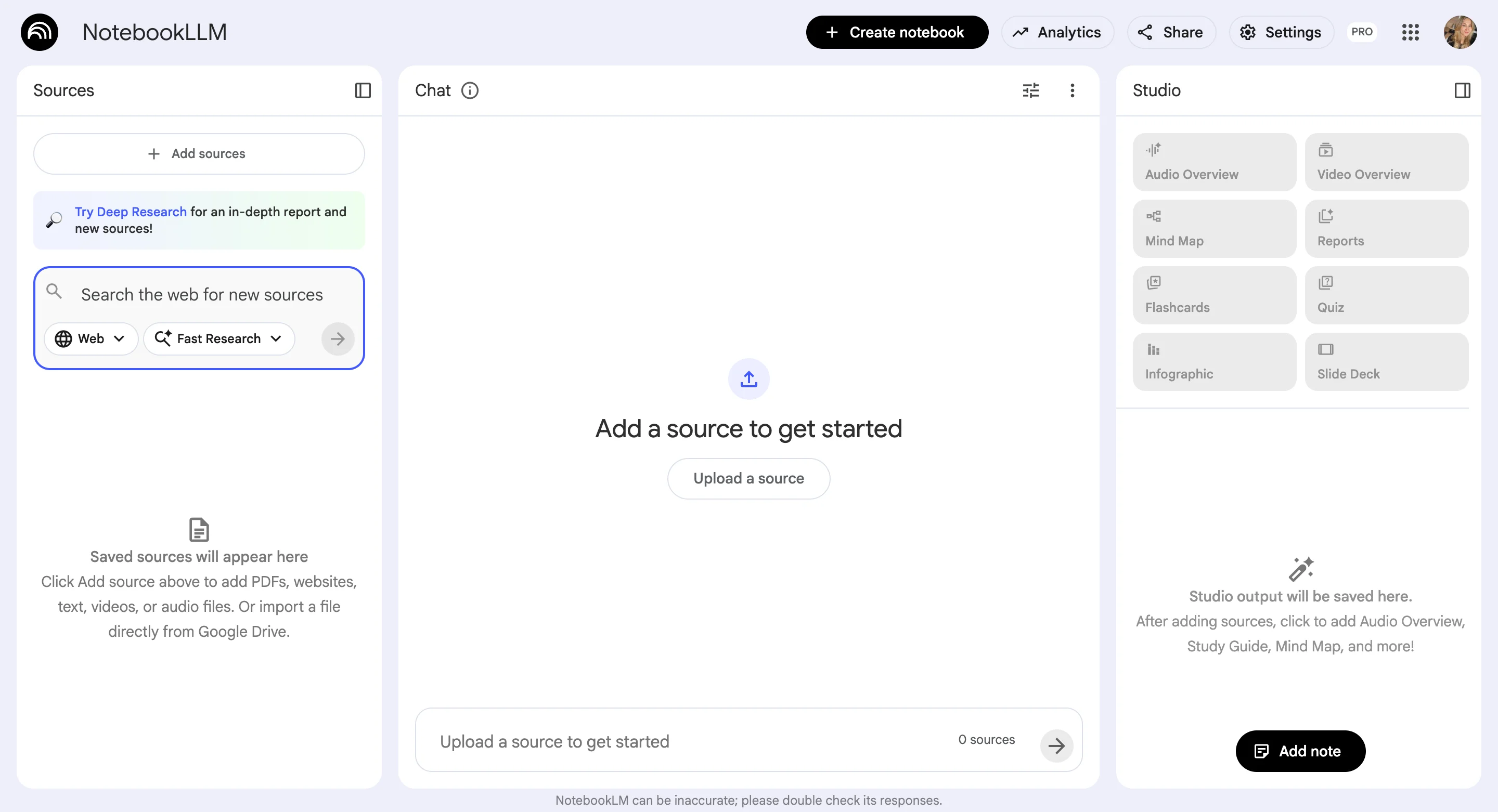
NotebookLM is not a research repository platform specifically, but it can serve as one.
This Google's AI-powered research dedicated tool helps you interact with your documents through conversation. Built on Google's Gemini language model, it transforms your uploaded research materials, whether research papers, reports, notes, or other documents, into an AI assistant that can answer questions, surface insights, and help you understand complex information.
It starts to collect reviews from users on G2, with the current rating being 4.9/5 stars, but only under 10 reviews submitted so far.
Pricing
Google’s NotebookLM originally launched as Project Tailwind in May 2023, but the tool shed its experimental status in October 2024 and now offers both a free version and NotebookLM Plus, a paid tier available to enterprise customers and Gemini Advanced subscribers through Google Workspace and Google Cloud.
NotebookLM (Free) is designed for individual users and includes core features like uploading PDFs, Google Docs, Google Slides, websites, YouTube URLs, and other sources. You can generate summaries, FAQs, timelines, and briefing documents with one click, create and listen to audio summaries from anywhere, and ask questions to get detailed insights with citations.
NotebookLM Plus (Paid) includes everything in the free version plus significantly expanded capacity with 5 times more audio summaries, notebooks, queries, and other features. Here, you get to create shared notebooks for team collaboration with usage analytics, enhanced privacy and security controls, and additional enterprise-focused capabilities.
To use NotebookLM on the upgraded version, a Google AI Pro or Google Pro Ultra subscription is required, which cost around $30 and $350 monthly, respectively. So either $360/year or $4200/year, making it the cheapest research-repository-like tool on this list.
Features overview
But with the lower costs come limited capabilities, so let’s get into the exact features overview.
Notebooks and supported sources
NotebookLM is the easiest tool to test out. After all, everyone should be able to access it from within their Google workspaces.
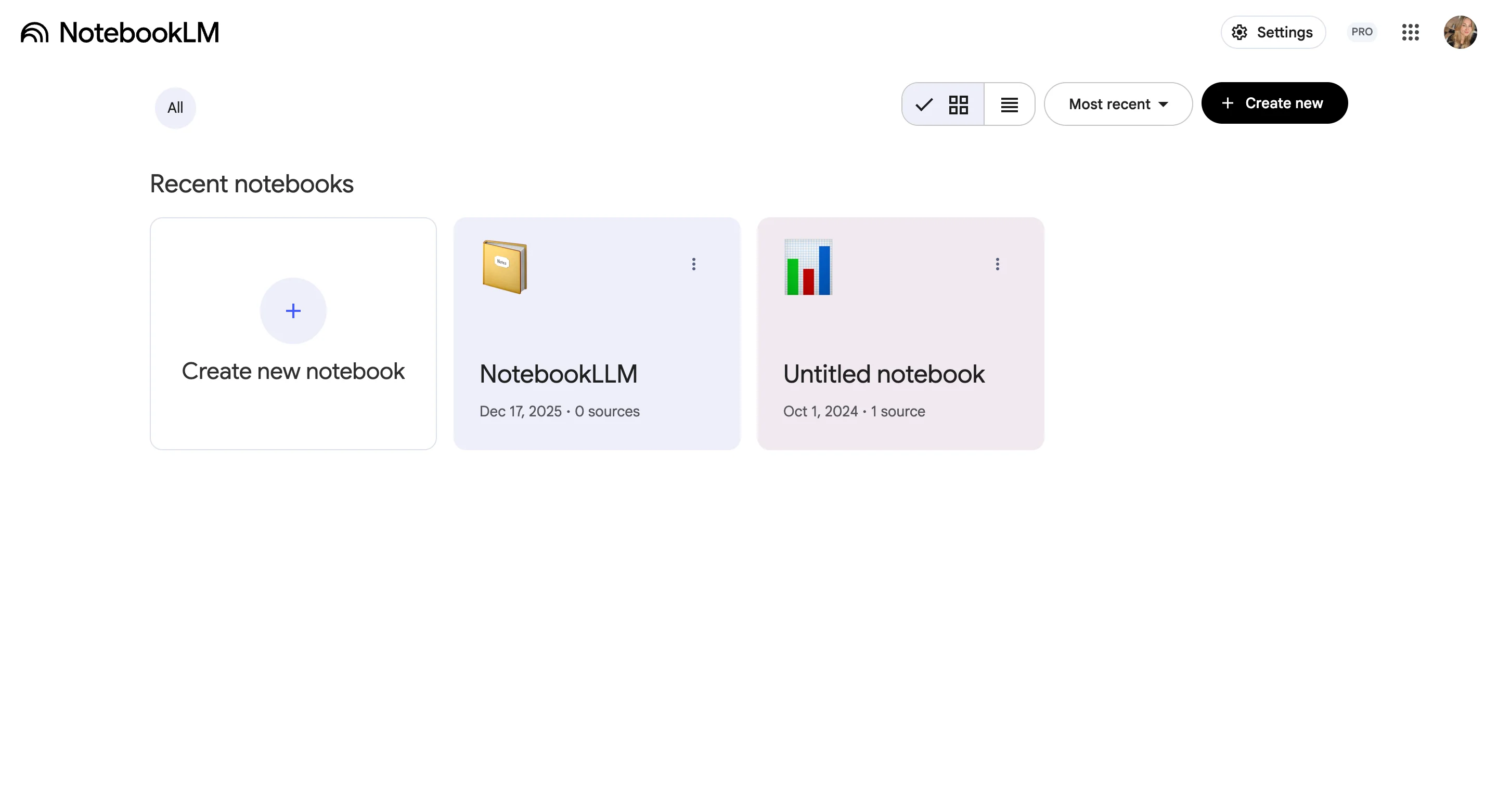
Once you get in, you’ll be met with the overview of all the “notebooks” you’ve created, which may translate to specific studies or research projects you’re running.
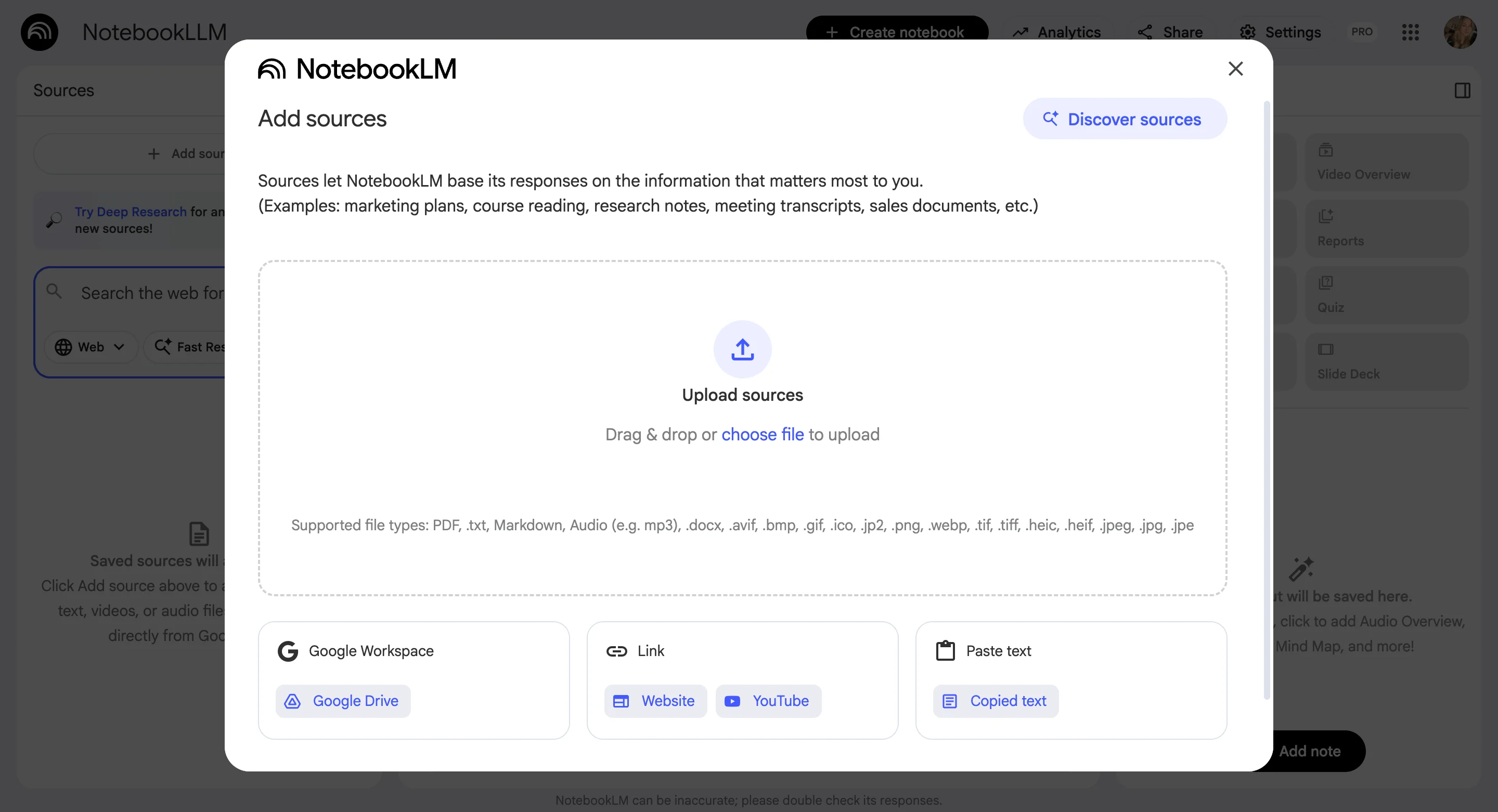
When creating a new Notebook, you can add in your sources, which are limited to all sorts of files basically. We’re talking PDF, .txt, Markdown, Audio (e.g. mp3), .docx, .avif, .bmp, .gif, .ico, .jp2, .png, .webp, .tif, .tiff, .heic, .heif, .jpeg, .jpg, .jpe, as well as files from within your Google Workspace, direct URLs to websites or YouTube videos, and pasted text.
There’s no possibility to connect NotebookLM with an external user research platform to connect your data with, as of now.
Data analysis
Not judging the book by the type of files you can upload into it, let’s take a closer look at the data analysis possibilities of NotebookLM to see how it really compares with professional research repositories.
And unfortunately it’s not as comprehensive.
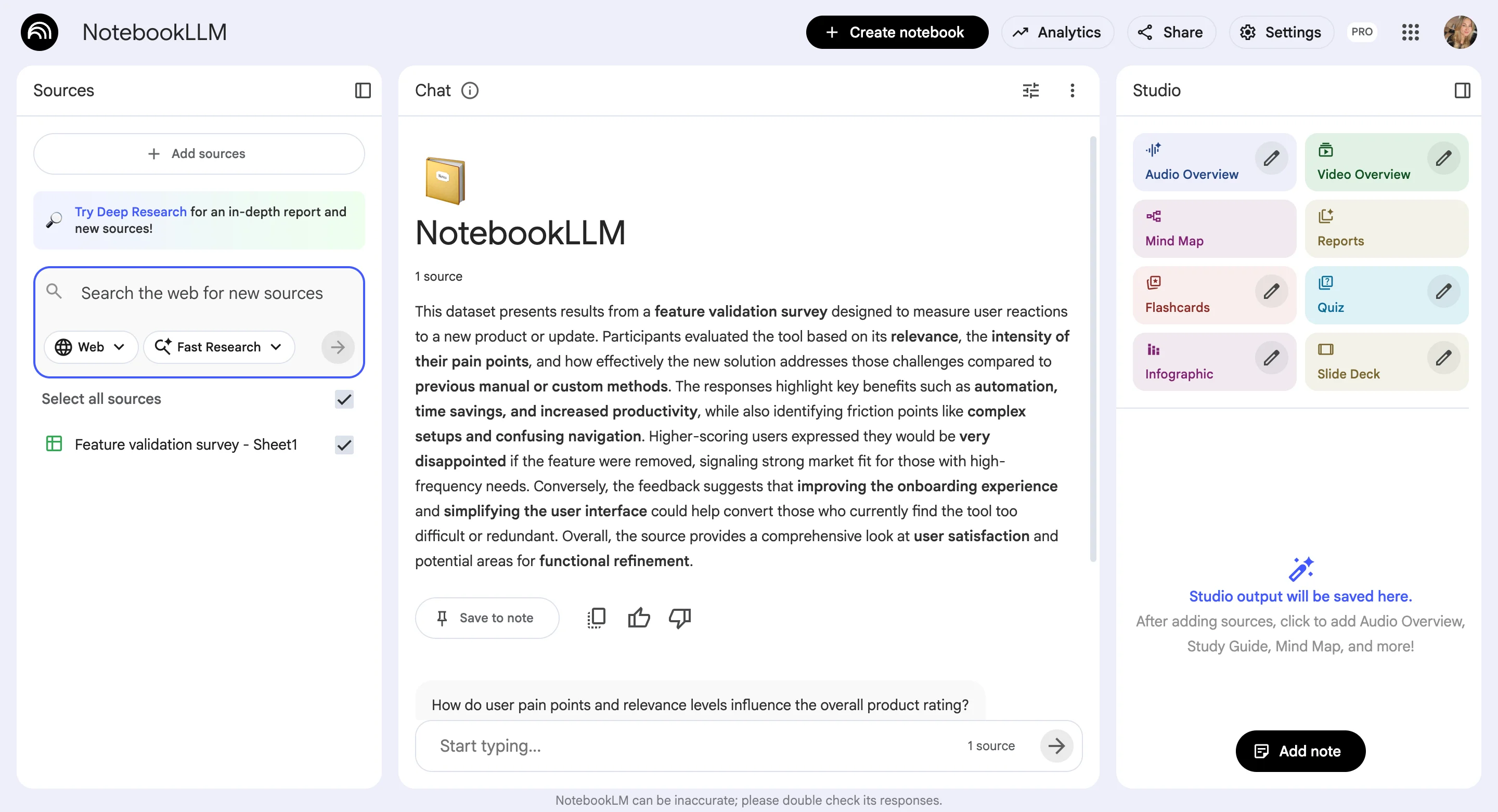
For example, after adding in a csv file with around 30 responses to a feature validation survey, NotebookLM gave us a very short summary, explaining the goal of the survey and a rundown of the responses, but not linking back to exact quotes or the number of supporting insights for a given finding.
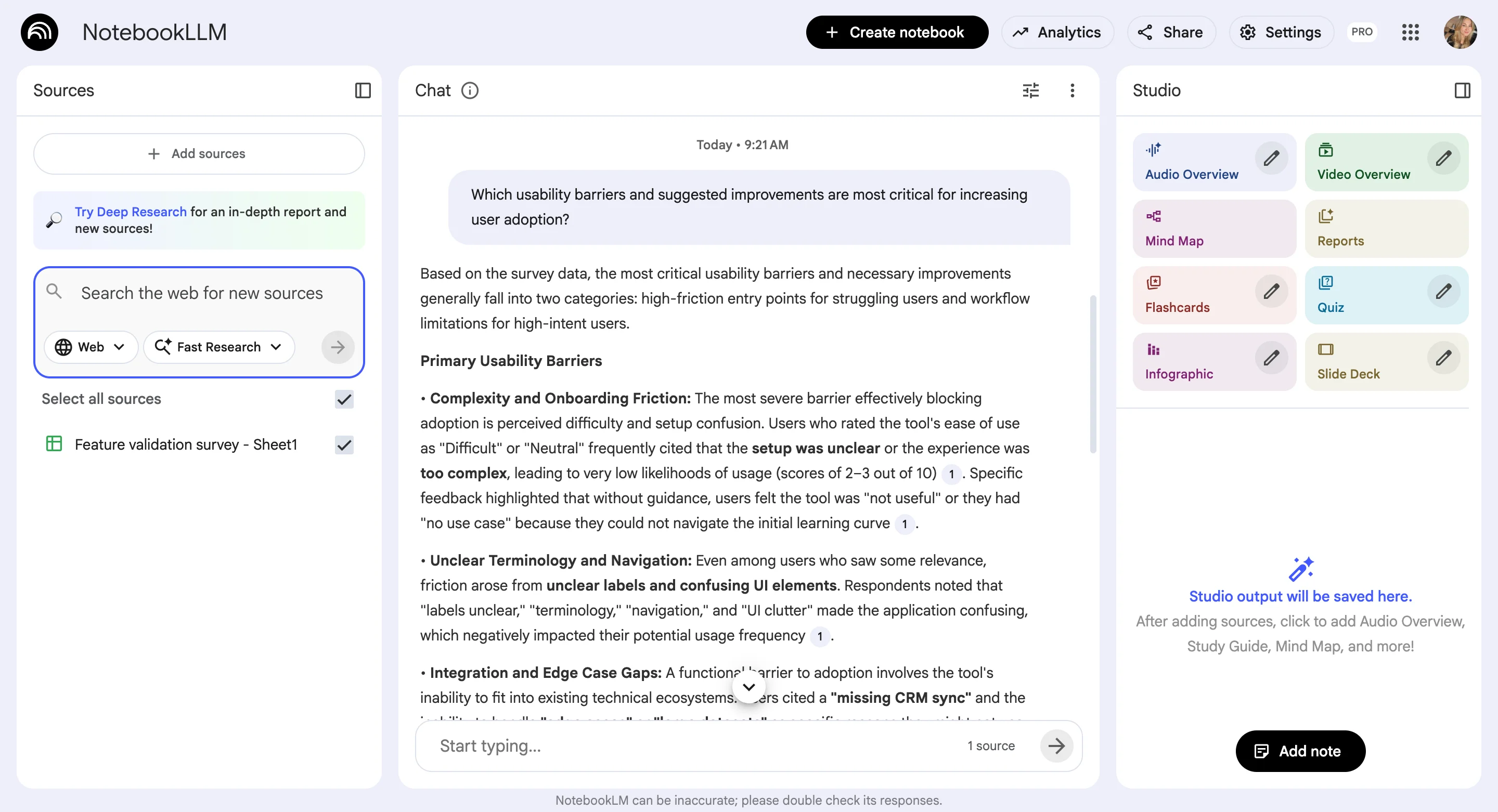
Only after you ask more detailed questions, does NotebookLM dig into the data deeper, providing sources (but linking back to the whole file (?), still not being too transparent about the way it makes sense of uploaded data.
Sharing the insights
From the additional options, besides just chatting with all the data, you also get to create insights, reports, overviews, blog posts, quizzes and mindmaps based on the information you’ve uploaded.
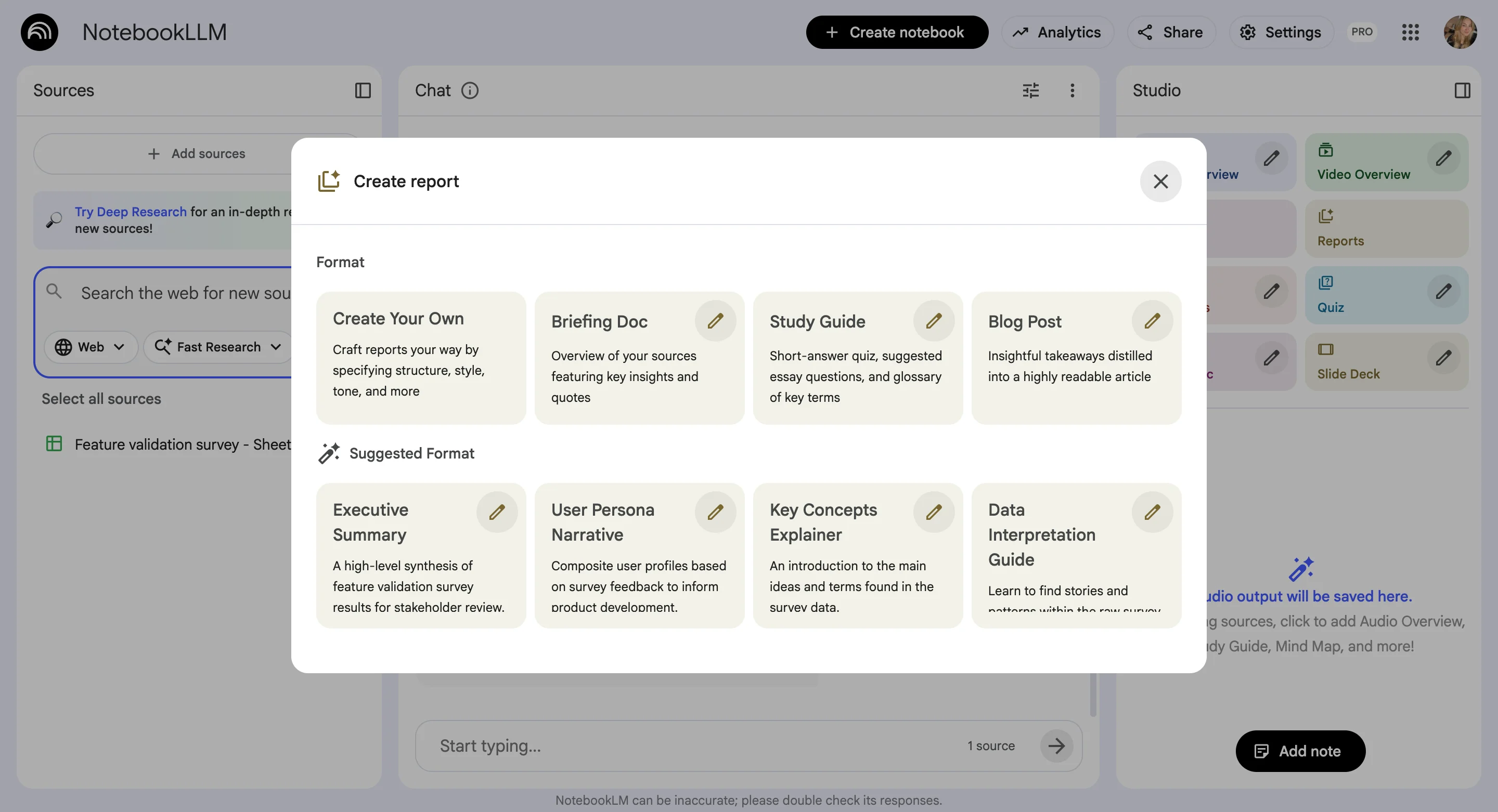
The reports, the summaries, and answers take quite a bit of loading time, unfortunately.
Now, putting the loading time aside, all the generated assets, as well as full notebooks (or just the chat) can be shared with your stakeholders.
If you share research insights from NotebookLM with at least four team members, you can then check the Analytics tab for more information on how the Notebook is actually used by your teammates.
Ease of use
NotebookLM is a pretty straightforward tool with a modern user interface, making it easy to get around and use.
This is also supported by the G2 reviews, with users saying things like:
- “The UI is super easy to use.” G2 review
- “As it provides summaries and insights, you can check details of the specific source it was extracted from very intuitively.” G2 review
Customer support
Based on Google product reviews (since NotebookLM-specific support reviews aren't available on G2), NotebookLM's customer support can vary.
Support quality appears to vary significantly depending on your licensing level, with enterprise customers potentially receiving better service, especially if they work through reseller channels that can provide additional management support.
“Customer support can vary depending on the level of licensing, although there are various reseller channels that can provide support in management if you choose to contract the service in that way.” G2 review
Response times are a common pain point, while some users praise 24/7 availability and helpful support teams.
“It takes only a short time to implement, and customer support is available 24x7 to address our requirements. 100% recommend to every small, medium or large enterprise too” G2 review
Others report slower-than-expected responses, particularly for non-urgent issues, with one user specifically noting they expected faster replies from Google's support team.
- “Cusomer support is okay, but i expected faster response from the google support team.” G2 review
- “Also customer support on non-urgent issues can be slower than expected.” G2 review
Do other tools make good research repositories?
Many tools can be used as research repositories, but most of them fall short once research scales.
General-purpose tools like Notion, Miro, Confluence, Airtable, or Trello rely heavily on manual structure, tagging, and upkeep, which often turns “organized” spaces into static archives no one searches or trusts.
Research execution platforms (Maze, UserTesting, Dscout, Optimal Workshop, Userlytics) are excellent at generating insights, but rarely at preserving and connecting them across studies and time. Call tools (tl;dv, Grain) capture valuable conversations but lack synthesis and cross-source analysis.
Analytics and behavior tools (Mixpanel, Hotjar, Crazy Egg) explain what users do, not why, and weren’t built for qualitative insight management. Even feedback and roadmapping tools (Productboard, Cycle, Chisel, Marvin) focus on prioritization and delivery rather than rigorous research synthesis.
In most cases, these tools either require heavy manual work, silo insights by study or team, or lack traceability back to raw data—which is exactly why many “repositories” end up looking tidy but rarely get used.
Summary
User Experience research might feel shaky right now, but the way researchers work is evolving fast. With AI adoption climbing, the real opportunity isn’t using AI to “conduct research for you.” It’s using it to make research usable: less manual tagging, less fragmented data, and far less time spent digging through old notes to prove a point.
That’s where modern research repository tools come in.
The best ones don’t just store transcripts, survey exports, and random spreadsheets, they help you connect data across sources, auto-surface themes with traceable quotes, organize insights into clear research projects, and share research findings in a way multiple stakeholders actually engage with (dashboards, exports, Slack, and searchable insight libraries).
In this guide, we tested and compared five popular options with a specific lens on AI features that support researchers (not replace them).
- Survicate stands out for end-to-end workflows and a researcher-friendly UI that makes research analysis and insights sharing fast.
- Dovetail is strong for qualitative depth but can get pricey and messy at scale.
- Condens offers classic repository structure, but still leans heavily on manual work
- Enterpret is powerful for large orgs with lots of sources, though complex and expensive.
- NotebookLM can help with lightweight synthesis, but lacks the integrations and traceability you need for a true repository.
If you’re choosing a specialized tool to make your further research process smoother, optimize for one thing: getting to credible, source-backed insights faster and making those insights easy for the rest of the org to find, trust, and act on.
FAQ
1. What is a research repository (and how is it different from a folder in Notion/Drive)?
A research repository is a centralized system built for research knowledge, not just storage. Beyond housing files, it helps you connect insights across studies, search by theme or question, and trace insights back to raw sources (quotes, recordings, surveys). Tools like Notion or Drive can store data, but without structured organization and synthesis, they often become static archives that teams don’t use consistently.
2. What are the must-have features in a research repository tool?
The strongest research repositories excel at four core areas, with these helpful features:
- Aggregating data from across sources (surveys, interviews, recordings, tickets, reviews).
- Analyzing and synthesizing with traceability (AI or automated themes that link back to exact quotes or data points).
- Organizing work into projects or study structures so insights don’t get lost.
- Sharing insights easily (dashboards, exports, Slack/Teams integrations, stakeholder access).
Survicate checks all these boxes with strong AI-assisted themes, dashboards, and flexible knowledge sharing options. Dovetail and Enterpret handle deep qualitative analysis well but can be more complex or costly. Condens offers classic project management but leans more on manual tagging. NotebookLM can help with lightweight synthesis but isn’t a full repository replacement.
3. Is AI in a user research repository actually safe or does it hallucinate?
AI can be both helpful and risky. The tools that handle it best are the ones that ground every conclusion in your data and surface key insights rather than generative summaries that feel good but may invent context. Survicate, Dovetail, and Enterpret all focus on AI outputs tied back to source content, which helps avoid hallucinations. Relying on tools without this linkage increases the risk of misleading UX research insights.
4. Which UX research repository tools should I choose?
- Best overall for research teams: Survicate
Matches deep qualitative analysis strength on par with Dovetail, and also adds survey building and activation workflows (e.g., routing feedback to Slack, Jira, etc.). It’s powerful and affordable, making user centric decisions easier than ever before. - Strong qualitative focus, easy to use but costly: Dovetail
Good tagging, themes, and qualitative synthesis with a clean, intuitive UI. But it’s significantly more expensive than similar alternatives and doesn’t include built-in survey creation. - Most granular + powerful, but complex and pricey: Enterpret
Offers very deep taxonomy and layered insight breakdowns, which can be a strength or a burden depending on how much structure your team actually needs. Most expensive option overall. - Affordable but limited: NotebookLM
Great for students, light syntheses, quick document interaction, and affordable research collaboration tools. Easy to use and cheap, but not built for multi-source research repositories at scale. - Least research-ready in practice: Condens
Intended as a repository, but UI and manual workload issues mean more research efforts, less automation, and slower insight flow compared to the others, making it the weakest option from a productivity standpoint. Atomic research is possible, but time-consuming.
5. What are the best UX research repository tools?
The best UX research repository tools in 2026 are Survicate, Dovetail, Condens, Enterpret, and NotebookLM, each covered in depth in this guide.
For most UX teams, Survicate is the strongest starting point: it handles data collection, analysis, and sharing in one place at a fraction of the cost of alternatives. Dovetail is the better fit if your workflow is primarily video and interview-heavy. Condens suits small teams comfortable with manual tagging, Enterpret suits large orgs with high feedback volume, and NotebookLM works for lightweight synthesis but isn't a true repository replacement.
6. Which research repository tools are easiest for non-researchers to use?
If the tool is only usable by the researcher who set it up, it's failed at one of its core jobs. Survicate and NotebookLM are the most accessible for non-researchers, both have clean, modern interfaces that don't require onboarding to navigate. Dovetail is close behind being pretty easy to grasp. Condens and Enterpret have steeper learning curves and work best when there's a dedicated researcher managing the setup and maintenance.
7. Do any of these user research repository software platforms integrate with Figma or Jira?
Yes, several do, though not the same ones.
For Figma, Dovetail integrates with Figma Make for AI prototyping workflows, letting design teams pull in real user quotes and research insights as context. Condens integrates with both Figma and FigJam, allowing you to reference and embed live design files in your research projects and push highlights directly into FigJam.
For Jira, Dovetail, Survicate, and Enterpret all connect with it. Dovetail lets you import Jira Service Management issues into Channels for automatic analysis and embed highlights into Jira issues. Survicate lets you automatically create Jira tickets from feedback patterns. Enterpret also integrates with Jira, letting you assign work directly from Dashboards, but at ~$40k/year median, it's the most expensive option on this list by a significant margin. Condens doesn't integrate with Jira, and NotebookLM doesn't integrate with any of these tools.
If Figma is the priority, Dovetail or Condens. If Jira is the priority, Dovetail or Survicate offer the best balance of functionality and cost.
8. Which tools work best for cloud-based qualitative research workflows?
All five tools in this comparison are cloud-based, but they handle qualitative workflows very differently. Dovetail and Survicate are the strongest for end-to-end qualitative work; both support call and video transcription, auto-theming across sources, and natural-language AI chat with your data. Dovetail leans more video-native; Survicate handles a broader mix of sources including surveys, support tickets, and app reviews alongside qualitative files.
Condens supports qualitative workflows too but relies more on manual tagging.
Enterpret can go very deep on qualitative analysis, its five-level taxonomy breaks feedback down from broad themes all the way to individual quotes—but that granularity comes with complexity and a ~$40k/year price tag that puts it out of reach for most teams.
NotebookLM can work for lighter qualitative synthesis if you're willing to manually upload transcripts and documents, but it doesn't link insights back to exact sources with the same reliability as the dedicated tools, which increases the risk of acting on something the AI got slightly wrong.
9. Which tools are best for storing video sessions and highlight reels?
Dovetail is the strongest here. Video transcription and highlight clipping are central to how it works, and Projects are built around interview recordings. Survicate supports call and video transcription via file uploads and connects with tools like tl;dv and Gong, but the video-native experience is more core to Dovetail's product. If video sessions are your primary research input, Dovetail has an edge. If video is one source among many—alongside surveys, tickets, and reviews—Survicate handles the full mix better.
10. Which research repository platforms support multiple workspaces or large teams?
For large orgs, Enterpret and Survicate are the strongest options, though with a significant cost difference worth factoring in.
Enterpret is built for scale, handling high feedback volume across 50+ sources with deep taxonomy and filterable dashboards designed for cross-functional visibility. It's powerful, but at ~$40k/year median it's a serious investment.
Survicate scales well too, with multi-seat plans, granular user permissions, custom dashboards, and flexible stakeholder access; team members who don't need a full account can still view and interact with research findings without taking up a paid seat. It also integrates with Slack for sharing insights across teams who never log into the platform at all. At under $8k/year median, it's a fraction of Enterpret's cost for most of the same large-team functionality.
11. What's the best research repository for a small UX team?
For small teams, the priority is usually getting value quickly without heavy setup or a big budget. Survicate is the strongest fit; intuitive, affordable (under $8k/year median), and handles the full workflow from data collection through to sharing. Condens is priced for small teams but requires significant manual effort to maintain. Dovetail's per-data-point pricing model can get expensive faster than expected once a small team starts analyzing real research volumes. NotebookLM is technically cheapest but too limited for serious repository work at scale. Enterpret, at ~$40k/year median, is simply not built for small team budgets.
12. Which tools are best for organizing interview notes and tags?
It depends on how much control versus automation you want.
Condens is the most manual; you upload transcripts yourself and tag each data point by hand, which gives you full control over how notes are coded but takes considerably more time to set up and maintain.
Dovetail offers transcript support and auto-categorizes data into themes, so you're not starting from scratch. The trade-off is that analysis can take a while to process, and the charts and visualizations that come out of it aren't the most readable.
Enterpret automates theming and tagging aggressively, breaking feedback down across five levels of granularity from broad topics all the way to individual quotes. It's powerful, but for many teams the level of detail becomes more overwhelming than helpful.
Survicate auto-generates themes and tags from connected data, but you can also create and customize your own topics on top of that—giving you speed without losing control. Charts are clean and exportable, and the interface makes it easy to share organized findings with people outside the research team.
NotebookLM can summarize uploaded documents but isn't built for structured tagging or organized note management at any meaningful scale.
13. What are the best Dovetail alternatives for user research repositories?
The right Dovetail alternative depends on what you're trying to fix. If it's cost, Survicate is the most direct swap; it covers auto-theming, AI chat, traceable quotes, and Slack and Jira integrations at roughly a third of the price. If it's the lack of survey functionality, Survicate is again the obvious move. Condens works for small teams willing to do more manual work. Enterpret goes deeper on taxonomy but costs significantly more than Dovetail. For product managers in particular, Survicate's combination of feedback collection, analysis, and direct integrations with product tools tends to make it the most practical Dovetail alternative.




.webp)
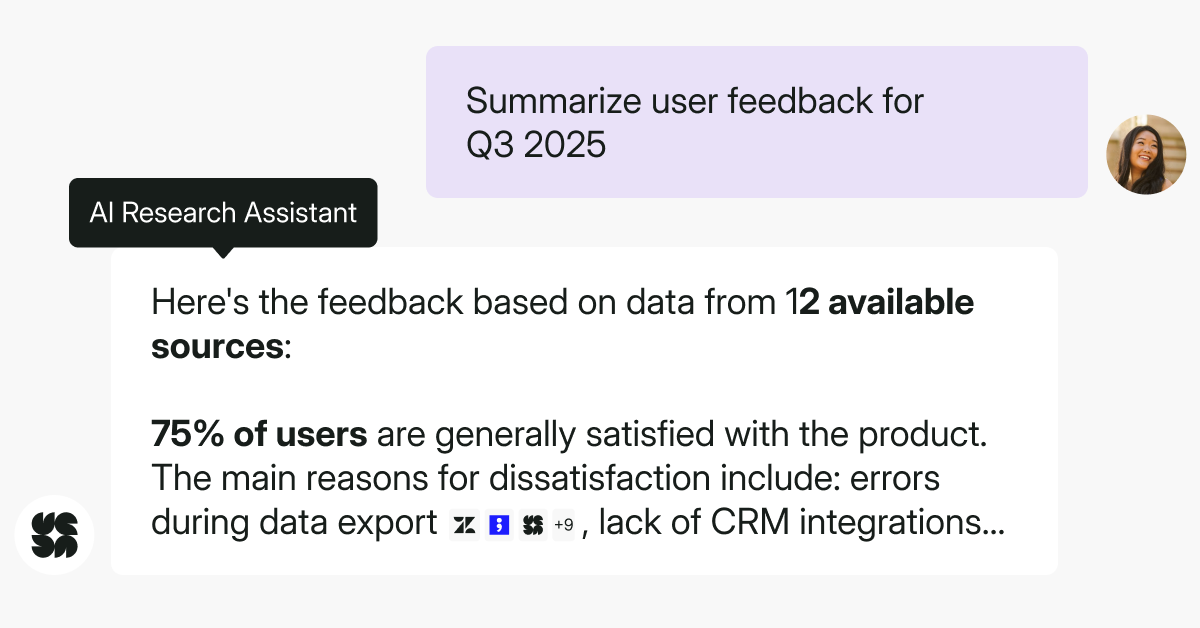

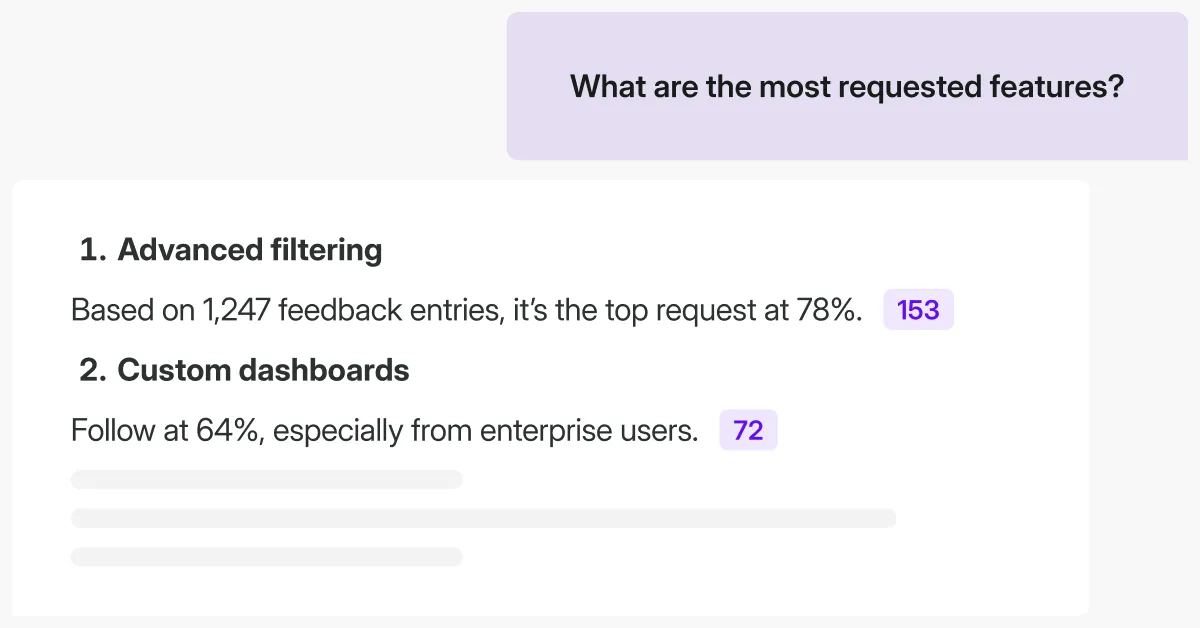
.svg)

.svg)