I guess we can all agree that customer experience work is getting harder. Customers expect quick, thoughtful support and a smooth path through products. Teams are stretched and budgets are careful. Yet the journey still needs to feel steady across web, app and support channels.
To understand which customer experience tools actually help, I spoke with leaders who manage CX day to day in SaaS, digital-first brands and e-commerce. They shared the CX tools that are working for them and the results they’ve seen in practice.
This guide groups those tools into four roles they play in the journey:
- Voice of customer and feedback collection
- Customer journey analytics
- Customer support and communication
- Management and automation
Each section includes a real example of a team using the tool to solve a specific problem. No theory or feature lists, but actual outcomes from operators who needed something that worked.
7 best customer experience tools worth testing
Let's take a closer look at them. Listed brands are not placed in order of importance or ranking of any sort.
Voice of customer and feedback collection platforms
These tools gather feedback at meaningful moments in the journey. They help teams listen at scale and understand what customers are experiencing in their own words.
Survicate
Survicate is built to gather fast, contextual feedback inside the product, website or email touchpoints where the experience actually happens. It helps teams collect short, meaningful signals rather than long surveys that customers ignore.
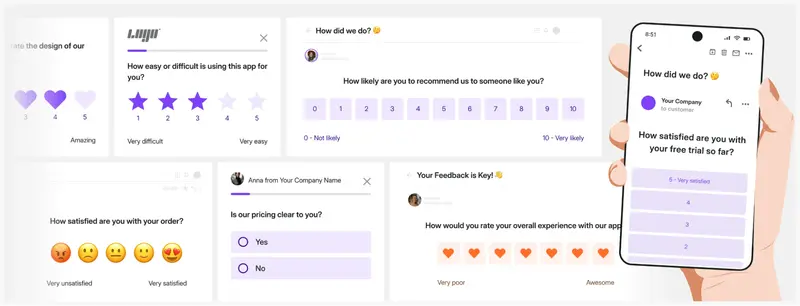
Where it fits in the customer journey: Awareness. Onboarding. Adoption. Expansion. Support. Renewal.
Survicate shows its strength during onboarding and adoption, when understanding how people navigate early steps matters most.
It continues to help with support and renewal phases by tracking sentiment and uncovering friction before it turns into churn.
Why industry experts recommend it and why they use it
Isabella Rossi, CPO at Fruzo, turned to Survicate to understand what her users weren’t saying. Her team already heard from the most vocal customers, but decisions were still being shaped by a small minority. The quiet majority held the real signal, and that was the part they couldn’t see.
“We were missing the silent opinions,” she said. They added short, in-app surveys at natural moments in the product. The shift changed how product decisions were made.
One survey revealed that 40% of users struggled with a specific settings menu, even though no one had ever complained about it. That insight led to a small design change that immediately reduced friction across the platform. Survicate helped the team understand what most users felt but never voiced, which made their roadmap more grounded in reality than assumption.
Best fit for
- Survicate works well for SaaS products, digital services and e-commerce teams that want fast insight loops.
- It suits small and mid-sized teams that prefer continuous learning rather than periodic research cycles.
- It also fits companies with a growing product surface area where blind spots appear easily.
Potential drawbacks or limitations
Overall, Survicate is farily easy to use, while the team consistently improves the platform based on user feedback. That being said, some things users find to be potentially limiting are partial responses collecting, missing additional customization options, or wish to add more depth to the AI capabilities of the platform.
Pricing
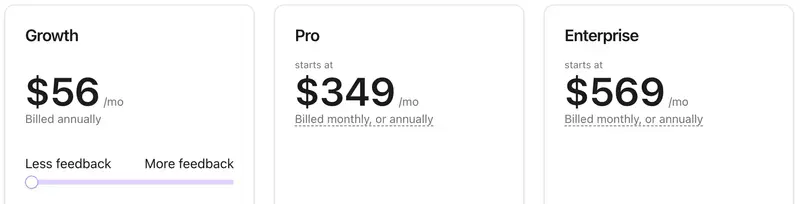
Survicate pricing starts from $56/month on the Growth plan, billed annually.
Typeform
Typeform helps teams collect feedback in a way that feels natural to the person responding. Instead of presenting a wall of questions, it guides someone through one prompt at a time. This lowers the pressure and encourages thoughtful answers.
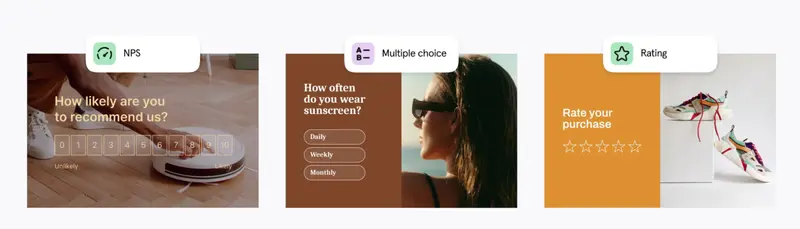
Where it fits in the customer journey: Awareness. Onboarding. Adoption. Expansion. Support. Renewal.
Typeform supports:
- Awareness when used for lead capture.
- Onboarding when teams gather basic details to personalize experience.
- Adoption and support when used for feedback, satisfaction checks or simple reporting forms.
- Renewal when used to measure sentiment over time.
Why industry experts recommend it and how they use it
Matt Little, Managing Director and Founder of Festoon House, relies on Typeform to gather feedback that leads to real operational change. He explained that his earlier approach, sending feedback requests through email, rarely produced more than a 20% response rate. The low engagement left him without a clear view of recurring installation failures and product durability concerns.
“Typeform gave us a survey that people actually completed,” he said. “Response rates climbed to more than 65% in three months.” He attributes this shift to simpler, clearer question sequencing that encourages customers to respond in their own words.
The feedback surfaced patterns he could act on. He learned where supply chain delays originated and where teams struggled during installation. The changes that followed reduced late delivery issues by 18% and installation complaints by 22% in a single quarter.
Best fit for
- Businesses and teams that want to collect information in a way that feels human rather than transactional. This includes product teams, marketing teams and research teams.
- Suitable for small to mid sized teams. Works fine at scale, but shines most when ease and friendliness matter more than heavy customization.
- Useful at any maturity stage once a company is actively learning from customers or prospects.
Potential drawbacks or limitations
Typeform works best when the questions are written with care. Matt pointed out that the biggest risk is not the platform itself but the design of the survey. Poorly framed questions lead to muddled answers and misleading conclusions.
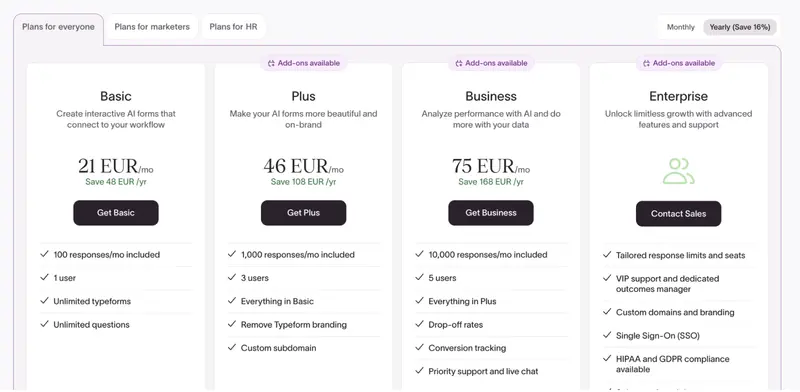
“Bad question design will distort the results,” he said. He also noted that the more advanced analytics and reporting features are locked behind higher tier plans. This can matter when a team wants deeper trend analysis or more flexible data outputs.
Pricing
Customer journey analytics
Customer journey analytics tools show how customers move through an experience over time. They trace the steps someone takes, from first interaction to long-term use.
Hotjar
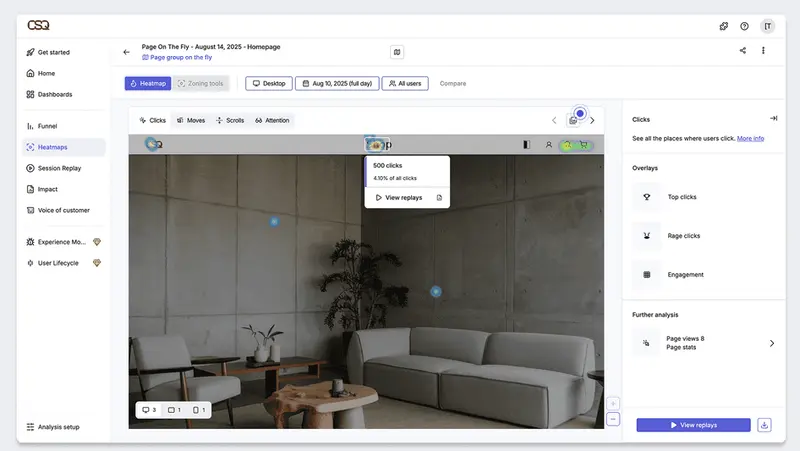
Hotjar helps teams understand how users behave and how they feel while using a product or website. It offers heatmaps, screen recordings and short contextual feedback prompts.
Where It fits in the customer journey: Awareness. Onboarding. Adoption. Expansion. Support. Renewal.
- Hotjar primarily supports the adoption stage. This is where users are already interacting with a product or website.
- It also influences onboarding when teams analyze where users struggle and refine flows.
- It can influence expansion indirectly when insights help improve feature usability.
Why industry experts recommend it and how they use it
Michael Alexander, Founder and Managing Director of Tangible Digital, uses Hotjar to understand what customers experience in real moments rather than what dashboards suggest from a distance. He works in environments where a small assumption can lead to a big shift in a customer journey. He described Hotjar as the CX tool that fills the gap between behavior data and the human experience behind that behavior.
“Analytics can show where users drop off,” he said. “Hotjar shows what it feels like to be that user at that moment.” The recordings and heatmaps help him see where people slow down, hesitate or abandon a path. He has used it to pinpoint the exact steps that introduce friction. In his experience, the issue is not always strategy or messaging. More often, it comes down to clarity and flow.
His team made targeted adjustments based on those insights including clearer direction, cleaner copy and fewer unnecessary steps. While these changes did not produce dramatic overnight jumps, they created consistent gains that compounded as customers moved more comfortably through the experience. Traffic and interactions along key journeys rose over time.
Best fit for
- Product teams that care about user experience and customer insight. This includes SaaS companies, ecommerce brands and digital service platforms.
- Works well from small product teams to mid sized organizations. Larger design and research teams also use it, though it tends to shine when speed and accessibility of insights matter more than complex enterprise research stacks.
- A good fit when a team has traffic or active users and wants to understand friction or emotional responses.
Potential drawbacks or limitations
Michael noted that Hotjar’s insights are observational. It shows where someone struggles but not the underlying reason. He pairs it with analytics patterns and direct feedback to understand what is actually driving the behavior. In his view, meaningful improvement comes from noticing those quiet moments of friction and addressing them with care rather than chasing big dramatic ideas.
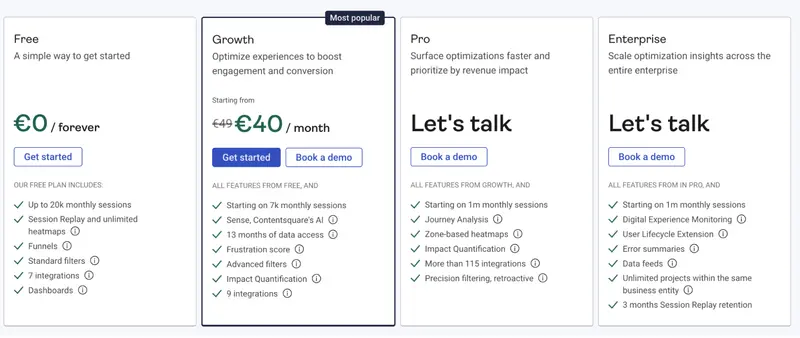
Pricing
Customer support and communication
These CX tools help teams handle customer questions and issues without losing the thread of the relationship. They keep every conversation, history detail and follow-up in one place so support doesn’t feel scattered.
Freshdesk
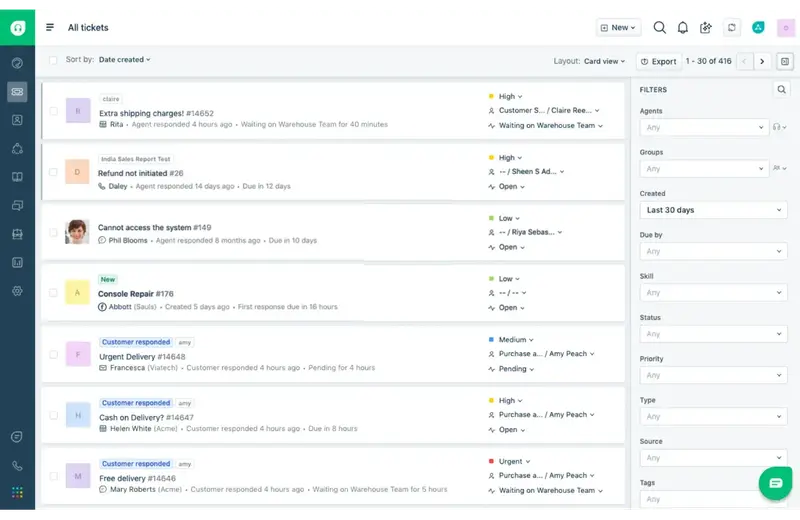
Freshdesk is built to help companies manage and respond to customer inquiries from multiple channels in one unified workspace. It solves the problem of fragmented support processes (e.g., email here, chat there, phone separately), duplication of work, slow response/resolution times, and lack of self-service options.
Where it fits in the customer journey: Awareness. Onboarding. Adoption. Expansion. Support. Renewal.
Freshdesk is most relevant in the support phase of the journey. It’s used when customers have questions, issues or need help after adoption.
It may also touch renewal indirectly, by helping improve satisfaction and retention through good support.
Why industry experts recommend it and how they use it
Aaron Whittaker, VP of Demand Generation and Marketing at Thrive Internet Marketing Agency, uses Freshdesk to centralize customer conversations. His team handles a high volume of inquiries each week, and before Freshdesk those messages lived across separate systems. Emails lived in one place, chat in another, notes in the CRM and social messages elsewhere. The fragmentation slowed responses and created confusion about ownership.
“Freshdesk gives our team a single, dependable platform to manage all customer interactions,” he said. “Everything flows into one dashboard so nothing gets missed.” The team now works from one shared view where each ticket moves from open to resolved with clear accountability.
Response times dropped from nearly ten hours to under four. Customer satisfaction scores climbed from 4.3 to 4.8. Every interaction is now tracked through to closure, which strengthens follow-through and reduces repeated work.
Best fit for
- Businesses that provide service or product and have a customer-support function (SaaS, retail, B2B service firms, etc.)
- Small to mid-sized teams. It can scale to larger enterprises, though its sweet-spot is often smaller or mid teams according to reviews.
- Organisations that have moved beyond basic manual email support and want a more structured support system with automation and multichannel capabilities.
Potential drawbacks or limitations
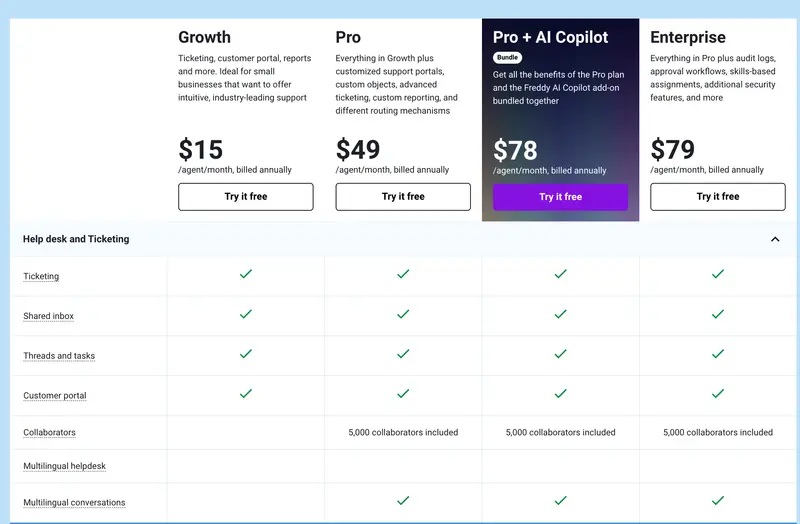
Aaron noted that Freshdesk works best when the workflows are mapped before scaling. Clear ticket categories and SLAs prevent automation from creating new confusion. Some of the more advanced features, like AI routing and deeper analytics, sit in higher-tier plans, so teams may need to choose what matters most early on.
Pricing
HubSpot Service Hub
Service Hub is built to help teams support and communicate with customers through tickets, a knowledge base, live chat and connected support workflows. Because it lives inside the HubSpot ecosystem, it also links support activity with marketing and sales context.
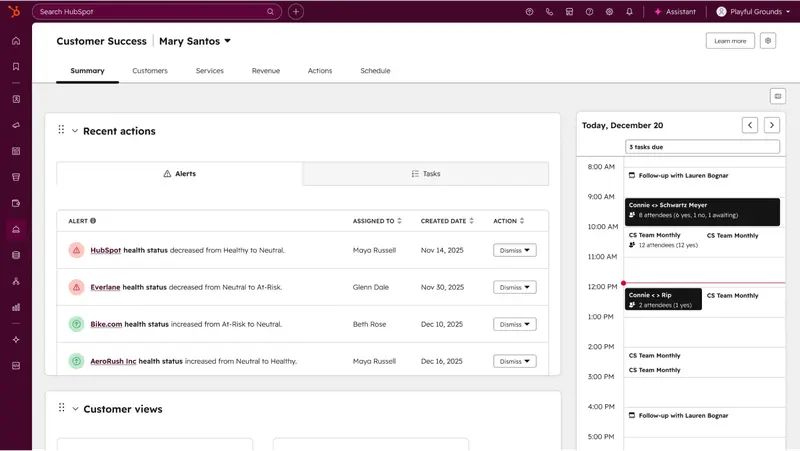
Where it fits in the customer journey: Awareness. Onboarding. Adoption. Expansion. Support. Renewal.
- Service Hub operates most directly in the support stage.
- It also influences renewal because support experience shapes satisfaction and retention.
When paired with a knowledge base and proactive help content, it can support parts of onboarding and adoption by helping customers learn how to use the product.
Why industry experts recommend it and how they use it
Ryan Whitcher, CEO of Harmony Home Buyers, adopted HubSpot Service Hub to bring order to a high-volume communication environment. His team manages interactions across real estate deals, support needs and ongoing lead conversations. Before HubSpot, messages lived in different inboxes and spreadsheets, which slowed responses and made accountability unclear.
He explained that Service Hub changed this by putting every message, note and task in one place. “We needed a CX tool that unified communication and made customer data instantly actionable,” he said. With a single view of each client, the team could track activity, automate follow-ups and maintain consistent context throughout the relationship.
Within three months, average response time dropped by 40% and customer satisfaction improved by 25%. The shared workspace also revealed workflow bottlenecks that had been hard to see. The team used automated post-transaction surveys to learn where the experience worked well and where it needed refinement.
Best fit for
- Organizations that want support activities connected with CRM data rather than stand-alone ticketing. This includes B2B SaaS companies, service providers and customer success led businesses.
- Works well for small to mid sized support or success teams. It scales to larger teams if the company already uses HubSpot CRM.
- Best for companies that have adopted CRM fundamentals and are now ready to unify their support touchpoints. Less ideal for companies with no CRM foundation and enterprises with highly complex or specialized support infrastructure.
Potential drawbacks or limitations
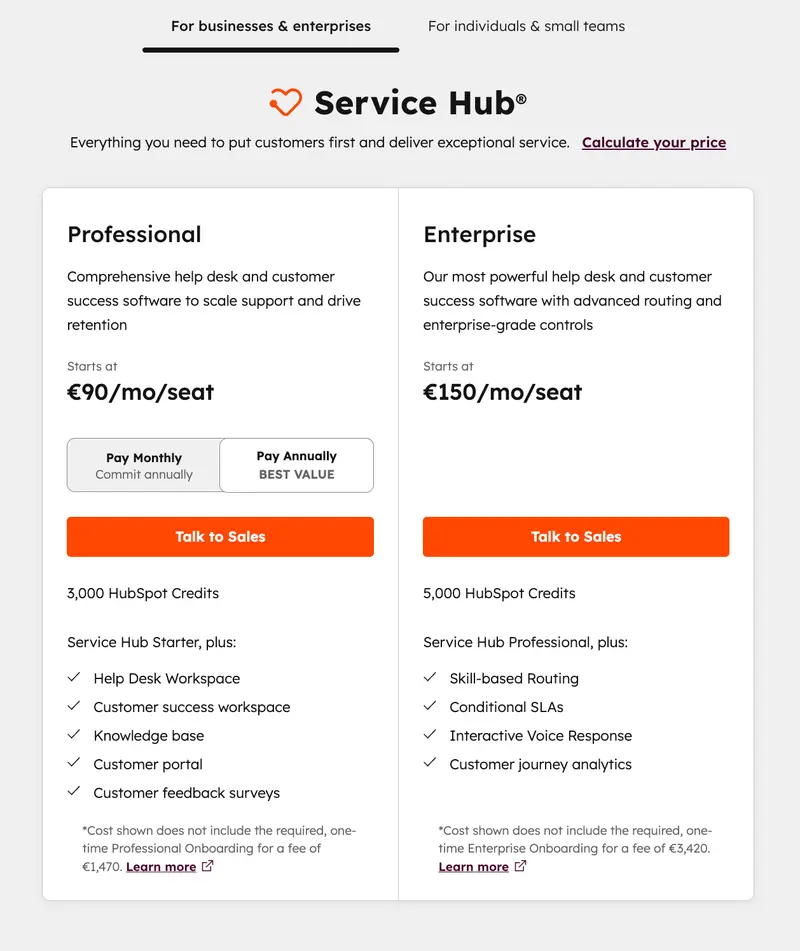
Ryan pointed out that HubSpot’s pricing increases as teams expand and add more advanced features. A growing company needs to factor this into its budget planning.
Pricing
Intercom
Intercom solves the gap between product usage and customer communication. Traditional support starts after something has gone wrong. Intercom brings communication into the product experience so teams can guide users while they are using the product, answer questions quickly and automate simple responses with bots.
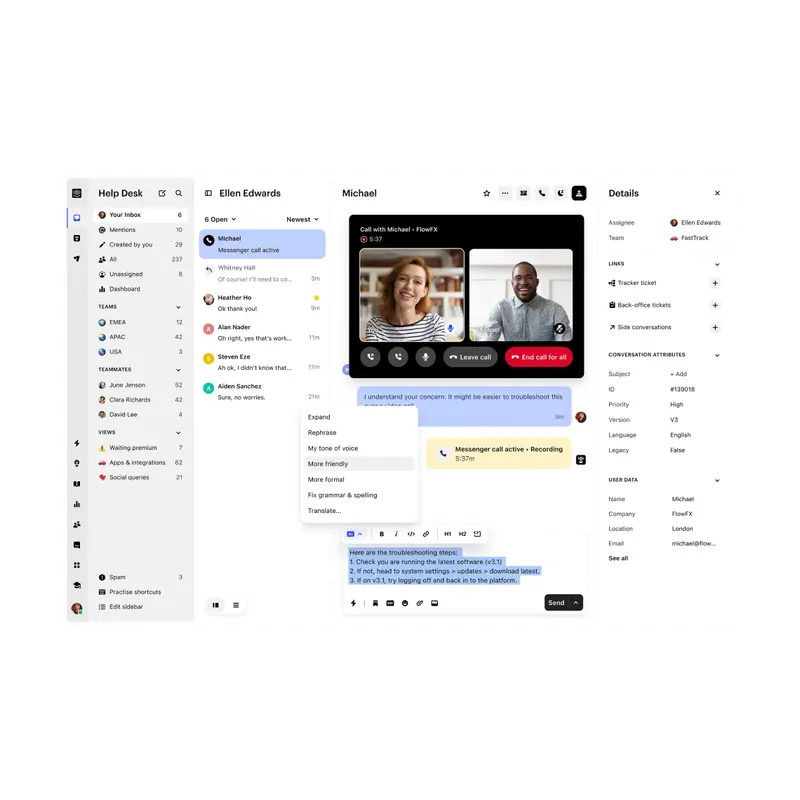
Where it fits in the customer journey: Awareness. Onboarding. Adoption. Expansion. Support. Renewal.
- Intercom is strongest in onboarding and support. It guides new users while they learn the product. It also helps resolve questions and issues as customers continue using it.
It can influence adoption because targeted in-app messages help people discover features and keep moving forward.
Why industry experts recommend it and how they use it
Sybil Romley, Corporate Executive Director at Briggs Home Care and a Consultant at Abby Senior Care, works across fifteen home care agencies in different states. Her teams support families who are often under stress and looking for guidance about a parent’s care. Phone lines alone couldn’t keep up. When calls went unanswered, consultations were lost and trust was harder to build.
She introduced Intercom to create real-time access to care coordinators across time zones. “Families needed immediate, empathetic responses, not queues,” she said. Live chat with smart routing connected people to the first available coordinator instead of forcing them to wait for business hours. The consultation booking rate rose from 31% to 47% in four months.
The channel also changed the tone of the conversations. Families could ask sensitive questions in a space that felt gentler than a phone call. Coordinators shared educational resources during the chat, which helped families feel informed and supported.
Best fit for
- SaaS products and digital platforms where users are active inside an app or logged-in environment.
- Works well for growing product teams and support teams that want to scale conversation handling without losing speed.
- Best for companies that already have active users and want to improve product guidance and conversational support quality.
Potential drawbacks or limitations
Sybil noted that Intercom works best when staff are trained to communicate empathy through writing. Tone carries more weight when conversations unfold in text. She also mentioned that live chat can raise expectations for around-the-clock availability. Teams need to define clear hours or plan for expanded coverage so the channel remains supportive rather than stressful.
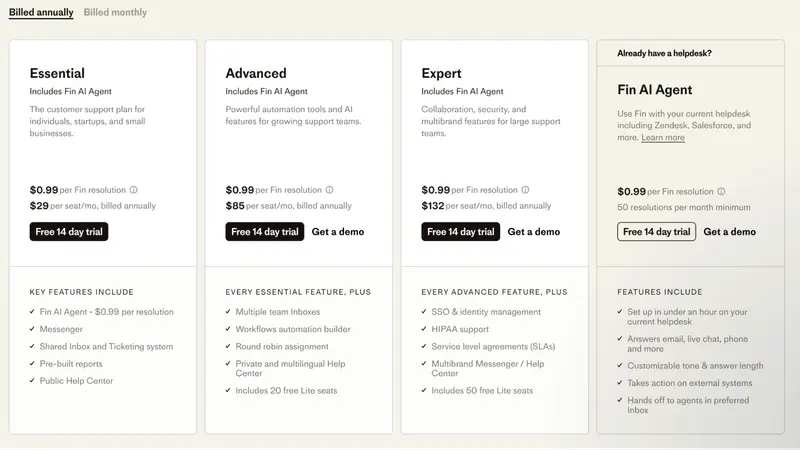
Pricing
Management and automation
This category includes CRMs and marketing automation platforms that help teams run their customer relationships with structure and consistency.
Go High Level
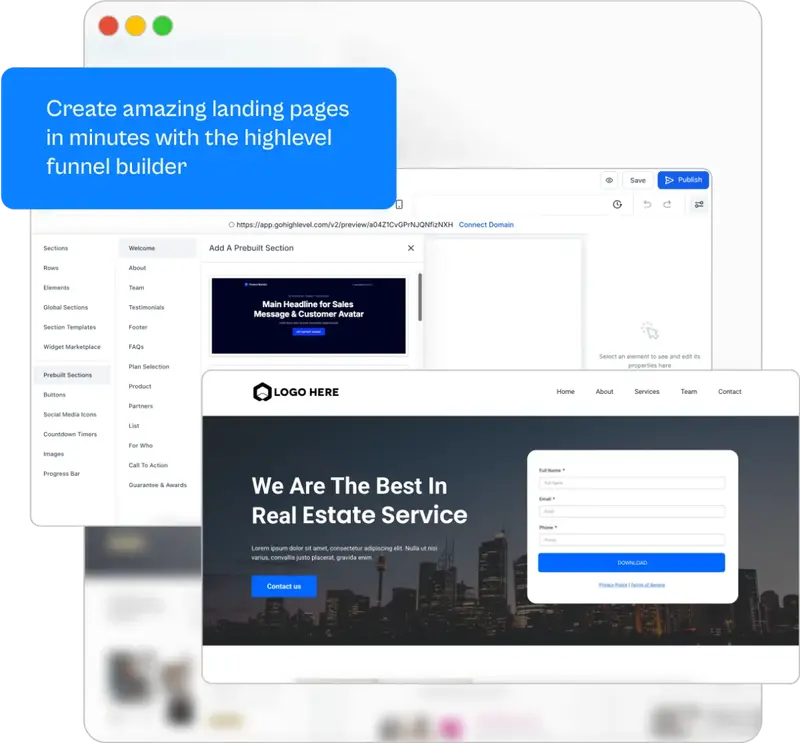
Go High Level solves the sprawl of disconnected tools used to attract, convert and manage clients. Many teams run their CRM in one system, their landing pages in another and their emails somewhere else. This creates gaps and wasted effort. Go High Level pulls these into one operating space.
Where it fits in the customer journey: Awareness. Onboarding. Adoption. Expansion. Support. Renewal.
- Most active in awareness, onboarding, and expansion. It supports outbound and inbound lead handling, it also guides people through funnels and follow ups.
- It can also influence renewal when teams automate ongoing touchpoints with existing customers.
Why industry experts recommend it and how they use it
Dr. Reema Sethi, an ER physician and founder of Aura Health and Spa, turned to Go High Level to manage a customer journey that doesn’t follow predictable patterns. Med spa clients can be enthusiastic during an initial visit, then disappear without warning. The team struggled to track who needed follow-ups and when to reach out which led to lost consultation deposits due to silence and no-shows.
She explained that the main issue was invisible drop-off. Someone would book a consultation, pay a deposit and then vanish with no reply or reschedule. They were losing a large share of potential clients this way. With Go High Level, her team now sends automated check-ins at 72, 48 and 24 hours before appointments. Each message has its own purpose so the outreach feels supportive rather than repetitive.
Their no-show rate fell to 8%, and they recovered nearly five thousand dollars in deposits in one quarter.
Best fit for
- Agencies and service based businesses that manage many client accounts or use repeatable funnel and nurture systems.
- Works well for lean teams that want one system rather than a patchwork of many tools.
- Strong fit once a business has repeatable workflows and wants to automate them for scale. Less ideal for very early teams that have not yet defined clear sales or onboarding flows.
Potential drawbacks or limitations
Dr. Sethi shared that Go High Level can feel overwhelming at first. It covers email, SMS, pipelines, scheduling and more, which creates a steep learning curve. Small teams without someone dedicated to setup should expect a few weeks of frustration while building the workflows
Pricing

What to remember when selecting customer experience tools?
A strong customer experience comes from small, consistent decisions like clear language, timely replies and fewer steps. The right CX tools make those decisions easier because they show where customers slow down and where support matters most.
If you’re looking to strengthen how you collect and act on feedback, Survicate is worth a closer look. It helps teams understand what customers are feeling in the moment, not after the fact. That kind of signal makes improvements faster to spot and faster to deliver.
Start with one touchpoint, listen there then move to the next. The progress adds up.
Author’s note (last verified: 27 January 2026): Statements such as ‘best’ reflect our opinion and typical use cases, not a universal guarantee. This comparison is based on publicly available information and our best understanding at the time of writing. Vendors may change features, pricing, and packaging without notice. For the latest details, please check the official sources or reach out to the vendor directly.