If you wouldn’t use your own software, why should your customers?
Some SaaS platforms have to force their employees to use their tools (or McDonald’s leadership forcing the CEO to try their new “burger product” despite him being visibly disgusted), some actually use them willingly because they’re genuinely that useful.
That’s basically dogfooding (or more than dogfooding as the title suggests, because it’s not just for testing purposes.)
If you’re a Developer, Product Manager, Marketer, or Researcher, you likely have heard about it.
If you haven’t, though:
“Eating your own dog food or "dogfooding" is the practice of using one's own products or services. This can be a way for an organization to test its products in real-world usage using product management techniques.” Wikipedia definition
At Survicate, multiple teams across our company use our platform, some in standard feedback flows, others a bit more creatively.
So if you’re curious about how Survicate uses Survicate and how to make the most of our platform, get reading.
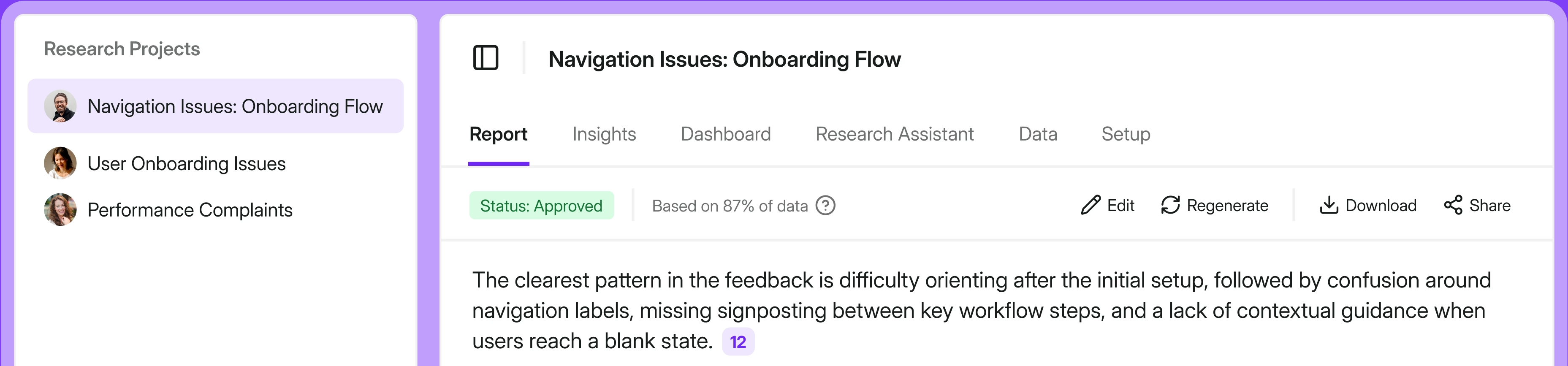
UX Research and Product team for user needs and more
Our UX Research and Product team is busy at work interviewing users, drafting the roadmap, vibecoding new solutions, validating said vibecoded MVPs, and of course, running surveys to understand our users and their needs better.
As Justyna Parmee, our UX Researcher said herself when asked whether the survey workflows she uses ease her work in any way:
“It’s hard to answer this question from a researcher’s perspective. This doesn’t necessarily make my work easier, this is my work.”
So, if this is also your work, here’s what you can do with Survicate.
3 standard UX and product workflows
Starting with the things every UX Research team is likely doing with surveys and feedback, we’ve got three workflows we swear by.
Validate user persona
- Goal: qualitative findings validation
- Survey type: email/link survey
- Where it’s triggered: sent via Intercom to a selected group of users
- Follow-up action: no follow-up action, just analysis
- Result: confirmed insights on user personas gathered from interview calls
Every business has to find their product market fit and know who they’re selling and talking to in order to actually sell, right?
That’s why you look for user personas, define them, and then research the heck out of actual real-life users that match this criteria to make sure you understand them completely.
A good way of doing that is of course via interview calls, but another way that you achieve that goal (especially if you’re short on time), or simply confirm what you found through interviews, is with surveys.
With this survey we ask quite a bit of questions with a link survey sent to a selected group of Survicate users via Intercom. It helps us understand them better and validate our hypothesis made during research interview calls.
Questions like “What is your primary role in using Survicate?, “Which of the following best describes how you run most of your surveys?”, or “Were you responsible for choosing Survicate as a tool to use in your company?”, help us achieve that.
We then analyze the responses and use that intel to feed our efforts in product marketing, engineering, and more. More on that later. 😉
Find purchasing decision makers

- Goal: exploration. Learn who the buyer is among our users, whether the same people are buying and later using Survicate, and identify participants to follow up with an interview
- Survey type: email/link
- Where it’s triggered: sent via Intercom to a selected group of users
- Follow-up action: scheduling an interview with users who match specific criteria (scheduling directly within the survey)
- Result: catching qualified interview participants automatically
Finding the people who are actually responsible for the purchasing decision process (especially for B2B processes with multiple stakeholders and complicated budget decisions), is the real jackpot.
If you tailor your messaging or ABM campaigns towards Content Writers with your SEO optimization tool, but the real decision-maker is the Marketing Director, you end up actively burning money.
To avoid that, learn who has the actual authority to make a purchasing decision for your tool with…a survey, you guessed it.
Here, the main question we ask is:
“Were you involved in choosing or buying Survicate for your company?”
Once we find a group of people who were actually involved in the purchasing process with the survey, an interview call booking link is automatically shown at the end of the survey. That way, we get the right participants scouted automatically and can learn more about them via interviews.
Measure satisfaction for new features continuously
- Goal: ongoing measurement of feature satisfaction
- Survey type: in-product survey
- Where it’s triggered: when the user is using a specific part of the platform, our Research Hub
- Follow-up action: —
- Result: additional and ongoing source of feedback and improvements for critical parts of the platform
Who would we be if we didn’t take customer feedback into consideration when building or improving our own platform? Hypocrites!
Fortunately we do, on multiple levels.
For example, we quite recently launched Research Hub (a research repository basically), which we’re in the process of heavily improving.
To do that, we run in-product surveys triggered only by users actually visiting and using the solution, and collecting their opinion to then analyze and improve.
As Justyna Parmee says herself, these surveys:
“Allow me to collect better insights. With in-product surveys, I can collect feedback while users are still in the product and actively using features, instead of sending them an email a few days (or even hours) later.”
Catching users’ fresh thoughts and feelings toward our solution.
Out-of-the-box UX and product workflows
Knowing a tool inside out gives you the benefit of drawing a million ideas on how to use it. And some of them may be quite unique.
For UX Research and product building specifically, we have two out-of-the-box ideas for surveys you can steal today. Two for one, what a bargain.
Get the right interview participants, quick
- Goal: screener survey to get the right participants for interviews
- Survey type: email/link
- Where it’s triggered: sent via LinkedIn messages
- Follow-up action: scheduling an interview (automated)
- Result: easy relevant participants scouting
Usually, screener surveys (the ones you use to check off whether a particular participant you want to recruit for an interview call is the right one) go more less like this:
- You launch a screener survey,
- You wait for the person filling it out to do so,
- You review the answers,
- You send a follow-up based on their answer (whether they got to be in your interview or not).
Until someone comes up with a Tinder-like app for swiping on research participant recruits, you can do one much simpler with Survicate, like Justyna.
The flow will then go like this:
- You set up a screener survey with the right conditioning paths and a direct link for booking an interview call ONLY with the right participants.
That’s literally it. Participants (the ones that check all of your boxes) get a direct link to book the call, aka, complete the action. Immediately.
And you no longer need to spend the time reviewing responses and only then reaching out to the right people. It’s done upfront.
As Justyna Parmee says:
“I think the impact is that we keep the ball rolling, if that makes sense. Since they’ve already decided to complete the survey, they get a call to action immediately. So it’s probably easier to schedule a call, and maybe we even get more calls. I don’t have data to support that, but it definitely cuts out a few steps and makes the process faster.”
Offer the right follow-up action

- Goal: constant flow of feedback + accessible way for users to share feedback
- Survey type: in-product
- Where it’s triggered: it’s always visible in the product
- Follow-up action: depending on the response:
- If someone rates us and gives us a good score, they see a call to action to leave us a review
- If they report an issue, an Intercom conversation with support is started automatically
- Result: constant flow of feedback, an easy way for users to share whatever they need and if they have a problem they get support’s help
Feedback Button surveys in themselves are not that unique. But the way this one is approached, is.
Let me explain.
Feedback Button surveys (the sticky ones, that are always available for customers to leave their opinion) are usually pretty simple. One question. One purpose.
Like, how would you rate the satisfaction with our website? Do you have ANY feedback about our product? Followed by a simple thank you.
With ours, it gets more complex (but not complicated).
Again, building off of the Survicate logic tree, we offer a different path for every user based on their answer.

The possible options we give users are:
- Rate us: if someone gives a good score, we ask them kindly for a G2 review (they’re already happy!), if someone gives a low score, we automatically start a conversation between the user and our Support on Intercom.
- Share a new feature idea: describe the feature they had in mind easily without visiting the customer advisory board and quickly explain what problem they’re trying to solve with it.
- Report an issue: describe in detail the issue they’ve experienced (open-text) with the option to take a screenshot of the bug immediately from the survey window.
- Other: for anything else, open text.
That way, we use the initially simple Feedback Button to its absolute maximum potential.
Customer Success team for checking customer pulse
Our Customer Success team has a straightforward mission: make sure customers get the utmost value from Survicate and catch the ones who aren't, before it's too late.
Surveys are central to how they do both.
React exactly as needed
- Goal: surface churn risk early and turn promoters into advocates
- Survey type: in-app, 5 micro-surveys
- Where it’s triggered: in-product. Lifecycle-based triggers based on customer “age”
- Follow-up action: differs based on Promoters, Detractors, Passives
- Result: We catch dissatisfaction before renewal conversations even start
A one-time CSAT survey at the end of the year tells you how customers feel at one moment in time. That's a snapshot.
Customer Pulse is basically a film reel.
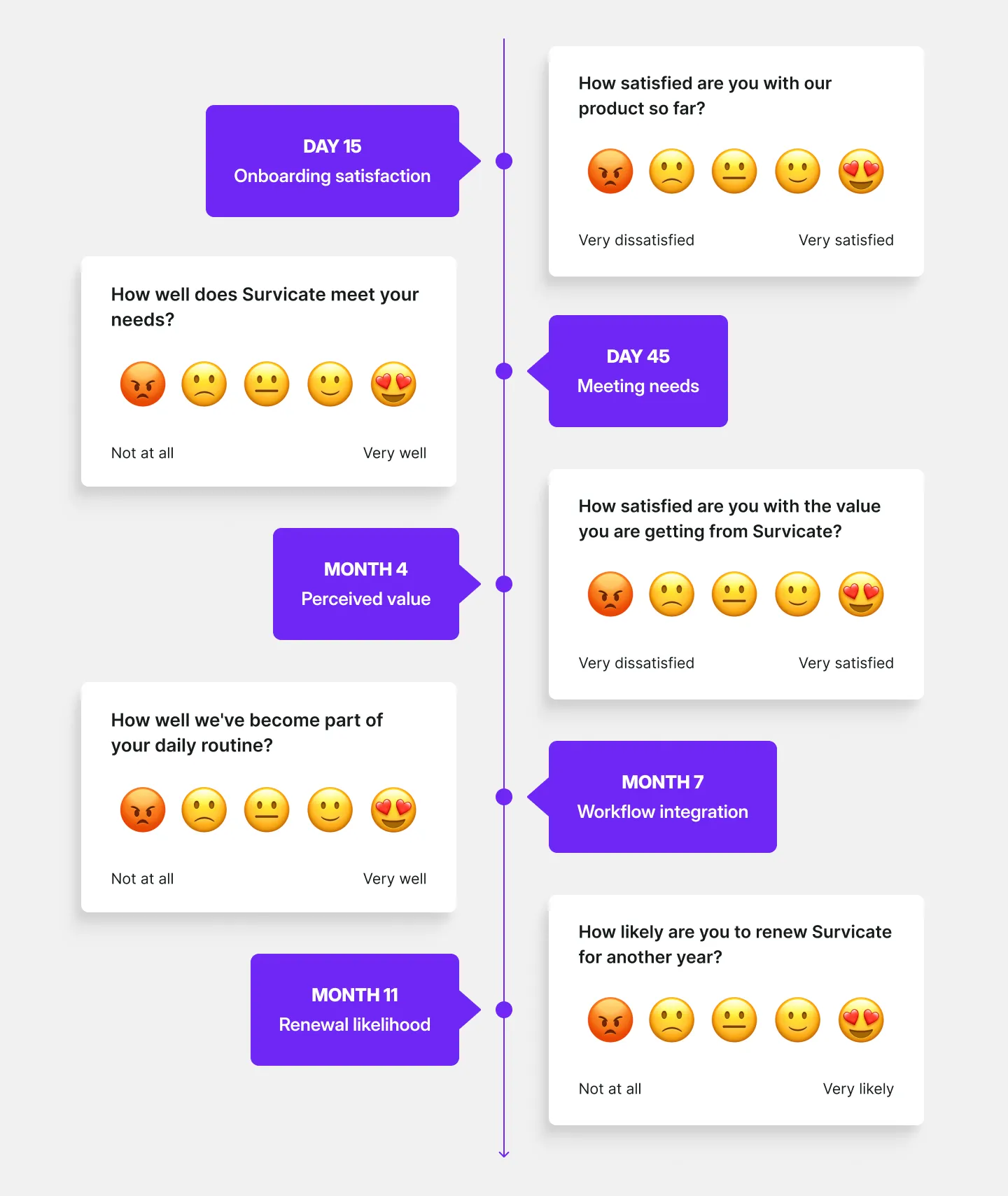
Instead of measuring satisfaction once, our CS team runs 5 micro-surveys at key milestones across the entire customer lifecycle:
- Day 15: onboarding satisfaction (early friction check)
- Day 45: "How well does Survicate meet your needs?"
- Month 4: perceived value
- Month 7: workflow integration—how well we've become part of their daily routine
- Month 11: renewal recommendation likelihood
All use a CSAT scale, which makes it possible to calculate a consistent, comparable satisfaction score across the entire customer base.
As Eylül Nowakowska Beyazıt, our Sales and Customer Success Director says, with this approach:
“Instead of “randomly asking happy customers” we systematized review generation. CSMs focus on high-risk/high-impact accounts instead of guessing who needs attention.”
Now, what happens with those responses is where it gets really interesting.
Rather than collecting answers and leaving them sitting in a spreadsheet somewhere, every response triggers a specific action.
- Promoters (5/5) → in-survey review ask + follow-up email + added to advocacy list (case studies, referrals)
- Detractors (≤3) → Slack alert → CSM follow-up in <1 business day
- Open-ended feedback → auto-start 1:1 support chat to close the loop
- Feature gaps → logged in Savio
All responses go into our Research Hub and Dashboards for an easier analysis, pattern spotting, and quick overview.
This all leads to our CSMs spending their time on the accounts that actually need them, reviewing generation becomes a system instead of a favor, and churn risk gets surfaced months before it becomes a renewal problem.
Give customers the right onboarding

- Goal: understand customer intent immediately after purchase and tailor onboarding + communication to their actual objective
- Survey type: Intercom in-app and email (follow-up)
- Where it’s triggered: first shown in-app immediately after purchase. If the user doesn’t respond → we resend it via email to maximize response rate
- Follow-up action: responses are pushed to our customer success platform. Based on the answer, the customer is automatically enrolled in a dedicated, goal-based post-purchase communication flow (educational emails, use-case content, best practices)
- Result: higher messaging relevance (customers receive content aligned with what they’re trying to get done). Stronger activation because we remove generic messaging. Better internal visibility into why customers buy Survicate in the first place
Most onboarding flows are built around the product. Here's feature A, here's feature B, here's a checklist of things to click on.
The problem is that different customers buy Survicate for completely different reasons. Someone trying to reduce churn doesn't need the same onboarding as someone trying to collect product feedback or run UX research.
So the first thing we ask new customers—right after they purchase—is one simple question:
"What are you ultimately trying to get done with Survicate?"
The answer shapes everything that follows. Based on what they tell us, they're automatically enrolled in a communication flow tailored to that goal: relevant educational emails, the right use cases, best practices that actually apply to their situation.
The survey appears in-app immediately after purchase.
If someone doesn't respond, we resend it via email because the insight is valuable enough to follow up on, and we'd rather not onboard someone blindly just because they missed a notification.
Marketing team for lead capture, educational purposes, and all the creativity
Marketing teams live and die by how well they understand their audience.
Our marketing team has baked surveys into almost every stage of how they work, from figuring out pricing to filling up event RSVPs to generating leads from blog posts.
Here are 9 workflows our marketing team uses regularly.
6 standard marketing workflows
Starting with the standard approach you may already have thought about.
Understand feature value and pricing sensitivity
- Goal: understand the value of features we plan to implement and gauge pricing more accurately
- Survey type: in-app survey
- Where it’s triggered: in product to users who meet specific targeting boxes
- Follow-up action: use the insights to inform product building and pricing + inform users of next steps
- Result: not wasting budget or causing pricing discomfort to our users
Survicate is a platform that knows how much of an impact on your workflow your tool stack has.
We currently integrate natively with 40+ tools, allowing you to collect, but also connect your feedback with external tools.
So often when considering a new addition to that package, we run a feature value survey, like we recently did when evaluating whether a Trustpilot integration is a good addition.
As Aleksandra Korczyńska, our Marketing Director herself says:
“Before building a product integration that would cost us a specific flat fee, we ask paying customers whether they would be willing to pay extra for it and how much.”
Simple idea, but the targeting is what makes it useful.
We don't just blast the survey to everyone. We use attribute and event-based targeting to reach paying customers who already have any integrations connected—the segment most likely to have an informed opinion on this.
In the Trustpilot case, out of the segment we were interested in, many users came out who would have loved to use a Trustpilot integration, but less than half were willing to pay for it at the moment, which for us meant postponing prioritizing the project.
The follow-up was an automated email informing users of next steps.

If we were to build the integration, we’d send a campaign of “You asked, we built” kinda style, also putting those users on a dedicated waitlist for that feature to make it more exclusive and thank them for sharing their feedback.
We may still build the integration in the future and re-evaluate with a second round of this survey.
Check website clarity

- Goal: validate new landing page messaging clarity
- Survey type: website survey
- Where it’s triggered: on new landing pages after a user scrolls or spends a defined amount of time on the page
- Follow-up action: redirect based on answers to follow-up questions
- Result: understanding the impact of marketing activities, better clarity of writing
Launching a new page and hoping it works is not a strategy, obviously.
So after major page launches, we ask one question:
"Did you find what you've been looking for?"
If the answer is no, the survey branches into follow-up questions that help us learn more. We’ve used it on multiple pages, from absolutely crucial ones like pricing page clarity or home page messaging clarity to completely new landing page experiments.
Event registration survey

- Goal: see who’s interested in attending our offline event before sending over formal printed invitations
- Survey type: email/link survey
- Where it’s triggered: sent to attendees via email or LinkedIn
- Follow-up action: send a formal printed invitation to those who expressed initial interest
- Result: quickly get an initial attendee list for an offline event without unnecessary spending on printed invitations
Spring is opening up the doors for new opportunities, employees are forced to go back to office (couldn't be us), and the business events segment is back in fashion.
Not to stay behind, but also not to lose our sanity working remotely, we’re joining and organizing quite a few in-person events this year. One of the latest is a private dinner with talks on CX for Customer Success and Customer Experience specialists living in Poland where we’re based.
To invite our guests, we could’ve used a traditional letter RSVP, but once again Survicate came to rescue.
We’ve drafted an RSVP survey with a few additional questions and sent it over to our selected guests.
As Aleksandra Korczyńska says, with this survey:
“I really like that we can add an image, change the layout, adjust it perfectly for mobile, and add a meta image so the link survey looks almost like a landing page. I also really like the real-time Slack integration, so we can see who is registering and what they are answering as it happens on a dedicated channel.”
As registrations came in, the team saw who was signing up in real time and what they're answering, which gave us a good amount of time to properly prepare.

With that initial list of attendees, we sent over a traditional, paper invitation with all the details to those who voiced their interest in the event.
Capture leads from blog content
- Goal: catching leads from blog content
- Survey type: website survey
- Where it’s triggered: blog articles
- Follow-up action: automated enrolling in nurturing flows
- Result: catching visitors who are not ready for a purchase just yet and nurturing them further
This case is pretty dang simple, making it that much more enticing if you’re looking for ways to use surveys for more than just collecting feedback. A low hanging fruit if you will.
As you know, most blog visitors read the article they landed on for whatever reason and then go about their day.
This survey catches them before they exit.
We ask readers a simple question:
"Would you like to receive more educational content from us?"
Those who say yes get pushed to Customer.io automatically (native integration) and are enrolled in email flows relevant to what they were reading. One question, one click, and a new lead is in the pipeline. 😉
A cherry on top of this survey cake is that we get to do a little show-off as well.
Where the stakes are low, we use those moments to do a little self-promo and put the final button with a CTA to try building a survey like this one yourself.
Check satisfaction after offline events

- Goal: getting an idea of attendees’ satisfaction following an in-person event
- Survey type: link/email survey
- Where it’s triggered: embedded in Customer.io emails
- Follow-up action: —
- Result/impact: not guessing the success of our events, learning what we can to improve on measurable metrics
We’ve talked about the in-person event craze already, and how it’s clawing its way back into our marketing strategies.
We’ve talked about the in-person event craze already, and how it’s clawing its way back into our marketing strategies.
Creating a valuable event and calling it a day is not the end of the story here, although you’d wish you could just leave it at wine tasting.
The aftermath is equally important as the event itself.
The way we go about making sure those who attend get the most out of it, is by running a post-event CSAT survey.
This one is sent via email, with the first question of “On a scale from 1-5, how satisfied are you with our event?” or “How would you rate your overall event experience?” being embedded directly into the email itself so that it’s as easy as possible to answer, maximizing response rates.
Aleksandra Korczyńska, Survicate’s Marketing Director says:
“I really like that these surveys are beautifully embeddable into Customer.io with a first question there and that attributes match automatically.”

Learn why users don’t sign up for your webinars

- Goal: learn what makes our webinars interesting (or not)
- Survey type: website survey
- Where it’s triggered: on webinar landing pages upon exit intent
- Follow-up action: —
- Result: improve webinar content
Webinars can be a bit tricky. After all, it’s an event you want people to sign up for. Trade their time, give you their full attention. But it’s not as fancy as going to an in-person conference with fun after-hours drinks and networking.
To convince people to attend an online event, you gotta offer something exceptional.
But how can you be sure the topic you landed on after hours of brainstorming, research, and even interviews with similar personas, is the one that’s going to resonate?
That’s right. You can’t guess. You need to ask.
One route is asking satisfied webinar attendees whether they liked the webinar or not.
The second is asking the people who may have opted out. Or thought about it at least.
Know your webinar landing page? Set up a simple website survey that asks users two questions:
- Did you sign up for our webinar?
- Why/why not - depending on the answer to the first question.
Then view and analyze the responses to spot patterns and help improve your webinar pages and topics.
PS. Sometimes, the topic isn’t the real problem. Maybe your registration form is not working as expected, or something else happened technical-wise that you did not catch. 😶
3 unique marketing workflows
Now onto the stuff that you can use Survicate for beyond regular marketing surveys!
Gate content and capture leads
- Goal: collecting marketing leads
- Survey type: website survey and/or email/link survey
- Where it’s triggered: selected pages only after a user scrolls the page at least 60% in depth or link shared via social/ABM campaign
- Follow-up action: automated enrollment in our content newsletter
- Result: much easier leads collection with gated content (no need to build another landing page)
Picture this: you’ve spent an ungodly amount of time crafting the best lead magnet on planet earth, giving value, unique POVs, expertise, and everything juicy that just screams: READ ME.
Those working in marketing know exactly how much work it takes to put a simple PDF together.
But that’s not the end of the story.
After you create a good piece of content, you gotta promote it. That’s what lead magnets are all about.
So, you could go the SEO-route, which we all know may prove to be time-consuming. Or…you could set up a simple landing page and then promote your PDF on social, via paid ABM, podcast, helicopter banner advertising, or whatever crazy idea you can think of.
The thing is, building a landing page with a dedicated registration form is not the easiest marketing task of them all. You usually have a whole process in place, with copy drafting, approvals from multiple stakeholders, design in Figma, blablabla, right?
With surveys, you could do one much easier.
In fact, you don’t have to build a landing page at all!
Instead, you could simply create a short contact form survey in Survicate, ask for the respondent's email address, and add a button with a custom label of: “Download” or “Read now”. That way, you have a registration form and no need for a landing page.
Select to trigger the survey only on URLs that match the gated content’s theme or slap it right on the homepage if it’s that good and will be relevant for everyone.
PS, you can also connect your contact form survey with your favorite marketing automation platform, and have those leads automatically enrolled in your nurture comms. 😉
If you decide that your website is not the route, you can also do the same with a simple link survey and share that link in your ABM campaign, organic social, or wherever else.
Mix qualitative and quantitative insights
- Goal: understand product value perception at scale
- Survey type: email/link survey + Research Hub for feedback analysis
- Where it’s triggered: shared via LinkedIn
- Follow-up action: —
- Result: improving the product, improving marketing messaging, and more
In a perfect world where rose buds soften every step and free chocolate-covered strawberries welcome you at office doorstep, all teams in a company work together, sharing all the information they have about customers.
UX Researchers share their insights, and everyone from C-level down to marketing juniors actually read it to understand users better.
In the real world, we all get sucked into ad-hoc tasks, endless Slack messages, spam emails, and urgent projects, giving us little to no time to either share or properly dive into information.
Doing a 180 with this example, we’re not just going to talk about surveys. Thought Survicate was just a survey tool, didn’t you?
It’s not! It’s actually a full-on customer feedback platform that helps you collect feedback, but also properly analyze and understand it.
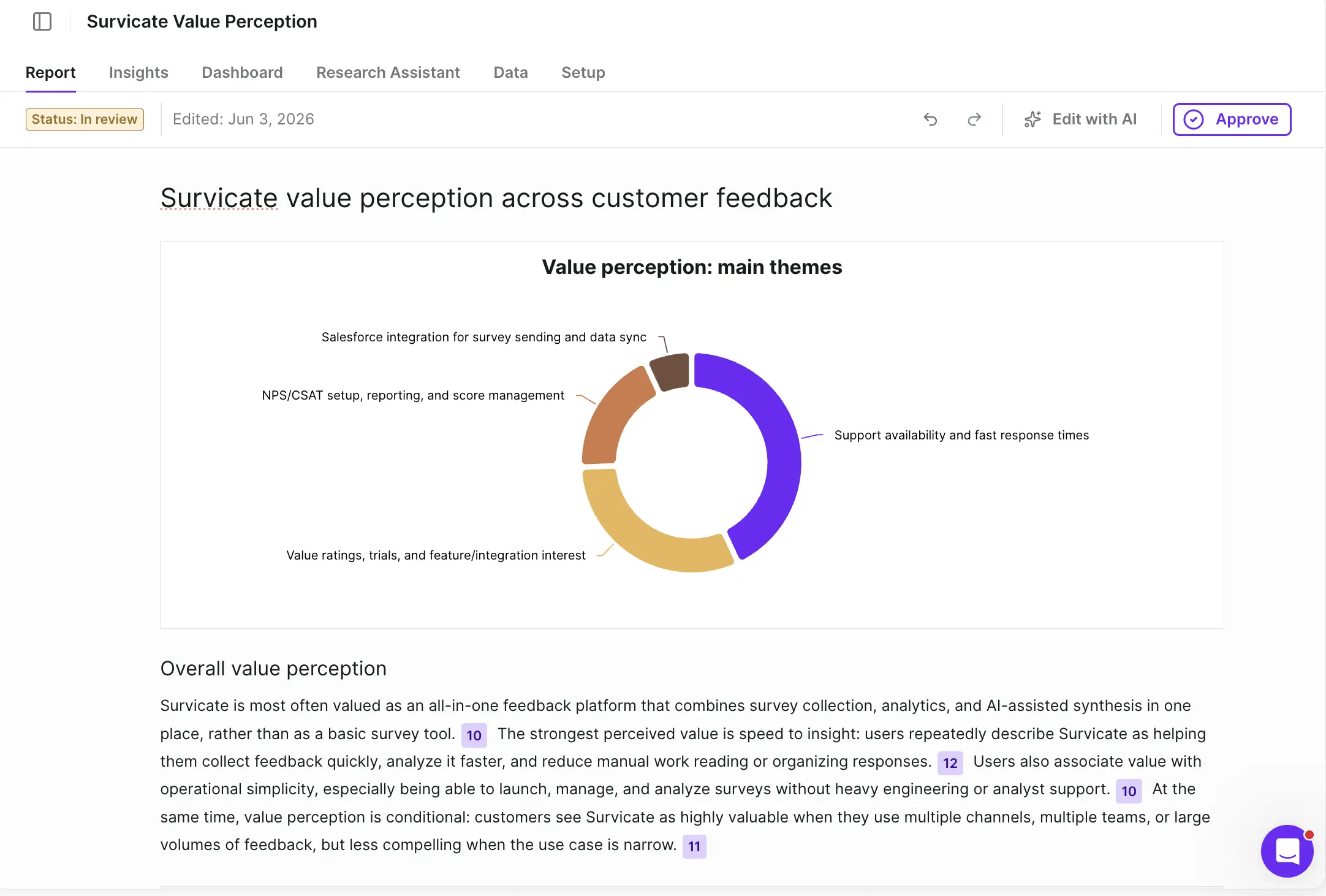
One of such features that helps us understand our customers better is our Research Hub that uses verifiable AI to help categorize feedback from across sources into patterns that make more sense than scattered data.
We recently ran quite a few interview calls with prospects led by our UX Research team, sprinkled with product value surveys. Mixing qualitative and quantitative insights.
Now, collecting feedback is super fun.
Analyzing it and sharing the insights with more people is usually when it gets painful. So, we connected the survey results with our Research Hub, and then used the integration with tl;dv so that both survey responses and call transcriptions get analyzed by Research Hub’s AI.
We then got several patterns categorized, with specific insights linking back to the source material. For an easier overview, we could go through the automatically generated graphs and charts.
As Aleksandra Korczyńska, Survicate’s Marketing Director says:
“The fact that I can filter by attributes there and go through relevant findings is crucial!”
All without having to ask the UX Researcher for a summary.
Dig out relevant content ideas

- Goal: get relevant blog content topic ideas
- Survey type: —
- Where it’s triggered: —
- Follow-up action:
- Result: plan blog content that’s actually relevant, stemming from real user pain points and points of discussion
Using Research Assistant (another no-bs AI tool we introduced), we chat with the AI about our user data to scout content ideas.
For example, right after this article, I’m going to be writing one on the topic of how difficult it often is for UX Researchers to make their findings resonate with different stakeholders. A part of this issue is the process of building a good research report that quotes mixed sources for higher credibility.
I could check a few issues here to validate whether that’s a good idea or not. Decided to start by checking the data triangulation issue for our users based on all our feedback data.
And I got a whole lot of exact quotes from interview calls, surveys, and all our connected sources from the past year that support this issue.
As Alex, our Organic Content Lead says:
“It allows me to validate a content idea by using AI chat and asking if we've so far seen user feedback that supports that idea.”
And I, Ola (Content Marketing Manager, author of this article), agree 100%. 😉
Product Marketing is not just for mama bear nurtures
Last, but certainly not least we want to highlight Tom Barragry, our Product Marketing Lead, who uses surveys in many different ways to help support product launches, amplify existing features, perfect his carefully built product nurtures, and more.
Since we’ve covered lots of marketing use cases, with the Product Marketing branch specifically, we’ll focus on one last case, but make it a really strong one. One that can directly influence MRR.
Let’s go.
Auto-detect the need for sales-led motion

- Goal: turn an inactive lead, into a qualified lead for Sales
- Survey type: email/link survey
- Where it’s triggered: automated email sequence for post-onboarding emails
- Follow-up action: book a time with our team based on answers for upgrade blockage reasons
- Result: catching qualified leads that need sales-led motion, typically converting at a higher ARR/MRR (sales-led vs product-led)
Not every prospect converts through a self-serve trial. Some people need more time. Some need to talk to a human.
This survey is designed to catch those people before they go Casper the ghost on us.
It lives inside a post-onboarding email sequence Tom built, with the survey embedded directly in there so there's minimal friction to respond.
The core question is simple: why didn't you upgrade?
Then, based on the answer, the survey routes them to book time with the team.
The insight here is that a prospect saying "I need more information" or "I wasn't sure it fits my use case" is not a lost lead. It's actually a sales conversation waiting to happen.
The survey surfaces that intent and hands it off automatically, without anyone having to manually review responses and chase people down.
What’s most interesting here is that the leads that come through this flow tend to actually convert at higher ARR/MRR than self-serve conversions, which honestly makes sense. If someone needs a conversation to get convinced, they usually have a more complex (and more valuable) use case.
Helping us basically go from a product-led motion to a sales lead motion whenever needed, on auto-pilot.
Feedback flows for grabs!
All in all…
Dogfooding only works if the product is actually worth eating.
Across UX Research, Customer Success, Marketing, and Product Marketing, Survicate runs on Survicate. And not because someone told us to, but because it genuinely makes the work easier, faster, and more informed.
20+ workflows. One platform. Zero excuses to guess when you can just ask.
If any of these sparked an idea, try building your first survey or steal one of the templates above and make it your own. If you have any interesting feedback flows in place already, we’d love to hear from you too!




.webp)

.svg)

.svg)