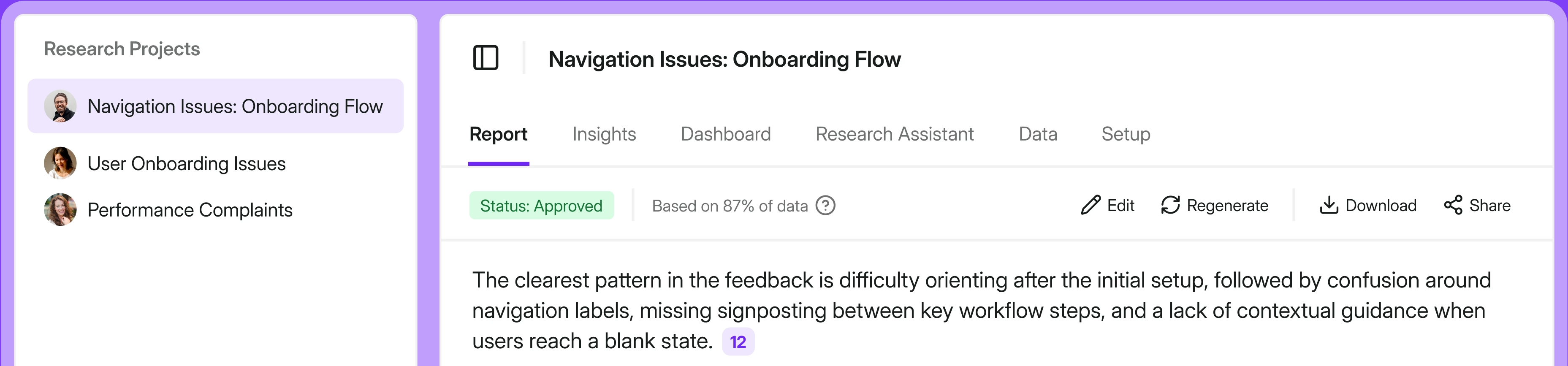
For us, research nerds, everything starts with the "Why?" Customer interviews, often underestimated in the business world, are a true gem among research methods because they help answer questions that analytics cannot. Numbers have become the rock stars of the business-driven decision-making process, but the nuances and behaviors that shape them are hidden in conversations.
What are customer interviews?
Customer interviews, also known as IDIs (in-depth interviews) in sociology and UX research, are one-on-one conversations designed to uncover the stories behind customers' choices, needs, and frustrations. In practice, most customer interviews fall into three buckets:
- Structured IDIs follow a fixed script and are helpful when you need every participant to answer the same questions in the same way.
- Semi-structured IDIs start with a loose guide but leave plenty of room for follow-up questions, making them ideal for product discovery and customer experience work.
- Unstructured IDIs are more like open conversations around a theme and work best when you are exploring a new problem space or sensitive topic and want the customer to set the direction.
“I conduct quite a lot of customer interviews and for me this is one of the best qualitative research methods. I usually go for semi-structured interviews, because it gives me a lot of room for exploration and I can even switch topics mid-conversation if I see the benefit of it.
I believe the value of CI is in helping researchers see the big picture, like finding a lens for segmentation. When I worked for Osome, an accounting startup aimed at solo and small entrepreneurs. Our clients were very different from each other (types of business, industry, size, revenue, operations and many more factors), but we needed to have a solid segmentation. Web analytics and surveys didn't really do much, because in the end we still had a variety of answers and scenarios. However CI helped me understand what all our clients had in common and that was the starting point of building our segmentation model.” Anna Khakho, Senior UX Researcher
Pros and cons of customer interviews
Every research method has benefits, and costs. In the following section we’ll dive into both categories, plus a business perspective.
Disadvantages of IDIs
IDIs are time-consuming. Scheduling interviews, conducting them, and analyzing takes time. One-hour-long interviews also require extensive preparation. Time is money, but you can't afford to miss these insights either. What you need to take into consideration is that during interviews, customers might respond falsely if the matter is embarrassing, or if they don't remember accurately. Declarative insights don't necessarily reflect actual behavior. This is why it's beneficial to combine many research methods and get the whole picture.
Advantages of customer interviews
IDIs are not only an addition to website or product statistics, survey data, and other analytical reports, but they can also be a basis for your research. Customer interviews provide explanations and context, helping you lay the foundations for further data collection, as you already have some understanding of the situation. They're also perfect for creating business or marketing personas, because they focus on customers as individuals, their motivations, and feelings. IDIs can also be used for usability testing when product teams need to capture nuances of using their websites or apps.
Business benefits of IDIs
Qualitative research's impact can be challenging to measure; nevertheless, we have a success story to share. A conversion optimization case study reports that one brand increased conversions by 33% simply by aligning product language with how customers actually talked about the offering (changing "add‑ons" to "expansion packs" based on customer feedback and search behavior), illustrating how using customers' own wording can quickly lift performance.
Customer interviews are a great source of feedback for products or services; they also provide teams with the benefits that actually matter to interviewees, as well as the wording and tone of voice they use in relation to the brand—no more guesswork. Thanks to IDIs, you'll learn not only how to improve your offering, products, and website, but also gain valuable guidelines for your marketing team, specifically copywriters. That's a massive shift. The insights you gather aren't theoretical reflections, but practical tips for various teams in your organization. Just a few insightful conversations with customers can save you a lot of time spent regularly on testing strategies and pivots across the whole company.
Practical framework: How to conduct customer interviews?
Customer interviews work best when they follow a clear, repeatable process. Check out our practical framework filled with tips and ideas, and design the method that works best for your organization.
Clarify your research goals
Start by assessing the basics: how much time and budget you have, what kind of incentive you can offer (for example, a small discount or gift card), and who needs to be involved.
Next, align your research with the customer journey and your business goals. Map key pain points and ask stakeholders which decisions they need to make—such as "What's blocking adoption of feature X?" or "Which segment should we prioritize?"—and treat those decisions as your north star.
Turn goals into questions
Translate each research goal into three to five concrete questions your interviews must answer. Focus on what triggers customers to act, the barriers they face, the workarounds they use, and what success looks like for them. Drop any interview question that does not clearly connect back to those priorities to keep the conversation focused and actionable.
In the most interesting topics, dig deep. Prepare a few follow-up questions like:
- "What happened just before you decided to do that?"
- "How did that make your workday harder or easier?"
- "What did you try instead?"
Decide upfront which metrics your study should correspond to, so it's easier to share outcomes with stakeholders. For example:
- Churn: Focus on what happens before downgrade/cancellation, early warning signs, and decision triggers.
- NPS / satisfaction: Explore moments that create delight or frustration across the journey.
- Activation: Look at first‑value moments, blockers in onboarding, and feature discovery.
- ARPA / expansion: Investigate when and why people upgrade, add seats, or adopt premium features.
- Support volume: Ask about issues that repeatedly force them to contact support or search for workarounds.
Design your interview script
Structure your script into three parts: warm‑up, core questions, and follow‑ups. Use warm‑up questions to build connection, then move to the main topics.
Lean on open questions ("Walk me through your last interaction with feature X") and sprinkle in a few closed questions to understand frequency or to segment responses later. Ask about current behavior, the sequence of steps they take, how often they use certain options, and what they would like to see in the future. By all means, avoid leading questions.
Recruit the right participants
Aim for a diverse mix of participants so you do not hear from just one type of customer. Combine different roles, levels of experience, company sizes, and product usage patterns to get a fuller picture of needs and pain points.
Run the interview
Start by thanking the participant, stating the purpose, and explaining how their feedback will be used. Ask for consent to record and share the agenda so they know what to expect. Use your script as a guide, not a checklist.
Capture notes and recordings
Assign one person to lead the conversation and another to take notes, so you can stay present while still capturing details. Structure notes around your research goals and keep all recordings and transcripts in one shared space.
As you write notes, tag each insight to the decision or metric it supports, such as churn, activation, NPS, or segment prioritization. Highlight strong quotes and examples that illustrate triggers, barriers, workarounds, and success criteria to speed analysis and reporting.
How to analyze customer interviews and act on them: Survicate example
The market offers several tools for gathering and analyzing feedback. We'll use the example of Survicate to walk you through the process—it'll give us a more practical approach.
Step 1: Centralize your interview notes
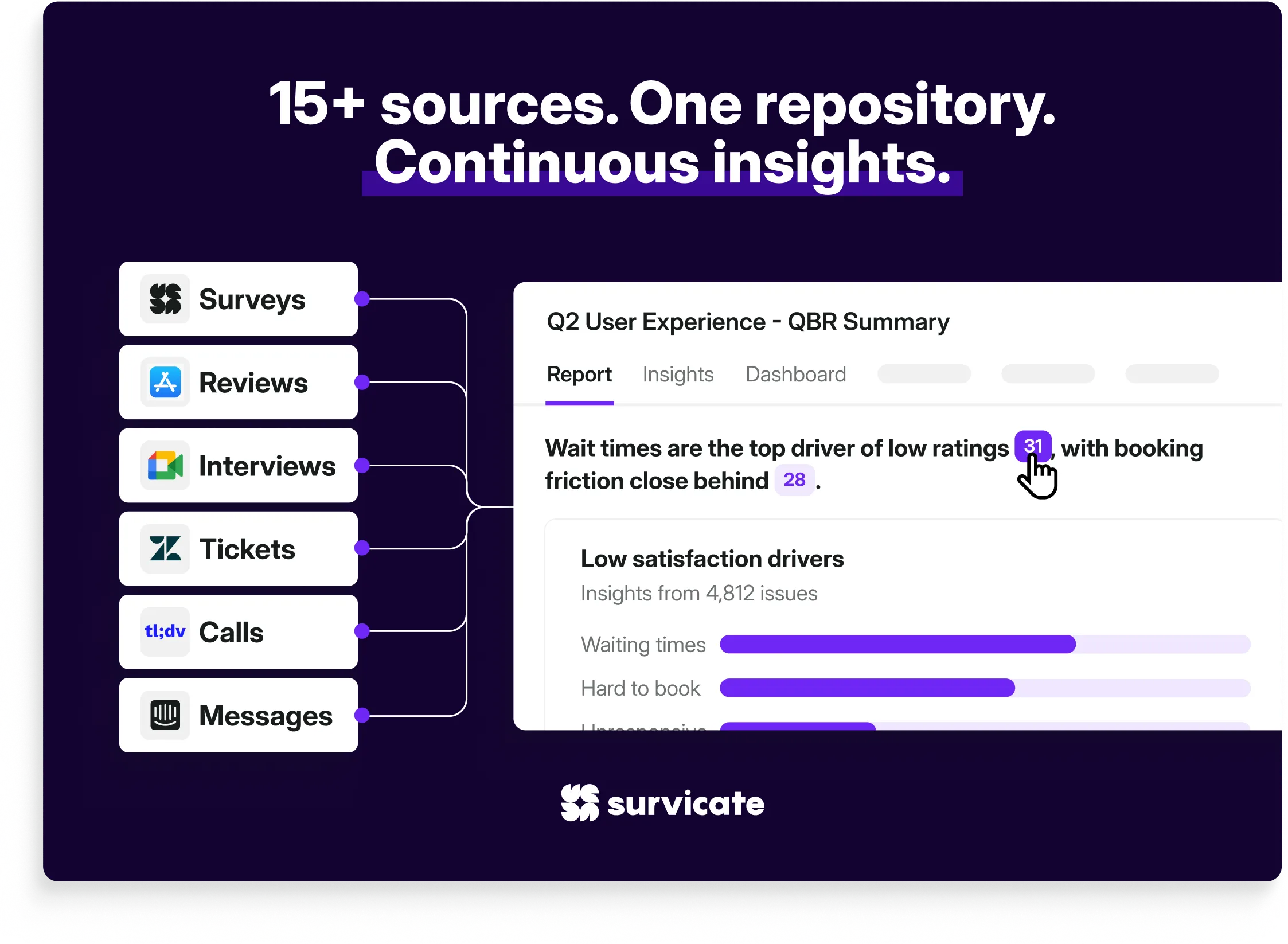
Start by connecting all your customer interview transcripts or recordings (you can automatically transcribe them in Survicate, too) into one repository. You can connect interviews from tools like tl;dv, Gong, or Google Meet directly.
You can also import a spreadsheet with interview summaries so they sit next to NPS, CSAT, or product feedback results in Survicate.
Step 2: Create research projects and automatically structure insights
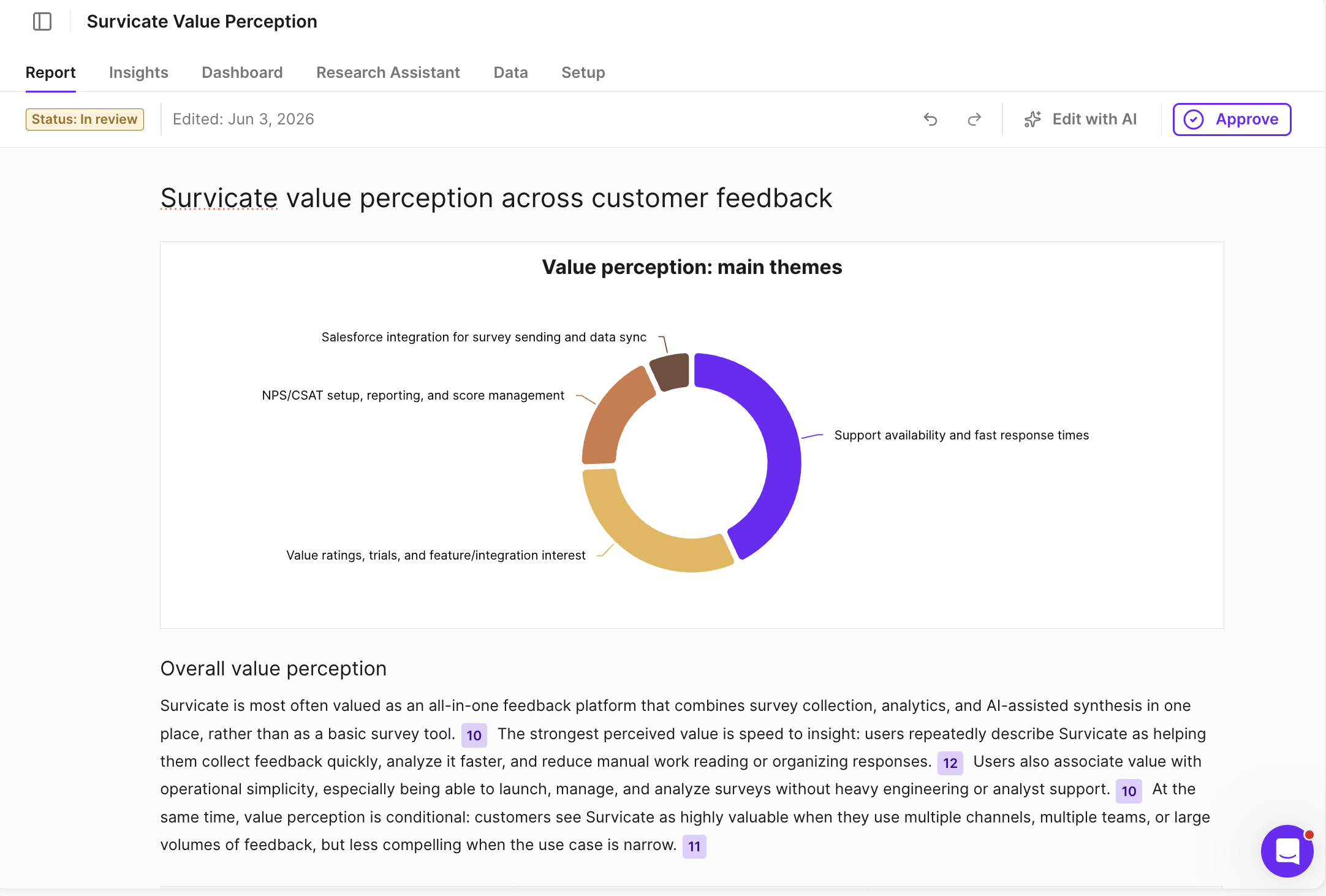
Create dedicated research projects with set goals, selected sources, time frames, and all the business context added into the tool to help answer specific questions based on all your customer interviews.
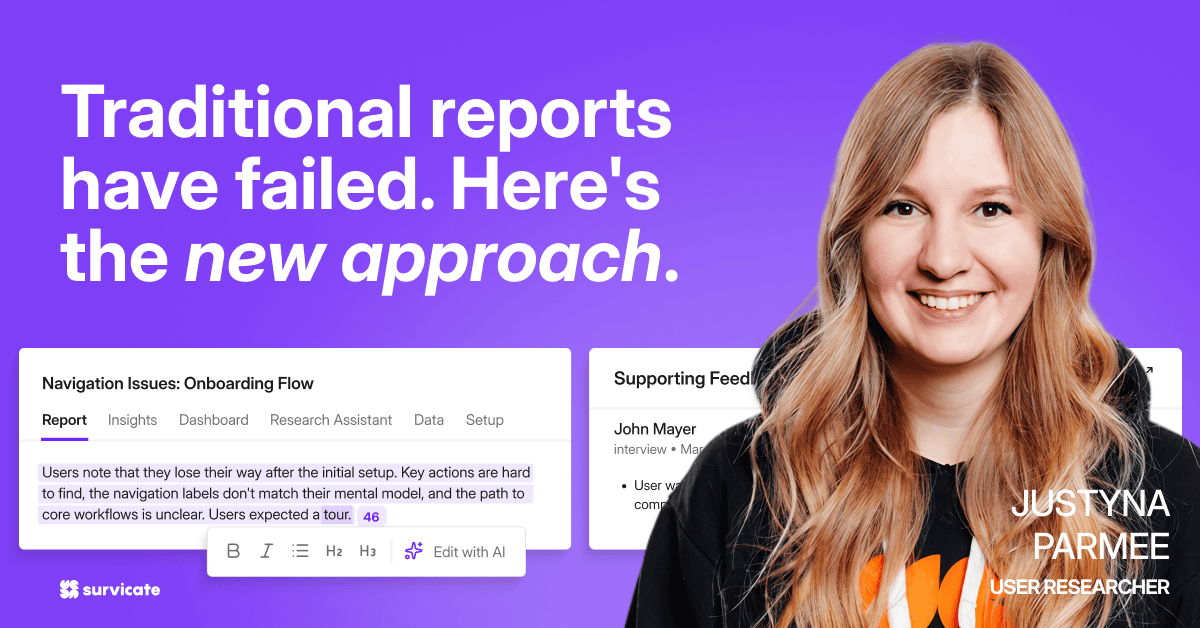
Survicate’s Research Hub automatically groups new feedback into insights you might miss in raw notes, organizing lots of data much quicker than when done manually.
What's especially important with this tool is that it relies on the human researcher to review the selected quotes that back up the automatically detected insights. So you get to review, refine, edit, reject, and approve the generated report on insight-level. That way, you can ensure no irrelevant data gets into your research report, at the same time, saving lots of time on manually reviewing and tagging data.
Step 3: Ask more questions

To dive even deeper, ask Research Assistant (or let your team ask) additional questions about your research data, filtered by sources and timelines you find relevant, with responses always backed by actual customer quotes, interview snippets, and sources.
Step 4: Connect interview themes to customer data
Survicate pulls customer attributes from your CRM, such as subscription tier, account value, and lifecycle stage, into your analysis. With this customer data at your fingertips, you can ask powerful, business-driven questions: "What are enterprise customers saying about onboarding?" or "Which features do churned users mention most?"
When you connect qualitative themes from interviews with your existing customer data, you transform scattered feedback into clear, actionable insights about the customer segments that drive your business forward.
Step 5: Turn insights into follow-up actions
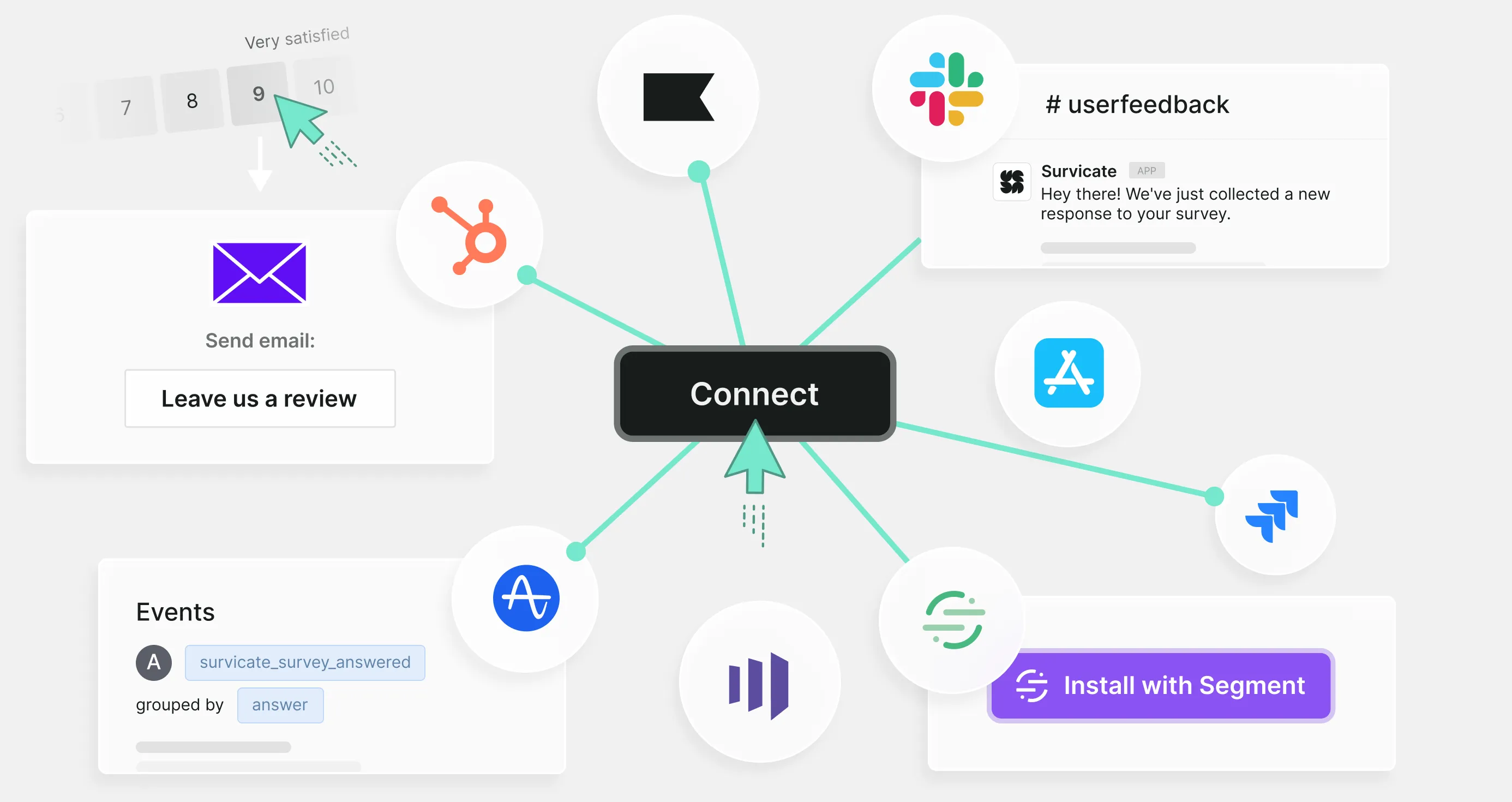
Create simple views or dashboards that highlight top themes, sentiment, and representative quotes, and share them with product, CX, and marketing teams. Use integrations with tools like HubSpot, Intercom, or Slack to push critical interview-based signals, such as a frequent bug or churn trigger, straight into the workflows where owners can prioritize fixes or campaigns.
No matter which survey platform you use, make sure there's a straightforward way to bring your own insights, like interview notes, hypotheses, and context, into the system, not just raw scores and comments. The real value of any tool lies in how well it helps you turn those insights into action, whether that means triggering follow-up workflows, prioritizing roadmap items, or sharing clear next steps.
Toolkit for running customer interviews
Instead of the standard key takeaways, we gathered a few handy platforms to make conducting and analyzing IDIs smooth and efficient. Check out the list of tools that might be useful to you and your team at every stage of preparation, execution, and analysis, so you keep all customer insights in one consistent workflow.
Planning
- FigJam and Miro are great for mapping the customer journey and visualizing touchpoints, emotions, and pain points, so your team can align on what to explore during interviews.
- Survicate helps you understand the "before" state by aggregating survey results and other customer feedback you have already collected, so you can spot patterns, prioritize segments, and turn recurring pain points into interview questions.
- Notion works well for documenting your research plan, storing discussion guides, and crafting interview scenarios in a single shared workspace, which makes it a favorite among content and UX teams.
Scheduling
- Calendly, Cal.com, or zcal automate scheduling by letting participants pick a time that fits their calendar, based on the availability rules you set.
- HubSpot Meetings or Microsoft Bookings – Ideal if you already use those ecosystems.
Running, recording, and transcribing
- Lookback is an all-in-one platform for running live user sessions, recording interviews, and generating transcripts. It supports moderated and unmoderated studies, screen and camera recording, and live observation rooms where your teammates can watch, take notes, and tag important moments as the session progresses.
Analyzing
- Survicate gives you the big picture by combining structured survey feedback with qualitative insights from interviews, so you can see how individual stories fit into broader trends.
Final thoughts on customer interviews
Running customer interviews can actually be really rewarding. Even if a Researcher isn't your daily role in the organization, it's fun to become one and try to look at your everyday issues differently—from the customer's perspective. Having these honest conversations is key to understanding the deeper layer of the client's needs and opinions.
If you were to remember one thing from this article, remember this: customer interviews are not sales sessions. Forget about upselling, showing new features, and explaining the benefits. Avoid the bias and focus on the person, their views, and feelings. Don't interrupt and restrain yourself from ending their sentences. Be kind, listen actively, and be grateful for their time and valuable insights.



.svg)

.svg)