TL;DR
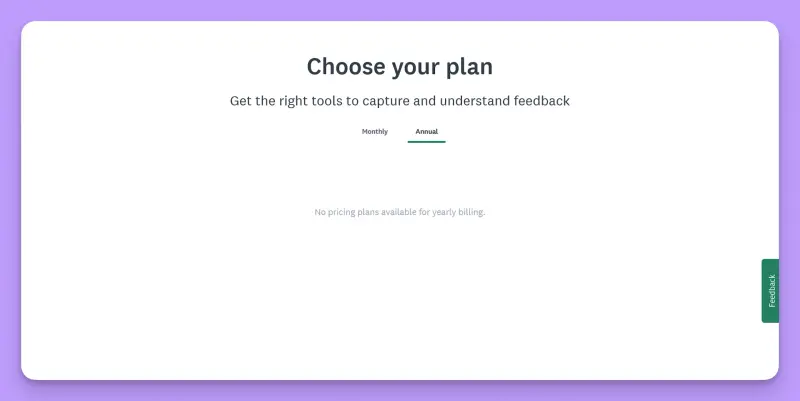
- GetFeedback has no public price right now. The Starter and Plus plans launched in July 2026 at $119 and $299 a month, but neither was available in the signup flow I tested. The plan picker displayed no options.
- GetFeedback Direct closes on December 31, 2026. SurveyMonkey proposes its Enterprise plan as the migration destination and recommends moving at your next renewal. You can choose another provider, of course.
- Direct customers need an Enterprise quote. The price depends on paid Power seats, a negotiated response pool, and add-ons, including Salesforce. There's no published Enterprise price, and the mix of seats and add-ons can make a substantial difference to the bill.
- Count the people who need to build surveys, not just read the results. Power seats can use email, website, and other collectors, as well as integrations. Casual seats can view results and create basic Web Link surveys of up to 10 questions. They can't run the other collectors or use integrations.
- The license won't cover the whole migration cost. Budget for the Salesforce mappings, triggered sends, dashboards, and other workflows your team may have to rebuild.
GetFeedback used to have a price you could read off a page. In July 2026, SurveyMonkey relaunched it as a self-serve website feedback product with two plans, published prices, and a seven-day trial. By November, the prices were gone.
I went looking for them anyway. The product page had no plans or signup option, only a Log in button that took me to Usabilla. I created an account, answered the onboarding questions, and reached the plan picker. Both the monthly and annual tabs were empty. I tried again through a US VPN. Same result.
That leaves two very different situations. If you're already on Direct, SurveyMonkey is steering you toward its Enterprise tier, where the price is negotiated. And if you're shopping for website feedback, there's no published price and no plan to select in the signup flow.
This article covers both situations, with B2C CX teams in mind. If you track satisfaction across customer segments, collect responses through your website, mobile app, and email, and read support tickets and app store reviews alongside them, this is written for you.
For currently published prices, I checked the vendors' pricing pages and help centers. To put SurveyMonkey Enterprise costs in context, I used contract data reported by Vendr and SpendHound, plus reviews on G2 and Capterra, our own testing of both tools, and transcripts from sales calls and customer interviews.
I work at Survicate, so my preference is clear. However, I'll point out where GetFeedback, SurveyMonkey Enterprise, or another competitor is a better choice.
How much does GetFeedback cost in 2026?
| Plan | Price / status | What's included | My 2 cents |
|---|---|---|---|
| GetFeedback Starter (previously published) | $119/mo, 1,000 responses/mo | Trigger-based website forms, multi-form analysis | The plan is straightforward. Buying it is another matter; the plan picker came back empty. |
| GetFeedback Plus (previously published) | $299/mo, 2,000 responses/mo | Adds the feedback button and embedded forms | More website feedback formats, same limitation: no email or mobile app surveys. |
| GetFeedback (formerly Digital) | Quote only | Website and in-app in-the-moment feedback, feedback buttons | Existing customers can renew past 2026. New buyers get no price and no self-serve route. |
| GetFeedback Direct | Quote only, closing Dec 31, 2026 | Salesforce-native NPS, CSAT, and CES programs | Budget for the migration, including the work of rebuilding surveys and Salesforce workflows. |
| SurveyMonkey Enterprise (the Direct migration path) | Quote only, five-seat minimum | Power and Casual seats, negotiated response pool, Salesforce add-on | This is the number your 2027 CX budget depends on. Get the quote broken into seats, response pool, and add-ons. |
Before you can compare prices, you need to know which GetFeedback you're dealing with. The name covers two self-serve plans that have disappeared from signup, an older website feedback product, and Direct, which is being shut down. SurveyMonkey Enterprise also enters the picture as the proposed replacement for Direct.
Starter and Plus: the self-serve plans you can no longer buy
When SurveyMonkey reintroduced GetFeedback in July 2026, the pitch was that a team could sign up, choose a plan, and add a form to their website with a single line of code. The pricing page listed two plans and a seven-day trial.
| Plan | Monthly | Annual | Responses | Included |
|---|---|---|---|---|
| Starter | $119 | $99 | 1,000/mo | Trigger-based form, multi-form analysis |
| Plus | $299 | $249 | 2,000/mo | Trigger-based form, feedback button, embedded form, multi-form analysis |
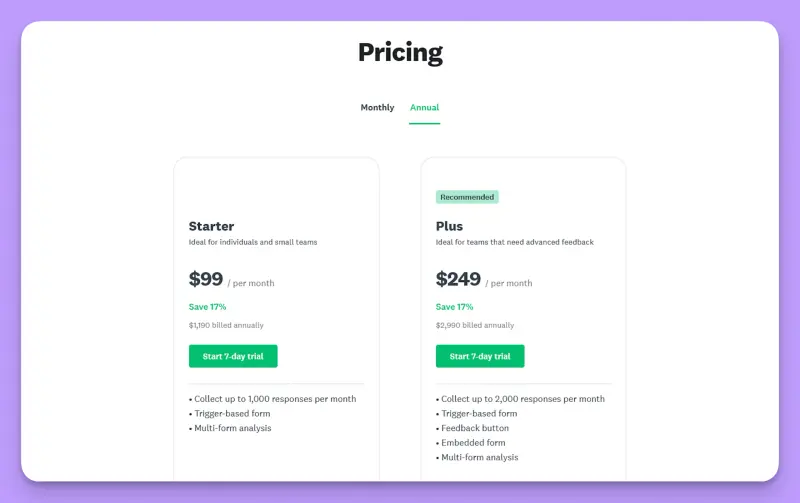
Those are historical prices, so don’t mistake them for current offers. Unused responses didn't roll over, either. Each month had its own cap, so a quiet month couldn't make up for a busy one.
You'll still find GetFeedback listed at $50 a month in software directories. That's from an older version of the product and isn't a price you can buy it at today.
GetFeedback, the website feedback product
This is the product previously called GetFeedback Digital, and before that, Usabilla. It covers in-the-moment website and in-app feedback: passive forms, campaigns, in-page widgets, and an analysis dashboard.
Unlike the short-lived Starter and Plus plans, this older product offered a broader range of feedback capabilities. It still has no published price or self-serve signup, but existing customers can renew their subscriptions past December 31, 2026.
GetFeedback Direct
Direct is the Salesforce-native product for relational and transactional NPS, CSAT, and CES. Its pricing has always been negotiated, and the product stops being available after December 31, 2026. For existing customers, the cost to work out now is what replacing it will involve.
SurveyMonkey Enterprise, the migration path
SurveyMonkey Enterprise has no published price. The pricing page offers a Contact sales button, and the minimum purchase is five seats.
SurveyMonkey does publish prices for its smaller plans:
| Plan | Monthly price | My 2 cents |
|---|---|---|
| Advantage Annual | $39 | Individual plan. Not a realistic starting point for a CX team. |
| Premier Annual | $139 | More features for one user, but still no Enterprise capabilities. |
| Team Advantage | $30/user | Starts at three users. Cheaper per seat, but limited for CX. |
| Team Premier | $92/user | Also starts at three users. Still doesn't replace Direct's Salesforce setup. |
On these published plans, extra responses cost $0.15 each, and unused responses don't roll over.
Our breakdown of SurveyMonkey's plans goes through those tiers in more detail.
The trouble for a CX team leaving Direct is that those prices offer little guidance. Salesforce, SSO, HIPAA, regional data residency, SMS surveys, and offline collection all require Enterprise. So even if a smaller plan looks affordable, it won't tell you what replacing Direct will cost.
What companies report spending on SurveyMonkey
With no published Enterprise price, procurement platforms offer some indication of what companies pay SurveyMonkey. Vendr and SpendHound report annual contract values, but their data covers purchases of different sizes and scope, including plans below Enterprise. The figures are useful for context, though neither gives you a reliable estimate of what your own Enterprise contract would cost.
| Source | Reported | Basis |
|---|---|---|
| Vendr | Median annual contract value $16,336, range $6,498 to $40,600 | Roughly 199 purchases |
| SpendHound | $4,297/year average for companies of 50 to 1,000 employees, $38,808/year average above 1,000 | Tracked contracts from 160 companies |
Those are some wildly different numbers, partly because the contracts themselves differ so much. Both datasets mix smaller Team subscriptions with multi-year Enterprise agreements that may include add-ons and services.
A company paying for a few survey seats and one paying for an Enterprise rollout across departments end up in the same statistics. So resist treating Vendr's $16,336 median, or either of SpendHound's averages, as a likely quote for your GetFeedback migration.
A more useful reference point comes from the quotes teams bring to us during evaluations. The shape that recurs is seat-driven rather than response-driven: a mid-sized CX contract covering roughly fifteen seats plus a compliance add-on lands near $20,000 a year.
Is there a GetFeedback free plan or free trial?
There has never been a free GetFeedback plan. The self-serve launch in July 2026 did, however, include a seven-day trial for Starter and Plus.
What the trial gives you now
You can still create an account and complete the onboarding questions. But when you reach the plan picker, there's nothing to select on either the monthly or annual tab. That's where the signup process stops. The advertised trial doesn't give you a working way to test the product or find out what you'd eventually pay.
Can you test the CX product before buying?
Not independently. SurveyMonkey has a free plan, with tight limits on questions and responses per survey. But you won't be testing the Enterprise capabilities that matter to a CX team migrating from Direct: Salesforce, SSO, or regional data residency.
To evaluate those, you'll need a demo and a quote. That takes time, and SurveyMonkey estimates around 90 days for a Direct migration. With the December 31, 2026 shutdown approaching, the schedule is already urgent. If you're still on Direct, ask how the vendor plans to handle the transition if the migration runs past that date.
How does GetFeedback pricing work?
The former Starter and Plus plans and SurveyMonkey Enterprise use very different pricing models.
Starter and Plus were response-based: a flat monthly fee, a fixed response allowance, and no rollover. Easy enough to budget for, provided your monthly volume stayed within the cap.
SurveyMonkey Enterprise uses a hybrid model. Your quote depends on the number of paid seats, the response pool you negotiate (some contracts offer unlimited responses instead), the add-ons you need, and the length of your contract. With all four variables in play, the five-seat minimum tells you very little about the eventual bill.
Power seats and Casual seats
A Casual seat is fine for checking results or building a basic Web Link survey. Once someone needs to set up an email collector, a website survey, or an integration, they need Power access.
| Power seat | Casual seat | |
|---|---|---|
| Questions per survey | Unlimited | Capped at 10 |
| Survey logic | Full | Not available |
| Collectors | Email, website embed, offline kiosk, SMS, QR | Web Link only |
| Integrations and API | Included | Not available |
| Branding | Your own | SurveyMonkey branding |
Some Enterprise contracts include a set number of Power seats and unlimited Casual seats. For a CX team working across several markets, the important thing is to count the people who will actually set up website collectors, mobile SDK surveys, email sends, or the Salesforce connection. Each needs Power access. Someone who only opens a dashboard to check last week's CSAT by city can probably stay on Casual.
Why doesn't SurveyMonkey publish a price for CX?
Enterprise contracts are assembled per organization. The number of seats, response allowance, add-ons, data residency requirements, and support terms can all change the price. SurveyMonkey gives you the feature list, then asks you to talk to sales for the number.
Until recently, there was at least a published starting point for the separate website feedback offering: $119 a month for Starter. That never told a Direct customer what Enterprise would cost, but it gave new website feedback buyers a price to work with. Now that Starter and Plus have disappeared from signup, even that reference point is gone.
What are you paying for?
A survey builder, NPS, CSAT and CES question types, email and link distribution, a website pop-up, dashboards, and exports. These are standard capabilities across CX tools. Survicate and several of the alternatives in this review cover the same ground without an Enterprise contract.
The Enterprise premium is largely about control. Divisions and workgroups, roles and permissions, SSO, HIPAA, audit controls, a custom subdomain, and regional hosting. The Salesforce integration is a paid add-on. That's a defensible premium. If your CX program spans several brands or markets and IT has an opinion about where the data sits, there's a good reason to pay for those controls.
With six departments running surveys, you need to manage who can create them, who sees the results, and where customer data is stored. But a CX team only running NPS and CSAT across two or three channels can still end up with an Enterprise quote full of permissions, audit controls, and other features designed for much larger organizations. The package may be fairly priced. That doesn't mean the team has much use for it.
Meanwhile, the team still needs to follow up with this week's detractors and investigate recurring complaints that may require a product fix next quarter. Permissions and audit controls won't show them which problems keep appearing or make sure someone follows up. If feedback arrives in four places and nobody owns the next step, spending more on administration won't fix it.
Website feedback: can SurveyMonkey replace Digital's visual tools?
GetFeedback Digital built its reputation on visual, in-the-moment website feedback, including feedback tied to specific page elements and screenshots from the person reporting the problem.
SurveyMonkey's website collector offers four formats: an embedded survey, an embedded button, a popup invitation, and a popup survey. It uses cookies to control repeat display, so a visitor who clears them may see the invitation again.
Those formats cover common ways to intercept visitors. But they don't tell you whether SurveyMonkey can collect feedback about a specific page element with a screenshot attached. If that's why your team uses GetFeedback Digital, ask for a demonstration of that exact workflow before treating SurveyMonkey as a replacement.
Mobile surveys and what they require
SurveyMonkey has a Mobile SDK for iOS and Android. Developers can trigger surveys from within the app or schedule them around milestones such as time since install.
The SDK is available on more than one SurveyMonkey plan, so you don't need Enterprise just to run mobile surveys. Some capabilities do require a paid plan: SDK Data Pull, which lets the app act on a survey response, and custom variables, which attach your own user attributes to that response.
There's also an important restriction for European mobile teams. SurveyMonkey's European Data Center doesn't support the Mobile SDK collector. We'll come back to what that means for your budget in the next section.
What drives GetFeedback and SurveyMonkey Enterprise pricing up?
The Enterprise quote covers seats, response volume, and add-ons. But for a team leaving GetFeedback Direct, the bill can also grow through migration work, restrictions on which channels you can use, and the terms you agree to at renewal.
Seats that are allowed to run a collector
Casual seats look like a cheap way to give the whole CX function access. And for people who only check results or send the occasional Web Link survey, they are. But a triggered CSAT, a website intercept, or anything connected to Salesforce needs someone with Power access to set it up.
Think about who actually builds and manages those surveys, especially if different markets run their own. Those people need Power seats, and their number affects your license cost. Count them before you negotiate, rather than discovering after signing that half the team needs an upgrade.
The Salesforce add-on
SurveyMonkey for Salesforce is an Enterprise add-on, priced on top of the license. Automated SMS survey invites from Salesforce cost extra again. For a team leaving Direct, that's a particularly unpleasant line item.
Salesforce was native to the product you're leaving. In SurveyMonkey Enterprise, you have to pay for the connection separately. And your Salesforce admin still has to deal with the differences between the two products. If Salesforce is the center of your CX program, it's worth comparing the full cost with tools built around it.
Response pools and overage
On SurveyMonkey's published plans, responses beyond the allowance cost $0.15 each, and unused responses don't roll over. Enterprise pools are negotiated, with some contracts offering unlimited responses instead.
For a B2C program with seasonal peaks, the details can make a considerable difference. Ask whether your allowance is monthly or annual, what happens when you exceed it, and what overage costs under your Enterprise contract. A month when your app ships a redesign and response volume triples is a good scenario to test the numbers against.
Paying twice for a channel the EU data center won't run
SurveyMonkey's European Data Center is available to new Enterprise customers, but several collection methods don't work there. The documented exclusions include the Mobile SDK collector, the Text Message collector, the audience panel, and most existing apps and plug-ins.
Being based in Europe doesn't automatically mean you have to use that data center. SurveyMonkey offers other storage and transfer arrangements. But if your legal team requires the EU data center and your product is a mobile app, you have a problem: the Mobile SDK collector won't work under that arrangement. Our Survicate vs SurveyMonkey comparison examines this restriction alongside the other features you lose with EU hosting.
You may end up buying another tool just to run in-app surveys, on top of your Enterprise contract. Settle the hosting requirements with your legal team before comparing quotes. Otherwise, you could negotiate a price for a platform that still leaves you paying someone else for mobile feedback.
The migration nobody puts in the quote
SurveyMonkey describes the move from GetFeedback as taking around 90 days, with a technical solutions manager assigned. Data migration services are offered to customers in the US; elsewhere, you'll need to manually rebuild the surveys you want to keep.
And the surveys themselves are only part of the work. Depending on what SurveyMonkey agrees to handle, your team may also have to recreate Salesforce field mappings, triggered sends, alert routing, and dashboards.
Ask exactly what's included in the migration service and what your team will have to rebuild. Estimate the internal hours for the latter, and include them in your budget. Do the same for a possible future exit, because you're now dealing with a vendor that's already retiring one of the products you're using.
The renewal is the pricing event
SurveyMonkey recommends migrating at your next renewal date. That's a sensible time to change systems, but it's also when your commercial terms reset.
Before you commit to the migration schedule, agree on the Power seat count, the full add-on list, and a cap on future price increases. Get those terms in writing. Once you've rebuilt your surveys and Salesforce workflows around Enterprise, switching providers again will be a much bigger job, and SurveyMonkey knows that.
Why do teams choose GetFeedback and SurveyMonkey Enterprise? The pros
- Website feedback that's easy to manage. Once the snippet is installed, a marketer can launch trigger-based forms or an always-on feedback button without another engineering ticket. For teams that regularly change their surveys, that's a good reason to stick around.
- Direct's native Salesforce setup. Surveys lived inside Salesforce, triggered by its events and writing responses back to its records. Admins could manage the whole process in a system they already knew. It's a big part of why Direct's shutdown hurts.
- Enterprise governance. Divisions, workgroups, granular permissions, SSO, HIPAA, audit controls, and regional hosting cover much of what large organizations need. If IT and procurement have a long checklist, SurveyMonkey Enterprise has answers that smaller tools often don't.
- One vendor across departments. If HR, marketing, and research already use SurveyMonkey, bringing CX under the same contract can be easier than introducing another platform. Sometimes the procurement argument wins.
- Plenty of ways to reach respondents. Email, links, website, SMS, offline kiosks, QR codes, and mobile SDK surveys, plus a research panel for reaching people who aren't your customers.
What are GetFeedback's and SurveyMonkey Enterprise’s cons?
- Neither product has a price you can look up. There’s no published price for the CX products, and the new self-serve signup has no plans to choose from. For Direct customers facing a December 31 deadline, spending time in a sales cycle just to learn the cost can be particularly frustrating.
- The channel list has conditions attached. SurveyMonkey offers more ways to reach respondents than most CX tools, but your account setup determines which ones you can use. The Mobile SDK collector isn't available in its European Data Center, and anyone setting up surveys through channels other than Web Link needs a Power seat. Check that the channels your team needs are supported by the hosting and seat configuration you're being quoted.
- Price increases show up in reviews. One Capterra reviewer said their team left GetFeedback after a sharp increase. SurveyMonkey reviewers also complain about tier limits and rising costs as response volumes grow. Individual experiences, of course, but good reasons to negotiate overage charges and renewal terms upfront.
- Identifying respondents takes extra work. SurveyMonkey automatically identifies respondents when you send surveys through its own email invitations. For website and other channels, you need additional setup, such as custom variables, unique links, or passing user data through the mobile SDK. That's a headache for a CX team that wants to see which customers gave low scores, compare results across segments, and follow up with the right people.
- Enterprise turns Salesforce into a paid connector. Moving from Direct to SurveyMonkey Enterprise means replacing a Salesforce-native application with an add-on you buy separately. Your admin will have to adapt existing workflows, and you'll pay extra for the integration that used to be part of the product.
When is GetFeedback worth the price, and when is it a problem?
When SurveyMonkey Enterprise is worth it
- You're standardizing survey work across departments. HR runs engagement surveys, marketing runs research, CX runs NPS and CSAT. If each department has its own tools and accounts, Enterprise gives IT a way to manage access and permissions across the organization without taking over every survey. That's a reasonable thing to pay for.
- Your program runs through email, links, and Salesforce, with US data residency. Relationship NPS to a customer segment, CSAT after a support ticket, results written back to Salesforce. Enterprise can handle that setup, provided the Salesforce add-on is included in your quote. And with US hosting, the EU data center restrictions won't get in your way.
- You’re already a SurveyMonkey customer. If HR or marketing already uses the platform, adding CX to the same contract may spare you another procurement process. We've seen how much that matters in our own sales conversations. Among teams that chose SurveyMonkey over Survicate, an existing contract came up again and again as the deciding factor. It's an understandable reason to stick with a vendor, but I'd still check what the extra Power seats and add-ons will cost before assuming you're getting the better deal.
When the pricing becomes a problem
- You bought Direct for its native Salesforce architecture. Moving to a connector means revisiting the workflows your admins built inside Salesforce. Before accepting Enterprise as the replacement, compare the add-on cost and migration work with what a Salesforce-native alternative would require.
- You're a consumer app or marketplace with EU data center requirements. The Mobile SDK collector won't work under that hosting arrangement. You could end up paying for Enterprise to handle your website and email surveys while buying another tool for feedback inside the app. An expensive workaround for what should be a fairly ordinary CX program.
- The Enterprise package is more than you need. Your team runs NPS and CSAT across a couple of channels, but the offer comes with a five-seat minimum, a sales process, and governance features designed for much larger organizations. That's a lot to take on when all you want is to launch a CSAT survey next week.
- You want to test before you commit. There's no self-serve route into the CX product. You'll get a sales-led demo, but testing how your own surveys and workflows behave means arranging that with the vendor. It's a less comfortable way to buy software if you're used to trying things yourself first.
GetFeedback pricing vs Survicate, Qualtrics, Sprig, SurveySparrow, and AskNicely
The alternatives serve quite different teams, and their pricing reflects that. A published starting price tells you little until you know which channels, features, and response allowances it covers.
| Tool | Pricing model | Starting price or available figures | Where it fits |
|---|---|---|---|
| SurveyMonkey Enterprise (the Direct migration path) | Hybrid: Power seats, negotiated response pool, paid add-ons | Quote only, five-seat minimum | Large organizations standardizing surveys across departments, with extensive governance needs and Salesforce workflows that can run through a connector |
| Survicate | Response allowances and Research Hub data points, with published starting prices | Growth from $56/mo billed annually at the lowest pool of 100 responses, Pro from $349/mo, Enterprise from $569/mo | CX teams running continuous, high-volume feedback across web, in-product, mobile, email, and links, with AI analysis and CRM integrations |
| Qualtrics CustomerXM | Quote only, based on modules, seats, and interaction volume | Quote only. Its separate self-serve research product starts near $420/mo, billed annually | Enterprise CX teams with dedicated analysts and advanced statistical needs |
| Sprig | Quote only; depends on response volume, research capabilities, and distribution environments | Quote only. Its pricing page shows a single Enterprise platform behind a Book a demo button | Product and CX teams running in-product research across web and mobile |
| SurveySparrow | Published response-based tiers; CX Suite sold separately | Self-service tiers at 2,500, 15,000, and 36,000 responses; Enterprise quote-only | Teams running simpler feedback programs. Self-service plans allow one active CX survey; broader programs require a custom plan |
| AskNicely | Response-based, with published starting prices that rise with volume | Learn from $449/mo, Grow from $849/mo, Transform from $999/mo, billed annually, with unlimited users | Frontline service businesses using customer feedback to coach staff by location |
For a closer look at individual tools, see our guides to Qualtrics pricing, Sprig alternatives, and AskNicely pricing.
My hot take: how does Survicate compare to SurveyMonkey?
SurveyMonkey wants to move GetFeedback Direct customers to Enterprise, where Salesforce becomes a paid add-on. I wouldn't assume that's the best destination for everyone. Survicate connects to Salesforce Sales Cloud on Pro, letting teams sync survey responses with CRM records, trigger workflows, and use Salesforce attributes for targeting.
That's enough to handle a lot of the NPS and CSAT work Direct customers need to preserve. Teams relying on native Salesforce survey objects could check our rundown of survey tools that work with Salesforce.
And there's a good chance your CX program goes well beyond Salesforce. You may be sending relationship NPS by email, running CSAT after an order, and surveying users inside your app. Survicate covers all those channels with one response pool.
Research Hub then lets you analyze the answers alongside support tickets, app store reviews, and call transcripts, with findings linked to their sources. You can also explore that data through Claude, ChatGPT, or Slack using Survicate MCP.
That's the kind of setup I'd want to compare with the Enterprise offer. SurveyMonkey has advantages when a large organization needs to govern survey work across departments, with extensive controls for IT and procurement.
And then there's Europe. SurveyMonkey's European Data Center doesn't support its Mobile SDK collector. So if you need EU data residency and want to survey users inside your app, you're paying for Enterprise and still need another tool for mobile feedback. That's a fairly expensive limitation for a product sold as Enterprise. Survicate handles both under one roof, with data hosted in Ireland.
The bottom line: what should GetFeedback buyers do?
- For CX teams running continuous, high-volume feedback programs: I’d give Survicate a try. It covers NPS, CSAT, and other surveys across web, in-product, mobile, email, and links, with Research Hub bringing survey results together with feedback from other sources. The Salesforce integration also makes it a serious option for teams leaving Direct.
- For large organizations consolidating survey work across departments: SurveyMonkey Enterprise. Its governance, permissions, and administration capabilities make sense when several departments need to work under one contract. Just get the Power seat count and add-ons priced before you agree to migrate.
- For existing GetFeedback Digital customers: If the product still does what you need, renewal is an option. But I'd compare it with alternatives, including Survicate, and ask SurveyMonkey about its development plans for Digital. When a vendor shuts down one product and makes another difficult to buy, I'd want to know how committed it is to the one I'm being asked to renew.
- For enterprise CX programs requiring advanced statistics and complex research: Evaluate Qualtrics, particularly if you have dedicated analysts who will use its more specialized capabilities. Budget for implementation alongside the license.
- For product teams with extensive in-product research needs: Compare Sprig with Survicate. Both handle in-product surveys, but Sprig also offers built-in heatmaps and session recordings, which Survicate supports through integrations. If you want those capabilities in the same tool as your surveys, Sprig has an advantage. You'll need a quote to find out what that costs, though.
- For CX teams collecting feedback beyond digital channels: SurveySparrow is worth considering if you need to reach customers by SMS, WhatsApp, or on tablets in physical locations. It supports channels that many survey tools don't cover. Just bear in mind that running multiple active CX surveys takes you into Enterprise territory, where pricing is negotiated.
- For frontline service teams: AskNicely has a particular advantage when customer feedback is used to coach employees by location. I'd check that managers will actually use the coaching tools before paying for them.
What brought you here matters. If you're a Direct customer, December 31, 2026 is the shutdown date, and you need to decide where your surveys and Salesforce workflows will go. If you came looking for a website feedback subscription and found an empty plan picker, I'd move on to evaluating alternatives.
Start with the feedback program you want to run in 2027, including the channels, integrations, and analysis your team needs. Then compare what each vendor will charge to support it. Our GetFeedback alternatives guide can help you build a shortlist.
FAQ
Is GetFeedback Direct the same product as GetFeedback?
No. GetFeedback Direct is the Salesforce-native survey product closing on December 31, 2026. GetFeedback, formerly Digital and before that Usabilla, is the website and in-app feedback product. It continues, and existing customers can renew past that date. If you've been running surveys inside Salesforce, you're affected by the Direct shutdown.
I'm new to GetFeedback and only need website feedback. Do I have to buy SurveyMonkey Enterprise?
No. Enterprise is SurveyMonkey's proposed migration path for Direct customers. For a website form or feedback button, you'd normally look at website feedback tools rather than an Enterprise contract. The problem is that GetFeedback currently has no published price or working self-serve signup for new buyers, so you'll have to look elsewhere or contact sales.
Can I still migrate off GetFeedback Direct before December 31, 2026?
You'll need to settle that with SurveyMonkey immediately. The vendor describes its migration process as taking around 90 days, and December 31 is now less than two months away. Ask for a realistic schedule, what happens if the migration isn't finished by the shutdown date, and which data and workflows you'll need to move yourself. I'd export your response history as early as possible.
I keep seeing GetFeedback listed at $50 a month. Is that figure current?
No. That price comes from older software directory listings. GetFeedback's more recent Starter and Plus plans were advertised at $119 and $299 a month, but neither is available through the signup flow I tested. There's currently no published price you can use to buy a GetFeedback subscription.
Author's note (last verified: 13 November 2026): Statements such as "best" reflect our opinion and typical use cases, not a universal guarantee. This comparison is based on publicly available information and our best understanding at the time of writing. Vendors may change features, pricing, and packaging without notice. For the latest details, please check the official sources or reach out to the vendor directly.
Key takeaways
- Migrating from Direct means rethinking your Salesforce workflows. SurveyMonkey Enterprise offers a paid connector in place of Direct's native integration. Before signing, check which workflows you can preserve and which you'll need to rebuild.
- An Enterprise contract doesn't guarantee every survey channel. SurveyMonkey's EU Data Center excludes mobile SDK surveys, and collector access also depends on Power seats. Your hosting and seat choices can determine whether the CX program you planned is even possible.
- Knowing who answered matters as much as collecting the answer. SurveyMonkey's respondent identification outside its own email invitations takes extra setup. That can complicate customer segmentation, detractor follow-up, and connecting feedback to existing CRM data.
- The best alternative to GetFeedback depends on what your team actually does with feedback. Survicate covers continuous, multi-channel CX programs; SurveyMonkey Enterprise brings cross-department governance; Sprig adds native heatmaps and session recordings; SurveySparrow reaches customers through channels such as WhatsApp and in-person tablets.