TL;DR
- Zonka covers plenty of CX needs, but digital teams may struggle with its integrations. It connects natively to CRMs and helpdesks, while Segment, Braze, and Customer.io require middleware. AI analysis is also a costly separate add-on.
- Survicate and Iterate connect directly to tools that manage customer segments. Survicate also brings surveys, tickets, and reviews into one analysis, although Braze and other premium integrations require Pro. Iterate can launch surveys from Braze or Iterable campaigns and write responses back to customer profiles.
- SurveySparrow offers similar channel coverage to Zonka, along with some familiar pricing headaches. Triggered in-app surveys require Enterprise plus SpotChecks, while the mobile SDK is also reserved for Enterprise.
- Qualtrics can take on larger CX programs that include contact center analytics. Buyers report contracts around $30,000 a year, with additional analysis capabilities licensed separately.
- The remaining alternatives serve more specific needs. SurveyMonkey suits email-led programs, though mobile surveys are added one collector at a time. Alchemer Digital lets teams manage new survey triggers after the initial setup, but comes with a separate quote. AskNicely is designed around frontline service teams.
Zonka Feedback can handle just about any survey channel you throw at it: email, SMS, web, in-app, even offline kiosks. It also offers AI analysis of tickets and reviews, plus case management for customer follow-ups. That's a lot of ground covered by one platform. But how much of it fits the way a digital CX team actually works?
Take a CX lead at a food delivery marketplace. She wants to survey customers who haven't ordered in a month, using segments already defined in Braze or Segment. She wants those surveys to run in the app and by email, and the answers to feed back into her campaigns. Zonka can support this workflow, but it takes middleware to connect the tools, and launching new mobile app surveys may involve developers.
And that's just one example of where Zonka can make a day at a digital CX team harder than it needs to be. I'll look at the other sticking points and compare seven alternatives to see which ones could better fit your needs.
I work at Survicate, so you should know where I'm coming from. I'll also cover the situations where I'd recommend another tool over Survicate.
The tools are listed in no particular order.
| Tool | G2 rating | Known for | My 2 cents |
|---|---|---|---|
| Survicate | 4.6 | Multichannel feedback collection, Research Hub for AI analysis and integrations for acting on feedback | Strong when your audiences are defined in Segment, Braze, or Customer.io and you want to analyze surveys, tickets, and reviews together. Event targeting and Braze require Pro. |
| SurveySparrow | 4.4 | Conversational surveys across email, SMS, WhatsApp, and in-app | Closest to Zonka in channel coverage and case management, although triggered in-app surveys require Enterprise plus the SpotChecks add-on. |
| Qualtrics Customer Experience | 4.3 | Enterprise experience management across digital, contact center, and research | Worth considering when your CX program spans several markets and needs contact center analytics, and sophisticated research capabilities. |
| SurveyMonkey | 4.4 | Broad, familiar survey platform | Useful when several departments run different kinds of research. Less convincing for event-triggered feedback inside digital products. |
| Alchemer Survey | 4.4 | Research-grade surveys plus Alchemer Digital for in-app feedback | Alchemer Digital lets the team configure survey targeting from the dashboard after developers instrument events. It's a separate product priced by monthly active users. |
| Iterate | 4.3 | Surveys launched from Braze and Iterable campaigns | Particularly interesting if you already run campaigns in Braze or Iterable. Pricing follows monthly active users, and you'll need another tool to analyze tickets and reviews. |
| AskNicely | 4.7 | NPS and CSAT with frontline coaching | Goes further than Zonka in coaching frontline staff and measuring their performance. Less useful when most customer interactions happen inside an app. |
Why are digital CX teams leaving Zonka Feedback?
Zonka has grown from a survey tool into what it calls an AI feedback intelligence platform, with features that make particular sense for businesses running CX across stores, clinics, or field teams. But a digital-first CX team has different priorities, and that's where some of Zonka's characteristics become apparent.
Your customer segments are stuck in other tools
Zonka has plenty of native CRM and helpdesk integrations, including Salesforce, HubSpot, Pipedrive, Zendesk, Intercom, Freshdesk, Help Scout, and Front. It also connects to Klaviyo, Mailchimp, and ActiveCampaign. If your CX team works mainly out of a CRM or helpdesk, that's a decent selection.
The trouble starts when your customer segments live in Segment, Braze, Customer.io, or Iterable. Zonka doesn't connect to any of them natively. Its help center points you to APIs, webhooks, or Zapier instead.
Say your lifecycle team has already identified customers in Braze who haven't placed an order in a month. You want to survey them and feed their answers back into a win-back campaign. Simple enough, except now someone has to build the connection between Braze and Zonka, make sure the data flows both ways, and keep an eye on it when either tool changes something. All to use customer data your company already has.
If you're planning that kind of workflow, our guide to how CX teams automate customer feedback goes through the routing.
Running web and mobile surveys means two different workflows
On the web, Zonka gives the CX team plenty of freedom. Developers add a JavaScript snippet once, and from then on, the team can launch new surveys, change targeting rules, and configure widgets from the dashboard. No need to go back to the developers for every new idea.
In a mobile app, things get more complicated. Zonka assigns a separate token to each survey, which has to be included in the app's code. Once that survey is deployed, the CX team can change its questions, design, audience, and display timing without developer involvement. So there's still plenty they can do on their own.
But adding another survey means adding another token. And that brings developers back into the picture, potentially along with another app release. A CX team that can launch a new web survey this afternoon may have to wait for a development sprint to ask the same question inside the app.
That's a frustrating limitation when your customers use both channels. It also makes experimenting with new surveys harder.
AI analysis comes with a hefty price tag
Zonka sells Feedback Management and AI Feedback Intelligence as separate products, with an option to bundle them. The first is priced mainly on survey responses; the second analyzes feedback from surveys, tickets, and reviews, with pricing based on data credits. For a digital CX team trying to understand customer feedback across all those sources, that second product is hardly optional.
And the price of that AI analysis is quite something. Zonka's own blog puts Feedback Management at around $199 a month and AI Feedback Intelligence at a whopping $999. That's nearly $12,000 a year for AI alone, at the advertised starting price. You still need a quote to find out what your team would pay, but the numbers give you a pretty good idea of the budget Zonka has in mind.
That's a steep entry point in 2026, when AI feedback analysis is increasingly included in regular survey plans. Survicate, for example, includes Research Hub in Growth, starting at $56 a month on annual billing. And it's hardly alone in offering AI without a separate four-figure monthly bill.
Zonka may well justify the price for companies processing enormous volumes of feedback across locations and channels. For a digital CX team that wants to understand what customers are saying in surveys, tickets, and app reviews, though, I'd certainly shop around before committing that kind of money.
Zonka may be more platform than your CX team needs
Zonka's Feedback Management plan includes offline surveys, kiosk apps, and location- and agent-level reporting. These are valuable features for a clinic network or retail chain managing feedback across dozens of locations.
Such businesses also need case owners, routing rules, escalation paths, and a feedback taxonomy. When someone complains about a particular branch, the complaint has to reach the right manager, and someone needs to make sure it gets resolved. Zonka is well equipped for that kind of work.
But say your CX team runs surveys across a website and mobile app, with Zendesk handling the occasional unhappy customer. You probably don't need another system for assigning cases, tracking escalations, and reporting on individual locations. Yet you may still find yourself configuring parts of one just to run your feedback program.
And it's not necessarily a quick setup. Reviewers who go beyond basic surveys mention automation and custom reporting as time-consuming, while some say certain controls are difficult to find.
How I did this review
What I looked for
I compared the tools against three tasks a digital CX team would typically want them to handle:
- Segment-targeted relationship NPS. Can you survey customers in a segment defined in Segment, Braze, or Customer.io? And can their scores go back to the customer profiles used to trigger follow-up campaigns?
- Transactional CSAT inside the app. Can the CX team launch an event-triggered survey after a delivery or booking without waiting for another app release?
- One view of direct and indirect feedback. Can you analyze survey responses alongside support tickets and app store reviews, broken down by segment or market? And how does adding those sources affect the bill?
These three tasks cover collecting feedback, analyzing it, and acting on the results. I also considered ease of use, customer support, and pricing. After all, someone has to set up the tool, and someone else has to approve the invoice.
How I validated the claims
I checked features, plan restrictions, and integration details against each vendor's help center, developer documentation, and current pricing page. Where vendors don't publish prices, I used buyer-reported figures from Vendr and identified them as estimates.
I also checked what users say about ease of use and support on G2 and Capterra. Where relevant, I drew on our in-house testing and transcripts from our sales calls.
For Zonka itself, I relied on its documentation, pricing page, and integrations page.
Survicate: surveys and feedback analysis connected to your data stack
What does Survicate do?
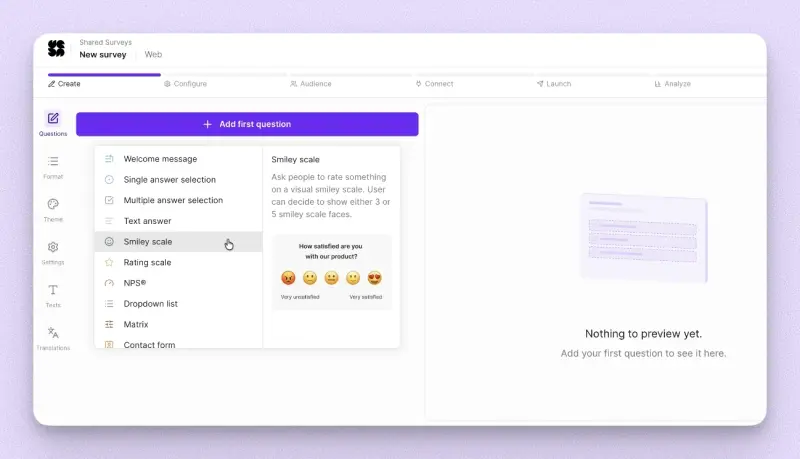
Survicate collects feedback through surveys on websites, inside digital products and mobile apps, by email, and through links. Its mobile SDKs support iOS, Android, React Native, Flutter, and Unity.
You can send email surveys directly from Survicate or embed them in messages sent through tools like HubSpot and Customer.io. Surveys also work inside Intercom Messenger and, on Pro, Braze in-app messages.
Then there's Research Hub, Survicate's AI research repository, which brings survey responses together with feedback from multiple sources, such as App Store and Google Play reviews, Zendesk, Intercom conversations, and more. You can also ask questions about the data in plain language, the way you'd type into a chatbot.
Survicate MCP makes that feedback accessible through AI assistants such as Claude and ChatGPT. You can explore survey results, investigate findings from Research Hub, or draft a new survey directly in a conversation with the assistant. Any survey created this way remains a draft until someone launches it in Survicate.
Who is Survicate primarily for?
Survicate is particularly useful for CX teams at consumer apps, digital marketplaces, and other high-volume digital businesses. They can collect feedback across the app, website, email, and links, analyze it alongside support tickets and app reviews, then send the results to the tools they already use for follow-ups. Survicate has 47+ native integrations, including Segment, Braze, Customer.io, HubSpot, Intercom, and Zendesk, so much of that work can happen without building custom connections.
What's Survicate's ease of use?
You can start using Survicate without booking a demo. G2 reviewers describe the survey builder as easy to use, and the mobile SDK is relatively straightforward to install.
The difference from Zonka becomes particularly clear when you want to add another survey to your mobile app. With Survicate, developers install one workspace key and define the screens and events available for targeting. Once that's done, the CX team can launch new surveys from the dashboard without waiting for another app release.
Our guide to collecting in-app feedback covers where those surveys tend to work best.
What's Survicate's customer support like?
Survicate offers live chat with human agents on all plans. The company reports a 97% customer satisfaction rate and a two-minute first response time. Pro includes priority chat, while Enterprise adds a dedicated customer success manager and one-to-one training.
What are the main pros of using Survicate?
- Surveys across web, mobile apps, email, and links. Run NPS, CSAT, and other surveys across channels, with all responses available for analysis in Survicate.
- Combined analysis of surveys, tickets, and reviews. Research Hub helps you identify recurring complaints across different feedback sources and check whether a problem affects one channel or several.
- New in-app surveys without another app release. Once developers have instrumented the relevant screens and events, the CX team can launch surveys from the dashboard. Event-based targeting requires Pro.
- Two-way Segment integration on every plan. Use customer traits from Segment to target surveys and filter results, then send survey answers back as events.
- Survey responses sent back to messaging tools. Customer.io (from Growth), Braze, and Iterable (from Pro) receive answers as profile attributes and events. A low NPS score can trigger a follow-up campaign without anyone exporting the data.
- Access to feedback through AI assistants. Survicate MCP lets you explore survey results and Research Hub findings in Claude or ChatGPT, using questions written in ordinary language.
What are the main cons of using Survicate?
- No built-in case management. You'll need a connected tool such as Zendesk, Intercom, or HubSpot to manage customer follow-ups.
- Several important features require Pro. Event targeting and integrations with Braze, Iterable, Amplitude, and Mixpanel aren't available on Growth.
- Multiple usage limits to keep an eye on. Survey responses, Research Hub data points, and email sends have separate allowances. Heavy usage can push you toward more than one limit.
- No native SMS or WhatsApp sending. You can distribute survey links through your own messaging tools, but Survicate doesn't send SMS or WhatsApp invitations itself.
Pricing
Survicate's Growth plan starts at $56 a month on annual billing, with 100 survey responses and 500 Research Hub data points included. The price increases as you choose higher allowances. Growth includes Research Hub, attribute targeting, built-in email sending, and integrations with Customer.io, Segment, Intercom, and Zendesk.
Pro starts at $349 a month, with response and data point allowances agreed during a sales call. It adds event-based targeting and premium integrations, including Braze and Iterable. Enterprise starts at $569 a month.
Your bill depends mainly on survey responses and Research Hub data points. Growth also limits email sends to five times your response allowance. There's a 10-day trial with no credit card required, up to 25 responses, and access to pro-level features.
My hot take: How does it compare to Zonka?
I'd put Survicate high on the shortlist for a digital CX team running NPS and CSAT across an app, website, and email, especially if it also wants to analyze support tickets and app reviews. Research Hub covers that analysis from Growth, while Zonka sells its AI Feedback Intelligence separately. That means with Survicate you can collect feedback across all those channels and analyze it without having to buy a second product.
Survicate connects natively to Segment, Braze, and Customer.io, so your team can survey existing customer segments and send the answers back to the tools running follow-up campaigns.
It also gives CX teams more independence in the mobile app: once the SDK is set up, they can launch new surveys without waiting for developers to update the app. Both are areas where Zonka makes the team work harder.
Of course, the price depends on what you need. Growth covers attribute targeting and Customer.io, but event-based targeting and Braze require Pro, starting at $349 a month. I'd account for that when comparing quotes, particularly if those features are among your main reasons for considering Survicate.
Zonka also has something Survicate doesn't: built-in case management. If you want to assign, track, and close customer cases inside your feedback platform, that's a good reason to stay with Zonka.
When should you choose another tool over Survicate?
I work at Survicate, so I have an obvious preference. But there are several situations where I'd point you elsewhere.
If your CX program covers physical locations such as stores, clinics, or restaurants, Zonka deserves a closer look. Its location-level reporting, kiosk surveys, and tools for managing feedback across branches are designed for that kind of work.
SurveySparrow is another option if you need SMS or WhatsApp surveys, while AskNicely is worth considering if you also want to coach frontline employees based on customer feedback.
Iterate deserves a closer look if your lifecycle team already runs its campaigns in Braze or Iterable and wants to launch surveys directly from those journeys. Its unlimited responses can also work in your favor when you have a relatively stable audience answering lots of surveys, although pricing depends on monthly active users.
SurveySparrow: omnichannel CX surveys with a conversational format
What does SurveySparrow do?
SurveySparrow offers conversational and traditional surveys across email, SMS, WhatsApp, websites, and mobile apps. Its SpotChecks let teams target surveys by audience, screen, or event, while a separate offline app handles in-person feedback. Mobile SDKs are available for iOS, Android, React Native, and Flutter.
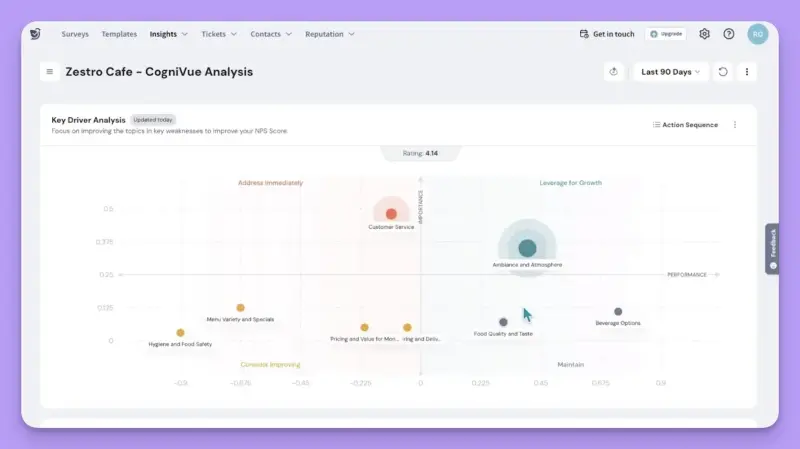
Beyond surveys, there's a separate CX Suite for NPS, CSAT, and CES programs, along with ticket management, reputation management across review sites, and CogniVue for AI analysis of open-text responses.
SurveySparrow also connects to Segment in both directions, although there's an important limitation for digital CX teams: Segment events can trigger email or SMS surveys, but they can't launch a survey inside the product. Data warehouse integrations include Snowflake and BigQuery.
Who is SurveySparrow primarily for?
SurveySparrow can be an option for CX and marketing teams that collect feedback across several channels, particularly SMS and WhatsApp. Its conversational survey format may also appeal to teams that want something more engaging for respondents, while built-in ticketing lets them manage customer follow-ups without leaving the platform.
What's SurveySparrow's ease of use?
Ease of use is one of the things reviewers praise most on G2 and Capterra. They particularly like the conversational format and how quickly they can put a survey together.
SpotChecks are flexible too. Once set up, the same target can be used for multiple surveys, with the CX team controlling screens, events, and display frequency from the dashboard.
What's SurveySparrow's customer support like?
Support depends on the plan. Basic and Starter include 24x5 email support, Business adds 24x5 chat, and Enterprise comes with a dedicated customer success manager. Reviews are mixed: plenty of users praise the support team, although some report slow responses when they need help with more complex issues.
What are the main pros of using SurveySparrow?
- A wide range of survey channels. Collect feedback through email, SMS, WhatsApp, web, mobile apps, and offline surveys. SMS, WhatsApp, and the mobile SDK require Enterprise.
- Flexible web and mobile targeting. Once SpotChecks are installed, the CX team can configure surveys by screen, event, and audience from the dashboard.
- Conversational survey format. Chat-style questions can make longer surveys feel less demanding for respondents.
- Two-way Segment integration. Use customer traits from Segment and send survey responses back to your CDP.
- Ticketing and reputation management. Manage customer follow-ups and monitor reviews alongside your survey program.
What are the main cons of using SurveySparrow?
- Only one active CX survey on self-serve plans. Even Business limits you to one. Running relationship NPS alongside transactional CSAT means moving to the separately priced CX Suite.
- In-product targeting requires Enterprise and an add-on. SpotChecks are sold separately, and the mobile SDK is also restricted to Enterprise.
- Advanced reporting is limited to higher plans. Cross-tabs and word clouds start on Business, while text analytics, custom widgets, and the executive dashboard require Enterprise.
- No native integrations with several popular digital tools. Braze, Iterable, Customer.io, Amplitude, and Mixpanel require middleware or custom connections.
- AI analysis can't combine surveys and external reviews in the same analysis. CogniVue handles them separately, so you can't investigate a complaint across both sources in a single analysis.
Pricing
Basic starts at $19 a month, Starter at $39, and Business at $79, all billed annually. Business includes three seats, with additional users costing $49 a month each.
That's the straightforward part. Many features a digital CX team would need, including triggered in-app surveys and multiple active CX surveys, take you into quote-only territory: Enterprise, SpotChecks, and the CX Suite. So don't expect the $79 Business plan to tell you much about your final bill.
Older SurveySparrow material puts the CX Suite around $199-249 a month. Vendr reports an average contract near $4,100 a year, though that's based on just a handful of transactions. Our SurveySparrow pricing breakdown goes into the details.
The 14-day trial includes Business features and up to 50 responses.
My hot take: How does it compare to Zonka?
SurveySparrow comes closest to Zonka in its range of survey channels and built-in case management. Their pricing models are a different story, although neither makes budgeting particularly easy. Zonka gives you no full public price list, while SurveySparrow publishes plans starting at $19 a month. But those prices won't get a digital CX team very far.
Triggered in-app surveys require Enterprise plus SpotChecks, and running NPS and CSAT side by side may mean buying the CX Suite as well. You'd still be calling sales to find out what your program will cost.
The similarities go beyond the messy pricing. Like Zonka, SurveySparrow separates the analysis of surveys and external feedback. CogniVue can analyze survey responses or external reviews, but can't combine them in a single analysis. If customers complain about the same issue in both places, you'll have to examine the results separately.
If you want to know whether SurveySparrow is a better deal than Zonka, go get quotes for Enterprise, SpotChecks, and the CX Suite first. The published pricing tells you very little about what you'll end up paying for a digital CX program.
Qualtrics CX: enterprise experience management for complex CX programs
What does Qualtrics do?
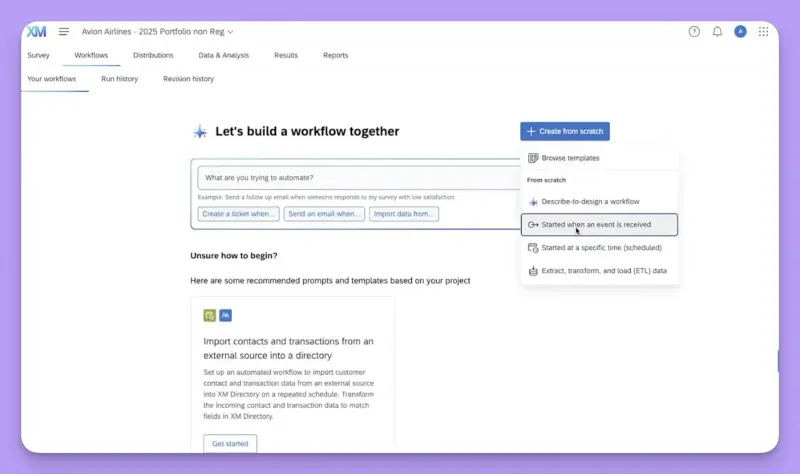
Qualtrics XM for Customer Experience covers surveys, website and app intercepts, mobile SDKs, text analytics, dashboards, and workflows for following up on customer feedback. XM Discover adds analysis of calls, chats, and support tickets, with a separate license. Qualtrics also offers advanced research methods such as conjoint and MaxDiff, access to respondent panels, and a full employee experience suite.
Who is Qualtrics primarily for?
Qualtrics is built for large organizations running experience programs across multiple teams, markets, and channels. It's worth considering if your company needs contact center analytics, advanced research methods, or compliance standards such as FedRAMP.
What's Qualtrics's ease of use?
Reviewers on G2, Capterra, and TrustRadius often say building a basic survey is quick. Things get considerably harder when you move into advanced features, intercepts, and dashboards, where reviewers report a steep learning curve.
In-app surveys require developers to install the mobile SDK first. From there, the team can configure intercepts, although anything beyond the guided templates usually takes someone with a good understanding of the platform.
What's Qualtrics's customer support like?
Reviewers generally speak well of Qualtrics support. Premium support, however, adds to an already substantial contract. Buyers on Vendr report paying around 10% to 20% of the contract value for it.
What are the main pros of using Qualtrics?
- A broad CX program covering multiple feedback sources. Surveys, web and app intercepts, contact center transcripts, and reviews can all feed into your analysis. Calls and tickets require the separately licensed XM Discover.
- Advanced web and app targeting. Configure intercepts using cookies, events, and analytics data to reach customers at specific moments.
- Research capabilities beyond standard CX surveys. Conjoint, MaxDiff, and statistical tools support more complex pricing and preference studies.
- Enterprise compliance. Qualtrics offers standards such as FedRAMP that matter to public sector and healthcare organizations.
What are the main cons of using Qualtrics?
- Contact center analysis costs extra. XM Discover, which handles tickets, chats, and calls, requires separate licensing.
- Advanced text analysis has its own requirements. Sentiment analysis and recommended topics are Advanced Text iQ features. Basic text analysis involves more manual work.
- No public CX pricing. Contracts are individually quoted, and buyer-reported costs vary enormously.
- Limited native connections to the digital CX stack. Braze and Iterable require API work or partner extensions, while the HubSpot connector is sold separately.
- A steep learning curve beyond basic surveys. Reviewers describe advanced features, intercepts, and dashboards as considerably harder to master.
Pricing
Qualtrics publishes prices only for Strategic Research at $420 a month, billed annually. This number doesn't tell a CX team much about what it will pay. The Customer Experience suite is quote-only, with pricing based on interactions such as survey responses, calls, chats, emails, and reviews.
Vendr puts the median Qualtrics contract at around $30,000 a year, with reported deals ranging from roughly $7,000 to $140,000. Additional modules, seats, and professional services can push the price higher.
I call it the Rigor Premium: the extra cost of Qualtrics' research-grade capabilities, from advanced study design to statistical testing. My Qualtrics pricing breakdown explains when paying that premium makes sense.
My hot take: How does it compare to Zonka?
Consider Qualtrics when your CX program has grown beyond what Zonka can comfortably handle. Think several markets, large contact centers, complex reporting requirements, and research teams that need more than standard NPS and CSAT surveys. Qualtrics has the tools to manage all of that, although getting everything you need may involve several licenses.
And the bill can get serious. If Zonka's separately priced AI analysis already gives you pause, Qualtrics is unlikely to offer much relief. XM Discover, Advanced Text iQ, and advanced statistical capabilities can all add to the contract.
For a digital CX team mainly collecting segment-level NPS and CSAT, I'd have a hard time justifying that expense. But if contact center analytics, enterprise governance, or strict compliance requirements are central to your program, Qualtrics deserves a place on the shortlist.
Before talking to sales, list the modules you'll need for surveys, tickets, and reviews, and ask for a quote based on your expected interaction volumes. Check out the guide to Qualtrics alternatives for other options if the numbers don't work out.
SurveyMonkey: general-purpose surveys and market research
What does SurveyMonkey do?
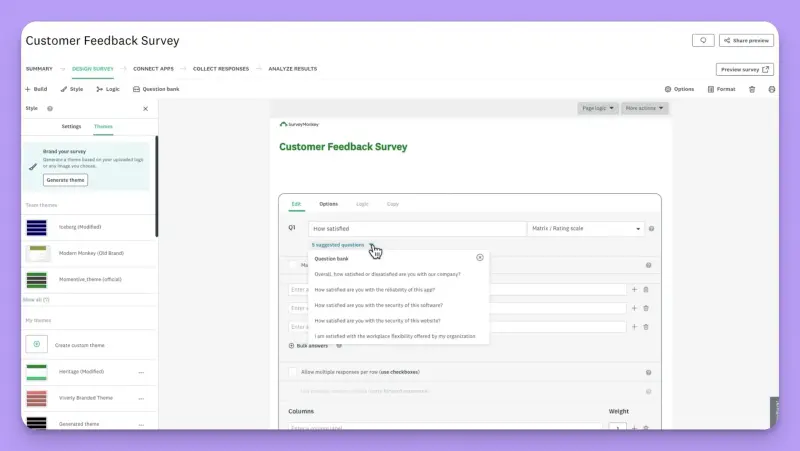
SurveyMonkey lets teams create and distribute surveys through email, links, and website embeds, with a large question bank, templates, and reporting tools. It supports NPS and CSAT, along with more advanced research methods, cross-tabs, and statistical analysis.
For market research, SurveyMonkey Audience gives you access to a paid respondent panel, so you can collect answers from people outside your customer base. There's also AI-assisted text analysis and an MCP connector for working with surveys in Claude.
Mobile surveys are available through an iOS and Android SDK. SurveyMonkey also offers GetFeedback for Apps, a separate product with more advanced in-app feedback capabilities.
Who is SurveyMonkey primarily for?
SurveyMonkey makes sense when several departments need surveys for different purposes. A CX team can run NPS and CSAT, while marketing conducts market research and HR collects employee feedback. Its respondent panel and statistical tools are particularly useful for research involving people who aren't already your customers.
What's SurveyMonkey's ease of use?
SurveyMonkey's builder gets plenty of praise on G2 and Capterra. The templates help people create surveys quickly, which explains some of its popularity across departments.
That being said, the interface is showing its age. As my colleague Aleksandra Dworak put it after testing the builder, editing a SurveyMonkey survey feels like editing a WordPress page in 2010. The 2026 redesign reached the main dashboard, not the survey editor, and some G2 reviewers describe the older controls as confusing.
Mobile surveys also need developer involvement. Each survey uses a collector with its own survey hash, which has to be added to the app.
What's SurveyMonkey's customer support like?
Paid plans include 24/7 email support. Phone support is reserved for Premier, Team Premier, and Enterprise. Reviews are mixed: some users praise the support team, while others report slow responses when they need help with more complex issues.
What are the main pros of using SurveyMonkey?
- Surveys for almost any department. A large template library and question bank cover customer feedback, market research, employee surveys, and plenty of other use cases.
- Advanced research and reporting. Cross-tabs, statistical tools, and thematic analysis give research teams more to work with than basic survey dashboards.
- Access to external respondents. SurveyMonkey Audience lets you purchase responses from a research panel when you need to reach people outside your existing customer base.
- Several CX metrics on one plan. Run NPS, CSAT, and CES surveys together, with no active-survey cap on team plans.
- Mobile survey options. SurveyMonkey offers a mobile SDK and the separately sold GetFeedback for Apps, although both require developer involvement.
What are the main cons of using SurveyMonkey?
- Limited behavioral targeting. You can't natively target surveys using customer attributes or product events, making it harder to collect feedback immediately after a particular action.
- Mobile surveys need developers. The SDK uses individual survey collectors, while GetFeedback for Apps is a separate purchase. The Mobile SDK is also unavailable in SurveyMonkey's EU data center.
- No native integrations with key digital tools. Braze, Iterable, Customer.io, Amplitude, and Mixpanel require middleware or custom connections.
- Respondent identification takes extra work. SurveyMonkey identifies people through its own email invitations, but website and link surveys generally need additional information or custom variables to connect answers to customer records.
- No combined analysis of surveys and external feedback. You'll need another tool to analyze survey responses alongside support tickets and app reviews.
- Seat costs and response overages. Team plans require at least three users, and responses above the annual allowance cost $0.15 each.
Pricing
In the US, Team Advantage costs $360 per user per year and Team Premier $1,104, both with a three-seat minimum. Enterprise starts at five users and is quote-based. Responses above the plan's allowance cost $0.15 each.
The annual response pool is shared across users, so a large research project can eat into the allowance your CX team was counting on. Check our guide to get a more detailed look at SurveMonkey’s pricing.
My hot take: How does it compare to Zonka?
SurveyMonkey has something Zonka can't really match: a broad research toolkit that goes well beyond customer experience. Marketing can study consumer preferences, HR can survey employees, and researchers can reach people outside the company's customer base through SurveyMonkey Audience. If several departments need a survey platform, there's a good case for buying one that serves them all.
The trouble is that SurveyMonkey offers less freedom where digital CX teams need it most. You can't target surveys based on product events, each new mobile survey involves developers, and analyzing tickets alongside survey responses requires another tool. For European teams, there's another nasty surprise: choosing the EU data center disables 14 features, including the Mobile SDK and Analyze with AI.
So there's a trade-off worth thinking through when considering SurveyMonkey. The platform gives you a much broader range of research capabilities, but a team running continuous NPS and CSAT across a digital product may spend more time working around its limitations than using those extra features.
Alchemer: research-grade surveys plus a dedicated in-app product
What does Alchemer do?
Alchemer offers several products. Alchemer Survey handles complex questionnaires, with advanced logic and a wide range of question types.
Alchemer Digital, formerly Apptentive, handles feedback inside mobile apps and on websites. It combines surveys, rating prompts, a message center, and a Love Dialog that asks users whether they enjoy the app.
For mobile surveys, developers instrument the relevant events once. The CX team can then target surveys and prompts by event, screen, and customer data from the dashboard, without requiring a new app release for each survey.
Who is Alchemer primarily for?
Alchemer suits teams that need advanced survey logic and research capabilities, as well as digital CX teams looking for dedicated in-app feedback tools. These capabilities are spread across several products, however. A CX team collecting feedback across web, email, and mobile apps may need Alchemer Survey and Digital, with additional purchases for website targeting, workflows, and AI analysis.
What's Alchemer's ease of use?
Reviewers on G2 praise Alchemer Survey's logic and customization, although some find the interface dated or difficult to navigate at first.
Alchemer Digital gives CX teams more independence once developers have installed the SDK and instrumented the relevant events. They can change surveys and targeting from the dashboard without updating the app. Survey and Digital have their own interfaces and separate G2 listings, so it's worth evaluating both if you plan to use them together.
What's Alchemer's customer support like?
Collaborator includes 24/7 email support. Phone support is available with annual Professional and Full Access plans, Monday through Friday, from 6 a.m. to 6 p.m. Mountain Time. For European teams, that generally means support starts around 2 p.m., leaving just three or four hours of overlap with a typical working day.
Some G2 reviewers also report being directed back to documentation when asking for help with more complex tasks.
What are the main pros of using Alchemer?
- Advanced survey logic and customization. Professional supports complex conditions, answer piping, quotas, randomization, and A/B testing. Full Access adds more question types and finer control over quotas.
- Research methods beyond standard CX surveys. Full Access includes conjoint, MaxDiff, TURF, card sorting, crosstabs, and exports to SPSS and R. These are substantial capabilities if your team conducts formal research alongside NPS and CSAT.
- Email distribution on the entry plan. Even Collaborator includes contact lists, reminders, and sending from your own domain, without requiring an expensive upgrade.
- A dedicated product for mobile feedback. Alchemer Digital has its own event targeting, customer identity, and interaction history, along with in-app surveys and rating prompts. It offers more specialized mobile feedback functionality than a basic survey SDK.
What are the main cons of using Alchemer?
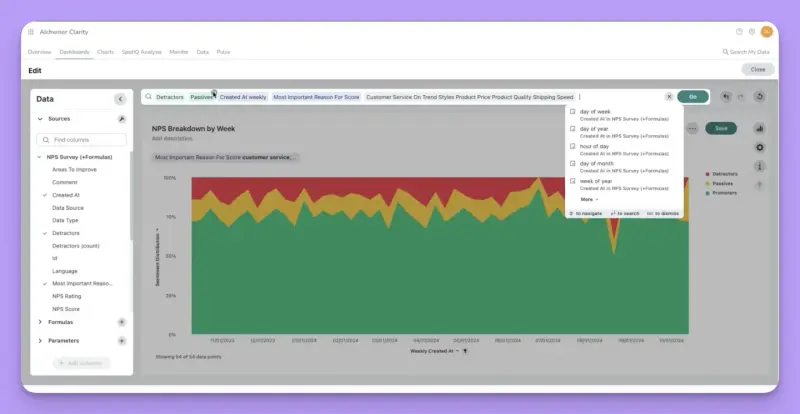
- A full CX program may require several purchases. Alchemer Survey handles standard survey distribution, Digital covers mobile feedback, Website Intercept provides visitor targeting, and Pulse handles AI analysis. The additional products have no published starting prices.
- A three-user ceiling on self-serve plans. Adding a fourth user moves you to the quote-based Business Platform. You also can't mix license levels in self-serve, so one analyst needing Full Access can put the whole team on the most expensive plan.
- More seats don't mean more responses. The annual response allowance is shared across the account. Three Full Access users still get 125,000 responses between them.
- Limited native integrations with the digital CX stack. Alchemer's standard integration and connector lists don't include Braze, Iterable, Customer.io, Amplitude, or Mixpanel. Some connections are available through other Alchemer products, such as Workflow, adding another layer to the setup.
- Limits on sharing data between Survey and Digital. The products can exchange customer information, but responses to an Alchemer Survey launched through a Digital Prompt can't be used directly for Interaction Response Targeting inside Digital. That complicates programs where one survey should determine what the customer sees next.
Pricing
Alchemer Survey's self-serve plans are priced per user: Collaborator costs $315 a year, Professional $1,075, and Full Access $1,895, all billed annually. Each plan supports up to three users. Alchemer Digital and the Business Platform require custom quotes.
Adding a fourth survey user, API access, or native in-app feedback takes you beyond those published prices. Website Intercept, Workflow, and Pulse can add further costs. Digital also uses monthly active users to calculate usage, so its bill can grow with your app audience even when survey response volume stays unchanged.
My hot take: How does it compare to Zonka?
Alchemer has some serious advantages over Zonka. Its survey builder offers much more for formal research, and Digital gives CX teams greater freedom to run surveys inside their apps. Once developers have set up the relevant events, the team can launch another survey without asking for an app update. With Zonka, a new mobile survey means going back to the developers.
I'd be more enthusiastic about Alchemer if buying it were as straightforward as using those features. If you want surveys across email, web, and mobile, with automated follow-ups and AI analysis, you're potentially looking at five products: Survey, Digital, Website Intercept, Workflow, and Pulse. Each comes with its own purchasing considerations, and even after you've bought them, some customer data won't flow between Survey and Digital in the way you'd expect.
Zonka has its own limitations, but at least you don't have to assemble its feedback collection and case management from separate products. With Alchemer, better ask for an itemized quote and a demonstration of how the pieces work together before you make up your mind.
Check our guide to Alchemer alternatives to see how it compares to other tools on the market.
Iterate: surveys launched from Braze and Iterable campaigns
What does Iterate do?
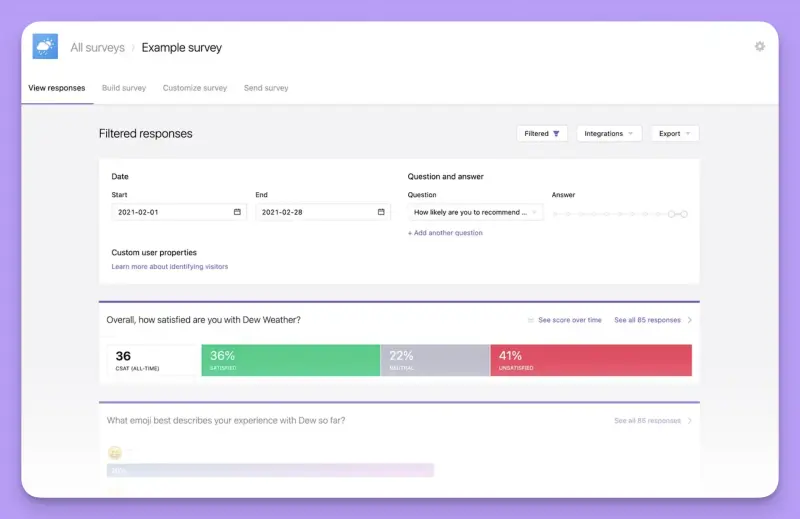
Iterate runs in-app, email, web, and link surveys, with particularly close integrations with Braze and Iterable. It also connects natively to Klaviyo, Segment, Airship, CleverTap, and MoEngage.
You can launch surveys directly from a Braze Canvas or Iterable journey, using the segments and triggers already configured there. Surveys can even appear as Braze in-app messages without installing Iterate's SDK. Responses go back to customer profiles as attributes and events, where they can trigger the next step in a campaign.
For surveys triggered by events inside an app, Iterate offers native iOS and Android SDKs, with React Native support. Its Research Assistant add-on analyzes open-text responses for topics and sentiment.
Who is Iterate primarily for?
Iterate makes particular sense for lifecycle marketing and product teams already using Braze or Iterable. They can add surveys to existing customer journeys, collect responses, and use those answers to decide what happens next, all without rebuilding their audiences in another platform.
What's Iterate's ease of use?
Iterate has only 20 reviews on G2, so there's limited feedback to draw conclusions from. Reviewers generally describe it as intuitive and easy to use.
The Braze and Iterable integrations also simplify setup for teams familiar with those tools. They can use existing campaign segments and triggers instead of configuring the same targeting rules in Iterate.
What's Iterate's customer support like?
The small number of G2 reviews generally describe support as fast and responsive. With so little feedback available, I'd confirm the support channels and response times during the trial.
What are the main pros of using Iterate?
- Surveys inside existing customer journeys. Launch surveys from Braze or Iterable campaigns using segments and triggers your team has already configured.
- Responses that trigger follow-ups. Survey answers go back to customer profiles as attributes and events. A low NPS score, for example, can immediately start a retention campaign.
- Unlimited survey responses. Every plan includes unlimited responses, so a successful survey won't increase your bill simply because more customers answered.
What are the main cons of using Iterate?
- No native helpdesk integrations. Iterate sends survey responses directly to Braze and Iterable, but doesn't offer the same connection to Zendesk, Intercom, or Freshdesk. Turning a negative response into a support ticket requires Zapier, webhooks, or custom integration work.
- AI analysis limited to Iterate surveys. Research Assistant analyzes survey responses, but you'll need another tool to examine support tickets and app store reviews alongside them.
- Pricing based on monthly active users. You pay for users you never survey, and your bill grows with your audience even if you run the same number of surveys and collect the same number of responses.
- Add-ons push the price up. Removing Iterate branding, white labeling, and the Research Assistant also come at an additional cost. On Starter, some integrations such as Braze, Iterable, Klaviyo, Segment, and Mixpanel cost extra.
- Separate limits on email sending. Starter allows 1,000 recipients a month and Business 10,000. Unlimited survey responses won't help much if you can't send your relationship NPS to everyone you want to reach.
Pricing
Iterate charges by monthly active users, with unlimited survey responses on every plan. Starter ranges from $10 to $70 a month for audiences up to 50,000 MAUs. Business costs $150 to $425 a month for 50,000 to 1 million MAUs and includes premium integrations. Removing Iterate's branding, adding Research Assistant and White labeling are all paid extras.
Enterprise is quote-based, and there's a 14-day trial. Iterate's pricing configurator calculates the final cost based on audience size, email volume, and add-ons.
My hot take: How does it compare to Zonka?
Iterate is a strong contender if your customer journeys already run through Braze or Iterable. You can launch a survey using the segments and triggers you've set up there, then send the answers straight back to customer profiles. A poor NPS score can start a retention campaign immediately. Zonka doesn't offer that kind of native connection to either platform, so you'd have to build it yourself.
But there's more to acting on feedback than triggering another campaign. If a customer reports a problem that needs investigating, someone still has to get that response into your helpdesk and make sure the right person follows up. Iterate doesn't handle that handoff natively, so your team has to build it. Zonka has more of that operational follow-up built in, which is worth something if your CX team spends as much time resolving complaints as collecting them.
Iterate also leaves support tickets and app reviews outside its feedback analysis, and its MAU-based pricing deserves attention if your app has a large or fast-growing audience. I'd test it with an actual Braze or Iterable journey, including what happens after a customer leaves a negative response. You'll probably find that triggering a retention campaign is straightforward, while getting a complaint to the right support agent takes more work.
For a closer look, see how other tools compare with Iterate.
AskNicely: NPS and CSAT built around frontline teams
What does AskNicely do?
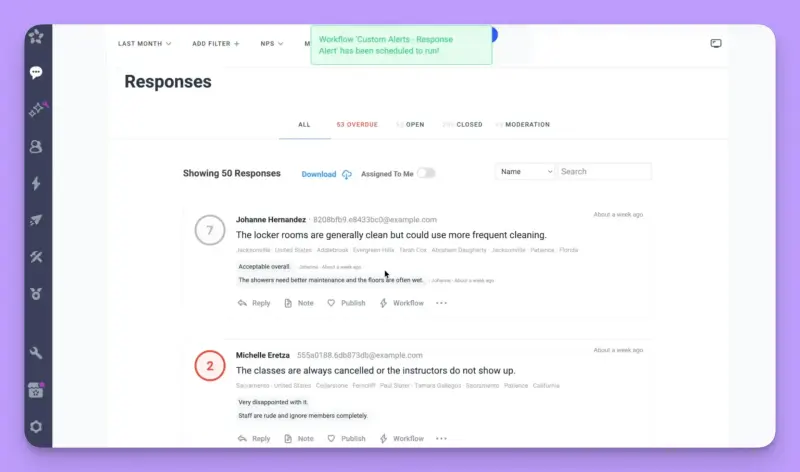
AskNicely collects NPS and CSAT feedback through email, SMS, WhatsApp, and QR codes, with in-app surveys available on its highest plan. Its focus is on frontline employees, with leaderboards, team huddles, coaching, recognition, and TV displays showing live scores. The platform also includes case management, basic review requests, and an optional AI product called NiceAI.
Who is AskNicely primarily for?
AskNicely is built for service businesses with multiple locations and frontline staff, such as clinics, hotels, and home services companies. It helps managers see how individual employees and teams are performing based on customer feedback, then use those results for coaching.
What's AskNicely's ease of use?
Reviewers on G2 and GetApp generally describe AskNicely as easy to set up and use, particularly praising its intuitive dashboards. Getting value from the coaching features is another matter: managers need to make them part of their regular work.
What's AskNicely's customer support like?
All plans include chat and email support. Contracts above $9,600 a year come with a named customer success manager and an activation team to help with implementation. There's no free trial, so evaluating AskNicely starts with a personalized demo.
What are the main pros of using AskNicely?
- Coaching built around customer feedback. Connect NPS and CSAT scores to individual employees, teams, and locations, with leaderboards, recognition, and coaching tools to help managers act on the results. Full coaching features require Transform.
- Unlimited users on every plan. Managers and frontline employees can access feedback without paying for additional seats.
- Multiple feedback channels with case management. Collect responses through email, SMS, and WhatsApp, then assign and track customer issues within AskNicely.
What are the main cons of using AskNicely?
- In-app surveys require Transform. Frontline coaching, team huddles, and CX goals are also reserved for the highest plan.
- Limited survey builder. AskNicely focuses on NPS, CSAT, CES, and 5-star ratings. Teams needing varied question types, complex logic, or detailed product research will find it restrictive.
- AI and reputation management cost extra. NiceAI and the broader reputation management module are separately priced add-ons.
- Limited integrations with the digital CX stack. There's no native connection to Braze, Iterable, Customer.io, Amplitude, or Mixpanel. Integrating them requires the API or Zapier.
- Expensive for a digital CX team. AskNicely starts at $449 a month, more than some competing survey platforms charge for their higher-tier plans. That may be too much if you won't use its frontline coaching and performance management features.
Pricing
AskNicely doesn't publish prices on its pricing page, although its own blog lists Learn from $449 a month, Grow from $849, and Transform from $999, all billed annually. Plans start at 500 responses a year, with pricing tied to response volume.
Exceeding your allowance brings overage charges, and SSO costs another $1,500 a year.
My hot take: How does it compare to Zonka?
AskNicely takes customer feedback a step further into managing frontline performance. A hotel manager can see how individual employees are doing, recognize the ones customers praise, and use poor scores to decide where coaching is needed. Zonka has case management and location-level reporting, but AskNicely gives managers more tools for working directly with their staff.
That's useful when the people delivering the service are central to the customer experience. If your frontline is a mobile app, though, much of AskNicely's appeal disappears. Its survey builder is limited to basic CX metrics, in-app surveys require Transform, and the platform offers little native connectivity to the tools digital CX teams use to target and analyze feedback.
I'd have trouble justifying that investment for a team mainly investigating product friction and customer behavior. For other options on the market, see our guide to AskNicely alternatives.
Is Zonka Feedback right for you?
Zonka is a good choice for businesses that need to collect feedback both digitally and at physical locations. Its built-in case management helps teams assign, track, and resolve complaints across branches or frontline staff. It also supports SMS and WhatsApp surveys, although both channels come with their own conditions and limitations.
For digital-first CX teams, Zonka's lack of native integrations with Segment, Braze, and Customer.io means extra work connecting tools they already use. Launching new mobile surveys can involve another app release, and AI analysis carries a hefty separate price tag.
These are good reasons to look at alternatives before building your feedback program around Zonka.
Which Zonka alternative should you choose?
- Survicate for digital CX teams running NPS and CSAT across web, mobile apps, and email. It brings survey responses, tickets, and reviews together for analysis, then sends feedback to CRM, helpdesk, and messaging tools for follow-up. Event targeting and Braze integration require Pro.
- SurveySparrow for teams that need Zonka's broad channel coverage, including SMS and WhatsApp, along with built-in ticketing. A full digital CX program requires quotes for Enterprise, SpotChecks, and the CX Suite.
- Qualtrics CX for enterprises running complex CX programs across markets, contact centers, and research teams. Expect high costs and additional licenses for some capabilities.
- SurveyMonkey for organizations combining customer feedback with market research and surveys across other departments. Its research capabilities are extensive, but behavioral targeting and in-app feedback are weak points.
- Alchemer for advanced survey logic, formal research, and specialized mobile feedback. Running a multichannel CX program requires several separately priced products.
- Iterate for lifecycle teams running campaigns in Braze or Iterable. Surveys can launch within those journeys and trigger follow-up campaigns based on responses. Iterate lacks native helpdesk integrations, so getting complaints into support tickets requires additional setup. Tickets and reviews also remain outside its feedback analysis.
- AskNicely for service businesses that coach frontline employees across multiple locations. Its staff performance features are wasted on a digital CX team whose customers mainly interact with an app.
Before booking demos, return to the problem that made you question Zonka. If it's the integrations, test whether a survey can reach the right customer segment and send the answer back without custom work. If it's mobile surveys, check whether your CX team can launch a new one without developers. And if it's AI analysis, ask what you'll pay once tickets, reviews, and higher feedback volumes enter the picture.
Our guide to building an automated customer feedback program covers what to do once you've chosen your tool.
FAQ
Does Zonka Feedback integrate with Segment or Braze?
Zonka has no native Segment or Braze integration. Its native integrations cover CRMs, helpdesks, and marketing tools such as Klaviyo and Mailchimp. Connecting Zonka to Segment, Braze, or Customer.io requires middleware such as Zapier, Make, or Integrately, or a custom connection through APIs and webhooks.
Is AI analysis included in Zonka's pricing?
No. AI Feedback Intelligence is a separate product that can be bundled with Feedback Management. The two use different pricing models: Feedback Management is based mainly on survey responses, while AI Feedback Intelligence uses data credits. Neither has a public price list. Zonka's own blog has cited starting prices of around $199 and $999 a month, respectively, but you'll need a quote for your actual usage.
Which Zonka alternatives let a CX team launch new mobile app surveys without an app release?
Survicate, SurveySparrow (through SpotChecks), and Alchemer Digital let CX teams launch new in-app surveys from a dashboard after the initial developer setup. Survicate's event targeting requires Pro, while SurveySparrow's SpotChecks require Enterprise and a paid add-on.
Iterate can also launch surveys as Braze in-app messages without its own SDK. Zonka and SurveyMonkey use individual survey tokens or collectors, so adding a new mobile survey generally involves developers.
What's the difference between response-based and audience-based survey pricing?
Response-based pricing follows the number of answers you collect. Survicate, SurveySparrow, AskNicely, and Zonka Feedback Management use response allowances, although some also charge for additional usage, such as AI analysis or data points.
Audience-based pricing, used by Iterate and Alchemer Digital, depends on monthly active users. You pay for users you never survey, and as your audience grows, so does your bill, even if you collect the same number of responses. Check how each vendor defines an active user, too.
Alchemer Digital, for example, counts unique devices that launch your app within a rolling 30-day period. Iterate includes unlimited survey responses, but email sends and some features have separate limits or charges.
Can I keep Zonka for case management and use another tool for digital surveys?
Yes, although you'll be running two feedback platforms. You'll need to connect them so that survey responses collected in the second tool can reach Zonka, with enough customer information for your team to assign and follow up on cases.
Before committing to that setup, check the integration work and combined cost. If your support team already manages cases in Zendesk or Intercom, sending survey responses directly there may be simpler.
Author's note (last verified: 26 November 2026): Statements such as 'best' reflect our opinion and typical use cases, not a universal guarantee. This comparison is based on publicly available information and our best understanding at the time of writing. Vendors may change features, pricing, and packaging without notice. For the latest details, please check the official sources or reach out to the vendor directly.
Key takeaways
- Channel coverage tells you little about how independently your CX team can work. Two platforms may both support mobile surveys, yet differ greatly in whether launching a new one requires developers and another app release.
- The real price of a CX platform depends on the workflow you need. Published entry plans often leave out event targeting, mobile SDKs, AI analysis, or multiple CX programs. Compare the configuration you'll actually use.
- Collecting, analyzing, and acting on feedback are three separate capabilities. A platform may excel at gathering responses but struggle to connect them with support tickets, customer profiles, or the people responsible for follow-ups.
- More built-in functionality isn't automatically better for your team. Case management, location reporting, and frontline coaching can be valuable, but they add little when those jobs are already handled by other tools or aren't part of your CX program.