Feedback tools rarely stop fitting overnight. More often, the mismatch creeps in: traffic pushes website pricing up, new channels add new cost meters, and Product starts doing more of its research outside the feedback platform.
This might just be the case with Mopinion (Netigate). The tool already handles digital feedback well across websites, apps, and email, with solid targeting, analysis, integrations, actions, and follow up. But those channels are metered separately, while continuous research across several evidence sources is less central to the product.
For a product team, the useful question is how well that setup still fits the way it collects evidence and turns it into decisions. That is the lens I use in this comparison.
I’m writing for a product team at a digital product company: a Product Manager who needs evidence to inform decisions and delivery, and a Product Researcher who tests hypotheses and validates findings. The seven alternatives below solve that job in different ways, with different trade-offs in reach, research workflow, integrations, and pricing.
Survicate is the platform I work on, but my objective is to not include bias in this analysis. The tools here aren’t listed in any particular order.
TL;DR
Here’s a quick overview before we go into more details on each tool.
| Tool | G2 rating | Known for | My 2 cents |
|---|---|---|---|
| Survicate | 4.6 | Multichannel surveys plus AI research repository for ongoing feedback programs | Covers the main product feedback channels without charging by traffic or MAU, then gives Product a place to turn those responses into ongoing research and action. No native session replay or case management. |
| Sprig | 4.5 | Multichannel product research with panels and research agents | Most interesting when research reaches beyond your existing users. Panels and agent-led research add real depth, but MAU-based pricing deserves attention as the product grows. |
| Refiner | 4.6 | Contextual SaaS surveys tied to user attributes, events, and MAU pricing | A natural fit for identified SaaS users, especially when participation is high and unlimited responses pay off. Fast user growth can make the MAU model less attractive before research volume catches up. |
| Qualaroo | 4.3 | Website Nudges with behavioral targeting, heatmaps, and session replay | The closest website-first replacement for Mopinion. It adds useful behavioral context, but paid usage is still tied to exposure, while native mobile and deeper integrations sit in Enterprise. |
| Zonka Feedback | 4.7 | Omnichannel feedback with native cases, workflows, and AI analysis | Particularly useful when Product shares responsibility for feedback with CX, support, or frontline teams. That operational depth can also be more system than a digital product team needs on its own. |
| SurveyMonkey | 4.4 | General-purpose surveys across web, mobile, email, links, and panels | A strong generalist when several departments need the same survey platform. Less convincing for continuous product feedback that depends heavily on account attributes and product events. |
| Medallia | 4.5 | Enterprise-wide experience management with analytics, cases, and workflows | Makes sense when Product is one part of a broader company-wide experience program. For a team simply replacing Mopinion, the scope and implementation are usually much larger than the problem. |
Why Product Teams look beyond Mopinion
Mopinion already does targeting, integrations, and feedback analysis well enough that I would not switch simply to get more of the same. For product teams, the more interesting reasons to look elsewhere show up in how the product is priced and how it fits the research work around the feedback.
Mopinion is built more around feedback operations than continuous research workflows
Mopinion gives teams plenty to work with after a response comes in: dashboards, inbox-based exploration, AI summaries and categorization, alerts, internal actions, and direct follow-up. A team can monitor incoming feedback, investigate patterns, and react without exporting everything elsewhere first.
The gap becomes more noticeable when feedback feeds an ongoing research process. A product team may want to organize evidence around hypotheses, combine survey responses with support conversations, reviews, and other sources, and keep findings linked back to the material behind them.
Mopinion does not provide the same kind of workspace for that continuous synthesis. Teams that regularly revisit questions, compare evidence across sources, and build findings over time will likely end up doing part of that work elsewhere. For a product team that puts weight on research, that can be a meaningful limitation.
Mopinion prices each feedback channel separately
Standard lets buyers enable Websites, Email, and Apps as separate channel components. Websites start at $279 per month, Email at $255, and Apps at $463, bringing the checked three-channel configuration to $997 with annual billing.
That makes the $279 Websites price a fairly poor shorthand for what a multichannel product team may actually spend. And some requirements that many larger teams will treat as fairly basic, including White Label and SSO, push you into Enterprise territory and add further cost. The practical lesson is simple: price the setup you will really use, because the number you first see on the page can tell only a small part of the story.
Website pricing can rise with traffic, not response volume
Mopinion for Websites is priced by monthly pageviews, while responses are unlimited. At annual billing, 500,000 pageviews cost $279 per month, one million $343, and two million $399. The jumps are not dramatic, but the meter still moves with traffic even if the amount of feedback you collect barely changes.
That can be a problem when a busy site produces relatively few responses. An always-on feedback button may sit across the whole website while only a small share of visitors ever open it. Mopinion can also trigger surveys proactively, so this scenario does not describe every deployment. Still, if traffic keeps growing faster than response volume, a pricing model tied to collected feedback will usually fit the program better.
How I did this review
What I looked for
I judged each tool against the needs of a product team running continuous customer research. I looked at five things:
- where the team can collect feedback across web, product, mobile, and email;
- how precisely it can target users and control survey frequency;
- how responses move into the rest of the product stack;
- whether the analysis keeps conclusions connected to the underlying evidence;
- and how the product is packaged and priced.
A tool does not need to win on all five to belong here. It needs a good reason to choose it, and a trade-off worth knowing before you do.
How I validated the claims
For features and pricing, I relied primarily on each vendor’s current product page, documentation, and pricing pages. For Mopinion, I use Standard with Websites enabled as the baseline.
When I compare multichannel coverage or cost, I switch to a configuration that actually includes those channels rather than treating the website price as representative of the whole platform. I also keep plan limits separate from product-wide capabilities and distinguish native features from integrations or external workflows.
I cross-checked the vendor material against public reviews on G2 and Capterra, as well as Reddit discussions where teams describe how they use these tools and why they switch. Where relevant, I also drew on Survicate’s internal testing notes and sales-call transcripts from teams with experience using these products. I only use review-based claims when there is enough current evidence to support a pattern.
The 7 Mopinion alternatives, compared for product teams
Survicate: multichannel surveys with an evidence-linked research workspace
What does Survicate do?
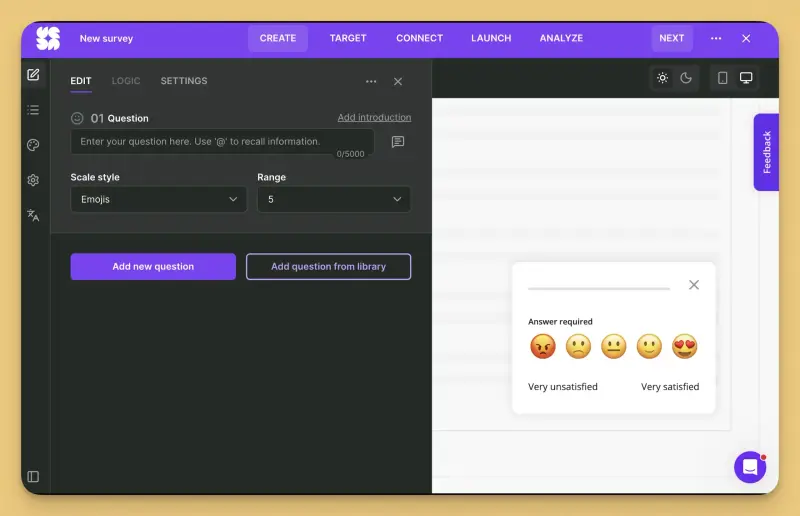
Survicate combines multichannel surveys with a research workspace. Teams collect feedback across websites, products, mobile apps, email, and link surveys. They then bring it into Research Hub alongside feedback from 15+ connected sources, such as Intercom, Zendesk, and app reviews. There, they can test a hypothesis, work with AI-drafted reports, ask questions about the data, and trace each finding back to the original response.
The practical difference is that collecting feedback and making sense of it happen in the same place, so neither job has to wait on an export.
Survicate MCP brings that same data into the AI assistants most teams already work in, such as Claude, ChatGPT, or an assistant running inside Slack. Teams can pull survey results and verbatim answers, read research reports, or draft a new survey without leaving the conversation.
Who is Survicate primarily for?
Product teams at consumer apps, marketplaces, and other digital products that collect feedback across several customer touchpoints. It fits especially well when that feedback feeds an ongoing research process and the team wants to keep survey responses, external evidence, and findings connected instead of managing them in separate places.
What's Survicate's ease of use?
For common website and email use cases, survey setup is no code. Native mobile deployment requires an SDK. G2 reviewers regularly praise Survicate’s ease of setup and survey builder. Attribute and event-based targeting is available on Growth, so teams considering a lower plan should check which targeting controls are included.
What's Survicate's customer support like?
Survicate provides human chat support on all plans, and G2 reviewers frequently highlight the responsiveness and practical help of its support and customer success teams.
What are the main pros of using Survicate?
- Website, in-product, mobile, and email surveys sit in one product, so adding another feedback channel does not mean buying another channel component.
- Research Hub keeps findings connected to their source feedback, which makes AI generated reports easier to verify before they influence a product decision.
- 40+ integrations, including tools used across product, support, CRM, and collaboration workflows, so the feedback can be routed to the people actually responsible for acting on it.
- Survey pricing follows collected responses rather than traffic or MAU. A growing audience doesn’t increase the survey bill on its own simply because more people visit the site or use the product.
What are the main cons of using Survicate?
- Some integrations, including Salesforce, Braze, Amplitude, Mixpanel, and FullStory, require Pro, so teams with a mature product and CRM stack may need the higher plan.
- Follow up runs through integrations and webhooks rather than native case management, so teams that need assigned cases and resolution tracking will need another system.
Pricing
Survicate starts at $56 per month, with paid plans reaching $569 per month at the Enterprise end. A free trial includes access to Pro level features. Pricing is based on survey responses and Research Hub data points rather than monthly active users, so simply adding more users to the product does not increase the bill.
Survicate won’t be the right fit for everyone: here’s when you should pick someone else
Survicate covers a lot of the ground a product team needs, but some jobs clearly belong elsewhere. It has no native session replay, so Qualaroo will make more sense if you want to watch what happened around the feedback.
It does not manage cases and resolution tracking like Zonka, and Sprig goes further when panels and research outside your existing user base are what matters. Medallia is in another league entirely when Product needs to sit inside an enterprise-wide experience program with heavy governance and operational workflows.
Those are meaningful differences, not missing checkboxes. If one of them sits at the center of your feedback program, choosing the specialist is likely to make more sense than stretching Survicate into a job it was not built to do.
Sprig: multichannel research with panels and AI agents
What does Sprig do?
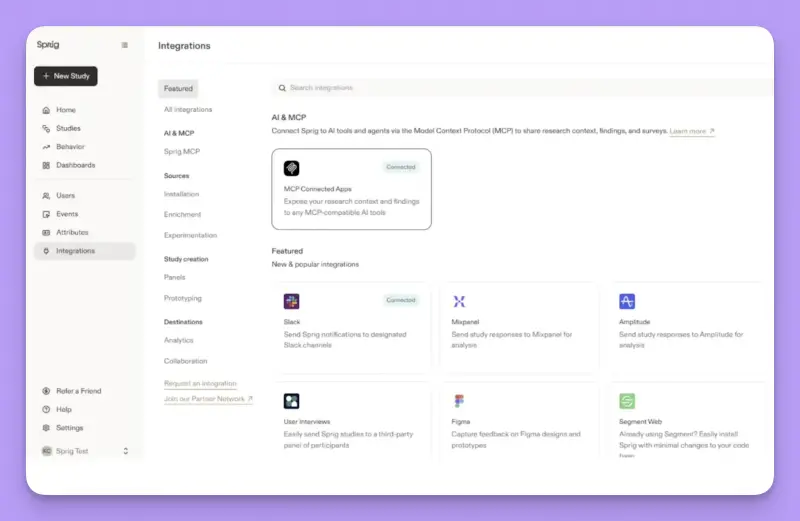
Sprig is built for product research across websites and web apps, mobile apps, email, and external panels. Its Design, Field, and Synthesize Agents help researchers plan studies, recruit and reach participants, and work through the results. Web studies can also be triggered using user attributes and behavioral events, so teams can ask questions in context rather than rely only on scheduled surveys.
The result is closer to a research program in one platform than to a simple in-product feedback tool.
Who is Sprig primarily for?
Product teams running research continuously, especially those that need to combine questions asked inside the product with email studies and research involving external participants. It makes more sense when research is an ongoing function than when the main need is simply to put a feedback widget in front of users.
What's Sprig's ease of use?
A lot depends on what kind of study you are running. Email and panel research can be launched without any product setup, while behavioral web studies depend on the right user attributes and events being available. Once that setup exists, Sprig keeps study design, fieldwork, and analysis inside the same workflow instead of making researchers piece the process together across several tools.
What's Sprig's customer support like?
Sprig’s support is generally well regarded, with G2 reviewers praising the team for being responsive and helpful when problems come up. One caveat for European teams: replies can take longer, as the Sprig support is US-based.
What are the main pros of using Sprig?
- Attribute and event based targeting lets researchers ask questions while the relevant product behavior is still fresh.
- Native email and external panels let teams research people outside active product sessions.
- Design, Field, and Synthesize Agents support more of the research process than survey delivery alone.
What are the main cons of using Sprig?
- Much of Sprig’s appeal comes from panels and agent led research, which may be more than you need if most studies stay within your own web, app, and email audience.
- Pricing and capability packaging are quote led, making it difficult to compare scope and forecast costs before speaking to sales.
- Acting on feedback usually means handing it off. Responses can trigger Slack alerts or move through Zapier and webhooks, but follow-up, task ownership, and resolution are managed in the destination tool rather than inside Sprig.
Pricing
Sprig does not publish its prices. Capterra lists Starter at $5,000 per year, while Vendr reports a median above $23,000. Treat those figures as rough benchmarks rather than a price list.
Below Enterprise, the bill depends on both study units, including responses, replays, and heatmaps, and Monthly Unique Users. That matters for growing products: your audience can get much larger even if the number of people who actually see or respond to a study barely changes. In that case, Sprig can become more expensive simply because the product grew, so teams with a large MAU base should model that cost before committing.
My hot take: how does it compare to Mopinion?
Sprig makes more sense to me when the team is starting to do more than collect feedback from people already using the product. Panels open the door to participants outside your own customer base, and the research agents reach into study design and synthesis as well. At that point, you are replacing a different part of the job than you would with a straightforward Mopinion alternative.
I would be more cautious if most research still happens with your own web, app, and email audience. You may end up paying for a fairly ambitious research setup while using only the most familiar parts of it. MAU pricing adds another wrinkle for a growing product: the bill can move up because the audience grew, even if research participation did not.
And since Sprig keeps pricing behind sales, you will probably need a fairly clear picture of what you want to run before you can tell whether the whole package makes financial sense. Our Sprig comparison goes deeper into that trade-off.
Refiner: contextual SaaS surveys billed by MAU
What does Refiner do?
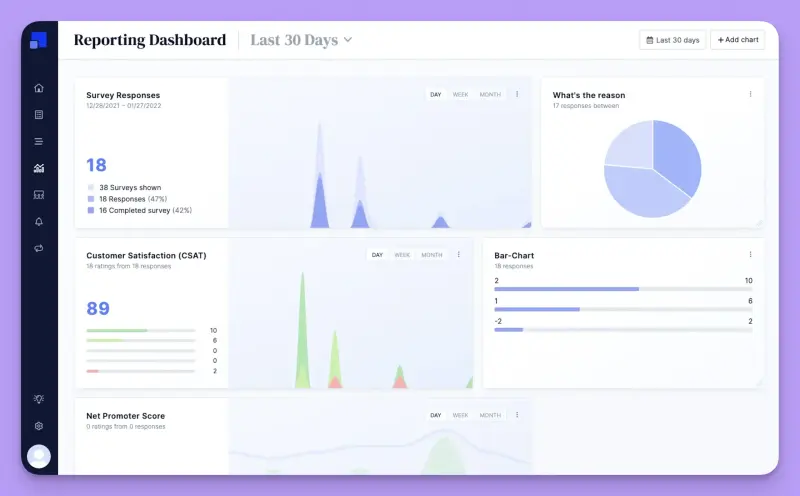
Refiner is built around feedback from identified SaaS users. Teams can run surveys inside web and mobile apps, on public websites, through email embeds, and on hosted survey pages, while keeping responses tied to user data.
That context is the important part. Essentials can target users by attributes, while Growth adds event tracking, behavior based segmentation, and deeper integrations with CDP, CRM, and product analytics tools. So a survey can appear because of who the user is or what they just did, and the response can flow back into the rest of the product stack.
Who is Refiner primarily for?
Product teams at SaaS, fintech, and marketplace companies that already know a lot about their users and want feedback to stay connected to that context. It is particularly attractive when participation is expected to be high, since paid plans include unlimited responses. If that’s your world, our guide to tools that collect in-app feedback will give a solid overview of what’s already out there in the market.
What's Refiner's ease of use?
G2 reviewers repeatedly praise Refiner’s quick setup and intuitive survey builder. Web surveys can be installed through JavaScript, Google Tag Manager, or NPM, while native mobile surveys require an SDK. Once that connection is in place, the product team can build, style, target, and launch new surveys without going back to engineering every time.
What's Refiner's customer support like?
Support is mainly handled by email, with Refiner saying teams usually hear back within a few hours. Public review volume is limited, but the feedback that does exist tends to describe the customer success team as quick to respond and helpful.
Larger customers get a more hands-on setup: Enterprise includes priority support, phone access, and a dedicated representative.
What are the main pros of using Refiner?
- Surveys can run across web, mobile, email, and hosted pages, with integrations carrying responses into the rest of the team’s stack.
- Attribute and event targeting lets teams ask questions in the context of who the user is and what they have done.
- Unlimited responses on paid plans mean strong participation does not create response overages.
What are the main cons of using Refiner?
- MAU pricing can become problematic. Teams at companies where the active user base expands faster than survey participation might pay quite a lot without necessarily learning a lot.
- Refiner can hand feedback off, but it doesn’t own what happens next. If a poor score needs an assigned owner, a follow-up task, and visibility until the issue is resolved, that workflow needs to be handled in the CRM, help desk, or another tool.
- Analysis stays centered on Refiner survey data, dashboards, and AI tagging rather than bringing several feedback sources into one research workspace.
Pricing
Refiner offers a 30 day trial followed by a limited free plan. Essentials costs $124 a month with annual billing, while Growth is $279 per month; both start with 5,000 monthly active users cap and the price goes up as you add more MAU. Responses remain unlimited. Enterprise pricing is custom. This makes the size of your active user base the number to watch rather than the number of survey responses you collect.
My hot take: how does it compare to Mopinion?
Refiner may be a good fit particularly when feedback is treated as part of the customer record. You already know the user, their account, plan, lifecycle stage, and product behavior; the survey adds another signal to that picture, and the response can move into the CRM, analytics stack, or another workflow where the team is already working. For a product organized around identified users, that can be a very tidy way to run feedback.
Where I would be cautious is the MAU model. A consumer app or fast-growing SaaS company can move through pricing tiers simply because the active audience is getting bigger, even if survey participation grows much more slowly. Unlimited responses soften that when engagement is high, but they do much less for a team surveying only a slice of a bigger user base.
Refiner also stays fairly close to the feedback it collects itself. That focus is useful if surveys are the main evidence source. Once support conversations, reviews, calls, and other customer signals start carrying equal weight, you will need another place to put the whole picture together.
Qualaroo: on-site Nudges with heatmaps and replay
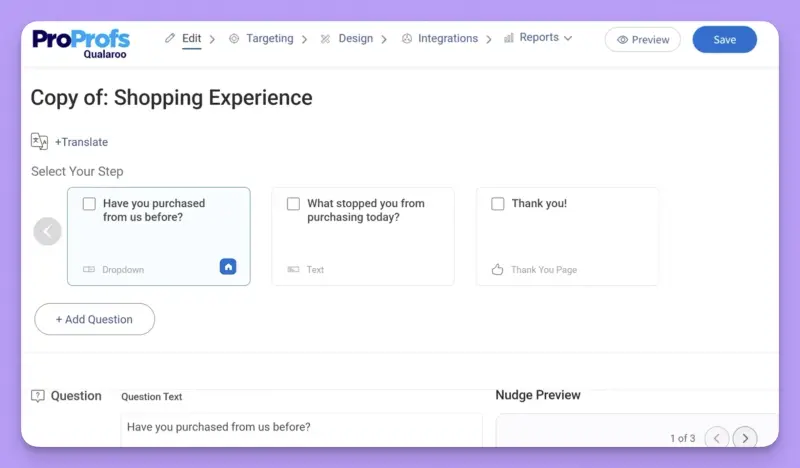
What does Qualaroo do?
Qualaroo is built around targeted Nudge surveys for websites and web apps. Teams can trigger them based on the page, visitor identity, timing, behavior, scroll depth, or exit intent, then use heatmaps and session replay to see what happened around the feedback.
That makes Qualaroo the closest match here to Mopinion’s website use case. The lower plans stay focused on that job, while native iOS and Android surveys and deeper integrations sit in Enterprise.
Who is Qualaroo primarily for?
Product teams whose main feedback surface is a public website or web app, especially when they are investigating conversion, content performance, or UX friction. Qualaroo lets them ask why while the behavior is happening, then use replay to inspect the same journey.
What's Qualaroo's ease of use?
Website setup requires a single asynchronous JavaScript snippet. Once it is installed, the product team can create, target, launch, and pause new Nudges without going back to engineering. That simplicity applies mainly to the website workflow. Native mobile surveys require an SDK and the Enterprise plan.
What's Qualaroo's customer support like?
Qualaroo has a relatively thin review base, so there is not enough there to draw a strong conclusion about the support experience. What is worth noting, however, is that you can reach a person without moving to an Enterprise contract: Qualaroo offers email, phone, and live chat support, with 24/7 chat advertised on its site. Higher-tier customers get a more hands-on setup, including dedicated support.
What are the main pros of using Qualaroo?
- Detailed behavioral targeting lets teams ask for feedback at a precise point in the website journey.
- Heatmaps and session replay connect what visitors say with what they actually did.
- Once the Qualaroo script is installed, product teams can launch and retarget new Nudges without opening another engineering ticket.
What are the main cons of using Qualaroo?
- Business is capped at 100,000 tracked pageviews and 5,000 email sends, so a high exposure program can outgrow the plan even with unlimited responses.
- Analysis stays centered on Qualaroo surveys and behavior data rather than bringing support conversations, calls, reviews, and other feedback sources into one research workspace.
- Acting on an important response gets much easier only on Enterprise. If a poor score should update the customer record or trigger a follow up elsewhere, Salesforce, HubSpot, APIs, and webhooks sit behind the highest plan.
Pricing
Qualaroo has a free plan capped at 50 lifetime responses. Paid plans range from $19.99 to $499 per month with annual billing. The lower end is self service, while the upper figure applies to the Customer Delight and Customer Growth suites, which bundle several ProProfs products and require a demo. Customer Delight adds tools such as live chat, a help desk, and a knowledge base, while Customer Growth adds CRM and lead capture tools such as BIGContacts and Picreel.
Enterprise also goes through sales despite showing a starting price of $149 per month. Removing Qualaroo branding costs another $300 per year.
My hot take: how does it compare to Mopinion?
Qualaroo is probably the most straightforward website feedback replacement for Mopinion on this list. It keeps the familiar on-page prompt model, adds heatmaps and session replay, and gives product teams more behavioral context without asking them to buy into a much broader research platform. It’s narrower by design, and if your real job is still understanding what happens on the website, that focus is part of the appeal.
But I noticed that the same focus starts to matter differently with the program growing beyond the website. Native mobile and deeper integrations move into Enterprise, while pricing still depends on exposure.
That also affects what happens after a response comes in: useful CRM and workflow routes are available only on Enterprise, so acting on feedback across the rest of the product stack comes with a higher price. Qualaroo gives you a lower entry point, but it does not fundamentally change the economics of a high traffic feedback program.
That may be perfectly fine for a team that is focused solely on the website: you get the behavioral context you need, and you don’t pay for a much bigger research setup.
Zonka Feedback: omnichannel feedback with native case management
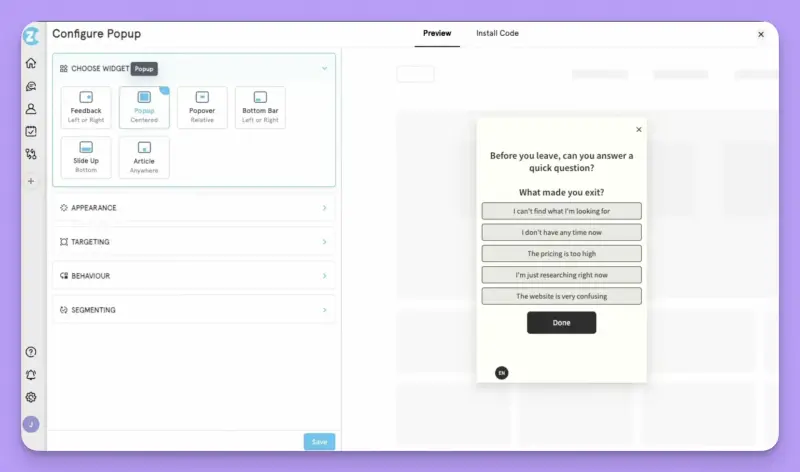
What does Zonka Feedback do?
Zonka Feedback combines broad survey collection with case management and workflows. Teams can collect feedback across digital and physical touchpoints, then turn responses into alerts, assigned cases, and follow up tasks instead of leaving them in a survey dashboard.
Its AI Feedback Intelligence layer can also bring in surveys, tickets, chats, and reviews to surface recurring themes, sentiment, and business impact. That gives Zonka a wider operational role than a typical product feedback tool.
Who is Zonka Feedback primarily for?
Product teams that share responsibility for customer feedback with CX, support, or frontline teams. It makes particular sense when someone needs to own a negative response, escalate it, and track what happened next.
What's Zonka Feedback's ease of use?
G2 reviewers praise Zonka’s ease of use and survey customization. The survey builder itself is approachable, but the broader setup can involve data sources, integrations, dashboards, roles, cases, and workflows. Zonka says most teams complete that rollout within days or weeks and provides tailored onboarding.
What's Zonka Feedback's customer support like?
Zonka backs the product with a help center, developer resources, and onboarding support, while the exact support level and SLAs depend on the plan. Enterprise customers get more dedicated options and priority support.
G2 users repeatedly mention quick, responsive help, including teams that say Zonka worked with them proactively when something needed fixing or adjusting. That matters here, because Zonka’s setup can easily need more than a help-center article once implementation gets serious.
What are the main pros of using Zonka Feedback?
- Built in email, SMS, and WhatsApp sending complements web, in-product, kiosk, and offline collection, so teams can run cross channel programs in one system.
- Native case management and workflows turn negative responses into assigned, trackable follow up.
- AI Feedback Intelligence analyzes surveys alongside tickets, chats, and reviews, helping teams spot issues that repeat across several customer channels.
What are the main cons of using Zonka Feedback?
- AI Feedback Intelligence is a separate product or add on, and its data credit meter sits alongside response based survey pricing.
- Digital only product teams may end up paying for capabilities they barely use. Cases and workflows are still useful for acting on feedback, but frontline, kiosk, and other operational features make sense only when the program also extends beyond the product.
- The AI layer is built more around CX monitoring and operational action than research projects and hypotheses, so product research may still need a separate workspace.
Pricing
Zonka uses custom pricing. Feedback Management is metered by survey responses, while AI Feedback Intelligence uses data credits, so teams using both need to account for two different usage measures. A 14 day trial is available after a demo call. Capterra lists Feedback Management at $199 per month and the AI module at $999, but if Zonka makes your shortlist, get a quote for both layers and the channels you actually need.
My hot take: how does it compare to Mopinion?
Zonka becomes interesting when feedback needs an owner, not just an analyst. A negative response can turn into a case, move to the right person, and stay visible until someone deals with it. That is the part I find more compelling than the extra channels, because Mopinion already covers the core digital channels well.
For a product team working mostly on its own, that broader setup may be unnecessary. Zonka makes more sense when Product, CX, support, or frontline teams share responsibility for what happens after feedback arrives. Otherwise, the cases, workflows, and AI layer may simply be more system than the team needs.
SurveyMonkey: the familiar generalist
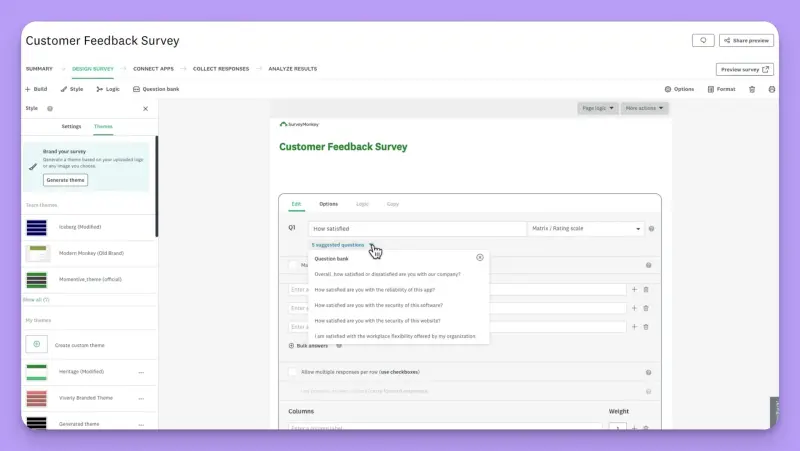
What does SurveyMonkey do?
SurveyMonkey is a general survey and research platform used across customer, employee, market, and product research. It covers the familiar email and link surveys, but can also collect feedback through website embeds and popups, respondent panels, and a mobile SDK for iOS and Android.
That breadth is the point. SurveyMonkey can reach many of the same surfaces as a product feedback tool, but it starts from general survey research rather than from the product and the user context around it.
Who is SurveyMonkey primarily for?
Cross-functional teams that want one approachable survey tool for several kinds of research. For product teams, the fit is weaker when survey targeting needs to reflect account data, lifecycle stage, or what a user has just done in the product. SurveyMonkey makes more sense when broad distribution and survey flexibility matter more than that product context.
What's SurveyMonkey's ease of use?
SurveyMonkey is designed to make starting a survey relatively easy, with templates, AI assisted creation, question suggestions, and survey design guidance. Website collection requires adding an embed code once, after which survey changes appear without another code update. That makes it accessible to teams that run research only occasionally as well as to regular survey users.
What's SurveyMonkey's customer support like?
G2 reviewers who do mention it tend to be positive about the help they receive from the team. You don’t need a top-tier plan to reach a person. Paid customers get 24/7 email support, while the Premier plan also includes phone support. Enterprise adds a more hands-on layer through onboarding and Customer Success.
What are the main pros of using SurveyMonkey?
- Templates, AI assistance, and a wide range of question types make it easy for different teams to get a survey running.
- Website collection, mobile surveys, email, links, and respondent panels give teams plenty of ways to reach people without adopting a specialist product feedback tool.
- Team Advantage includes AI, thematic, sentiment, and multi survey analysis, so teams can do more with results before reaching for another analysis tool.
What are the main cons of using SurveyMonkey?
- Website targeting relies mainly on session behavior (sampling, scroll depth, exit intent, etc.) rather than account attributes or product events. For product teams running continuous feedback, that is a major limitation: the survey has much less context about who the user is and what just happened in the product.
- Mobile survey triggers are implemented in the app, so targeting across website and product surfaces is less unified than in specialist product feedback tools.
- Closing the loop takes extra work. SurveyMonkey can pass a response into the rest of the stack, but it does not naturally carry the same account and product context with it. So the team still needs to work out who the customer is and what happened before deciding what to do next.
Pricing
SurveyMonkey has a free plan. Team plans range from $30 to $92 per user per month with annual billing and require at least three users, putting the practical starting point at $1,080 per year. Team Advantage includes 50,000 responses per year, while Team Premier includes 100,000, with additional responses charged separately. Enterprise pricing is custom.
My hot take: how does it compare to Mopinion?
If you still think of SurveyMonkey mainly as a standalone survey tool, the current product is broader than that. It can reach people on websites, in mobile apps, by email, through links, and through panels. But breadth is not the same thing as product context.
That distinction matters more than it may seem. If your feedback program depends on knowing which account a user belongs to, what plan they are on, or what they just did in the product, SurveyMonkey starts to feel less natural. Mopinion and other specialist feedback tools are built much closer to that moment of use. And when a response needs follow up, that missing context travels along; the team still has to work out who the customer is and what happened before deciding what to do next.
I would consider SurveyMonkey when the company wants one survey platform that Product, Marketing, HR, CX, and research can all use. Its generalist model becomes a strength there. For continuous product feedback tied closely to customer and behavioral data, though, I would expect a more specialized tool to fit the workflow better.
Medallia: enterprise CX with analytics
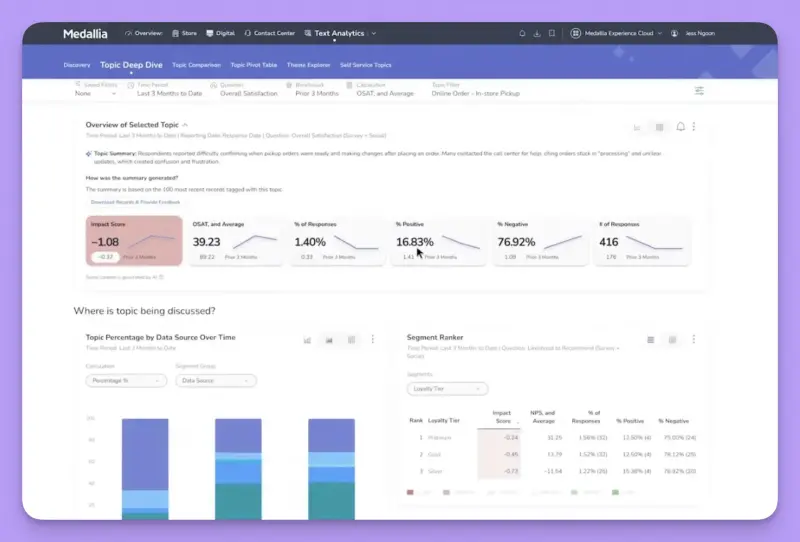
What does Medallia do?
Medallia is an enterprise experience management platform built to bring customer signals from across the organization into one system. That includes surveys, contact center conversations, reviews, digital behavior, operational data, and employee feedback. It then helps teams analyze those signals and route what they learn through reporting, alerts, cases, and workflows.
This is much broader than running a digital feedback program. Medallia is designed for organizations that want different teams to work from the same customer evidence and coordinate what happens next.
Who is Medallia primarily for?
Large enterprises running formal experience programs across digital products, contact centers, frontline operations, and employee experience. For a product team, Medallia starts to make sense when Product is only one part of a broader company-wide feedback program, with several functions sharing the same customer signals, governance, and reporting structure.
What's Medallia's ease of use?
Once the platform is running, Medallia's Admin Suite lets teams make their own changes to surveys, reports, alerts, data imports, and access controls. Getting to that point is the heavier part. Signals need to be connected, roles defined, workflows configured, and governance agreed.
This is a platform an organization operates, not something a product team adds on the side.
What's Medallia's customer support like?
Medallia’s service offering goes well beyond troubleshooting. Depending on the contract, it can include implementation, onboarding, managed services, training, and strategic advisory.
G2 feedback is generally positive about access to support, with reviewers mentioning responsive help and proactive problem-solving. But there are also some mixed signals around account management, with some users complaining about communication around renewals and contract changes.
What are the main pros of using Medallia?
- Surveys can sit alongside speech, reviews, digital behavior, and operational data, so teams can investigate a customer journey without piecing the evidence together manually.
- Text and speech analytics help teams work through volumes of unstructured feedback that would be unrealistic to review by hand.
- Medallia has a serious action layer of its own. Alerts can be assigned, escalated, and tracked through resolution, while integrations can push the same customer context into enterprise systems where other teams already work.
What are the main cons of using Medallia?
- Implementation involves data connections, roles, workflows, and governance, so it requires much more specialist work than replacing a digital feedback tool.
- There is no public list price, which means you need a quote before you can compare its cost with your current setup.
- Medallia is built around organization-wide reporting and operational workflows rather than a product team's research projects, so a product only use case may leave much of the platform unused.
Pricing
Medallia does not publish list prices. Medallia Experience Cloud uses Experience Data Records, or EDRs, as the basis of its pricing model. Actual costs vary widely with scope and EDR volume. Third party pricing guides generally place Medallia in the tens of thousands of dollars per year and above, while large deployments can run into multimillion dollar costs over several years.
My hot take: how does it compare to Mopinion?
Medallia only makes sense to me here when the organization is solving a much bigger problem than the one it bought Mopinion for. A product team looking for better website, app, or email feedback probably does not need an enterprise platform tying together contact center conversations, operational data, employee signals, cases, and governance. At that point, you are moving into a different category of software.
But there are organizations where that difference is exactly the point. Once CX, Product, contact center, frontline teams, and other functions all need to work from the same signals, Mopinion and Medallia stop solving the same problem. Medallia can keep follow-up inside its own case and workflow layer or connect it deeply with enterprise systems such as Salesforce.
For a product team living mainly in analytics, lifecycle, and product management tools, though, that level of integration is more likely to involve implementation work than a simple plug and play connector. I would consider Medallia at that stage, not before. Our guide to Medallia alternatives covers the lighter alternatives.
Is Mopinion right for you? The final verdict
Mopinion remains a credible choice for product teams that want targeted feedback across websites, email, and apps, with solid analysis, integrations, alerts, actions, and follow up. I would not leave it because another vendor can produce a longer feature list. The real reasons to look elsewhere are more specific: how Mopinion prices the program you want to run, and whether its feedback workflow still fits the way your team works with evidence.
Pricing is the first thing I would check. The $279 Websites price says little about a multichannel setup: in the configuration I checked, Websites, Email, and Apps came to $997 per month. Website pricing also follows pageviews while responses remain unlimited. That can be awkward for a busy site collecting relatively little feedback, although the same model may work well when response volume is high.
The other question is what happens once feedback becomes research material. Mopinion is good at monitoring responses, analyzing them, and helping teams react. Teams that regularly combine surveys with support conversations, reviews, and other evidence may still need another place to build findings and return to the sources behind them. That is the point where a different tool starts to make sense.
Before switching, map the workflow and the usage model you actually have. If Mopinion fits both, there may be little to gain from moving. If it does not, however, choose one of the alternatives listed here that fixes that particular mismatch. Our roundup of voice of the customer tools can help if you need to map the wider category first.
Which Mopinion alternative should you choose?
- When the product team needs continuous feedback across web, product, mobile, and email, with an ongoing research workflow: Survicate. It combines multichannel collection and behavioral targeting with Research Hub for working with survey responses and external feedback over time. Usage is measured through responses and Research Hub data points rather than traffic or MAU, so you are not getting punished financially for getting bigger.
- You run a mature research program that also reaches external participants: Sprig. Its panels and research agents extend the job beyond collecting feedback from your existing web, mobile, and email audience. MAU based pricing requires attention if the product has a large or quickly growing user base.
- You survey an identified SaaS user base and expect plenty of responses: Refiner. Feedback stays closely tied to user attributes and product behavior, while integrations and webhooks can move responses into the rest of the team’s stack. Paid plans include unlimited responses, although MAU pricing can become burdensome when the user base grows faster than survey participation.
- You mainly want a website feedback replacement for Mopinion: Qualaroo. It keeps the on site Nudge model and adds behavioral context through heatmaps and replay. Paid usage is still tied to email sends and tracked pageviews, while native mobile and deeper integrations sit in Enterprise.
- Product shares responsibility for feedback with CX or frontline teams: Zonka Feedback. Native cases and workflows are the bigger distinction than its long channel list. Pricing is quote led, and AI introduces a separate data credit allowance.
- You need a general survey tool that other departments can use too: SurveyMonkey. It covers website and mobile collection, but its weaker connection to account attributes and product events makes it a less natural fit for continuous, contextual product feedback.
- Product is one part of a broader company wide experience program: Medallia. Its governance, analytics, cases, and workflows make sense when several functions need to work from the same customer signals, rather than when a product team is simply replacing one feedback tool.
FAQs
How should you compare Mopinion's pricing with alternatives that charge by responses, MAU, or interactions?
Start with what you are actually paying for. Mopinion does not meter every channel by pageviews. Websites uses domains and pageviews, Email uses brands and email volume, and Apps uses apps and app sessions. At the default inputs checked for annual billing, Websites alone came to $279 per month, while Websites, Email, and Apps together came to $997.
For Websites, responses are unlimited while the price moves through pageview tiers. That can be awkward for a high traffic site collecting relatively little feedback, but the same model may work well when response volume is high. Other tools move the meter elsewhere.
Survicate uses survey responses and Research Hub data points, Refiner uses MAU with a pageview allowance for anonymous website visitors, and Qualaroo meters email sends and tracked pageviews. SurveyMonkey combines seats with an annual response pool, while Medallia uses Experience Data Records.
Compare those models against your own traffic, active users, response rate, external source volume, and required channels rather than assuming one meter is inherently cheaper.
What should I check before switching, given Mopinion was acquired by Netigate?
Treat the acquisition as a reason to check the commercial details, not as evidence that Mopinion's roadmap or terms will get worse. Confirm what you can export and in what format, how long data is retained, when the contract renews, what your channel and usage limits are, and whether the integrations you depend on will remain covered.
If a roadmap or migration commitment matters to your decision, get it in writing. Then test one complete workflow in the alternative, from targeting and collection through analysis, routing, and what happens after the response arrives.
Which capabilities actually matter for digital product feedback beyond collecting responses?
Look at what happens before and after the response. Can you reach the right user at the right moment inside the product? Can you control how often they see a survey? Does the answer reach the product, CRM, or support system where someone can use it? And can the team bring that response together with other customer evidence and trace a conclusion back to the material behind it?
Mopinion already provides substantial targeting, integrations, AI assisted analysis, alerts, actions, and follow up. The useful comparison is how far those capabilities take your own workflow, which plan includes them, and what the team still has to handle elsewhere.
What's a common mistake teams make when replacing a website feedback tool?
Comparing headline prices and channel lists before mapping the actual workflow. A vendor may support web, app, and email but package them differently. An integration may move data in only one direction. A pricing model that looks attractive at first may behave very differently once your traffic or response volume grows.
Map the channels, volumes, targeting data, destinations, and owners you expect over the next year. Then test that workflow from the first survey trigger to the person who is supposed to act on the response.
Author's note (last verified: 21 October 2026): Statements such as "best" reflect our opinion and typical use cases, not a universal guarantee. This comparison is based on publicly available information and our best understanding at the time of writing. Vendors may change features, pricing, and packaging without notice. For the latest details, please check the official sources or reach out to the vendor directly.