Alchemer sells itself as the step up for teams that have outgrown SurveyMonkey but don’t need Qualtrics. That middle ground does exist. The problem is that many mid-market teams (say, 200+ employees) no longer need a bigger survey engine. What they need is a simpler way to run feedback continuously across channels. And that’s a fair reason to look for an alternative to Alchemer.
Alchemer can collect feedback across surveys, websites, email, and native apps. The bigger issue is that these channels don’t run on one shared respondent and targeting layer. Feedback collected in one part of the Alchemer stack doesn’t automatically become context you can use elsewhere.
I work on the team at Survicate, so I have an obvious perspective here. But to keep the comparison fair and useful, I apply the same criteria to every product. I’m looking at these tools from the seat of the person responsible for customer satisfaction: usually CX and Customer Success. Can that person (or team) use a given tool to collect, target, and analyze feedback across web, email, and product? And can they act on it without assembling the program from several products? Let’s find out.
The tools aren’t ranked in any order of importance.
TL;DR
The key takeaway isn’t that Alchemer lacks the capabilities needed for an always-on VoC program. The public Survey plans handle only part of that job. The small-team survey engine sits in one place, while digital collection, native in-app feedback, and more advanced action workflows lead to an add-on, a separate product, or the Business Platform. The alternatives below don’t beat Alchemer at everything, but they do fit different operating models better. Here’s an overview before we review each tool more closely.
| Tool | G2 rating | Known for | My 2 cents |
|---|---|---|---|
| Survicate | 4.6 | Always-on VoC across web, email, and in-product | Built for continuous web, email, and in-product feedback, with 10 seats on Growth. Research depth is lighter and case management stays outside the tool. |
| Zonka Feedback | 4.7 | Omnichannel CX and native case management | Strongest when feedback from digital and physical touchpoints needs an owner and a status. Likely too heavy if it doesn't. |
| QuestionPro | 4.5 | Public survey software plus separate Research Suite and CX products | Best when research methods are the job. Combining research and continuous CX may recreate the fragmentation you're leaving. |
| SurveySparrow | 4.4 | Conversational surveys, SpotChecks, workflows, and tickets | A more complete CX option than its chat-style image suggests. Reporting, customization, and package complexity are the trade-offs. |
| SurveyMonkey | 4.4 | A broad survey generalist with many collectors and Connect automations | Easy to start and able to trigger lightweight actions, but case ownership and multi-source analysis still live elsewhere. |
| Typeform | 4.5 | Design-first forms, Growth Flow, and Research Flow | Best when the form is the deliverable. There's no supported native mobile SDK, and hard response caps are risky for continuous programs. |
| Sprig | 4.3 | Product research with in-product surveys, replays, and heatmaps | Strong when feedback needs behavioral context. Public link surveys broaden its reach, but the deepest value still requires an SDK or Enterprise. |
| Qualtrics | 4.3 | Quote-led enterprise XM, governance, and closed loop | The right move for multi-market XM with dedicated resources. The wrong direction if you're leaving Alchemer to simplify. |
Why are people looking for Alchemer alternatives?
Alchemer, formerly SurveyGizmo, is a capable survey engine. It has a broad question library, offline collection, and serious research depth. People don’t usually leave because it’s bad. The more common reason is that the fit stops making sense once feedback stops being merely a project and becomes a program instead.
One useful way to look at it is by the tool’s operating model:
- Primitives handle one part of the feedback process.
- Aggregators assemble several products under one platform.
- Orchestrators connect collection, analysis, and action in one operating layer.
- Enterprise Suites add the governance and scale needed to run all of this across a large organization.
Alchemer sits in the Aggregator category. It has grown by acquiring specialist products and bringing them under one brand. That creates genuine breadth, but the seams remain visible between Survey, Website Intercept, Digital, and Business Platform. Many teams leaving Alchemer aren’t looking for fewer capabilities. What they really want is an Orchestrator that makes the daily program easier to run.
A few recurring switching triggers follow from that:
- The main program is built for a small active team. Public Alchemer Survey plans cover one to three licensed users. Reports can be shared by URL, so stakeholders don’t need a seat merely to read the results. The constraint appears when more people need to create surveys, filter data, explore reports, or administer the program themselves. At that point, the self-serve path leads to the custom Business Platform.
- The channels don’t share one respondent and targeting layer. Alchemer is multi-channel, but those capabilities are spread across products. Website Intercept is an add-on, native in-app feedback lives in Alchemer Digital, and SMS plus the broader workflow layer sit with the Business Platform. Digital also has its own dashboard, survey builder, Customer ID, events, and interaction history. The important consequence is that the respondent doesn’t automatically travel between them: answers collected in Survey do not become targeting data in Digital. So adding another channel can also mean adding another implementation and another layer to operate, rather than extending one continuous customer feedback profile. Teams also have to maintain separate web and mobile implementations, while deeper mobile styling requires developer work in the SDK.
- Advanced features come with a learning curve. Reviews point to the effort required to master Alchemer’s more sophisticated functionality. Someone has to maintain the logic, reporting, integrations, and product setup after the initial project ends, often without a dedicated platform administrator. That can be a handful when feedback runs continuously.
- Advanced logic stops at the survey boundary. Alchemer Survey supports sophisticated branching, piping, and logic inside an individual questionnaire, but it doesn’t support cross-survey referencing. This means you cannot use an answer in Survey A to decide whether the same respondent should see Survey B. That makes it harder to build sequential survey programs and continuous feedback loops.
None of this makes Alchemer a bad tool. If complex survey design is central to the job, it remains a strong one. For a mid-market team running feedback continuously across channels, however, the public Survey product can be the wrong shape.
How I did this review
What I looked for
I used one operating question: what does a customer satisfaction owner need to collect, target, analyze, act on, and maintain an ongoing feedback program? I looked at channels and targeting, analysis of survey and external feedback, routing and follow-up, and how easily the wider team can work with the results.
How I validated the claims
I treated each tool’s public core as the default and labelled capabilities that belong to add-ons, separate products, or quote-led platforms. Official pages and documentation were the primary sources for features and package boundaries. Where relevant, I also used some of our insights from testing these tools by the Survicate team, along with sales calls transcripts. Review sites helped identify repeated patterns in setup, daily use, and support.
8 Alchemer Alternatives Built for Always-On VoC
The tools below solve different versions of the Alchemer problem. Some simplify an always-on VoC program. Others trade Alchemer’s survey depth for stronger case management, respondent experience, product research, or enterprise governance. Read them as eight different directions, not eight interchangeable replacements.
Survicate
What does Survicate do?
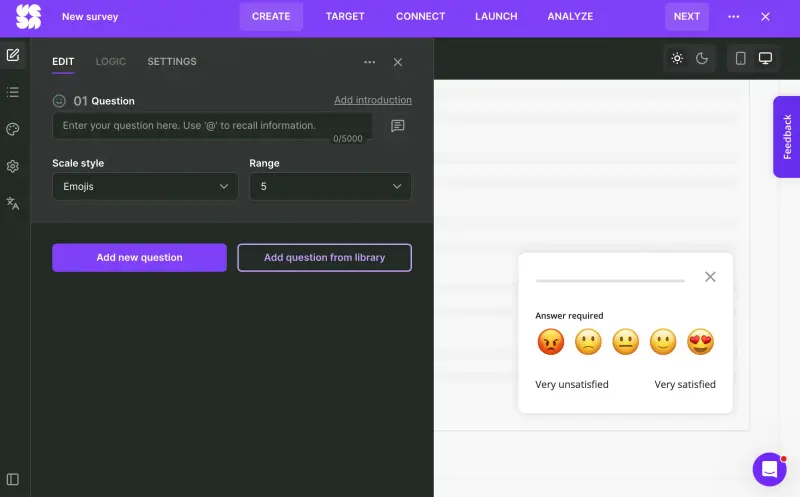
Survicate is a customer feedback platform for running NPS, CSAT, CES, and custom surveys across web, email, links, Intercom, and native apps. Attribute- and event-based targeting lets teams ask in context instead of sending the same survey to everyone.
Research Hub, its AI research repository, combines survey responses with support tickets, reviews, and call transcripts, then finds themes across the feedback. Insights can be routed to the tools the team already uses through more than 40 integrations. In the market map above, that makes Survicate an Orchestrator: collection, analysis, and routing sit in one operating layer.
Who is Survicate primarily for?
Survicate suits the person running customer satisfaction as an ongoing program rather than a series of research projects. They need to cover web, email, and product touchpoints, analyze more than survey responses, and route findings into the CRM, support, or product tools where someone can act on them.
What’s Survicate’s ease of use?
Email and link surveys are no-code. Website and in-product surveys require a one-time snippet or mobile SDK installation, so the first rollout may need a developer. Once that foundation is in place, a non-technical program owner can create, target, and launch surveys without returning to engineering each time. Ease of use and setup are recurring positive themes in G2 reviews.
What’s Survicate’s customer support like?
Support is another recurring strength in reviews. Survicate provides human help through live chat and email, while premium plans add priority and second-line support. The company reports a two-minute average first response and 97% CSAT.
What are the main pros of using Survicate?
- Web, email, and in-product surveys sit in one tool. Respondent attributes can also carry logic across surveys (for example, by showing Survey B only to people who answered X in Survey A) so the owner can run sequential feedback programs.
- Research Hub combines surveys with external feedback sources, so analysis doesn’t stop at the responses collected in Survicate.
- 40+ native integrations can turn feedback into CRM updates, alerts, or tickets.
- Once the SDK is installed, mobile surveys stop being a development project. The feedback team can launch and adjust them without engineering.
- Growth includes 10 seats, compared with the one-to-three-license structure of public Alchemer Survey plans. A wider team can work with the program before custom packaging becomes necessary.
What are the main cons of using Survicate?
- Its question types and survey logic cover most CX and product-feedback programs, but not the research depth of Alchemer Full Access. Survicate is the weaker instrument for complex questionnaire design and advanced research methods.
- There’s no native ticket or case-management layer. Survicate can send feedback to Jira, Zendesk, a CRM, or another system, but ownership and case status live there.
- Survicate doesn’t provide its own respondent panels for recruiting people outside your existing audience. You’ll need an external panel or another recruitment source if you’re after that kind of research.
Pricing
Growth starts at $56 per month, billed annually. Pro and Enterprise start at $349 and $569 per month, respectively. The 10-day trial unlocks pro-level features and doesn’t require a credit card.
My hot take: How does it compare to Alchemer?
For a CX or CS lead, I would choose Survicate over Alchemer Survey mainly because it is easier to run as one program. Web, email, and in-product collection use the same respondent attributes, so an answer collected in one channel can shape what that person sees in the next. Growth also includes 10 seats, compared with Alchemer Survey’s three.
Adding a channel, survey step, or collaborator therefore doesn’t send the owner into another product and contract. The same applies to survey sequences: Alchemer Survey may provide more depth inside one questionnaire, but Survicate lets the logic continue from one survey to the next.
So the takeaway is this: Alchemer remains the better survey instrument for advanced research methods, while Survicate is the better daily workspace for continuous VoC. If native case management or SMS is essential, however, I would look elsewhere. Sending feedback to another system can fill the gap, but it also gives back much of the simplicity that makes Survicate the stronger choice here.
Survicate won’t be the right fit for everyone: here’s when you should pick someone else
Survicate is built to run the full feedback loop and it does this job well, but it has clear limits. It will not match Alchemer’s research depth, manage cases like Zonka, connect surveys with replays and heatmaps like Sprig, or provide Qualtrics-level governance. It also lacks native SMS.
Some tools on this list fill those gaps, but they usually demand something in return. Be it more complexity, higher costs, stricter limits, or a narrower use case. Survicate remains strong at closing the feedback loop, but if one of its limitations is vital to your program, you might want to look elsewhere.
Zonka Feedback
What does Zonka Feedback do?
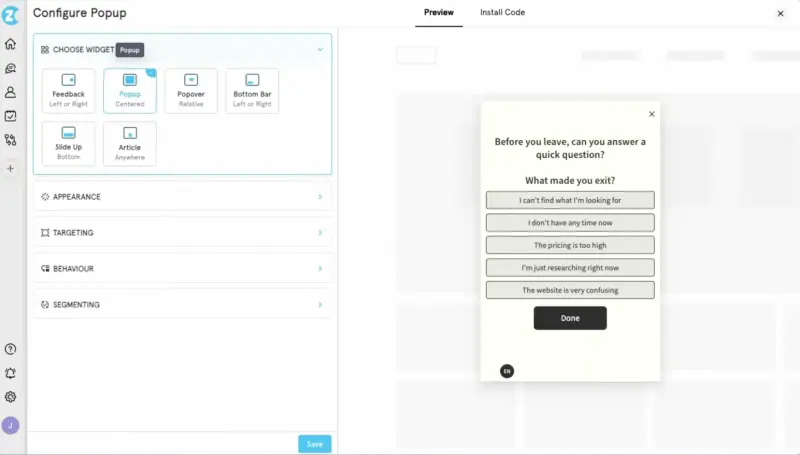
Zonka Feedback is an omnichannel CX platform covering email, SMS, WhatsApp, web, in-app, QR, kiosk, and offline collection. It combines surveys with tickets, reviews, chats, and conversations, then applies AI analysis across those sources.
Its distinction is native case management. Feedback can become a case with an owner, status, escalation path, and follow-up inside Zonka instead of ending with an alert to another system.
Who is Zonka Feedback primarily for?
Zonka is aimed at CX and operations teams whose customer journey crosses physical and digital touchpoints. It’s particularly relevant to multi-location businesses where feedback must be routed by store, region, or service team and followed through to resolution.
Teams that mainly need web, email, and in-product surveys may get less from it, especially if follow-up already happens in their CRM or support platform.
What’s Zonka Feedback’s ease of use?
Reviewers generally describe Zonka as straightforward to use. The setup burden comes from defining case owners, routing rules, escalations, locations, dashboards, and possibly a feedback taxonomy. That’s useful administration when Zonka runs CX operations. If the team only wants to launch surveys and pass the occasional detractor elsewhere, it becomes extra work.
What’s Zonka Feedback’s customer support like?
Responsive, hands-on support is one of the clearest positive themes in public reviews. Zonka has a much smaller G2 review base than several tools in this comparison, so I’d treat that as a promising pattern rather than proof that every larger deployment receives the same experience.
What are the main pros of using Zonka Feedback?
- Digital and physical channels sit in one platform, so a multi-location team can compare feedback from email, web, SMS, WhatsApp, in-app, kiosk, and offline touchpoints without running separate collection systems.
- Native case management gives feedback an owner, status, escalation path, and resolution history. Closing the loop is part of the product rather than a handoff to another system.
- Its feedback repository combines surveys with tickets, reviews, chats, and conversations, then applies thematic, sentiment, and entity analysis across the combined data.
What are the main cons of using Zonka Feedback?
- Teams that mainly need web, email, and in-product surveys may end up configuring more workflows, roles, taxonomies, and dashboards than their program requires.
- Zonka isn’t a direct replacement for Alchemer’s questionnaire and research depth. Its advantage lies in CX operations, not advanced survey methodology.
- Pricing and plan entitlements aren’t transparent enough to evaluate the full setup without talking to sales. Teams should confirm whether case management, AI Feedback Intelligence, and the required channels are included in the proposed package.
Pricing
Zonka is quote-based. Feedback Management is metered by responses, while AI Feedback Intelligence uses data credits. Capterra lists the two products at $199 and $999 per month, respectively, and a 14-day trial is available. If Zonka makes your shortlist, get the actual quote for both layers and the channels you need.
My hot take: How does it compare to Alchemer?
Zonka moves ahead of Alchemer Survey when “act” means more than just sending an alert. If every complaint needs an owner, a status, an escalation path, and a documented resolution, Zonka gives the CX team an operating system for that work. The case becomes stronger when feedback also comes from stores, kiosks, WhatsApp, SMS, and other physical or messaging touchpoints.
However, I wouldn’t pick it merely to get a longer channel list. Alchemer can cover many of the same scenarios through Digital, add-ons, and Business Platform. Zonka puts omnichannel collection and case management at the center of the product. Without a need for that operational layer, the same breadth becomes extra process rather than extra value.
QuestionPro
What does QuestionPro do?
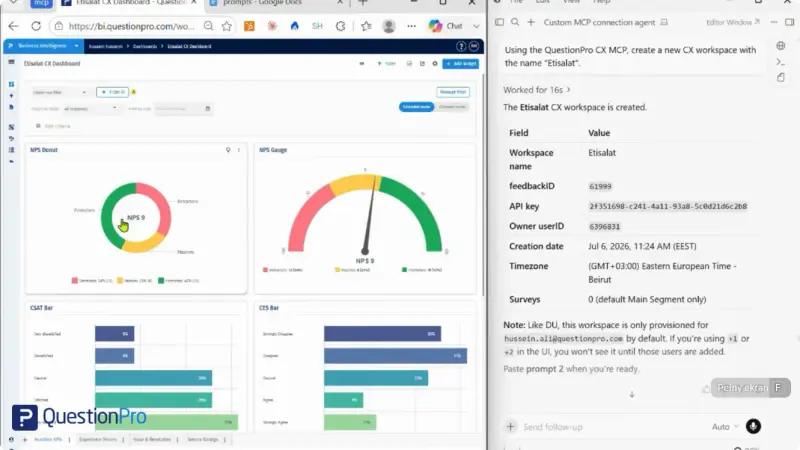
QuestionPro is a product family rather than one survey platform. Public Survey Software covers survey creation, logic, distribution, and analysis. The quote-led Research Suite adds Conjoint, MaxDiff, communities, panels, and research services.
A separate Customer Experience product provides intercepts, SMS, mobile SDKs, and closed-loop ticketing. Buying a public Survey plan doesn’t automatically give you that research and CX stack.
Who is QuestionPro primarily for?
Survey Software suits teams that need a capable general survey engine. Research Suite is aimed at researchers running advanced studies, panels, or longitudinal communities. Customer Experience handles in-app collection and closed-loop operations.
A mid-market CX manager may need more than Survey Software without needing the weight of either specialist suite. That awkward middle is where QuestionPro begins to resemble Alchemer.
What’s QuestionPro’s ease of use?
The public survey builder is generally well regarded for ease of use. Complexity grows with the job. Research Suite adds specialist methods and workflows, while Customer Experience brings intercepts, SDK implementation, dashboards, and tickets. For recurring NPS, CSAT, and CES, the program owner may end up administering a broader ecosystem than the work requires.
What’s QuestionPro’s customer support like?
QuestionPro includes 24/7 chat and email support on its public Essentials and Advanced plans. Team Edition adds a dedicated account manager, while Research Suite adds a success manager. Responsive, helpful support is also a recurring positive theme in G2 reviews.
What are the main pros of using QuestionPro?
- The public Survey Software plans offer a broad survey engine with increasingly advanced logic, analysis, and collaboration as you move up the tiers.
- Research Suite adds serious methodology, communities, Audience, and research services when research itself is the team’s deliverable.
- The separate Customer Experience product includes native mobile SDKs and closed-loop ticketing, so QuestionPro can support a mature CX operation instead of stopping at survey collection.
What are the main cons of using QuestionPro?
- Survey Software, Research Suite, and Customer Experience solve different parts of the job. Combining survey depth, advanced research, in-product collection, and closed loop means crossing SKU and contract boundaries.
- The research-first range can add more methods, administration, and specialist workflows than an always-on NPS, CSAT, and CES program needs.
- The public Survey plans are easy to price, but the products with the strongest research and CX capabilities are quote-led. You can’t evaluate the cost of the complete setup without talking to sales.
Pricing
Essentials is free for one user with 200 responses per survey. Advanced costs $99 per user per month with annual billing and includes 25,000 annual responses. Team Edition costs $83 per user per month but starts at five users, putting the floor at $415 per month. Research Suite starts at 10 users and uses custom pricing. Customer Experience is also quote-based.
My hot take: How does it compare to Alchemer?
For me, QuestionPro makes the stronger case when research itself is the output. Conjoint, MaxDiff, panels, communities, and advanced studies can justify moving into Research Suite, where the product becomes a serious research ecosystem rather than a general survey builder.
The appeal fades if the goal is to simplify an always-on VoC program. Once the team needs public Survey Software, Research Suite capabilities, and the separate Customer Experience layer, QuestionPro can recreate the fragmentation it was meant to replace. I see it as a strong Alchemer alternative for research teams, but it won’t automatically give a mid-market CX owner a cleaner setup.
SurveySparrow
What does SurveySparrow do?
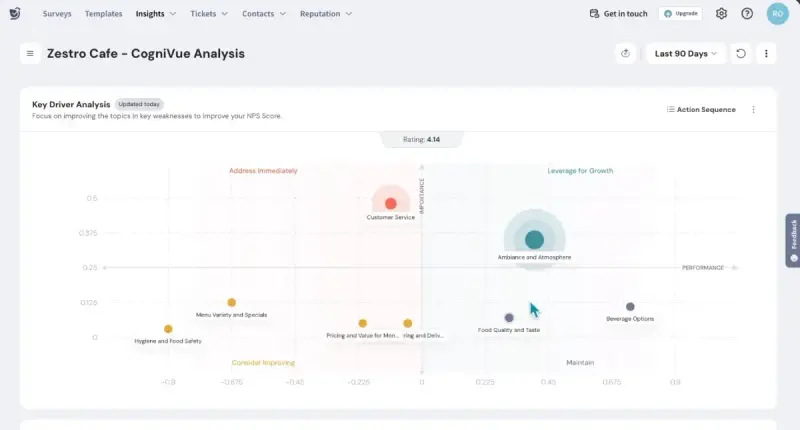
SurveySparrow is best known for conversational surveys, but it also supports recurring surveys, email, SMS, QR, web and mobile distribution, and in-context SpotChecks. These can be targeted by screen, delay, event, visitor data, or previous survey activity.
Built-in workflows and ticket management let a low score create a ticket with an owner, priority, and resolution status.
Who is SurveySparrow primarily for?
SurveySparrow suits CX teams that want a strong respondent experience alongside SMS, recurring surveys, in-context web or mobile feedback, and direct follow-up. Its case weakens when deep statistical analysis, highly customized reporting, or Alchemer-level questionnaire flexibility matters most.
What’s SurveySparrow’s ease of use?
Reviewers repeatedly praise SurveySparrow’s clean interface, quick setup, and conversational builder. In-product collection needs an initial implementation: mobile SpotChecks require an SDK plus tracked screens or events. Once that’s in place, a non-technical owner can configure targeting and launch surveys.
What’s SurveySparrow’s customer support like?
Support is generally described positively in reviews. The actual channel depends on the plan. Basic and Starter include 24/5 email support, Business adds chat, and Enterprise includes a dedicated customer success manager.
What are the main pros of using SurveySparrow?
- Conversational respondent experience is paired with broad distribution, including email, SMS, web, QR, and mobile SDK surveys. SurveySparrow can do considerably more than send attractive links.
- SpotChecks allow teams to ask for feedback after specific screens, actions, or events instead of sending the same survey to every customer.
- Built-in tickets and workflows give detractors an owner, priority, and status. Closing the loop can happen inside SurveySparrow instead of ending with an export or notification.
What are the main cons of using SurveySparrow?
- Reporting and customization are recurring weak spots in reviews, particularly when teams need deeper trend analysis, cross-department comparisons, or more flexible dashboards.
- SurveySparrow now spans Surveys, CX, Brand, Research, Documents, and 360 Assessment. That breadth makes it harder to tell which package contains everything a growing VoC program needs.
- Mobile SpotChecks require SDK implementation and event instrumentation. Teams without product-engineering support won’t get the strongest in-app targeting immediately.
Pricing
With annual billing, public survey plans start between $19 and $79 per month, depending on the tier. Those prices buy the lowest response allowance. Basic, Starter, and Business each have three response tiers, taking the monthly price as high as $275. Enterprise is quote-based, and SurveySparrow doesn’t publish a price for its separate CX Suite.
My hot take: How does it compare to Alchemer?
SurveySparrow made me consider it more carefully than its chat-style reputation would suggest. It brings conversational surveys, SMS, behavioral in-product feedback, workflows, and ticketing into a relatively approachable platform. That combination can be more useful than Alchemer’s research depth when the team cares about respondent experience and direct follow-up.
Alchemer remains the more adequate choice when questionnaire flexibility and survey methodology are the center of the job. SurveySparrow’s trade-off appears as the program grows: reporting and customization can become restrictive, while the number of suites and response tiers makes the buying decision much less obvious than the $19 starting price suggests.
SurveyMonkey
What does SurveyMonkey do?
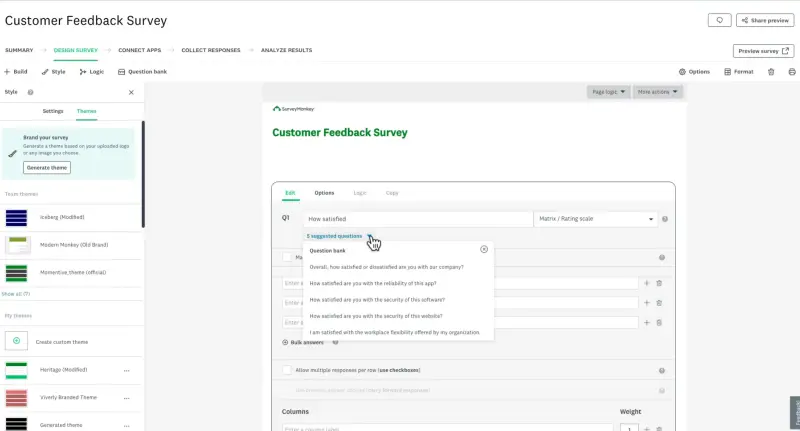
SurveyMonkey is a popular survey generalist covering surveys, forms, quizzes, market research, and recurring feedback. Collection extends beyond email and links to website embeds and popups, QR codes, kiosk and offline surveys, Audience panels, and a paid mobile SDK.
SurveyMonkey Connect adds no-code actions that can send selected responses to Slack, Teams, Excel, or Google Sheets.
Who is SurveyMonkey primarily for?
SurveyMonkey fits individuals and teams that value familiar, low-friction survey creation and need one tool for many different survey jobs.
For the CX manager in this article, it makes most sense when the program remains survey-led and the CRM or support platform already handles ownership and follow-up. It’s less persuasive when SurveyMonkey itself needs to become the operating layer for the entire VoC program.
What’s SurveyMonkey’s ease of use?
Ease and familiarity remain its clearest strengths. Reviewers consistently praise the quick learning curve, and many stakeholders already know how to build, answer, or read a SurveyMonkey survey.
More advanced website targeting, mobile collection, integrations, and analysis introduce plan checks and some technical setup. The core survey workflow is still one of the easiest here to adopt.
What’s SurveyMonkey’s customer support like?
Support depends on the plan. Paid plans include email support, higher individual tiers add expedited email and priority phone support, and Team Premier includes phone support. Enterprise customers receive a more managed support relationship.
What are the main pros of using SurveyMonkey?
- The familiar builder and large template library make it easy for different teams to launch surveys without much training.
- Collection extends beyond links and email to website targeting, QR, kiosk and offline surveys, mobile SDK, and paid respondent panels.
- Connect and more than 200 integrations can send selected responses to Slack, Teams, spreadsheets, CRMs, and other systems, so lightweight action doesn’t require manual exports.
What are the main cons of using SurveyMonkey?
- SurveyMonkey has alerts, quick actions, and integrations, but no native case-management layer. An owner, case status, escalation path, and resolution history still live in another system.
- Some capabilities that make it more useful for a mature VoC program, including deeper CRM and BI integrations, governance, and parts of the mobile workflow, depend on higher plans.
- Team plans start at three users, and paid plans have response allowances. Going over the allowance triggers automatic per-response charges, which makes continuous collection less predictable than the headline price suggests.
Pricing
SurveyMonkey divides its subscriptions into Individual, Team, and Enterprise plans, alongside a limited free Basic plan. Team plans run from $30 to $92 per user per month with annual billing and require at least three users, so the practical entry sit at $1,080 per year. Enterprise is quote-based, and response overages are charged per response.
My hot take: How does it compare to Alchemer?
SurveyMonkey may be the easy move when familiarity and speed matter more than survey depth. It suits a broad, decentralized survey program where different teams need to launch work quickly and the CRM, help desk, or collaboration stack already handles what happens next.
Calling SurveyMonkey a collect-only tool would be unfair, as it does have notifications, integrations, website targeting, and the mobile SDK. The problem is that SurveyMonkey still doesn’t own the case after it routes the signal. If your migration is meant to put feedback, ownership, status, and multi-source analysis into one operating layer, it won’t solve that problem. It could be a fit, though, if you mainly want a somewhat popular generalist. For a deeper look, see our full guide to SurveyMonkey alternatives.
Typeform
What does Typeform do?
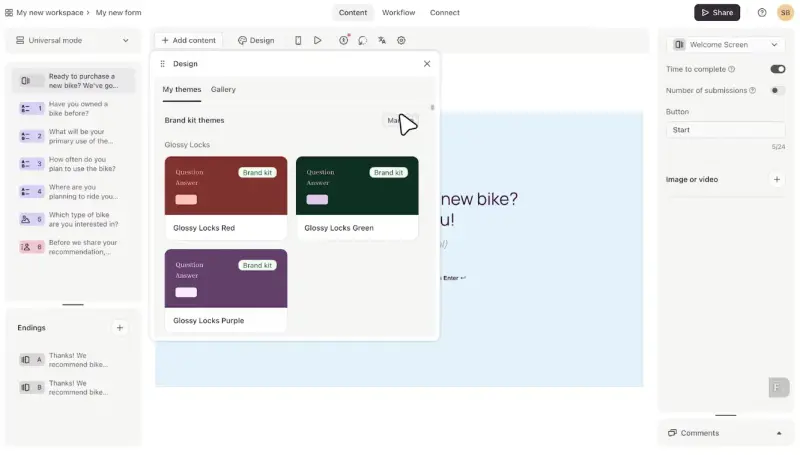
Typeform builds design-first, one-question-at-a-time forms, surveys, and quizzes. Web embeds can launch on page load, after a delay or scroll, or on exit intent.
Growth Flow adds contact enrichment, automations, and email or SMS follow-ups for GTM teams. The separate, quote-led Research Flow covers participant recruitment, video research, transcription, and AI synthesis. These products extend Typeform beyond forms, but they don’t turn its public core into a unified VoC platform.
Who is Typeform primarily for?
Core Typeform fits marketing and brand teams that need a polished form, quiz, application, or survey. Growth Flow serves GTM teams that want to enrich and follow up with contacts, while Research Flow handles recruitment and qualitative studies.
A CX manager seeking one continuous layer across web, email, native apps, and external feedback will struggle to map that job onto any one of those products.
What’s Typeform’s ease of use?
Typeform remains one of the easiest tools to start with, and reviewers consistently praise both the builder and the quality of its output. AI-assisted creation makes the first draft even faster.
Website targeting is also straightforward once the form is embedded. Native mobile collection is the bigger limitation. Typeform doesn’t offer an officially supported native mobile SDK, and it recommends sending users to a browser link instead of relying on a WebView.
What’s Typeform’s customer support like?
Core plans include standard support. Business and Growth Flow add priority support and live chat, while Enterprise includes dedicated account management, onboarding, and technical implementation help. Reviews focus much more often on pricing and feature limits than on support quality.
What are the main pros of using Typeform?
- Strong form design and respondent experience when the interaction needs to feel like part of the brand.
- Forms are quick to build, and web embeds can launch after page load, delay, scroll, or exit intent without requiring a separate targeting product.
- Growth Flow can enrich contacts and trigger email or SMS follow-ups, while Research Flow adds a genuine recruitment and qualitative-research workflow.
What are the main cons of using Typeform?
- Response allowances are hard monthly limits shared across the account. Without auto-upgrade, every form becomes private when the limit is reached and stops collecting until the next month or an account upgrade.
- Typeform has no officially supported native mobile SDK. A WebView workaround doesn’t provide the same supported in-app collection and behavioral targeting as a product built for native mobile feedback.
- Core, Growth Flow, and Research Flow solve different jobs. Contacts can organize people collected through forms, but they aren’t a multi-source VoC repository combining surveys with tickets, reviews, calls, and other feedback.
Pricing
Typeform’s free plan allows 10 responses per month. With annual billing, Basic costs $28 per month for 100 responses and one user, Plus costs $56 for 1,000 responses and three users, and Business costs $91 for 10,000 responses and five users. Growth Flow is priced $266 per month with annual billing, while Research Flow and Enterprise are quote-based. Note that Typeform is currently testing different pricing configurations, so you may see slightly different plans or prices depending on the pricing page version you’re shown.
My hot take: How does it compare to Alchemer?
Typeform seems to be the choice when the form itself is the deliverable. It needs to look attractive, launch quickly, and convert. Alchemer makes more sense when questionnaire depth and advanced survey methodology carry more importance than presentation.
Growth Flow and Research Flow give Typeform meaningful post-submission workflows, so the comparison doesn't really end with “pretty forms.” The central trade-off for an always-on VoC program remains: no supported native mobile SDK, no multi-source feedback repository, and hard response limits that can stop collection halfway through the month. Typeform is strong at the experience around a form, but running a continuous feedback operation is a different job. More options are covered in our Typeform alternatives guide.
Sprig
What does Sprig do?
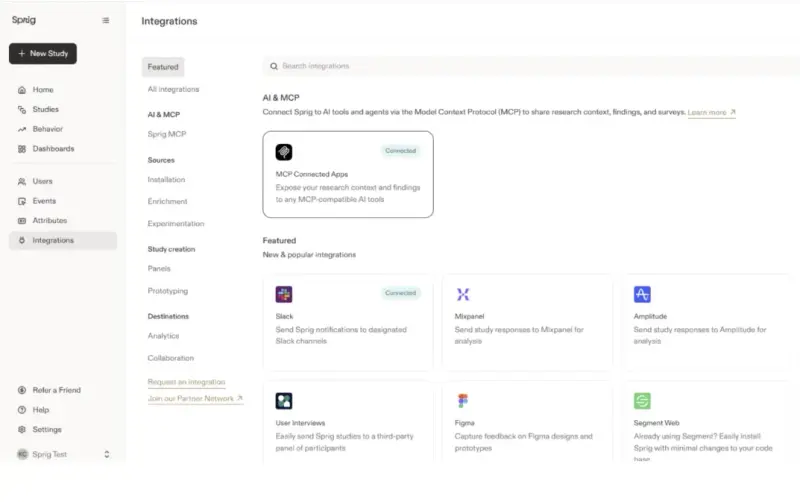
Sprig combines surveys with session replays, heatmaps, continuous feedback, and AI-assisted analysis. A product team can connect what users say with what they were doing inside the product.
Free and Starter also include link surveys. Enterprise expands the product with native email delivery, external panels, Conjoint, and MaxDiff.
Who is Sprig primarily for?
Sprig suits product and UX teams investigating drop-offs, validating feature decisions, or connecting a response with the session that produced it. Enterprise also serves larger research teams.
A CX owner seeking a self-serve layer for continuous NPS, CSAT, and CES across several channels will find the product less natural. Sprig’s center of gravity remains product research.
What’s Sprig’s ease of use?
Link surveys need no installation. Sprig’s main differentiator requires more technical work: targeted in-product surveys, replays, and heatmaps depend on an SDK and correctly passed user attributes and events. Once that foundation is in place, reviewers praise the speed of launching studies.
What’s Sprig’s customer support like?
Public reviews are generally positive about Sprig’s support and onboarding, particularly among product and research teams. Enterprise includes increased support.
What are the main pros of using Sprig?
- In-product surveys, replays, and heatmaps let a product team investigate both what happened and why, without manually reconciling feedback with a separate behavioral tool.
- Public link surveys provide a no-SDK route for reaching respondents outside the product. Enterprise expands that reach with built-in email delivery and external panels.
- AI agents support survey design, adaptive follow-up, thematic analysis, and synthesis, reinforcing Sprig’s specialization in moving product research from question to insight quickly.
What are the main cons of using Sprig?
- The deepest product context still requires SDK installation, user identification, and reliable event or attribute instrumentation. Without that technical foundation, much of Sprig’s differentiation disappears.
- Native email, panels, Conjoint, MaxDiff, and the broader enterprise research workflow sit behind a custom Enterprise package. They aren’t equivalent to a straightforward public multichannel VoC plan.
- Free and Starter have hard limits across study units and Monthly Unique Users. Reaching either limit can stop data collection, which creates risk for an always-on program. Reviews also point to limitations in survey logic, formatting, analytics, and exports.
Pricing
Sprig doesn’t publish its pricing. Capterra lists Starter at $5,000 per year, while Vendr reports a median contract above $23,000. The figures aren’t directly comparable, but they make one point clear: expect a sales conversation.
Below Enterprise, billing combines study units, including responses, replays, and heatmaps, with Monthly Unique Users. That MAU component can make growth more expensive even when survey activity stays flat, because you’re paying for the size of the user base, instead of just the people who actually receive or engage with feedback.
My hot take: How does it compare to Alchemer?
Sprig would earn its place on my shortlist if product research was the main pressure point for the team. Surveys, replays, heatmaps, and behavioral context help the team understand both what happened and how the user explains it. Public link surveys also give researchers a route beyond the product.
But that still wouldn’t make Sprig the replacement for an always-on mid-market VoC program. Its most valuable context requires technical implementation, its broader email and research capabilities lead to Enterprise, and its hard usage limits can interrupt continuous collection. Alchemer also offers native in-app feedback through the separate Alchemer Digital product. Sprig distinguishes itself by combining product feedback and behavior inside one research workflow.
Qualtrics
What does Qualtrics do?
Qualtrics CustomerXM combines surveys with signals from websites, apps, contact centers, chats, social media, and reviews, then applies text and sentiment analysis across the data. Role-based dashboards, workflows, tickets, follow-up, and governance make it a full enterprise CX platform. Employee experience and strategic research sit elsewhere in the wider portfolio.
Who is Qualtrics primarily for?
Qualtrics makes sense for organizations running CX across markets, brands, locations, or business units, with different access levels and common governance. It assumes dedicated CX operations, insights, administration, IT, or implementation resources. Company size matters less than whether the program justifies that structure.
What’s Qualtrics’s ease of use?
The burden goes beyond learning the survey builder. Someone must configure and maintain modules, directories, roles, dashboards, workflows, and integrations. Website and app intercepts add deployment and targeting rules, while native mobile feedback requires an SDK and development support.
Reviewers repeatedly mention the resulting learning curve and administration. The software may automate a great deal once configured, but someone still has to own that configuration.
What’s Qualtrics’s customer support like?
Qualtrics offers enterprise support, advisory, implementation, and managed services, depending on the contract. These services don’t remove the need for an internal owner. Qualtrics supports its mobile SDK and generated code, but custom implementation remains the customer’s responsibility.
What are the main pros of using Qualtrics?
- Surveys, digital feedback, contact-center conversations, reviews, and other experience signals can feed one CX program, with text analytics and closed-loop workflows turning the combined data into action.
- Role-based dashboards, directories, permissions, security controls, and multi-market governance let a large organization give local teams access without giving up central control.
- Advanced research and statistical capabilities sit alongside web and mobile targeting, automated ticketing, and customer follow-up. A dedicated CX or insights team can run more of the program without assembling several specialist tools.
What are the main cons of using Qualtrics?
- CustomerXM is modular and quote-led. The public Strategic Research plan belongs to a different product and doesn’t reveal what a multichannel CX deployment will cost.
- Digital and mobile feedback take real implementation work. SDK deployment, targeting logic, integrations, governance, and ongoing platform administration all come before the organization receives the full value.
- For a mid-market team running a focused NPS, CSAT, and CES program, the platform can create more roles, configuration, and procurement overhead than the feedback workflow needs.
Pricing
Qualtrics CustomerXM pricing is quote-based. The public Strategic Research license starts at $420 per month with annual billing, but it’s a research product and not a comparable price for replacing Alchemer. Marketplace data puts the median Qualtrics contract near $30,000 per year.
My hot take: How does it compare to Alchemer?
Qualtrics is the deliberate up-market move when Alchemer no longer provides enough scale, governance, or organizational control. It could be my choice if several markets or business units needed to combine multiple feedback sources, run closed-loop workflows, and work within tightly managed roles and security rules.
At the same time, I would need to make sure that I don’t have to operate the platform myself alone, and there’s a dedicated team to take care of both the implementation and the day-to-day.
If simplification brought you here, Qualtrics points in the opposite direction. It adds more configuration, a larger implementation, and a contract whose value depends on using capabilities well beyond recurring NPS and CSAT. It’s more platform, not less. See our full Qualtrics alternatives guide for lighter-weight options.
Is Alchemer right for you? The final verdict
Alchemer Survey remains a strong choice when the questionnaire itself is the hard part, with research capabilities, offline collection, quizzes, assessments, and email campaigns. The wider portfolio adds Panel Services, behavioral web targeting through Website Intercept, native in-app feedback through Alchemer Digital, and SMS plus broader workflows through Business Platform.
The split also breaks continuity at the respondent level. Alchemer Digital can identify the same person across devices within Digital, but answers collected in Survey do not automatically become targeting data there. A sequence that moves from web to native mobile and then to email is therefore not one native journey.
For a mid-market team running continuous NPS, CSAT, and CES, I wouldn’t treat Alchemer Survey as the default. Its public shelf covers one to three licensed users, while web targeting, mobile feedback, SMS, and the broader action layer lead elsewhere in the portfolio.
If survey and research depth justify that setup, Alchemer may be worth a look. If the goal is to collect feedback continuously across web, email, and product, analyze several sources, and close the loop without crossing product boundaries, one of the alternatives will usually be the cleaner fit.
Which Alchemer alternative should you choose?
- For an always-on VoC program across web, email, and in-product: Survicate. It keeps collection, targeting, multi-source analysis, and routing in one public product, while Growth includes 10 seats.
- For physical and digital touchpoints with native case management: Zonka Feedback. Choose it when complaints need owners, statuses, escalations, and documented resolutions.
- For advanced research methodology: QuestionPro Research Suite. It’s the stronger direction when panels, communities, Conjoint, and MaxDiff are the work rather than supporting features.
- For conversational surveys with workflows and tickets: SurveySparrow. Its strength matters most when respondent experience and messaging channels outweigh the need for deeper reporting.
- For familiar, general-purpose surveys: SurveyMonkey. It remains the easiest default for one-off research and broad survey work, with Connect adding lightweight automations.
- For a form that needs to look and convert exceptionally well: Typeform. Its Core and Growth products make sense when the form experience is the deliverable.
- For product research tied to behavior: Sprig. Its strongest case is combining in-product surveys with session replays and heatmaps, although the broader email and panel layer leads to Enterprise.
- For enterprise XM across markets and business units: Qualtrics. Choose it when governance, multiple feedback sources, closed-loop operations, and organizational scale justify a dedicated platform team.
FAQ
What should a mid-market team prioritize when replacing Alchemer?
Start with the complete workflow: collect, target, analyze, act, and operate. For each stage, confirm that the specific plan you’re buying covers the channels, data sources, and targeting you need. Then check how a response reaches an owner and what happens next. Count the people who need to work with the program, not merely receive a report. Seats, add-ons, separate products, implementation, and response limits often matter more than the headline price or number of question types.
Why does per-seat pricing matter for a feedback program?
Reading a shared report and actively working with the data are different jobs. For example, Alchemer can share reports by URL, so stakeholders don’t need paid licenses merely to view the results. The constraint appears when more than one to three people need to create surveys, edit reports, filter or explore data, and administer the program themselves. At that point, the public Survey plans lead to a custom Business Platform account.
Which Alchemer alternatives support in-product surveys?
Survicate, Sprig, SurveySparrow, Zonka Feedback, SurveyMonkey, and Qualtrics all support some form of in-product survey collection. Survicate and Sprig offer targeted surveys across web and native mobile apps. Survicate also connects that channel with email collection, multi-source analysis, and feedback routing, making it better suited to running a broader VoC program rather than a product research workflow alone. SurveySparrow provides web and mobile SpotChecks, while Zonka covers web and mobile in-app feedback as part of its broader omnichannel CX platform. The differences lie in targeting depth, implementation requirements, and plan availability rather than basic access to the channel. Alchemer also supports native in-app feedback, but through its separate Digital offering.
Which pricing limits can disrupt an always-on feedback program?
Watch for hard response caps, study-unit allowances, and usage limits tied to tracked users. A hard cap can stop collection in the middle of the month and leave a continuous NPS, CSAT, or in-product program with a gap in its data. Typeform can close forms once the response allowance is exhausted, while Sprig limits both study units and Monthly Unique Users. Before buying, confirm what happens when you reach the limit, whether unused capacity rolls over, and how quickly you can add more without changing plans.
Author's note (last verified: 22 September 2026): Statements such as 'best' reflect our opinion and typical use cases, not a universal guarantee. This comparison is based on publicly available information and our best understanding at the time of writing. Vendors may change features, pricing, and packaging without notice. For the latest details, please check the official sources or reach out to the vendor directly.