TL;DR
- What: Native email survey sending, built into Survicate.
- Who it's for: CX and CS teams who own the feedback program but not the send button.
- How it works: Upload a CSV (up to 10,000 contacts per file), design the email, then send now or schedule.
- Where results go: Straight into Analyze, with delivery stats next to responses.
Your survey is built. You know the audience. And it's still sitting in another team's backlog.
Sound familiar? For most CX and CS teams, that's the whole story of surveys. You do the hard part, designing an NPS or CSAT survey worth sending, then you hand it off: to another team, a separate email tool, someone else's roadmap. And there it waits.
So we built the send into Survicate itself. You can now email NPS, CSAT, and other surveys natively, with every response landing right back in the platform you already analyze in. Here's what it does, where it fits, where it honestly doesn't yet, and how CX teams can put it to work today.
Why we built this: a $100k problem
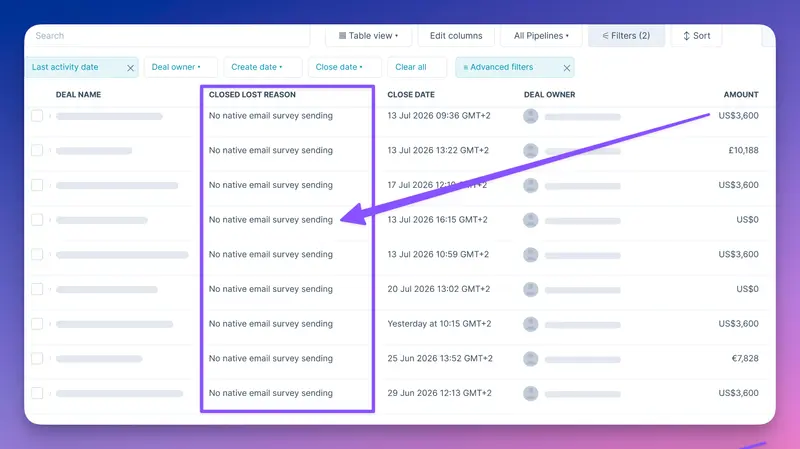
$100k. That's what not having this cost us in deals last year.
Prospects, mostly CX and CS teams, asked for native email sending more than any other feature. When the answer was "you'll need to connect Mailchimp or HubSpot for that," some of them walked. And it wasn't really about the email. It was about a pattern we heard over and over: these teams own the customer feedback program, but they don't own the send button.
That gap shows up in three ways, and none of them have anything to do with the survey itself:
- You depend on another team to hit send. CX and CS teams own the Voice of Customer program, but an email survey routes through marketing, an in-app one through product. Either way it stalls in someone else's queue. The survey meant to catch a churning customer this week goes out next month, or never.
- You're paying for, and switching between, two tools. Your team bounces between Survicate for the survey and a separate tool for the send, on top of that tool's per-send or per-contact pricing. Native sending drops both the daily tool-switching tax and the cost of running a second tool.
- Opt-outs bleed between marketing and surveys. If your org keeps one master list, an "all emails" unsubscribe in your marketing tool signs people out of everything, surveys included, and vice versa. Sent natively from Survicate, survey opt-outs stay separate, so a feedback unsubscribe doesn't quietly shrink your marketing list.
So we built native sending, and made sure every response flows straight back into Survicate, next to the feedback your team already tracks and analyzes.
What built-in email sending actually does
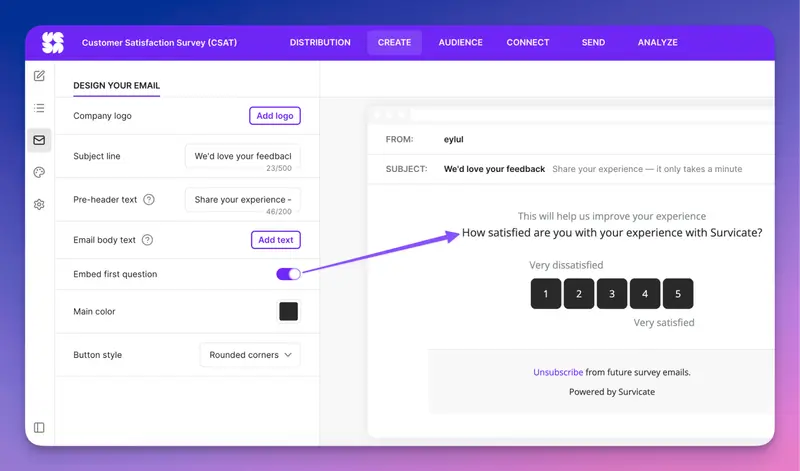
It's what it sounds like: build a survey in Survicate, then email it straight from Survicate.
Here's what you get:
- Sending from your own domain. At launch you send from your own custom domain, verified with DKIM records (plus an optional DMARC record): a one-time setup our Help Center guide walks you through. A Survicate-managed domain is coming later.
- A template editor for subject, pre-header, body, button, logo, and custom HTML.
- Your first question embedded right in the email, or a CTA button if you'd rather. Single choice, smiley, rating, NPS, and welcome messages all render inline, so people can start answering from the inbox.
- CSV audience upload (up to 10,000 rows, 100 columns, and 20MB per file; multiple audiences can be enabled in a single send).
- Send now or schedule, plus a test send so you can check the thing before it goes out.
- Sender name and reply-to that point to you, not to Survicate. Replies land with your team, and if you skip the reply-to field, they default to the sender address.
- Automatic unsubscribe link and workspace-level suppression. Once someone unsubscribes, hard-bounces, or marks your email as spam, they’re dropped from every future send automatically, even if they turn up in a later audience upload.
- Send history in the Send tab, with delivered, opened, clicked, bounced, unsubscribed, and spam stats for every campaign, plus email stats in Analyze right next to your responses.
And because responses land back in Survicate, they slot straight into everything you already do there: dashboards that show feedback at a glance and alongside your other surveys, AI that categorizes open-text responses into topics at scale, and VoC reports that combine this data with every other source you've connected.
The send stats don't live in a separate email dashboard you have to go log into. They show up in the same place as your responses, next to every other feedback source you already track in Survicate.
Build the survey, send it, analyze the responses, and act on them, all in one place.
Already on the roadmap
This is the first release, and we're already planning how to make it better with:
- AI-assisted email editing: draft or rewrite parts of your email with AI, the same way you already build surveys.
- Name personalization: pull a name column from your CSV to open with "Hi [first name]."
- A Survicate-managed sending domain: so you can send without setting up your own domain first.
- Dynamic audiences: build lists from rules and filters instead of uploading a CSV each time.
- One-click follow-ups to non-responders, without re-uploading a trimmed list.
- Unsubscribe export via API: sync opt-outs to your other tools automatically.
- Response anonymization: for cases like employee surveys where you don't want responses tied to individuals.
Five ways CX teams actually put this to work
Let's get to the useful part: what does this look like in practice?
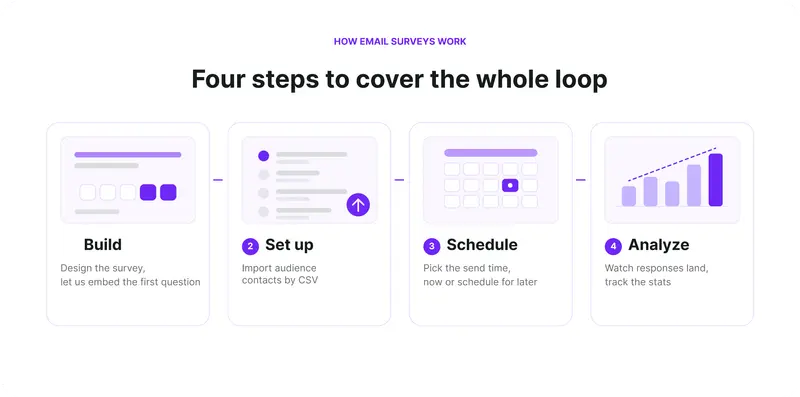
On your timeline NPS and lifecycle programs
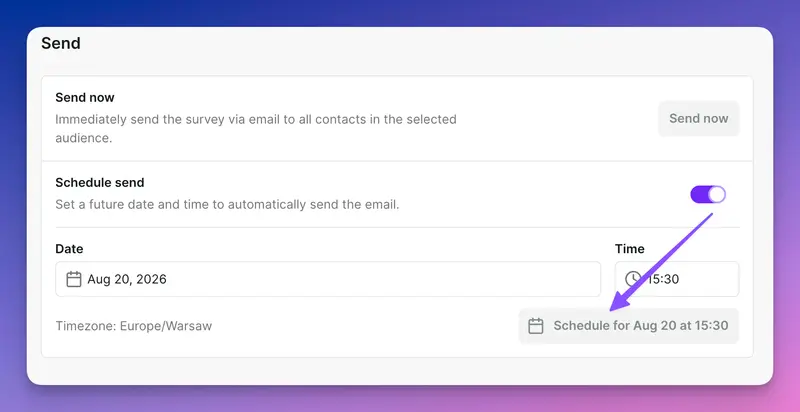
You run NPS quarterly, or CSAT on a rolling basis, and you want it to just happen without a ticket to marketing every cycle.
With Survicate, you can:
- Build the survey once.
- Upload your audience.
- Schedule the send.
- Watch delivery stats and responses populate in Analyze together.
The program runs on your timeline, not someone else's queue.
Transactional CX surveys after support or purchase
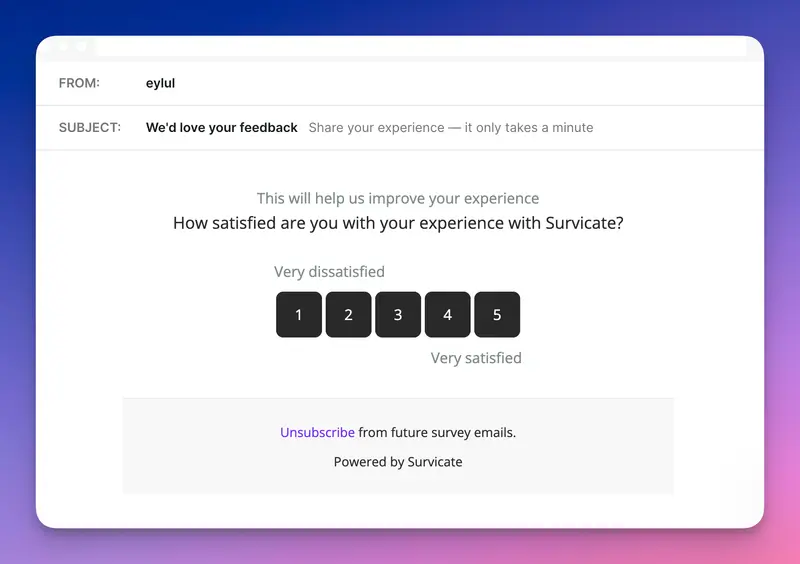
- Someone closes a support ticket or completes a purchase.
- That's the moment to ask, while it's fresh. Export the list of recent tickets or orders, upload it, and send a short survey with the first question embedded, so answering takes one click from the inbox.
- Run it as a regular scheduled batch (weekly, say) to keep the feedback close to the interaction.
One-off research, screeners, and post-event sends
Not everything is a program. Sometimes you just need to ask a specific group one thing, fast: a post-webinar pulse, a quick screener, a one-time validation.
- Upload the list.
- Design the survey and email.
- Send now, done.
No standing up a whole campaign in another tool for a survey you'll run once.
Health-check before your next meeting
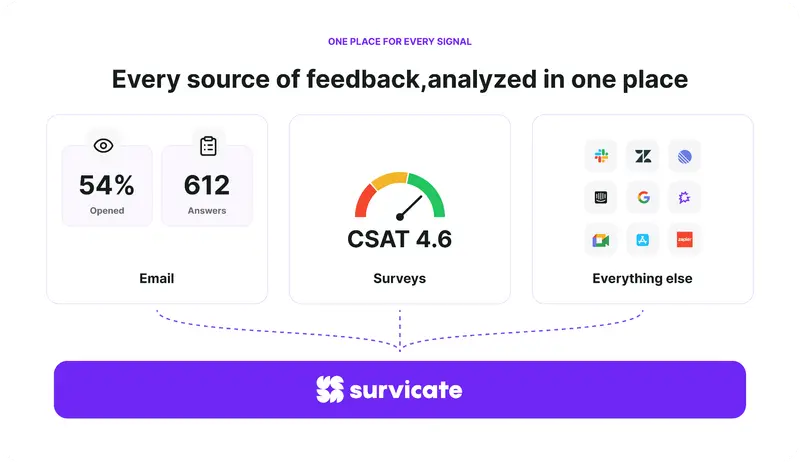
The send is only half of it. Because the responses land back in Survicate, the analysis is already waiting for you.
Say you ran a one-off survey last month to validate a topic. Before your next review, you can:
- Pull those responses up alongside your ongoing NPS and CSAT surveys.
- Cross-check the pattern against your other connected sources, like Zendesk tickets, Gong calls, and reviews.
- Drop the combined read straight into a VoC report or Research Hub, no exporting or stitching data together by hand.
You walk into the meeting with the full picture, not one survey's worth of it.
Close the loop without leaving your tech stack
Sending the survey and reading the replies is only two-thirds of it. The reason to keep the whole thing in Survicate is what happens after the response lands: it becomes an action, on its own.
That action can route into a tool you already own, so the loop stays yours from start to finish. No marketing queue at the send, and none at the follow-up either.
Take Intercom, where a lot of support teams already work:
- Audience: export the contacts whose Intercom conversations wrapped up this week and upload them to Survicate.
- Survey: Survicate sends a Support CSAT email, on your schedule, from your domain.
- Response: the answer syncs back into Survicate for analysis, and into Intercom as an attribute on that contact.
- Act, in the tool you run every day: a 1 or 2 opens a proactive Intercom message or routes the contact to a CSM for a check-in, before it turns into a cancellation. A 4 or 5 tags them as happy and can trigger a review ask.
And because Survicate connects to 47+ tools, the same pattern works with whatever your team owns, whether that's Intercom, Zendesk, or a simple Slack ping to the right CSM. The destination is your call.
Who else this helps
We built native email survey sending with CX and CS teams in mind. But the moment survey sends stop routing through shared tools, a few neighbors get something back too.
- Marketing gets its queue back. Every CX survey that used to land in the marketing backlog is now a request that never gets filed. The send calendar and contact lists stay focused on campaigns that serve marketing goals, with no survey opt-outs bleeding into lifecycle audiences.
- Researchers get scoped outreach on demand. Recruiting a cohort for a study no longer means borrowing the marketing stack or standing up a separate tool. Upload the list, send the screener, done, and the responses land next to the rest of the research.
- Product managers get a fast read. When a decision needs one data point before the next sprint, they can validate with a targeted segment directly, instead of waiting on a send slot they don't control.
The pattern is the same for all three: the dependency that used to sit between them and the data is just gone. We're not building dedicated workflows for each of them here, but it's worth knowing the win travels.
An addition, not a replacement
Worth saying plainly, because it's the honest frame for the whole feature: this is a first release that adds native sending. It isn't trying to replace a professional email marketing platform, and it won't fit every team or every use case.
You're still better off in your existing email tool if you're:
- Running high-volume marketing campaigns, not survey sends
- Relying on advanced segmentation, dynamic audiences, or automated sequences
- Triggering sends off CRM events or contact behavior
- A/B testing send content and timing at scale
For those, the third-party integrations aren't going anywhere, connect Survicate to HubSpot, Braze, or Klaviyo and send from there, exactly as before.
What this release is built for is the survey send that kept getting stuck: a defined list, a clear question, on the CX team's own timeline. That part now lives with you.
Try it on your next send
The next NPS or CSAT you've got queued up? Send it yourself, on your own timeline, no ticket required. Set up your domain once and the send is yours from there.
Start sending email surveys from Survicate.
FAQ
How is this different from competing survey tools like SurveyMonkey, Retently, SurveySparrow, or Zonka?
Most tools that bundle email sending keep the sending and the analysis siloed inside that one tool. Some competitors match individual pieces of this, branded custom-domain sending, CSV audiences, delivery tracking, and a few even layer AI analysis on top. But that analysis only ever reads the data collected in that one tool.
That's the difference. In Survicate, responses feed back into the platform and into Research Hub, sitting alongside every other feedback source you've connected, such as Zendesk, Gong, G2, and app reviews. The analysis layer reads everything you feed it, not just the surveys you sent by email, like you'd expect of an AI research repository. Other tools can send the survey. None of them read it back against the rest of your customer feedback.
How is it different from Delighted (sunsetted)?
Delighted did one thing well: simple recurring NPS and CSAT surveys. Now that Qualtrics has sunset it, those teams need somewhere to land, and native sending covers the same job: branded surveys from your own domain, on your schedule. It also fixes Delighted's biggest gripes, you control your own sends directly instead of emailing support to change a survey, and responses feed back into Survicate and Research Hub for analysis Delighted never had. That makes moving over easy: same send, more to work with.
Does Survicate meet the Gmail and Yahoo sender requirements?
In 2024, Gmail and Yahoo started requiring anyone sending emails at volume to prove they're legitimate, otherwise messages get dumped in spam or blocked. Survicate handles the parts a sending tool is responsible for: you send from your own verified domain (that's what the one-time DKIM and DMARC setup covers), and every email includes an automatic unsubscribe link, with anyone who opts out suppressed from future sends.
How will I know if my emails are actually landing?
You'll see delivery stats in Analyze, delivered, clicked, bounced, unsubscribed, and spam among them. A note on open rate: it's become a shaky metric, because Apple, Gmail, and others fire "open" tracking automatically whether or not anyone actually opened the email. Most teams now lean on click rate to judge performance instead. Since email surveys typically drive recipients toward a single clear CTA, Survicate’s native email survey send feature should support both high engagement and deliverability rates.
Can respondents opt out of just survey emails?
Yes, and this is a small side benefit. Because survey sending is native to Survicate, someone can opt out of your survey emails specifically while still receiving your other communication sent through your other tool, such as sales, marketing, and product emails. Once they opt out, Survicate suppresses them at the workspace level, so they won't get another survey email even if they land in a future audience upload. The reverse holds too: unsubscribing from marketing emails in that other tool doesn't automatically remove someone from Survicate. You can export unsubscribed contacts as a CSV from Email stats in Analyze to reconcile the lists by hand for now, and design your marketing tool's opt-out page to treat surveys as their own category (highly recommended).
Can I follow up with people who didn't respond?
Not automatically, not yet. For now, sending a reminder to non-responders means uploading a new audience file with just those contacts and sending a fresh campaign to them. An easier one-click follow-up is something we're working on.
What happens if I send the same survey again?
Watch your audiences here. If you run a second send with the previous audience still enabled, those people get the survey a second time. To reach only new contacts, disable the old audience and enable the new one before you send.
Do I need to be an email marketing expert to set this up?
No, but you do need to set your domain up properly, and that step is slightly more technical than the rest of the feature. This Help Center guide covers it from start to finish. It's a one-time setup, and it's what makes your survey emails send cleanly in your own name.
Which plans include email sending?
Current paid plans do. Legacy plans don’t, but you can still send surveys through your own email tool or a survey link. Starter and Growth include 5 times your response limit (500 to 7,500 sends a month), Pro and Enterprise include 50,000 sends a year, and you can send up to 10,000 emails a day.
Is this replacing my email marketing tool?
No. It's a scoped addition primarily for CX and CS teams sending surveys, not a professional email marketing platform. Your marketing, sales, and product emails stay where they are. This just takes the survey send, the one part that kept getting stuck, and puts it back in your hands.
Key takeaways
- CX and CS teams can now email NPS, CSAT, and other surveys from Survicate. No marketing ticket required.
- Responses land next to every other feedback source you've connected, so analysis starts the moment answers come in.
- You send from your own domain, authenticated with DKIM and DMARC. It's a one-time setup.
- Embed the first question in the email, and people can answer straight from the inbox.
- Survey opt-outs stay separate from marketing unsubscribes, so neither list quietly shrinks the other.