Most teams looking for a Refiner alternative are not fleeing a bad product. They have reached the point where getting product feedback is no longer the whole job.
A Product Manager surveys logged-in users inside the app and gets what they need. A month later, Customer Success wants post-ticket CSAT, a relationship check before renewal or feedback from churned accounts. Outbound delivery moves to another system.
Refiner can still hold the survey and responses, but campaign context and follow-up now live elsewhere. CS still has to make sure a poor score reaches the account owner and becomes a follow-up before the next renewal conversation. Nobody chose a two-tool workflow, but here we are.
I compared seven platforms through one question: how well can one tool connect in-product feedback with the rest of the customer journey, so Product and Customer Success can collect it, make sense of it, and act on it without building a patchwork of systems?
It matters to Product Managers and Heads of Product, but also to CS leads: the people who tend to inherit the same stack whether anyone planned it or not. If you're still designing the program, start with how the pieces of a feedback system fit together.
Listed brands are not ranked.
TL;DR
The seven tools below take different routes beyond the product screen. Some deepen product research, some give Customer Success much stronger outbound reach, and a few can credibly serve both teams without turning feedback into two separate programs.
| Tool | G2 rating | Known for | My 2 cents |
|---|---|---|---|
| Survicate | 4.6 | Multi-channel feedback plus an AI research repository (Research Hub) | An all-round Refiner replacement: multichannel collection, cross-source analysis and routing for follow-up. Refiner wins on geo-targeting. |
| Sprig | 4.3 | Continuous product discovery through in-product surveys, replays, heatmaps, panels and AI analysis | The product-research upgrade when microsurveys are no longer enough. Less convincing when CS also needs outbound feedback and follow-up. |
| Iterate | 4.2 | Lightweight surveys, including event-triggered prompts | A clean lateral move: keep lightweight product surveys and add email sending. Analysis and follow-up stay thinner. |
| Pendo | 4.4 | Product analytics, in-app guides and replay, with surveys inside the wider suite | Buy it for analytics and guides, not to solve Refiner's outbound gap. Customer success still lacks a standalone survey workflow. |
| SurveySparrow | 4.4 | Conversational, one-question-at-a-time surveys | Worth a look when email, SMS, WhatsApp or Intercom matter most. Product gets useful in-app surveys, but less control than with Refiner. |
| Zonka Feedback | 4.7 | Digital and offline collection across many sources, with optional cross-source AI | Best when feedback also comes from physical locations. It adds case management and AI analysis, but the latter costs extra. |
| Qualaroo | 4.3 | Behavior-triggered web Nudges, deep targeting and prototype surveys | A low-cost pick for focused web feedback. Not the home for a broader feedback program though. |
Why do people look for Refiner alternatives?
Refiner alternatives become relevant when the feedback program grows beyond in-app microsurveys. The question is no longer only where you can ask, but where the answer lands, what context comes with it, and who can act on it. Here is where Refiner starts to leave work on your side.
- In-product pricing follows identified users. For web and mobile app surveys, identifying a user is enough to count toward monthly active users (MAU); for email, hosted pages and website popups, only respondents count. You can therefore run a modest study against a large logged-in base and pay for plenty of people who never answer. “Unlimited responses” is accurate, but incomplete as a pricing story.
- Analysis remains limited to Refiner data. Feedback Hub and AI tagging are useful, but native analysis doesn't combine surveys with support tickets, calls or reviews. If a support lead has seen the same complaint in six tickets, the survey analysis will not know that. Bringing those signals together means adding another tool, or building your own pipeline. Either way, there is another system to own.
- It doesn't own outbound delivery. Email is an HTML snippet placed in your email platform. Refiner can hold the survey and response, but recipient selection, delivery, unsubscribes and campaign metrics stay with the sender. That splits the story between two systems: one knows whether the message arrived, the other knows what the customer said. Any follow-up has to bridge the two. There is no SMS, and Intercom supports the embed in an email campaign rather than a survey inside Messenger.
- The plan you need may not be the $99 plan. Refiner’s Essentials covers survey building, targeting, dashboards and alerts. Once Product wants surveys triggered by customer behavior, or Customer Success needs responses passed into the rest of the stack, Growth becomes the realistic starting point at $239 a month. Refiner can hand the feedback off; the follow-up still happens in the destination tool.
If those boundaries don't matter, Refiner might still be the right fit. Otherwise, keep going. For a wider category view, see how the main in-app feedback tools handle the same job.
How I did this review
What I looked for
I used four criteria that mirror Refiner's appeal and the reasons teams eventually look beyond it.
- Whether Product and CS can work from the same evidence. Do in-app and outbound responses land in one place, with enough customer context to understand who said what? Can the tool bring survey answers together with support tickets, calls or reviews, or are the teams still comparing exports?
- What happens after someone answers. Can product feedback reach the PM who owns the relevant area? Can a poor relationship score alert the account owner, update the customer record or create a follow-up before renewal? I distinguish between centralized case management and workflows coordinated through integrations. Native case management keeps assignment and tracking in one system; integrations can still route issues to the right owner and track follow-up in the tools teams already use.
- To what degree it is useful to Product. Can PMs reach the right users after meaningful product behavior, work across web and mobile, and avoid interrupting people at the wrong moment? Wider reach loses value if Product stops wanting to use the tool.
- What the meter counts. Monthly active users, responses, sessions, seats or sends, including the first tier that can run your actual program.
How I validated the claims
Vendor documentation and pricing came first. Feature pages might say a product “does email” or “closes the loop”. Cool, but help-center articles reveal who sends the message, where the response lands, what context travels with it and what actually happens next. Some of the practical context also came from our own testing of competing tools and internal transcripts of sales calls.
I used G2 and Capterra for ease of use and support, and third-party sources where pricing is private. Ratings and packaging move, so verify them before buying. I work at Survicate; keep that in mind, and see if the section below makes our weak spots as visible as the strengths.
How 7 Refiner alternatives expand your feedback program beyond the app
Survicate: one feedback program across many touchpoints, with a research layer underneath
What does Survicate do?
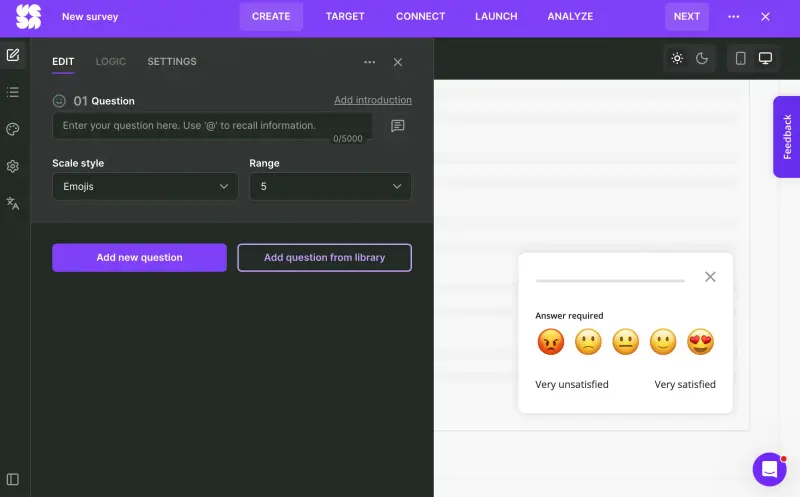
Survicate lets Product and Customer Success run one feedback program from the same platform. Research Hub, an AI research repository, analyzes survey responses alongside support conversations, calls and reviews, with findings linked back to the source. Responses can also update customer records in CRM or alert a team in Slack, so follow-up starts in the tools people already use; there are 40+ native integrations available.
Who is Survicate primarily for?
Product managers working alongside Customer Success and CX managers. The fit is strongest when in-app research, relationship surveys and post-interaction feedback should feed the same customer view instead of sitting in separate team dashboards.
What's Survicate's ease of use?
Survicate holds a “Best ease of use” badge on Capterra, with survey builder and workflows often praised by reviewers as clean and seamless. The web snippet and mobile SDKs are standard installs.
What's Survicate's customer support like?
Live human chat is included on every paid plan; Survicate publishes 97% satisfaction and a two-minute first-response time. Support is also a recurring positive in G2 reviews.
What are the main pros of using Survicate?
- One tool for Product and Customer Success. Both teams collect and analyze feedback in Survicate, while native integrations can update CRM records or alert teams in Slack when someone needs to follow up.
- Pricing follows feedback volume rather than the size of your logged-in user base. Growth in signups alone does not raise the survey bill.
- Research Hub brings more than surveys into the analysis, combining responses with support conversations, calls and reviews while keeping findings traceable to source quotes.
What are the main cons of using Survicate?
- No geo-targeting or “keep asking until answered” rule. Refiner has both.
- No SMS or WhatsApp sending. Links can be shared there, but Survicate doesn't own delivery.
- No native case management. Survicate can route responses and start follow-up through integrations, but it does not assign, track, and close customer cases inside the platform.
Pricing
Growth is the first tier I'd consider for an ongoing cross-team feedback program, with attribute-based targeting and integrations such as HubSpot. It starts at $56 per month when billed annually, with 100 survey responses and 1,000 data points per month, and scales up as you increase those allowances.
Pro starts at $349 per month and adds event-based targeting along with integrations such as Salesforce, Braze, Amplitude, and Mixpanel, for teams that need feedback connected to a broader stack. Enterprise starts at $569 and adds the security, compliance, and implementation support larger organizations need to run that program at scale.
A 10-day free trial gives you access to all pro-level features. Pricing is based on survey responses and data points rather than monthly active users, so a spike in signups doesn’t increase the bill on its own.
My hot take: How does it compare to Refiner?
I think Survicate is a natural step forward once feedback belongs to more than product. A product manager can keep running in-app and mobile research. Customer Success can run relationship or post-interaction surveys beyond the product.
A poor score can update the customer record and alert the account team, giving CS a clear follow-up before the next renewal conversation. Research Hub analyzes the same feedback alongside tickets, calls and reviews. The feedback does not have to stop at an answer in a survey dashboard.
So, I would look at Survicate as a Refiner alternative when the program needs to serve both Product and Customer Success, and getting feedback back into everyday workflows matters more than keeping some specialist in-app controls. However, for a small product team surveying one logged-in app, Refiner might still be more interesting. It has country targeting, unlimited responses, and the keep-asking rule Survicate lacks.
Survicate won't be the right fit for everyone: here's when you should pick someone else
I'm on the team at Survicate, so I know where we stop being the obvious answer. We collect feedback across the product, web, mobile, and other touchpoints, analyze it in one place, and push it into the tools where follow-up happens.
We don't own that follow-up: there's no native case management, so if a poor score needs an owner and a status until it's closed, Zonka Feedback and SurveySparrow do that inside the platform. And if the question is what someone did before they answered, Sprig's replays or Qualaroo's heatmaps will tell you more than Survicate will.
Sprig: the in-product specialist that moved upmarket
What does Sprig do?
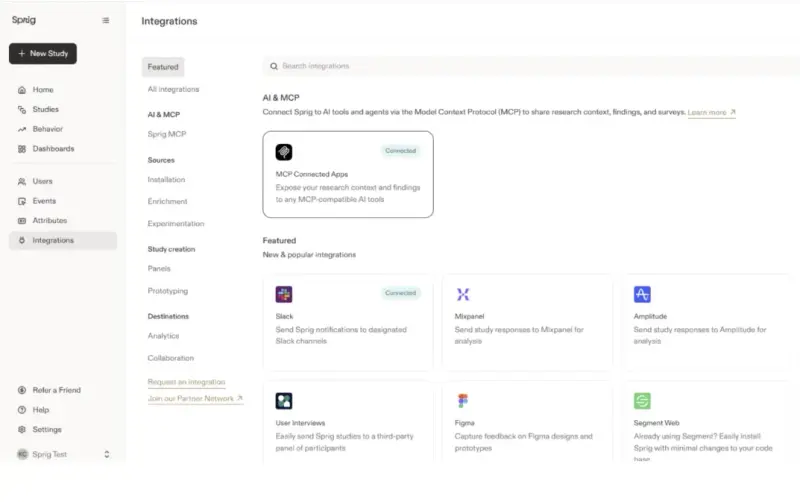
Sprig combines web and mobile in-product surveys with session replays, heatmaps, concept testing, video and voice answers, AI analysis and recruited panels. Mobile delivery uses iOS, Android and React Native SDKs; distribution also includes links and QR codes, plus native email on Enterprise.
Who is Sprig primarily for?
Heads of product, product managers, and researchers at companies running continuous discovery as a function rather than a side project. If Refiner appealed because a product manager could understand the price and start without procurement, expect a different buying conversation here.
What's Sprig's ease of use?
Reviewers on G2 describe the builder as intuitive and quick for launching in-app studies. The builder itself is the easy part. Expect developer help with the initial SDK setup and with any product events or user attributes the research team wants to use for targeting.
What's Sprig's customer support like?
Well regarded, with one caveat if you're in Europe: the answer from the support team can take longer from an EMEA timezone. Sprig is a US company and the coverage reads that way.
What are the main pros of using Sprig?
- Replays, heatmaps and surveys together, so researchers can inspect what happened before an answer rather than infer it from the response alone.
- Rich in-app targeting, including page-view history, session filters and rage clicks.
- Panels, AI reports and adaptive questioning, useful when the team needs participants outside its own user base or follow-ups that adjust to an answer.
What are the main cons of using Sprig?
- No published pricing, and more than one usage meter. Below Enterprise, study units and monthly unique users both matter. Native email on Enterprise is priced by annual send volume.
- Email does not create a shared customer history. Native email is Enterprise-only, and Sprig keeps Contact List recipients separate from in-product users even when their email address or user ID matches. So, product and CS still see two versions of the same person.
- The action layer is a handoff. Completed responses can alert product teams in Slack or move through Zapier and webhooks, but any follow-up, task or product change is managed in the destination tool.
Pricing
Pricing isn't published. Capterra lists Starter at $5,000 a year, while Vendr's own median sits above $23,000. What those rough numbers tell you is that you need a sales conversation. Below Enterprise, the meter combines study units, including replays, heatmaps and responses, with monthly unique users.
My hot take: How does it compare to Refiner?
I think Sprig is worth the upmarket move when the Product Team has outgrown microsurveys and needs a continuous research system. Replays, heatmaps, panels, and AI synthesis change what the team can learn, not merely where it can send a survey.
I would not choose Sprig just to give Customer Success email. That channel sits on Enterprise, adds annual send volume to the quote and keeps its Contact List separate from in-product users. Customer follow-up still happens outside Sprig. It is a strong product-research upgrade, but an awkward answer to a shared Product and Customer Success feedback program. And probably a costly one.
Want the detail on how the pricing models differ? We've written up what changes when you stop paying by monthly active user.
Iterate: a lightweight step beyond in-app surveys
What does Iterate do?
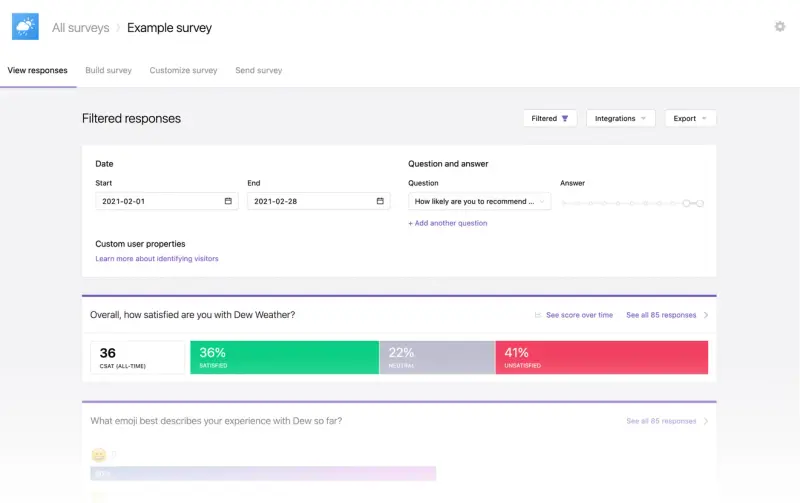
Iterate runs website, in-product and mobile surveys, plus links and email campaigns it sends itself. The team can trigger questions after specific behavior; Customer Success can schedule sends and manage unsubscribes. Its optional Research Assistant does a first pass on open-text answers, from sentiment and recurring themes to follow-up questions and summary reports.
Who is Iterate primarily for?
Product managers, and CS/CX leads who want short in-product, mobile, and email surveys in one lightweight tool. The fit is strongest when a Refiner-like setup needs more reach, but an enterprise research suite would be overkill.
What's Iterate's ease of use?
G2 reviewers describe Iterate as developer-friendly and easy to implement. The builder is simple; developer work mainly appears when Product wants surveys tied to its own events or mobile app.
What's Iterate's customer support like?
Generally positive, but 23 G2 reviews and none on Capterra are too few for a firm conclusion.
What are the main pros of using Iterate?
- Event-triggered surveys on web and mobile, so Product can ask after meaningful customer behavior instead of showing the same prompt to everyone.
- Research Assistant makes open text easier to use, tagging topics and sentiment, asking clarifying follow-ups and producing summary reports.
- Email that Iterate actually sends, with recipient lists, scheduling, and unsubscribe handling.
What are the main cons of using Iterate?
- Research Assistant is an add-on, not a shared research repository. It works with Iterate survey responses, not support conversations, calls or reviews.
- Summary reports need enough volume. Insights reports require at least 50 responses to a free-text question in the selected period, so smaller B2B samples may not qualify.
- Follow-up happens elsewhere. Some native integrations write responses to customer profiles, while Zapier and webhooks pass them to other tools. Iterate itself does not assign or track the work that follows.
Pricing
Iterate publishes a configurator rather than fixed plan ranges. The bill scales with combined web and mobile MAU, monthly email sends and paid extras such as Research Assistant, premium integrations and white labeling; responses stay unlimited.
A lightweight setup can cost tens of dollars a month, below Refiner's entry point. Push both sliders up and add the extras, though, and the bill can reach several thousand dollars a month. Enterprise is quote-based.
My hot take: How does it compare to Refiner?
I like Iterate as a clean lateral move for a team that still wants a lightweight tool. Product keeps event-triggered web and mobile surveys; Customer Success gets email that Iterate sends and manages. You solve the obvious Refiner gap without buying an enterprise research suite.
Refiner remains the better choice when the team relies heavily on backend-triggered targeting and detailed per-user survey rules. For the more common job, like keeping lightweight in-app feedback and giving Customer Success a proper email channel, Iterate is the easier answer. Mandatory homework: play with the price configurator before you make up your mind about the product.
Pendo: surveys as a feature of a product suite
What does Pendo do?
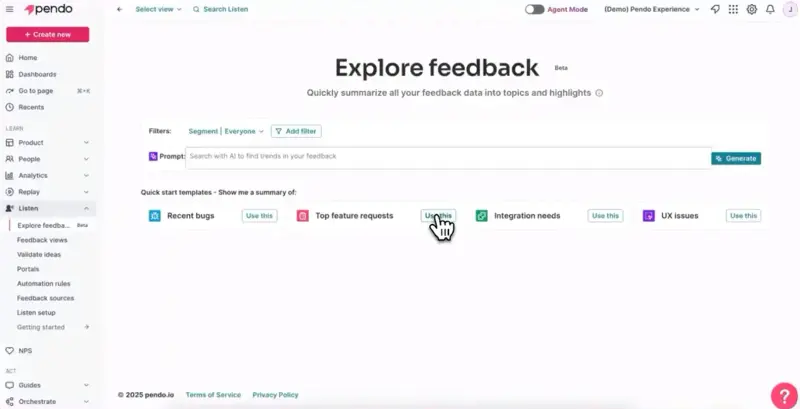
Pendo combines product analytics, in-app guides, session replay, and the Listen feedback and idea repository. Its Sentiment module delivers NPS, product-market fit, CSAT, and surveys through Pendo-instrumented products. Listen brings those responses together with product feedback from other sources and turns it into ideas and roadmaps for the Product Team.
Who is Pendo primarily for?
Heads of Product and product operations leaders at mid-market and enterprise companies buying analytics, guides, and replay together. Here, the survey requirement usually arrives after the team has decided it needs a broader product suite. That order matters.
What's Pendo's ease of use?
G2 reviewers praise no-code guides and the combination of analytics and guidance, but repeatedly cite a steep learning curve and tedious feature tagging. Expect an implementation measured in weeks, with an owner for instrumentation and rollout, not a quick survey install.
What's Pendo's customer support like?
Support is a recurring positive across more than 1,800 G2 reviews, a large enough sample to treat it as a credible pattern.
What are the main pros of using Pendo?
- Behavior and feedback sit together, with analytics, session replay, guides and surveys under one contract. A PM can compare what people say with what they actually do.
- Listen brings in more than survey responses, combining product feedback from Zendesk and Salesforce with call transcripts, then organizing it with AI.
- Feedback can turn into owned product work, with assignees, statuses, roadmaps, Jira links and update emails for the people who submitted it.
What are the main cons of using Pendo?
- You have to buy around the survey. Sentiment and product discovery are included on Ultimate and sold as add-ons below it, which is hard to justify if feedback is the only requirement.
- You cannot send a normal survey link. Sentiment surveys run inside your product. Apart from NPS backup emails, Customer Success cannot use them as ordinary email surveys.
- The pricing model is still MAU-based. Like Refiner, Pendo can become more expensive as product usage grows, even if the number of survey responses stays the same.
Pricing
Free up to 500 monthly active users with Pendo-branded NPS. Paid plans are quote-based and MAU-metered. Sentiment is bundled on Ultimate and an add-on below it, while AI features can add another charge. Vendr reports a median annual contract around $49,000, with varying scope, so treat it as a rough benchmark only.
My hot take: How does it compare to Refiner?
Pendo can be a real Refiner upgrade when the missing piece is not another survey channel, but a route from feedback to product decisions. Listen can pull in support, CRM, and call feedback, turn it into ideas, connect those ideas to Jira and roadmaps, and update the people who asked. That is something more than just a nice dashboard.
I find Pendo much less convincing when Customer Success simply needs to survey churned accounts or send post-ticket CSAT. Apart from its NPS backup email, Pendo surveys only run inside the product, so the basic reach problem remains. And pricing still follows MAU, just as it does in Refiner. If you already need Pendo's analytics and guides, surveys fit naturally. If feedback is the main purchase, this is a lot of platform to buy around it.
SurveySparrow: broad outbound reach, thinner in-app depth
What does SurveySparrow do?
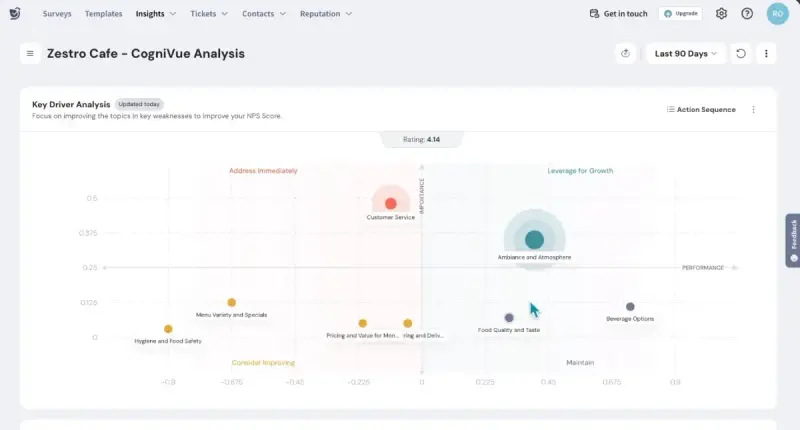
SurveySparrow is best known for conversational, chat-like surveys that show one question at a time. It sends them through email, SMS and WhatsApp, but also covers Intercom, links, QR codes, and offline collection. Product gets targeted web and mobile in-app surveys and can turn poor responses into assigned tickets.
Who is SurveySparrow primarily for?
Customer success managers, CX managers and support leads running relationship surveys across several channels, especially where the customer relationship isn't confined to a product login. Product can share the platform, but Customer Success is the more natural owner.
What's SurveySparrow's ease of use?
G2 reviewers generally like the conversational builder, although advanced branching and skip logic draw more criticism. Building and sending a standard outbound survey is the easier part; developer help enters when the team wants in-app surveys tied to its own events.
What's SurveySparrow's customer support like?
Basic and Starter get 24x5 email support; chat starts on Business. Some Capterra reviewers report slow replies.
What are the main pros of using SurveySparrow?
- It runs the outbound campaign apart from surveys. Email, SMS and WhatsApp sequences can include reminders and follow-ups for people who have not responded.
- Product can still use the same platform. Web and mobile in-app surveys cover active users, while Intercom reaches customers during support conversations.
- Poor scores can become owned customer cases. Workflows create a ticket, assign it to an agent or team and set its priority, so a detractor does not stop at the dashboard.
What are the main cons of using SurveySparrow?
- In-app research is a supporting feature, not the center of the product. Teams buying mainly for continuous product discovery will find Refiner more focused and lighter.
- The most useful workflow and analysis features sit higher in the plans. Ticket workflows start on Business, key-driver analysis is Enterprise-only, and AI analysis uses separately metered credits.
- Pricing takes some modeling. Responses, contacts and email sends have separate limits, with extra charges for additional users or responses.
Pricing
Self-serve survey tiers start at $19-79 a month with annual billing, but only at the lowest response allowances. Each has three response bands, taking the top price to $275.
For a cross-team feedback program, Business is the first tier I'd realistically look at: it adds three users plus workflows and webhooks for routing feedback and automating follow-up. Contacts, email sends, seats, AI credits and feature access also vary by plan, so the calculator is not optional homework. Enterprise and the separate CX suite are quote-based.
My hot take: How does it compare to Refiner?
I think SurveySparrow is strongest when Customer Success or CX owns the feedback program. It handles recurring outreach across email, SMS and WhatsApp, while Product still gets a useful in-app layer.
The surveys themselves use the conversational, one-question-at-a-time format. That combination makes sense for a company whose customer relationship happens in more places than the product.
I would stay with Refiner if precise in-app microsurveys are still the main job. SurveySparrow asks you to accept a broader platform and a more complicated bill in exchange for much stronger outbound campaign management. For a CS-led lifecycle program, that trade can make sense.
Zonka Feedback: the widest channel list in this comparison
What does Zonka Feedback do?
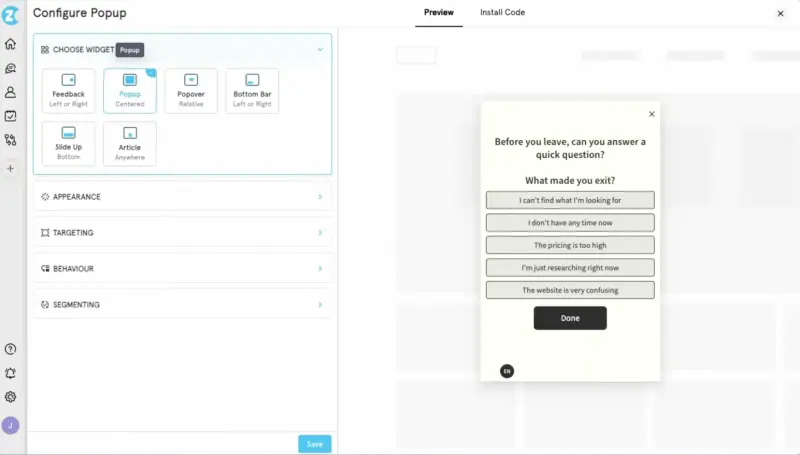
Zonka collects feedback through email, SMS, WhatsApp, web and mobile apps, links, QR codes, and offline kiosks. A separately priced AI product brings surveys, support tickets, chats and public reviews into one analysis, using its own data-credit allowance.
Who is Zonka Feedback primarily for?
CX managers and customer operations leads running feedback through SMS, WhatsApp, apps, and physical locations. Multi-location businesses and teams with customers outside a browser are the clearest fit.
What's Zonka Feedback's ease of use?
Reviewers praise customization but also mention bugs and hard-to-find controls. Read together, the signal is a broad, functional platform whose interface has not caught up with every capability.
What's Zonka Feedback's customer support like?
Support is the strongest review theme and scores 4.9 in Capterra's sub-ratings. The G2 review sample is modest, but the pattern is consistent.
What are the main pros of using Zonka Feedback?
- It reaches customers almost anywhere. Email and SMS can be sent from the platform, while WhatsApp, links, QR codes and offline kiosks cover digital and physical touchpoints.
- Product keeps the core Refiner use case. Web and mobile in-app surveys can appear after relevant user behavior, so PMs can still ask questions inside the product.
- AI analysis reaches beyond surveys, combining responses with support tickets, chats and public reviews to surface recurring themes and sentiment.
What are the main cons of using Zonka Feedback?
- The full collection-and-analysis setup is two purchases. Survey collection is metered by responses, while cross-source AI analysis is priced separately by data credits. Neither price is public.
- A product-only team may be buying far more than it needs. Much of Zonka’s value sits in messaging channels, kiosks, and case management. If the job is limited to in-app microsurveys, Refiner is the more focused purchase.
- Nothing about the cost is public, so you can't size the program before a sales call.
Pricing
Quote-based, with Feedback Management metered by responses and AI Feedback Intelligence by data credits; a 14-day trial is available upon a demo call. Capterra lists FM for $199 a month and the AI module for $999. If you plan to shortlist Zonka, get the actual quote for both layers and the channels you need.
My hot take: How does it compare to Refiner?
Zonka makes the most sense to me when broad reach is only half the job. It collects feedback across email, SMS, WhatsApp, apps and physical locations, then turns a poor response into an assigned case and keeps it visible until resolution. That is a more meaningful step beyond Refiner than simply adding another survey channel, while Product still gets credible web and mobile in-app surveys.
For one SaaS product and a handful of in-app microsurveys, I would stay with Refiner: it is narrower, easier to price, and probably easier to operate. Zonka earns its complexity when the team will genuinely use both the extra channels and case management. Cross-source AI analysis needs to be treated as a separate purchase, probably too expensive for a smaller team.
Qualaroo: strong web surveys wrapped in confusing packaging
What does Qualaroo do?
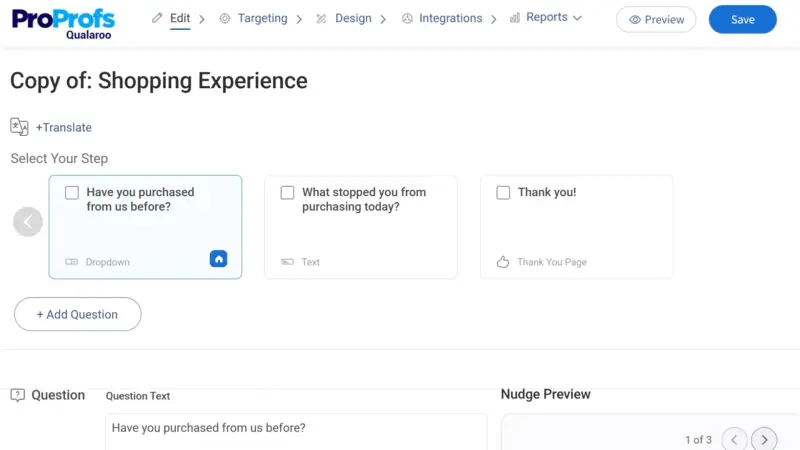
Qualaroo is built around Nudges: short surveys that appear on a website or inside a web product at a chosen moment. Product teams use them to ask about an experience while it is still happening, target specific visitors, and test prototypes before development. Qualaroo also supports survey links. Email campaigns and longer questionnaires come from ProProfs Survey Maker, while native mobile Nudges require Enterprise.
Who is Qualaroo primarily for?
Product managers and growth teams that need behavior-triggered web feedback or prototype testing. Teams trying to make Product and Customer Success share one feedback program will have more pieces to connect.
What's Qualaroo's ease of use?
G2 reviewers like its launch speed and describe surveys going live within minutes. Complaints cluster around limited design options and a confusing, underwhelming reporting UI.
What's Qualaroo's customer support like?
Business includes 24/7 email, phone and live chat support plus onboarding; Enterprise adds dedicated training and account management. The review sample is small, but the support comments that do exist are generally positive.
What are the main pros of using Qualaroo?
- Contextual web targeting is the real strength. Surveys can appear after relevant behavior and use identity, location and customer data, so Product can ask while the experience is still fresh.
- Prototype feedback arrives before engineering starts. PMs and designers can place surveys on Figma and other shared prototypes without waiting for a working product.
- Heatmaps and session replays add behavioral context, helping Product see what happened around the survey rather than relying on the answer alone.
What are the main cons of using Qualaroo?
- One subscription still leaves you with two feedback products. Email and longer surveys live in ProProfs Survey Maker. To see their answers alongside Qualaroo feedback, you must connect the products and map matching questions; the combined report then lives in Survey Maker.
- Closing the loop gets expensive. Salesforce, HubSpot, APIs and webhooks sit on Enterprise, so lower tiers do not give Customer Success a native route from a poor score to the customer record or follow-up workflow.
- Analysis stops at survey responses. Qualaroo can analyze sentiment and summarize its own feedback, but it does not bring in support tickets, calls or public reviews.
Pricing
Qualaroo has a free plan capped at 50 lifetime responses. Published paid pricing runs from $19.99 a month on annual billing to $499 a month. The lower end is self-serve; the upper figure applies to either the Customer Delight or Customer Growth suite, both multi-product ProProfs bundles sold through a demo. Enterprise also requires a sales call despite showing a starting price of $149 a month. Removing Qualaroo branding costs $300 a year.
My hot take: How does it compare to Refiner?
Qualaroo is cheap where it is strongest: targeted Nudges on websites and inside web products. They are quick to launch, the targeting goes deeper than the price suggests, and prototype surveys are a useful extra. Against Refiner, that is a credible bargain rather than a cut-down tool.
The low-cost story gets messier when the job extends beyond web feedback. Email and longer surveys live in a second product, mobile sits on Enterprise, and combining the results takes setup. By that point, I’m probably spending more than I’d want to. So, Qualaroo wouldn’t be my pick for a broader feedback program. For focused web feedback? More like it.
Is Refiner right for you? (the final verdict)
Refiner’s targeting is strong for the price, and customers often praise the support. It may be all you need when most feedback happens inside the product, MAU pricing suits your logged-in user base, and outbound campaigns can stay in your email platform.
The fit weakens when Product and Customer Success need one place to compare surveys with support tickets or calls and make sure a poor score reaches someone who can act. If you read that sentence and made exceptions in your head, here is where I would look instead.
Which Refiner alternative should you choose?
If one feedback program needs to cover the Product and what happens beyond it: Survicate is a strong fit here. Product keeps web, in-app, and mobile surveys; Customer Success gets CRM and Intercom. Research Hub adds support conversations and calls to the analysis, while integrations move survey data into the tools where follow-up happens. If your lifecycle depends heavily on SMS or WhatsApp, SurveySparrow is worth a look instead. Zonka goes further when the same program also needs kiosks, offline collection or multiple physical locations.
If Product has outgrown microsurveys and wants continuous discovery: Sprig. Replays, heatmaps and panels make it a real research upgrade, but most of that value stays on the product side. You should expect an enterprise price and buying process.
If you want the smallest possible move beyond Refiner: Iterate keeps short product surveys, adds direct email and stays simple. Qualaroo is the more focused option for precisely targeted feedback on websites and web products, where its Nudges are the main attraction. Neither is trying to become the home for a broad, cross-channel feedback program.
If the real purchase is product analytics and in-app guidance: Pendo. Surveys make sense as part of that suite. They are not a solution for reaching churned customers or giving Customer Success its own feedback workflow.
If your shortlist is wider than the tools here, we've also compared the platforms product and research teams evaluate most often.
FAQ
What should I look for in a Refiner alternative?
Do not judge it by channel count alone. A useful replacement should preserve what Refiner does well: targeted in-product surveys shown after meaningful product behavior. Then look at what happens beyond collection. Can it reach customers outside the login, keep responses with enough customer context, analyze them alongside support conversations or calls, and route important feedback into the CRM or help desk? Finally, model its pricing metric against the growth you expect, not just the audience you have today.
Which Refiner alternatives cover both in-product and outbound feedback?
Survicate, Iterate, SurveySparrow, and Zonka Feedback cover both, but with different centers of gravity. Survicate keeps web, product, mobile, email, and Intercom feedback in one wider program. Iterate is the lighter option for in-app plus email. SurveySparrow and Zonka lean more toward Customer Success and CX, adding SMS, WhatsApp, and offline channels around a useful in-app layer.
How should I compare MAU-based and response-based pricing?
MAU pricing follows the user base the platform processes, even when only a small share answers. Response-based pricing follows the feedback you actually collect. The first can work well when you expect high response volume from a compact user base; the second often suits fast-growing products that survey a sample. Model both against today’s usage and next year’s growth.
What should happen to feedback after a customer responds?
First, the response should keep enough customer and account context to explain who said what. Then it should be analyzed alongside other relevant evidence, such as tickets or calls, and routed to the person who can act. That handoff might start with an alert in Slack, while ownership and resolution are tracked in the CRM, help desk, or another system the team already uses.
Author's note (last verified: 02 October 2026): Statements such as 'best' reflect our opinion and typical use cases, not a universal guarantee. This comparison is based on publicly available information and our best understanding at the time of writing. Vendors may change features, pricing, and packaging without notice. For the latest details, please check the official sources or reach out to the vendor directly.