TL;DR
Choosing a user feedback tool is a decision product teams feel long after implementation. Get it wrong and you end up with siloed survey data that rarely makes it into product decisions. Get it right and feedback becomes a part of how your team decides what to build next.
In this article, I compare seven tools across multi-channel feedback collection, analysis depth, and how well each fits product managers and user researchers working together inside product teams. You’ll find the final verdict at the end, but if you want the quick view first, here it is.
5 must-have features in a user feedback tool for product teams
Before the reviews, here's what to look for when evaluating any feedback tool as a product manager or researcher. This is the lens applied to each tool below.
1. Multi-channel feedback collection. Your users don't live in one place. You need to reach them in your product, on your website, through email, and in your mobile app without stitching together three separate tools. Look for native support across all these channels from a single platform.
2. Behavioral targeting and event triggers. Timing matters in feedback. A survey shown right after a user completes onboarding will most likely outperform one sent in a generic weekly email. Look for tools that trigger surveys based on user behavior, funnel steps, or custom attributes.
3. AI-assisted analysis of open-ended responses. Qualitative feedback often explains the “why” behind product behavior, but it’s also where product teams get stuck. At scale, manual tagging isn't viable. Tools that categorize, theme, and summarize open-ended answers save hours of analysis time.
4. Integration with your product stack. Feedback is easier to act on when it reaches the tools your product team already uses. Look for native integrations with your product analytics and customer data tools (Amplitude, Mixpanel, Segment), CRM (HubSpot, Salesforce), and communication tools (Slack, Intercom).
5. A centralized research repository. A single survey gives you a snapshot. A research repository gives you the full picture. Product teams that consolidate feedback from surveys, support tickets, call transcripts, and app reviews into one place spot patterns much faster than teams working from individual survey reports.
How I did this review
What I looked for
This review focuses on user feedback tools evaluated from the perspective of product managers and user researchers. The core question for each tool: can it help a product team collect multi-channel feedback, make sense of it quickly, and connect findings to product decisions?
I assessed each tool across six dimensions: channel coverage (web, in-product, email, mobile), analysis depth, ease of setup, integration ecosystem, pricing transparency, and user support quality. Listed brands were not placed in order of importance or ranking of any sort.
How I validated the claims
I verified features and pricing directly on each tool’s website and cross-referenced against G2 and Capterra reviews. User sentiment was assessed from G2 and Capterra review data and community discussions on Reddit. For Survicate, I also used first-hand product knowledge to make sure the description reflects how the platform works in practice.
The real-world breakdown: 7 feedback tools for product teams
Survicate: multi-channel feedback with a built-in research repository
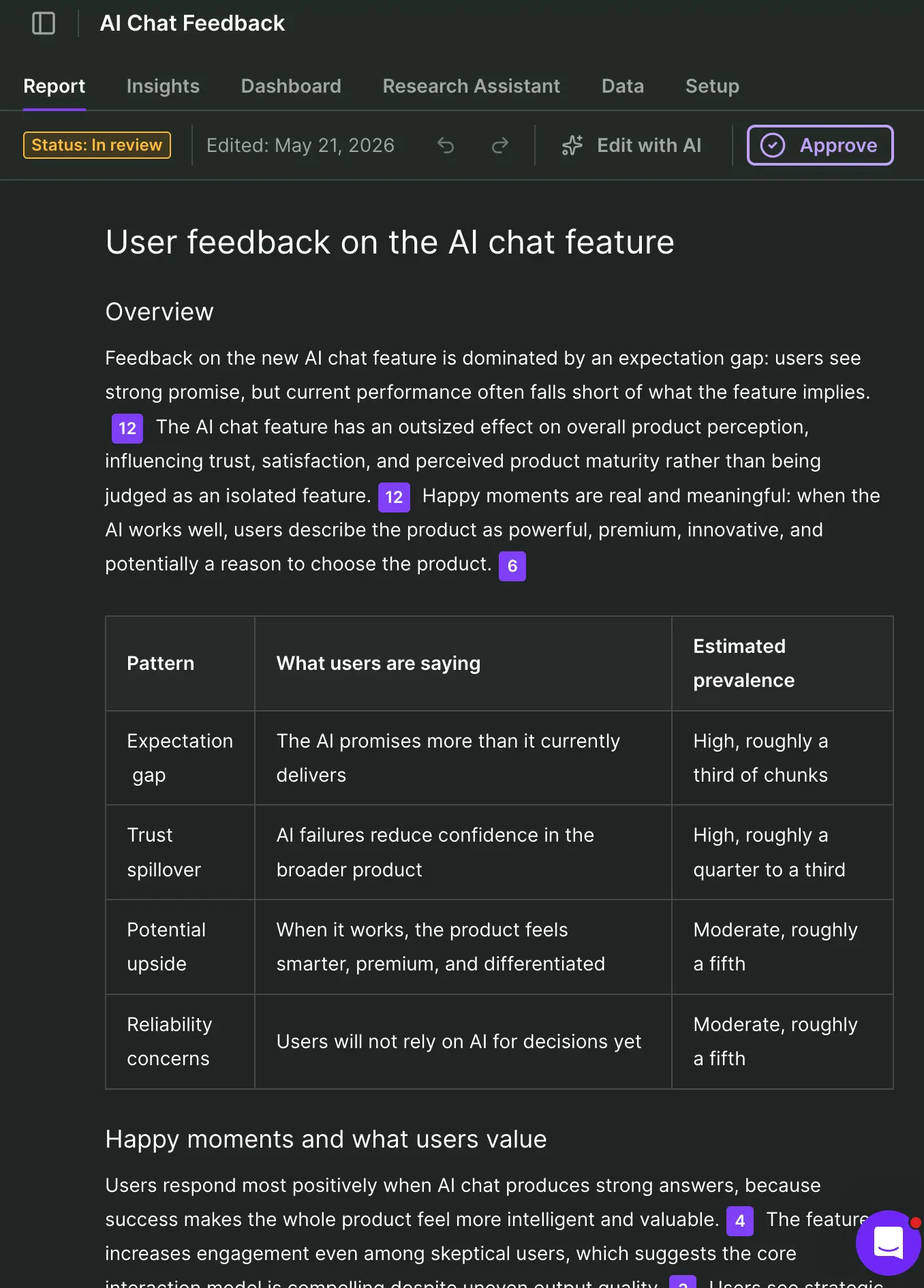
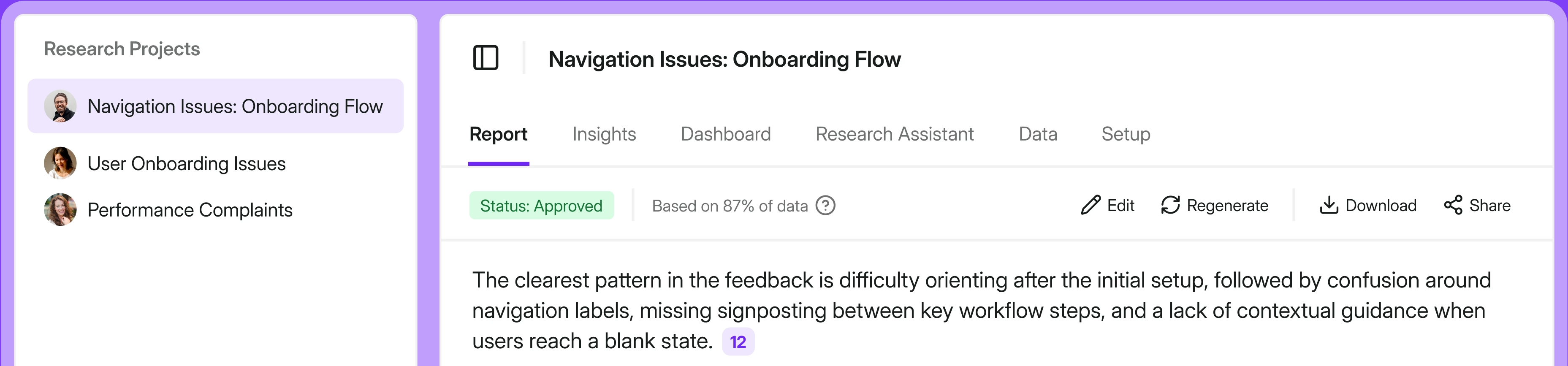
Survicate is a customer feedback platform for collecting and analyzing feedback across the customer journey, built for product and CX teams capturing NPS, CSAT, and in-product surveys at scale.
What sets it apart from most tools on this list is that it combines two distinct capabilities in a single platform. The survey side covers website, in-product, email, and mobile app channels. The research side, called Research Hub, centralizes feedback from those survey channels plus external sources like Intercom conversations, Zendesk tickets, call recordings, and app store reviews, then runs AI analysis across all of it.
For product teams, this connects feedback collection, insight generation, and action in a way most single-channel tools can’t.
What does Survicate do?
Survicate covers three main jobs.
- First, it runs multi-channel survey distribution across web, in-product, mobile app, and email-embedded surveys from a single platform. For website and in-product use cases, you can target surveys based on user behavior, custom attributes, or events.
- Second, it centralizes survey responses and feedback from multiple sources in its AI research repository, categorizing themes, identifying sentiment, and finding recurring issues across the feedback.
- Third, the AI Research Assistant lets teams query their entire feedback repository in plain English (or any language of choice), getting instant answers with source quotes rather than manually digging through data.
If you want a deeper look at how user feedback works across the product lifecycle, the user feedback guide on the Survicate blog covers collection methods and analysis approaches in full.
Who is Survicate primarily for?
Survicate fits product managers who need to run surveys across multiple touchpoints without developer involvement, and user researchers who need to connect survey data with other feedback sources for synthesis. It works well for teams that have outgrown a single-channel tool and want everything feeding into one research layer.
It’s especially relevant for SaaS companies, B2B platforms, and digital products where product teams need feedback across several user touchpoints.
How easy is Survicate to use?
Setup is easy. The JavaScript snippet or SDK install is straightforward, and you can have your first survey live in a day without engineering support. The survey builder is drag-and-drop, the targeting logic is visual, and templates cover common product survey use cases. G2 reviewers consistently cite ease of use as a top strength, with many noting that non-technical team members can build and launch surveys without help.
Research Hub has a steeper onboarding curve, particularly when connecting external sources. A small number of G2 reviewers flag that the dashboard can feel complex once you get into advanced features.
What's Survicate's customer support like?
Survicate offers human live chat support rather than making users talk to bots. Based on publicly available data from our company's website, support maintains a 97% satisfaction rate with a median first response time of around two minutes. Many G2 and Capterra reviewers also mention responsive support as a standout.
What are the main pros of using Survicate?
- True multi-channel survey coverage: web, in-product, email, mobile, and Intercom messenger surveys from one platform
- Research Hub consolidates feedback from surveys, support tickets, call recordings, and third-party reviews into one AI research repository
- Strong native integrations with product analytics tools (Amplitude, Mixpanel, Segment), CRM platforms (HubSpot, Salesforce), and customer communication tools (Intercom, Zendesk, Braze)
- AI follow-up questions that automatically dig deeper based on how a user answers an open-ended question
- Multilingual survey support with automatic translations, useful for global product teams
- Public pricing with clear response limits, so teams can scale predictably
What are the main cons of using Survicate?
- Survicate is built for feedback collection and analysis, not behavioral analytics; teams that need heatmaps or session recordings will still need a separate tool
- Some users report that the survey dashboard can feel complex when managing a large number of surveys across different channels
- Advanced behavioral targeting based on backend events is a newer addition to the platform; teams that need deep, event-based triggering at enterprise scale should confirm feature availability for their specific setup
Pricing
Survicate starts from $56/month (Growth plan, billed annually). That plan includes multi-channel surveys, Research Hub access, AI analysis, and key integrations. A free trial covers all Pro features for 10 days with no credit card required. Enterprise pricing is custom, based on response volume and organizational needs.
My hot take: How does Survicate hold up for product teams?
For product managers and researchers who need to collect feedback across channels and actually make sense of it, Survicate is a competitive option on this list. Combining multi-channel survey collection with a built-in research repository and AI-powered analysis means you're not managing three separate tools to run a basic feedback program.
The integrations stand out in this context. Having NPS results from in-app surveys flow into HubSpot while the same responses get categorized in Research Hub and trigger a Slack alert when a detractor responds - this is the kind of closed-loop setup most product teams want but rarely achieve with single-channel tools. For teams building a continuous research practice rather than running one-off projects, this is worth a lot.
Survicate won't be the right fit for everyone. Here's when you should pick someone else
I'm team Survicate, which is why I know our weaknesses well enough to tell you when a competitor is the better pick.
If behavioral observation is your primary use case, use Hotjar. Survicate runs surveys well, but if what you really need is to watch how users navigate your product through heatmaps and session recordings, Hotjar is built for that. Survicate integrates with session recording tools, but that's a different experience from having it all native.
If your primary need is product analytics with some feedback on the side, use Pendo. Pendo's core strength is tracking what users do in your product. The feedback layer in Pendo is secondary. If you're evaluating tools where the analytics come first and surveys are a nice addition, Pendo makes more sense than Survicate for that specific need.
If you need enterprise research methodology with conjoint analysis, MaxDiff, or complex survey logic for large formal research programs, Qualtrics has capabilities we don't match. Survicate is strong for ongoing product feedback loops, but if you're running formal academic-style market research or experience management at enterprise scale, Qualtrics was built for that.
Sprig: purpose-built for in-product user research
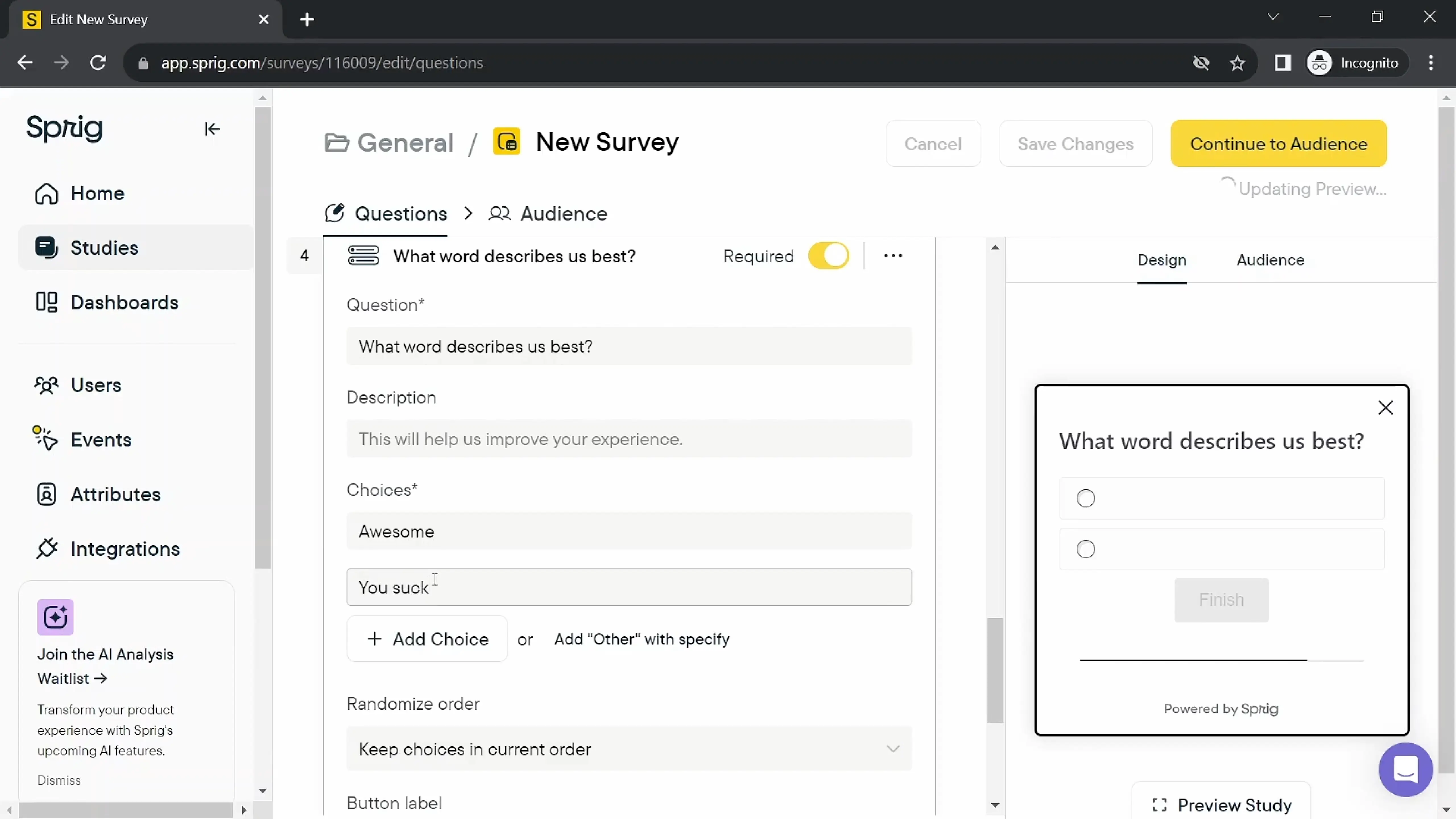
Sprig (formerly UserLeap) started as an in-product microsurvey tool for product managers and UX researchers. It has since expanded into a broader research platform with session replays, heatmaps, and AI-powered analysis alongside its survey capability.
The company's focus remains on product teams, and its customer list (Notion, Figma, Dropbox, Coinbase) reflects that positioning. If your team needs to capture user sentiment inside the product experience, Sprig is one of the more focused tools on this list.
What does Sprig do?
Sprig lets you trigger in-product surveys based on user behavior, events, and attributes. You can run microsurveys within web and mobile products, collect session replays of users who respond, and use AI to analyze and summarize open-ended responses. A long-form survey feature allows link surveys for email and SMS distribution, though the core product remains in-product targeting.
Who is Sprig primarily for?
Sprig targets product managers and UX researchers at growth-stage and enterprise digital product companies, particularly in the US. Sprig is strongest when your main goal is to capture contextual, in-the-moment feedback from specific user segments inside the product.
How easy is Sprig to use?
Implementation requires SDK installation and event instrumentation. The survey builder itself is straightforward, but setting up behavioral triggers and event-based targeting requires engineering involvement for initial setup. Some G2 reviewers note that despite the "no-code" marketing, practical use often involves developer support for trigger management.
What's Sprig's customer support like?
G2 reviews are mixed on support. Some users cite slower response times, including in non-US time zones. Documentation is available, though more complex setups may require back-and-forth with the support team.
What are the main pros of using Sprig?
- Detailed in-product targeting with behavioral event triggers, user attributes, and backend event support
- Native session replay tied directly to survey responses, so you can see what a respondent was doing when they answered
- AI analysis that summarizes open-ended responses and identifies recurring themes in real time
- Video and voice question types for richer qualitative research
- Clean, researcher-friendly interface that product teams find intuitive for in-product studies
What are the main cons of using Sprig?
- Teams looking for deeper email survey workflows or marketing automation integrations may find it less complete than broader feedback platforms
- Mobile SDK has documented limitations: iOS is not thread-safe by default, requiring developers to invoke on the Main Thread
- Survey design flexibility is limited; customization requires CSS and has real constraints
- Pricing is partly based on Monthly Unique Users (MUUs), which can become expensive at scale if anonymous users are inadvertently tracked
- Narrower integration ecosystem compared to tools like Survicate or SurveyMonkey; strong with product analytics tools but lacks CRM and marketing automation depth
- Buyer-reported Vendr data suggests enterprise plans start above $2,000/month; no publicly listed prices make budgeting difficult
- Some users recommend manually verifying AI-generated analysis against source responses, as it might sometimes be inaccurate
Pricing
Sprig has a Free plan and custom paid plans, so you need to contact sales to get a quote. All pricing is based on Monthly Unique Users and study unit volume (survey/feedback responses, replay clips, and heatmap captures).
My hot take: How well does Sprig hold up for product teams?
Sprig is the right choice when in-product survey targeting is your primary need and you have a development team that can handle the initial implementation. The behavioral event triggering and native session replay integration are strong, and the researcher-friendly UX makes it easy for non-technical users to interpret results.
The limitations show up when your feedback program grows beyond the product interface (see here how Sprig stacks up against us at Survicate specifically). Email surveys are link-based and depend on your existing email or CRM workflows, while limited native CRM integrations and a pricing model tied to MUUs mean Sprig still works best as a product research tool rather than a full-lifecycle feedback platform. Teams that outgrow that scope often end up adding a second tool for other channels.
Hotjar: behavioral analytics with survey overlays (now part of Contentsquare)
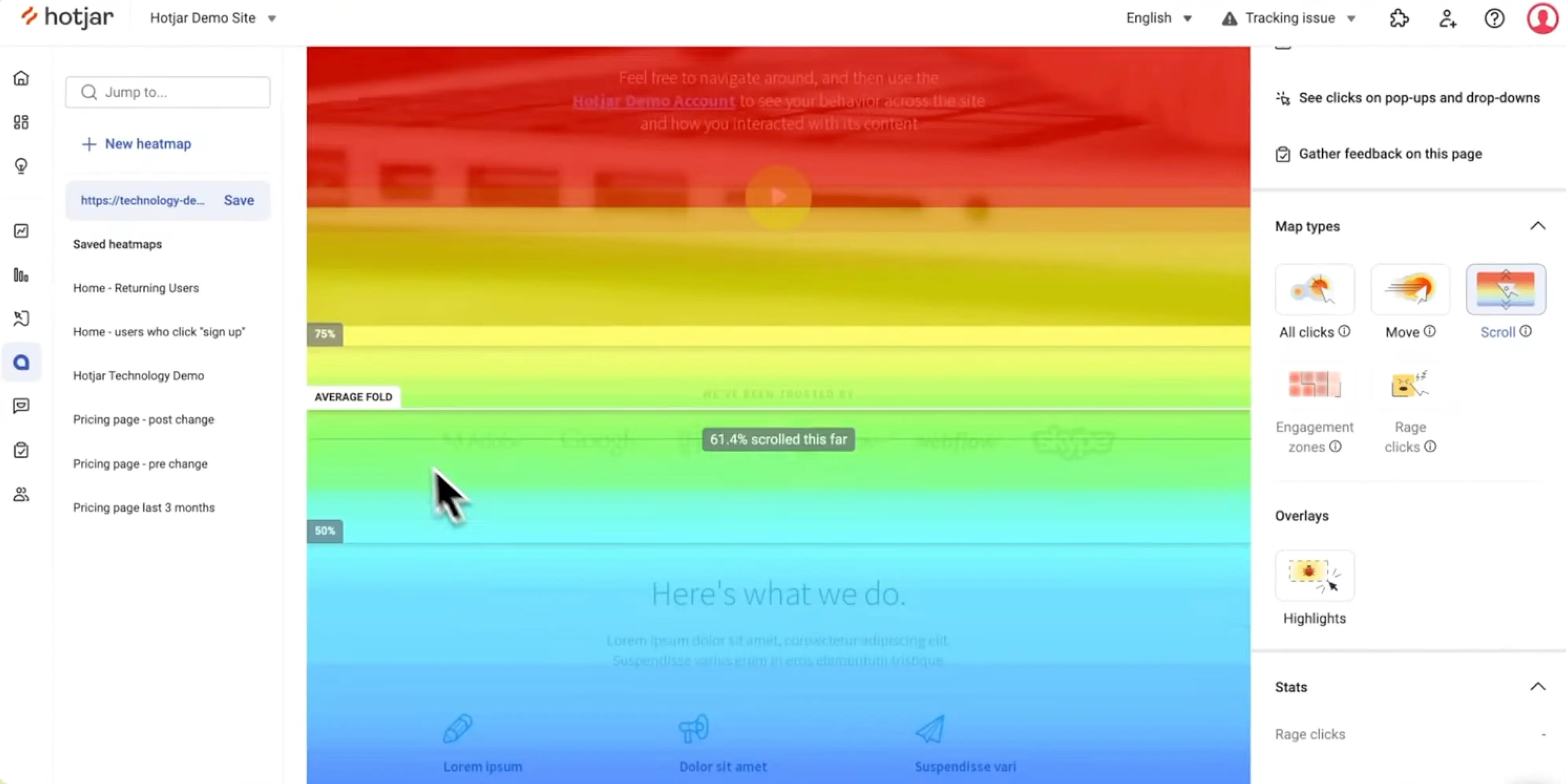
Hotjar built its reputation primarily as a tool for understanding how users interact with websites through heatmaps, scroll maps, and session recordings. Surveys and feedback widgets now sit as a complementary layer on top of that behavioral data.
An important update for teams evaluating Hotjar in 2026: Contentsquare completed its acquisition of Hotjar in July 2025. Plans, pricing, and packaging are now tied more closely to Contentsquare, so plans packaging is worth checking carefully.
What does Hotjar do?
Hotjar combines three types of insight:
- behavioral data (heatmaps showing where users click, scroll, and hover; session recordings that replay individual user sessions),
- voice-of-customer feedback (short survey overlays, feedback buttons, and longer questionnaires),
- and qualitative interviews (a built-in user interview scheduling feature).
For product and UX teams, the combination of "what users do" and "what users say" in one platform is where Hotjar is strongest.
Who is Hotjar primarily for?
Hotjar is used broadly across UX/UI teams, product managers, marketers, and conversion rate optimization specialists. Its primary strength lies with teams focused on website and product experience optimization, where behavioral data is as important as survey responses.
How easy is Hotjar to use?
Hotjar is one of the quickest tools to set up on this list. A single JavaScript snippet captures heatmaps and recordings within minutes. The survey builder is basic but functional. Non-technical team members can navigate the core features without training, though more advanced analysis (filtering recordings by behavior, building funnels) takes practice.
What's Hotjar's customer support like?
Support options vary by plan. Hotjar does not offer the same level of live chat support as some feedback platforms, including Survicate – lower-tier users primarily access help through documentation and email. G2 reviews reflect broadly positive sentiment on the product, with some critique of support responsiveness for complex issues.
What are the main pros of using Hotjar?
- Strong heatmaps and session replay for understanding user navigation patterns
- Combines behavioral observation with survey overlays in a single platform
- Low barrier to entry: a free plan exists, and the paid Growth plan starts at $49/month
- Behavioral data provides context that pure survey tools lack (you can see what a user was doing when they gave negative feedback)
- Broad integration support with major analytics, CRM, and project management tools
What are the main cons of using Hotjar?
- Survey capabilities are secondary to behavioral analytics; survey logic, branching, and targeting are more limited than dedicated survey platforms
- No native mobile app surveys – Hotjar focuses on web surfaces
- No native email survey distribution; reaching users outside your website or app requires a separate tool
- Pricing is no longer the simple Hotjar model many buyers remember. Once you need more than basic heatmaps, recordings, and survey responses, costs can spread across separate Contentsquare product lines and usage limits
- Acquisition by Contentsquare creates migration uncertainty for customers evaluating the product's long-term trajectory
Pricing
Hotjar offers a free tier with limited sessions per day. The Growth plan is listed at $49/month when billed annually with in-app payment. Product teams that need both behavioral analytics and surveys may need subscriptions to both the Observe and Ask products at separate price points. Enterprise and Pro plans are custom-quoted. Given the ongoing Contentsquare migration, confirm current pricing directly with the vendor.
My hot take: How well does Hotjar hold up for product teams?
Hotjar is the strongest choice on this list when behavioral observation is your primary objective. If you need to understand how users navigate a website or product interface before deciding which surveys to run, the combination of heatmaps and session recordings gives you context that no survey-only tool provides.
Where Hotjar falls short for product researchers is in the depth and flexibility of its feedback layer. Survey logic is basic, mobile coverage is absent, and email surveys rely on link-based workflows. Teams that start with Hotjar for behavioral data often end up adding a dedicated survey platform to cover channels that Hotjar doesn't reach.
The Contentsquare acquisition is a factor worth monitoring. Customers are being migrated to the unified platform during 2026, so the tool you evaluate today may look meaningfully different within a year.
Pendo: product analytics platform with in-app feedback
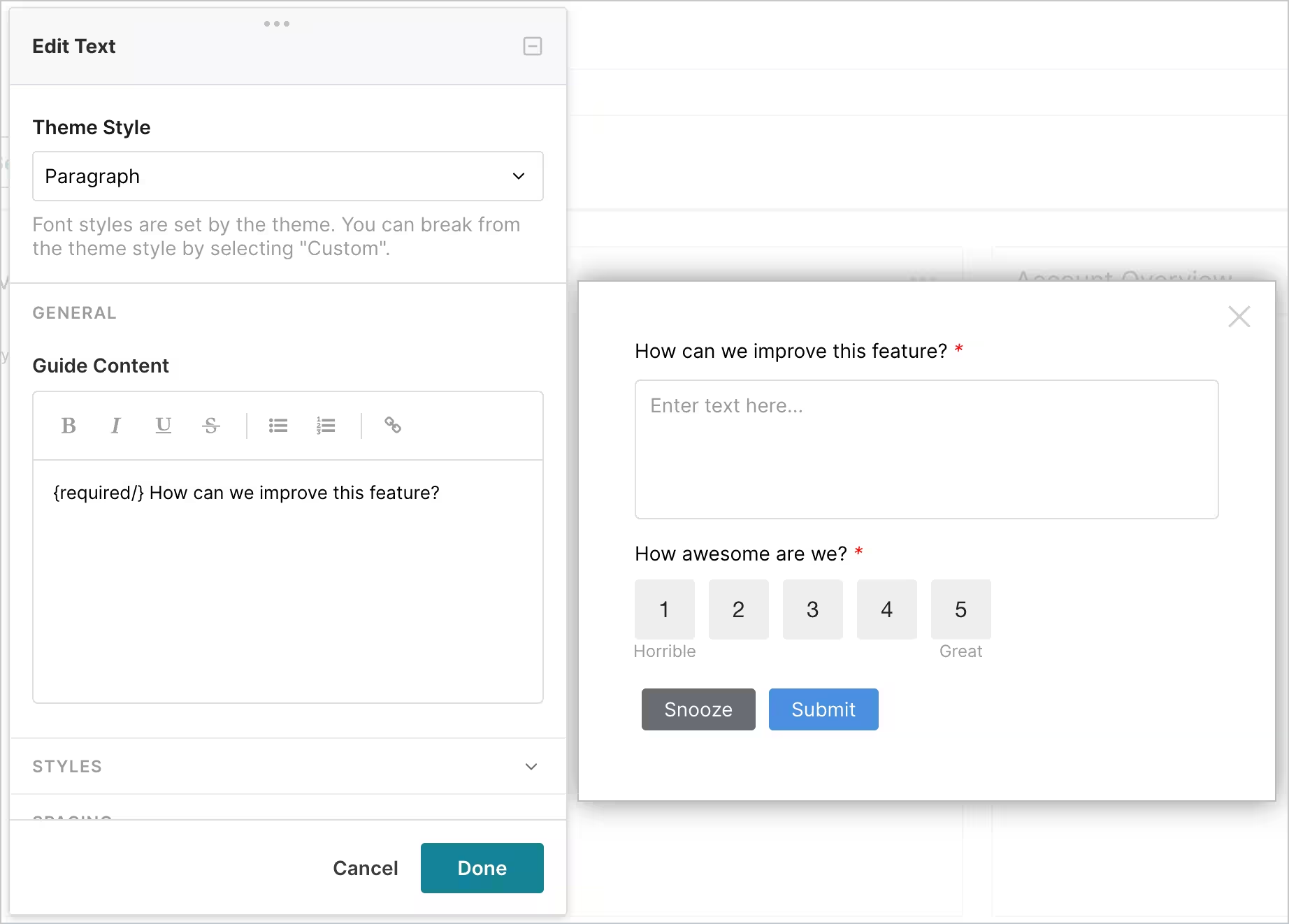
Pendo is an analytics-first platform built for SaaS product teams. Its core capability is tracking how users interact with your product, automatically and without manual event instrumentation, through its no-code tagging system. Feedback collection and in-app guides now sit on top of that analytics foundation to cover more of the product experience lifecycle.
Understanding Pendo's identity matters when evaluating it for user feedback, as it's a product analytics company that offers surveys, not a feedback platform that offers analytics. That distinction shapes almost every decision about whether it fits your team's needs.
What does Pendo do?
Pendo automatically tracks user behavior across your product without requiring developers to add event tracking manually. On top of behavioral data, it offers in-app NPS surveys, polls within in-app guides, and a feedback management module called Pendo Listen for collecting and prioritizing feature requests. Session replay is available on Core and higher plans. In-app guides help teams communicate with specific user segments based on their behavior.
Who is Pendo primarily for?
Pendo is designed for product managers at SaaS companies who need product analytics as their primary tool, with the ability to layer in feedback and user guidance on top. It's most relevant for teams doing user adoption tracking, onboarding optimization, and feature usage analysis at scale.
How easy is Pendo to use?
Pendo's initial setup is more involved than lighter-weight tools. Installing the JavaScript snippet and configuring page tagging requires some technical setup. Multiple G2 reviewers describe a steep learning curve, and complex feature setups often need dedicated resources or Pendo's professional services. The breadth of modules creates navigation complexity once you're inside the platform.
What's Pendo's customer support like?
Pendo provides a dedicated Customer Success Manager on higher plan tiers, with standard support on lower tiers. G2 reviews note generally positive support quality, though several reviewers flag the pricing model's inflexibility as a friction point when dealing with contracts and renewals.
What are the main pros of using Pendo?
- Automatic, retroactive product analytics without manual event instrumentation; you can analyze user behavior from the day you install it
- Connects behavioral data directly to NPS and survey responses, so you can see how feature usage correlates with satisfaction scores
- In-app guide builder lets non-technical PMs create onboarding flows, announcements, and contextual help without engineering support
- Pendo Listen centralizes feature request feedback and links it to account data (revenue, plan tier) for more informed prioritization
What are the main cons of using Pendo?
- Pricing is fully custom and opaque. Based on buyer-reported data aggregated by Vendr and other procurement platforms, annual contracts range from approximately $15,000 to over $100,000, depending on MAU volume and plan tier. No prices are published, requiring a sales conversation before you can assess cost
- The feedback module is secondary to analytics. G2 reviewers describe it as feeling like an "afterthought" compared to dedicated survey platforms
- Data processing has an approximately one-hour lag between a user action and it appearing in Pendo dashboards, which limits real-time responsiveness for time-sensitive interventions
- Multiple reviewers mention navigation complexity, reporting friction, and occasional slowdowns in high-volume views
- Pendo does not alert you when you're approaching your MAU limit, which can lead to unexpected overage charges at contract renewal according to multiple user reports
- No native email survey capability comparable to Survicate or SurveyMonkey
Pricing
All Pendo plans (Base, Core, Ultimate) are custom-quoted, and a free plan is available for up to 500 monthly active users. Third-party benchmarks (Vendr, Spendhound, Apty) vary, but estimates often cluster around $15,000–$60,000 per year for smaller and mid-market paid deployments, while enterprise contracts can exceed $200,000.
My hot take: How well does Pendo hold up for product teams?
Pendo is the strongest choice when product analytics is your primary need and feedback is supplementary. If your team needs to track feature adoption, identify where users drop off in onboarding flows, and understand product usage patterns at account level, Pendo's automatic tracking and retroactive analytics are stronger than what most survey-first tools can offer.
For teams primarily looking to collect and analyze user feedback, Pendo is expensive for what you get. The survey functionality is limited, pricing is opaque, and the analytics depth you're paying for isn't what you need if feedback collection is the core job. Teams in that situation get better value from a dedicated feedback tool.
Typeform: conversational surveys with strong completion rates

Typeform is known for trying to make surveys feel less like surveys. The one-question-at-a-time format, animated transitions, and clean visual design consistently produce higher completion rates than traditional form-style surveys. If the respondent experience matters more than workflow depth, Typeform is the benchmark.
The honest caveat: Typeform is primarily a collection tool. Analysis and distribution capabilities are more limited than dedicated feedback platforms, which matters for product teams that need to act on what they collect.
What does Typeform do?
Typeform builds and distributes conversational surveys and forms. You can create surveys with branching logic, conditional questions, and various question types, then share them via links, embed them on websites, or send via email. Responses feed into a clean results dashboard with basic analytics, while higher-tier plans add AI-powered summaries, topic detection, and sentiment analysis. Typeform integrates with hundreds of third-party tools via native connections and Zapier, allowing you to route responses into CRMs, spreadsheets, and project management tools.
Who is Typeform primarily for?
Typeform is used across product teams, researchers, marketers, and designers who need to collect structured feedback from users, clients or research participants. It performs well for user research studies, concept testing, and customer satisfaction check-ins where response quality and completion rate are priorities.
How easy is Typeform to use?
Typeform is one of the easiest tools to get started with on this list. No technical setup is required. You can build a polished survey in minutes using templates or starting from scratch. G2 reviews consistently praise the interface for intuitiveness and visual appeal.
What's Typeform's customer support like?
Typeform offers email and chat support across plans, with live chat available on the Plus plan and above, and faster response times on higher tiers. Community resources and documentation are extensive. G2 reviews reflect generally positive support sentiment, with occasional notes about response times on lower plans.
What are the main pros of using Typeform?
- The one-question-at-a-time format outperforms traditional survey layouts on completion rates
- Clean, mobile-first design that works across devices without extra configuration
- Strong template library covering user research, product feedback, NPS, and concept testing use cases
- 300+ integrations with third-party tools via native connections and Zapier
- Video and image embedding within questions for richer concept testing
What are the main cons of using Typeform?
- Analysis is limited for deeper research work. Teams doing serious thematic analysis or reporting will likely need to export data or use a separate workflow
- No native in-product survey capability; Typeform works via links and embeds, not behavioral event triggers inside a product
- AI analysis is limited to Typeform response data, so teams that need to synthesize feedback across channels will need a separate workflow
- Response limits on lower-tier plans are restrictive (100 responses/month on Basic); scaling increases cost quickly
- Bot protection (reCAPTCHA) is only available on higher-tier plans, which G2 reviewers flag as a significant gap for teams running paid campaigns that attract bot traffic
- Pricing goes from $28/month (Basic) to $91/month (Business) for features that include logic, HubSpot integration, and branded experiences
Pricing
Typeform’s core plans sit in the $28–$91/month range when billed annually, but advanced features such as reCAPTCHA, Smart Insights, automations, and higher response volumes push teams into Growth, Talent, or Enterprise plans.
My hot take: How well does Typeform hold up for product teams?
Typeform may be the best option on this list if your primary goal is maximizing survey completion rates for a specific research study or concept test. The conversational format works, and for user research conducted via distributed links, it outperforms every other tool on respondent experience.
The gap for product managers running continuous feedback programs is that Typeform is still strongest at collection, and that’s where its limits show up for continuous product feedback programs. You still need to analyze the data, and you still need another tool to reach users in-product or in your mobile app. Teams that treat Typeform as one part of a broader research stack, rather than their primary feedback platform, tend to get the most out of it.
SurveyMonkey: the reliable choice for structured research
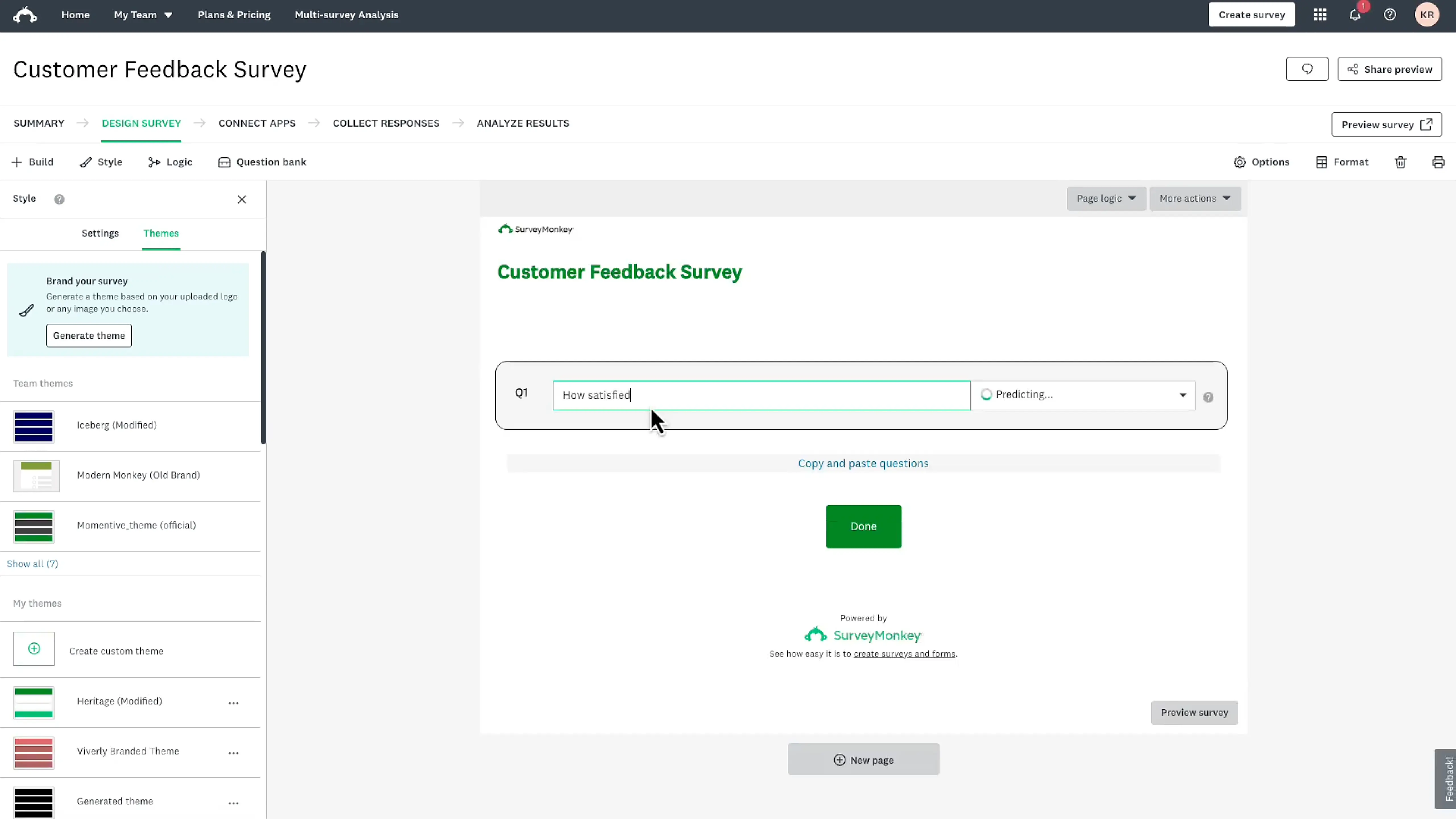
SurveyMonkey has been in the survey space since 1999. That longevity brings strengths: a big template library, a reliable delivery engine, and a name that stakeholders recognize and trust. It also brings some limitations that matter specifically to product teams looking to run continuous feedback programs.
What does SurveyMonkey do?
SurveyMonkey creates and distributes surveys across email, web links, and embedded forms. It offers extensive question types, branching logic, audience panels for reaching external respondents, AI-powered analysis of open-ended answers, and benchmarking data for NPS and satisfaction scores across industries. Teams use it for customer satisfaction surveys, product research studies, market research, and employee feedback.
Who is SurveyMonkey primarily for?
SurveyMonkey serves a broad audience: product teams, researchers, HR departments, marketers, and academic institutions. For product teams specifically, it's most relevant for structured, periodic research studies rather than always-on product feedback collection.
How easy is SurveyMonkey to use?
SurveyMonkey is easy to learn. The drag-and-drop builder, template library, and straightforward distribution options mean most team members can launch a survey without training. G2 reviewers consistently cite ease of setup as a top strength.
What's SurveyMonkey's customer support like?
Support availability depends on the plan. Standard email support is available across paid plans, and phone support is included on higher tiers. G2 reviewers note generally positive experiences, with some critique on response times for complex technical issues.
What are the main pros of using SurveyMonkey?
- Extensive template library with hundreds of pre-built surveys covering most research use cases
- Large built-in respondent panel for reaching external audiences without managing your own list
- AI-powered sentiment analysis and theme detection for open-ended responses
- Industry benchmarking data to contextualize NPS and CSAT scores against sector averages
- Reliable survey delivery infrastructure with a long track record
What are the main cons of using SurveyMonkey?
- In-product feedback is clunky compared to dedicated product feedback tools; triggering surveys inside a web app usually means setting up GetFeedback, adding JavaScript triggers, and involving a developer
- Analytics can feel limiting once you need more than basic charts; advanced filtering and cross-tabulation require higher-tier plans
- G2 reviewers frequently mention email survey deliverability issues, with surveys landing in spam or junk folders for a portion of recipients
- Enterprise pricing can escalate significantly; based on SpendHound buyer data, average annual spend for mid-market teams runs around $4,297, with enterprise contracts averaging around $38,808
- Better suited to periodic, structured research projects than to continuous product feedback loops
Pricing
SurveyMonkey has a limited free Basic plan, but no free trial for premium features. Standard Monthly costs $99/month. Annual individual plans cost $39/month for Advantage and $139/month for Premier, billed annually. Team plans start at $30/user/month with a 3-user minimum, also billed annually. Enterprise pricing is custom. See our deep-dive into SurveyMonkey's pricing for a full overview.
My hot take: How well does SurveyMonkey hold up for product teams?
SurveyMonkey is a reliable choice for structured research projects, particularly when you need to reach an external audience using their respondent panel, or when stakeholder familiarity with the brand matters. For formal quarterly customer research, concept validation studies, or market analysis, it covers the fundamentals well.
Where it falls short for product teams is in the continuous feedback loop. Hard to launch in-product feedback, limited mobile reach, and analytics that require higher-tier plans to become genuinely useful mean SurveyMonkey fits a research project mindset better than a product feedback mindset. Teams running ongoing NPS, CSAT, or in-app feedback programs often find they need to supplement it with a more targeted tool.
Qualtrics: enterprise experience management at scale
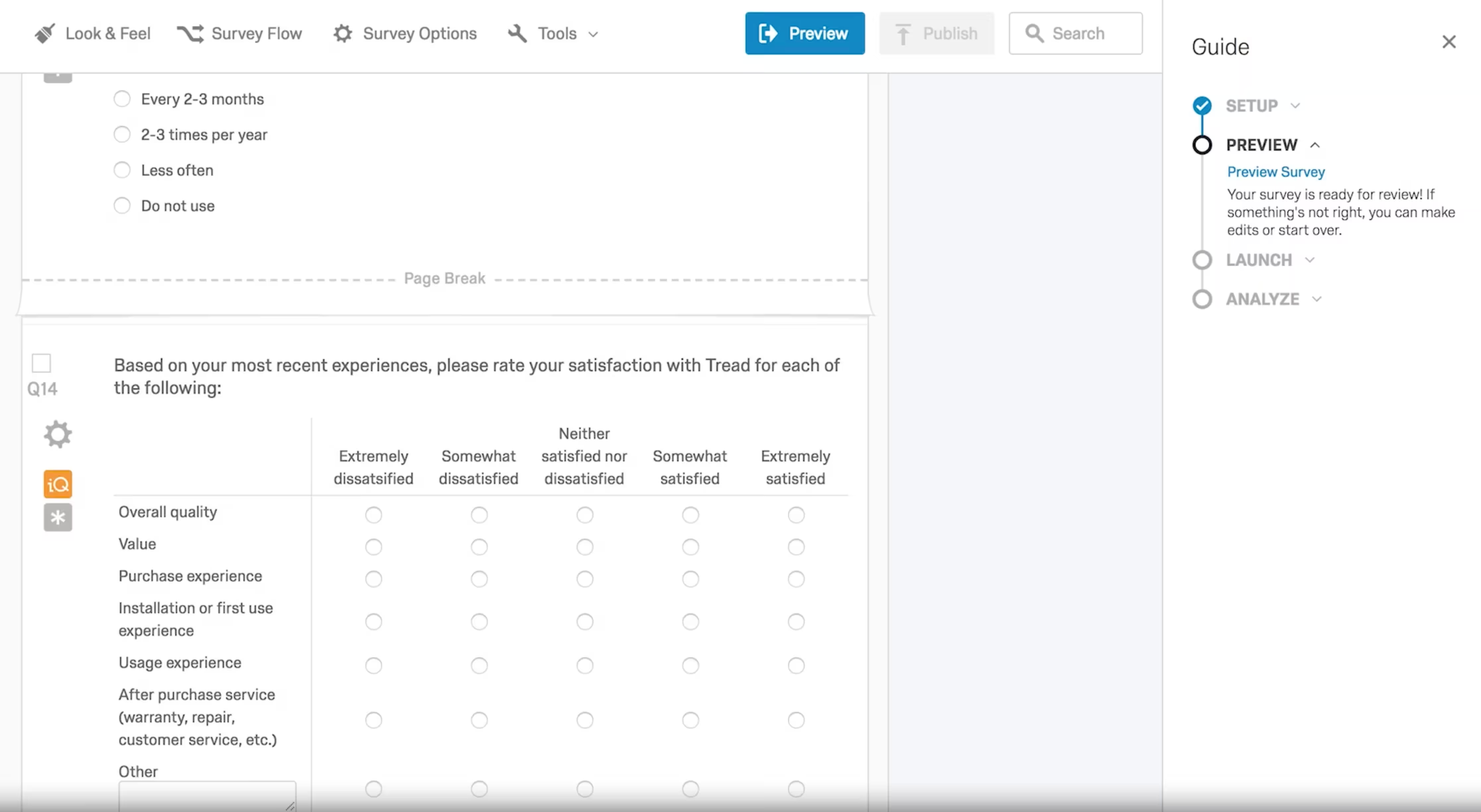
Qualtrics is an enterprise-grade experience management platform used by large organizations to run structured research programs across customer, employee, product, and brand dimensions. Its survey capabilities are among the most sophisticated available, with research methodologies like conjoint analysis and MaxDiff that no other tool on this list supports natively.
The catch is that Qualtrics is built for enterprises running multi-departmental feedback programs, not for product teams that need to set up continuous feedback collection and get results quickly.
What does Qualtrics do?
Qualtrics offers advanced survey creation with complex branching and display logic, omnichannel distribution (web, email, SMS, app, and more), NLP-based text analysis (Text iQ for sentiment and themes), statistical modeling (Stats iQ), and predictive analytics (Predict iQ), with generative AI features added on top. It covers customer experience, employee experience, and research programs in one platform, with dashboards and workflows designed to connect feedback to organizational action.
Who is Qualtrics primarily for?
Qualtrics serves enterprises with dedicated research or CX teams, typically large organizations with the resources to implement and manage an enterprise platform. It's most relevant for product researchers at companies where formal research methodology matters and where connecting feedback data to multiple business functions is a requirement.
How easy is Qualtrics to use?
Multiple G2 reviewers describe a significant learning curve. The platform is capable but complex, so getting value from advanced features like Text iQ, Stats iQ, and custom dashboards requires training, and sometimes dedicated administrators. Smaller teams or those without research expertise often find they underutilize what they're paying for. Setup typically takes weeks, not days.
What's Qualtrics's customer support like?
Qualtrics provides enterprise-level support with dedicated customer success resources on higher plans. G2 reviews generally praise the support team's responsiveness and expertise. The trade-off is that the platform is complex enough that teams often need more hand-holding than they would with simpler tools.
What are the main pros of using Qualtrics?
- Very deep survey methodology: conjoint analysis, MaxDiff, advanced branching logic, and experimental design features that no other tool on this list matches
- Deep analysis suite built for enterprise research volumes, covering sentiment and theme detection (Text iQ), statistical analysis (Stats iQ), and predictive modeling (Predict iQ) - built on NLP, with generative AI capabilities added more recently
- Multi-module coverage: customer experience, employee experience, product research, and brand tracking in one platform
- Enterprise security and compliance: SOC2, GDPR, HIPAA, FedRAMP certification for regulated industries
- Closed-loop workflow engine that automatically routes feedback to the right teams based on survey responses and thresholds
What are the main cons of using Qualtrics?
- Cost is the dominant limiting factor. Qualtrics does not publish full pricing, and buyer-reported estimates often put serious paid deployments in the five-figure annual range, with enterprise programs reaching well above $100,000
- Setup typically takes 4 to 12 weeks for a standard deployment, which means teams under pressure to start collecting feedback quickly will feel the weight of that ramp-up period more than they would with simpler tools
- G2 reviews flag performance slowdowns with large datasets and complex dashboards, which is notable for a platform priced at enterprise level
- Steep learning curve requires training and often dedicated platform administrators, and teams without those resources commonly underutilize their investment
- More tool than most product teams need for continuous, lightweight feedback programs
Pricing
Qualtrics does not publish pricing. All plans are custom-quoted. Enterprise contracts are reported to start above $20,000/year based on publicly available estimates and typically require multi-year commitments. A limited free account is available, and Qualtrics also offers a 30-day Strategic Research trial.
My hot take: How well does Qualtrics hold up for product teams?
Qualtrics is the right choice for large enterprises with dedicated research teams running formal, multi-method experience management programs. If your organization needs conjoint analysis, MaxDiff, or integration across CX, EX, and product research programs simultaneously, Qualtrics is the most capable platform available for that work.
For most product teams evaluating this list, Qualtrics is more tool than you need at more cost than your budget allows. The implementation complexity, steep learning curve, and enterprise pricing mean the upside is conditional on having the internal resources to use it properly. Teams that buy Qualtrics for product feedback surveys and nothing else are significantly overpaying.
Which user feedback tool is right for you? (The final verdict)
The right answer depends on how your product team collects feedback, analyzes it, and turns it into product decisions.
If you need multi-channel feedback collection and a research repository in one place, Survicate is probably the strongest overall fit for product managers and researchers. It covers in-product, website, email, and mobile feedback without requiring separate platforms, and Research Hub turns collected feedback into organized, AI-analyzed insights across sources. The integration depth with product analytics tools (Amplitude, Mixpanel) and CRMs (HubSpot, Salesforce) means feedback doesn't stay siloed. For product teams building a continuous product research practice rather than running one-off surveys, it's the most complete option at a price point that doesn't require enterprise budget approval.
If in-product microsurveys for UX research are your primary need, Sprig's behavioral targeting and session replay integration are strong. It works best when your feedback program is scoped to product interactions and you have engineering resources for initial setup.
If behavioral observation (heatmaps, session recordings) is as important as survey data, Hotjar remains the best option for combining both. It falls short on survey depth and mobile reach, but for website and product UI analysis, nothing on this list matches its visual behavior layer.
If product analytics is your primary tool and surveys are supplementary, Pendo makes sense. You'll pay enterprise prices and work through custom quotes, but the automatic behavioral tracking and retroactive analytics are genuinely differentiated.
If you're running one-off research studies where response quality and completion rates are critical, Typeform's conversational format is hard to beat. Treat it as one part of a broader research stack, not a complete feedback solution.
If you need structured, periodic research at scale and your product team runs formal studies rather than continuous feedback programs, SurveyMonkey's template depth and respondent panel cover that use case reliably.
If you're a large enterprise running a formal experience management program across multiple departments with the budget and team to match, Qualtrics is the most capable platform available.
For a broader look at product feedback tools and how teams structure their feedback collection, we cover the topic across use cases and team sizes. If you're specifically focused on AI-assisted analysis of open-ended feedback, the guide to customer feedback AI walks through how modern teams approach that problem.
FAQ
What's the difference between a user feedback tool and a survey tool?
The terms overlap significantly, but there's a meaningful distinction. A survey tool focuses on creating and distributing surveys, usually through links, embeds or email. A user feedback tool typically includes behavioral targeting (showing feedback prompts based on what a user is doing in a product), multi-channel coverage, and analysis features beyond basic response tallies. Most dedicated user feedback platforms incorporate survey capabilities, but add in-product delivery, advanced targeting, and integration with product analytics tools that general survey platforms lack.
Which user feedback tool is best for product managers?
For product managers running feedback across multiple touchpoints and synthesizing findings in one place, Survicate covers in-product, website, email, and mobile channels with a built-in AI research repository. Sprig is the stronger choice when the primary need is in-product microsurveys with behavioral targeting. Pendo fits best when product analytics comes first and surveys are supplementary.
How much do user feedback tools cost?
Pricing varies widely across this list. Survicate starts from $56/month (Growth plan). Typeform starts from $28/month. SurveyMonkey starts from $39/month. Hotjar starts from $49/month. Pendo and Qualtrics are custom-quoted and typically require enterprise budgets; buyer-reported data suggests annual contracts range from five-figure to well over $100,000 for each.
Do I need a user feedback tool if I already have product analytics?
Product analytics tells you what users do. User feedback tools tell you why they do it. Both types of data are valuable, and the most effective product teams combine them. Analytics identifies a drop-off in onboarding; a survey captures why it's happening. They answer different questions, and the most useful insights often come from connecting both. If you're newer to building a research practice, the UX research process guide covers how to structure this kind of continuous feedback loop.
What's the easiest user feedback tool to set up?
For link and email surveys, Typeform, SurveyMonkey, and Survicate all require no technical installation or developer involvement. For in-product surveys, Survicate and Hotjar are consistently rated as the easiest to implement among tools that support behavioral targeting. Sprig and Pendo have steeper technical setup requirements.
Author's note (last verified: June 18 2026): Statements such as "best" reflect our opinion and typical use cases, not a universal guarantee. This comparison is based on publicly available information and our best understanding at the time of writing. Vendors may change features, pricing, and packaging without notice. For the latest details, please check the official sources or reach out to the vendor directly.




.svg)

.svg)