Thinking about leaving Dovetail?
You're not the only one.
To make your choice a little bit easier (migrating a platform like that is hard enough), I tested Dovetail and chose three top alternatives (yes, it’s subjective).
A quick note on how I picked the alternatives. I didn't line Dovetail up against the other enterprise-priced heavyweights (your Marvins, Condens, Enterprets), because if you're leaving Dovetail, chances are the price tag is part of why. I also didn’t want to overcomplicate this list, but if you want to you can compare Dovetail against major repositories here.
For this article, I went with the options people reach for to get a quicker jump: a more affordable repository that still closes the full loop (that's us: Survicate), and the two LLMs researchers are already using for analysis day to day, Claude and NotebookLM.
Of course, I have tested Dovetail, Claude, Survicate, and NotebookLM to make sure the comparison is fair.
To make the output more systematic, I used each tool to analyze common themes in the most recent reviews on Dovetail’s G2 page. Results of which you’ll see throughout the article.
So if you’re expecting a shallow list of top 15 Dovetail alternatives, this ain’t it. But it may just be better. (toot, toot).
What to choose instead of Dovetail? Quick table overview
Why teams start looking for Dovetail alternatives
Not long ago, a UX designer went on LinkedIn to ask where her Dovetail folders had gone. Another redesign had moved everything, buried the folder structure somewhere below the fold on the homepage, and nudged her toward asking the AI chat for answers instead.
And she's not a lone grump, she's a very articulate representative of a much larger mood.
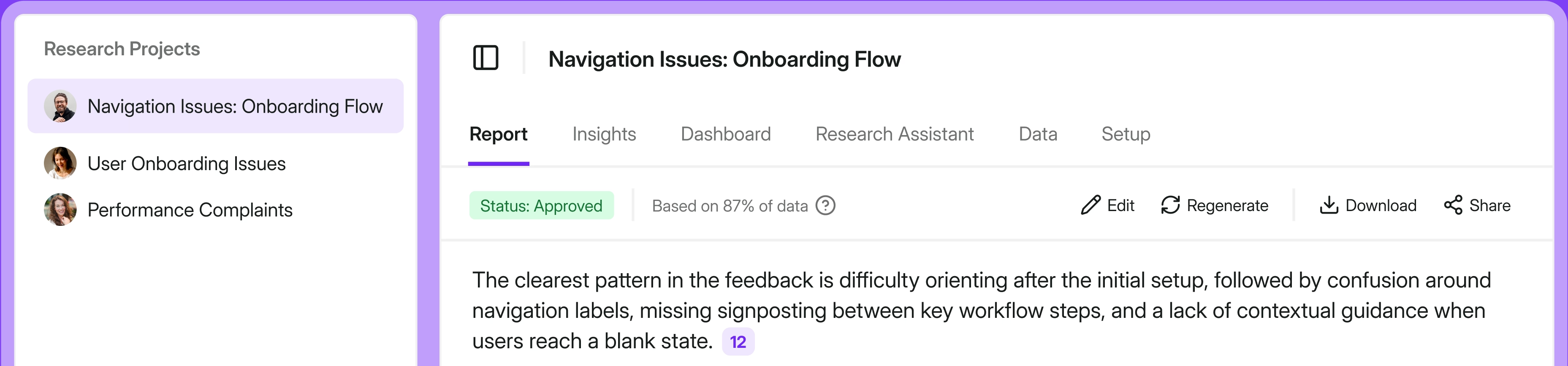
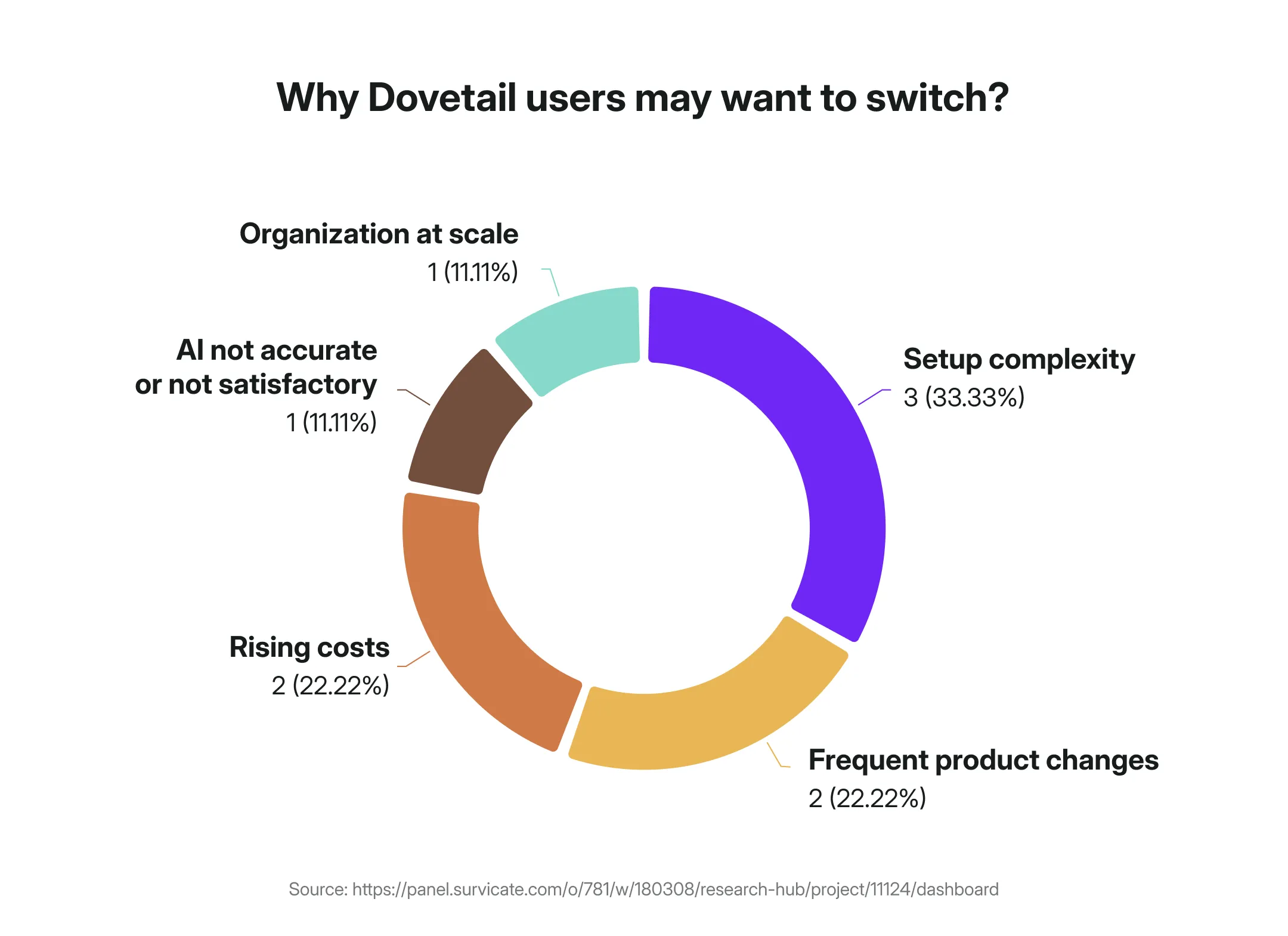
I ran Dovetail's ten most recent G2 reviews through our own AI analysis in Research Hub to see what negative themes come up for Dovetail users. And then compared it to my own experience testing the platform.
Here’s what came up.
The redesign treadmill
Frequent product and interface changes disrupt established workflows.
This is the Kim-on-LinkedIn post, but quantified: you build a setup, you learn where everything lives, and then a release moves it all and your muscle memory is worthless.
“They’ve made so many changes to the features and UI that the way I originally set up my repository has become difficult to use.” G2 review
The setup tax
Getting Dovetail genuinely useful takes real effort upfront, aka, a steep learning curve.
You're designing tagging taxonomies, building templates, and inventing repository conventions before you've extracted a single insight.
Great if you have a research-ops function whose whole job is curating the library.
Rough if you're a team of one who just wanted to find the themes in fifteen interviews.
“I'm still learning how to structure the work for the highest impact. The available templates sometimes feel at bit too opinionated, while a blank project obviously leaves me with all the power to mess it up on my own. A bit more guidance would be appreciated.” G2 review
The scale up chaos
A repository is at its most valuable when lots of people are putting research into it and lots more are pulling insight out, across teams, across projects, and over time.
But some describe the opposite happening in Dovetail as they scale: the more teams pile in, the harder the thing gets to keep coherent.
One reviewer captured both ends of it: the heavy start and the multi-team sprawl that follows, in a single breath:
"I found the initial setup of Dovetail quite difficult and time-consuming. The early version of the product required a substantial amount of effort to establish a tagging system, template, and other necessary configurations. I also struggle with organizing files and projects when multiple teams are using Dovetail, as it becomes challenging to manage and sort through the various documents and initiatives efficiently." G2 review
So you pay the setup tax up front to impose order, and then watch that order erode anyway once more than one team is in the building.
This is the trap my colleague Justyna calls becoming a librarian, aka, spending your days filing and re-tagging research instead of running it.
And one Nikki Anderson also mentioned during our webinar on surviving the AI sprint as researchers.
The AI that sends you elsewhere
AI gaps is another theme. Some Dovetail users are not necessarily satisfied with the AI features in Dovetail, saying:
“On top of that, they’re pushing AI features that, in my experience, don’t work very well.” G2 review
Some directly said working with LLMs is better for them.
“Meanwhile the way our team works has changed and we are starting to see more value out of working directly with LLMs than using Dovetail for research analysis.” G2 review
That tracks with what I found poking around the tool myself.
The AI analysis is real, but it makes you wait, and several of the more interesting features still wear a beta badge.
Charts render so small that spotting a trend at a glance is pretty much impossible. You have to really look into it.
And then there's the bill (for just analysis)
As of writing, there are two public pricing options for Dovetail: Free, or Enterprise "custom pricing."
The Professional tier has been discontinued, so there's no longer a self-serve option to graduate to.
And you will graduate fast, because Free is one project and one channel, with basic versions of the AI features. The moment you outgrow that, your only route forward is a sales call and a number you can't see coming.
Everything that makes Dovetail an actual repository, from folders, global tags, dashboards, the advanced AI, unlimited projects, redaction, and single sign-on, sits behind the Enterprise wall.
“Costs have absolutely ballooned and the interface continues to get more confusing and convoluted.“ G2 review
“The prices keep going up steadily. They’ve made so many changes to the features and UI that the way I originally set up my repository has become difficult to use.” G2 review
So how much does the "custom" you’ll be committing to actually cost?
With no list price above Free, Vendr is the closest thing to a straight answer: the median buyer pays over $22,000 a year for Dovetail. However, the final subscription price may differ based on your needs.
And here's the part that stings most: that ~$22k buys you just the analysis.
Dovetail doesn't run surveys at all. It's built for what happens after the feedback is in. So if surveys are part of how you gather research, you're paying enterprise repository prices on top of a separate survey or VoC tool to feed it.
Two subscriptions to do one job.
Three Dovetail alternatives, three different trade-offs
This all may point you to start opening other tabs.
So let's look at which tabs you should be opening to find the best Dovetail alternative.
If you don’t care for a full deep dive, check out the comparison table below.
And if you can spare a minute, let’s dive deep. Starting with the DIY route.
Claude: if you want to DIY your AI
Remember those reviewers who said they'd rather take their analysis straight to an LLM than use Dovetail's built-in AI?
They're not wrong to be tempted.
Let's be honest about where a lot of researchers are right now: you're expected to move faster, while budgets are tighter, and "just use AI for the first pass" has become part of the job, whether you went looking for it or not.
So a lot of researchers are already in the chat window, pasting in transcripts, wrangling prompts, seeing how far they can get on their own.
Some like it, some not really.
If you’re the first group: the researcher who actually likes getting under the hood, building your own workflow, and keeping full control of the analysis, Claude is probably the most capable place to do it.
So how far does it actually get you as a Dovetail replacement? Let’s find out.
What Claude is genuinely great at
For thinking through a smaller research project, it's superb.
Drop in a dozen interview transcripts and it will synthesize themes, argue with itself about what matters, pull illustrative quotes, and rewrite the whole thing in your stakeholder's language in seconds.
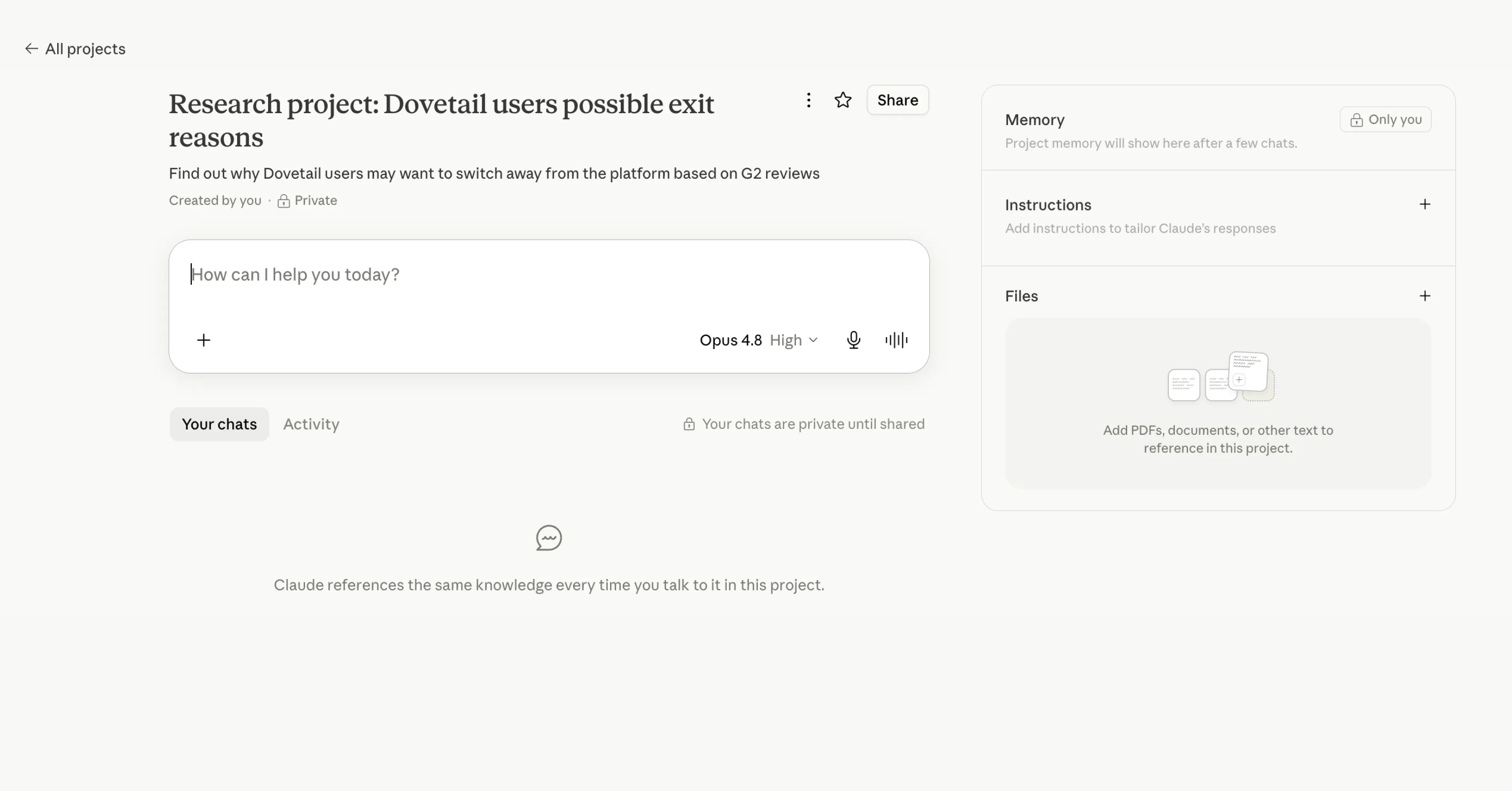
Projects give you a persistent home for a study.
You can upload your files, set custom instructions ("you're helping a UX researcher analyze onboarding friction, always cite the participant"), add in preferred methodology.
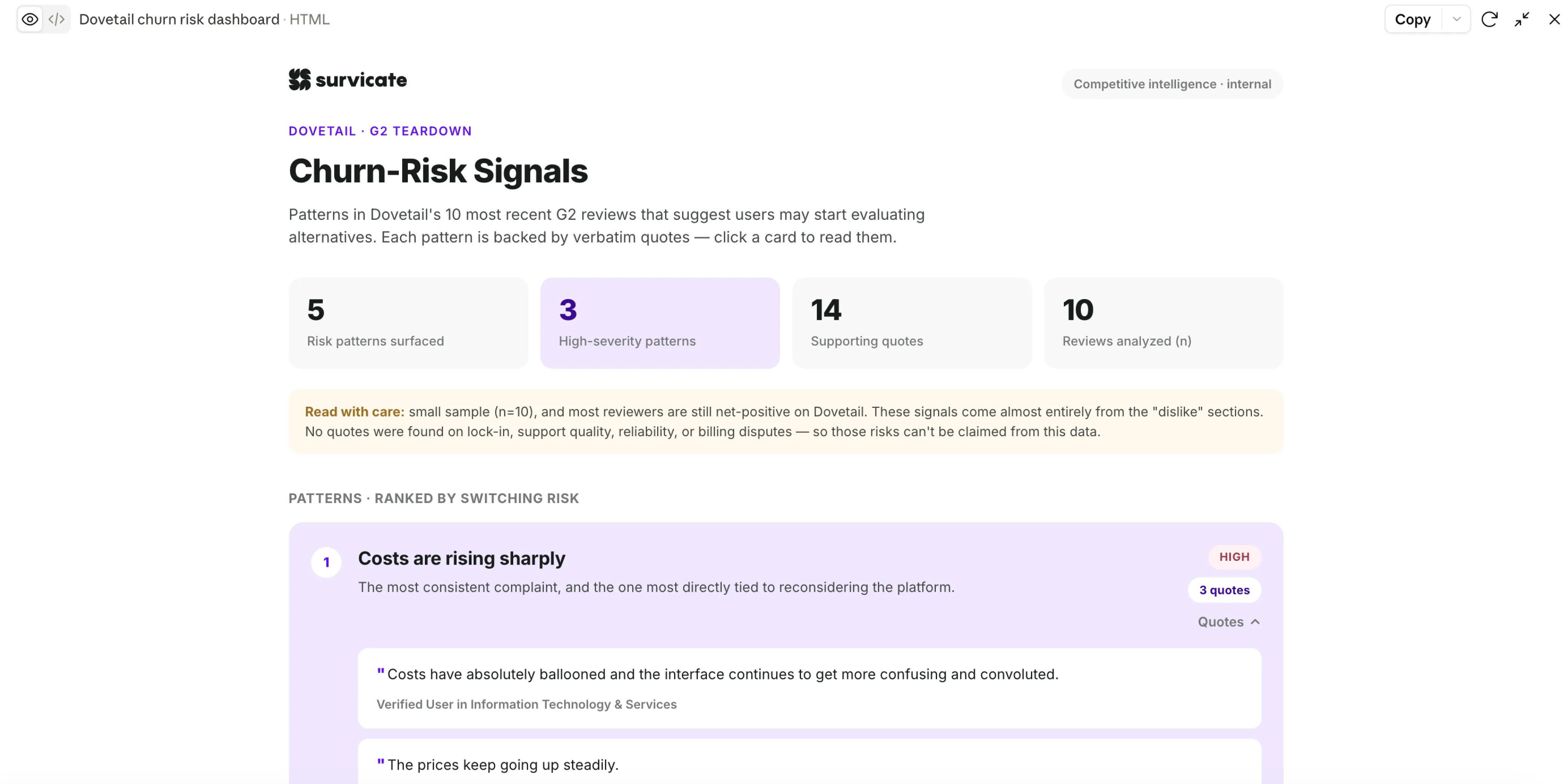
Artifacts let you go a step further and have it build things: a quick tagging view, a chart, a little interactive dashboard you can poke at, generated from your data.
There's web search when you need outside context, a good enough context window for smaller projects, and a growing set of connectors (Slack, Notion, Drive, and the like).
And it's cheap in a way that makes the CFO stop frowning: a Pro seat is $20/month, and a five-person research team on Claude Team runs about $20 per seat per month, roughly $1,200 a year.
So on paper, it starts to look like it could stand in for a repository: flexible, cited-ish, and a fraction of the cost of a $22k-a-year contract.
One more thing worth knowing if you're handling participant data: on the individual plans (Free, Pro, Max) Anthropic now trains on your conversations by default unless you opt out, while Team and Enterprise are contractually excluded from training.
For research subject to consent and privacy obligations, it's a checkbox you need to get right before anything sensitive goes in.
The cost we’ve counted above is a Team Standard plan that doesn’t train on your data by contract.
Where it stops working
The trouble starts exactly where research synthesis gets serious, and it comes in three flavors.
First, the context window.
The limitation you've probably felt without knowing its name. Feed a large dataset straight into an LLM and it runs into "lost in the middle": the model holds the beginning and the end of a long input sharply and lets the middle go blurry.
Past roughly 1,000–2,000 rows of data, it can silently miss or misrepresent a real chunk of your feedback. And the obvious workaround doesn't save you, because even when you break the data into smaller pieces yourself, they still get concatenated into one long flat context, so the middle still lands in the dead zone.
Second, prompt purgatory and the traceability gap.
The output is only ever as good as the prompt, so you're the one building the scaffolding, from writing the instructions, re-feeding the context, nudging it back on track.
After a few tries, you can get to something genuinely good.
Then a stakeholder asks the question: "Who said that, exactly?", and there's no click-to-source waiting for you.
Claude will happily quote a participant, but you have to trust that it points to the source correctly, and review each one at a time.
Third, nothing persists in the way research needs it to.
Every new chat starts cold. Ask the same question on Tuesday that you asked on Monday and you can get different themes, different emphasis, different counts, because that's simply how the model generates.
You can't reliably trend January against June, and you can't hold a taxonomy still.
And because each project is a Claude-only silo with no shared, governed insights library sitting on top, there's no place for the rest of the org to self-serve what you found.
Oh, and you're still bringing all the data yourself, every time. Claude doesn't run the surveys, sit on your Zendesk, or watch your calls. It analyzes what you hand it, when you hand it over.
The thing the $20 price tag costs: your time (and maybe some token overuse)
Every transcript uploaded, every prompt written and rewritten, every "no, not like that, try again," every answer you go back and verify against the source, and every csv document you upload by hand, is one of the biggest drawbacks of working with Claude.
The subscription is $20 a month. But the real bill is measured in your afternoons and it's the line item that never shows up when you're comparing it against a $22k contract.
There's a second cost hiding in that $20, too: the pricing isn't really flat.
Claude's heavier plans meter tokens, and token consumption doesn't behave like a per-seat SaaS bill. The same person, doing the same kind of work, can run up wildly different usage depending on how much data they push through and how long their sessions run.
You don't have to take my word for how quickly it adds up.
Uber reportedly burned through its entire 2026 AI budget four months into the year after rolling Claude Code out to its engineers, with power users running hundreds to thousands of dollars a month.
Microsoft started pulling most of its Claude Code licenses, partly over cost. And the r/ClaudeCode Reddit threads are full of paying users watching a single session eat 20–30% of their usage cap and swapping tricks to avoid overage.
So the $20 sticker is often the floor, not the ceiling, and heavy synthesis work is precisely the kind of thing that pushes you off it.
Claude vs Dovetail
The debate so far has been about AI quality, but Dovetail is a whole research workspace, and Claude is a chat window with a very clever brain.
If you're coming from Dovetail, here's what doesn't make the trip:
NotebookLM: if price is the deciding factor
Not everyone reading this can afford to tokenmaxx, spend $22k, or even add a corporate card to expense a Claude Team seat to.
For those of you, the deciding factor is the number at the bottom of the invoice. And on that one metric, nothing here touches Google's NotebookLM.
So the fair question is what the cheapest serious option actually buys you.
What NotebookLM is great at
The price, obviously, and it's worth being precise about how good the deal is.
The free tier is not a crippled trial: it's 100 notebooks, 50 sources each, and 50 questions a day, with no card and no clock.
If you outgrow it, the paid step-ups are $4.99 (Plus) or $19.99 a month (Pro), and even those aren't really NotebookLM bills.
They're Google AI subscriptions that happen to include NotebookLM alongside Gemini and a chunk of Drive storage. Set the free tier next to a $22k contract and it barely registers as a line item.
It's also the easiest tool on this list to start using, by a wide margin. It already lives in your Google account. There's no setup, no taxonomy to design, no onboarding call. You just open it, drop in your sources, and ask.
For a researcher who just wants answers out of a pile of documents this afternoon, the barrier is essentially zero.
Then there's also the party trick everyone knows it for: Audio Overviews.
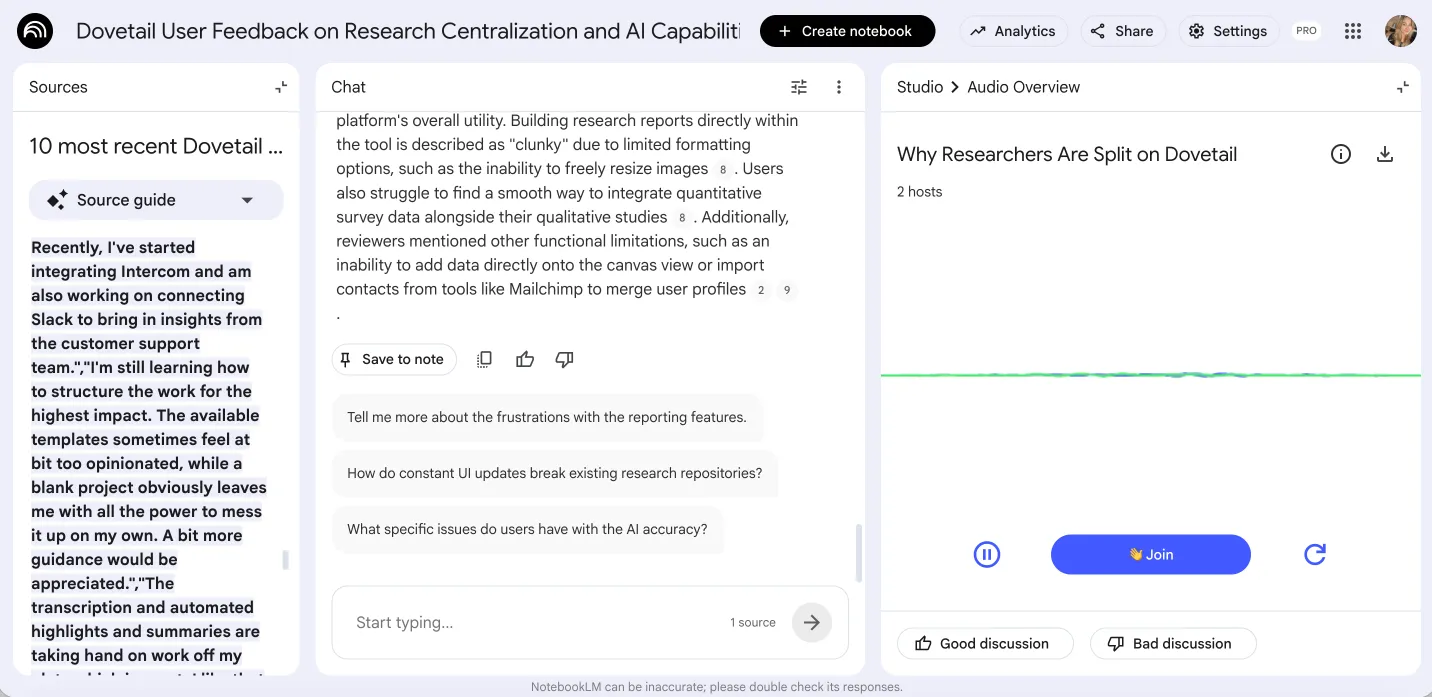
Feed it your research and it generates a podcast-style conversation between two AI hosts talking through your material, which you can actually join, and add in your thoughts and/or questions! As long as you can survive the hundreds “exactlys” and “actuallys”. 😉
Going back to other features, NotebookLM can also spin up mind maps, briefing docs, timelines, and study guides from the same sources.
The catch is everything a research repository actually demands.
Where it stops working
Pretty much at the same point as Claude, arrived at from a slightly different direction.
First, it's upload-only, with no integrations at all.
Where Claude at least has a growing connector list, NotebookLM has none. You hand-feed it PDFs, Docs, Sheets, pasted text, and YouTube links, one at a time. Nothing connects to Zendesk, nothing watches your App Store reviews.
It's a reading companion for documents you bring to it, not a pipeline that gathers feedback for you.
Second, it's grounded in the data you upload but not traceable in the way research needs.
This is the subtle trap, because "every answer has citations" sounds like it solves the exact problem raw Claude has. It half-solves it.
I put this to the test, actually. I'd already run Dovetail's ten most recent G2 reviews through Claude, so I fed the same ten reviews into NotebookLM to see if it could do the same clustering job.
It got most of the way there.
It produced a sensible-looking set of themes: pricing, UI instability, learning curve, and so on, which, on the surface, looks like the same output.
But two things gave the game away.
First, it took a couple of tries to get the analysis right. The first output was pretty much a quick AI summary.
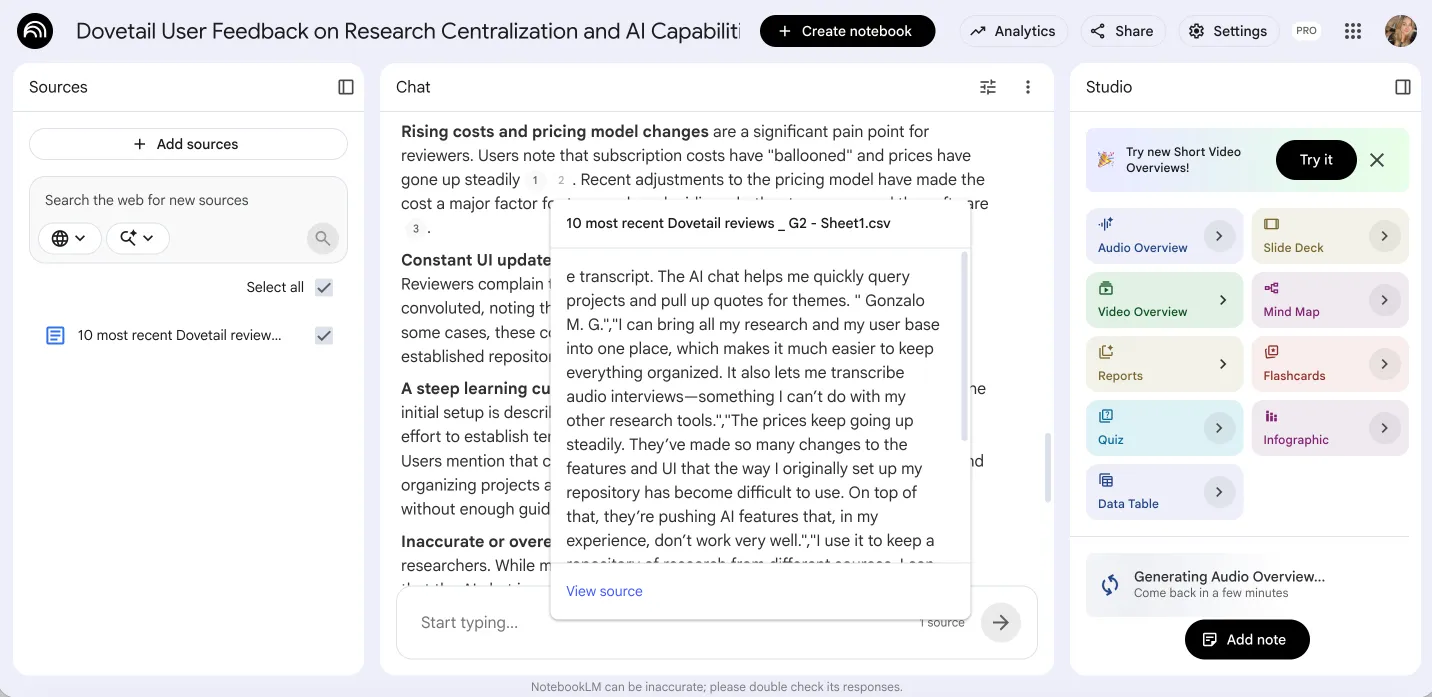
Second, the citations were there, but they were hard to follow, pointing at whole reviews rather than the exact line, so I couldn't cleanly trace a given theme back to who actually said it or how many times.
Bonus point, nothing accumulates into a system of record.
Notebooks are siloed. There's no shared, governed taxonomy that means the same thing across studies and teammates, no reliable way to trend this quarter against last, no org-wide library the rest of the business can self-serve from.
You can share a notebook, and there's a light analytics view once a few people are in it, but that's document-sharing, not a research repository the company builds on over years.
NotebookLM vs Claude
Since these are the two DIY-ish routes, it's worth a quick head-to-head before the Dovetail comparison, because they fail at different points, and which one suits you depends on what you're optimizing for.
NotebookLM vs Dovetail
If anything, NotebookLM gives up more of the workspace than Claude does:
Where NotebookLM isn't the right call
The free price hides a few hard limits worth naming before you commit to it.
If your sources live in other systems and change constantly (support tickets, reviews, call tools), the upload-only model means you're forever re-exporting and re-uploading to stay current, which stops being free the moment you count your time.
If you need to defend exact counts to a stakeholder, whole-file citations won't get you there.
And if you're trying to build something the whole team relies on over months, siloed notebooks aren't a foundation. It's a superb personal thinking tool. It's a shaky team system of record.
Survicate: if you want credible AI without the DIY (with surveys included)
So: is there a tool that keeps the AI-first speed that makes Claude and NotebookLM tempting, but actually does the repository job: the ingestion, the quote-level traceability, the shared library, without signing a $22k Dovetail contract and without unnecessary DIY?
Yes.
And it's ours: Survicate.
I'm obviously on the team at Survicate, which also means I've spent enough time in the competitive weeds to tell you exactly where we're the wrong call and where we’re good.
Let’s start with the good.
Our platform is for the researcher who:
- wants AI to do the synthesis grunt work but refuses to babysit prompts to get there,
- won't put their name on a finding they can't trace to the exact person who said it,
- and who would rather not pay repository prices for a place to store data they had to go collect with some other tool.
If that's the trade you've been trying to make, this is the section that matters.
What Survicate is great at
The short version: Survicate’s Research Hub takes the three things that broke the DIY route and builds the product around fixing them.
It automatically extracts data from connected sources and lets you control the triangulation.
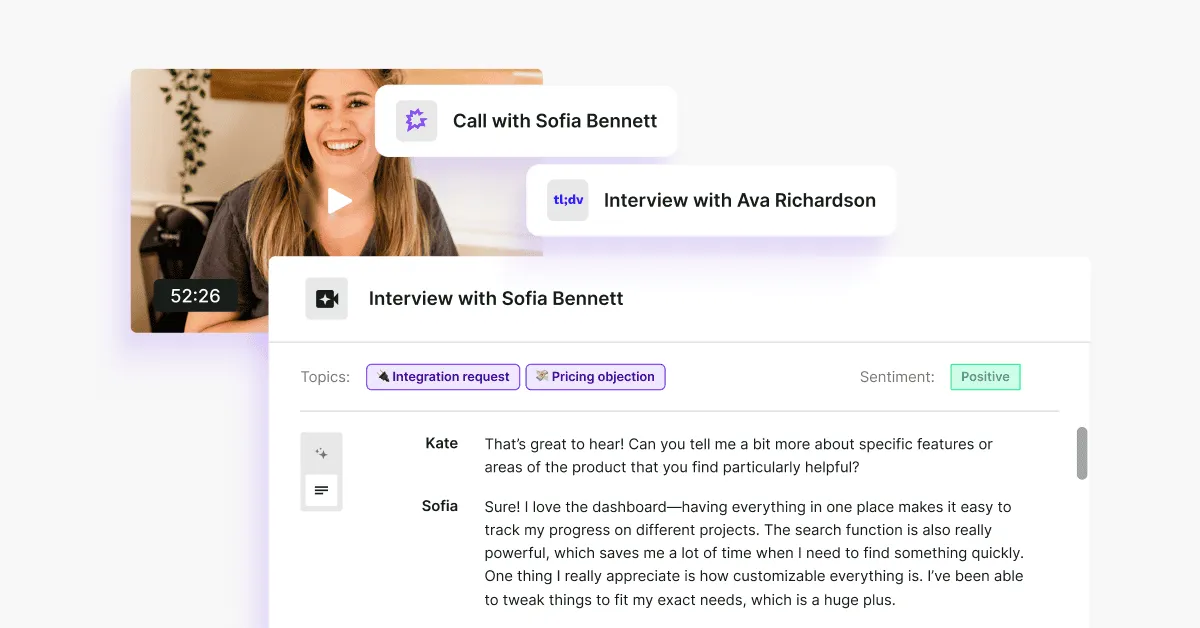
Research Hub connects 15+ feedback sources, from survey responses, Intercom and Zendesk conversations, App Store and Google Play reviews, to tl;dv and Google Meet transcripts, and more.
Connect it once and it’ll automatically extract data and store it in the Research Hub.
Of course, not every research dataset lives in third-party apps, so you can also upload files directly to the Hub: from CSVs to interview recordings it'll transcribe for you.
Where Claude and NotebookLM make you hand-feed files one at a time, and where the DIY route loses the middle of the bigger picture, Research Hub pulls it all into one place automatically.
Connect once and run multiple research projects, just selecting whatever’s fit for the particular project.
You can choose between:
- continuous research projects (and say, have a permanent overview of all your connected sources and emerging trends)
- or one-off projects (e.g., run a study across App Store and Google Play Store reviews from the past quarter and the user interviews you ran at that time, to study recent user satisfaction.)
It doesn't lose the middle.
This is the direct answer to the lost-in-the-middle problem that makes raw LLMs shaky past a couple thousand rows.
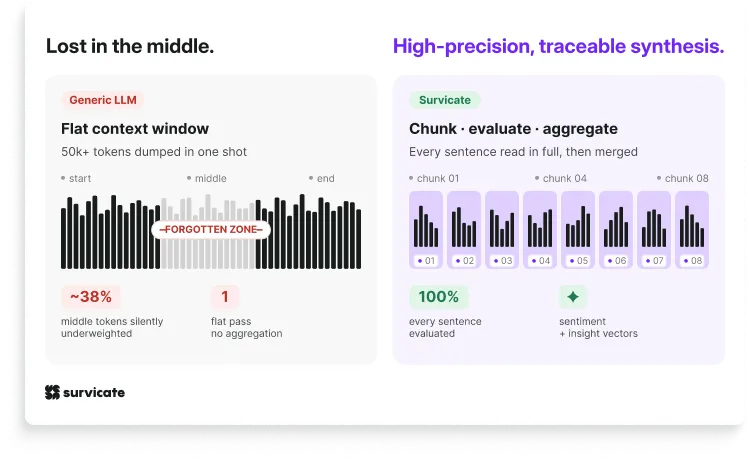
Instead of pouring your whole dataset into one flat context and hoping for the best, Research Hub has specific systems built in place that chunk the data first, evaluate the sentiment and insight at the sentence level, and aggregate the results before the model ever writes a conclusion.
On top of a system that’s built to overcome common problems LLMs analysis comes with, it’s also a system with research methodology woven in so that the report that comes out the other end is not a random summary.
Every claim is traceable to the exact quote and source.
Because the analysis works at sentence level, each finding in a report links back to the specific fragment that supports it.
But it’s not just the quote. Survicate’s Research Hub always tells you which source the given quote was taken from and if applicable, add in the user's or participant’s name as well.
That makes triangulation confident.
You get to spot patterns between multiple sources at once and then click through each insight, seeing the exact review or transcript line and its source.
It remembers your business, so you're not re-explaining it every session.
The end result of running a project in Research Hub is a fully editable report, right?
But what would that report be if the AI didn’t have access to the essential business context. Things like…
Your product, your personas, your positioning (it can even pull a lot of that from your website for you).
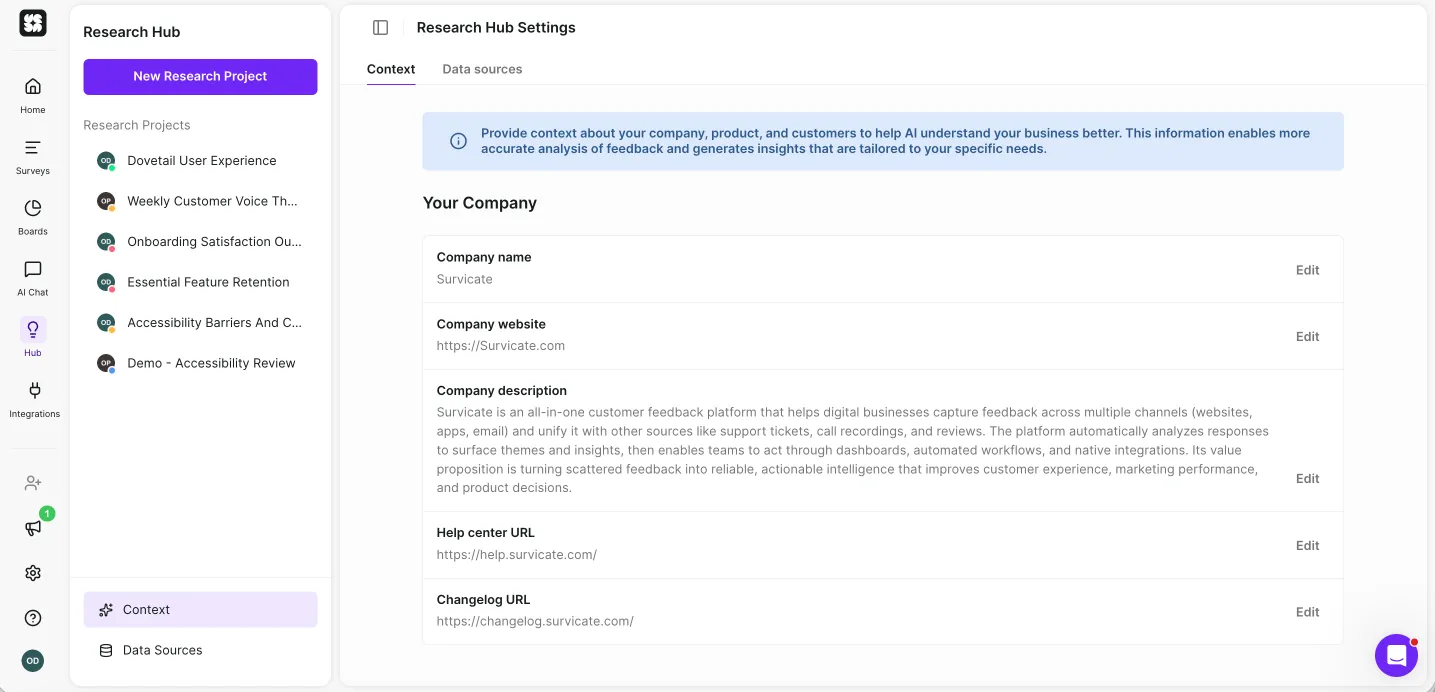
You add your context once and then every future project is rooted in that business information.
No prompt purgatory, no re-pasting who you are into a cold chat. Continuous projects stay consistent because the tool isn't relearning your business on every run, which is exactly what a new Claude chat can't do.
You stay in control.
This isn't AI that files you under "replaced.”
You scope the project: choose the sources, time frame, description and write in your research question.
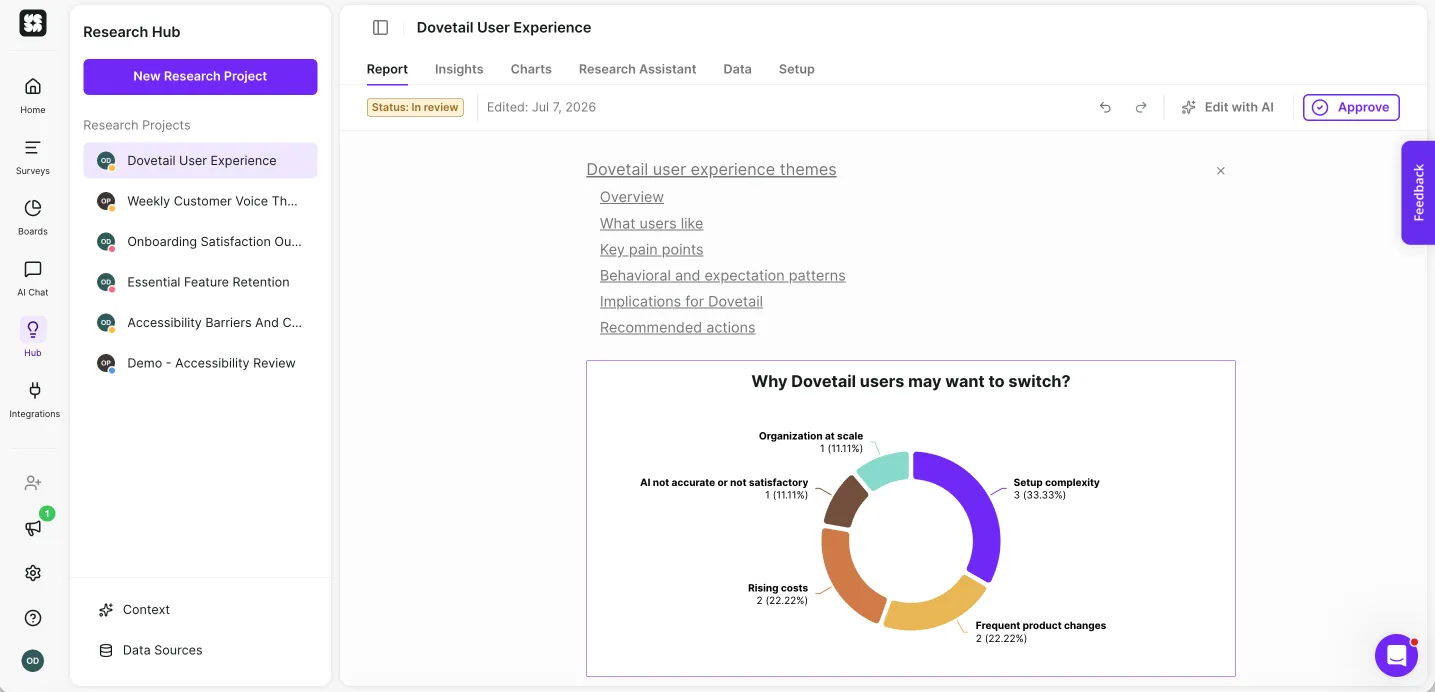
The AI drafts the report based on that selection and the business context we mentioned earlier, but it’s you who reviews the end result.
You get to edit the full report, removing insights or sections you find irrelevant, add in charts, tables, or writing a new section yourself.
You’re only approving a report you’re fully happy with.
And Survicate runs the surveys too.
This is the part neither Dovetail nor the AI tools do: Survicate gives you multiple ways to collect the feedback and do research with multichannel surveys you can run across web, in-app, mobile, email, and links.
So you're not stitching a survey tool to a repository and paying for both.
Collection and analysis live under one roof and one bill.
Then it helps you share and act.
With Research Hub, you can of course invite the team into the platform so stakeholders read the reports themselves, build dashboards stakeholders self-serve from, and push insights into 45+ integrations.
Connect the insights with Jira, Linear, Zendesk, so a finding becomes a ticket instead of dying in a deck. Or becomes a dedicated campaign in Customer.io to help you fight churn with everything you’ve learned.
With survey responses, you can also pipe the responses straight into Slack so people who'll never log in can still view them.
Similarly, your whole team can also use an /askSurvicate option to chat with all the insights and findings, ask their own questions and get research-backed answers right on Slack.
That's the shared, governed library the DIY silos never had.
Pricing
A cherry on top is…Survicate costs a fraction of Dovetail.
Your Research Ops lead or the CFO directly will definitely be happy to hear this, come on now!
Paid plans start at $56/month (Growth, billed annually), and Research Hub is on every paid plan, not walled off in an enterprise tier.
For something more tangible, according to Vendr, the median buyer pays under $8k a year. That’s against Dovetail's $22k median, with the surveys included.
We’ve got one even better, though!
Your first Research Hub project is free with 5,000 data points included, no card required which is enough to run something real and see what a traceable, automated report actually looks like.
Where Survicate isn't the right call
If your research lives almost entirely in video, from highlight reels, to clip-heavy interview workflows, stakeholders who need to watch the customer say it rather than read the traced quote, Survicate isn't the most purpose-built option (yet).
You can upload and transcribe recordings and watch them, even clicking through to a specific part of the interview based on the text section you select.
But it’s not a library of shareable video clips, and tools like Dovetail (or Marvin) lean harder into that video-native experience.
Similarly, if you need dedicated participant recruiting and panel management baked in, that's not what Research Hub is for.
And the deepest value shows up once you connect several sources. If you've got exactly one data source and no plans for more, you'll see a thinner slice of what it does. Worth knowing before you switch, not after.
Survicate vs Dovetail
So what do I do?
If you're leaving Dovetail, the right replacement depends on what you're actually optimizing for.
Reach for Claude if you like building your own workflow and want raw AI power for a bounded, one-off analysis, but just know the repository work (traceability, persistence, sharing) falls on you.
Reach for NotebookLM if the deciding factor is price. The free tier is genuinely usable for source-grounded synthesis, as long as you don't need live sources, quote-level traceability, or a shared library.
And reach for Survicate if you want the AI to do the synthesis without the DIY or the hallucinations. You get cross-source analysis that doesn't lose the middle, every claim traced to the exact quote and source, and the surveys to collect the feedback built in; all for a fraction of Dovetail's price.
Don't take my word for it, though.
Your first Research Hub project is free, 5,000 data points included, no credit card required. The data points are just enough to run something real and see what a traceable, automated report looks like.
Author's note (last verified: 7 July 2026): Statements such as "best" reflect our opinion and typical use cases, not a universal guarantee. This comparison is based on publicly available information and our best understanding at the time of writing. Vendors may change features, pricing, and packaging without notice. For the latest details, please check the official sources or reach out to the vendor directly.



.svg)

.svg)