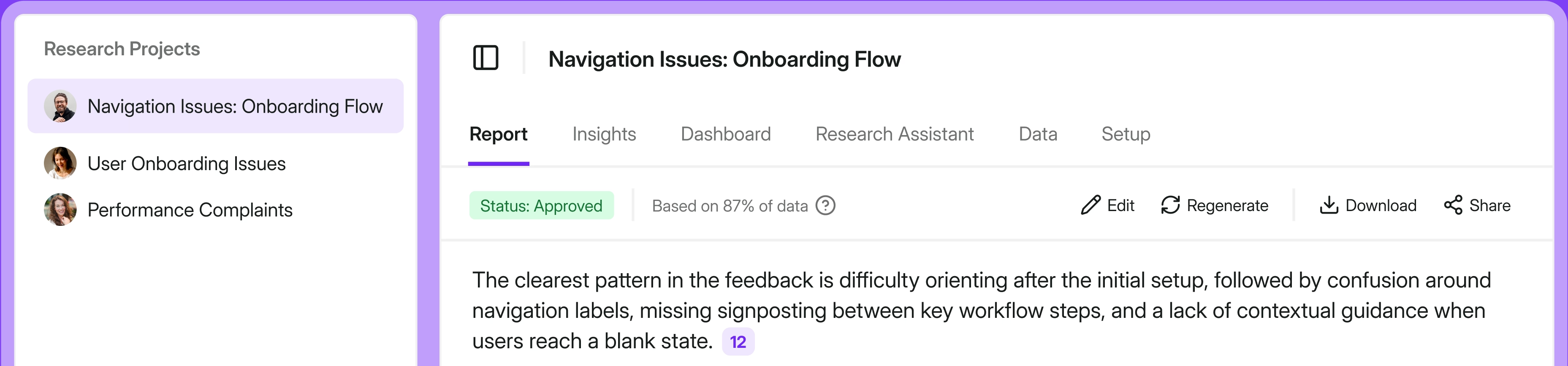
Feedback data has one job: to be in the room when the decision gets made. But it often isn't there.
Because it costs a tab switch, an export, and a paste, while the roadmap call is happening right this second and can't wait too long.
So we're giving you a shortcut. Survicate now connects to Claude, ChatGPT, Copilot, Slack (coming soon), and any other assistant that supports remote MCP.
Ask for feedback data in the conversation you're already strategizing in.
Look up churn reasons across all Q3 surveys. Draw on feedback patterns already categorized across App store reviews, and CS calls. Collect what's missing, drafting new surveys from the context the AI thread holds.
And hey, we're not the first to ship an MCP. But we might offer the only one that reads your surveys and research projects, then lets you create new ones, from a single connection.
Read on for how to connect the MCP, what it can and can't do, 8 workflows worth running first, and 10 prompts you should try from day one.
Survicate MCP banner: the Survicate logo connecting to Claude, ChatGPT, Copilot, Gemini, Slack, and Cursor
Quick answers
If you don’t have the time to read the full article, go through the essentials in the table below.
Full list of tools you can access via the MCP can be found in our help center.
Quick prompts to try today:
→ "Across all our feedback, what are the top reasons customers churn, ranked, with the wording they used?"
→ "Pull the results for our NPS survey for last quarter, then show me what the detractors actually wrote."
→ "Based on this chat, draft a survey asking churned users why they left.
What MCP is, and what it does with your survey data
.gif)
MCP stands for Model Context Protocol. And even though it sounds like something only your engineers need to care about, it isn't.
There's a good chance you've already used one without thinking about it as "MCP."
But to provide a definition: it's an open standard for connecting AI assistants to outside tools. You connect a tool once, and the assistant (LLM or Slack) can reach it mid-conversation, instead of sitting there waiting for you to paste things in.
That’s how you get to ask about last month's organic traffic, and get the numbers straight from Ahrefs, right in the chat, with no hallucinations.
Ask it to book the follow-up call, and it creates the event in your Google Calendar.
Describe the bug you just found, and it creates the ticket in Linear.
Ask what the team decided about pricing back in June, and it reads through the Slack threads to find out.
Same conversation. Different tools (MCPs) doing the work each time.
Every one of those is a connector. And Survicate is now one too, which means your customer feedback becomes something the assistant can reach in the middle of a conversation, the same way it reaches your calendar or your backlog.
And because they all plug into the same conversation, they compose. Pull churn reasons from Survicate, scan Linear to see which ones are already tasked, and build the ticket if it isn't there. All in one thread.
Survicate MCP: what it is, and where it sits
Survicate is an AI customer feedback platform…and Survicate’s MCP is how you transform the feedback you've collected, and research you've run into a layer of trustworthy context for tools like Claude, ChatGPT, and Slack.
The MCP is the first major feature in our new Agentic Layer.
It lands on two surfaces now:
In your AI assistant. Connect Survicate to Claude, ChatGPT, or Copilot, and work with your feedback in the tool you're already thinking and working in.
Where your team already talks. The same connection reaches assistants running inside tools like Slack (coming soon), and the full tool set travels with it. Anyone in a thread can pull customer feedback into the conversation. When the thread turns up something nobody knows, the survey to go answer it gets drafted without leaving Slack.
And coming up next is the ability to use these tools directly in Survicate (an expert agent that works alongside you inside the platform).
So what does the assistant actually get?
What you ask for. Nothing more.
You ask for something specific, like the results for this survey, the responses from last quarter, the report behind this insight and the assistant calls the matching Survicate tool and pulls actual feedback data, inside that conversation.
Who decides what it's allowed to see?
Your team already did, when you set up your Survicate account.
Access here is governed and scoped. You connect once with OAuth, so there's no API key to generate, share, or rotate.
You get to read and perform actions that correlate with your workspace role, folder access, and Research Hub role, applied exactly as they are when you log into the panel.
Can't see a survey in Survicate? You can't see it through your assistant either.
One connection, both halves of the loop
Survicate holds two things that usually live in separate tools. The surveys you collect feedback with, and the research findings stored in your repository. One connection reaches both, while also allowing you to collect missing feedback data when it's apparent there's a gap.
So a single conversation can move through all three stages of working with feedback.
You analyze what you already have, pulling survey results, multi-source feedback insights, and research-grade reports into the reasoning.
You collect what's missing, because the assistant can draft surveys from the context the conversation already holds.
Then you act, carrying the customer's own language into the roadmap doc, the campaign, or the voice of the customer report you were building in the first place.
All without switching tabs.
How is this different from the API and integrations?
Survicate already has a REST API, a JavaScript API, webhooks, and 45+ native integrations. Those move data between systems on rails a developer sets up in advance.
MCP is different in kind. A person asks for what they need in plain language, and the AI assistant uses the tools available to it via the MCP to go get it for you, no dev ticket required. Conversational, on demand, and open to anyone with a Survicate seat and an assistant.
The API and integrations still do the heavy, systematic data movement into your other tools, like HubSpot or Braze, while the MCP allows you to work and think with feedback data directly in Claude and other tools.
It's also a different job from our existing Slack integration. That one brought Research Assistant into Slack to answer questions from your Survicate feedback.
With MCP, your team's own assistant will treat Survicate as one connected source among many. It can weigh customer feedback against everything else in the thread, draft a survey when the thread finds a gap, and carry the work into the next tool.
One answers questions about your feedback. The other acts on it.
How to connect Survicate to Claude, ChatGPT, or Copilot

In Claude, you're adding Survicate as a custom connector.
On Pro or Max, go to Customize > Connectors, click "+", then choose "Add custom connector." Paste the Survicate remote MCP server URL, which you'll find in the product and in our Help Center article, then click "Add."
Claude sends you to a Survicate screen to log in. That's the step that scopes the connection to the surveys, folders, and Research Hub access your role already allows.
On Team and Enterprise plans, an Owner adds Survicate for the whole organization first, under Organization settings > Connectors > Add > Custom > Web.
Everyone else then finds it under Customize > Connectors and clicks "Connect" to log in with their own account.
One more step in every case: switch the connector on for a conversation using the "+" button in the chat, then "Connectors."
💡Note that we're working toward being listed in Claude's connector directory, which is how most people pick up new connectors. Basically, connecting from Claude, choosing Survicate as one of the listed connectors, and logging into the tool from there.
In ChatGPT, Copilot, and other assistants, same pattern. Add Survicate as a custom or remote MCP connector, paste the URL, and approve on a Survicate screen.
In Slack, you’ll be connecting from Survicate. Survicate MCP will be listed as an integration, and once you've connected it, the agent is added to your Slack workspace.
Call the agent in a public channel and the response is visible to everyone in that channel.
What the Survicate MCP can and cannot do today
As the first version of our MCP, it can get quite a lot done already, but nothing that could potentially run live to your customers.
What it reads
Every survey in your workspace, with status, type, and response count, or searched by name.
- Any survey's full structure: questions, types, wording, and answer choices
- Whole-survey results and single-question numbers, including NPS, CSAT percentages, and averages, with an optional date range
- A question located by type or wording, without you knowing which survey holds it
- Research projects and their status, full cited reports and charts, extracted insights, and existing research notes
What it writes
- A drafted survey, created as a draft with a name, type, and questions
- A new research project in Research Hub
Everything else is read-only.
What it won’t do
Send anything to your customers. Ever.
A survey drafted in your assistant lands in Survicate as a draft. A person reviews it, targets it, and launches it. Nothing reaches a respondent until someone hits send.
What we don't control
In short, the approval process.
Once feedback reaches your assistant, what happens to it depends on how your business sets that assistant up.
Retention and training settings there are your provider's and yours. Most teams already have an approval process for MCP connectors, and this is a good moment to use it.
8 workflows to run once you're connected
All this theory and definitions are sure fun, but what's more fun is actually using the MCP.
And the good news is you don't need any fancy incantations, aka prompts, to get started. LLMs got pretty good at understanding what we need, so these are written the way you'd actually ask.
Each one is a short chain: what you're in the middle of, what you ask, and what comes back. The underlying tool is named where it helps.
Work out why customers actually leave, across everything you've collected
CX and customer success, product managers
Your CEO asks why buyers churn and what the top reasons are.
The honest version of this answer used to take a day: open the churn survey, open the NPS survey, open the exit survey, export three CSVs, hold the pattern in your head. And ignore the churn signals sitting in app reviews and interview calls, because nobody can read through that much by hand.
Now, you just input this into your LLM of choice with Survicate MCP connected:
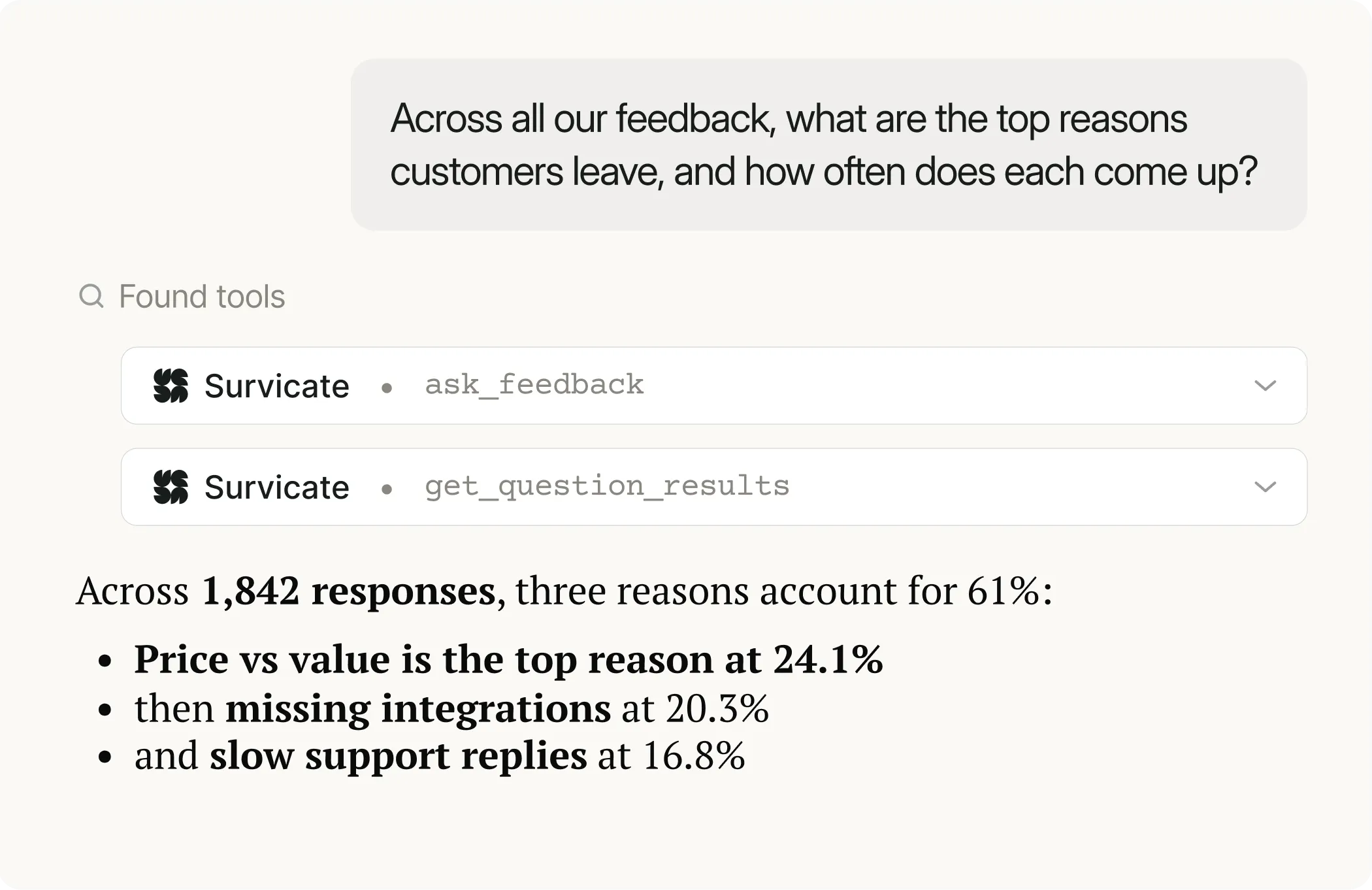
→ "Across all our feedback, what are the top reasons customers leave, and how often does each come up?"
Ranked reasons, drawn from everything in the workspace rather than one survey at a time. ask_feedback
→ "Show me what people actually wrote for the top two." The verbatim answers, including the AI follow-ups where people explained themselves. get_question_results
→ "Do we have research on this? What did the churn analysis find?" The cited report, citations attached. list_research_projects, get_research_project_report
Pressure-test a roadmap call against two sources at once
Product managers
You're deciding whether to rebuild group ordering next quarter, and the case so far is a hunch and a loud Slack thread.
So, instead you type this into ChatGPT:
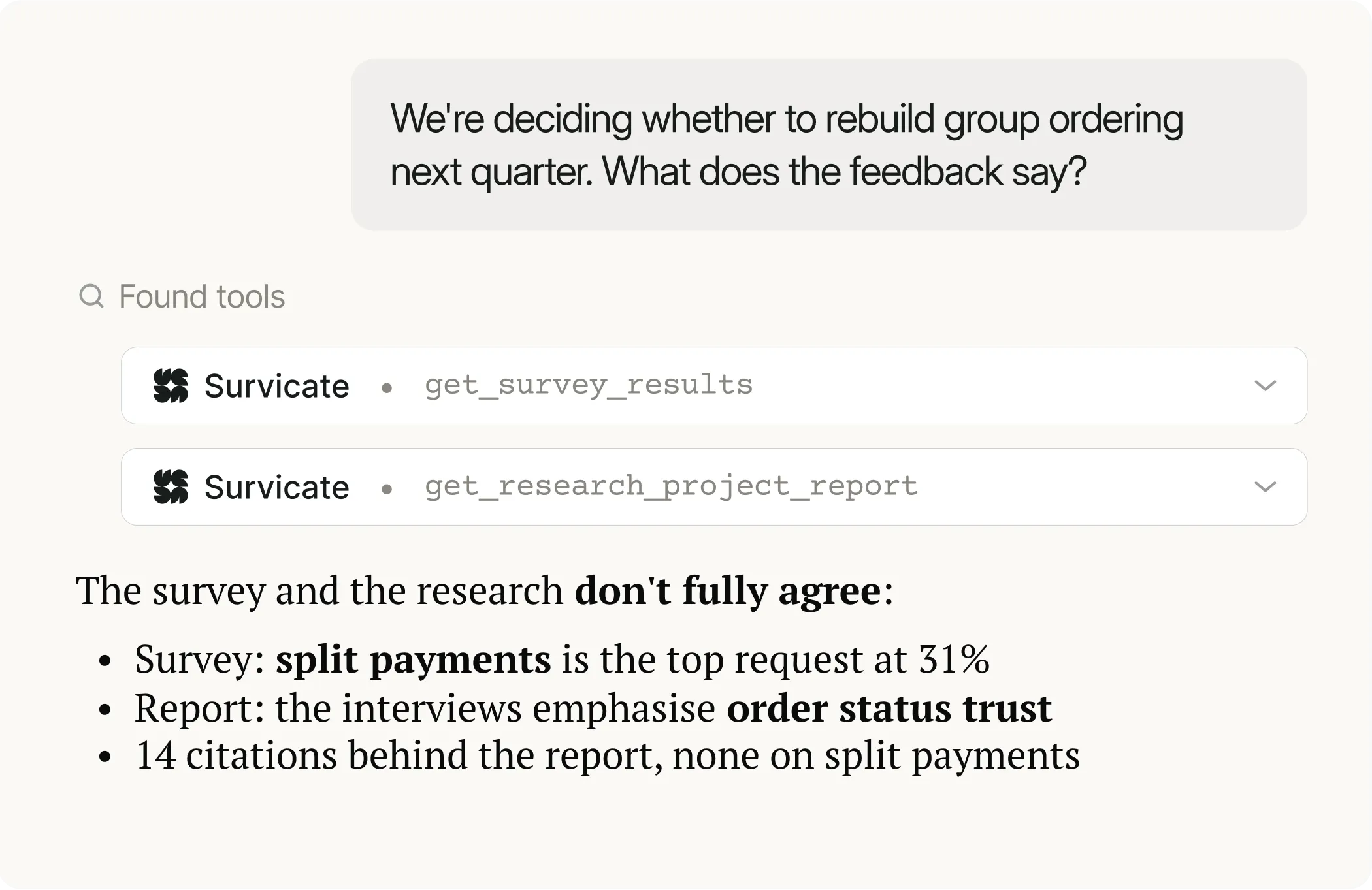
→ "We're deciding whether to rebuild group ordering next quarter. What does the feedback say?"
In return, you get a satisfaction spread, the biggest-problem distribution, and the open text on what people want improved. get_survey_results, get_question_results
To make sure, you ask:
→ "Does our research say the same thing?"
And the relevant project report, with lines cited, comes right back. get_research_project_report
Turns out that the survey's top complaint and the research's emphasis don't fully line up. That gap is the useful part, and you'd never have seen it holding one tab at a time.
Check whether a loud complaint is a real pattern or four people
Product managers, CX and customer success
Someone posts a screenshot in a channel and the whole team reacts to a sample of one.
To make sure it’s not just one loud complaint, you get into Claude and check:
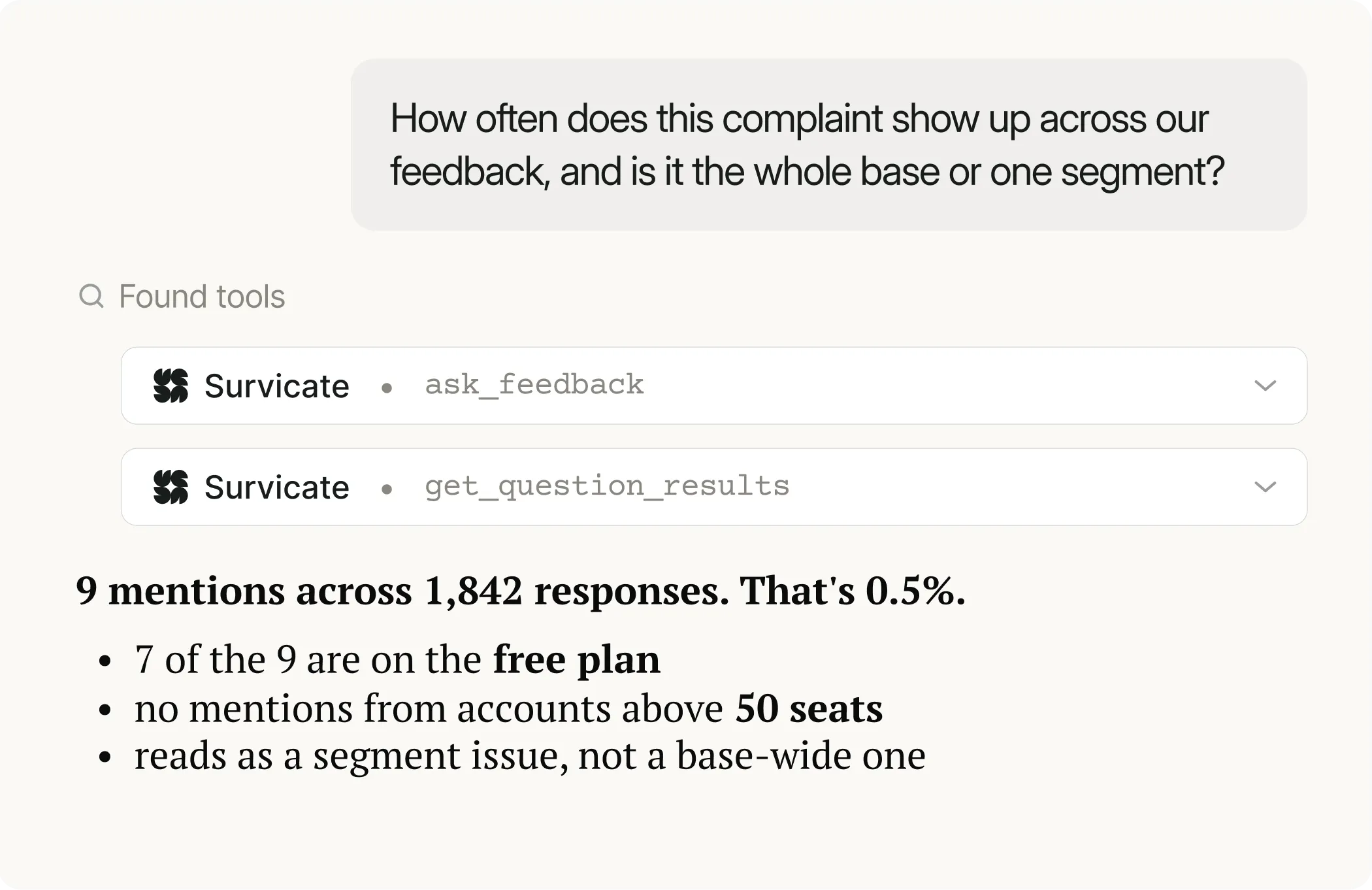
→ "How often does this complaint show up across our feedback, and is it the whole base or one segment?"
You get actual frequency and a shape, instead of a vibe. ask_feedback
→ "Show me the wording." Whether people are describing one problem or three different ones. get_question_results
Sometimes it's a pattern you've been under-weighting for months. Sometimes it's four people. Both are worth knowing before the meeting, and you find out in the time it takes to type the question.
Check whether the fix you shipped changed what customers say

Product managers
You shipped a new update to a heavy bug in June and nobody has looked at it since.
So you ask:
→ "Pull this question's results for the three months before June and the three after."
This time you get the distributions side by side. get_question_results
And compare the actual attitude toward the feature comparing the open-texts.
→ "Now the open text for both windows. Did the language change?"
As a result, you get an analysis of what people complained about then, and what they complain about now.
Because scores move slowly and for a dozen reasons. But wording moves faster and tells you why. If the complaint has left the text, that's your answer, and it's the one you can put in a retro.
Get the exact words customers use for the right messaging
Marketing and lifecycle
You're writing the positioning line, or the email, or the ad. The copy is running on how the team talks about the product, not how customers do.
So you go in to all the known feedback data and search:
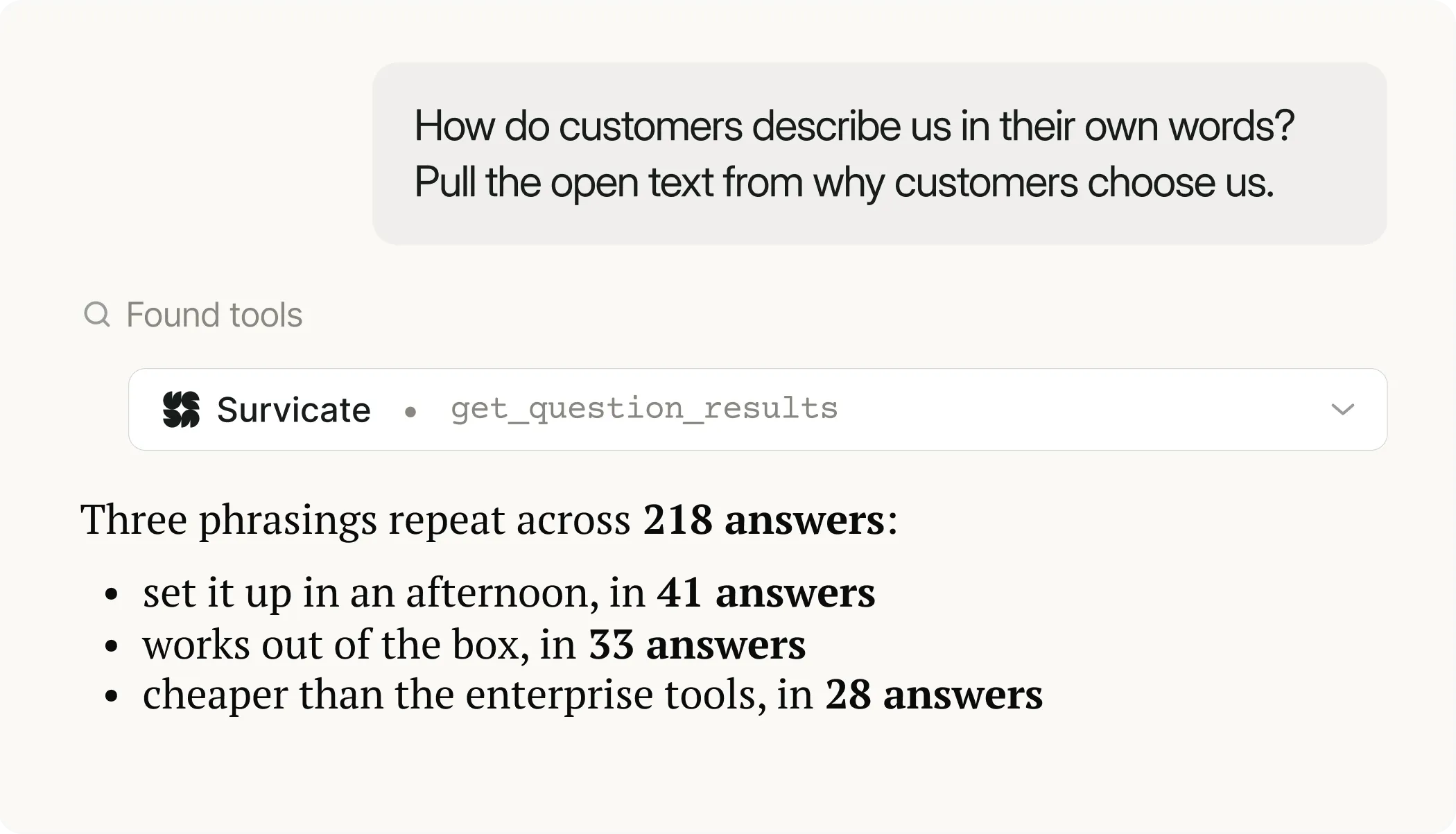
→ "How do customers describe us in their own words? Pull the open text from the 'why customers choose us' survey."
You get short, unpolished sentences from real people. get_question_results
Then analyze further:
→ "Which three phrasings keep repeating?" Your headline, your subject line, and the objection you keep failing to answer.
Then you paste the phrase straight into the draft. No request to anyone, no export, no second tab.
Actual customer language goes directly into copy. And when the responses don't cover the angle you need, the next line is "nothing here covers pricing, draft me that survey."
Find out whether the study needs to run at all

Researchers
Someone wants a partner study scoped. Before you spend three weeks on it, you check what's already sitting in the repository.
→ "Before I scope a partner study, what do we already know?"
Survicate’s MCP returns the existing project report, with all the conclusions, and insights ready. list_research_projects, get_research_project_report, list_research_insights
Now you go deeper:
→ "Does the survey data agree with the report?"
You then get the survey's distribution against the report's emphasis, and where the two diverge. (list_questions, get_question_results)
Turns out, the study doesn't need to run after all, and the conclusion goes back into the repository instead of dying in a chat window.
Take stock of a quarter before you report on it

CX and customer success, researchers
It's the week before the QBR and the real question is what your own data actually says.
So you search:
→ "Pull the results for this survey for last quarter."
You receive response and completion counts, answer distributions, and scores in one pass. Then narrow to a single question when a number looks off. get_survey_results, get_question_results
To dig deeper, ask:
→ "Across everything customers told us this quarter, what got better and what got worse?"
The version of the answer your exec will actually ask for. (ask_feedback)
You walk in with a read on the quarter instead of a chart you built at 11pm and can't defend.
Turn the gap into something, in the same conversation

The whole team
This is the one that changes how the conversation ends.
A thread surfaces a pattern nobody can size. Instead of "someone should look into this," you have two moves.
→ "Draft me a survey to catch this earlier." The assistant already holds the context, so the draft comes back on point: named, typed, questions written. It lands in Survicate as a draft for you to target and launch. create_survey
→ "This needs more than one survey. Create a research project on it, and cite the evidence." The project gets set up in Research Hub, and it synthesizes across your connected sources into a cited report. create_research_project
Nothing sends itself. Both land as work waiting for a person, which is the point.
10 prompts to try on day one
Copy these, swap in your own survey names, and see what comes back.
- "Across all our feedback, what are the top reasons customers churn, ranked, with the wording they used?"
- "What are customers complaining about most this quarter that they weren't complaining about last quarter?"
- "Show me my Survicate surveys, with response counts, and tell me which ones are still collecting."
- "Pull the results for our NPS survey for last quarter, then show me what the detractors actually wrote."
- "Find every question I've asked about onboarding, across all surveys."
- "Check whether the complaint in this thread shows up across our whole feedback base, or just in support responses."
- "Compare this result against our existing research notes and insights. Have we documented this already?"
- "Did what customers say about checkout change after we shipped the fix in June?"
- "Draft a short survey to find out why churned users stopped using our product, based on this conversation. Don't launch it."
- "Create a research project on why buyers don't come back, and cite the evidence."
Connect Survicate to your assistant
If your team already reasons in Claude, ChatGPT, or Copilot this is a one-time setup that brings customer evidence into every AI-assisted decision. Not just the ones you had time to prepare for.
Make informed decisions. Base them in actual customer data.
Connect Survicate to your AI assistant.
FAQ
Which AI assistants does Survicate’s MCP work with?
Any assistant that supports remote MCP. Claude, ChatGPT, and Copilot are where most teams start.
Can I use it in Claude and ChatGPT chat, or only in developer tools like Claude Code?
The chat versions, and that's where it's meant to be used. Survicate connects like any other connector, and you authorize it once.
Do I need a paid Claude plan to add a custom connector?
No. Custom connectors using remote MCP are available on Claude's Free, Pro, Max, Team, and Enterprise plans, with free accounts limited to one custom connector. On Team and Enterprise plans, an Owner adds the connector for the organization first, then each member connects their own account.
What's involved in setup?
It's worth asking your AI assistant how to set up a remote MCP server, but in general you're creating a custom connection using this URL (https://mcp.survicate.com/) to start that process. For example, in Claude, on Pro or Max, go to Customize > Connectors, click "+", then choose "Add custom connector." Paste the Survicate remote MCP server URL, then click "Add." Then approve the connection on a Survicate screen. You only authorize once.
Do I need an API key?
No. OAuth, once. Nothing to generate, store, or rotate.
Can the MCP write and delete, or only read?
It writes two things: a drafted survey and a new research project. Everything else is read-only, and it doesn't delete anything.
Can it send surveys to my customers on its own?
No. Surveys arrive in Survicate as drafts, and a person reviews, targets, and launches them.
Can teammates see feedback they don't normally have access to?
No. Every call runs as the connected user, so workspace role, folder access, and Research Hub role apply exactly as they do in the panel.
How is this different from the Survicate API or a Zapier connection?
The API and integrations move data between systems on rails a developer sets up in advance. MCP lets a person ask in plain language, in the moment, and get the answer inside the conversation they're already having. Different jobs, and you can run both.
Can each teammate connect their own account?
Yes, and that's the intended setup. Each person connects individually, choosing their preferred workspace, and their own permissions travel with the connection.



.svg)

.svg)