The tech world currently feels divided into two loud, opposing tribes. On one side stand the AI enthusiasts, convinced that models will fully automate every role by next quarter. On the other side sit the AI skeptics, dismissing the technology as an overhyped, hallucinating parlor trick.
But as with most things in life, the truth lies somewhere in the middle. The real challenge is figuring out how to adapt. No industry can simply ignore it, but the most exciting reality is that nobody has completely figured it out yet. We are all learning how to navigate this shift in real time.
This perspective comes from my own unique vantage point as Head of Product at Survicate. Because I spend my days building AI product prototypes while simultaneously studying how researchers interact with data here at Survicate, I see both sides of the coin. Working at this intersection reveals that the structural challenges of why AI is bad for user research boil down to just two fundamental words: quality and trust.
Whether using ChatGPT, NotebookLM, Claude or specialized software, researchers repeatedly hit the same walls. To understand how to make these tools work effectively, we have to look closely at three universal problems that compromise research data – and exactly what we can do to fix them.
Problem 1: AI averages everything – and averages are the enemy of good research
Most of us are familiar with the old computer science saying: "garbage in, garbage out." If a data set is poor quality, the resulting insights will be just as bad.
With Large Language Models (LLMs), however, a less obvious and much more frustrating problem happens. Even when we feed them pristine, high-quality data, AI has a structural weakness that surfaces when handling large data sets. It flattens nuance, misses weak signals, and averages everything out.
To understand why this happens – and why AI is bad for user research in its raw state – we need to look under the hood at how these models process information.
The counterintuitive weakness of the context window
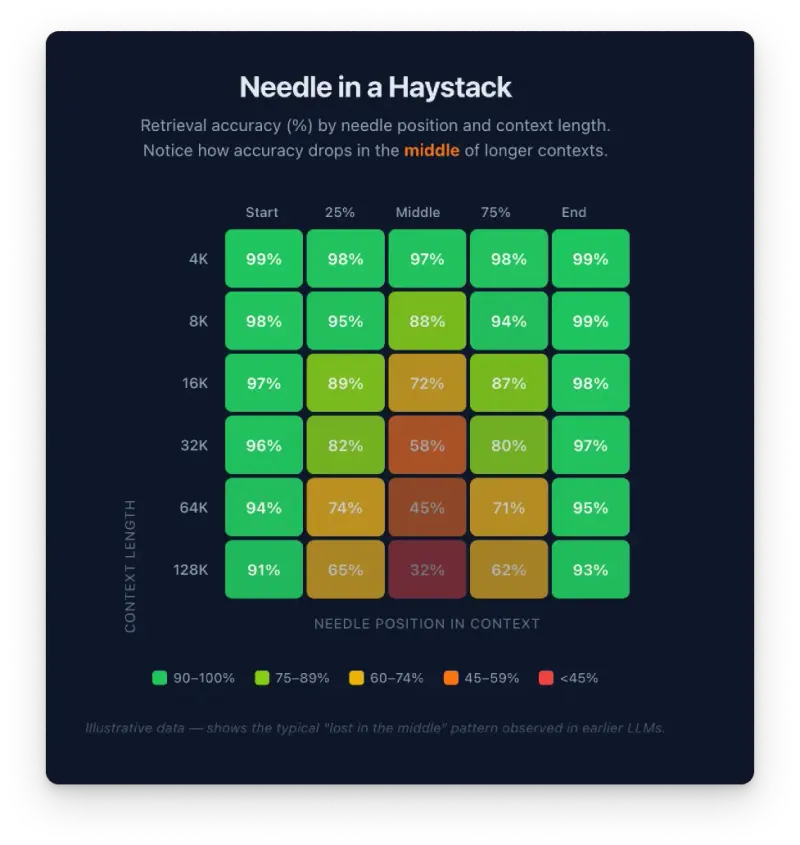
Every AI model operates within a "context window," which is simply the total amount of data passed to the model in a single conversation. It is easy to assume that a larger context window means the AI can synthesize more information more effectively. The reality is quite the opposite.
When dealing with massive data sets, AI models naturally tend to average the data. For researchers, "average" means sacrificing the exact insights we need. The model drops the subtle, weak signals that often hold the most valuable breakthroughs. The larger the data set, the higher the chance of encountering this flattening effect.

Weronika Denisiewicz, Senior Product Researcher, notes that this creates a major trust barrier:
"I trust models most when they summarize data I collected myself – meaning we are moving within a topic I know and where I have a feel for reality. In those cases, I know I will catch a wrong interpretation and can provide additional context on the fly.
It gets harder when the data is new to me and I have nothing to reference. Without solid verification, it is impossible to tell if the model made a mistake. And that is exactly where the boundary of trust lies. If someone lacks foundational knowledge in a given field, it is difficult to trust the results because the tools to verify them just aren't there."
The "lost in the middle" trap
Beyond flattening nuance, large data sets trigger a phenomenon known as "lost in the middle" degradation.
Imagine asking someone to read a thousand-page book and summarize every detail. They will easily recall the opening chapters and the ending, but the middle blurs together. LLMs experience the exact same human-like fatigue.
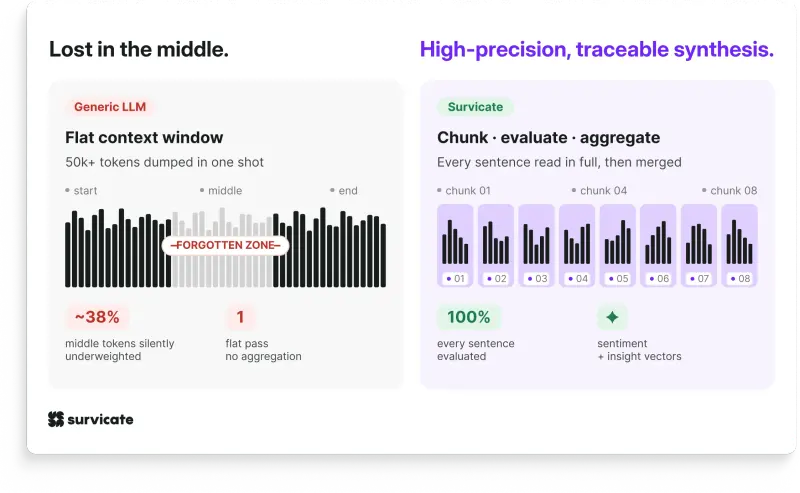
When we feed large datasets directly into an LLM, the model suffers from this "lost in the middle" degradation. It systematically underweights content positioned in the middle of a long context window. At 50k+ tokens, which is roughly 1,000 to 2,000 data rows, the model may silently miss or misrepresent a substantial portion of the data.
On top of losing critical data, running massive datasets through a single prompt is incredibly inefficient. The bigger the data set, the more expensive it becomes to run queries and ask questions.
How to fix it (the manual way)
To run better AI user research without letting the model dilute the findings, we can apply a few practical guardrails:
- Filter before feeding. Work with the smallest data set possible without removing relevant information. Strip out irrelevant data before the research starts to keep the model focused.
- Scope the work tightly. Break the data down into specific research projects, product areas, or distinct topics rather than dumping everything into one chat.
- Ask one question at a time. Multi-part questions confuse models and yield weaker responses. Focus on uncovering one insight at a time.
How we solved this at the architecture level in Research Hub
While manual filtering helps, the most candid, specific feedback (the kind that usually comes mid-conversation during an interview) still risks getting diluted. This is exactly why we needed a specialized tool.
What happens to data processing before sending it to synthesis changes everything. If we download all user interviews and upload them to our AI research repository, Research Hub, we get significantly better insights than if we uploaded them directly to a raw LLM. Even though Research Hub uses the same underlying model in the end.
We addressed this at the architecture level by chunking data and aggregating results before passing them to the LLM model. This ensures every data point gets processed, not just the ones that happen to land at the edges of the context window.
Rather than passing an entire feedback dataset to a single model in one shot, Research Hub chunks the conversation into digestible sizes and runs them through purpose-built agents in sequence. Each agent handles a defined piece of the synthesis. Because each chunk is short, nothing gets buried, and every single sentence is evaluated in full. The result is higher precision, traceable attribution, and insights that reflect what customers actually said.
Built-in guardrails for real insights
We integrated the best manual research practices directly into the software:
- Project setup controls. These controls allow data scoping before analysis even begins. We can filter by uploaded user attributes – like job title, plan tier, or customer segment – so only the right voices inform the report. This eliminates manual pre-sorting or copy-pasting filtered exports into a chat window. We define the boundaries, and the agents work within them.
- Quality over speed. Unlike tools built to respond instantly, Research Hub takes around 10 minutes to generate reports. This is a deliberate architectural choice, not a limitation. Thorough synthesis that actually holds up in front of stakeholders cannot be rushed, and giving the agents time to process ensures the highest quality output.
Problem 2: Without context, AI speaks in generalities
This is where AI output frequently stops being “just” underwhelming and becomes actively misleading. The issue traces back to the same root cause, i.e., lack of context.
You need to give the model access to extensive information before it starts generating responses. Instead of relying only on a single prompt, you should equip it with background knowledge – who your customers are, how your product works, what your company focuses on, and how you typically talk about it.
When using tools without memory, teams often structure this into reusable templates they copy-paste, so the model doesn’t have to “figure things out” from scratch every time.
Here’s an experiment I ran to illustrate the difference between output with and without company context. I came up with some sample survey data for a voice generation platform, and asked AI to find and analyze customer feedback from newly-setup users.
My goal was to show what “well-fed” AI can do as opposed to a model with little-to-no context. I broke it down into three parts: personas, company description, and product offering. That gave the model a clear frame of reference before it even saw the prompt.
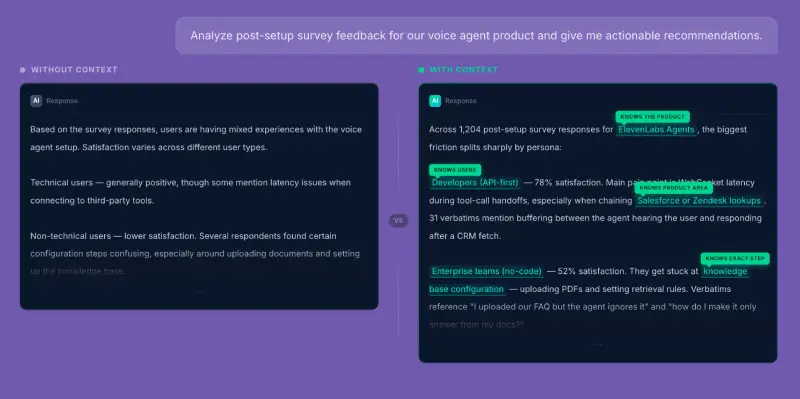
On the left-hand side, there’s the view without context – responses are broad and non-committal. They might sound reasonable, but they don’t reflect any specific user, product, or use case. It’s the kind of output that might not hold up when you try to apply it.
Once we add the context (as on the right-hand side of the image), we see that the same prompt produces something much more grounded. The model can reference real user needs, connect them to product capabilities, and adjust its language to fit the business it’s “speaking for.”
How to fix it – building a relevant context layer
The first part is baking the context in, and the second – using it consistently. The latter can turn out to be quite tricky in practice.
My colleague Weronika pointed out that cases where AI misses weak signals or unexpected patterns still happen (but, luckily, less often than they used to).
In her experience, the reason why researchers might start seeing fewer AI misjudgments is more about how they learn to work with models, and less simply about technical model updates.
“What helps me avoid errors is, first of all, providing the model with all relevant contextual information. Secondly – breaking the analysis into smaller parts, i.e., asking specific questions step by step and building the report gradually.” Weronika says. “I also try to maintain a close relationship between conclusions and raw data. Specifically, I want to be able to link every conclusion to a specific quote or record, so that if something raises doubts, I always have something to go back to.”
She also mentions prompt quality, because researchers must guide the model to look for patterns rather than isolated examples. Whenever something feels “off”, we shouldn’t hesitate to ask the AI to verify the output in the source data.
Make context persistent, not prompt-based
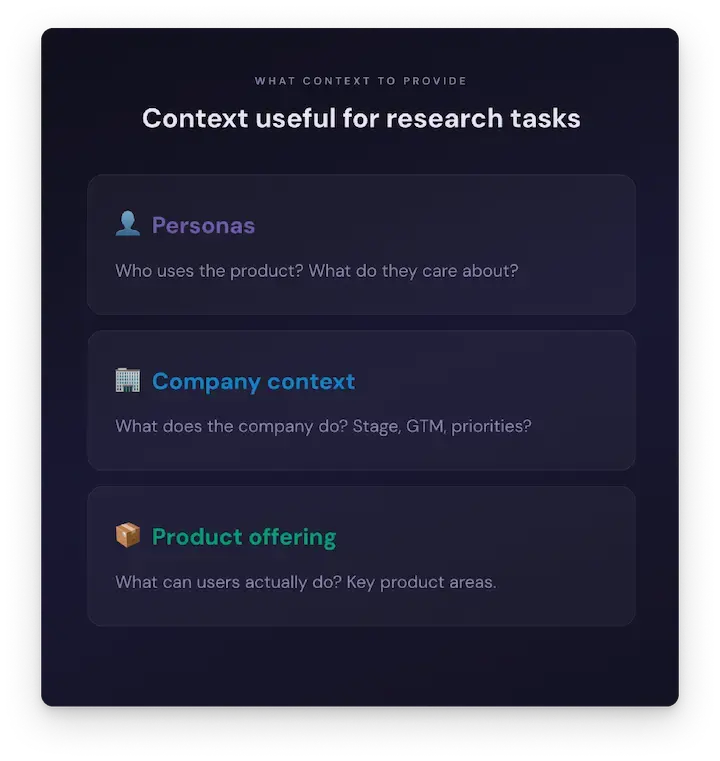
As mentioned, teams frequently copy-paste the same background information into every query they run. It works, but it’s inefficient and easy to get wrong. A better approach is to store context at the workspace or project level, so it’s always available and applied consistently.
It helps to think of it as a shared knowledge base the model can draw from, which covers your company, product areas, and internal understanding of the domain. Once it’s in place, every prompt builds on that foundation.
Some tools are better at surfacing supporting data like this than others. For example, NotebookLM allows you to browse source materials alongside generated responses, making it easier to see how the model arrived at a given answer. In more general-purpose tools like ChatGPT, that connection between output and source isn’t always as visible, which can make validation more time-consuming.
The goal isn’t to review everything line by line, but to have the option to dig deeper when needed, especially when something looks questionable.
Be deliberate about what context you include
More context isn’t always better.
If you feed the model everything (strategy documents, internal narratives, positioning frameworks) you risk narrowing its perspective too much. The output becomes highly aligned with how the company already thinks, but less sensitive to anything outside of that frame.
That’s why it’s worth being selective. Context should guide the model instead of constraining it. Otherwise, it might be less capable of spotting subtle outliers or insights.
This is exactly the problem we solve with the context layer in the Research Hub.
Teams can define company-level and project-level context and have it applied automatically across analyses. That way, the AI outputs are grounded in the business from the start, without requiring researchers to repeat the same setup.
Problem 3: We treat AI like a magic button, not a collaborator
When building apps or writing code with AI, anyone who has spent time with a model knows that it almost never yields perfect results on the first try. A developer might get a functional foundation, but it is rarely polished or complete. I know from experience that the final, production-ready version usually requires dozens of prompt cycles, manual design reviews, quality assurance testing, and strict code evaluation. Software engineering teams naturally accept this reality and iterate relentlessly.
Yet, when it comes to figuring out how to use AI for user experience research, there’s a massive expectation gap. Too often, people treat AI like a magic button. They input a prompt, click a button, and expect a flawless report.
When the raw output feels flat or slightly off, trust breaks down entirely. The fix is not to lower expectations, but to bring that exact same engineering mindset to research by keeping humans meaningfully in the loop.
The research iteration loop
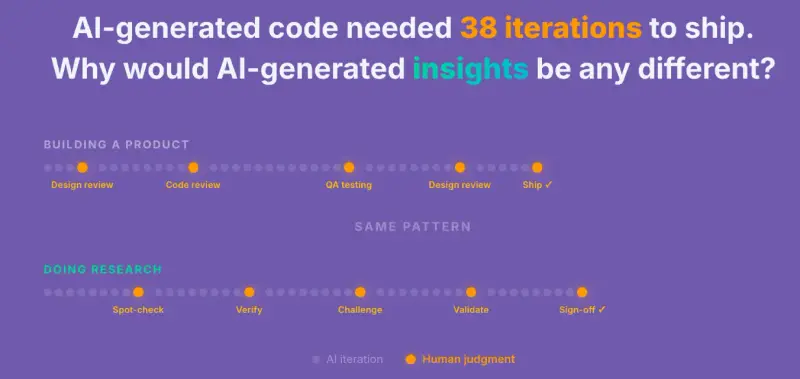
Research with AI should work just like software development. It requires a dedicated workflow rather than a single question-and-answer prompt. To truly leverage using ai for user research methods, the process must look like a deliberate loop:
Curate data → Build context → Query → Read carefully → Verify citations → Refine output → Repeat
Preparation takes time, so before asking an AI model a single question, researchers must curate the dataset and build the necessary context. Once the model generates a report, the work is only half done. The draft requires careful reading, a deep dive into supporting evidence, and structural refinement before anyone considers it final.
Citation verification as a trust mechanism
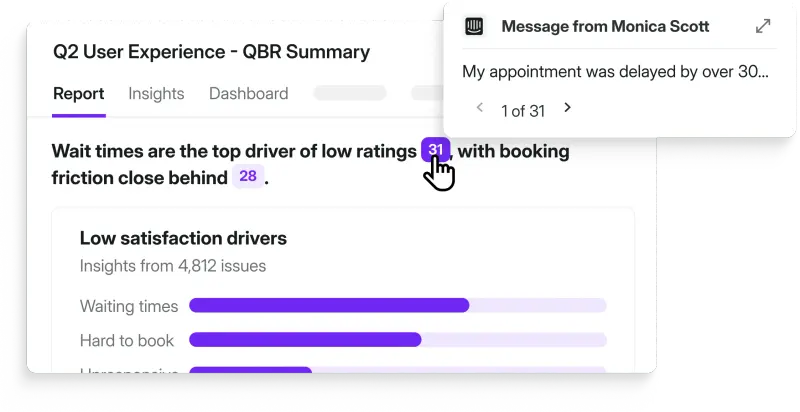
To maintain absolute quality, every claim in an AI-generated report must be traceable to a real piece of user feedback. This allows for a "spot check" approach. While a researcher might not verify every single citation, the tool must provide the ability to do so instantly whenever a finding feels counterintuitive.
General-purpose LLMs struggle heavily with this. They frequently hallucinate quotes, misattribute feedback, or lose track of references entirely when dealing with long context windows.

Justyna Parmee, User Researcher at Survicate, highlights exactly why raw AI citations fall short:
"I am always skeptical when I ask AI for quotes. It often delivers snippets that are very loosely connected to the original statement, or fragments torn out of context that fit a specific thesis but fail to reflect the true meaning of the broader conversation. Because of this, having direct references to the original, raw feedback is absolutely essential."
Grounding all claims and insights directly to raw customer feedback data for instant verification is precisely where general-purpose LLMs fail, and it remains a unique necessity for reliable user research. If a report says "users struggle with onboarding," a researcher should be able to click that sentence and see the exact three customer chat transcripts that triggered the insight.
The "council of agents" tactic
This iterative, skeptical approach is exactly where modern AI architecture is heading. Instead of relying on a single prompt to do all the heavy lifting, sophisticated research systems now deploy a "council of agents."
In this setup, one specialized AI agent is responsible for building the initial report based on the data boundaries. A second, entirely separate agent is programmed to act as a skeptic. This critique agent reviews the draft, cross-references it with the source material, challenges assumptions, and points out where nuance might have been flattened.
By the time the human researcher steps in to review the report, the AI has already run its own internal QA process.
How to fix it
There are at least a few tactics you can use – here are some tips from product research experts.
Never treat the first AI output as the final output
This might sound obvious, especially if we maintain an iterative loop in our user research – but it's still where things frequently break. If a response sounds coherent and comprehensive, it’s tempting to move on instead of digging deeper.

Nikki Anderson, User Research Consultant and Founder at Drop In Research, shared how she uncovered an error like this when AI synthesized data from a round of interviews she held.
“AI confidently told me the main barrier users reported was pricing, but when I went back to the raw transcripts myself, I realized pricing was almost a throwaway in most conversations. The real signal was buried in how people talked about trust,” she explained. It was about the seemingly small moments of hesitation right before people answered Anderson’s direct questions.
That kind of nuance – hesitation, tone, or underlying “energy shifts” – is exactly what gets flattened during synthesis.
It’s worth noticing that the model didn’t hallucinate, per se. It just simplified the story in a way that made it sound clearer than the full picture has shown.
That experience reshaped how Anderson currently applies AI in her work. “I use it constantly now, and I love it for the heavy synthesis lifting, but I've learned to treat its outputs as a starting point, and not a finished insight.” Among others, she looks for contradictions and subtle changes in sentiment or phrasing. “Those still live in the raw data, and I've found that going back to it is non-negotiable for me.”
Read AI-generated insights critically (especially the things that surprise you)
If we were to summarize this tip into three key actions, they’d be:
- Verifying citations for anything surprising or decision-critical
- Checking whether conclusions actually reflect the underlying data
- Paying attention to what might be missing, not just what’s included.

Kasia Jordan-Kaźmierczak, UX Researcher at Survicate, takes a structured approach to this. When reviewing AI-generated findings, she goes back to her original interview notes and checks how well the conclusions map to what was said. But that’s not all, because Kasia also runs double-checks to verify if nothing important is missing.
“I pay special attention to findings I didn’t catch on my own. Sometimes I’m genuinely impressed by how well AI identifies patterns I hadn’t noticed myself at first,” Kasia explained.
She said that over the last few years, she started trusting AI more, but with an important caveat. “I still see AI as a collaborator rather than an independent researcher. I’m happy to let it accelerate analysis, but I won’t be letting it take control anytime soon.”
This approach can help keep research work grounded in verifiable data. And it’s also where tooling can make a real difference.
In Research Hub, every conclusion is linked directly to the exact source quotes it’s based on. Instead of manually digging through transcripts, researchers can click through and verify how a given insight was formed. That shifts AI into the role it’s best suited for – a synthesis assistant. The researcher still decides what holds up, what needs refinement, and what shouldn’t make it into the final report.
Bonus tip: Separate generation from validation
There’s one more practical habit that can help – don’t validate your data in the same thread where the insight was originally generated.
When you continue in the same conversation, the model tends to reinforce its earlier answers. Starting a fresh conversation for validation gives you a “cleaner”, more independent check, which is closer to how a second researcher would review the work. It’s a small change, but it reduces confirmation bias in the workflow.
With the right setup, AI can be great a research collaborator
AI cannot operate on autopilot, and research needs a process, not just a prompt. True adaptation belongs to a "third tribe" of professionals, i.e., those who embrace UX research AI, but refuse to treat it like a magic toy.
To make automated insights trustworthy, researchers must stay the experts while AI acts as the facilitator. This requires a strict, design-led workflow: filtering data to protect nuance, structuring tight context, and relentlessly keeping humans in the loop.
While nobody has fully solved the AI evolution yet, a human-in-the-loop framework is the ultimate trust mechanism. These exact principles guided the creation of our new tool. To build a highly precise, reliable workflow that honors real customer voices without the shortcut risks, explore Survicate’s AI research repository.