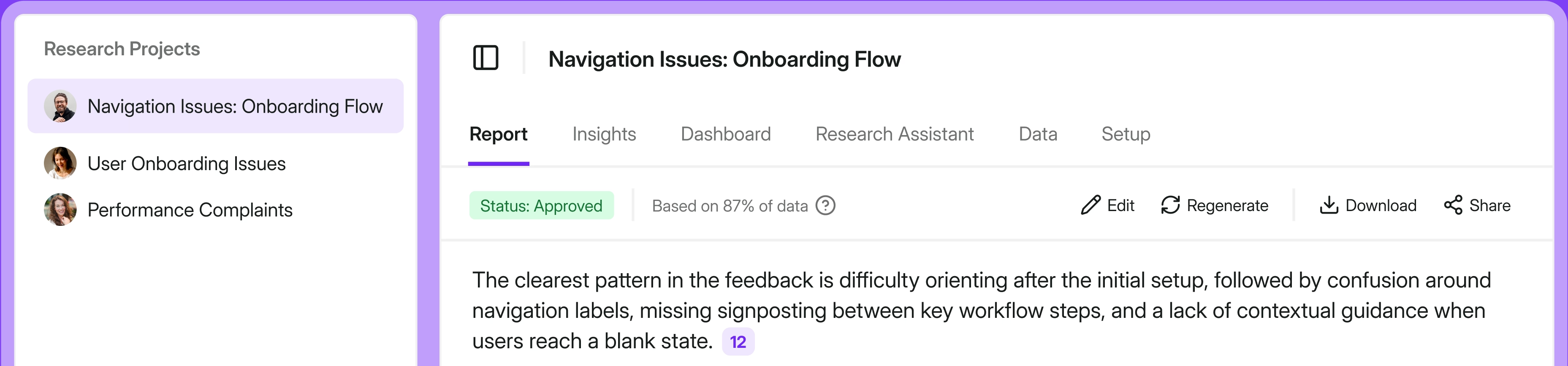
Does Iterate feel too narrow for your feedback program? It often starts to look that way when surveys stop being the whole job. Maybe survey responses now need to sit alongside support tickets, call transcripts, app reviews, and other customer evidence. At the same time, negative feedback needs a clear owner and a follow-up workflow.
Iterate still covers the survey side well, with contextual web and mobile targeting, email and link studies, open-text analysis, and integrations. But once your team needs a broader system around those surveys, it may be time to look elsewhere.
I work at Survicate, so I have a horse in this race. I’ve tried to be straight about where we fit and where we don’t. This guide looks at seven Iterate alternatives through the lens of Product Managers and Product Growth leads at product-led SaaS companies.
They need to collect contextual feedback inside and beyond the product, analyze it alongside other customer evidence, and route what they learn into action. I also consider how much setup each tool takes and how its pricing behaves as the audience grows. Where another tool fits that job better than Survicate, I say so.
Listed brands are not placed in order of importance or ranking of any sort.
TL;DR
No alternative replaces Iterate one for one, because each solves a different part of that problem. The right choice starts with deciding what your feedback program needs next. Here is the short version before the full breakdown.
Why are people leaving Iterate?
Iterate is strongest when surveys remain at the center of the program. Product and lifecycle teams get precise targeting across web and mobile, plus email and link studies, AI analysis, and activation through tools already in their stack.
The fit starts to loosen around three adjacent needs: bringing in feedback collected elsewhere, giving responses an operational next step, and keeping costs aligned with survey use rather than total product reach.
- The first gap is source breadth. Iterate’s Research Assistant goes beyond basic reporting: it adds sentiment and topic tagging, contextual follow-up questions, and one-off or recurring Insights reports. Its analysis, however, remains centered on responses collected through Iterate. If you also need to work with support tickets, calls, app reviews, transcripts, and uploaded files, that material has to come together somewhere else.
- The second gap appears after the answer arrives. Iterate’s integrations with lifecycle and product tools can enrich user profiles and trigger activity. The native CRM and helpdesk layer is thinner, however. If a negative response is supposed to create a ticket, reach a named owner, update the right account, and start a customer follow-up, most of that workflow still has to be built outside Iterate.
- Pricing can add another reason to look elsewhere. Starter and Business plans scale with audience size through MAU pricing. That makes the model easier to inspect than quote-only pricing, but product growth can raise the bill before the team runs more surveys or learns anything new. The price you first see in Iterate’s configurator may not be the one you end up paying, either. Higher email-send allowances, Research Assistant, and removing Iterate branding are all paid extras. Add a few of them and the monthly bill can climb considerably.
Iterate remains a capable tool within its boundaries. The fit weakens when a team needs one place to analyze evidence from the wider customer stack, a more native handoff into CRM or support, or pricing less tightly coupled to audience growth.
How I did this review
What I looked for
I judged every tool against the same job: running continuous feedback across the product and other customer channels, understanding what the responses mean, and getting the result to the right place. I looked at where and how surveys can be delivered, what the analysis reveals, and what can happen next - whether that means updating a CRM record, triggering a lifecycle campaign, or assigning a ticket. I also considered how much work each tool takes to set up, what support is available, and how pricing behaves as the audience grows.
How I validated the claims
I started with our own in-house testing documentation and relevant sales calls transcripts. I also dug deep into vendor documentation and product pages, then cross-checked the claims against public user reviews and independent pricing sources where official numbers weren’t available. Pricing and packaging change often, so treat every figure as a starting point and confirm it with the vendor before you buy.
Inside 7 Iterate alternatives for product-led teams
Here's each tool in depth. Read the hot takes for where each one actually fits.
Survicate: multichannel product feedback with cross-source analysis
What does Survicate do?
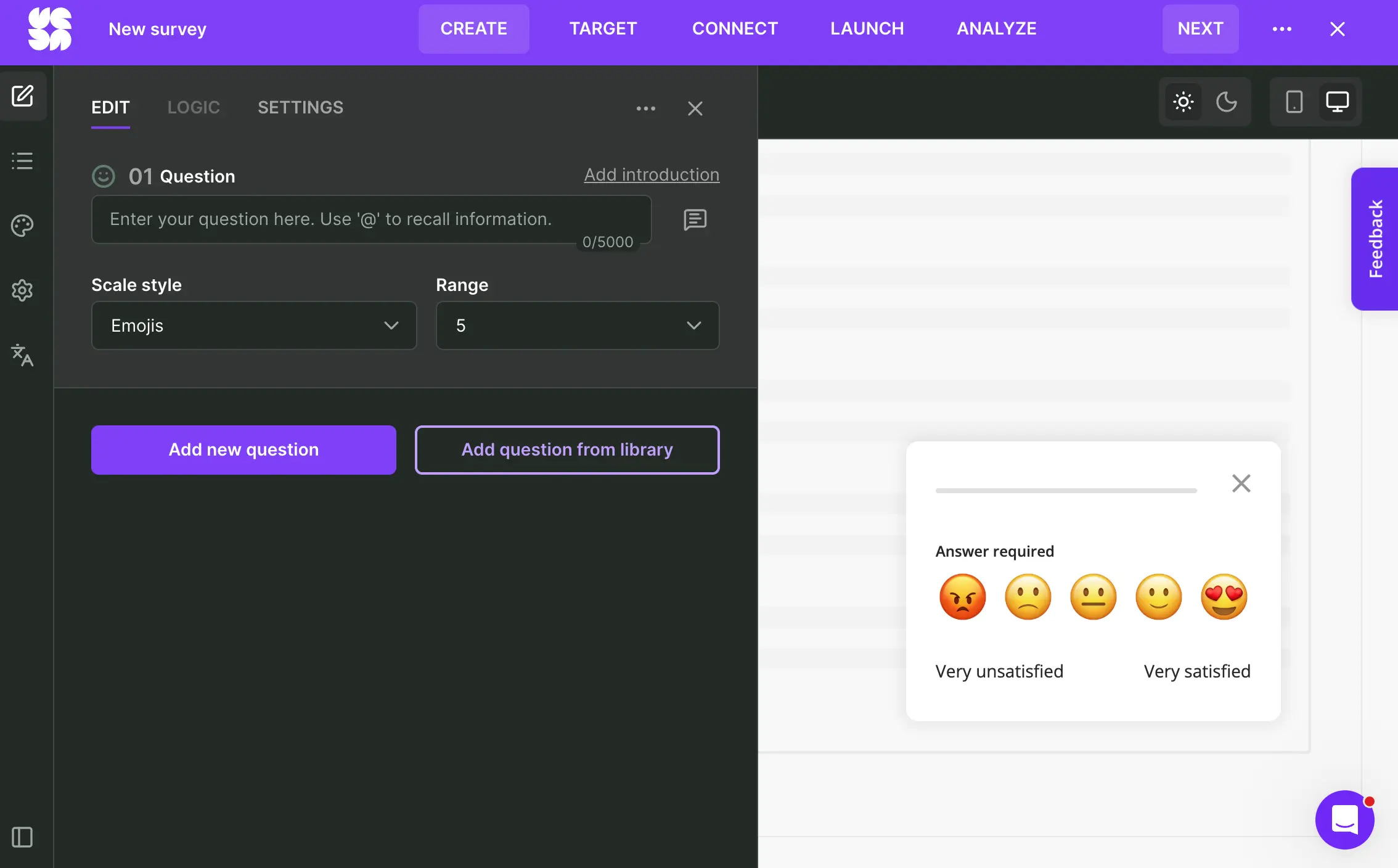
Survicate runs targeted surveys inside web and native mobile products, on websites, through email campaigns, and by link or QR code. Product events and user attributes determine who sees a survey and when.
Responses flow into Research Hub, where teams can analyze them alongside support tickets, call and interview transcripts, app reviews, and files from 15+ sources. Its AI surfaces recurring themes and sentiment, lets you ask questions across the dataset, and drafts editable reports with conclusions linked back to the original feedback.
Who is Survicate primarily for?
Survicate fits product teams at SaaS companies that need contextual in-product surveys but also receive useful evidence through tickets, calls, and reviews. It gives them one place to analyze those sources together and pass the relevant findings into their CRM, helpdesk, lifecycle, or product analytics stack. CX and research teams working across the same sources are also a natural fit.
What’s Survicate’s ease of use?
Setup is self-serve. Website, email, and link surveys can go live without a sales call. Contextual in-product surveys require an initial technical step: installing the web snippet or mobile SDK. G2 reviewers consistently rate Survicate highly for ease of use and setup.
What’s Survicate’s customer support like?
Customers can reach a person through live chat. Survicate reports a 97% satisfaction rate and a two-minute first response time. Positive experiences with the support team are a recurring theme in reviews on G2 and Capterra.
What are the main pros of using Survicate?
- Website, in-app, mobile, link, and QR surveys can all be managed from one account. This gives teams broad channel coverage without splitting collection across several survey tools.
- Event and attribute targeting ties feedback to a particular user and the moment that prompted the survey. The result carries more context than an anonymous score collected after the fact.
- Research Hub analyzes surveys alongside tickets, calls, transcripts, app reviews, and files. Its reports link conclusions back to the original material, so teams can check what customers actually said.
- Native integrations can update CRM records, create or update support tickets, and pass identified responses into product analytics and lifecycle tools such as HubSpot, Zendesk, Intercom, Amplitude, Mixpanel, Segment, Braze, and Salesforce.
What are the main cons of using Survicate?
- Product analytics and session replay still require another tool. Integrations can connect survey responses with behavioral data, but you will leave Survicate to see what a customer did before answering.
- Teams running formal research methods such as conjoint or MaxDiff will need a more specialized research platform.
- Survicate has no native case-management layer. It can create or update tickets through integrations, but ownership, assignment, and customer follow-up remain in the CRM or helpdesk.
Pricing
Survicate pricing starts at $56 per month and reaches $569 on Enterprise. A free trial unlocks all pro-level features. Usage is measured through survey responses and data points rather than monthly active users, so a sudden increase in signups does not automatically increase the bill.
My hot take: how does it compare to Iterate?
Survicate makes its strongest case when Iterate still covers survey collection well, but the feedback work around it has grown. You keep contextual web and mobile survey campaigns.
The meaningful change comes after collection: survey responses can be analyzed beside tickets, calls, reviews, and transcripts, then passed into the CRM, helpdesk, or product stack. I also find response and data-point pricing easier to defend for a growing app than a bill tied to every active user.
The switch becomes less convincing if behavioral analytics and replay need to live beside the feedback, or if the team regularly runs formal methods such as conjoint and MaxDiff. On this list, Survicate’s role is the feedback orchestrator. Behavioral analytics and enterprise research remain separate jobs.
Survicate won't be the right fit for everyone. Here's when you should pick someone else
I work at Survicate, which makes it my responsibility to be honest about when you’d be better off choosing another tool. Pick Sprig if you want product research to revolve around session replay, heatmaps, and continuous discovery, Pendo if feedback is only one part of a broader product analytics and adoption stack, or Qualtrics if you need enterprise-grade research methods and governance. SurveySparrow may also make more sense when the priority is a more operational CX setup built around channels such as SMS and WhatsApp, ticket ownership, SLAs, and escalation workflows.
Sprig: enterprise product research with replay, panels, and AI
What does Sprig do?
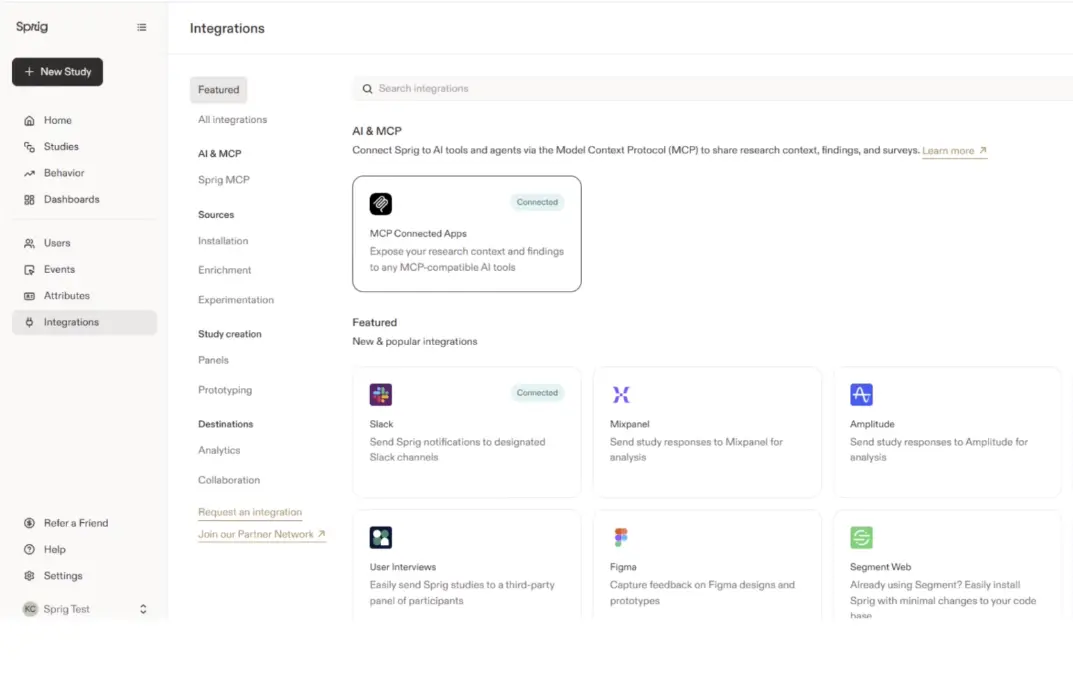
Sprig (formerly UserLeap) is an enterprise platform for product and UX research teams. It runs targeted surveys inside web and mobile products, as well as standalone studies delivered through links, email, and participant panels. Session replay and heatmaps sit beside the responses, so researchers can see what someone did before and after answering instead of interpreting the comment in isolation.
Its AI agents help design studies, ask adaptive follow-up questions, synthesize findings, and build reports. Sprig also supports formal methods and advanced survey logic, making it much closer to a full research environment than a tool for firing off the occasional microsurvey.
Who is Sprig primarily for?
Sprig is built for mature product and UX research teams that need rigorous studies, participant panels, and behavioral evidence in the same system. A SaaS product team can use it too, of course. But if most research questions can be answered with a short in-app survey and a dashboard, a fair amount of Sprig may sit unused.
What’s Sprig’s ease of use?
Building the study is the easy part. AI can turn a research goal or uploaded document into a first draft, saving researchers some time at the blank-page stage.
The heavier work begins when you want to target studies using actual product behavior. That requires an installed SDK, identified users, attribute data, and properly instrumented events. At this point, the researcher may find themselves waiting on engineering or data before the clever targeting shown in the demo becomes available in practice.
What’s Sprig’s customer support like?
Sprig includes enterprise onboarding and support in its current packaging, which is useful when the rollout involves SDKs and event instrumentation rather than another login and a short setup checklist. Public reviews do not give a consistent enough picture for me to make a confident claim about the everyday support experience. Ask who will help with implementation, how long that help lasts, and what happens once onboarding is over.
What are the main pros of using Sprig?
- Targeting can use attributes, product events, and user behavior across web and mobile products. This gives research teams much more precision than a broad segment or a survey shown after an arbitrary delay.
- Native session replay and heatmaps place answers beside the behavior surrounding them. Researchers do not have to guess whether a frustrated comment came before the user found the feature, after three failed attempts, or somewhere else in the journey.
- Formal methods, advanced logic, and AI-assisted follow-ups give Sprig more depth than a typical continuous-feedback tool. The AI can also take on parts of study design, synthesis, and reporting that would otherwise remain manual.
- The same platform can be used to study existing customers and recruit participants from outside the current user base. In-product surveys, links, enterprise email, and panels cover both sides of that work.
What are the main cons of using Sprig?
- The most interesting behavioral targeting depends on SDK installation, user identity, attribute data, and event instrumentation. Without help from engineering or data, the first properly targeted study may take longer to launch than the survey builder suggests.
- Sprig can be a lot of platform for a team running lightweight, always-on feedback. Its research depth brings more implementation, governance, and purchasing complexity, so the team needs to use enough of that depth to justify carrying it.
- Integrations and MCP-enabled workflows can move findings into other systems, but they do not give a negative response an owner by themselves. If every detractor needs a ticket, a follow-up SLA, and someone responsible for the account, that handoff still has to be designed elsewhere.
Pricing
Sprig does not publish its prices, so there is no useful number to check before speaking to sales. Capterra lists Starter at $5,000 per year, while Vendr reports a median annual spend above $23,000. Treat both figures as rough benchmarks: getting an actual number still requires a sales conversation. Below Enterprise, usage is measured on two fronts: monthly unique users and study units, which include survey responses, replay clips, and heatmap captures.
My hot take: how does it compare to Iterate?
Sprig becomes the more interesting option when a survey answer is only the beginning of the investigation. Session replay and heatmaps show the behavior around it, panels take research beyond the users you already have, and methods such as MaxDiff and conjoint support questions that Iterate was never designed to answer. If those capabilities would be used regularly, the extra research depth can justify the move.
I would be much less enthusiastic about giving all that machinery to a team that mainly wants lightweight, continuous feedback and a clean handoff into CRM or support. Sprig can move findings through integrations and MCP-enabled workflows, but the owner, ticket, and follow-up process still need to exist somewhere else. Compared with Iterate, Sprig earns its place through research depth, not simply more ways to send a survey. That depth comes with enterprise weight, and the team needs to use enough of it to make the trade worthwhile.
Pendo: product analytics with in-app guidance and discovery
What does Pendo do?
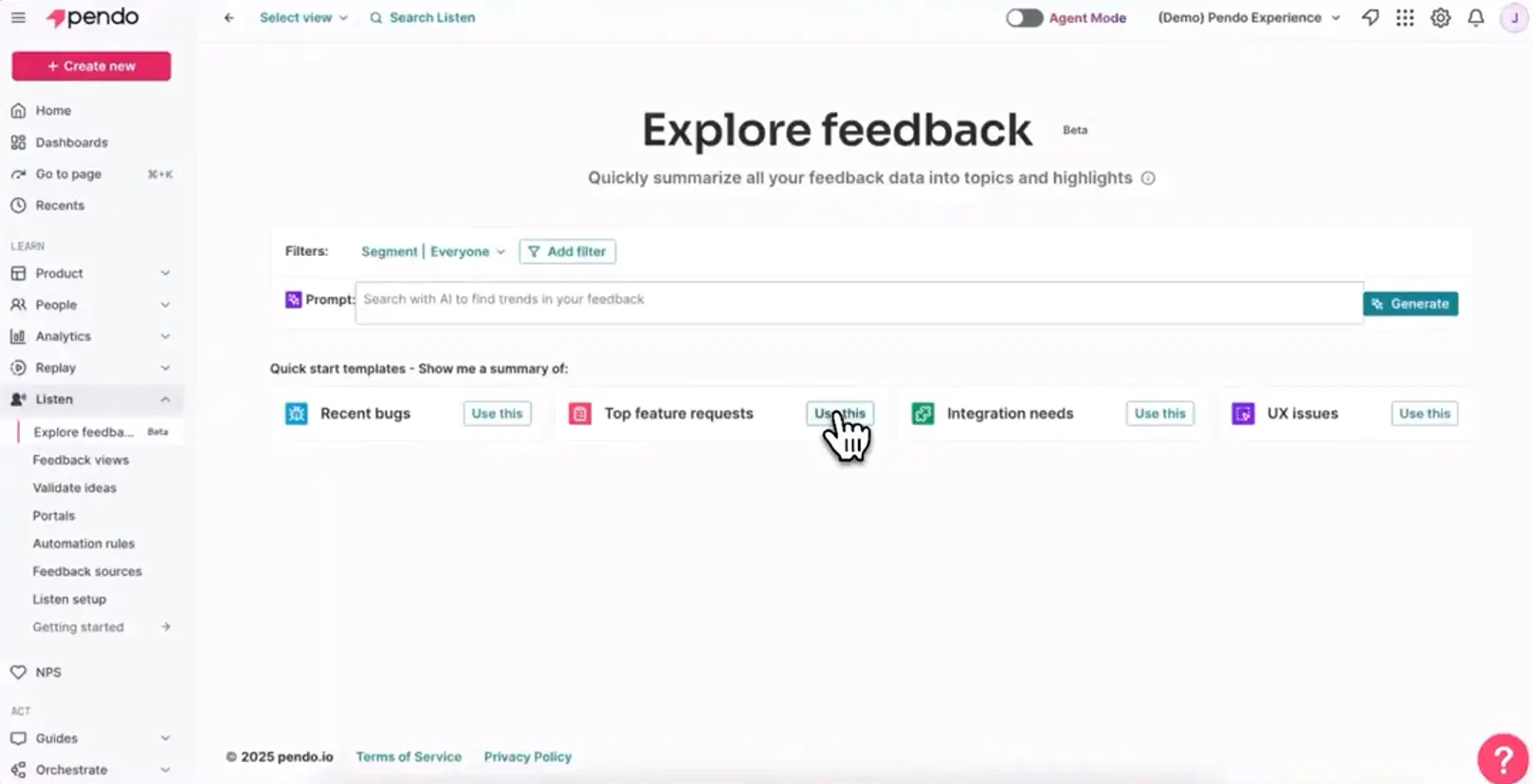
Pendo starts with what users do. Its core platform combines product analytics, session replay, in-app guides, and onboarding. The Listen layer adds what users say, bringing together responses from Pendo surveys and feedback collected elsewhere.
AI helps find themes and trends across that material. From there, feedback can be assigned to an idea, used in validation, moved onto a roadmap, connected to Jira, and eventually turned into a customer update. Pendo is trying to cover a large part of the journey from discovering a problem to shipping something in response.
Who is Pendo primarily for?
Pendo is aimed at product teams in mid-market and enterprise companies that want usage data, adoption, feedback, and planning in one system. Customer success and sales teams can add evidence, but product discovery and delivery remain essential.
What’s Pendo’s ease of use?
Pendo’s breadth is part of the appeal, but it also creates most of the work. Instrumentation, data structure, segments, guides, integrations, and governance all need attention before the wider platform starts behaving like one coherent system.
That investment can pay off when analytics, adoption, and discovery are all part of the plan. If they are not, someone still has to implement and administer a platform whose more interesting parts may remain untouched.
What’s Pendo’s customer support like?
Pendo offers customer success, technical success, and professional services covering onboarding, training, deployment, and integrations. That range suits a platform-scale rollout. The labels alone do not tell you which help is included in your contract, though.
Before signing, pin down who will support the implementation, which integrations they will help configure, and what happens after the initial deployment. The software subscription does not necessarily cover the whole rollout.
What are the main pros of using Pendo?
- Product analytics, session replay, guides, and surveys place customer feedback beside feature adoption, journey, and account data. Teams can compare what users say with what the same users actually do.
- Listen can combine Pendo responses with material from Zendesk, Salesforce, Slack, call transcripts, and CSV or API imports. Its AI then looks for recurring themes, trends, and sentiment across those sources.
- Pendo has one of the strongest action chains on this list. Feedback can be assigned and categorized, linked to an idea, validated inside the product, promoted to a roadmap, connected to Jira, and followed by an update to customers once the work ships.
What are the main cons of using Pendo?
- Pendo’s own survey collection remains primarily in-app. Listen expands the range of feedback you can analyze, but teams that regularly run email, link, and standalone surveys will not find the same collection flexibility they get from a multichannel survey platform.
- Implementing the wider platform is a data, process, and governance project. Someone has to maintain the instrumentation, data structure, segments, guides, integrations, and permissions after the initial rollout.
- Paid plans are quote-only and priced by monthly active users as well as functionality. The full Listen workflow is bundled into Ultimate, while product discovery costs extra on lower tiers. Both audience growth and the temptation to add one more module can find their way into the next contract.
Pricing
Pendo Free supports up to 500 monthly active users and includes a basic feature set. Paid plans are quote-based, with the price determined by MAU volume and selected modules. Vendr reports common annual spending of roughly $20,000 to $60,000+, while larger deployments can reach six figures. These are buyer-reported benchmarks, not official Pendo prices.
My hot take: how does it compare to Iterate?
I would take Pendo seriously if replacing Iterate is part of a larger decision about the product stack. Feedback can sit beside behavioral data, turn into an idea, be tested with users, move through Jira and the roadmap, and finish with an update to the customers who asked for it. Few survey tools can carry the thread that far.
As a straight replacement for targeted surveys, Pendo is much harder to defend. The survey-distribution layer is narrower, implementation is heavier, and MAU remains part of the price. You may also end up buying several capabilities simply to reach the one that interested you.
Pendo can therefore be the better platform and still be the wrong migration. It earns its weight when analytics, adoption, and product discovery matter as much as feedback itself.
Refiner: lightweight SaaS surveys and in-app messages
What does Refiner do?
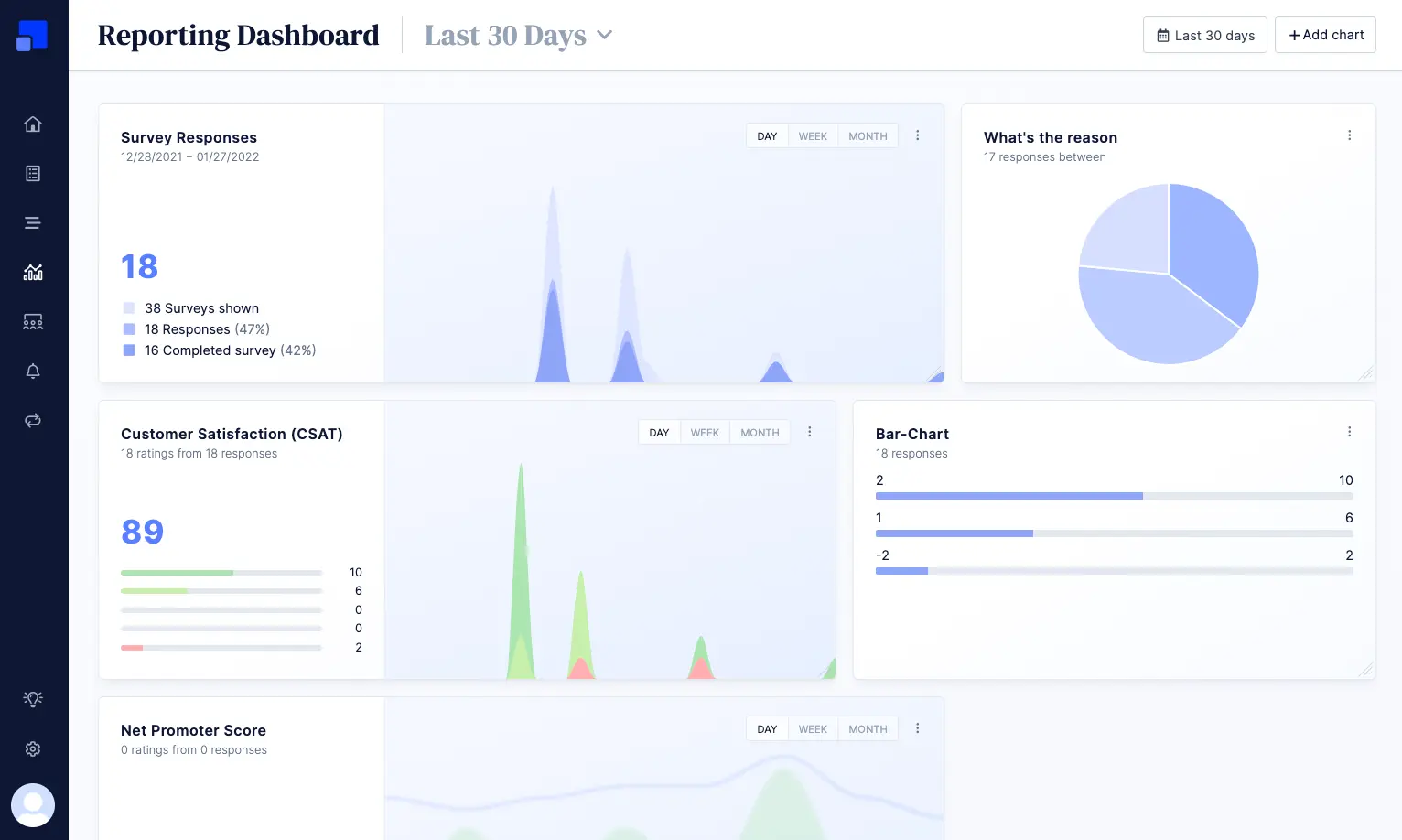
Refiner keeps its ambitions fairly narrow. It is built specifically for collecting feedback in SaaS and digital products, with targeted surveys inside web and native mobile apps, website popups, shareable links, and email embeds. The email part comes with one important condition: Refiner provides the embed and landing page, while your existing email platform does the sending.
Targeting can use user attributes, pages, screens, and timing. Event tracking is available on Growth. Refiner also includes targeted in-app messages with calls to action, which can be used for announcements, review requests, redirects, and upgrade prompts.
Who is Refiner primarily for?
Refiner fits product, growth, and customer success teams that want surveys to look and behave like part of their SaaS product, without taking on a larger research or analytics platform.
The fit is clearest when the rest of the stack is already in place. Amplitude, Mixpanel, or Segment can provide the behavioral context, while a CRM handles whatever needs to happen after the response. Refiner fills the survey-shaped gap between them.
What’s Refiner’s ease of use?
The word “lightweight” needs a small asterisk on mobile. The SDK still has to be installed, initialized, and connected to user identities. Behavioral targeting also requires the team to pass screens and events.
Once that foundation is in place, the day-to-day work becomes much lighter. Surveys can be created, targeted, and changed from the dashboard without waiting for another app release.
What’s Refiner’s customer support like?
Essentials and Growth include self-serve documentation and email support. Growth also comes with a one-to-one onboarding call. Enterprise adds live chat and phone support, a dedicated representative, concierge service, and consulting.
The support model therefore changes quite noticeably between tiers. Teams expecting hands-on help beyond the initial onboarding call should check which level they would actually receive.
What are the main pros of using Refiner?
- Surveys can be targeted using product context and styled to match the surrounding interface. They are less likely to feel like an external form dropped into the middle of the experience.
- Refiner covers web and native mobile apps, website popups, email embeds, and survey links. Its in-app messages add a simple way to prompt another action after or outside a survey.
- Dashboards, trends, segmentation, and AI response tagging provide enough analysis for teams that need to monitor and sort feedback without running a formal research program.
What are the main cons of using Refiner?
- Refiner does not include product analytics, session replay, heatmaps, or onboarding walkthroughs. An in-app message can point a user somewhere, but it will not show where they struggled or guide them through a full product flow.
- Its analysis covers feedback collected through Refiner. Support tickets, calls, reviews, and other external evidence do not come together in the same repository.
- Refiner does not send email surveys itself. It supplies the embed and landing page, so the campaign still depends on your existing email or marketing platform.
- Event tracking, behavioral segmentation, API and webhooks, and most CRM, CDP, and product analytics integrations require Growth. Alerts and integrations can pass feedback to another system, but assignment, ownership, and customer follow-up still live elsewhere.
Pricing
Refiner offers a 30-day trial followed by a limited free plan. Paid plans cost between $99 and $239 per month, scale with monthly active users, and include unlimited responses. More answers do not raise the price, but a larger audience does. Enterprise pricing is custom.
My hot take: how does it compare to Iterate?
Refiner may be the least dramatic Iterate replacement on this list, and to me that is part of its appeal. If Iterate mainly serves as the survey layer in your stack, Refiner can take on much the same role without asking the team to adopt a broader research or product platform. It covers targeted web and native mobile surveys, website popups, links, and email embeds, while adding in-app messages for the occasional nudge or announcement.
Its boundaries are easy to find. Refiner will not send those email surveys for you, bring tickets and calls into one research repository, or manage a detractor through an owned follow-up process. It also keeps MAU as the pricing metric, although unlimited responses make a successful survey less likely to create a nasty surprise.
For a team that already likes its analytics, CRM, and lifecycle stack, those limits may be perfectly reasonable. If the reason for leaving Iterate is that the wider feedback program has outgrown a survey specialist, Refiner is likely to reproduce the same ceiling.
Qualtrics: enterprise experience management and research
What does Qualtrics do?
Qualtrics treats research as enterprise infrastructure. It can handle everything from straightforward surveys to formal studies built with more than 100 question and sub-question types, advanced logic, conjoint, MaxDiff, Text iQ, and statistical analysis through Stats iQ.
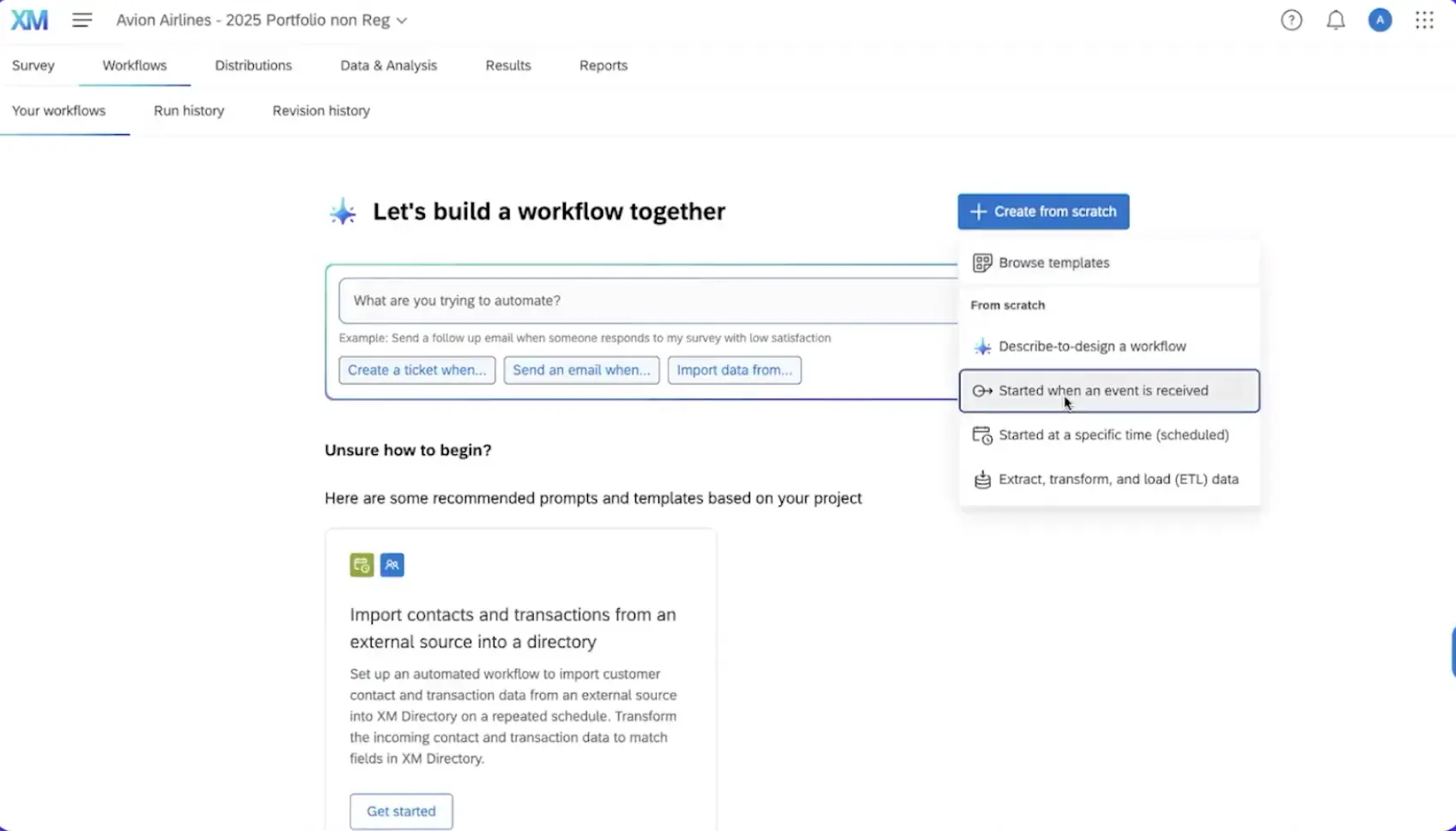
That breadth extends into the product experience. Website & App Insights supports targeted website intercepts and embedded feedback through iOS, Android, and React Native SDKs. On the operational side, a poor response can become a ticket with an owner, reminders, and an escalation path instead of waiting in a dashboard for someone to notice it.
Who is Qualtrics primarily for?
Qualtrics is built for large organizations and dedicated research, CX, and digital-experience teams running formal programs across several markets. It becomes particularly useful when the same program needs shared standards, controlled permissions, and a defined process for following up on feedback.
A smaller research team can start out using the self-serve product as well. The wider platform starts to justify its weight when several teams need to work from one governed system rather than each running research in its own way.
What’s Qualtrics’s ease of use?
A capable team can launch a focused study or guided website intercept relatively quickly. The difficulty arrives by accumulation. Add an app SDK, complex logic, several markets, dashboards, roles, integrations, and ticket workflows, and someone has to make the whole system hold together. At that point, Qualtrics needs a clear admin owner and an implementation plan.
What’s Qualtrics’s customer support like?
Qualtrics follows an enterprise support model, with extensive documentation and a range of implementation and professional services. The exact experience depends heavily on the contract. Onboarding, technical support, professional services, and ongoing administration may all be treated as separate scopes.
I would spell out those responsibilities before signing rather than assume that “enterprise support” covers every implementation problem down the road. Support is part of the contract you negotiate, not one standard setup every customer gets, so it is also worth revisiting the scope and terms at each renewal.
What are the main pros of using Qualtrics?
- Qualtrics has the deepest formal research capability on this list. Conjoint, MaxDiff, advanced logic, text analysis, and statistical tools support studies that need to survive more scrutiny than a quick product survey.
- Governance, permissions, and multi-market support allow a large organization to standardize research across teams. Not everyone has to invent their own process, dashboard, and access rules.
- Closed-loop workflows can assign a response to an owner, trigger a follow-up, and escalate an unresolved case. Feedback therefore has a defined route out of the reporting layer.
What are the main cons of using Qualtrics?
- The capabilities are spread across research, digital-feedback, and CX products. The buying process needs careful scoping, or the final quote may omit a channel, analysis tool, or workflow you assumed was part of the platform.
- Some of the more advanced capabilities require additional licenses. Stats iQ, for example, is an add-on, so increasing the research depth can also increase the bill beyond the initial quote.
- For teams mainly running continuous NPS, CSAT, and lightweight product feedback, Qualtrics can be overkill. Unless the program makes real use of its enterprise-level research, governance, and workflow depth, you may be paying for more platform than you need. On top of that, you still take on the administrative work of managing permissions, dashboards, integrations, and governance.
- Custom plans are priced by usage and selected capabilities. With several products and add-ons involved, predicting how the cost will change is harder than it would be with a focused survey tool.
Pricing
Qualtrics does not publish a general price for its platform, so most purchases require a custom quote. The one public self-serve option is Strategic Research, starting at $420 per month. That is the price of a specific research product, not a public entry point reflecting the wider Qualtrics setup.
Verified contract data (Vendr) puts the median Qualtrics cost at $30,000 a year, with a spread from roughly $7,000 to $140,000. Larger enterprise deals may typically land on the higher end of that spectrum.
My hot take: how does it compare to Iterate?
Qualtrics earns its place when both feedback and research have to follow formal methods across markets, permissions need to be governed, and a poor response must become a ticket with an owner, an SLA, and an escalation path. Qualtrics can also collect feedback inside websites and native apps, so moving from Iterate does not mean retreating to email surveys and standalone forms.
I would not make that move just to give a product-led SaaS team a more powerful NPS or CSAT tool. Iterate is far more direct for contextual product feedback and lifecycle activation. With Qualtrics, the license is only the visible part of the cost. The platform also expects an admin owner, an implementation plan, and processes that several teams will actually follow.
If formal methods and enterprise governance are not non-negotiable, you are buying an institution to solve a workflow.
Typeform: conversational forms and AI-assisted research
What does Typeform do?
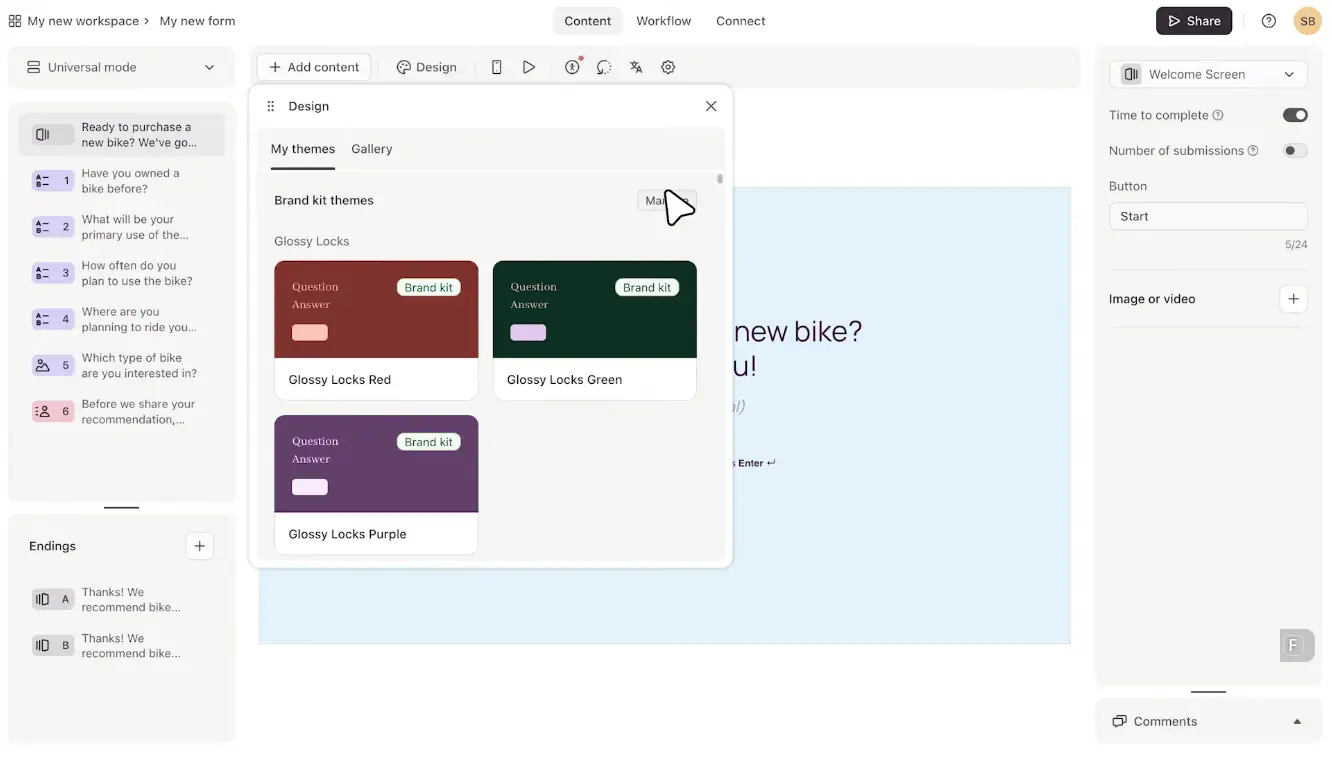
Typeform builds polished, one-question-at-a-time forms, surveys, and quizzes distributed through links, email, and web embeds. Clarify with AI asks follow-up questions after open-text answers, while Smart Insights finds themes, sentiment, correlations, and differences between respondent groups. Research Flow adds AI-moderated text, voice, and video studies, participant recruitment, and automated synthesis.
The catch is that these features analyze research conducted through Typeform. They do not bring in support tickets, calls, reviews, or other feedback from the customer stack.
Who is Typeform primarily for?
Typeform fits marketing, research, and product teams running standalone surveys, concept tests, quizzes, and studies where the respondent experience matters. For product teams, it is better suited to a defined research project than an always-on in-app feedback program.
What’s Typeform’s ease of use?
Typeform remains one of the easiest tools here to start with. The builder is intuitive, and forms look polished without much work. Research Flow and automations add complexity, but publishing a standard form is still a self-serve job.
What’s Typeform’s customer support like?
Typeform offers a Help Center and ticket-based support. Business adds priority support and live chat, while Enterprise includes dedicated account management, tailored onboarding, and priority expert support.
What are the main pros of using Typeform?
- The conversational layout and strong design controls give surveys a polished respondent experience.
- Clarify with AI can probe open-text answers, while Smart Insights analyzes qualitative and quantitative results.
- Integrations and automation tools can route submissions, update contact data, and trigger email or SMS follow-ups.
What are the main cons of using Typeform?
- Web embeds do not provide native targeting based on product events and attributes, and Typeform has no mobile survey SDK. The form can appear inside the product without knowing what the user has just done there.
- Its AI analyzes Typeform studies rather than combining them with tickets, calls, reviews, and other external evidence.
- Monthly response limits apply across the account. Once the allowance is used, all forms become invisible until the next month or an upgrade.
Pricing
Typeform’s free plan allows 10 responses per month. With annual billing, its main self-serve plans range from $28 to $91 per month. Moving up the tiers increases both the response allowance, and the number of seats, from one to five.
Growth Flow costs $266 per month with annual billing, while Research Flow and Enterprise are quote-based. I noticed that Typeform is currently testing different pricing configurations, so the plans and prices you see may vary slightly between versions of its pricing page.
My hot take: How does it compare to Iterate?
Typeform can be an interesting option when the participant experience deserves as much attention as the survey questions. But Typeform offers more than just pretty design: Clarify with AI and Research Flow also give teams more room to probe an answer and run standalone research.
However, I would be much less convinced by it as a direct replacement for Iterate. Typeform lacks event and attribute targeting and a native mobile SDK, so asking the right user immediately after a particular product action requires external orchestration. An embed may look perfectly at home inside the product, but it still does not understand the product moment.
That is the dividing line for me. Typeform is stronger when you invite someone into a study and want that experience to feel polished. Iterate is the more natural tool when user behavior decides whom to ask and when.
SurveySparrow: in-product surveys with multichannel CX follow-up
What does SurveySparrow do?
SurveySparrow combines in-product surveys with a broader CX workflow. It collects feedback through websites, native mobile apps, email, links, QR codes, SMS, and WhatsApp. The platform can also analyze open-text responses, create tickets, assign owners, and trigger customer follow-up.
Who is SurveySparrow primarily for?
SurveySparrow is primarily for CX and feedback teams, from SMB to enterprise, that want to collect feedback and manage the response in the same system.
For a product-led SaaS team, the clearest fit is a shared workflow: product collects feedback at a specific moment, while customer success or support takes responsibility for what happens next.
What’s SurveySparrow’s ease of use?
Reviewers generally find the standard survey builder approachable and easy to use. The in-product layer needs more preparation. A developer must install the website code or mobile SDK and pass the screens, events, and user properties used for targeting. After that, the team can launch and update SpotChecks without redeploying each survey.
Choosing the package may prove less straightforward than building the survey. In-product feedback, CX programs, advanced analysis, and operational workflows sit across different capabilities and pricing tiers.
What’s SurveySparrow’s customer support like?
Basic and Starter include 24x5 email support, while Business adds chat. Enterprise includes a dedicated customer success manager.
What are the main pros of using SurveySparrow?
- SpotChecks run across websites and native mobile apps, with targeting based on pages, screens, user properties, and custom events. Mobile SDKs support iOS, Android, and Flutter.
- SurveySparrow has its own email distribution and also supports SMS, WhatsApp, links, and QR codes. The feedback program does not have to remain inside the product.
- Ticket management and workflows can assign negative feedback, apply SLAs, escalate unresolved cases, and automate follow-up.
What are the main cons of using SurveySparrow?
- SpotChecks and some advanced CX and analysis capabilities require an Enterprise conversation, so the useful comparison with Iterate starts with a complete quote.
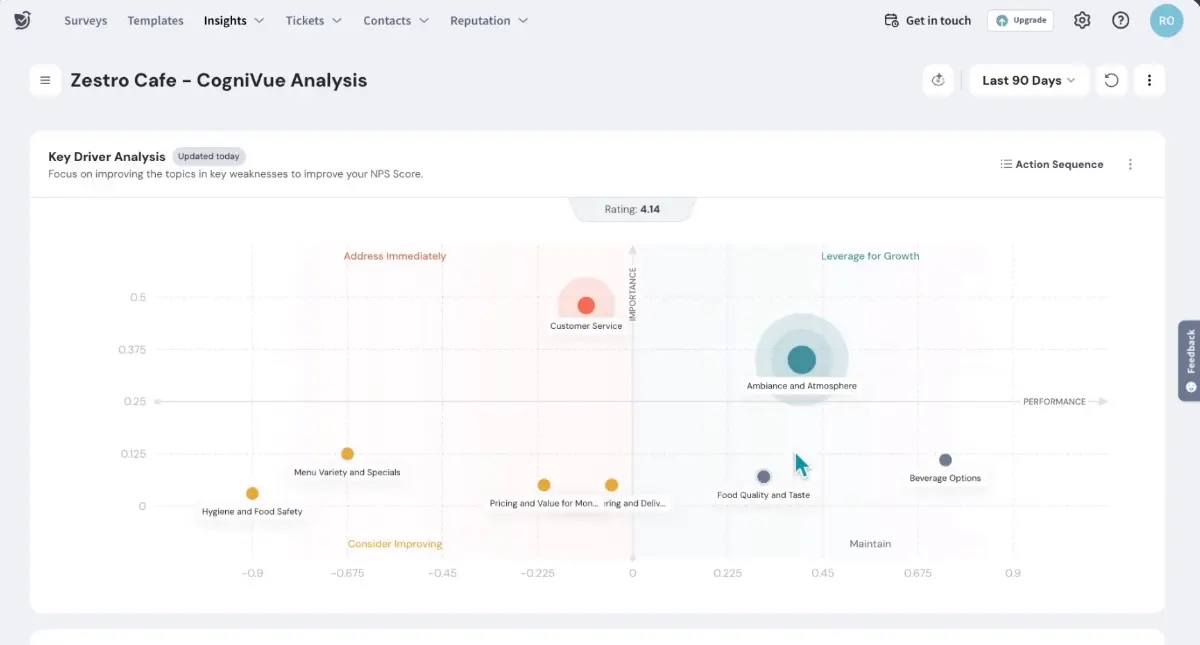
- CogniVue can analyze several surveys or several review platforms, but it cannot currently combine survey responses and external reviews in the same analysis. Teams looking for one repository spanning surveys, tickets, calls, reviews, and other evidence will still have a gap.
- SurveySparrow can receive events through tools such as Segment, but teams using Braze or Iterable should map events, identities, response data, and campaigns before migrating.
- Web and mobile targeting requires engineering work upfront. Screens, custom events, and visitor properties must be instrumented before they can be used in SpotChecks.
Pricing
With annual billing, SurveySparrow’s public survey plans start between $19 and $79 per month, depending on the tier. Those prices cover the lowest response allowance. Basic, Starter, and Business each offer three response levels, which can take the monthly cost as high as $275.
Enterprise is quote-based. SurveySparrow also keeps pricing for its separate CX Suite behind a sales conversation.
My hot take: how does it compare to Iterate?
SurveySparrow is most convincing to me when feedback needs an owner, not only a place in the dashboard. It can ask at a specific product moment, continue the conversation through email, SMS, or WhatsApp, and turn a poor response into a ticket with an SLA and follow-up. If the problem with Iterate begins after the answer arrives, that is a meaningful upgrade.
I would not switch based on the $19 headline or the assumption that CogniVue becomes a repository for every kind of customer evidence. The relevant in-product setup requires an Enterprise quote, and mixed-source analysis still has limits. Teams relying on Braze or Iterable also need to map the existing lifecycle workflow before switching tools.
Is Iterate right for you? The final verdict
Iterate remains a strong choice while surveys sit at the center of your feedback program. It covers targeted web and native mobile surveys, built-in email, open-text analysis, and useful integrations with lifecycle and product tools. It’s also relatively easy to evaluate upfront: pricing is public, and there’s a 14-day trial.
Look elsewhere when you need to analyze feedback beyond surveys, route responses into owned CRM or support workflows, or stop paying according to product reach. Those are good reasons to migrate or rethink your shortlist; “the reporting feels basic” isn’t necessarily one on its own.
Which Iterate alternative should you choose?
Start with the job you need the next tool to do better. For SaaS product teams, that usually means deeper research, behavioral context, broader channels, cross-source analysis, a cleaner route from response to owner, or pricing that ages better as the product grows. Name the priority first, and the shortlist becomes much easier:
- Survicate is the closest fit for continuous, multichannel product feedback. It retains targeted web, and native mobile surveys and email-embedded surveys, while Research Hub adds analysis across surveys, tickets, calls, reviews, transcripts, and files. It also provides stronger handoffs into CRM, support, and product tools without tying the price to active users.
- Sprig goes further on product research. Session replay, heatmaps, participant panels, and formal methods make sense when the team will use that depth often enough to justify a larger budget and implementation.
- Pendo is the broader product-platform decision. Consider it when analytics, in-app guidance, and the path from feedback to roadmap matter as much as the surveys. It brings a heavier rollout and keeps MAU in the pricing model.
- Refiner is the focused survey specialist. It suits teams that already have product analytics and CRM tools and want targeted, on-brand surveys without adopting a larger platform. Built-in email sending and cross-source analysis remain outside its scope, while pricing still follows MAU.
- Qualtrics is for formal research and governed enterprise programs. It combines advanced methods, permissions, multi-market support, and closed-loop workflows, but expects considerably more administration and process in return.
- Typeform is strongest when the study itself is the deliverable. Its polished forms and AI-assisted research suit concept tests, interviews, quizzes, and standalone studies. Event-based product targeting and native mobile surveys are a different job.
- SurveySparrow fits a broader CX operation. SpotChecks add in-product feedback, while SMS, WhatsApp, ticketing, and workflows support cross-team follow-up. It is less natural when feedback needs to sit beside product analytics and session replay, and SpotChecks require Enterprise pricing.
FAQ
Does Iterate charge based on monthly active users, and why does that matter for a growing product?
For apps and websites, Iterate prices its plans by addressable audience size, expressed as monthly active users. Email surveys are metered separately by monthly email recipients. This matters because the bill can rise as your audience grows even if the number of surveys or responses does not. Compare the pricing metric, not just the starting price: Survicate scales by survey responses and Research Hub data points, Pendo and Refiner use MAU, while Sprig now quotes based on response volume, activated research capabilities, and deployment environments.
Which Iterate alternatives support both web and native mobile in-app surveys?
Survicate, Sprig, Refiner, SurveySparrow SpotChecks, Qualtrics Website & App Insights, and Pendo can all collect feedback inside both web and native mobile products. The surrounding job differs: Sprig and Pendo add deeper research or behavioral context, while SurveySparrow and Qualtrics place in-product feedback inside broader CX or enterprise platforms. Survicate is the more direct survey-program replacement that also allows for a broader research work and closing the feedback loop. Typeform can be embedded on the web, but it has no native mobile survey SDK or its own event-based product targeting engine.
What should I check before moving my in-product survey program off Iterate?
Map the full “collect, analyze, act” flow before comparing features. First, document the channels and targeting rules you use, including events, attributes, and behavior. Next, decide whether you only need to analyze survey responses or also tickets, calls, reviews, and other sources. Finally, define what each response should trigger and who owns the next step: a CRM update, lifecycle campaign, assigned ticket, product idea, Jira item, or customer follow-up. Then confirm that the necessary SDK setup, event instrumentation, integrations, and historical data can be recreated or moved. The common mistake is matching the survey itself while losing the system around it.
Do I need a separate tool to analyze feedback if I leave Iterate?
Not necessarily. If you mainly analyze survey responses, several alternatives already provide native reporting, AI tagging, sentiment analysis, or theme detection. A separate analysis layer becomes useful when surveys need to be examined alongside support tickets, calls, transcripts, app reviews, and files. In that case, choose a platform with a cross-source repository, such as Survicate with its Research Hub or Pendo (Listen), or keep a separate research repository in your stack. The real question is not whether a tool offers AI analysis, but which sources it can analyze together.
Author's note (last verified: 02 October 2026): Statements such as "best" reflect our opinion and typical use cases, not a universal guarantee. This comparison is based on publicly available information and our best understanding at the time of writing. Vendors may change features, pricing, and packaging without notice. For the latest details, please check the official sources or reach out to the vendor directly.



.svg)

.svg)